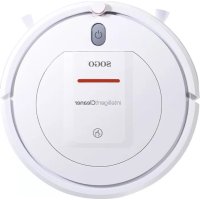
SS16055 - Vacuum Cleaner Sogo - Free user manual and instructions
Find the device manual for free SS16055 Sogo in PDF.



| Product type | Robot vacuum |
| Brand | Sogo |
| Model | SS16055 |
| Diameter | 290 mm |
| Net weight | 1.70 kg |
| Power supply | Ni-MH battery 14.4 V / 850 mAh |
| Charger | Input 100-240 V ~50/60 Hz, 0.4 A max; Output 5 V – 2 A |
| Charging time | 240 to 360 minutes (first charge: at least 6 hours) |
| Runtime | 40 to 60 minutes |
| Sweeping modes | Random, edge, scheduled |
| Sensors | Floor detection, collision sensors, infrared sensors |
| Noise level | Not specified in the manual |
| Dustbin capacity | Approximately 300 ml (estimate) |
| Filters | Preliminary filter and HEPA filter; washable (except HEPA: do not wash with water) |
| Side brushes | 2 (one left L, one right R) |
| Remote control | Yes, with AAA/LR03 batteries (not included) |
| Locate function | Emits a beep to locate the device |
| Operating temperature | 0 °C to 40 °C |
| Safety | Automatic shutdown, overload protection, secure battery |
| Maintenance | Clean the dustbin after each use; clean the side brushes and sensors regularly |
| Spare parts | Battery, side brushes, filters, wheels, adapter (available from customer service) |
| Repairability | Battery replaceable by user; other repairs by after-sales service |
| Warranty | Not specified in the manual; contact after-sales service (www.sogosat.com) |
Frequently Asked Questions - SS16055 Sogo
User questions about SS16055 Sogo
0 question about this device. Answer the ones you know or ask your own.
Ask a new question about this device
Download the instructions for your Vacuum Cleaner in PDF format for free! Find your manual SS16055 - Sogo and take your electronic device back in hand. On this page are published all the documents necessary for the use of your device. SS16055 by Sogo.
USER MANUAL SS16055 Sogo
Battery replacement 16
Product maintenance 17
Product Components 18
Host and accessories 18
Illustration of Host 19
Product maintenance 20
Cleaning of side brushes 20
Sweeping mode 21
Product Components 22
Product Operation 24
Declaration of conformity 25
Safety Notes
This manual can also be downloaded from our website www.sogo.es
When using electrical appliances, basic safety precautions should always be followed including the following.
Please read the following safety notes carefully and abide by all routine preventive measures for safety.
Conserve this instruction manual in a safe place for use in the future.
Appliances can be used by persons (including children) with reduced physical, sensory or mental capabilities or lack of experience and knowledge if they have been given supervision or instruction concerning use of the appliance in a safe way and if they understand the hazards involved.
Children should be supervised not to play with the appliance.
This appliance can be used by children aged from 8 years if they have been given supervision or instruction concerning use of the appliance in a safe way and understand the hazards involved.
Children shall not play with the appliance.
Cleaning and user maintenance shall not be made by children unless they are older than 8 and supervised.
Safety Notes
This product may be damaged due to any operation in conformity to this manual.
Expressions

Danger
It means that casualties or serious injuries may be caused in case of disobedience to this instruction or maloperation.

Warning
It means that casualties or serious injuries may be caused in case of disobedience to this instruction or maloperation.

Note
It means that casualties or serious injuries may be caused in case of disobedience to this instruction or maloperation.
Expressions

Prohibition
This symbol refers to prohibited (forbidden) conducts.
Detailed prohibition contents are indicated in or near the diagram.

Indication
It means that casualties or serious injuries may be caused in case of disobedience to this instruction or maloperation.
Note
This symbol aims at calling your attention (warning).
Specific attention contents are indicated in or near the diagram.
1. Serious injuries include: blindness, burn, electric injury, fracture and poisoning, etc. involving sequela and long-time hospitalization. 2. Staff injuries include: injuries, including burn or electric injury, to people who do not need hospitalization. *3. Material damages include: damages to household furniture, finance and pets and so on.
Notes on safety use of the host, charging dock, power adapter and accessories, etc.
Warning
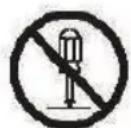
Dismantling is forbidden
Do not dismantle, repair or refit the product by yourself.
Otherwise, the product may be damaged and you may be injured.

Indication
This product shall be used as a power adapter configured by the manufacturer only. Otherwise, the product may be damaged or fire may be caused.

Dust removal
If there is dust on the metal part of the power socket or around it, it must be wiped and cleaned with a dry mop.
Otherwise, electric shock, heating, and fire, etc. may be caused.

AC
The power adapter shall be between AC 100V and 240V AC. Please insert it into the socket correctly and avoid children touching it.

Prohibition
Please don't use the product in the place where fire or explosion may be caused.
If the product is used in the place with flammable gas, e.g., propane gas and gasoline, an explosion or fire may be caused.

Prohibition

Prohibition
Prohibition
It is forbidden to stand or sit on this product.
Otherwise, the product may be damaged or you may fall down.
It is forbidden to use metal and conductive substances to touch the contact of the battery. Otherwise, in case of a short circuit,
heating, fire or explosions, etc. may be caused.
It is forbidden to wash and soak the host and charger with a lot of water. Otherwise, the host and charger may be damaged for an internal short circuit.
Safety Notes
Prohibition
It is forbidden to damage and process the power cable. Do not put a weight on the power cable or heat, drag or bend the power cable forcefully. Otherwise, the power line may be damaged and fire or electric shock, etc. may be caused.
! Indoor
Indoor use This is an indoor household product. Please do not use it outdoors.
Prohibition
Do not touch. When the product is operating and sweeping, please pay attention to the safety of babies, children and old people and avoid someone tripping.
Please do not touch wheels and side brushes by hand, so as to avoid being hauled in and injured, and pay more attention to children.

Do not touch
Do not touch it with a wet hand.
Do not touch it with a wet hand in the charging process. Otherwise, an electric shock may be caused.

Prohibition
Do not expose to sunshine.
This product is a kind of precise electronic equipment. Do not expose it in the sunshine for a long time.

Prohibition
Please keep this product close to cigarettes, lighters and other open fire.

If the product is not in use for a long time. Please turn off the power supply switch at the bottom of the machine.

Please carefully check if the power adapter is connected with the power socket well. Otherwise, the battery may be damaged.

When the dustbin is full, please clean up dust rubbish and then use the machine.

The use temperature scope of this product is from 0°C to 40°C . Please do not use it in the high temperature environment.
Prohibition
Please put this product in the place where it may fall down easily (e.g. on the desk, chair or high stand in the room).
Prohibition
Please do not use this product in a wet environment (e.g. bathroom).
Prohibition
Please do not clean this product when it is being charged.

Before using this product, please remove all wear goods (e.g. glass cup and lamp) on the floor and those that may entangle the side brush and air suction channel, (e.g. electric wire, paper scraps and window curtain).

This product may not be able to climb a vertical step about 8mm high.

Please do not use the machine to clean construction debris.

Battery
Please remove the battery from the machine before it is scrapped. When removing the battery, ensure it is switched off. Please recycle the scrapped battery for safety and environmental protection.
Safety Notes
Notes on using rechargeable batteries
Danger

Prohibition
Do not use other battery adapters. Otherwise, leakage, heating, or cracking may occur.

Prohibition
Do not carry or store it together with metal objects, such as necklaces and hairpins.
Prohibition
Otherwise, leakage, heating, or cracking may occur due to short circuit.

Prohibition
Do not short-circuit or damage the battery roughly.
Otherwise, leakage, heating or cracking may be caused.
Do not throw the battery into fire or heat it up.
Otherwise, leakage, heating or cracking may be caused.
(Note)
In case of abnormal overheating in the charging process, do not operate the product any more to prevent the leakage, heat or rupture.
If the product is not in use for long time, pull out the battery and put it at the cool and dry place to prolong the service life of battery, otherwise it may lead to the leakage, heat or rupture.
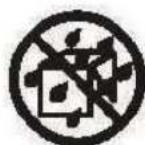
Do not immerse the product in or make it contact with water, otherwise it may cause the leakage, heat or rupture.

In case of abnormality (such as discoloration or deformation), be sure to stop operation, otherwise it may cause the leakage, heat or rupture.

Indication
When recycling or disposing the product, be sure to isolate the electrode with tape.

Ni-MH
Exposure to other metals may cause the heat, rupture or fire. Bring the used battery to the recycling company or dispose it according to local regulations.
(Warning)

Prohibition
In case of the deformation and expansion of battery case as well as electrolyte outflow, do not charge the battery or mount it in the product, otherwise it may lead to danger.

Prohibition
Be sure to use this specific rechargeable battery in your smart floor cleaning robot, and do not use it in other equipment.

Prohibition
In case of electrolyte leakage onto the skin or clothes, rinse immediately with water; otherwise, it may cause skin disease or other symptoms.
Prohibition
Do not strongly impact or throw the battery, as this may cause leakage, heat, or rupture.

Prohibition
Do not disassemble the battery pack, as this may cause rupture, electrolyte outflow, and potentially serious fire or explosion.
Product parameters
| Classification Item | Parameter | |
| Structural class | Diameter 290mm | |
| Net weight 1.70kg | ||
| Electronic class | Voltage 14.4V | |
| Battery capacity | Ni-Mh battery 850mAh | |
| AC Adapter type (for charging Rechargeable battery) | Input: 100-240V ~50/60Hz, 0.4A Max Output: 5V – 2A | |
| Sweeping parameters | Charging mode | Manual charging |
| Sweeping mode | Random sweeping, Edge sweeping and Auto sweeping | |
| One-time charging time 240-360min | ||
| One-time sweeping time 40-60min | ||
| Mechanical buttonHost | ||
Note: This product should be stored in an ambient temperature range from 0°C to 40°C.
Button type
Common faults
Alarm code table
When common faults occur with the machine, refer to the table below for solutions.
| Common faults and solution | |||
| No. | Tip Fault Solution | ||
| 1 | The red light flickers and the buzzer alarms. | Earth inspection fault | Put the host on the floor again. |
| 2 | The green light flickers and the buzzer alarms. | The fan is overloaded | Check the fan condition. |
| 3 | The red and orange lights flicker alternatively and the buzzer alarms. | The drive wheels are overloaded. | Check the left and right side wheels and the left and right side brushes. |
| 4 | The green and orange lights flicker alternatively and the buzzer alarms. | Collision switch fault. | Check the flexibility of the bumper. |
| 5 | The orange light flickers for 60s and the buzzer alarms for 10s | Charging fault, charging voltage >26V or <19V | Change a qualified adapter or battery |
| Note | If the problem cannot be solved with the method above, please try the following actions:1. Switch on the power supply at the bottom of the machine again and restart the machine.2. If the problem cannot be solved by restarting, please send the machine to After-sales Service Center for maintenance. | ||
Battery replacement
Battery replacement
- Use a screwdriver to remove the screws of the battery cover at the bottom of the machine.
- After the battery cover is removed, take out the battery.
- Slightly open the lock of the battery connecting plug to separate the battery from the host.
- Connect the plug of the new battery with the socket of the host.
- Put the new battery into the battery case and keep the face with characters upwards.
- Sort out the electric wire and stuff it beside the battery, then lock the battery cover.
- Switch on and check if the machine works normally.
! Note:
A. The battery configured for the machine shall be used only to avoid damaging the machine. B. After the battery is replaced, the new one shall be charged above 6h for the first time. C. Please recycle the old battery for environmental protection after it is replaced.
Product maintenance
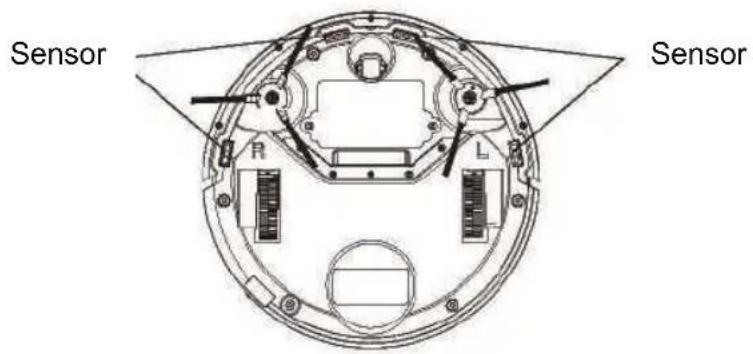
Cleaning of sensor lens
Use a cleaning tool or a piece of soft cloth to wipe the sensor slightly.
See positions indicated in the diagram below:
Product Components
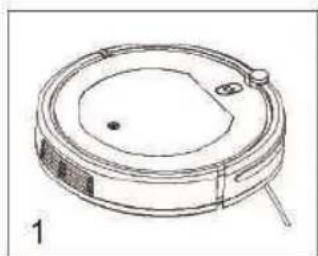
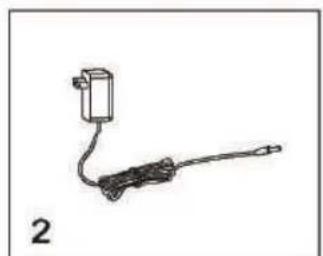
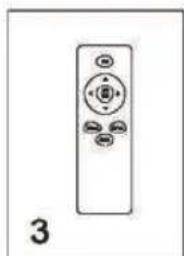
Host and accessories
| No. Name Quantity | |
| 1 Host 1 pcs. | |
| 2 Battery adapter | 1 pcs. |
| 3 Remote control | 1 pcs. |
| 4 Side brush | 2 (one on the left and right respectively) |
| 5 User manual | 1 pcs. |
| 6 dustbin | 1 pcs. |
| 7 efficient strainer | 1 pcs. |
| 8 preliminary strainer | 1 pcs. |
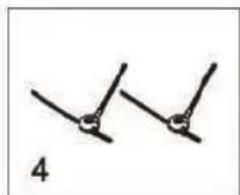
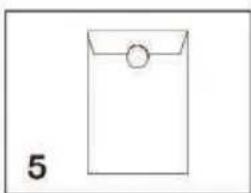
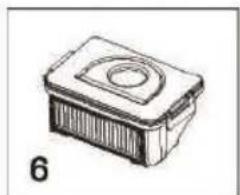
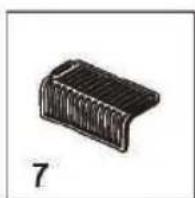
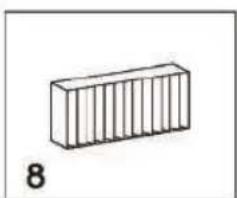
Product Components
Illustration of Host
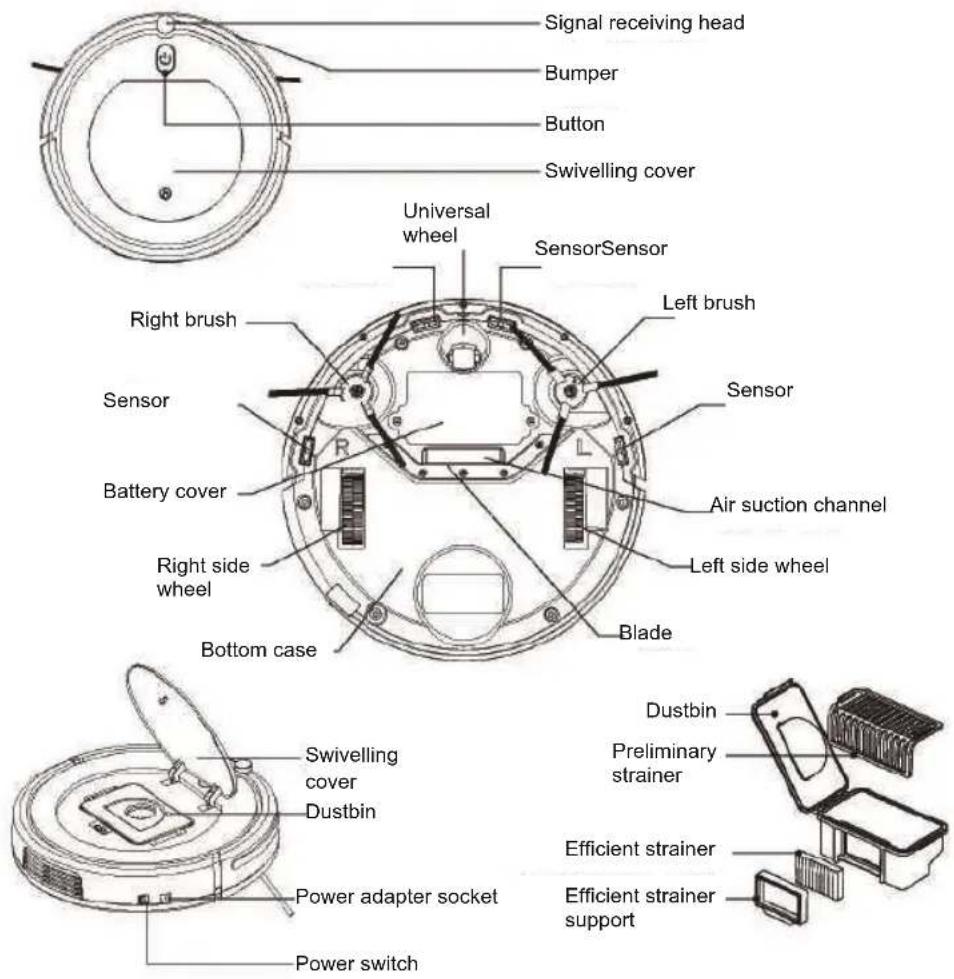
Host button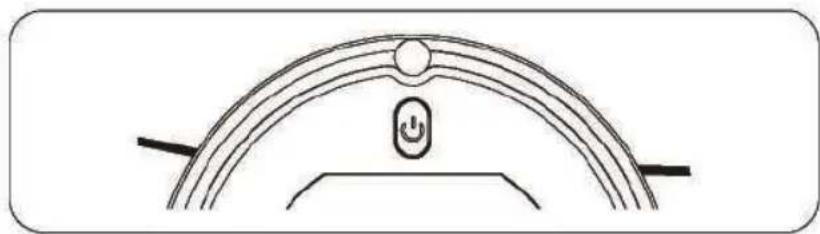
Start/stop button, it can be used for starting/stopping sweeping.
Product maintenance
- Cleaning of side brushes
If side brushes are dirty, please wash them with clean water and then use them after they get dry naturally. If they are damaged and cannot work normally, please change them.
! Note:
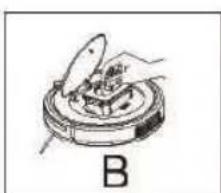
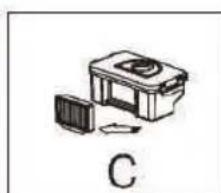
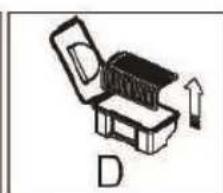
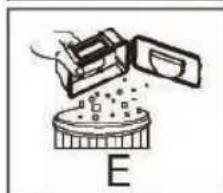
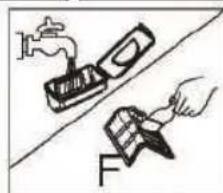
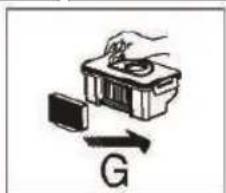
a. When changing side brushes, please correspond the sign “L” and “R” on the side brushes to the position “L” and “R” at the bottom of the machine respectively. b. After the machine finishes sweeping, please wash its side brushes to ensure its normal operation. 2. See the pictures below for cleaning the dustbin and strainer. A. After you press the finger sign of the swiveling cover, the cover will open automatically. B. After taking out the dustbin, please check if the suction channel of the host is obstructed by foreign matters and also clean it up. C. Remove the efficient strainer. D. Remove the preliminary strainer. E. Lower the dustbin until dust is poured out. F. Clean up the dustbin, preliminary strainer and efficient strainer fully. We suggest cleaning up the efficient strainer once after using it for 15-30 days. The maximum service life of the efficient strainer is 24 months. The efficient strainer shall not be cleaned with a brush but shall be blown with a dryer or knocked slightly by virtue of an external force to make dust fall down. Do not wash it with water. G. Assemble them correctly. Please ensure that the two trainers are assembled well to avoid damages to the machine.
! Note:
a. Please clean up the dustbin and the suction channel after sweeping every time b. After its components are washed with water, keep them getting dried naturally but do not dry them under the sunshine. They shall be put into the machine for use after they are fully dried to avoid affecting functions and life of the machine. c. If the preliminary strainer and the efficient strainer are damaged, they shall be replaced in time to avoid affecting the dust removal result.
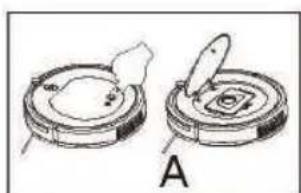
2. Sweeping mode
A. Auto sweeping Under the operating mode, after you press the button "Auto" on the remote control, the machine will start sweeping as planned. B. Edge sweeping
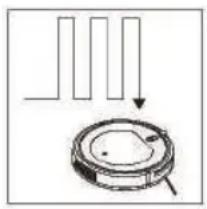
Under the operating mode, if you press the "Edge" button of the remote control, the machine will start sweeping along the maximum edge of the room.
C. Random sweeping
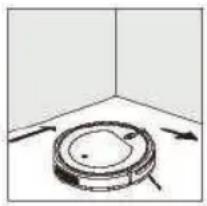
Under the standby mode, after you press the "start/pause" button of the remote control or the "②" button of the machine, the machine will enable the random sweeping mode. Under the operating mode, press the button "Random" on the remote control, the machine will start sweeping randomly.
! Note:
a. After a sweeping mode is selected, the machine will switch to another sweeping mode automatically according to the actual environment, so as to achieve the best sweeping effect. b. Under any sweeping mode, the machine will stop sweeping if you press either "start/pause" button of the remote control or the "⊙" button of the machine body.
3. Response function
When the machine is not in the range of visibility or you cannot hear it is working, after you press the button "Respond" on the remote control, the machine will beep, so that you can find it through the sound.
Product Components
Remote control
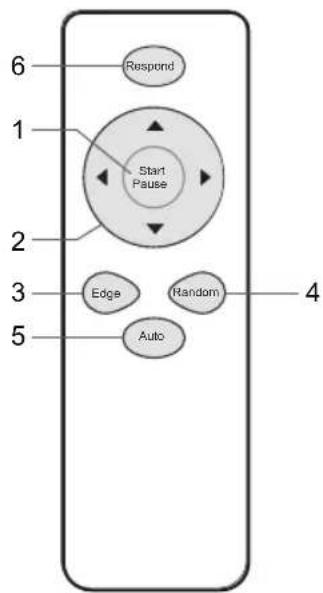
1 "Start/pause" button
A. Under the "standby mode" B. Under the "operating mode", the machine enters the standby mode.
- Direction buttons
A. “▲” Up
Under the "operating mode", the machine moves forward by pressing this button.
Under the "standby mode", the machine does not respond after you press this button.
B. “▼” Down
Under the "operating mode", the machine moves backward by pressing this button.
Under the "standby mode", the machine does not respond after you press this button.
C. “◁” Left
Under the "operating mode", the machine rotates to the left by pressing this button.
Under the "standby mode", the machine does not respond after you press this button.
D. “▷” Right
Under the "operating mode", the machine rotates to the right by pressing this button.
Under the "standby mode", the machine does not respond after you press this button.
Product Components
3. "Edge" button
Under the "operating mode", the machine will enter the along-edge mode after you press this button.
Under the "standby mode", the machine does not respond after you press this button.
4. "Random" button
Under the "operating mode", the machine will enter the stochastic mode after you press this button.
Under the "standby mode", the machine does not respond after you press this button.
5. "Auto" button
Under the "operating mode", the machine will enter the planned mode after you press this button.
Under the "standby mode", the machine does not respond after you press this button.
6. "Respond" button
Under the "operating mode" or "standby mode", the machine will beep after you press this button.
!Note:
- Please assemble two pieces of AAA/LR03 batteries before use.
- If the remote control is not in use for a long time, please take out its batteries.
Product Operation
- Charging
After switching off the power switch of the machine, connect the power adapter to power supply and insert the other end into the charging interface of the machine.
See the diagram below.
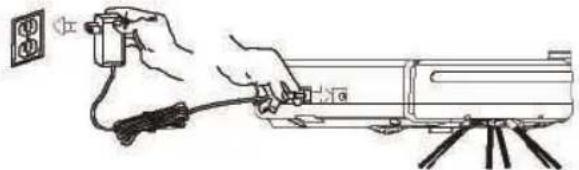
A. In case of low power, the red light of the button "start/suspend" will flicker. B. In the charging process, the green light of the button "start/suspend" will flicker. C. After the product is charged fully, the green light of the button "start/suspend" will be on constantly. D. When the product is charged for the first time, please ensure charging it for 6h at least. E. When the product is turned on and charged, if you remove the power adapter, the "start/suspend" light will flicker in red and green alternatively to remind you that the power switch is not turned off. If you do not use the machine, please turn off the power switch. F. Please charge the machine fully after you finish using it every time. G. In order to protect the battery, please charge it every 2 months when the machine is not in use for a long time.
- Start/stop
Standby mode: the power switch is ON, the machine does not move.
Operating mode: the machine sweeps.
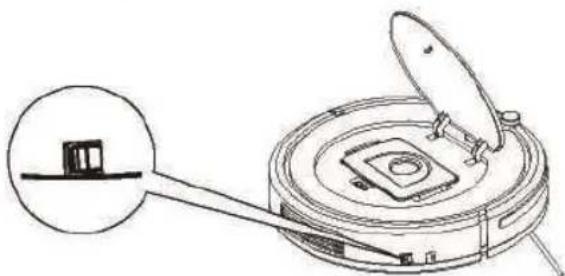
A. Switch on power and press the button "Start/Stop" on the remote control. B. When the machine works normally, the orange light of the button "Start/Stop" is on constantly. C. When the machine works normally, after you press the button "Start/Stop" or turn off power, it will stop working.
! Note:
A. Please switch off power in time when the machine does not need to work. B. The machine shall not start sweeping when it is being charged.
Declaration of conformity
This device complies with Low Voltage Directive 2014/35/EC, Electromagnetic Compatibility Directive 2014/30/EU, Directive 2011/65/EU on the restriction of the use of certain hazardous substances in electrical and electronic equipment and Directive 2009/125/EC on the eco-design requirements applicable to energy-related products.
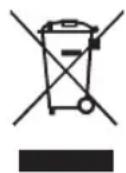
This symbol means that in case you wish to dispose of the product once its working life has ended, take it to an authorised waste agent for the selective collection of waste electrical and electronic equipment (WEEE).
Imported by:
Sanysan Appliances S.L, NIF: B98753056,
C/ Barcas 2, 2°
46002 Valencia, Spain
Product made in P.R.C.
Designed by SOGO based on the European Quality Standards
Customer Service: www.sogosat.com
Email:sogosat@sogosat.com/Tel:0034 902222161
SOGO®
Human Technology

SOGO

Human Technology
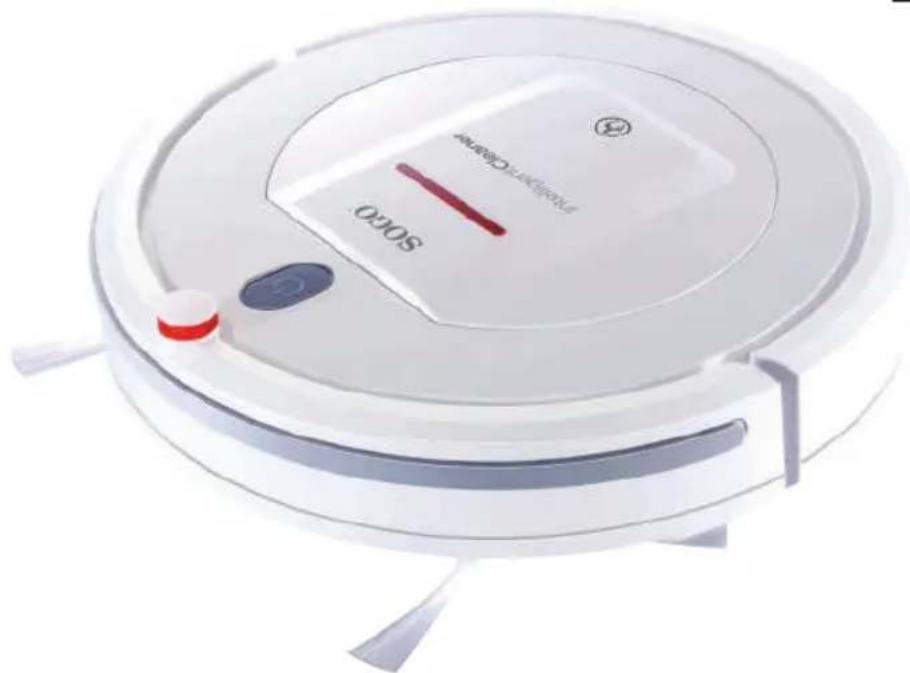
INTELLIGENT ROBOT VACUUM
INSTRUCTION MANUAL
Table of Contents

- SAFETY NOTES
- EXPRESSIONS
- WARNING
- BATTERY
- NOTES ON USING RECHARGEABLE BATTERIES
- DANGER
- (NOTE)
- (WARNING)
- PRODUCT PARAMETERS
- COMMON FAULTS
- ALARM CODE TABLE
- BATTERY REPLACEMENT
- NOTE
- PRODUCT MAINTENANCE
- PRODUCT COMPONENTS
- HOST AND ACCESSORIES
- ILLUSTRATION OF HOST
- SWEEPING MODE
- RESPONSE FUNCTION
- REMOTE CONTROL
- EDGE" BUTTON
- RANDOM" BUTTON
- AUTO" BUTTON
- RESPOND" BUTTON
- PRODUCT OPERATION
- DECLARATION OF CONFORMITY
- IMPORTED BY
- SOGO®
- SOGO
- INTELLIGENT ROBOT VACUUM
- INSTRUCTION MANUAL
- TABLE OF CONTENTS
Brand : Sogo
Model : SS16055
Category : Vacuum Cleaner