
Smart Tower Heater Lite - Heating Xiaomi - Free user manual and instructions
Find the device manual for free Smart Tower Heater Lite Xiaomi in PDF.
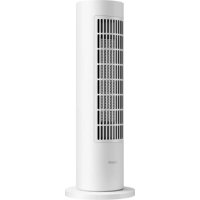



| Product type | Connected fan heater |
| Model | LSNFJ02LX |
| Brand | Xiaomi |
| Dimensions (L × W × H) | 184 × 184 × 500 mm |
| Net weight | 2.2 kg |
| Power supply | 220–240 V ~, 50–60 Hz |
| Rated power | 2000 W |
| Natural mode power | 12 W |
| Heating modes | Constant temperature, Hot, Warm, Natural |
| Adjustable temperature range | 22 °C, 24 °C, 26 °C, 28 °C (constant temperature mode) |
| Timer | 1 h, 2 h, 4 h, 8 h (scheduled shut-off) |
| Oscillation | Yes (enable/disable) |
| Connectivity | Wi-Fi 2.4 GHz, Mi Home / Xiaomi Home app |
| Child lock | Yes (simultaneous press of oscillation + mode for 7 s) |
| Protection | Anti-tip, automatic shut-off in case of overheating |
| Safety distance | 1 m minimum from flammable materials |
| Maintenance | Clean with a soft, damp cloth after complete cooling; do not immerse |
| Spare parts & repairability | Contact after-sales service; do not disassemble yourself |
| Manufacturer | Hangzhou Lexiu Electronic Technology Co., Ltd. (Mi Ecosystem company) |
| Usage | Indoor only, stable horizontal surface |
Frequently Asked Questions - Smart Tower Heater Lite Xiaomi
User questions about Smart Tower Heater Lite Xiaomi
0 question about this device. Answer the ones you know or ask your own.
Ask a new question about this device
Download the instructions for your Heating in PDF format for free! Find your manual Smart Tower Heater Lite - Xiaomi and take your electronic device back in hand. On this page are published all the documents necessary for the use of your device. Smart Tower Heater Lite by Xiaomi.
USER MANUAL Smart Tower Heater Lite Xiaomi
xiaomi Smart Tower Heater Lite User Manual
*This product is only suitable for well insulated spaces or occasional use.
Read this manual carefully before use, and retain it for future reference.
- This appliance can be used by children aged from 8 years and above and persons with reduced physical, sensory or mental capabilities or lack of experience and knowledge if they have been given supervision or instruction concerning use of the appliance in a safe way and understand the hazards involved. Children shall not play with the appliance.
- Cleaning and user maintenance shall not be made by children without supervision.
- If the supply cord is damaged, it must be replaced by the manufacturer, its service agent or similarly qualified persons in order to avoid a hazard.
- The heater must not be located immediately below a socket outlet.
- Do not use this fan heater in the immediate surroundings of a bath, a shower or a swimming pool.
- Do not use this heater if it has been dropped.
- Do not use if there are visible signs of damage to the heater.
- Use this heater on a horizontal and stable surface.
- Children of less than 3 years should be kept away unless continuously supervised.
- Children aged from 3 years and less than 8 years shall only switch on/off the appliance provided that it has been placed or installed in its intended normal operating position and they have been given supervision or instruction concerning use of the appliance in a safe way and understand the hazards involved. Children aged from 3 years and less than 8 years shall not plug in, regulate and clean the appliance or perform user maintenance.
WARNINGS
- Do not rinse the heater with water.
- Do not immerse the heater in water.
- Do not spill any water into the heater.
- Do not use the heater in greenhouses or construction sites.
- In order to avoid overheating, do not cover the heater.
- Do not use this heater in small rooms when they are occupied by persons not capable of leaving the room on their own, unless constant supervision is provided.
- To reduce the risk of fire, keep textiles, curtains, or any other flammable material a minimum distance of 1 m from the air outlet.
CAUTION
Some parts of this product can become very hot and cause burns. Particular attention has to be given where children and vulnerable people are present.
Usage
- This heater is intended for indoor use only. During use, stably place the heater on a level surface, and do not tilt or tip it over.
- Do not come into physical contact with the heater with bare skin to avoid burns.
- Do not touch the heater with wet hands. Do not use it to keep animals and plants warm.
- Do not touch the heater during or right after using it to avoid scalds.
- To prevent the risk of overheating or fire, never use an extension cord.
- Only use the heater in a well-ventilated environment. Make sure no foreign objects get into or block the air inlet or the air outlet of the heater.
- Do not insert any wires or other foreign objects into any opening of the heater to avoid electric shock.
- Do not place or use the heater near flammable or explosive materials such as gasoline and paint, nor near objects that are easily deformed, discolored, or deteriorated by heat, nor in places with heavy dust like garages or workshops.
- During use, do not share the same electrical circuit with other devices to avoid overloading the circuit.
- Do not disassemble the heater yourself to avoid safety hazards. If the heater malfunctions, contact the after-sales service team.
- The natural mode function of the heater cannot completely replace the fan function.
- Do not disconnect the heater from power when it has not cooled down completely. Otherwise, the heater may automatically turn off to ensure safety. The heater will resume normal operation after it cools down thoroughly.
Tower Heater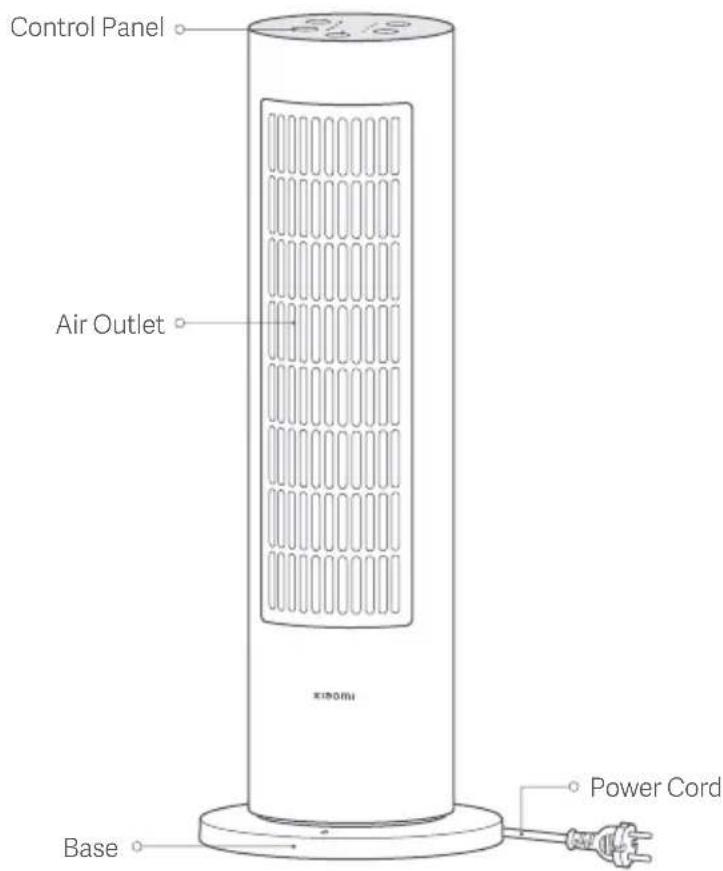
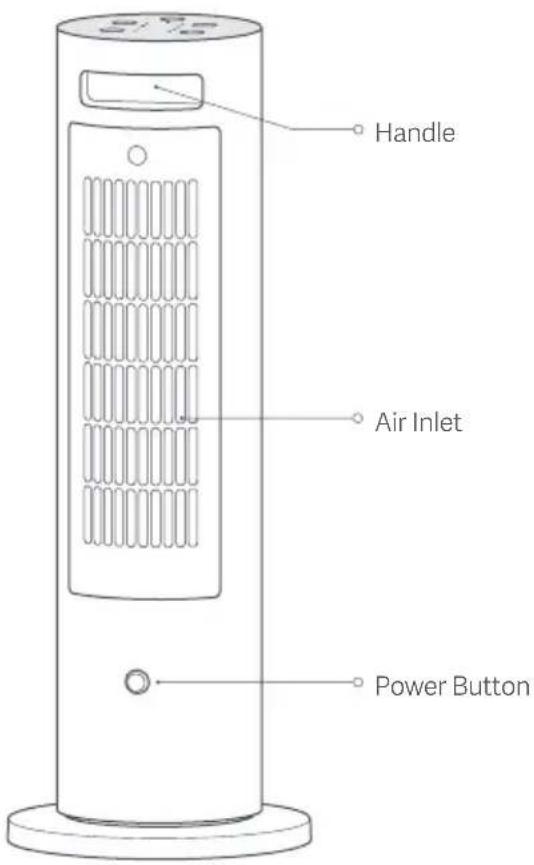
Front View Rear View
Control Panel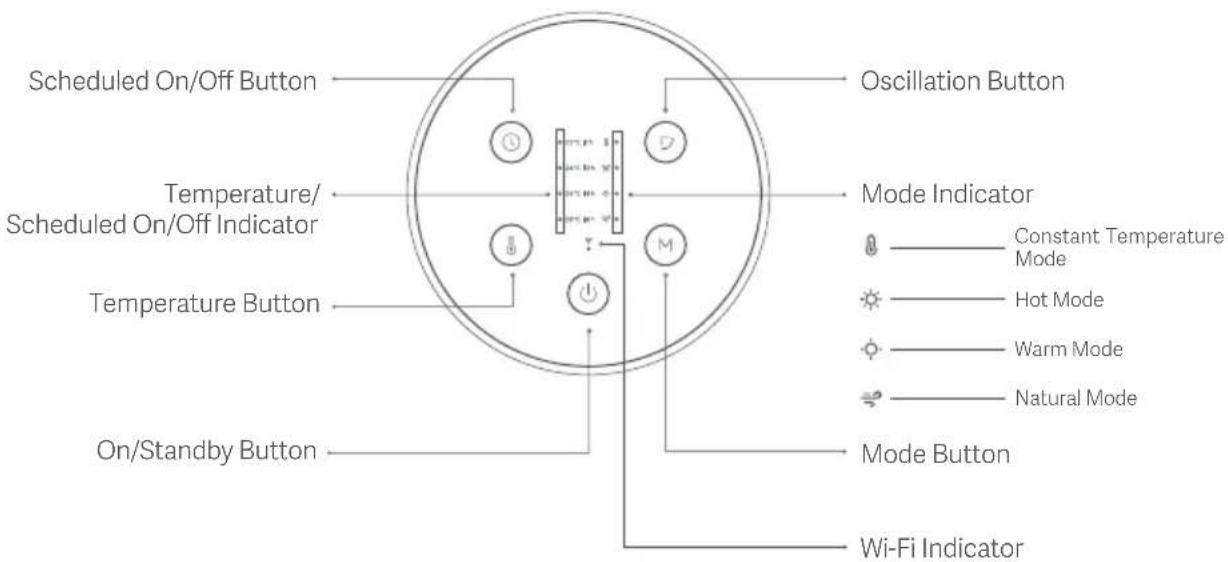
Note: Illustrations of product, accessories, and user interface in the user manual are for reference only. Actual product and functions may vary due to product enhancements.
Before Use
- Check if the heater is in good condition, and make sure the power cord is not damaged or broken.
- Use a 220–240 V AC electrical outlet with a rated current of at least 10 A. It is recommended to plug the power cord into a wall socket, and do not share the same power strip with other appliances.
- Press the power button on the back of the heater before use. When the heater makes a notification sound, it is connected to power.
- This heater is an electric appliance for close use. When using the heater to blow air directly, it is recommended to place it one to two meters away from you for optimal heating performance.
On/Standby
- Press the on/standby button to turn on the heater.
- Press the on/standby button when the heater is on, the heater will dissipate heat for 30 seconds, then enter standby mode.
Note: After the heater has been running in the natural mode for 30 seconds, pressing the on/standby button can make the heater directly enter standby mode.
- Press the on/standby button when the heater is dissipating heat, the heater will return to the previously used settings.
Note: When planning not to use the heater for a long time, make sure the heater is in standby mode and then turn off the heater and unplug the power cord.
Switching the Mode
- Press the mode button to cycle through the modes of constant temperature, hot, warm, and natural.
Adjusting the Expected Temperature
- Press the temperature button to cycle through the expected temperatures of 22°C, 24°C, 26°C, and 28°C.
- After the expected temperature is set, the heater will automatically enter the constant temperature mode. Other modes do not support the settings of the expected temperature.
Note: If the room temperature is higher than the expected temperature in the constant temperature mode, the heater may switch to the natural mode.
Scheduled Standby
- Press the scheduled on/off button to cycle through the scheduled standby times: one hour, two hours, four hours, eight hours, and off.
- If no operation is performed within three seconds after the scheduled standby time is selected, the indicator will display the expected temperature. If no expected temperature is set, the indicator will go out.
- After the scheduled standby time is selected, the indicator will show the remaining time once you press the scheduled on/off button. You can press the button again within three seconds to cycle through the scheduled standby times.
Enabling/Disabling Oscillation
- Press the oscillation button to enable or disable the oscillation mode.
Enabling/Disabling the Child Lock
- To enable or disable the child lock function, press and hold the oscillation button and the mode button simultaneously for seven seconds.
- The child lock function can also be disabled by turning on the heater again after disconnecting it from power or unplugging the power cord.
Enabling/Disabling the Wi-Fi
- To enable or disable Wi-Fi, press and hold the scheduled on/off button and the oscillation button simultaneously for seven seconds.
Resetting the Wi-Fi
- Press and hold the scheduled on/off button and the temperature button simultaneously for seven seconds. When the heater enters the network configuration mode, the Wi-Fi is reset successfully.
Connecting with Mi Home/Xiaomi Home App
This product works with Mi Home/Xiaomi Home app*. Control your device with Mi Home/Xiaomi Home app.
Scan the QR code to download and install the app. You will be directed to the connection setup page if the app is installed already. Or search "Mi Home/Xiaomi Home" in the app store to download and install it.
Open Mi Home/Xiaomi Home app, tap "+" on the upper right, and then follow prompts to add your device.
* The app is referred to as Xiaomi Home app in Europe (except for Russia). The name of the app displayed on your device should be taken as the default.
Notes:
- The version of the app might have been updated, please follow the instructions based on the current app version.
- If you fail to scan the heater's QR code, search for its name to add it.

Wi-Fi Indicator Status Description
| Heater Status Wi-Fi Indicator Status | |
| Awaiting connection | Blinking slowly (on for 0.2 seconds, then off for 0.8 seconds, repeatedly) |
| Network connected successfully | On |
| Reconnecting automatically after a disconnection | Blinking quickly (on for 0.1 seconds, then off for 0.2 seconds, repeatedly) |
| Updating the firmware | Blinking (on for 0.05 seconds then off for 0.1 seconds, and on for 0.05 seconds then off for 0.8 seconds, repeatedly) |
| Network connection function disabled | Off |
Care & Maintenance
- Before cleaning the heater, turn it off and unplug it and wait for it to cool down completely.
- Use a clean, soft, and damp cloth to wipe the heater. Do not drip water into the heater during cleaning.
- Do not disassemble the heater during care and maintenance. After cleaning, ensure the heater is completely dry before using or storing it.
- Avoid bumping or scratching the heater to prevent its surface coating from being damaged and rusting.
- When planning not to use the heater for a long time, store the heater in its original packaging in a dry place.
| Issue Possible | Cause Solution | |
| The heater is not connecting to power. | The power cord is not plugged in properly. | Check whether the plug and the power cord are plugged in properly. |
| Press the power button to turn the heater on.The heater is not | ||
| The heater is not placed steadily. Place the heater steadily on a level surface. | ||
| The heater does not work. | The heater is not started. | Press the on/standby button on the control panel to start the heater. |
| The temperature is too high, and the heater automatically turns off to ensure safety. | Keep the air inlet and the air outlet clear and unobstructed, and restart the heater after it cools down. | |
| The child lock function is enabled. Disable the child lock. | ||
| The heater cannot be found in the app. | The network connection fails. Reset the Wi-Fi. | |
| The Wi-Fi signal is weak. | Keep the phone and the heater close to the Wi-Fi signal source. | |
| The power cord is not plugged in properly. | Plug the heater in properly and turn it on again. | |
| The heater makes unusual sounds when it is moved or shaken. | The steel ball in the anti-tilt switch rattles. | Place the heater on a level surface steadily and avoid shaking it violently. |
Specifications
Name: Fan Heater
Model: LSNFJ02LX
Rated Voltage: 220–240 V~
Rated Frequency: 50–60 Hz
Rated Power: 2000 W
Natural Mode Power: 12 W
Item Dimensions: 184 × 184 × 500 mm
Net Weight: Approx. 2.2 kg
Operation Frequency: 2400–2483.5 MHz
Maximum Output Power: < 20 dBm
Under normal use conditions, this equipment should be kept at a separation distance of at least 20 cm between the antenna and the body of the user.
EU declaration of conformity

Hereby, Hangzhou Lexiu Electronic Technology Co., Ltd. declares that the radio equipment type LSNFJ02LX is in compliance with Directive 2014/53/EU. The full text of the EU declaration of conformity is available at the following internet address: http://www.mi.com/global/service/support/declaration.html
WEEE Disposal and recycling information

All products bearing this symbol are waste electrical and electronic equipment (WEEE as in directive 2012/19/EU) which should not be mixed with unsorted household waste. Instead, you should protect human health and the environment by handing over your waste equipment to a designated collection point for the recycling of waste electrical and electronic equipment, appointed by the government or local authorities. Correct disposal and recycling will help prevent potential negative consequences to the environment and human health. Please contact the installer or local authorities for more information about the location as well as terms and conditions of such collection points.
For detailed e-manual, please go to www.mi.com/global/service/userguide
| Model Identifier(s): | |||||
| Item | Symbol Value Unit Item Unit | ||||
| Heat Output | Type of heat input, for electric storage local space heaters only (select one) | ||||
| Nominal Heat Output | Pnom | 2.0 | kW | Manual heat charge control, with integrated thermostat | □ Yes □ No |
| Minimum Heat Output (indicative) | Pmin | 1.4 | kW | Manual heat charge control with room and/or outdoor temperature feedback | □ Yes □ No |
| Maximum Continuous Heat Output | Pmax,c | 2.0 | kW | Electronic heat charge control with room and/or outdoor temperature feedback | □ Yes □ No |
| Auxiliary Electricity Consumption | Fan assisted heat output | □ Yes □ No | |||
| At Nominal Heat Output | elmax | 0.000 | kW | Type of heat output/room temperature control (select one) | |
| At Minimum Heat Output | elmin | 0.000 | kW | Single stage heat output and no room temperature control | □ Yes □ No |
| In Standby Mode | ebB | 0.001 | kW | Two or more manual stages, no room temperature control | □ Yes □ No |
| With mechanic thermostat room temperature control | □ Yes □ No | ||||
| With electronic room temperature control | □ Yes □ No | ||||
| Electronic room temperature control plus day timer | □ Yes □ No | ||||
| Electronic room temperature control plus week timer | □ Yes □ No | ||||
| Other control options (multiple selections possible) | ||
| Room temperature control, with presence detection | ☐ Yes ☒ No | |
| Room temperature control, with open window detection | ☐ Yes ☒ No | |
| With distance control option | ☐ Yes ☒ No | |
| With adaptive start control | ☐ Yes ☒ No | |
| With working time limitation | ☐ Yes ☒ No | |
| With black bulb sensor | ☐ Yes ☒ No | |
| Model Identifier(s): | |||
| Description | Symbol | Value | Unit |
| Maximum Fan Flow Rate | F | 7.4 | m3/min |
| Fan Power Input | P | 5.6 | W |
| Service Value | SV | 1.3 | (m3/min)/W |
| Standby Mode Consumption | PSB | 1.04 | W |
| Fan Sound Power Level | IWA | 53 | dB(A) |
| Maximum Air Velocity | c | 0.9 | meters/sec |
| Measurement Standard For Service Value | IEC 60879:1986 +cor1:1992 | ||
Address: 2006-2010, Building 1, 501, 2nd Baiyang Street, Qiantang New District, Hangzhou, 310018 Zhejiang, China
Address: 2006-2010, Building 1, 501, 2nd Baiyang Street, Qiantang New District, Hangzhou, 310018 Zhejiang, China
Address: 2006-2010, Building 1, 501, 2nd Baiyang Street, Qiantang New District, Hangzhou, 310018 Zhejiang, China
Address: 2006-2010, Building 1, 501, 2nd Baiyang Street, Qiantang New District, Hangzhou, 310018 Zhejiang, China
To view the detailed manual online, visit www.mi.com/global/service/userguide
- XIAOMI SMART TOWER HEATER LITE USER MANUAL
- WARNINGS
- CAUTION
- USAGE
- BEFORE USE
- ON/STANDBY
- SWITCHING THE MODE
- ADJUSTING THE EXPECTED TEMPERATURE
- SCHEDULED STANDBY
- ENABLING/DISABLING OSCILLATION
- ENABLING/DISABLING THE CHILD LOCK
- ENABLING/DISABLING THE WI-FI
- RESETTING THE WI-FI
- CONNECTING WITH MI HOME/XIAOMI HOME APP
- NOTES
- CARE & MAINTENANCE
- SPECIFICATIONS
- EU DECLARATION OF CONFORMITY
- WEEE DISPOSAL AND RECYCLING INFORMATION
Brand : Xiaomi
Model : Smart Tower Heater Lite
Category : Heating