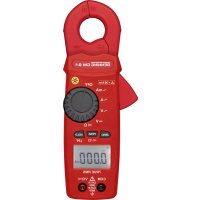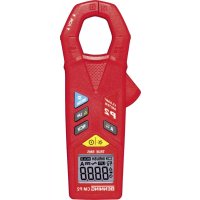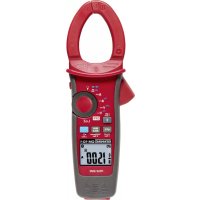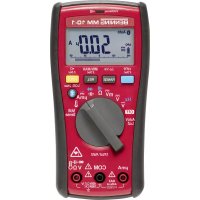
MM 101 - Multimeter BENNING - Free user manual and instructions
Find the device manual for free MM 101 BENNING in PDF.



| Product type | TRUE RMS Digital Multimeter |
| Model | BENNING MM 101 (equivalent MM 10-PV / MM 10-1) |
| Measurement categories | CAT IV 600 V, CAT III 1000 V, CAT II 1000 V |
| Display | LCD 6000 counts (4 digits, 15 mm height) with 120-segment bargraph |
| Dimensions (without protective frame) | 156 x 74 x 43 mm |
| Dimensions (with protective frame) | 163 x 82 x 50 mm |
| Weight (without frame) | 310 g |
| Weight (with frame) | 425 g |
| Power supply | 2 x 1.5 V type LR6 (AA) batteries |
| Battery life | Approx. 300 h (without backlight or Bluetooth) |
| Main functions | AC/DC voltage (up to 1000 V), AC/DC current (up to 10 A or 400 mA), Resistance (up to 40 MΩ), Capacitance (up to 10 mF), Frequency (up to 100 kHz), Temperature (type K probe, -40 °C to 400 °C), Continuity test, Diode test, Non-contact voltage indicator (VoltSense), PV measurement (with BENNING TA PV adapter) |
| PV voltage range (with TA PV adapter) | 1500 VAC / 2000 VDC (CAT II) |
| Overload protection | Fuse 11 A/1000 V (MM 10-PV) or 440 mA/1000 V (MM 10-1) |
| Data logger | Up to 4000 measurements, automatic mode (interval 1s to 60s) or manual |
| Wireless interface | Bluetooth 4.0 Low Energy (range approx. 10 m) |
| Protection rating | IP30 (protection against solids > 2.5 mm, no water protection) |
| Operating temperature | -10 °C to +50 °C (with humidity < 80%) |
| Storage temperature | -20 °C to +60 °C (without batteries) |
| Cleaning | With a dry cloth; do not use solvents or detergents |
| Included accessories | Test leads (red/black, 1.4 m), protective case, type K temperature probe, batteries, TA PV measurement adapter (for PV version) |
| Spare parts and repairability | Replaceable fuses (ref. 10218772 for 11A, ref. 10016655 for 440 mA), replaceable batteries (LR6) |
Frequently Asked Questions - MM 101 BENNING
User questions about MM 101 BENNING
0 question about this device. Answer the ones you know or ask your own.
Ask a new question about this device
Download the instructions for your Multimeter in PDF format for free! Find your manual MM 101 - BENNING and take your electronic device back in hand. On this page are published all the documents necessary for the use of your device. MM 101 by BENNING.
USER MANUAL MM 101 BENNING
Fig. 4a: PV voltage measurement using the BENNING TA PV measuring adapter (BENNING MM 10-PV)
Fig. 5a: Direct/ alternating current measurement (frequency measurement) (BENNING MM 10-PV)
Fig. 8: Temperature measurement
Fig. 9: Voltage indicator with buzzer and LED
text_image
Diagram showing three-step assembly of a remote control device with labeled parts and directional arrows indicating movement.text_image
Exploded view diagram of a remote control device with numbered parts and directional arrows indicating assembly or status.Fig. 12: Winding up the safety measuring leads
natural_image
Close-up of a coiled cable or hose component with coiled wires and connectors (no visible text or symbols)Bedienungsanleitung BENNING MM 10-PV/ MM 10-1
TRUE RMS Digital-Multimeter zur
natural_image
Diagram showing a waveform before and after an arrow, with no visible text or symbols
- DC/ AC voltage measurements
- DC/ AC current measurements
- resistance measurements
- continuity and diode tests
- capacity measurement
- frequency measurement
- temperature measurement
Table of contents
- User instructions
- Safety instructions
- Scope of delivery
- Device description
- Functions of the digital multimeter
5.1 General information
5.2 Data logger functions
5.2.1 Setting the data logger
5.2.2 Automatic storage (LOG)
5.2.3 Manual storage (SAVE)
5.3 Data transmission to the smartphone/tablet
-
Ambient conditions
-
Electrical specifications
-
Measuring with the BENNING MM 10-PV/ MM 10-1
-
Maintenance
-
Technical data of measuring accessories
-
Environmental note
1. User instructions
This operating manual is intended for
- skilled electricians and
- electrotechnically trained personnel.
The BENNING MM 10-PV/MM 10-1 is intended for measurements under dry ambient conditions. It must not be used in electrical circuits with a nominal voltage higher than 1000 VAC/DC (see section 6 „Ambient conditions“).
When using the BENNING MM 10-PV with the BENNING TA PV measuring adapter, the nominal voltage range increases to 1500 VAC/2000 VDC (see section 8.2.2 „Voltage measurement (switch position PV)“ and section 10 „Technical data of measuring accessories“ for details).
The following symbols are used in this operating manual and on the BENNING MM 10-PV/MM 10-1:

Attention! Magnets might affect the correct functioning of cardiac pacemakers and implanted defibrillators. As a user of such medical devices, keep a sufficient distance to the magnet.

Warning of electrical danger! Indicates instructions which must be followed to avoid danger to persons.

Attention! Must comply with documentation! This symbol indicates that the information provided in the operating manual must be complied with in order to avoid risks.
Measuring category II is applicable to testing and measuring circuits CAT II which are directly connected to user connections (sockets and similar connections) of the low-voltage mains installation.
Measuring category III is applicable to testing and measuring circuits CAT III connected to the distribution circuit of the low-voltage mains installation of a building.
Measuring category IV is applicable to testing and measuring circuits CAT IV connected to the feed-in point of the low-voltage mains installation of a building.

This symbol on the BENNING MM 10-PV/ MM 10-1 indicates that the BENNING MM 10-PV/ MM 10-1 is equipped with protective insulation (protection class II).

Please observe the operating manual!

This symbol on the BENNING MM 10-PV/ MM 10-1 means that the BENNING MM 10-PV/ MM 10-1 complies with the EU directives.

This symbol on the BENNING MM 10-PV/ MM 10-1 indicates the fuses which it contains.

This symbol appears on the display to indicate a discharged battery.

This symbol indicates the "diode-testing" application.

This symbol designates the „continuity test“ field. The buzzer is intended for acoustic result output.

This symbol marks the range "capacity testing".

(DC) Direct voltage or current.

(AC) Alternating voltage or current

Ground (voltage against ground)
2. Safety instructions
The instrument is built and tested in accordance with
DIN VDE 0411 Part 1/EN 61010-1
DIN VDE 0411 Part 2-033/EN 61010-2-033
DIN VDE 0411 Part 031/EN 61010-031
and has left the factory in perfectly safe technical condition.
To preserve this condition and to ensure safe operation of the device, the user must observe the notes and warnings given in these instructions at all times. Improper handling and non-observance of the warnings might involve severe injuries or danger to life.

WARNING! Be extremely careful when working with bare conductors or main line carrier! Contact with live conductors will cause an electric shock!

Attention! Magnets might affect the correct functioning of cardiac pacemakers and implanted defibrillators. As a user of such medical devices, keep a sufficient distance to the magnet.

The BENNING MM 10-PV/ MM 10-1 must be used in electrical circuits of overvoltage category III with a conductor for a maximum of 1000 V to earth or of overvoltage category IV with a conductor for a maximum of 600 V to earth only.
Only use suitable measuring leads for this. With measurements within measurement category III or measurement category IV, the projecting conductive part of a contact tip of the measuring leads must not be longer than 4 mm.
Prior to carrying out measurements within measurement category III and measurement category IV, the push-on caps provided with the set and marked with CAT III and CAT IV must be pushed onto the contact tips. The purpose of this measure is user protection.
Please observe that work on live parts and electrical components of all kinds is dangerous! Even low voltages of 30 V AC and 60 V DC may be dangerous to human life!

For voltage measurements on PV systems with system voltages of up to 1500 V DC, use the BENNING TA PV measuring adapter and the switch position "PV" of the BENNING MM 10-PV only. The measuring adapter reduces the voltage applied to the BENNING MM 10-PV and is to be used exclusively for the BENNINGMM10-PV!
Electrical danger!
The measuring adapter BENNING TA PV must be used in electrical circuits of overvoltage category II with a conductor for a maximum of 1000 V AC/ 1500 V DC to earth, overvoltage category III with a conductor for a maximum of 1000 V to earth only or of overvoltage category IV with a conductor for a maximum of 600 V to earth only.

In order to prevent any danger, always measure a present voltage first without low-pass filter (without high-frequency suppression) to detect a dangerous voltage.

Before starting the multimeter, always check the device as well as all measuring leads for damages.
If it can be assumed that safe operation is no longer possible, switch the device off immediately and secure it against unintended operation.
Safe operation can be assumed to be no longer possible, if
- the device or the measuring leads exhibit visible damages,
- the device no longer works,
- the device has been stored under unfavourable conditions for a longer period of time,
- the device was exposed to extraordinary stress during transport, or
- if the device or the measuring leads are exposed to moisture.

In order to prevent danger
- do not touch the bare contact tips of the measuring leads,
- plug the measuring leads into the correspondingly marked measuring sockets of the multimeter and check them for tight fit.

Cleaning:
Regularly wipe the housing by means of a dry cloth and cleaning agent. Do not use any polishing agents or solvents!
3. Scope of delivery
The scope of delivery of the BENNING MM 10-PV/ MM 10-1 comprises:
3.1 One BENNING MM 10-PV/ MM 10-1
3.2 Two safety measuring lead, red/ black (L = 1.4 m) (item no. 044145)
3.3 One compact protection carrying case
3.4 One wire temperature sensor, type K
3.5 Two 1.5 V batteries (type AA/ IEC LR6) for initial assembly is integrated into the device
3.6 One operating manual
Additional scope of delivery of the BENNING MM 10-PV:
3.7 Two safety crocodile clips, red/ black, 4 mm plug-in technology
3.8 One BENNING TA PV measuring adapter (item no. 10217846)
Note on optional accessory:
- Temperature probe (K-type) made of V4A tube
application: insertion probe for soft-plastic materials, liquids, gas and air measuring range: - 196 °C up to 800 °C
dimensions: length = 210 mm, tube length = 120 mm, tube diameter = 3 mm, V4A (item no. 044121)
Parts subject to wear:
- The BENNING MM 10-PV contains fuses for overload protection:
One fuse rated 11 A rapid-acting (1000 V) 30 kA, D = 10 mm, L = 38 mm (item no. 10218772).
- The BENNING MM 10-1 contains fuses for overload protection:
One fuse rated 440 mA rapid-acting (1000 V) 10 kA, D = 10 mm, L = 34.9 mm
- The BENNING MM 10-PV/ MM 10-1 is supplied by means of two integrated 1.5 V batteries (AA/ IEC LR6).
- With the protective caps being attached, the safety measuring leads mentioned above (tested accessories, item no. 044145) comply with CAT III 1000 V/CAT IV 600 V and are approved for a current of 10 A.
- The BENNING TA PV measuring adapter mentioned above (tested accessories, item no. 10217846) complies with CAT II 1000 V AC/1500 V DC, and with the protective caps being attached it complies to CAT III 1000 V/CAT IV 600 V.
4. Device description
See figure 1: Device front
The display and operating elements shown in figure 1 are designated as follows:
① Digital display, for the measurement reading, bar graph and display for overrange indication
② Polarity display
③ Battery display
4 Function key (blue), for selecting the measuring function/secondary function, resp. to enable the high-frequency suppression (low-pass filter)
5 RANGE key, switchover between automatic and manual measuring range, adjustment of the sensitivity of the voltage indicator (Lo/ Hi)
6 REL key, relative-value function, resp. MIN/MAX function, storage of highest and lowest measurement value
⑦ HOLD key, measured value storage, resp. display illumination
8 Bluetooth® key, for activation of the Bluetooth® interface, resp. LOG function
9 Rotary switch, for selecting the measuring function
10 Socket (positive ^1 ), for 10-A range (BENNING MM 10-PV), resp. for 400 mA range (BENNING MM 10-1)
⑪ COM socket, common socket for measurement of voltage, current, resistance, frequency, capacity, temperature, continuity and diode testing
⑫ Socket + (positive ^1 ) for V, A (BENNING MM 10-PV), μA (BENNING MM 10-1) Ω, -Hz, μF,
13 Protective rubber holster
14 BENNING TA PV measuring adapter (BENNING MM 10-PV)
15 LED (red) for voltage indicator and continuity test ^1) The automatic polarity display for DC current and voltage refers to this.
5. Functions of the digital multimeter
5.1 General information
5.1.1 The digital display ① is designed as a 4 digit liquid crystal indicator with 15 mm digit height and decimal point. The highest value displayed is 6000.
5.1.2 The bar graph display consists of 120 segments.
5.1.3 The polarity indication ② functions automatically. Only a polarity contrary to the socket definition is indicated as “-”.
5.1.4 The range overload will be displayed with "0L" or "-0L".
Attention: No indication and prior warning in the event of an overload condition! A exceeding of dangerous contact voltage (> 60 V DC/ 30 V AC rms) is indicated by an additional flashing symbol „(♂)“.
5.1.5 The BENNING MM 10-PV/ MM 10-1 confirms each button press with a signal sound. Invalid button presses are confirmed by a double signal sound.
5.1.6 The nominal measurement rate of the BENNING MM 10-PV/MM 10-1 is 3 measurements per second (sec) for the digital display.
5.1.7 The BENNING MM 10-PV/MM 10-1 is switched on and off by the rotating switch ^9 . Switch-off position “OFF”.
5.1.8 The function key (blue) ④ has two functions:
Press the function key (blue) ④ to select the secondary or third function of the rotary switch position.
HFR function (low pass filter):
Press the key for approx. 2 seconds to enable or disable the HFR function (low pass filter).
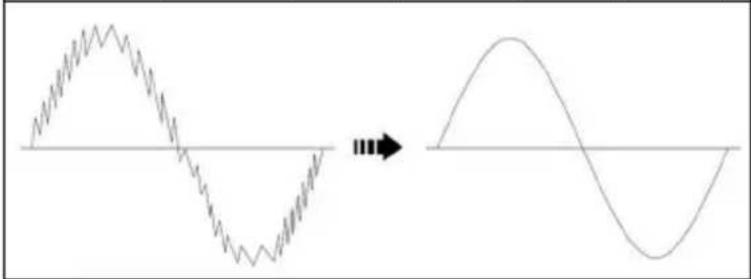
The HFR function is intended for connecting a low-pass filter (high-frequency suppression) in the V_AC and A_AC functions (BENNING MM 10-PV)/ mA AC (BENNING MM 10-1) in order to filter out high-frequency pulses e. g. at pulsed motor drives. "HFR" symbol on the LC display ①. The limiting frequency (-3 dB) of the filter is fg = 800 Hz. When reaching the limiting frequency fg, the displayed value is lower by a factor of 0.707 than the actual value without filter. Press the key again
to switch back to normal operating mode.
without HFR (without low-pass filter) with HFR (with low-pass filter)
natural_image
Diagram showing a waveform transitioning from a high-frequency oscillation to a low-frequency sinusoidal signal, with no text or labels present.
In order to prevent any danger, always measure a present voltage first without low-pass filter (high-frequency suppression) to detect a dangerous voltage.
5.1.9 The "RANGE" key ⑤ has two functions:
RANGE (measuring range):
The "RANGE" key can be used to change over to the manual measuring ranges and to hide "AUTO" on the display at the same time. By pressing the key for approx. 2 seconds, the automatic range selection is activated ("AUTO" on the display).
Lo/ Hi (sensitivity voltage indicator):
In the voltage indicator function (VoltSense), the RANGE key used to switch to Hi (high sensitivity) or Lo (low sensitivity).
5.1.10 The "REL" key ⑥ has two functions:
REL function:
The REL ket (relative-value function) stores the currently display value and displays the difference (offset) between the stored measured value and the following measured values on the display.
MIN/MAX function:
Press the key for approx. 2 seconds to enable the MIN/MAX function.
The MIN/MAX function automatically records and stores the highest and the lowest measured value. By pressing the key again, the following values are displayed: "MAX/MIN" displays the current measured value, "MAX" displays the highest value stored and "MIN" displays the lowest value stored. Press the HOLD key ⑦ to pause the MIN/MAX function. Press the REL key ⑥ for approx. 2 seconds to switch back to normal operating mode.
5.1.11 The "HOLD" key ⑦ has two functions:
HOLD function:
Press the HOLD to store the measuring result. At the same time, the digital display 1 shows the "HOLD" symbol. If the measured value exceeds the stored value by 50 digits, the change of the measured value is indicated by the display flashing and an acoustic signal. (Changes of measured values between AC and DC voltage / current will not be recognized). Press the key again to switch the device back to the measuring mode.
Display illumination:
Press the key for approx. 2 seconds to enable or disable the display illumination.
5.1.12 The Bluetooth key 8 has two functions:
Bluetooth® interface:
Enables the Bluetooth® interface with the „ ^TM ” symbol being shown on the LC display 1 at the same time. Press the key again to disable the Bluetooth® interface.
LOG function (data logger/measured value memory):
Press the key for approx. 2 seconds to enable the LOG function with the "LOG" symbol being shown on the digital display ① at the same time. See section 5.2
5.1.13 The BENNING MM 10-PV/ MM 10-1 switches off automatically after approx. 20 minutes (APO, Auto-Power-Off). It switches on again if the rotary switch is switched on from switch position "OFF" or if a key is pressed. The switch-off time can be set (see section 5.1.14).
5.1.14 The BENNING MM 10-PV/ MM 10-1 offers individual setting possibilities. To change a setting, press one of the following keys and simultaneously switch on the BENNING MM 10-PV/ MM 10-1 from the "OFF" position.
| Function key (blue) 4: | Setting the APO time to 5/10/20 min. or switching off the APO function, “OFF” is shown on the display.Each time the key is pressed again, the value changes. |
| REL key 6: | Unit of temperature in °C or °F |
| HOLD key 7: | Displaying all display symbols |
| RANGE key 5: | Displaying the firmware version |
5.1.15 Temperature coefficient of the measured value: 0.2 x (stated measuring accuracy)/°C < 18 °C or > 28 °C, related to the value for the reference temperature of 23 °C.
5.1.16 The BENNING MM 10-PV/ MM 10-1 is supplied by means of two 1.5 V batteries (IEC LR6/ AA).
5.1.17 The battery indication ③ continuously shows the remaining battery capacity via a maximum of three segments. When switched on, the device additionally displays the battery status "Full" (full), "HALF" (half) or "Lo" (low).

As soon as all segments of the battery symbol have disappeared and the battery symbol is flashing, the batteries must be replaced by new ones immediately in order to prevent danger for persons caused by incorrect measurements.
5.1.18 The battery life is approximately 300 hours without using the display illumination and the Bluetooth® function (alkaline battery).
5.1.19 Appliance dimensions:
(L × W × H) = 156 × 74 × 43 mm without protective rubber holster
(L x W x H) = 163 x 82 x 50 mm with protective rubber holster Weight:
310 g without protective rubber holster
425 g with protective rubber holster
5.1.20 The safety measuring leads supplied are expressly suited for the rated voltage and the rated current of the BENNING MM 10-PV/ MM 10-1.
5.1.21 The BENNING MM 10-PV/ MM 10-1 supports wireless data transmission via the Bluetooth® 4.0 standard to an Android or IOS device (smart-phone/tablet).
5.1.22 The BENNING MM 10-PV/ MM 10-1 is protected against mechanical damage by a protective rubber holster ^13 . The protective rubber holster ^13 allows to set up the BENNING MM 10-PV/ MM 10-1 when making measurements or to attach it by means of the integrated magnet.
5.2 Data logger functions
The data logger (LOG) allows the automatic and manual storage of series of measurements with a predefined measuring interval (sampling rate) and up to 4000 measured values. The measuring interval can be set from 1 s to 60 s. The measured values can be read out later via Bluetooth ^® for further processing.
5.2.1 Setting the data logger
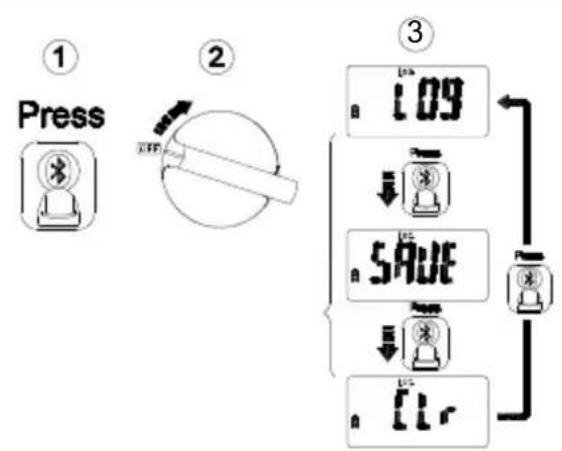
To set the data logger, press the Bluetooth® key 8 and simultaneously switch on the BENNING MM 10-PV via the rotary switch 9. The current setting is shown by a symbol on the digital display 1. As soon as the symbol appears, press the Bluetooth®key 8 repeatedly to select from the following functions:
| Symbol Function | |
| LOG | Automatic storage with predefined measuring interval |
| SAVE | Manual storage by pressing a key |
| CLR | Deleting the internal measured value memory |
A selected function will be automatically accepted after 2 seconds and remains permanently stored.
flowchart
graph TD
    A["Press"] --> B["LFP"]
    B --> C["Load"]
    C --> D["Time: 1.09"]
    D --> E["Load: 5.0V"]
    E --> F["Power: 1.5V"]
    F --> G["Display: 1.5V"]
5.2.2 Automatic storage (LOG)
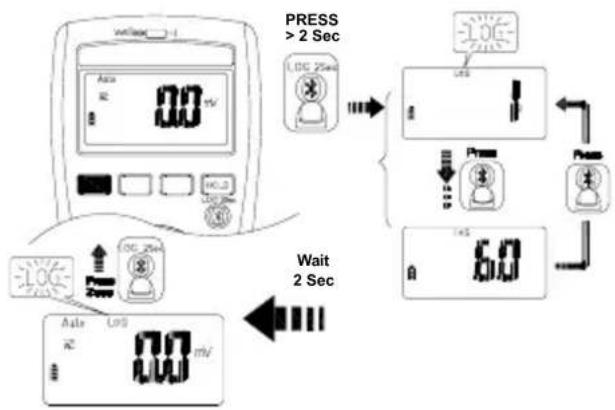
Set the data logger to automatic storage "LOG" with predefined measuring interval according to section 5.2.1. To enable the data logger, press the Bluetooth® key ⑧ for 2 seconds until the "LOG" symbol and the set measuring interval are shown on the digital display ①. As soon as the measuring interval is shown, directly press the Bluetooth® key ⑧ to set the measuring interval to 1 s, 5 s, 10 s, 30 s or 60 s.
After having selected the desired measuring interval, the data logger starts storing measured values in the internal memory automatically after 2 seconds. If the data logger is enabled, the symbol "LOG" is flashing. Press the Bluetooth® key 8 for 2 seconds to stop the data logger.
Note:
Each start of the data logger "LOG" deletes the internal memory and thus all stored measured values.
flowchart
graph TD
    A["Device 1: 00 mV"] --> B["Press > 2 Sec"]
    B --> C{Control Signals}
    C -->|Press| D["Display 1: 0.0"]
    C -->|Press| E["Display 2: 0.0"]
    C -->|Press| F["Display 3: 0.0"]
    C -->|Press| G["Display 4: 0.0"]
    C -->|Press| H["Display 5: 0.0"]
    C -->|Press| I["Display 6: 0.0"]
    C -->|Press| J["Display 7: 0.0"]
    C -->|Press| K["Display 8: 0.0"]
    C -->|Press| L["Display 9: 0.0"]
    C -->|Press| M["Display 10: 0.0"]
    C -->|Press| N["Display 11: 0.0"]
    C -->|Press| O["Display 12: 0.0"]
    C -->|Press| P["Display 13: 0.0"]
    C -->|Press| Q["Display 14: 0.0"]
    C -->|Press| R["Display 15: 0.0"]
    C -->|Press| S["Display 16: 0.0"]
    C -->|Press| T["Display 17: 0.0"]
    C -->|Press| U["Display 18: 0.0"]
    C -->|Press| V["Display 19: 0.0"]
    C -->|Press| W["Display 20: 0.0"]
    C -->|Press| X["Display 21: 0.0"]
    C -->|Press| Y["Display 22: 0.0"]
    C -->|Press| Z["Display 23: 0.0"]
    C -->|Press| AA["Display 24: 0.0"]
    C -->|Press| AB["Display 25: 0.0"]
    C -->|Press| AC["Display 26: 0.0"]
    C -->|Press| AD["Display 27: 0.0"]
    C -->|Press| AE["Display 28: 0.0"]
    C -->|Press| AF["Display 29: 0.0"]
    C -->|Press| AG["Display 30: 0.0"]
    C -->|Press| AH["Display 31: 0.0"]
    C -->|Press| AI["Display 32: 0.0"]
    C -->|Press| AJ["Display 33: 0.0"]
    C -->|Press| AK["Display 34: 0.0"]
    C -->|Press| AL["Display 35: 0.0"]
    C -->|Press| AM["Display 36: 0.0"]
    C -->|Press| AN["Display 37: 0.0"]
    C -->|Press| AO["Display 38: 0.0"]
    C -->|Press| AP["Display 39: 0.0"]
    C -->|Press| AQ["Display 40: 0.0"]
    C -->|Press| AR["Display 41: 0.0"]
    C -->|Press| AS["Display 42: 0.0"]
    C -->|Press| AT["Display 43: 0.0"]
    C -->|Press| AU["Display 44: 0.0"]
    C -->|Press| AV["Display 45: 0.0"]
    C -->|Press| AW["Display 46: 0.0"]
    C -->|Press| AX["Display 47: 0.0"]
    C -->|Press| AY["Display 48: 0.0"]
    C -->|Press| AZ["Display 49: 0.0"]
    C -->|Press| BA["Display 50: 0.0"]
    C -->|Press| BB["Display 51: 0.0"]
    C -->|Press| BC["Display 52: 0.0"]
    C -->|Press| BD["Display 53: 0.0"]
    C -->|Press| BE["Display 54: 0.0"]
    C -->|Press| BF["Display 55: 0.0"]
    C -->|Press| BG["Display 56: 0.0"]
    C -->|Press| BH["Display 57: 0.0"]
    C -->|Press| BI["Display 58: 0.0"]
    C -->|Press| BJ["Display 59: 0.0"]
    C -->|Press| BK["Display 60: 0.0"]
    C -->|Press| BL["Display 61: 0.0"]
    C -->|Press| BM["Display 62: 0.0"]
    C -->|Press| BN["Display 63: 0.0"]
    C -->|Press| BO["Display 64: 0.0"]
    C -->|Press| BP["Display 65: 0.0"]
    C -->|Press| BQ["Display 66: 0.0"]
    C -->|Press| BR["Display 67: 0.0"]
    C -->|Press| BS["Display 68: 0.0"]
    C -->|Press| BT["Display 69: 0.0"]
    C -->|Press| BU["Display 70: 0.0"]
    C -->|Press| BV["Display 71: 0.0"]
    C -->|Press| BW["Display 72: 0.0"]
    C -->|Press| BX["Display 73: 0.0"]
    C -->|Press| BY["Display 74: 0.0"]
    C -->|Press| BZ["Display 75: 0.0"]
    C -->|Press| CA["Display 76: 0.0"]
    C -->|Press| CB["Display 77: 0.0"]
    C -->|Press| CC["Display 78: 0.0"]
    C -->|Press| CD["Display 79: 0.0"]
    C -->|Press| CE["Display 80: 0.0"]
    C -->|Press| CF["Display 81: 0.0"]
    C -->|Press| CG["Display 82: 0.0"]
    C -->|Press| CH["Display 83: 0.0"]
    C -->|Press| CI["Display 84: -1.5mV, -1mV, -1mV, -1mV, -1mV, -1mV, -1mV, -1mV, -1mV, -1mV, -1mV, -1mV, -1mV, -1mV, -1mV, -1mV, -1mV, -1mV, -1mV, -1mV, -1mV, -2mV, -2mV"]
5.2.3 Manual storage (SAVE)
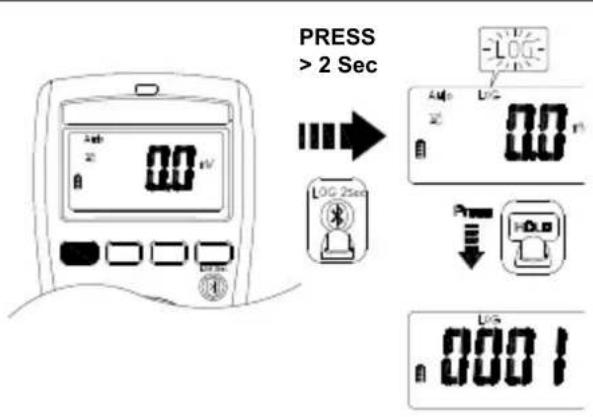
Set the data logger to manual storage "SAVE" by pressing a key according to section 5.2.1. To enable the data logger, press the Bluetooth® key ⑧ for 2 seconds until the "LOG" symbol on the digital display ① flashes. Each time the HOLD key ⑦ is pressed, the current measured value is stored in the internal memory and the corresponding storage location number is briefly shown on the digital display ①. Manual storage is stopped by pressing the Bluetooth® key ⑧ for 2 seconds.
Note:
The first start of the manual storage "SAVE" deletes the internal memory and thus all stored measured values of the data logger "LOG". The manual storage "SAVE" can then be started and stopped several times. The measured values are continuously stored in the internal memory at the storage locations 0001 to 4000.
text_image
PRESS > 2 Sec 0.00 mV 0.00 0.00 0.00 0.00 0.00 0.00 0.00 0.00 0.00 0.00 0.00 0.00 0.00 0.00 0.00 0.00 0.00 0.00 0.00 0.00 0.01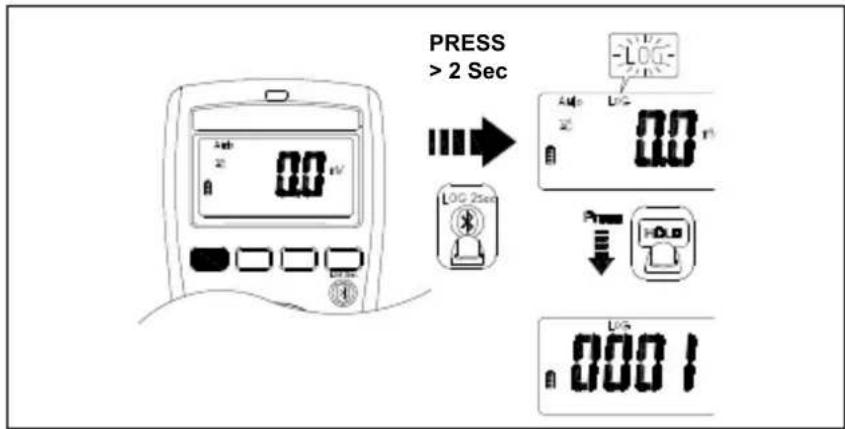
text_image
PRESS > 2 Sec LOG 2sec 0.0 0.0 0.0 0.0 0.0015.3 Data transmission to the smartphone/tablet
The BENNING MM 10-PV is provided with a Bluetooth Low Energy 4.0 interface for real-time wireless transmission of measured values to an Android or IOS device.
The "BENNING MM-CM Link" app required for this is available in the Google Play Store and in the Apple App Store.


Google Playstore App Store
The "BENNING MM-CM Link" app offers i.a. the following functions:
- Displaying of the measured values in real time and storage as CSV file.
- Download of the data logger LOG (up to 4,000 measured values) from the BENNINGMM10-PV.
To activate the Bluetooth® interface, press the Bluetooth® key 8 at the BENNING MM 10-PV (symbol ✕ flashes). As soon as a Bluetooth® connection is established, the symbol „✗”s displayed permanently.
Range in open space: approx. 10 m
6. Ambient conditions
- The BENNING MM 10-PV/MM 10-1 is intended for making measurements in dry environment.
- Maximum barometric elevation for making measurements: 2000 m,
- Overvoltage category / installation category of the BENNING MM 10-PV/MM10-1:
IEC 60664/ IEC 61010 → 600 V category IV; 1000 V category III
- Contamination class: 2,
- Protection class: IP 30 (DIN VDE 0470-1, IEC/ EN 60529)
IP 30 means: Protection against access to dangerous parts and protection against solid impurities of a diameter >2.5 mm, (3 - first index). No protection against water, (0 - second index).
- Operating temperature and relative humidity:
For operating temperatures from - 10 °C to 10 °C.
For operating temperatures from 10 °C to 30 °C: relative air humidity lower than 80 %,
For operating temperatures from 31 °C to 40 °C: relative air humidity lower than 75 %,
For operating temperatures from 41 °C to 50 °C: relative air humidity lower than 45 %.
- Storage temperature: The BENNING MM 10-PV/ MM 10-1 can be stored at temperatures between - 20 °C and + 60 °C, at a relative air humidity lower than 80 % without batteries.
7. Electrical specifications
Note: The measuring precision is specified as the sum of
- a relative fraction of the measured value and
- a number of digits (counting steps of the least significant digit).
This specified measuring precision is valid for temperatures in the range from 18 °C to 28 °C and relative humidity less than 80 %. The stated accuracy is specified for 1 % to 100 % of the final measuring range value.
Additional specifications for AC functions:
The measuring value is gained and indicated as effective value (True RMS, AC coupling). In case of non-sinusoidal curves, the indicating value becomes inaccurate. Thus, an additional error occurs for the following crest factors:
crest factor from 1.0 to 2.0 additional error + 3.0 % crest factor from 2.0 to 2.5 additional error + 5.0 % crest factor from 2.5 to 3.0 additional error + 7.0 %
Maximum crest factor of the measuring signal:
crest faktor 3.0 @ 3000 digits
crest faktor 2.0 @ 4500 digits
crest faktor 1.5 @ 6000 digits
Measured values < 20 digits are set to 0 on the digital display ①.
Square-wave signals are not specified.
HFR function (low-pass filter)
additional error for functions V AC and A AC
± 4 % with regard to the specified measuring accuracy (45 Hz to 200 Hz)
Limiting frequency fg (- 3 dB): 800 Hz
7.1 Voltage ranges (V AC, V DC)
| Function Measuring range Resolution Measurement accuracy | |||
| V AC | 600.0 mV 0.1 mV ± (1.0 % + 7 digits) | ||
| 6.000 V | 0.001 V | ± (1.0 % + 5 digits) | |
| 60.00 V | 0.01 V | ||
| 600.0 V | 0.1 V | ||
| 1000 V | 1 V | ||
| V DC | 600.0 mV 0.1 mV ± (0.5 % + 7 digits) | ||
| 6.000 V | 0.001 V | ± (0.5 % + 4 digits) | |
| 60.00 V | 0.01 V | ||
| 600.0 V | 0.1 V | ||
| 1000 V | 1 V | ||
Overload protection: 1000 VAC/DC
Frequency range: 45 Hz - 500 Hz (sine)
Input resistance: DC: 10 MΩ, AC: 10 MΩ II < 100 pF
7.2 Voltage ranges (PV) via BENNING TA PV measuring adapter (BENNING MM 10-PV)
| Function Measuring range Resolution Measurement accuracy | |||
| PV V DC | 600.0 V2000 V | 0.1 V1 V | ± (2.0 % + 7 digits) |
| PV V AC | 600.0 V1500 V | 0.1 V1 V | ± (2.0 % + 7 digits) |
Overload protection: 1000 VAC/DC
Frequency range: 45 Hz - 500 Hz (sine)
Input resistance: DC: 10 MΩ, AC: 10 MΩ II < 100 pF
7.3 Voltage ranges (AutoV LoZ) (BENNING MM 10-1)
The low-impedance input resistance of approx. 3 kΩ serves to suppress inductive and capacitive voltages.
| Function Measuring range Resolution Measurement accuracy | |||
| AutoV LoZ | 600.0 V1000 V | 0.1 V1 V | ± (2.0 % + 5 digits) |
Overload protection: 1000 VAC/DC
Frequency range: 45 Hz - 500 Hz (sine)
Input resistance: approx. 3 kΩ
7.4 Current ranges ( A_AC/DC ) (BENNING MM 10-PV)
Function Measuring range Resolution Measurement accuracy
| AAC | 6.000 A10.00 A | 0.001 A0.01 A | ± 1.5 % + 5 digits |
| ADC | 6.000 A10.00 A | 0.001 A0.01 A | ± 1.0 % + 5 digits |
Max. measuring time:
- 3 minutes at > 5 A (pause > 20 minutes)
- 30 secondes at > 10 A (pause > 10 minutes)
Overload protection: 11 AAC/DC
Frequency range: 45 Hz - 500 Hz (sine)
7.5 Microampere/ milliampere current ranges (μAAC/DC)
(BENNING MM 10-1)
Function Measuring range Resolution Measurement accuracy
| μA/mA AC | 600.0 μA 0.1 μA ± 1.5 % + 7 digits | ||
| 6.000 mA | 0.001 mA | ± 1.5 % + 5 digits | |
| 60.00 mA | 0.01 mA | ||
| 400.0 mA | 0.1 mA | ||
| μA/mA DC | 600.0 μA 0.1 μA ± 1.0 % + 7 digits | ||
| 6.000 mA | 0.001 mA | ± 1.0 % + 5 digits | |
| 60.00 mA | 0.01 mA | ||
| 400.0 mA | 0.1 mA | ||
Overload protection: 440 mA _AC/DC
Frequency range: 45 Hz - 500 Hz (sine)
7.6 Resistance measuring ranges ( ), continuity and diode testing
Function Measuring range Resolution Measurement accuracy
| 600.0 Ω 0.1 Ω ± 0.9 % + 7 digits | |||
| Resistance | 6.000 kΩ | 0.001 kΩ | ± 0.9 % + 4 digits |
| 60.00 kΩ | 0.01 kΩ | ||
| 600.0 kΩ | 0.1 kΩ | ||
| 6.000 MΩ | 0.001 MΩ | ||
| 40.00 MΩ* | 0.01 MΩ | ± 1.5 % + 7 digits | |
| Continuity | 600.0 Ω 0.1 Ω ± 0.9 % + 7 digits | ||
| Diode 1.500 V | 0.001 V | ± 0.9 % + 4 digits | |
* Measured values > 10 MΩ might cause changing values on the display (max. ± 50 digits).
Overload protection: 1000 VAC/DC
Max. open circuit-voltage: approx. 1.8 V
Continuity test: The built-in buzzer sounds when resistance is less than 20 Ω to 200 Ω.
Response time: < 100 ms
Acoustic indication: 2.7 kHz
7.7 Capacity ranges (μF)
Conditions: Capacitors discharged and connected in accordance with the polarity stated.
| Measuring range | Resolution | Measurement accuracy |
| 1.000 μF | 0.001 μF | ± 1.9 % + 7 digits |
| 10.00 μF | 0.01 μF | ± 1.9 % + 4 digits |
| 100.0 μF | 0.1 μF | |
| 1.000 mF | 0.001 mF | |
| 10.00 mF | 0.01 mF |
Overload protection: 1000 VAC/DC
Minimum sensitivity:
5 V _eff for V AC range (1 Hz \~ 10 kHz)
20 V _eff for V AC range (10 kHz \~ 50 kHz)
60 V _eff for V AC range (50 kHz \~ 100 kHz)
0.6 A _eff for V AC range (MM 10-PV)
Min. frequency: 1 Hz
7.9 Temperature range (°C/°F)
| Measuring range Resolution Measurement accuracy* | ||
| - 40 °C - +400 °C 0.1 °C ± (1 % + 22 digits) | ||
| - 40 °F - +752 °F | 0.1 °F | ± (1 % + 38 digits) |
* The measuring accuracy of the K-type temperature sensor has to be added to the specified measuring accuracy.
Wire temperature sensor (type K):
Measuring range: - 60 °C to 200 °C
Measurement accuracy: ± 2 °C
The measuring accuracy applies to stable ambient temperatures < ± 1^ . After a change of the ambient temperature of ± 2^ , the measuring accuracy data will apply after 2 hour.
Overload protection: 1000 VAC/DC
8. Measuring with the BENNING MM 10-PV/ MM 10-1
8.1 Preparation for measuring
Store and use the BENNING MM 10-PV/ MM 10-1 only under the correct temperature conditions stated. Always avoid longer exposure to sunlight.
- Check the rated voltage and rated current stated on the safety measuring leads. The safety measuring leads supplied with the unit are suitable for the rated voltage and current of the BENNING MM 10-PV/ MM 10-1.
- Check the insulation of the safety measuring leads. If the insulation is damaged in any way, do not use the leads.
- Check the continuity of the safety measuring leads. If the conductor in the safety measuring lead is interrupted, do not use the leads.
Before selecting another function with the rotating switch ⑨, always disconnect the safety measuring leads from the measuring point. - Sources of strong current in the vicinity of the BENNING MM 10-PV/MM 10-1 may cause unstable or incorrect readings.
8.2 Voltage/ frequency measurement

Do not exceed the maximum permitted voltage with respect to earth potential!
Please observe the overvoltage category of the electric circuit! Attach the protective caps (CAT III/IV) to the contact tips before making measurements in circuits of overvoltage category CAT III or IV.
Electrical danger!
The highest voltage that may be applied to the jacks
- COM jack ⑪,
- jack + 12
of the BENNING MM 10-PV/ MM 10-1 against ground is 600 V CAT IV/ 1000 V CAT III.
8.2.1 Voltage/ frequency measurement (switch position: V, \~ V=, mV= AutoV/LoZ)
- Use the rotary switch ⑨ to select the required function V\~ V=, mVoff, AutoV/LoZ (BENNING MM 10-1) on BENNING MM 10-PV/MM 10-1.
- Connect the black safety measuring lead to the COM jack ⑪ of the BENNING MM 10-PV/ MM 10-1.
- Connect the red safety measuring lead to the jack + 12 of the BENNING MM 10-PV/MM 10-1.
- Bring the safety measuring leads into contact with the measuring points and read the measured value on the digital display 1.
- In the function, the function key (blue) to frequency measurement (Hz). ④ can be used for switching over
see fig. 2: Direct voltage measurement
see fig. 3: Alternating voltage measurement (frequency measurement)
see fig. 4b: AutoV/Loz voltage measurement (BENNING MM 10-1)
Note:
On the digital display ①, the AutoV/ LoZ function (BENNING MM 10-1) is shown by the „Auto LoZ“ symbol. It automatically determines the required measuring function (AC/ DC voltage) and the ideal measuring range. Furthermore, the input resistance is reduced to approx. 3 kΩ in order to suppress inductive and capacitive voltages (reactive voltages).
8.2.2 Voltage measurement (switch position using the BENNING TA PV measuring adapter (BENNING MM 10-PV)

For voltage measurements on PV systems with system voltages of up to 1500 V DC, use the BENNING TA PV measuring adapter and the switch position "PV" of the BENNING MM 10-PV only.
The measuring adapter reduces the voltage applied to the BENNING MM 10-PV and is to be used exclusively for the BENNING MM 10-PV!
Electrical danger!
- Insert the BENNING TA PV measuring adapter into the COM jack ⑪ and the + jack ⑫.
- Use the rotary switch ⑨ to select the required function PV on BENNING MM 10-PV.
- The DC coupling mode is automatically preselected and can be set to the AC coupling mode using the function key (blue) ④, if necessary.
- Bring the safety measuring leads into contact with the measuring points and read the measured value on the digital display ① of the BENNING MM 10-PV.
Note:
If the PV measuring range is selected without the BENNING TA PV measuring adapter being inserted, or if an incorrect measuring range is selected with the BENNING TA PV measuring adapter being inserted, an acoustic signal is emitted and the "Prob" symbol is shown on the digital display 1.
An acoustic signal is emitted if the wrong coupling mode (e.g. AC instead of DC) is selected in the PV measuring range and a DC voltage greater than 30 V is contacted via the BENNING TA PV measuring adapter. The incorrectly set coupling mode is indicated in this case by a flashing symbol "DC" and "⚡".
The same applies to an AC application with incorrectly set DC coupling type. An acoustic signal is emitted and a flashing "AC" symbol and "⚡" is shown on the digital display.
see fig. 4a: PV voltage measurement using the BENNING TA PV measuring adapter (BENNING MM 10-PV)
8.3 Current/ frequency measurement (switch position ^* )A= (BENNING MM 10-PV)
- Use the rotary switch ⑨ to select the required function by the function key (blue) ④ can be used to select the coupling mode (AC or DC) on BENNING MM 10-PV.
- Connect the black safety measuring lead to the COM jack ⑪ of the BENNING MM 10-PV.
- Connect the red safety measuring lead to the jack + 10 of the BENNING MM 10-PV.
- Bring the safety measuring leads into contact with the measuring points and read the measured value on the digital display ①.
- The function key (blue) ④ can be used for switching over to frequency measurement (Hz).
see fig. 5a: Direct/ alternating current measurement (frequency measurement) (BENNING MM 10-PV)
8.3.1 Microampere/ milliampere current measurement (switch position A≈ (BENNING MM 10-1)
- Use the rotary switch ⑨ to select the required function μAthe function key (blue) ④ can be used to select the coupling mode (AC or DC) on BENNING MM 10-1.
- Connect the black safety measuring lead to the COM jack ⑪ of the BENNING MM 10-1.
- Connect the red safety measuring lead to the jack + 10 of the BENNING MM 10-1.
- Bring the safety measuring leads into contact with the measuring points and read the measured value on the digital display ①.
see fig. 5b: Microampere/ milliampere direct/ alternating current measurement (BENNING MM 10-1)
8.4 Resistance measurement (switch position )
- Use the rotary switch ⑨ to select the required function ♦pB BENNING MM 10-PV/MM 10-1.
- Connect the black safety measuring lead to the COM jack ⑪ of the BENNING MM 10-PV/ MM 10-1.
- Connect the red safety measuring lead to the jack + 12 of the BENNING MM 10-PV/MM 10-1.
- Bring the safety measuring leads into contact with the measuring points and read the measured value on the digital display ① of the BENNING MM 10-PV/ MM 10-1.
see fig. 6: Resistance measurement/ continuity test with buzzer and LED
8.5 Continuity test with buzzer and LED (switch position ⬆) Ω
- Use the rotary switch ⑨ to select the required function ♦pB BENNING MM 10-PV/MM 10-1.
- Connect the black safety measuring lead to the COM jack ⑪ of the BENNING MM 10-PV/ MM 10-1.
- Connect the red safety measuring lead to the jack + 12 of the BENNING MM 10-PV/MM 10-1.
- Press the function key (blue) ④ to enable the continuity test with buzzer/LED.
- Bring the safety measuring leads into contact with the measuring points. If the line resistance between the COM jack 11 and the jack 12 falls below a value between 20 Ω and 200 Ω, the integrated buzzer of the BENNING MM 10-PV/ MM 10-1 sounds and the red LED 15 lights up.
see fig. 6: Resistance measurement/ continuity test with buzzer and LED
8.6 Capacitance measurement (switch position (-) )

Discharge capacitors fully before measurement! Never apply voltage to the sockets for capacitance measurement as this may cause irreparable damage to the unit. A damaged unit may represent an electrical hazard!
- Use the rotary switch ⑨ to select the required function on BENNING MM 10-PV/MM 10-1.
- Determine the polarity of the capacitor and discharge it completely.
- Connect the black safety measuring lead to the COM jack ⑪ of the BENNING MM 10-PV/ MM 10-1.
- Connect the red safety measuring lead to the jack + 12 of the BENNING MM 10-PV/MM 10-1.
- Contact the discharged capacitor with the safety measuring leads observing correct polarity. Read the measurement value on the digital display ① of the BENNING MM 10-PV/ MM 10-1.
see fig. 7: Capacitance measurement/ diode test
8.7 Diode test (switch position (-) )
- Use the rotary switch ⑨ to select the required function on BENNING MM 10-PV/MM 10-1.
- Connect the black safety measuring lead to the COM jack ⑪ of the BENNING MM 10-PV/ MM 10-1.
- Connect the red safety measuring lead to the jack + 12 of the BENNING MM 10-PV/MM 10-1.
- Press the function key (blue) ④ 3 times to enable the diode test.
- Bring the safety measuring leads into contact with the measuring points and read the measured value on the digital display ① of the BENNING MM 10-PV/ MM 10-1.
- For a normal silicone diode located in flow direction, the flow voltage be-
tween 0.400 V and 0.800 V is displayed. If “000” appears in the display, there may be a short circuit in the diode, “0L” indicates an interruption inside the diode.
- For a diode applied in reverse direction, "0L" is displayed. If the diode is defective, "000" or other values are displayed.
see fig. 7: Capacitance measurement/ diode test
8.8 Temperature measurement (switch position)
- Use the rotary switch ⑥ to select the required function _on BENNING MM 10-PV/MM-10-1.
- Press function key (blue) ④ to switch over to °F or °C.
- Connect the temperature sensor (type K) correctly to the COM jack COM and jack 12, observe polarity.
- Place the contact point (end of the sensor lead) on the point to be measured. Read the measurement value on the digital display ① of the BENNING MM 10-PV/ MM-10-1.
see fig. 8: Temperature measurement
8.9 Voltage indicator (switch position Volt sense

The voltage indicator function is not intended for testing the absence of voltage. Even without an indication or acoustic signal, a dangerous contact voltage might be applied. Electrical danger!
- Use the rotary switch ⑨ to select the required function Volt BENNING MM 10-PV/MM 10-1, the symbol “/” is flashing on the digital display.
- Press the RANGE key ⑤ to switch over to Hi (high sensitivity) or Lo (low sensitivity).
- The voltage indicator function does not need any measuring leads (non-contact detection of an alternating field). The detector is located on the top side of the BENNING MM 10-PV/ MM 10-1. In case of a phase voltage being localized, an acoustic signal is emitted and the red LED ^15 on the top side of the device lights. An indication is shown in earthed AC mains only!
Practical hint:
Interruptions (cable breaks) in cables lying around openly such as e.g. cable reels, fairy lights etc. can be traced from the feeding point (phase) to the point of interruption.
Functional range:≥ 230 V
see fig. 9: Voltage indicator with buzzer and LED
8.9.1 Phase test (switch position) Volt Sense
- Connect the black safety measuring lead to the COM jack ⑪ of the BENNING MM 10-PV/ MM 10-1.
- Connect the red safety measuring lead to the jack + 12 of the BENNING MM 10-PV/MM 10-1.
- Use the rotary switch ⑨ to select the required function Volt BenNING MM 10-PV/MM 10-1, the symbol "f" is flashing on the digital display.
- Press the RANGE key ⑤ to switch over to Hi (high sensitivity) or Lo (low sensitivity).
- Connect the red safety measuring lead with the measuring point (system part).
- If an acoustic signal is emitted and the red LED 15 lights, the phase of an earthed alternating voltage is applied to this measuring point (system part).
9. Maintenance

Before opening the BENNING MM 10-PV/ MM 10-1, strictly observe that the device is free of voltage! Electrical danger!
Working on the opened BENNING MM 10-PV/ MM 10-1 under voltage must be carried out by skilled electricians special precautions for the prevention of accidents only!
Make sure that the BENNING MM 10-PV/MM 10-1 is free of voltage as described below before opening the device:
- First, remove both safety measuring leads from the object to be measured.
- Then, remove both safety measuring leads from the BENNING MM 10-PV/MM10-1.
- Turn the rotary switch ⑨ to the switch setting "OFF".
9.1 Securing the device
Under certain circumstances, safe operation of the BENNING MM 10-PV/MM 10-1 might no longer be ensured, e.g. in case of:
- visible damage of the housing,
- incorrect measuring results,
- recognizable consequences of prolonged storage under inadmissible conditions and
- recognizable consequences of extraordinary stress due to transport.
In such cases, immediately switch off the BENNING MM 10-PV/ MM 10-1, disconnect it from the measuring points and secure it against further use.
9.2 Cleaning
Clean the exterior of the device with a clean dry cloth (exception: special cleaning wipers). Do not use any solvents and/or abrasives to clean the device. Make sure that the battery compartment and the battery contacts are not contaminated by leaking battery electrolyte.
If there are electrolyte contamination or white deposits in the area of the battery or the battery compartment, clean these areas as well by means of a dry cloth.
9.3 Battery replacement

Before opening the BENNING MM 10-PV/ MM 10-1, strictly observe that the device is free of voltage! Electrical danger!
The BENNING MM 10-PV/ MM 10-1 is supplied by means of two integrated 1.5 V batteries (AA/ IEC LR6). Battery replacement (see fig. 10) is required as soon as all segments of the battery symbol □③ on the digital display ① have disappeared and the battery symbol □is flashing.
Proceed as follows to replace the battery:
- Disconnect the safety measuring leads from the measuring circuit.
- Remove the safety measuring leads from the BENNING MM 10-PV/MM10-1.
- Turn the rotary switch ⑨ to the switch setting "OFF".
- Remove the protective rubber holster ⑬ from the BENNING MM 10-PV/MM 10-1.
- Lay the BENNING MM 10-PV/ MM 10-1 face down and release the screws of the battery compartment cover.
- Lift the battery compartment cover to remove it from the housing.
- Remove the discharged batteries from the battery compartment.
- Insert the new batteries into the battery compartment observing correct polarity.
- Place the battery compartment cover onto the bottom part and tighten the screw.
- Replace the BENNING MM 10-PV/ MM 10-1 in its protective rubber holster ⑬.
See fig. 10: Battery replacement

Make your contribution for environmental protection! Do not dispose of discharged batteries via the household waste. Instead, return them to a collecting point for discharged batteries or spezial waste. Please look for information in your community's facilities.
9.4 Fuse replacement

Before opening the BENNING MM 10-PV/ MM 10-1, strictly observe that the device is free of voltage! Electrical danger!
The BENNING MM 10-PV is protected against overload by means of an integrated fuse (G melt insert) 11 A rapid and the BENNING MM 10-1 is protected against overload by means of an integrated fuse (G melt insert) 440 mA rapid (see figure 11).
Proceed as follows to replace the fuse:
- Disconnect the safety measuring leads from the measurement circuit.
- Disconnect the safety measuring leads from the BENNING MM 10-PV/MM10-1.
- Turn the rotating switch ⑨ to the "OFF" position.
- Remove the protective rubber holster 13 from the BENNING MM 10-PV/MM10-1.
- Lay the BENNING MM 10-PV/ MM 10-1 face down and release the screws
of the battery compartment cover.
- Lift the battery compartment cover to remove it from the housing and remove the batteries from the battery compartment.
- Unscrew the four outer screws (black) from the bottom part of the housing.

Do not loosen any of the screws on the printed circuit of the BENNING MM 10-PV/MM 10-1!
- Lift the housing base at the bottom and remove it from the top of the front part.
- Lift one end of the defective fuse out of the fuse holder.
- Push the defective fuse out of the fuse holder completely.
- Replace the defective fuse with another of the same rated power, same triggering characteristics and same dimensions.
- Push the new fuse into the centre of the holder.
- Clip the housing base into the front part and replace the four screws.
- Insert the batteries into the battery compartment observing correct polarity, place the battery compartment cover onto the bottom part and tighten the screw.
- Replace the BENNING MM 10-PV/ MM 10-1 in its protective rubber holster
13.
See fig. 11: Fuse replacement
9.5 Calibration
Benning guarantees compliance with the technical and accuracy specifications stated in the operating manual for the first 12 months after the delivery date. To maintain accuracy of the measuring results, the device must be recalibrated in regular intervals by our factory service. We recommend recalibrating the device once a year. For this purpose, send the device to the following address:
10. Technical data of measuring accessories
- Standard: EN 61010-031
- Maximum rated voltage (operating voltage) of the BENNING TA PV measuring adapter (item no. 10217846) for test and measuring electrical circuits, which are not directly connected to the mains: 1500 VAC/ 2000 VDC
- Maximum rated voltage to earth ( ± ) and measuring category for test and measuring electrical circuits, which are directly connected to the mains:
Safety measuring lead (part no. 044145)
With push-on caps: 1000 V CAT III, 600 V CAT IV
Without push-on caps: 1000 V CAT II
Maximum rated current: 10 A
BENNING TA PV measuring adapter (item no. 10217846):
With push-on caps: 1000 V CAT III, 600 V CAT IV
Without push-on caps: 1000 VAC CAT II/ 1500 VDC CAT II
- Length: 1.4 m
- Protection class II (☐), continuous double or reinforced insulation
- Contamination class: 2
- Ambient conditions:
Maximum barometric height for measurements: 2000 m Temperature: 0 °C to +50 °C, humidity 50 % to 80 %
- Only use the test leads if in perfect and clean condition as well as according to this manual, since the protection provided could otherwise be impaired.
- Replace the measuring lead if the insulation is damaged or the conductor/connector is interrupted.
- Do not touch the bare contact tips of the measuring leads. Only touch the area behind the grip limit intended for your hands!
- Insert the bent terminals into the testing or measuring device.
11. Environmental note
At the end of product life, dispose of the unserviceable device via appropriate collecting facilities provided in your community.
Notice d'emploi BENNING MM 10-PV/ MM 10-1
natural_image
Diagram showing a waveform before and after transformation, with no text or symbols present.
natural_image
Diagram showing a waveform with zigzag patterns transitioning from left to right, indicating a signal or wave pattern (no text or symbols present)