Mammut - Controller AL-KO - Free user manual and instructions
Find the device manual for free Mammut AL-KO in PDF.



| Product type | Maneuvering system for caravans |
| Brand | AL-KO |
| Model | Mammut |
| Weight (high mounting) | 29 kg |
| Weight (low mounting) | 36 kg |
| Power supply | 12 V battery, 80 Ah min |
| Maneuvering speed | Approx. 0.5 km/h |
| Remote control range | Approx. 10 m |
| Guidance | Continuous up to 360° |
| Instant stop | Yes |
| Protection | Motor and electronics protected against splashes and salt water |
| Manual reset | 13 mm hex key |
| Peak current | Maximum 120 A |
| Standby current | Maximum 5 mA |
| Operating time (full load) | Approx. 0.5 h |
| Operating time (flat ground) | Approx. 2 h |
| Slope capability (2.25 t) | 12 % |
| Slope capability (1.80 t) | 15 % |
| Slope capability (1.20 t) | 28 % |
| Roller material | Aluminium |
| Maximum authorized total weight (caravan) | 2.25 t |
| Maintenance | Clean with water or brush (no pressure washer), check 20 mm gap between rollers and tires |
| Warranty | According to regulations of country of purchase |
| After-sales service | Contact AL-KO after-sales service or a specialized garage |
Frequently Asked Questions - Mammut AL-KO
User questions about Mammut AL-KO
0 question about this device. Answer the ones you know or ask your own.
Ask a new question about this device
Download the instructions for your Controller in PDF format for free! Find your manual Mammut - AL-KO and take your electronic device back in hand. On this page are published all the documents necessary for the use of your device. Mammut by AL-KO.
USER MANUAL Mammut AL-KO
INFORMATION | MANUALS | SERVICE
AL-KO AMS MAMMUT
Do not dispose of old equipment, batteries or accumulators as household waste!
Packaging, machine and accessories are manufactured using recyclable materials and must be disposed of accordingly.
NL Afvoeren
1: Systemkomponenten
natural_image
3D rendering of a handheld electric shock absorber device with red and gray components (no text or symbols visible)natural_image
3D model of a futuristic spaceship with visible control buttons and a red arrow pointing to the side (no text or symbols on the vehicle itself)Dr. Klaus Wilhelm, Technical leader
Bij dit handboek
natural_image
3D rendering of a mechanical device with red and gray components, no visible text or symbolsnatural_image
3D model of a futuristic spaceship with visible cockpit, wheels, and red arrow indicator (no text or symbols)6: Handmatige terugstelling

Dr. Klaus Wilhelm, Technical leader
About this handbook
Read this documentation before starting up the machine. This is a precondition for safe working and flawless operation.
- Observe the safety warnings in this documentation and on the machine.
This documentation is a permanent integral part of the product described and must be passed on to the new owner if the machine is sold.
Explanation of symbols

Caution!
Following these safety warnings carefully can prevent personal injury and/or material damage.

Special instructions for greater ease of understanding and improved handling.

The camera symbol refers to illustrations.
Contents
Disposal....3
About this handbook 16
Contents 16
Product description 16
Technical data 17
System components ...... 18
Installation 19
Safety instructions 19
Radio remote control 20
Initial start-up 20
Operation....22
Option: Switching off the mammoth signal 25
Manual disengagement in the event of a malfunction . 25
Troubleshooting....26
Maintenance and care 27
Warranty 27
EC Declaration of Conformity 27
Product description
AL-KO Mammut is a manoeuvring system for caravans. A radio remote control is used to engage the electrically powered drive rollers on the right and left wheels of the caravan with the required contact pressure. The power is provided by an external 12 V battery in the caravan.
The operator can manoeuvre the caravan at approx. 0.5 km/h using a joystick. A towing vehicle is not required.
Performance features
■ Motor and electronics protected against water spray
■ Enabling switch on the overrun device
■ Automatic switch-off after disengagement
■ Rapid stop on slopes
■ Stepless 360° steering
■ Stepless speed control
■ Manual disengagement possible
No modification of the vehicle registration documents necessary
Intended use
AL-KO Mammut is intended exclusively for controlled manoeuvring of a caravan at camping sites and on private property. It can also be used for coupling the caravan to the towing vehicle.
Using this machine for any other or additional purpose is considered contrary to its intended use.
Incorrect use
■ AL-KO Mammut must not be operated on unbraked trailers.
- Do not use AL-KO Mammut for manoeuvring or turning on public roads.
Technical data
| Technical data Top-mounted variant Bottom-mounted variant | ||
| Weight 29 kg 36 kg | ||
| Installation in direction of travel In front of axle In | front of or behind axle | |
| Ground clearance No restriction Reduced by crossmember | ||
| Supply voltage 12 V battery with min. 80Ah* | ||
| One-hand control via radio remote control | ||
| Range of radio remote control approx. 10 m | ||
| Climbing ability with 2.25 t 12 % | ||
| Climbing ability with 1.80 t 15 % | ||
| Climbing ability with 1.20 t 28 % | ||
| Drive rollers Aluminium, gentle on tyres | ||
| Engagement of the drive rollers Electric | ||
| Speed control | Stepless | |
| Speed | approx. 0.5 km/h | |
| Steering | Stepless, 0-360° | |
| Rapid stop | Yes | |
| Engagement drive | Protected against spray water and salt water | |
| Manual disengagement | 13 mm wrench | |
| Modification of vehicle registration documents | No | |
| Power consumption | ||
| Peak current | max. 120 A | |
| Quiescent current | max. 5 mA | |
| Operating hours with charged 12 V battery with min. 80 Ah* | ||
| On level ground | approx. 2 h | |
| Under full load | approx. 0.5 h | |
| Maximum permissible total weight | ||
| Caravan | 2.25 t | |
* Not supplied
System components
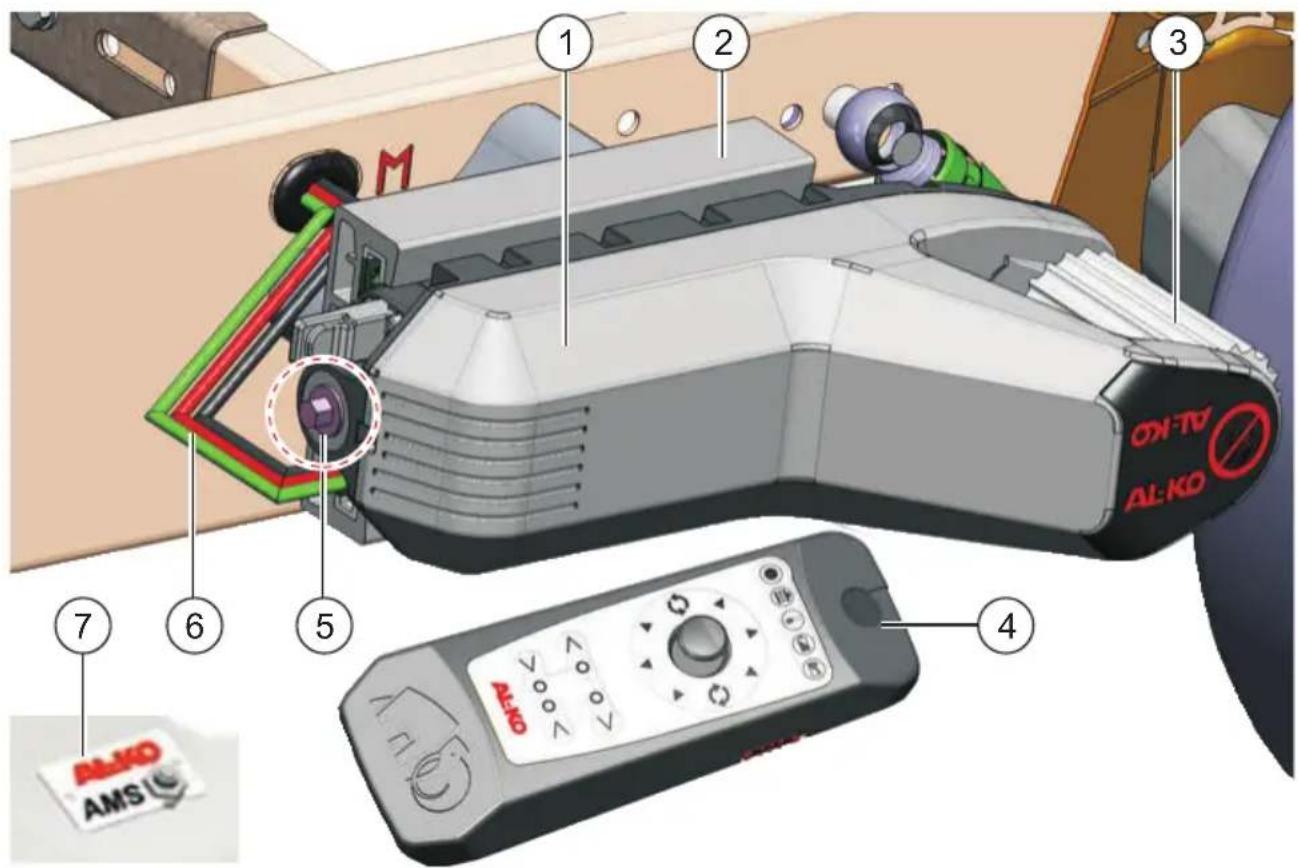
1: System components
| 1 Drive unit 5 Manual disengagement device | ||
| 2 Mounting adapter* 6 Cable harness | ||
| 3 Drive roller 7 Enabling switch on the overrun device | ||
| 4 Radio remote control |
* depending on the version
Meaning of symbols on the machine

Caution! Risk of crushing! Do not reach between the drive rollers and the tyres.

Read the operating instructions and operate the machine accordingly.
Safety features
Rapid stop
If the joystick is released, the trailer is braked to a stop.
■ Rapid stop from the OFF switch
If the remote control is switched off at the ON/OFF switch at the side, the trailer is braked to a stop. All motion is stopped.
When the remote control is switched back on, manoeuvring can be resumed without having to perform enabling again.
■ Disengagement of the drives
If both disengage buttons are pressed simultaneously during the engage motion of the drives, the engage motion stops immediately and the drives are retracted to the rear limit position.
■ Stopping the engagement drives
If the remote control is switched off during the engage motion of the drives, the engage motion is stopped and the system is switched off.

In this case, it is necessary to perform enabling again in order to disengage the drives. For this, both disengage buttons must be pressed.
Installation
■ See separate installation instructions.

We recommend having all installation and repair work carried out only by competent specialist
Safety instructions
Installation
- Observe the safety warnings in the installation instructions.
System

Risk of injury!
During manoeuvring, there must be nobody in the trailer or within its turning circle.

Risk of damage!
The manual disengagement device must not be used to engage the drives with the wheels
■ AL-KO Mammut must not be operated on unbraked trailers.
■ AL-KO Mammut must only be operated by persons of full legal age.
Radio remote control

Danger due to incorrect programming!
Before switching on the radio remote control for the first time, please observe the section "Initial start-up"!

Danger due to unauthorized operation!
Keep the radio remote control away from unauthorized persons.

Danger due to unintentional operation!
Do not put down an operational remote control or put it in your pocket. You could accidentally execute a motion with the joystick!

Risk of damage!
workshops or our AP-KE Service Centre control from dirt and moisture.
Radio remote control
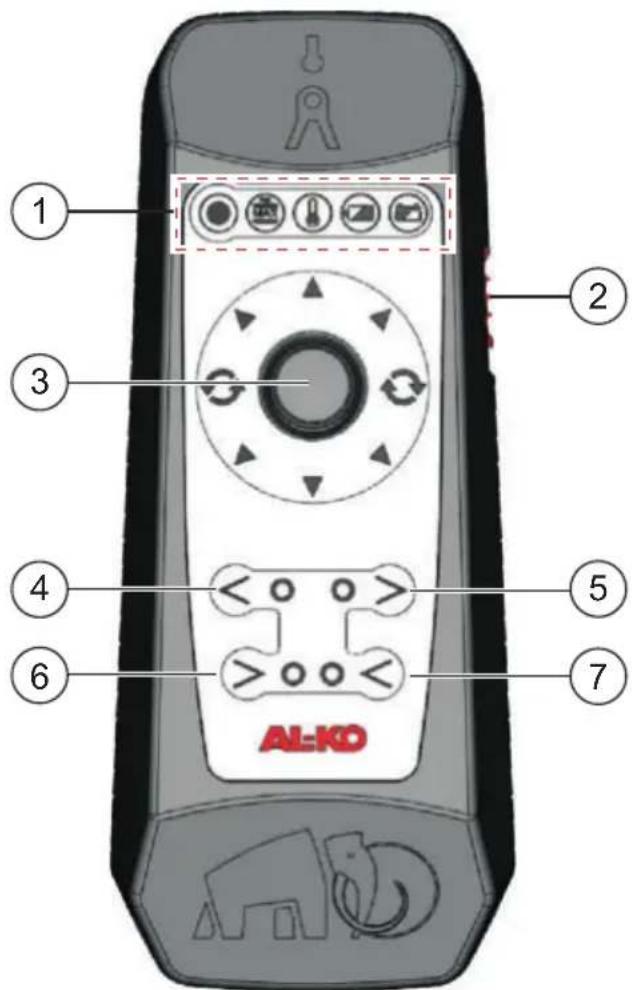
2: Radio remote control
| 1 LEDs |
| 2 ON/OFF switch |
| 3 Joystick |
| 4 Move left-hand drive unit away from wheel |
| 5 Move right-hand drive unit away from wheel |
| 6 Move left-hand drive unit towards wheel |
| 7 Move right-hand drive unit towards wheel |

Two-hand operation!
Switches 4 and 5 or 6 and 7 must always be pressed together.
Meaning of the LEDs

Operating state LED

Maximum climbing ability reached

Maximum drive temperature reached

Remote control battery level

Drive supply battery status

Rapid stop from the OFF switch!
If the remote control is switched off at the ON/OFF switch at the side, the trailer is braked to a stop. All motion is stopped.
When the remote control is switched back on, manoeuvring can be resumed without having to perform enabling again.
Initial start-up
Initial start-up after delivery of the new system is generally performed by the specialist workshop which has installed the drive units.

These functions are only to be carried out when the Mammut system is activated for the first time after installation, or when a new remote control is being put into operation.
Safety

Danger due to incorrect programming!
Errors during initial start-up can lead to misinterpretations between the remote control and the controller. This can result in hazardous operating situations.
- Carry out initial start-up on open ground, so that you can subsequently carry out a test run and function test with sufficient distance between you and the trailer.
To avoid the possibility of transmission errors, you should not perform initial start-up in the direct vicinity of another trailer with Mammut drives.
Calibrating the remote control with the system
In this step, the controller is told whether the drives are located in front of or behind the trailer axle (in the direction of travel). At the same time, the code of the remote control and the joystick position are transmitted to the drive controller.
The remote control must be switched off and the system must be inactive.
The numbers in brackets refer in this section to 2.
- Unplug the 3-contact connector of the data cable from the supply battery.
- Insert the battery into the battery compartment of the remote control. Ensure that the polarity is correct.
- Simultaneously press buttons 5 and 6 on the remote control.
- Keeping the buttons pressed, switch on the remote control at the ON/OFF switch (2).
First an LED self-test is carried out, then Expert mode is activated. The operating state LED flashes red.
You can now release both buttons.
- Hold the remote control against the enabling switch on the overrun device.
Communication is established with the drive units.

Carry out step 6a or 6b within a period of 10 seconds.
Make sure that you do not touch the joystick at the same time. To avoid malfunctions, this must be in the centre position.
- Press simultaneously for 10 seconds:
a. the disengage buttons (4 and 5), if the drives are located in front of the axle.
b. the engage buttons (6 and 7), if the drives are located behind the axle.
The data are transmitted – the corresponding LEDs light up as confirmation.
- Now switch off the remote control.
- Plug the 3-contact connector of the data cable back in.
The procedure is complete.
Initial start-up is now complete.

Should you have any questions or require clari- fication of any points, please contact our AL-KO Service or your installation workshop.
Operation
Operating elements on the remote control
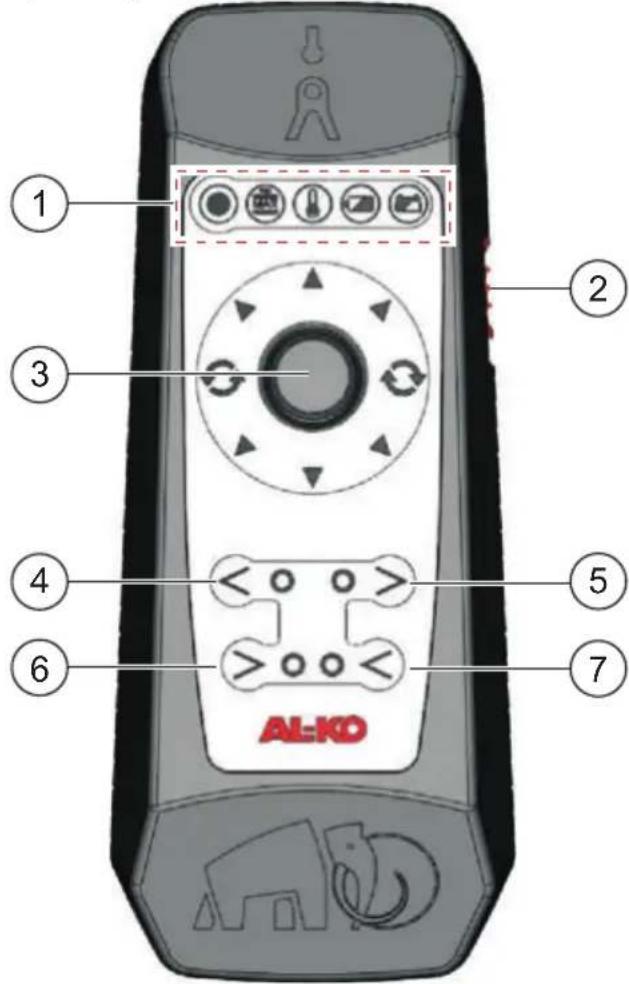
3: Operating elements on the remote control
Joystick functions
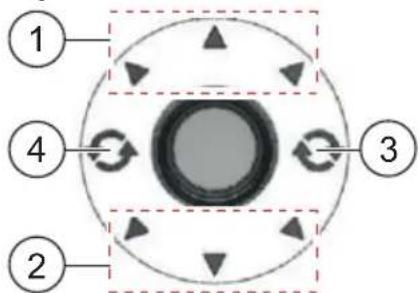
4: Joystick functions
| 1 Forward motion area |
| 2 Reverse motion area |
| 3 Turning area, clockwise rotation on the spot |
| 4 Turning area, anticlockwise rotation on the spot |
Fundamentals

The speed and direction of motion are controlled steplessly using the joystick.
Please note the functional difference between the following areas:
■ Forwards / Reverse (C: 1, 2)
■ Rotation 4:3,4)
In the areas for forwards (1) or reverse motion (2), the trailer can be moved with stepless control in the selected direction. The further the joystick is pressed in the desired direction, the faster the trailer moves.
If the joystick is pressed straight forwards or backwards in the direction of the middle arrow, the trailer moves in a straight line in this direction. If the joystick is moved towards the left-hand or right-hand arrow in the same direction, the trailer moves along a corresponding curve.
If the joystick is moved to the side into one of the turning areas, the trailer rotates to the right (3) or left (4) about its own axis.
Activating the drives

Caution! Risk of crushing!
During activation, the drives are engaged with the wheels.
During activation, ensure that nobody can reach unnoticed between the drives and the tyres!

Risk of damage to the drives!
The drives must never be activated when the trailer is coupled to the towing vehicle.
Engaging the drives with the wheels

The numbers in brackets refer in this section to 3.
- Switch on the remote control at the ON/OFF switch (2) located on the side.
All the LEDs light up briefly one after another. The mammoth signal sounds. After this, the operating state LED starts to flash green.
- With buttons 6 and 7 pressed, move the remote con-
trol over the enabling switch on the overrun device.
natural_image
3D rendering of a handheld electric shock absorber with red and gray casing (no text or symbols visible)Radio communication is established with the drives. The operating state LED then lights up continuously. The drives are active.
- Hold down the buttons until the
LEDs on the engage buttons flash.
The engage procedure is activated; you can now release the buttons. The drives are advanced towards the wheels. The drives are completely engaged with the wheels only when both LEDs are continuously lit.
- Check that both drives are correctly engaged.

Please note!
The drives are not to be used as a parking brake.
Disengaging the drives from the wheels

The numbers in brackets refer in this section to 3.

Risk of accident due to trailer rolling away!
Always apply the handbrake of the trailer before starting to disengage the drives.
-
Press buttons 4 and 5.
-
Hold down the buttons until the LEDs on the disengage buttons start to flash.
The disengage procedure is activated; you can now release the buttons. The drives are retracted from the wheels. The drive is disengaged when both LEDs are lit continuously.
- Wait until the operating state LED also fl ashes.
Only when the operating state LED also flashes are the drives safely switched off.
-
Switch off the remote control at the ON/OFF switch (2) located on the side.
-
Check that both drives are correctly disengaged.
Manoeuvring the trailer
The AL-KO Mammut manoeuvring system is steered via the remote control. The speed and direction are steplessly controlled using the joystick.
Safety instructions

Danger – Risk of injury!
Always observe the following safety instructions before manoeuvring your trailer with the Mammut drive.
During operation, ensure that there is a large enough safety distance from persons and objects.
During manoeuvring, the operator must keep a minimum distance of 0.5 m away from the trailer.
Also check the side of the caravan facing away from you.
If necessary, enlist the support of other persons to safeguard the area.
During operation, do not touch the drive rollers – Danger of crushing!
The AL-KO Mammut must only be operated by persons of full legal age.
During manoeuvring, there must be nobody in the trailer.
The manoeuvring system
■ must not be used for manoeuvring or turning on public roads.
■ must not be operated if the operator is under the influence of alcohol, drugs or medication.
■ Special danger in the case of slopes / gradients:
- Observe the maximum permissible gradient.
- Keep your distance from the trailer.
■ Always point the tow bar downhill. - Avoid coupling and uncoupling the trailer on sloping terrain.
Manoeuvring

The numbers in brackets refer in this section to 5.

We recommend practising manoeuvring with the AL-KO Mammut on open ground.
Maintain a substantial safety distance from persons and property.
- Activate the drives and engage the drives with the wheels.
- Check that the drives are correctly engaged.
- Release the parking brake on the trailer.
Observe the maximum permissible gradient! - To improve your orientation and avoid operating errors, we recommend holding the remote control in the normal direction of travel (not in the current manoeuvring direction).
- To move the trailer, press the joystick slowly in the desired direction.
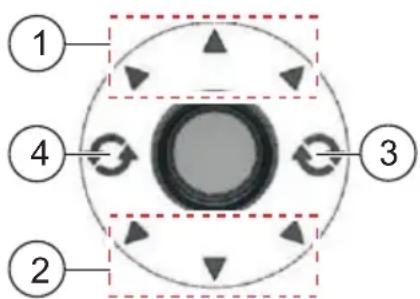
5: Joystick functions
In area 1, the trailer moves forwards. You can control the speed and the direction steplessly with the joystick.
In area 2, the trailer moves backwards.
In the left-hand and right-hand positions (3 and 4), the trailer turns on the spot in the specified direction.

If you release the joystick, the drives stop immediately and brake the trailer.

System switch-off at the OFF switch!
If the remote control is switched off at the ON/OFF switch at the side, the Mammut drive is switched off immediately. All motion is stopped.

Move the joystick with care!
Do not move the joystick directly from a forwards (1) or reverse motion (2) to one of the two turning areas (3 or 4). This could cause the trailer to turn unexpectedly.
Always select the turning areas (3 or 4) separately with the joystick.
-
When the trailer has reached the desired position, apply the handbrake of the trailer.
-
Disengage the drives from the wheels.
-
Hold down the buttons until the LEDs on the disengage buttons start to fl ash and the operating state LED lights up continuously.
Only then are the drives completely retracted.
-
Check that both drives are correctly disengaged.
-
Switch off the remote control at the ON/OFF switch located on the side.
Coupling the trailer
If you wish to couple your trailer, you can use the AL-KO Mammut to manoeuvre the trailer directly over the trailer coupling.

Manoeuvre slowly and carefully!
Move the joystick gently so that you do not put yourself at risk by manoeuvring too fast or damage your towing vehicle or trailer.
■ Once you have coupled the trailer correctly to the towing vehicle, you must disengage the drives from the wheels.

Before starting to tow, check that both drives are retracted from the wheels. The distance between the drive and the wheel should be at least 20 mm.
If the distance is smaller or if the drives cannot be moved off the wheels, the drives must be retracted manually. Please refer to the section "Manual disengagement in the event of a malfunction".
Option: Switching off the mammoth signal
The mammoth signal sounds immediately after switching on the remote control, once the LED test is completed.
The remote control must be switched off and the system must be inactive.
The numbers in brackets refer in this section to 3.
-
Simultaneously press buttons 5 and 6 on the remote control.
-
Keeping the buttons pressed, switch on the remote control at the ON/OFF switch (2).
First an LED self-test is carried out, then Expert mode is activated. The operating state LED flashes red.
You can now release both buttons.
- To deactivate the mammoth signal, press buttons 5 and 7.
The procedure is complete.

To activate the mammoth signal, press buttons 4 and 6 simultaneously.
Then switch off the remote control at the ON/OFF switch (2).
Manual disengagement in the event of a malfunction
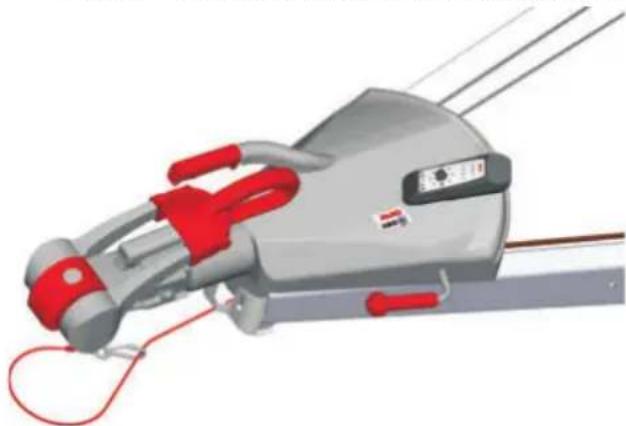
If a drive cannot be moved away from the wheel using the remote control, it can be retracted from the tyre using the manual disengagement device.
The manual disengagement device is located on the back of the drive unit.
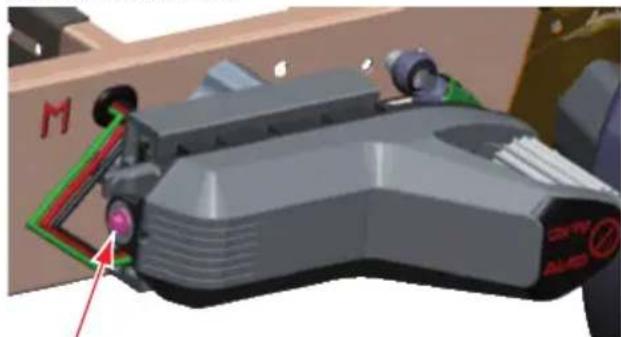
natural_image
3D model of a futuristic spaceship with visible control buttons and a red arrow pointing to the side (no text or symbols on the vehicle itself)6: Manual disengagement device

Danger due to unintentional motion!
Ensure that the drives cannot be operated using the remote control during manual disengagement.
Remove the fuse or disconnect the battery!
The trailer must not be able to move once the drive has been retracted. Secure the trailer!

To turn the manual disengagement device you need a 13 mm wrench.
For simpler handling, we recommend using a ratchet wrench.
- Secure the trailer. Apply the handbrake on the trailer.
- Switch off the system (remote control).
- Remove the fuse or disconnect the supply battery for the drives.
- Turn the manual disengagement device until the drive is at least 20 mm away from the tyre.
- Take the trailer to a service workshop to have the fault eliminated.
Troubleshooting
| Fault Possible cause Solution | ||
| The remote control does not perform an LED test when it is switched on | Batteries depleted Exchange the batteries | in the remote control |
| Remote control defective Exchange the remote control and calibrate the new one | ||
| The drives cannot be moved onto the wheels | Drive supply battery depleted, defective, or not connected | Check the batteryCharge, exchange or connect the battery |
| Fuse removed or defective Check the fuse | ||
| Connections of the supply cable disconnected or defective | Check the connectionsIf the connections are defective, contact your AL-KO Service Centre | |
| System defective Note LED on the remote control; operating state LED lights up redContact AL-KO Service Centre | ||
| Manoeuvring is faulty Trailer does not respond as desired, or no response at all | Error during initial start-up Repeat initial start-up | |
| Tyre pressure too low Correct the tyre pressure on trailer | ||
| Gradient too steep Move the trailer to flatter ground with the tow-ing vehicle | ||
| Obstacle blocking the wheels Check whether the wheels are blocked by an obstacle (e.g. curb or a stone) | ||
| Dirt deposits on drive Clean the drive unit and wheels | ||
| Slippery ground surface Check the ground under all the wheels | ||
| Remote control defective Exchange the remote control and carry out initial start-up | ||
| Drive supply battery depleted Note battery charge display on the remote control. Check / charge the battery | ||
| Radio connection poor or interrupted Reduce distance to the drives; observe mini-mum clearance of 0.5 m | ||
| Drive temperature too high Note the LED on the remote controlLet the drives cool down | ||
| System defective Note LED on the remote control; operating state LED lights up red.Contact AL-KO Service Centre | ||
| Disengagement of the drives does not work | See above Disengage drives manually | |

Danger during troubleshooting!
In the event of malfunctions not listed here – and always in case of doubt – please contact AL-KO Service. Secure the trailer before carrying out any troubleshooting. Before transporting the trailer to AL-KO Service, disengage the drives (if necessary, manually).
Maintenance and care

Danger due to unintentional motion!
Never lie or lean under an unsecured vehicle!
Before commencing any maintenance or preventive maintenance work, move the drives off the wheels (apply the handbrake of the trailer). Keep the radio remote control away from unauthorized persons.
We recommend having the Mammut checked and serviced during the annual inspection of the caravan, either by your dealer or directly by our Customer Service.
The drives must not be used as a jacking point.
■ Always remove the fuse or disconnect the supply battery when working on the drives.
- Check the drive rollers, housing and cables regularly for damage.
If you discover any visible defects, please contact your nearest AL-KO Service Centre.
Before each season, check that all screws are tightened securely.
Before every journey, and after a tyre change, check that the distance between the drives and the tyres is at least 20 mm.
If necessary, clean the drive rollers and housing with water or a brush (not a high-pressure cleaner).
■ Remove all foreign objects from the drives.
■ Recharge the supply battery regularly.
■ Disconnect the supply battery if the device is not used for a prolonged period.
■ Ensure that the polarity is correct when connecting the supply battery.
Warranty
We will eliminate any material defects or manufacturing defects during the statutory period of limitation; at our discretion, this will be effected either by repair or replacement. The period of limitation is determined in accordance with the laws of the country in which the machine was purchased.
EC Declaration of Conformity
We hereby declare that this product, in the form marketed by us, meets the requirements of the harmonised EU directives, the EU safety standards and the product-specific standards.
Product
| AL-KO Manoeuvring System |
Type
| AMS Mammut |
Serial number
| F100940008 |
Manufacturer
| ALOIS KOBER GmbH |
| Ichenhauser Str. 14 |
| D-89359 Kötz, Germany |
EU directives
| 2006/42/EC |
| 2004/108/EC |
| R&TTE 1999/5/EC |
Harmonised standards
Authorised representative
Oliver Glinka
| Ichenhauser Str. 14 |
| D-89359 Kötz, Germany |
Kötz, 01.01.2010
Oldans Wilton
Dr. Klaus Wilhelm, Technical Leader
Om denna handbok
1: Systemkomponenter
| 1 Drivenhet 5 Manuell frikoppling | ||
| 2 Monteringsadapter* 6 Kabelstam | ||
| 3 Drivrulle 7 Aktiveringskontakt på påskjutsanordningen | ||
| 4 Fjärrkontroll |
natural_image
3D rendering of a handheld electric shock absorber with red and gray casing (no text or symbols visible)natural_image
3D rendered model of a futuristic spaceship with control panels and a red arrow pointing to the side (no visible text or symbols)natural_image
3D rendering of a handheld electric shock absorber device with red and gray casing (no text or symbols visible)natural_image
3D model of a futuristic spaceship with visible cockpit, wheels, and control panel (no text or symbols)Dr. Klaus Wilhelm, Technical leader
natural_image
3D rendering of a mechanical device with red and gray components, no visible text or symbolsnatural_image
3D model of a futuristic spaceship with visible cockpit, wheels, and control panel (no text or symbols)6: Ritorno manuale

Dr. Klaus Wilhelm, Technical leader
O priročniku
Pred zagonom preberite to dokumentacijo. To je predpogoj za varno delo in nemoteno uporabo.
■ Upoštevajte varnostne in opozorilne napotke, ki so navedeni v tej dokumentaciji ali na napravi.
Ta dokumentacija je sestavni del opisa izdelka in jo je treba predati kupcu.
Razlaga simbolov

Pozor!
1: Komponente sistema
natural_image
3D rendering of a mechanical device with red and gray components, no visible text or symbolsnatural_image
3D model of a futuristic spaceship with green and red markings, no visible text or symbols6: Ročno odmikanje

Nevarnost zaradi nenamernega premika!
A AL-KO KOBER Ges.m.b.H. (+43)5282/3360-0 (+43)5282/3360-452
CH AL-KO ORION AG (+41)56/418-1300 (+41)56/418-1301
CZ AL-KO KOBER Spol.sr.o. (+420)577/453-343 (+420)577/453-361
D ALOIS KOBER GmbH (+49) 82 21/97-0 (+49) 82 21/97-449
DK JS Komponenter A/S (+45)43696-777 (+45)43696-776
E AL-KO Espana (+34)976/46-2280 (+34)976/78-5241
EST AL-KO KOBER SIA (+371)7/627-326 (+371)7/807-018
F AL-KO S.A.S. (+33)3/85-763500 (+33)3/85-763581
FIN Kehä Caravan Tukku Oy (+358)9/8494-300 (+358)9/8494-3030
GB AL-KO KOBER Ltd. (+44)1926/818-500 (+44)1926/818-562
H AL-KO KFT (+36)29/537050 (+36)29/537051
I AL-KO KOBER GmbH (+39) 0472/868-711 (+39) 0472/868-719
LT AL-KO KOBER SIA (+371)7/627-326 (+371)7/807-018
LV AL-KO KOBER SIA (+371)7/627-326 (+371)7/807-018
N AL-KO KOBER A/S (+47)64860-530 (+47)64860-531
NL AL-KO KOBER B.V. (+31) 74/255-9955 (+31) 74/242-5615
PL AL-KO KOBER Sp. z.o.o. (+48)61/81619 25 (+48)61/816 19 80
RUS 000 AL-KO KOBER (+7) 499/168 87 -16 (+7) 499/96600-00
S AL-KO KOBER AB (+46)31/5782 80 (+46)31/575414
SK AL-KO KOBER Slovakia Spol. s.r.o. (+421) 2/45 99 4112 (+421) 2/45 64 8117
UA TOV AL-KO KOBER (+380)44/453-6163 (+380)44/453-6162


- AL-KO AMS MAMMUT
- NL Afvoeren
- 1: Systemkomponenten
- Bij dit handboek
- About this handbook
- Explanation of symbols
- Caution!
- Contents
- Product description
- Performance features
- Intended use
- Incorrect use
- System components
- 1: System components
- Meaning of symbols on the machine
- Safety features
- Rapid stop
- ■ Rapid stop from the OFF switch
- ■ Disengagement of the drives
- ■ Stopping the engagement drives
- Installation
- Safety instructions
- System
- Risk of injury!
- Risk of damage!
- Radio remote control
- Danger due to incorrect programming!
- Danger due to unauthorized operation!
- Danger due to unintentional operation!
- Two-hand operation!
- Meaning of the LEDs
- Rapid stop from the OFF switch!
- Initial start-up
- Safety
- Calibrating the remote control with the system
- Carry out step 6a or 6b within a period of 10 seconds.
- Operation
- Fundamentals
- Activating the drives
- Engaging the drives with the wheels
- Please note!
- Disengaging the drives from the wheels
- Risk of accident due to trailer rolling away!
- Manoeuvring the trailer
- Danger – Risk of injury!
- Manoeuvring
- 5: Joystick functions
- System switch-off at the OFF switch!
- Move the joystick with care!
- Coupling the trailer
- Manoeuvre slowly and carefully!
- Option: Switching off the mammoth signal
- Manual disengagement in the event of a malfunction
- 6: Manual disengagement device
- Danger due to unintentional motion!
- Danger during troubleshooting!
- Maintenance and care
- Warranty
- EC Declaration of Conformity
- Om denna handbok
- 1: Systemkomponenter
- 6: Ritorno manuale
- O priročniku
- Razlaga simbolov
- Pozor!
- 1: Komponente sistema
- 6: Ročno odmikanje
- Nevarnost zaradi nenamernega premika!
Brand : AL-KO
Model : Mammut
Category : Controller