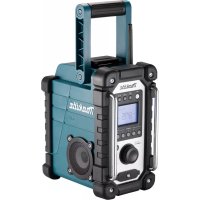
DMR116 - Radio MAKITA - Free user manual and instructions
Find the device manual for free DMR116 MAKITA in PDF.



| Product Type | Portable AM/FM Radio |
| Brand | Makita |
| Model | DMR116 |
| Dimensions (L x W x H) | 280 x 163 x 302 mm |
| Weight (without battery) | 4.1 kg |
| Main Power Supply | Makita 14.4 V - 18 V slide battery |
| Backup Power | 2 UM-3 (AA) batteries |
| AC Adapter | 12 V DC, 700 mA, center positive pin |
| FM Frequency Range | 87.50 - 108 MHz (0.05 MHz step) |
| AM (MW) Frequency Range | 522 - 1710 kHz (9 kHz step) |
| Speaker | 3.5 inches |
| Output Power | 14.4 V: 2.2 W x 2; 18 V: 3.5 W x 2 |
| AUX Input Terminal | 3.5 mm jack socket |
| FM Antenna | Folded flexible rod antenna |
| AM Antenna | Built-in bar antenna |
| Main Functions | AM/FM radio, radio alarm, HWS alarm, snooze, sleep timer, 5 presets per band, auto and manual tuning, stereo output, mono mode |
| Display | Backlit LCD (15 s) |
| Maintenance and Cleaning | Clean with a dry cloth. Do not use gasoline, benzene, thinner or alcohol. |
| Safety | Use only authentic Makita batteries. Do not expose to heat, water or fire. Short-circuiting the terminals may cause fire. |
| Replacement Batteries | UM-3 (AA) batteries for backup memory. Makita 14.4 V - 18 V slide batteries for power. |
| Repairability | Repair must be carried out by a qualified technician. Use only genuine Makita parts. |
Frequently Asked Questions - DMR116 MAKITA
User questions about DMR116 MAKITA
0 question about this device. Answer the ones you know or ask your own.
Ask a new question about this device
Download the instructions for your Radio in PDF format for free! Find your manual DMR116 - MAKITA and take your electronic device back in hand. On this page are published all the documents necessary for the use of your device. DMR116 by MAKITA.
USER MANUAL DMR116 MAKITA
natural_image
Technical line drawing of a mechanical device with control panel and display (no text or symbols)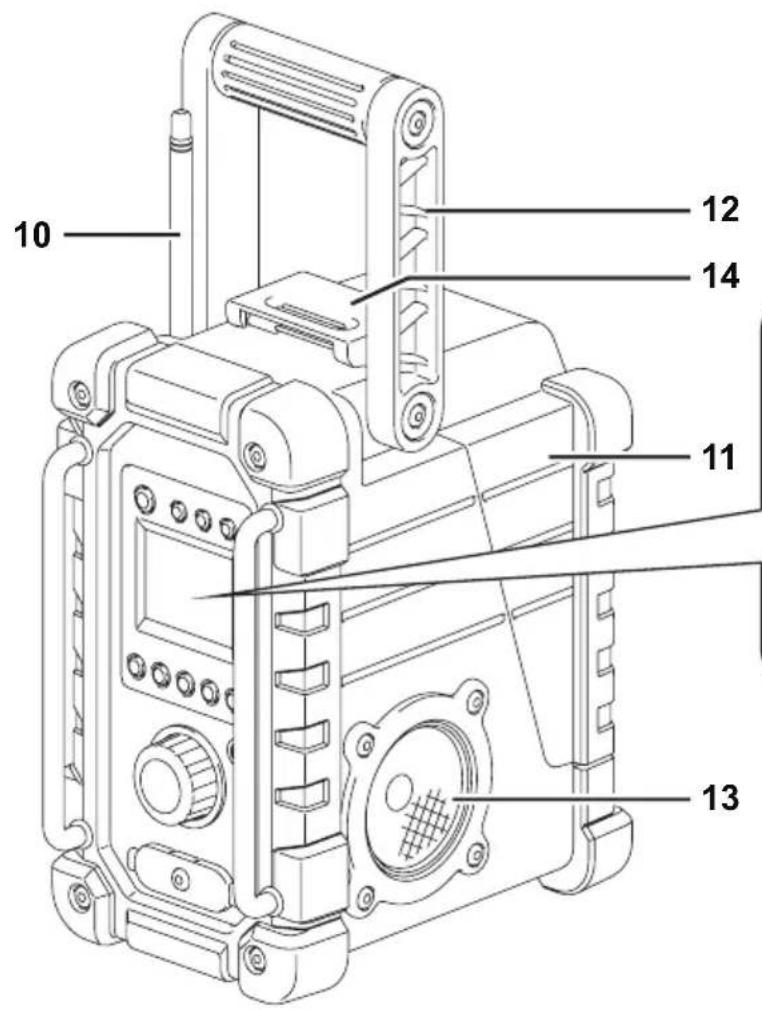
natural_image
Technical line drawing of a mechanical device with an inset close-up showing internal components (no text or symbols)2
natural_image
Technical line drawing of a mechanical device with internal components and a control panel (no text or symbols)3
natural_image
Technical line drawing of a mechanical device with internal components and a downward arrow indicating a component (no text or symbols present)4
5
natural_image
Technical line drawing of a mechanical assembly with a cylindrical component and an arrow indicating direction (no text or symbols)6
natural_image
Technical line drawing of a mechanical device with mounting holes and a cable (no text or symbols)7
ENGLISH
(Original instructions)
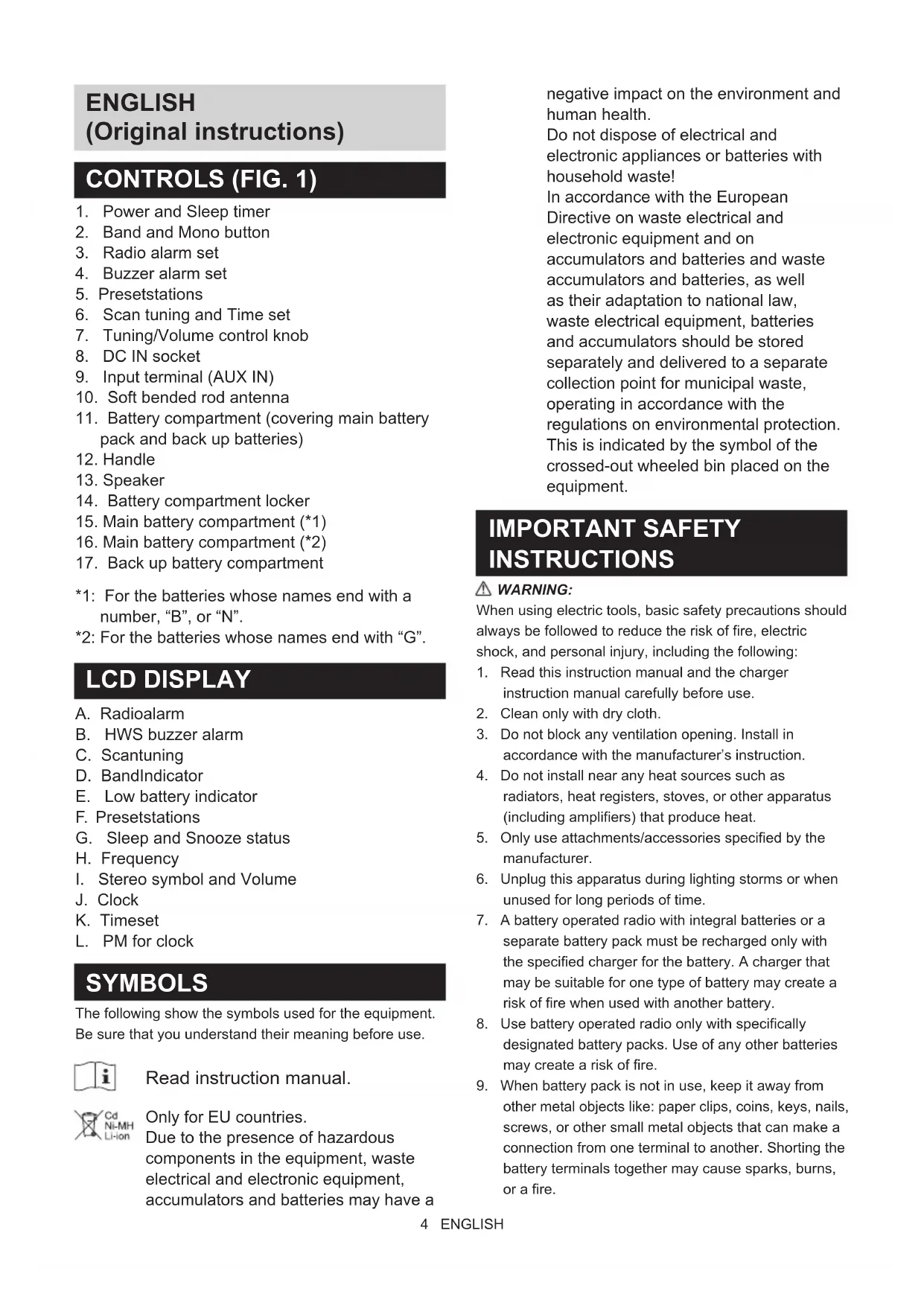
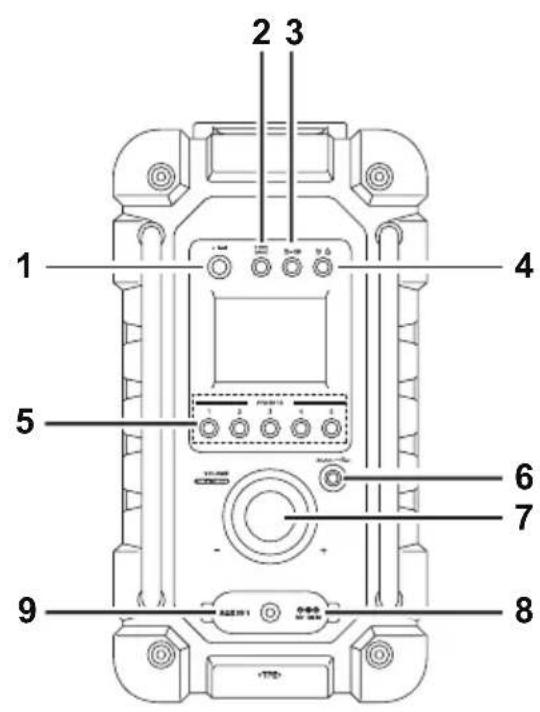
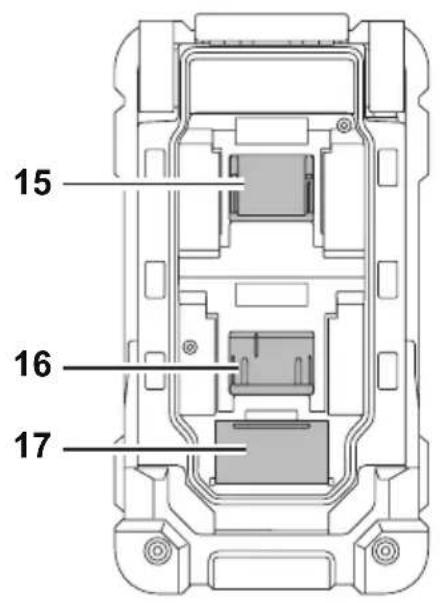
CONTROLS (FIG. 1)
- Power and Sleep timer
- Band and Mono button
- Radio alarm set
- Buzzer alarm set
- Presetstations
- Scan tuning and Time set
- Tuning/Volume control knob
- DC IN socket
- Input terminal (AUX IN)
- Soft bended rod antenna
- Handle
- Speaker
- Battery compartment locker
- Main battery compartment (*1)
- Main battery compartment (*2)
-
Back up battery compartment
-
Battery compartment (covering main battery pack and back up batteries)
*1: For the batteries whose names end with a number, "B", or "N".
*2: For the batteries whose names end with "G".
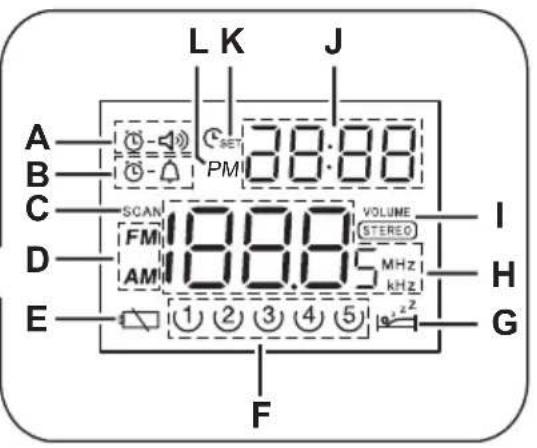
LCD DISPLAY
A. Radioalarm
B. HWS buzzer alarm
C. Scantuning
D. BandIndicator
E. Low battery indicator
F. Presetstations
G. Sleep and Snooze status
H. Frequency
I. Stereo symbol and Volume
J. Clock
K. Timeset
L. PM for clock
SYMBOLS
The following show the symbols used for the equipment.
Be sure that you understand their meaning before use.

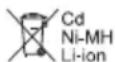
Read instruction manual.
Only for EU countries.
Due to the presence of hazardous components in the equipment, waste electrical and electronic equipment, accumulators and batteries may have a
negative impact on the environment and human health.
Do not dispose of electrical and electronic appliances or batteries with household waste!
In accordance with the European Directive on waste electrical and electronic equipment and on accumulators and batteries and waste accumulators and batteries, as well as their adaptation to national law, waste electrical equipment, batteries and accumulators should be stored separately and delivered to a separate collection point for municipal waste, operating in accordance with the regulations on environmental protection. This is indicated by the symbol of the crossed-out wheeled bin placed on the equipment.
IMPORTANT SAFETY INSTRUCTIONS
WARNING:
When using electric tools, basic safety precautions should always be followed to reduce the risk of fire, electric shock, and personal injury, including the following:
- Read this instruction manual and the charger instruction manual carefully before use.
- Clean only with dry cloth.
- Do not block any ventilation opening. Install in accordance with the manufacturer's instruction.
- Do not install near any heat sources such as radiators, heat registers, stoves, or other apparatus (including amplifiers) that produce heat.
- Only use attachments/accessories specified by the manufacturer.
- Unplug this apparatus during lighting storms or when unused for long periods of time.
- A battery operated radio with integral batteries or a separate battery pack must be recharged only with the specified charger for the battery. A charger that may be suitable for one type of battery may create a risk of fire when used with another battery.
- Use battery operated radio only with specifically designated battery packs. Use of any other batteries may create a risk of fire.
-
When battery pack is not in use, keep it away from other metal objects like: paper clips, coins, keys, nails, screws, or other small metal objects that can make a connection from one terminal to another. Shorting the battery terminals together may cause sparks, burns, or a fire.
-
Avoid body contact with grounded surfaces such as pipes, radiators, ranges and refrigerators. There is an increased risk of electric shock if your body is grounded.
- Under abusive conditions, liquid may be ejected from the battery; avoid contact. If contact accidentally occurs, flush with water. If liquid contacts eyes, additionally seek medical help. Liquid ejected from the battery may cause irritation or burns.
- Do not use a battery pack or tool that is damaged or modified. Damaged or modified batteries may exhibit unpredictable behavior resulting in fire, EXPLOSION or risk of injury.
- Do not expose a battery pack or tool to fire or excessive temperature. Exposure to fire or temperature above 130irc C may cause explosion.
- Follow all charging instructions and do not charge the battery pack or tool outside the temperature range specified in the instructions. Charging improperly or at temperatures outside the specified range may damage the BATTERY and increase the risk of fire.
SAVE THESE INSTRUCTIONS
SPECIFIC SAFETY RULES FOR BATTERY CARTRIDGE
- Before using battery cartridge, read all instructions and cautionary markings on (1) battery charger, (2) battery, and (3) product using battery.
- Do not disassemble battery cartridge.
- If operating time has become excessively shorter, stop operating immediately. It may result in a risk of overheating, possible burns and even an explosion.
- If electrolyte gets into your eyes, rinse them out with clear water and seek medical attention right away. It may result in loss of your eyesight.
- Do not short the battery cartridge:
(1) Do not touch the terminals with any conductive material.
(2) Avoid storing battery cartridge in a container with other metal objects such as nails, coins, etc.
(3) Do not expose battery cartridge to water or rain. A battery short can cause a large current flow, overheating, possible burns and even a breakdown.
- Do not store and use the tool and battery cartridge in locations where the temperature may reach or exceed 50irc C ( 122irc F).
- Do not incinerate the battery cartridge even if it is severely damaged or is completely worn out. The battery cartridge can explode in a fire.
- Do not nail, cut, crush, throw, drop the battery cartridge, or hit against a hard object to the battery cartridge. Such conduct may result in a fire, excessive
heat, or explosion.
- Do not use a damaged battery.
- To avoid risk, the manual of replaceable the battery should be read before use. And the max discharging current of the battery should be greater than or equal to 8A.
- The contained lithium-ion batteries are subject to the Dangerous Goods Legislation requirements.
- When disposing the battery cartridge, remove it from the tool and dispose of it in a safe place. Follow your local regulations relating to disposal of battery.
- Use the batteries only with the products specified by Makita. Installing the batteries to non-compliant products may result in a fire, excessive heat, explosion, or leak of electrolyte.
- If the tool is not used for a long period of time, the battery must be removed from the tool.
- During and after use, the battery cartridge may take on heat which can cause burns or low temperature burns.
- Do not touch the terminal of the tool immediately after use as it may get hot enough to cause burns.
- Do not allow chips, dust, or soil stuck into the terminals, holes, and grooves of the battery cartridge. It may result in poor performance or breakdown of the tool or battery cartridge.
- Unless the tool supports the use near a high-voltage electrical power lines, do not use the battery cartridge near a high-voltage electrical power lines. It may result in a malfunction or breakdown of the tool or battery cartridge.
- Keep the battery away from children.
CAUTION:
- Danger of explosion if battery is incorrectly replaced.
- Replace only with the same or equivalent type.
- Only use genuine Makita batteries. Use of non-genuine Makita batteries, or batteries that have been altered, may result in the battery bursting causing fires personal injury and damage. It will also void the Makita warranty for the Makita tool and charger.
Tips for maintaining maximum battery life
- Charge the battery cartridge before completely discharged. Always stop tool operation and charge the battery cartridge when you notice less tool power.
- Never recharge a fully charged battery cartridge. Overcharging shortens the battery service life.
- Charge the battery cartridge with room temperature at 10irc C - 40irc C ( 50irc F - 104irc F). Let a hot battery cartridge cool down before charging it.
- When not using the battery cartridge, remove it from the tool or the charger.
- Charge the battery cartridge if you do not use it for a long period (more than six months).
OPERATING TIME
* The suitable battery packs for this radio listed as the following table.
* The following table indicates the operating time on a single charge.
| Battery Capacity | Battery Cartridge Voltage At speaker | output = 50 mW + 50 mW(Unit: Hour) (Approximately) | |
| 14.4V 18V | |||
| 1.5Ah | BL1415G 10.0 | ||
| BL1415N 8.5 | |||
| BL1815G 10.0 | |||
| BL1815N 9.0 | |||
| 2.0Ah | BL1420G 11.0 | ||
| BL1820GBL1820B | 12.0 | ||
| 3.0Ah | BL1430B 14.0 | ||
| BL1830B 17.0 | |||
| 4.0Ah | BL1440 23.0 | ||
| BL1840B 24.0 | |||
| 5.0Ah BL1850B | 31.0 | ||
| 6.0Ah | BL1460B 30.0 | ||
| BL1860B 37.0 | |||
WARNING:
Only use the battery cartridges listed above. Use of any other battery cartridges may cause injury and/or fire.
Note:
- Table regarding to the battery operating time above is for reference. The actual operating time may differ with the type of the battery, charging condition, or usage environment.
- Some of the battery cartridges listed above may not be available depending on your region of residence.
INSTALLATION AND POWER SUPPLY
Note:
Keeping back up batteries inside the compartment prevent stored data in preset memories from being lost.
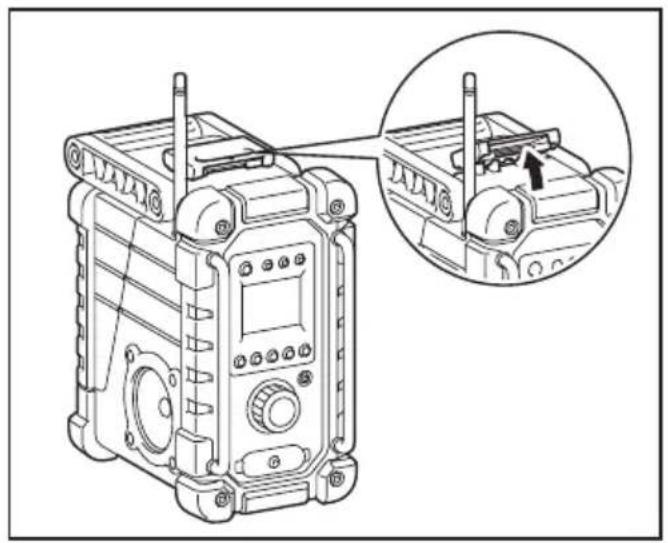
Back up battery installation (Fig. 2)
- Pull out the battery compartment locker to release battery compartment. There are main battery pack compartment and back up battery compartment.
- Remove back up battery compartment cover and insert 2 fresh UM-3 (AA sizes). Make sure the batteries are with correct polarity as shown inside the compartment. Replace the battery cover.
- After back up batteries are inserted, insert the main battery pack to power radio. The suitable battery packs for this radio listed as the following table.
The following tables indicate the operating time on a single charge.
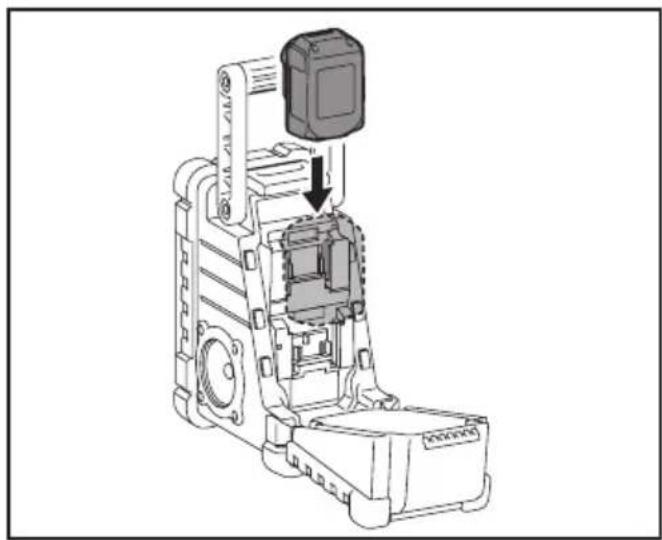
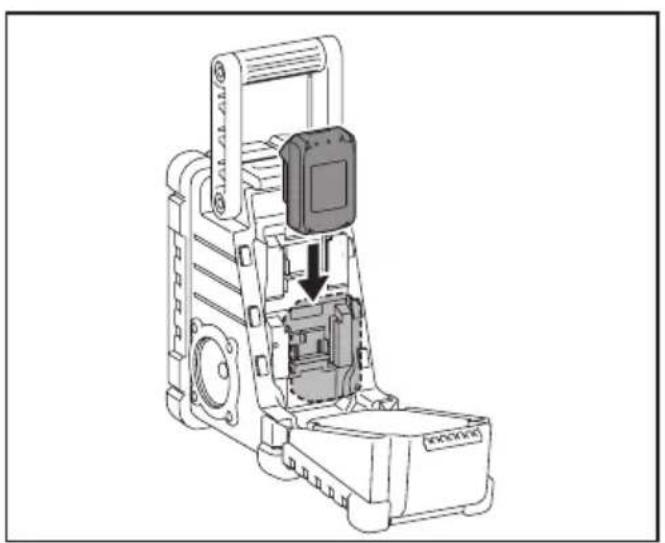
Installing or removing Slide battery cartridge (Fig. 3 & 4)
- Always switch off the tool before installing or removing of the battery cartridge.
- Hold the tool and the battery cartridge firmly when installing or removing battery cartridge.
- To install the battery cartridge, align the tongue on the battery cartridge with the groove in the housing and slip it into place. Always insert it all the way until it locks in place with a little click.
- If you can see the red indicator on the upper side of the button, it is not locked completely. Install it fully until the red indicator cannot be seen. If not, it may accidentally fall out of the tool, causing injury to you or someone around you.
- Do not use force when installing the battery cartridge. If the cartridge does not slide in easily, it is not being inserted correctly.
- To remove the battery cartridge, slide it from the tool while sliding the button on the front of the cartridge or pressing the buttons on both sides of the cartridge.
Return the battery compartment locker to the original position.
Reduced power, distortion and a "stuttering sound" or low battery sign that appears on the display are all the signs that the main battery pack needs to replace.
Note:
The battery pack can't be charged via the supplied AC power adaptor.
When low battery sign 📋 appears and an "E" keeps on flashing is the time to replace the back up batteries.
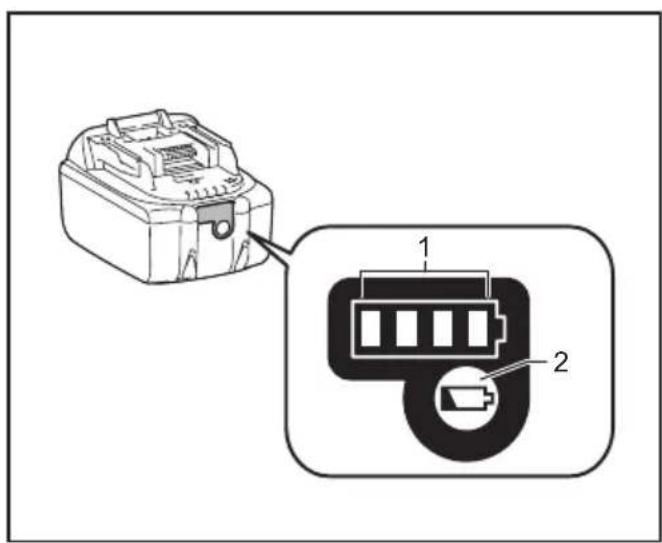
Indicating the remaining battery capacity (Fig. 5)
1. Indicator lamps 2. Check button
Only for battery cartridges with "B" at the end of the model number
Press the check button on the battery cartridge to indicate the remaining battery capacity. The indicator lamps light up for few seconds.
| Indicator or lamps | Remaining capacity | ||
| Lighted | 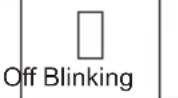 | ||
 | 75% to 100% | ||
 | 50% to 75% | ||
 | 25% to 50% | ||
 | 0% to 25% | ||
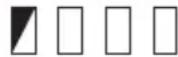 | Charge the battery | ||
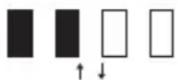 — — — — — — — —  | The battery may have malfunctioned | ||
015658
Note:
- Depending on the conditions of use and the ambient temperature, the indication may differ slightly from the actual capacity.
- The first(far left) indicator lamp will brink when the battery protection system works.
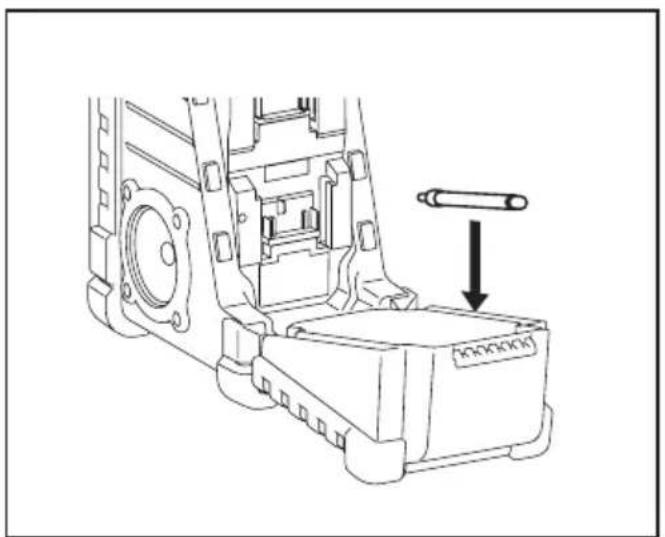
Installing the soft bended rod antenna (Fig. 2 & 6)
Install the soft bended rod antenna as shown in the figure. Note:
There is a click in the battery compartment designed to store the removed antenna.
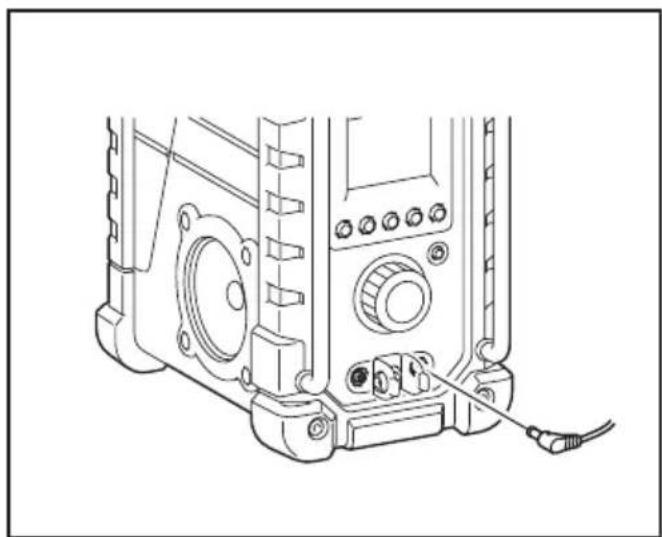
Using Supplied AC power adaptor (Fig. 7)
Remove the rubber protector and insert the adaptor plug into the DC socket on the front side of the radio. Plug the adaptor into a standard mains socket outlet. Whenever the adaptor is used, the battery pack is automatically disconnected. The AC adaptor should be disconnected from the main supply when not in use.
Note:
When your radio has any interference in AM band by its adaptor, please move your radio away from its AC adaptor over 30cm.
OPERATION
Setting the clock
- Clock can be set either when the radio is power on or off.
- Display will show “-:-” when the back up batteries are installed.
- Long press the time set button CSET for more than 2 seconds, display will flash time set symbol CSET and also the hour digit, followed by a beep.
- Rotate Tuning/Volume control knob to set the required hour.
- Press SET button to confirm hour setting, the minute digit will flash.
- Rotate Tuning/Volume control knob to set the required minute.
- Pressthe CSET button again to complete clock setting.
Operating the radio
This radio equips with three tuning methods - Scan tuning, Manual tuning and Memory presets recall.
Scan Tuning
- Press the Power button to turn on the radio.
- Select the required waveband by pressing the Band button. Make sure the rubber bended rod antenna has been well placed for best FM reception. For AM (MW) band, rotate the radio to get best signal. Try to avoid operating the radio next to computer screen and other equipment which will cause interference to the radio.
- Press and release Scan button (long press Scan button more than 2 seconds will activate time setting), LCD display will flash Scan symbol and the radio will search and stop automatically when it finds a radio station. Press the Scan button again to pick up the found station.
Note:
A stereo symbol will appear on the display, if the station found is a stereo station.
Note:
The radio will continue to search next available stations if you do not press Scan button again when it finds a radio station.
- Rotate the Tuning/Volume control knob to get required sound level. LCD display will show sound level changes.
Note:
During operating volume control, you can press in Tuning/Volume control knob to change volume control to tuning control status.
- To turn off the radio, press the Power button. Display will show OFF.
Manual Tuning
- Press the Power button to turn on the radio.
- Select the required waveband by pressing the Band button. Adjust the antenna as described above.
- A single rotary to the Tuning/Volume control knob will change the frequency in the following increment:
FM: 0.05MHz
AM: 9kHz
Note:
If the radio is in volume control status, press in the tuning/volume control to become Tuning status.
- Keep on rotating the Tuning/Volume control knob until the required frequency shown on the display.
- Rotate the Tuning/Volume control knob to get required sound level.
- To turn off the radio, press the Power button. Display will show OFF.
Storing stations in preset memories
There are 5 memory presets for each waveband.
- Press the Power button to turn on the radio.
- Tune to required station using one of the methods previously described.
- Press and hold down the required preset until radio beeps. The preset number will appear in the display and the station will be stored under chosen preset button.
- Repeat this procedure for the remaining presets.
- Stations stored in preset memories can be overwritten by following above procedures.
Recall stations from preset memories
- Press the Power button to turn on the radio.
- Select the required waveband.
- Momentarily press the required Preset button, the preset number and station frequency will appear in the display.
Setting the radio alarm
When the radio alarm is selected, the radio will turn on and play the chosen radio station at the chosen alarm time. The radio alarm will continue for one hour unless turned off by pressing the Power button. Pressing the Power button whilst the alarm is activated will cancel the alarm for 24 hours.
Note:
When the radio is in low battery status, the radio alarm can't be activated.
a. Setting radio alarm time:
- The radio alarm can be set either when radio is on or off.
-
Press and release radio alarm button Ⓜ-◀◀, the radio alarm symbol will flash.
-
While the radio alarm symbol is flashing, press SET button for more than 2 seconds until you hear a beep.
- Display Hour will flash, rotate Tuning/Volume control knob to select the hour then press Ⓜ SET button again to confirm hour setting.
- Follow same procedures of setting hour to set required minute. Press SET button to complete alarm time setting.
b. Setting radio alarmed station:
- During setting radio alarm time and radio alarm symbol is flashing, press Band button to activate the radio to select required wake-up band and station by manual tuning and recall the preset stations. Press 📋-◀◀◀ button to complete radio alarm setting. Display will show ⏱-◀◀◀.
- When above radio alarm time and station are set, press and hold down radio alarm button ⏻-◀◀ for 2 seconds followed by a beep to switch alarm on or off. Display will show ⏻-◀◀ when radio alarm is set.
Note:
If new radio alarm station is not selected, it will select the last alarm station.
Setting the HWS (Humane Wake System) buzzer alarm
A beep tone will activate when selecting the HWS buzzer alarm.
The alarm beep will become shorter every 15 seconds for one minute followed by one minute silence before repeating the cycle.
The HWS alarm will sound for one hour until turning off by pressing the Power button. Press the Power button whilst the alarm is activated will cancel the alarm for 24 hours.
- The HWS buzzer alarm can be set either radio is on or off.
- Press and release the HWS buzzer alarm button Ⓤ-△, the symbol will flash.
- During the symbol flashes, long pressing the SET button for more than 2 seconds followed by a beep and display Hour digit will flash.
- Rotate Tuning/Volume control knob to select required alarm hour, then press time set button CSET again. The minute digit will then flash.
- Rotate Tuning/Volume control knob to select required alarm minute, the press time set button SET again to complete HWS buzzer alarm setting.
- Press and hold down buzzer alarm button Ⓤ-△ for more than 2 seconds followed by a beep to switch on or off the HWS buzzer alarm. Display will appear Ⓤ-△ when buzzer alarm has been set.
Snooze function
- Whilst the alarm is activated, pressing any buttons except the Power button will activate the snooze
function. The radio or HWS buzzer alarm will be silenced with interval of 5 minutes.
- The display will flash both the snooze symbol and the alarm symbol. The snooze function can be repeatedly during one hour that the alarms are active.
Sleep function
The sleep timer will automatically switch off the radio after a preset time has elapsed.
- Press and continue to hold down the Power button for more than 2 seconds, followed by a beep tone, the display will cycle through the available sleep times in the order 60-45-30-15-120-90-60.
Release the Power button when the required sleep time appears in the display. The symbol will appear in the display and the radio will play the last station selected. - To cancel the sleep function, press the Power button. The Symbol will disappear and radio is off.
Display illumination
Press any buttons or rotate Tuning/Volume control knob will illuminate the LCD display for approx. 15 seconds. During scanning stations and alarm activated, will also automatically illuminate the display.
Change Stereo to Mono
When the stereo FM station reception is weak, you can improve it by pressing Mono button for 2 seconds. The sound is no longer in stereo and stereo indicator disappears.
AUXILIARY INPUT SOCKET
A 3.5mm Auxiliary input socket is provided at the front of your radio to permit an audio signal to be fed into the unit from an external audio device such as a MP3 or CD player.
- Connect an external audio source (for example, MP3 or CD player) to the AUX IN socket.
- Press the Power button to switch on your radio.
- Repeatedly press and release the Band button until "AU1" is displayed.
- To have the better sound quality, we recommend setting the volume to more than two-thirds level on your audio device and then adjust the volume on the radio as required.
Note:
Audio cord is not included as standard accessories. AUX can't be activated as alarm source.
MAINTENANCE
CAUTION:
- Never use gasoline, benzine, thinner, alcohol or the like. Discoloration, deformation or cracks may result.
SPECIFICATIONS
| Power Requirements | |
| AC power adaptor | DC 12V 700mA, center pin positive |
| Battery | UM-3 (AA size) x 2 for back up Slide battery: 14.4V - 18V |
| Frequency coverage | FM 87.50-108 MHz(0.05MHz/step)AM (MW) 522-1,710 kHz(9kHz/step) |
| Circuit feature | |
| Loudspeaker 3inches 8ohm | |
| Output Power | 14.4V: 2.2W x 2,18V: 3.5W x 2 |
| Input terminal 3.5mm dia. (AUX IN) | |
| Antenna system | FM: soft bended rod antennaAM: bar antenna |
| Dimension (W x H x D) in mm | 280 x 163 x 302mm |
| Weight 4.1Kg (without battery) | |
FRANÇAIS
(Instructions d'origine)
CONTRÔLES (FIG. 1)


- ENGLISH
- (Original instructions)
- CONTROLS (FIG. 1)
- LCD DISPLAY
- SYMBOLS
- Read instruction manual.
- IMPORTANT SAFETY INSTRUCTIONS
- WARNING:
- SAVE THESE INSTRUCTIONS
- SPECIFIC SAFETY RULES FOR BATTERY CARTRIDGE
- CAUTION:
- Tips for maintaining maximum battery life
- OPERATING TIME
- Note:
- INSTALLATION AND POWER SUPPLY
- Back up battery installation (Fig. 2)
- Installing or removing Slide battery cartridge (Fig. 3 & 4)
- Indicating the remaining battery capacity (Fig. 5)
- Indicator lamps 2. Check button
- Installing the soft bended rod antenna (Fig. 2 & 6)
- Using Supplied AC power adaptor (Fig. 7)
- OPERATION
- Setting the clock
- Operating the radio
- Scan Tuning
- Manual Tuning
- Storing stations in preset memories
- Recall stations from preset memories
- Setting the radio alarm
- a. Setting radio alarm time:
- b. Setting radio alarmed station:
- Setting the HWS (Humane Wake System) buzzer alarm
- Snooze function
- Sleep function
- Display illumination
- Change Stereo to Mono
- AUXILIARY INPUT SOCKET
- MAINTENANCE
- FRANÇAIS
- (Instructions d'origine)
- CONTRÔLES (FIG. 1)
Brand : MAKITA
Model : DMR116
Category : Radio