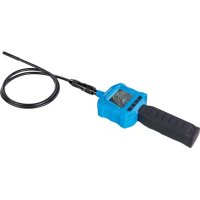
676660 - Inspection camera SILVERLINE - Free user manual and instructions
Find the device manual for free 676660 SILVERLINE in PDF.


| Product Type | Inspection Camera |
| Brand | Silverline |
| Model | 676660 |
| Image Sensor | CMOS 1/9 inch |
| Resolution | 640 × 480 pixels |
| Video System | PAL/NTSC |
| Horizontal Viewing Angle | 48° |
| Minimum Illumination | 0 Lux (LED on) |
| Protection Rating | IP67 (lens and cable only) |
| Display Type | LCD TFT 2.3" |
| Tube Dimensions | 8 mm × 980 mm (camera included) |
| Handle Dimensions | 257 × 92 × 44 mm |
| Weight | 1.1 kg (with batteries) |
| Power Supply | 4 AA batteries (included) |
| Operating Temperature | -10 °C to 50 °C |
| Relative Humidity | 15–85% |
| Included Accessories | Video cable, collar, magnet, mirror, single hook, double hook |
| Main Functions | Screen rotation, LED brightness adjustment, screen brightness adjustment, video output |
| Intended Use | Inspection of hard-to-reach areas |
| Maintenance | Clean with a damp cloth; do not immerse the main unit |
| Safety | Read the manual, wear PPE, avoid water on the main unit |
| Warranty | 3 years (registration within 30 days at silverlinetools.com) |
Frequently Asked Questions - 676660 SILVERLINE
User questions about 676660 SILVERLINE
0 question about this device. Answer the ones you know or ask your own.
Ask a new question about this device
Download the instructions for your Inspection camera in PDF format for free! Find your manual 676660 - SILVERLINE and take your electronic device back in hand. On this page are published all the documents necessary for the use of your device. 676660 by SILVERLINE.
USER MANUAL 676660 SILVERLINE
Video Inspection Camera with Colour LCD Monitor
640 × 480
FR Camera d'inspection avec écran LCD couleur
DE Video-Inspektionskamera mit LCD-Farbbildschirm
ES Endoscopio industrial con Pantalla LCD a color
IT Videoscopio con monitor LCD a colori
NL Video inspectiecamera met kleuren LCD scherm
PL Kamera inspekcyjna z kolorowym wyświetlaczem LCD

Register online: silverlinetools.com
A
B
C
D
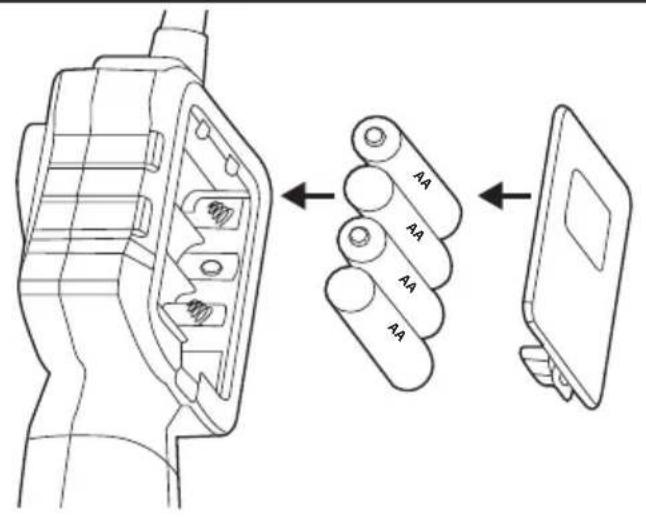
Fig I
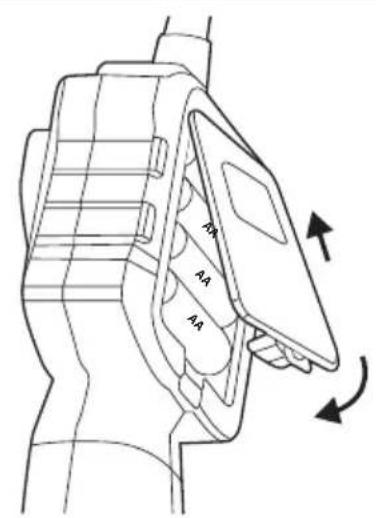
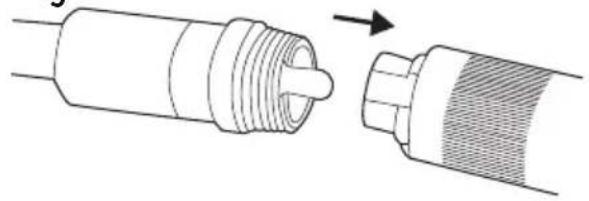
Fig II Fig III
English .06
Français 10
Deutsch............14
Espanol. 18
Italiano. 22
Nederlands .26
Polski 30
Introduction
Thank you for purchasing this Silverline tool. This manual contains information necessary for safe and effective operation of this product. This product has unique features and, even if you are familiar with similar products, it is necessary to read this manual carefully to ensure you fully understand the instructions. Ensure all users of the tool read and fully understand this manual.
Description of Symbols
The rating plate on your tool may show symbols. These represent important information about the product or instructions on its use.

Wear hearing protection.
Wear eye protection.
Wear breathing protection.
Wear head protection.

Wear hand protection.

Read instruction manual.

Caution!

Conforms to relevant legislation and safety standards.

Environmental Protection.
Waste electrical products should not be disposed of with household waste.
Please recycle where facilities exist. Check with your local authority or retailer for
recycling advice.
Technical Abbreviations Key
| V Volts | |
| A, mA Ampere | |
| ° Degrees | |
| ° | Diameter |
| Hz Hertz | |
| - - , DC Direct current | |
| W, kW Watt, kilowatt |
Specification
Imaging sensor 1/9-inch CMOS
Total pixels: 640 x 480
Video system: PAL/NTSC
Horizontal viewing angle: 48°
Minimum illumination: 0 Lux (LED ON)
Power: 4 x AA batteries (included)
Waterproof capacity: IP67 (for lens/tube only)
LCD screen type: 2.3" TFT LCD
Tube dimensions: 88mm x 980mm (including camera)
Handle dimensions: 257 x 92 x 44mm (excluding tube)
Operating temperature: 10^ - 50^ / 14^ - 122^
Operating humidity: 15-85% RH
Weight: 1.1 kg (including batteries)
As part of our ongoing product development, specifications of
Silverline products may alter without notice.
General Safety
WARNING: Read all safety warnings and all instructions. Failure to follow the warnings and instructions may result in electric shock, fire and/or serious injury.
WARNING: This appliance is not intended for use by persons (including children) with reduced, physical or mental capabilities or lack of experience or knowledge unless they have been given supervision or instruction concerning use of the appliance by a person responsible for their safety. Children must be supervised to ensure that they do not play with the appliance.
Save all warnings and instructions for future reference.
The term "power tool" in the warnings refers to your mains-operated (corded) power tool or battery-operated (cordless) power tool.
1) Work area safety
a) Keep work area clean and well lit. Cluttered or dark areas invite accidents.
b) Do not operate power tools in explosive atmospheres, such as in the presence of flammable liquids, gases or dust. Power tools create sparks which may ignite the dust or fumes.
2) Electrical safety
a) Avoid body contact with earthed or grounded surfaces, such as pipes, radiators, ranges and refrigerators. There is an increased risk of electric shock if your body is earthed or grounded.
b) Do not expose non-waterproof electrical devices to rain or wet conditions. Do not submerge non-pressure-rated devices in water. Water entering an electrical device will increase the risk of electric shock.
3) Personal safety
a) Stay alert, watch what you are doing and use common sense when operating a power tool. Do not use a power tool while you are tired or under the influence of drugs, alcohol or medication. A moment of inattention while operating power tools may result in serious personal injury.
b) Use personal protective equipment. Always wear eye protection. Protective equipment such as dust mask, non-skid safety shoes, hard hat, or hearing protection used for appropriate conditions will reduce personal injuries.
c) Do not overreach. Keep proper footing and balance at all times. This enables better control of the device in unexpected situations.
4) Use and care
a) Do not force the device. Use the correct device for your application. The correct device will do the job better and safer at the rate for which it was designed.
b) Do not use the electrical device if the switch does not turn it on and off. Any device that cannot be controlled with the switch is dangerous and must be repaired.
c) Use the device and its accessories in accordance with these instructions, taking into account the conditions and the task to be performed. Use the device for operations different from those intended could result in a hazardous situation.
5) Service
a) Have your power tool serviced by a qualified repair person using only identical replacement parts. This will ensure that the safety of the power tool is maintained.
Additional Safety Notes
The unit is not shock resistant. Do not drop the unit from height or otherwise subject it to high impacts
- The camera lens and cable are water resistant when the unit is fully assembled. The main unit with LCD screen is not water resistant
- Do not allow water or other liquids to enter the unit. Do not use the camera if condensation forms inside the lens; allow moisture to evaporate before using
- Turn off the system when it is not in use
Product Familiarisation
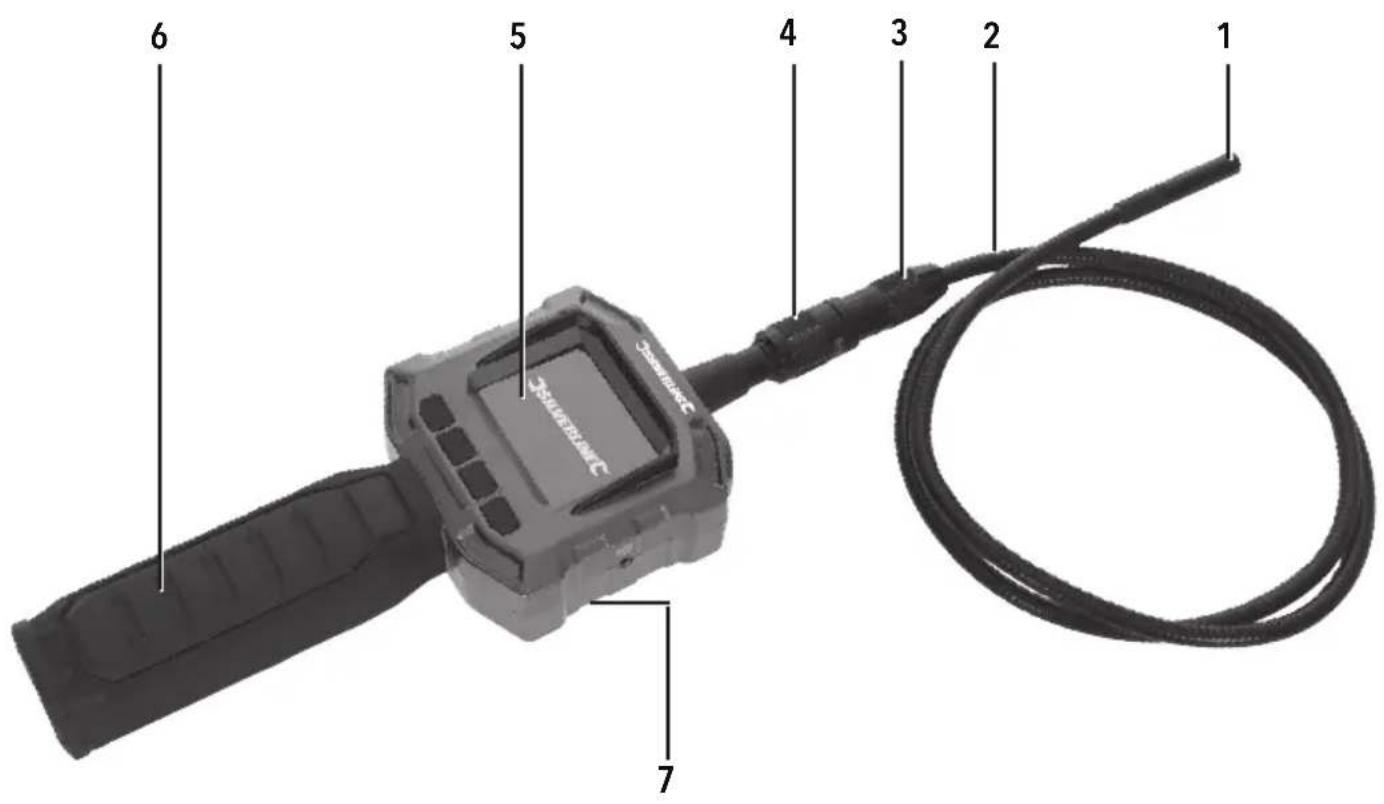
| 1 Camera Lens Housing |
| 2 Flexible Camera Cable |
| 3 Camera Cable Plug |
| 4 Camera Cable Socket |
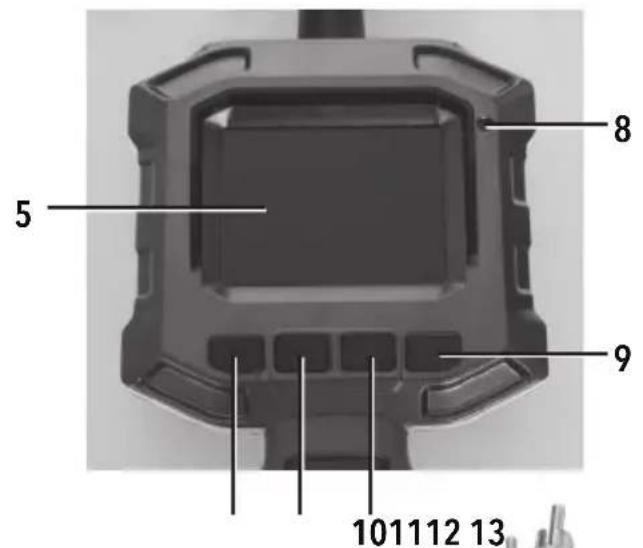
| 5 LCD Screen |
| 6 Handle |
| 7 Rear Battery Compartment (not shown) |
| 8 Power Indicator Light |
| 9 Power Button |
| 10 Screen Rotation Button |
| 11 Camera Lens LED Light Button |
| 12 LCD Brightness Button |
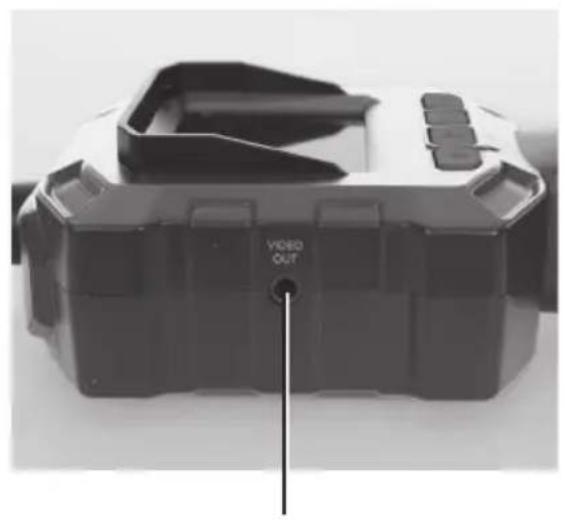
| 13 Video Out Socket |
| Accessories |
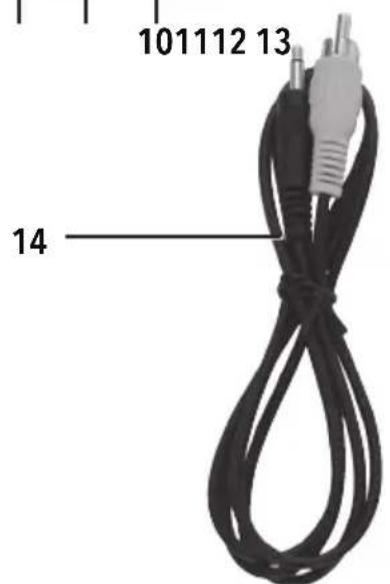
| 14 video Cable |
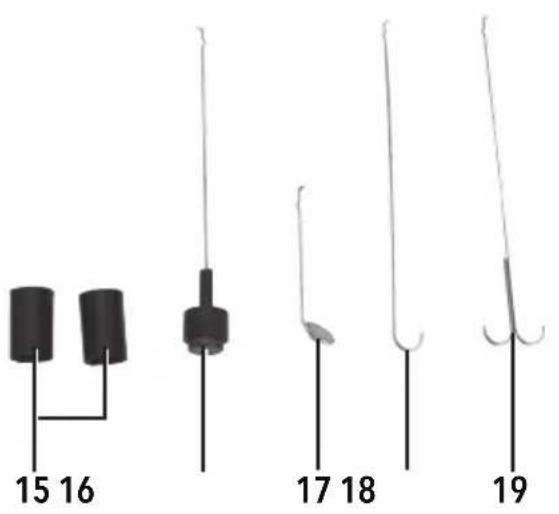
| 15 accessory Ring |
| 16 Magnet |
| 17 mirror |
| 18 look |
| 19 double Hook |
Intended Use
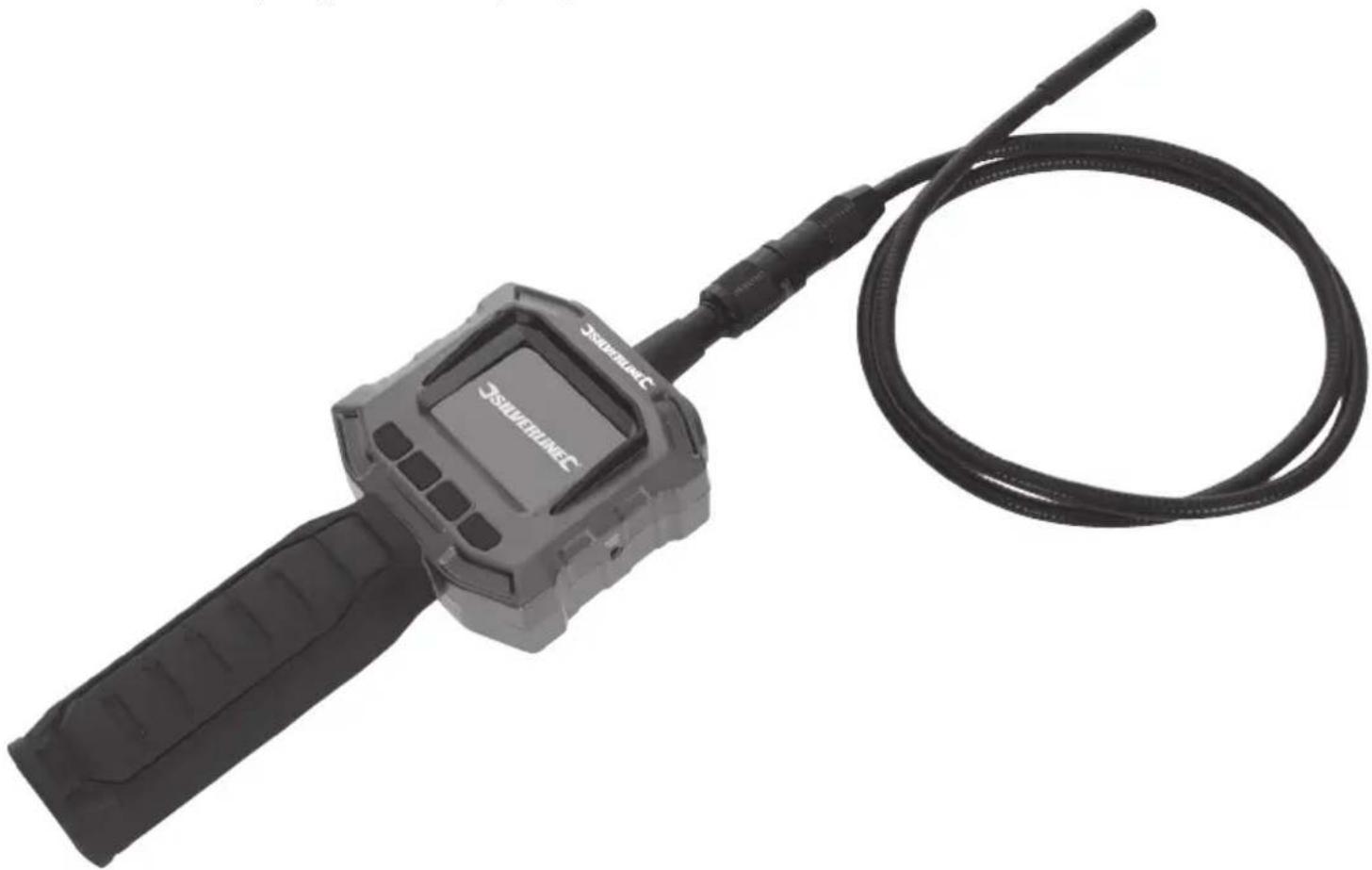
Video inspection camera for inspecting hard to reach places in loft, buildings, or for automotive work. Flexible waterproof camera cable can be fitted with included accessories: magnet, mirror, and hooks. The camera also features brightness-adjustable LED lights around the lens. The LCD monitor handset is lightweight and compact, which is powered by 4 × AA batteries (included).
Unpacking Your Tool
Carefully unpack and inspect your tool. Familiarise yourself with all its features and functions. Ensure that all parts of the tool are present and in good condition. If any parts are missing or damaged, have such parts replaced before attempting to use this tool.
Before Use
Battery installation
Note: This tool requires 4 x AA batteries (included). The Rear Battery Compartment (7) is accessed on the back of the device behind the LCD Screen (5) (Fig I).
- Remove the Rear Battery Compartment cover
- Install batteries correctly, ensuring the positive (+) and negative (-) terminals on the batteries match up with the device terminals
- Refit the cover
- The device is ready to use
Note: In the top left corner of the LCD Screen is the 10th which shows the battery charge status. When the battery becomes empty, it will be time to change the batteries. Replace all of the batteries at the same time.
Attaching the flexible camera cable
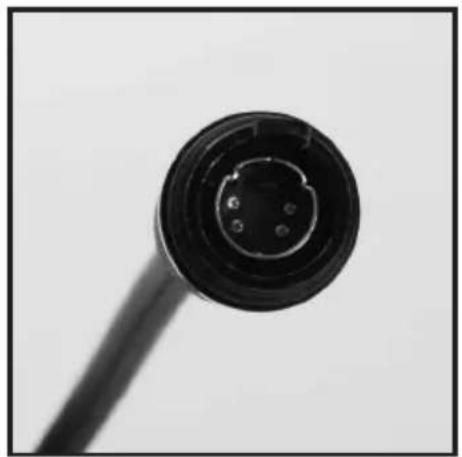
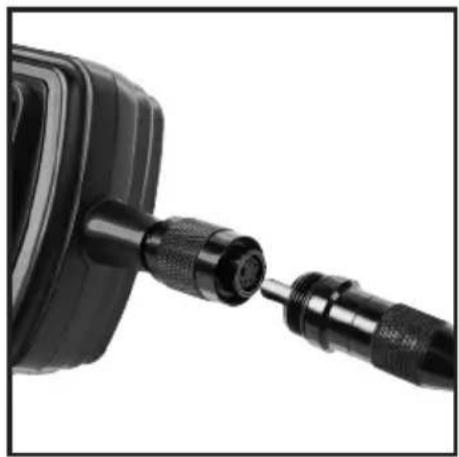
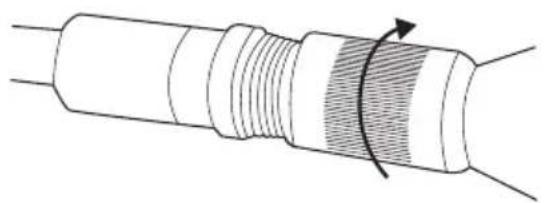
- The Flexible Camera Cable (2) can be attached to the LCD monitor handset by inserting the Camera Cable Plug (3) into the Camera Cable Socket (4) (see Fig II & III).
- Ensure the Camera Cable Plug is aligned correctly with the Camera Cable Socket, and use the guide (see Images A & B) to insert the plug
- Tighten the Camera Cable Socket by turning the threaded sleeve in a clockwise direction. If removing the Flexible Camera Cable, loosen by turning the threaded sleeve anti-clockwise before removing the plug
Attaching the camera accessories
- Four accessories are supplied for use with the camera: Magnet (16), Mirror (17), Hook (18), and Double Hook (19)
The Hook, Double Hook, or Magnet can be used to retrieve small items, such as dropped rings or screws
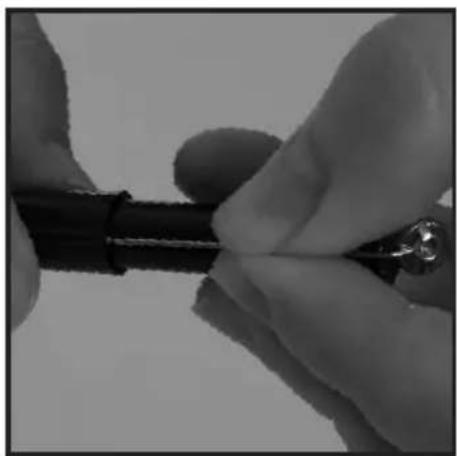
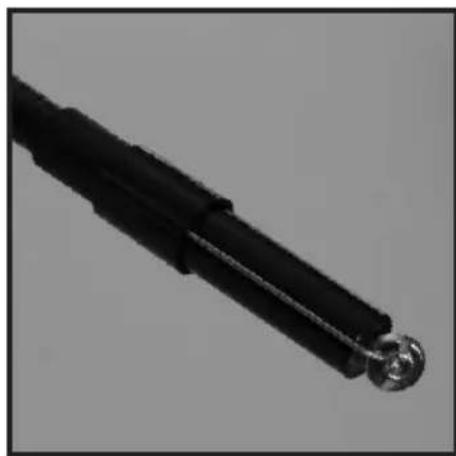
All these accessories attach in the same way: - On the accessory shaft is a small hook that can be hooked in to the small hole on the side of the Camera Lens Housing (1) (see C)
- Align the accessory shaft with the channel on the inside of the Accessory Ring (15) and slide the Accessory Ring on to the Camera Lens Housing to secure the accessory (see D)
Video output
- Connect the Video Cable (14) into the Video Out Socket (13) and the other end into a compatible video viewing device/monitor
The LCD monitor is now capable of outputting high quality video to another display
Operation
WARNING: Only the Camera Lens Housing (1) and Flexible Camera Cable (2) are waterproof. The LCD handset monitor is not waterproof. DO NOT immerse the handset in water and always dry hands before operating the device, changing the batteries, or pressing any of the buttons on the device.
Switching ON/OFF
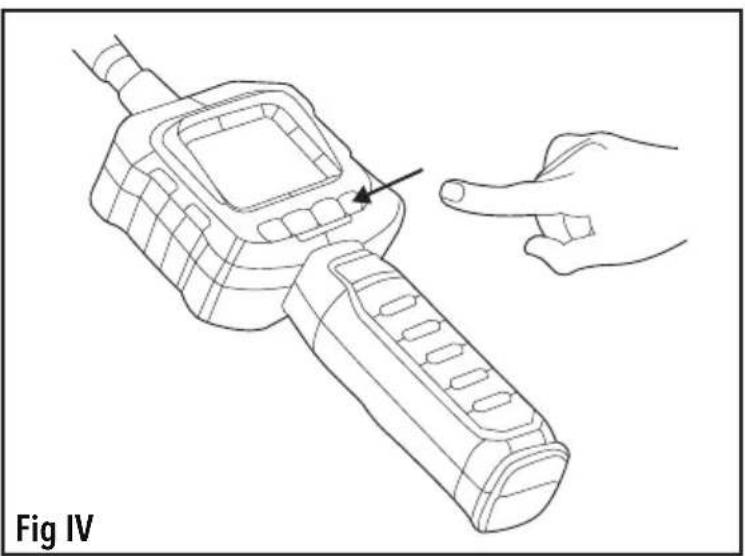
- To turn ON, hold the Power Button (9) down for 3 seconds until the LCD Screen (5) displays an image
- To turn OFF, press the Power Button once (Fig IV)
Buttons and features
Screen Rotation Button (10):
- Use this button to rotate the screen to the desired orientation
See below for the order of rotation - Press the button once to rotate and cycle through the orientations: Normal - Mirror, Normal Inside Down, Mirror Upside, Down, Norma




Camera Lens LED Light Button (11):
- Use this button to adjust the brightness of the LED light at the end of the Camera Lens Housing (1)
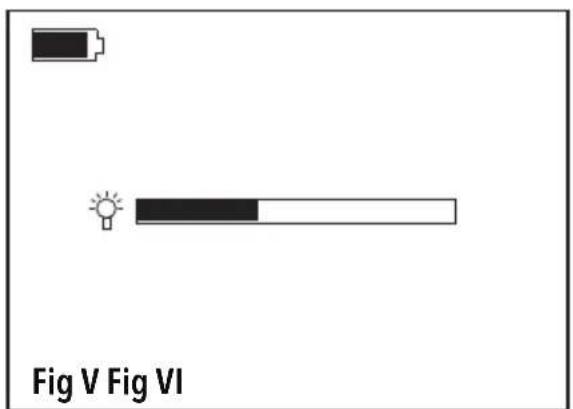
- Press the button once to activate the light and the on-screen gauge (see Fig V)
- Press the button again when the gauge is active on the LCD Screen to increase the brightness level and continue pressing the button to cycle through until the light deactivated
LCD Brightness Button (12):
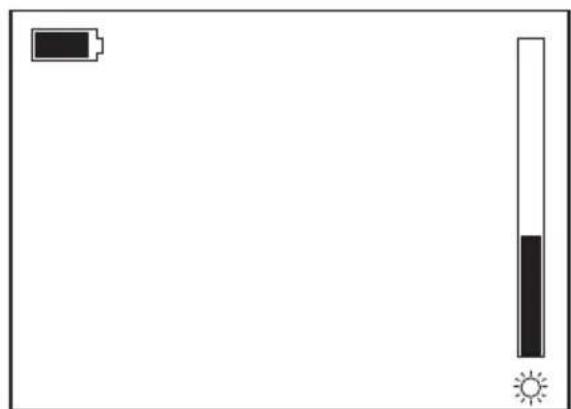
- Use this button to adjust the brightness of the LCD Screen (5)
- Press the button once to activate the gauge (see Fig VI) and repeatedly press the button to increase the brightness and cycle through back to the lowest brightness setting
Accessories
The inspection camera is compatible with other quality Silverline products:
| SKU Product | |
| 199374 2m Inspection Camera Flexible Extension | |
| 200259 Video Inspection Camera Head 50° angle lens | |
- Contact your Silverline stockist for more information
Maintenance
- Ensure all parts are clean and dry before storage
- Clean with care using a damp cloth or similar if needed
- Do not immerse any part of the LCD handset in water and do not use abrasive cleaning materials on any part of the device
Storage
Always remove batteries before storing for a long time to prevent battery drain, battery leakage, and damage to the device
- Store the product and all accessories in the case supplied, in a dry environment out of the reach of children
Disposal
- Do not dispose of power tools or other waste electrical and electronic equipment (WEEE) with household waste
- Contact your local waste disposal authority for information on the correct way to dispose of power tools
Silverline Tools Guarantee
This Silverline product comes with a 3 year guarantee
Register this product at www.silverinetools.com within 30 days of purchase in order to qualify for the 3 year guarantee. Guarantee period begins according to the date of purchase on your sales receipt.
Registering your purchase
Registration is made at silverlinetools.com by selecting the Guarantee Registration button. You will need to enter:
- Your personal details
Details of the product and purchase information
Once this information is entered your guarantee certificate will be created in PDF format for you to print out and keep with your purchase.
Terms & Conditions
Guarantee period becomes effective from the date of retail purchase as detailed on your sales receipt.
PLEASE KEEP YOUR SALES RECEIPT
If this product develops a fault within 30 days of purchase, return it to the stockist where it was purchased, with your receipt, stating details of the fault. You will receive a replacement or refund.
If this product develops a fault after the 30 day period, return it to:
Silverline Tools Service Centre PO Box 2988
Yeovil
BA21 1WU,UK
The guarantee claim must be submitted during the guarantee period.
You must provide the original sales receipt indicating the purchase date, your name, address and place of purchase before any work can be carried out.
You must provide precise details of the fault requiring correction.
Claims made within the guarantee period will be verified by Silverline Tools to establish if the deficiencies are related to material or manufacturing of the product.
Carriage will not be refunded. Items for return must be in a suitably clean and safe state for repair, and should be packaged carefully to prevent damage or injury during transportation. We may reject unsuitable or unsafe deliveries.
All work will be carried out by Silverline Tools or its authorized repair agents.
The repair or replacement of the product will not extend the period of guarantee
Defects recognised by us as being covered by the guarantee shall be corrected by means of repair of the tool, free of charge (excluding carriage charges) or by replacement with a tool in perfect working order.
Retained tools, or parts, for which a replacement has been issued, will become the property of Silverline Tools.
The repair or replacement of your product under guarantee provides benefits which are additional to and do not affect your statutory rights as a consumer.
What is covered:
The repair of the product, if it can be verified to the satisfaction of Silverline Tools that the deficiencies were due to faulty materials or workmanship within the guarantee period.
If any part is no longer available or out of manufacture, Silverline Tools will replace it with a functional replacement part.
Use of this product in the EU.
What is not covered:
Silverline Tools does not guarantee repairs required as a result of:
Normal wear and tear caused by use in accordance with the operating instructions eg blades, brushes, belts, bulbs, batteries etc.
The replacement of any provided accessories drill bits, blades, sanding sheets, cutting discs and other related items.
Accidental damage, faults caused by negligent use or care, misuse, neglect, careless operation or handling of the product.
Use of the product for anything other than normal domestic purposes.
Change or modification of the product in any way.
Use of parts and accessories which are not genuine Silverline Tools components.
Faulty installation (except installed by Silverline Tools).
Repairs or alterations carried out by parties other than Silverline Tools or its authorized repair agents.
Claims other than the right to correction of faults on the tool named in these guarantee conditions are not covered by the guarantee.
CE Declaration of Conformity
The undersigned: Mr Darrell Morris
as authorised by: Silverline Tools
Declarethat
This declaration has been issued under the sole responsibility of the manufacturer.
The object of the declaration is in conformity with the relevant Union harmonisation Legislation.
Identification code: 676660
Description: Video Inspection Camera with Colour LCD Monitor
Conforms to the following directives and standards:
EMC Directive 2014/30/EU
RoHS Directive 2011/65/EU
EN55022:2010
EN55024:2010
Notified body: TUV SUD Product Service
The technical documentation is kept by: Silverline Tools
Date: 07/10/2016
Signed:

Mr Darrell Morris
Managing Director
Name and address of the manufacturer:
Powerbox International Limited, Company No. 06897059. Registered address:
Powerbox, Boundary Way, Lufton Trading Estate, Yeovil, Somerset BA22 8HZ, United Kingdom.
Introduction
Alimentation: 4 piles AA (fournies)
Silverline Tools Service Centre
PO Box 2988
Yeovil
BA21 1WU, GroBbritannien
Alimentacion: 4 piles AA (fournies)
Tube dimensions: 8 mm x 980 mm (inclusa camera)
Dimensioni impugnatura: 257 x 92 x 44 mm (escluso tubo)
Temperatura d'esercizio: 10^ - 50^ / 14^ - 122^
Silverline Tools Service Centre
PO Box 2988
Yeovil
BA21 1WU,GB
Signor Darrell Morris
Total pixels: .640 x 480
Video system: PAL/NTSC
Minimale belichting: 0 Lux (LED AAN)
Stroom: 4 xAA batterijen (inbegren)
Silverline Tools Service Centre
PO Box 2988
Yeovil
BA21 1WU, GB
Wilgotnosc pracy. 15-85% RH
Silverline Tools Service Centre
PO Box 2988
Yeovil
BA21 1WU, UK
Name and address of the manufacturer:
Powerbox, Boundary Way, Lufton Trading Estate, Yeovil, Somerset BA22 8HZ, United Kingdom.
GB 3 Year Guarantee. Register online within 30 days. Terms and Conditions apply.