Evergum 70034 - Power strip Mennekes - Free user manual and instructions
Find the device manual for free Evergum 70034 Mennekes in PDF.


User questions about Evergum 70034 Mennekes
0 question about this device. Answer the ones you know or ask your own.
Ask a new question about this device
Download the instructions for your Power strip in PDF format for free! Find your manual Evergum 70034 - Mennekes and take your electronic device back in hand. On this page are published all the documents necessary for the use of your device. Evergum 70034 by Mennekes.
USER MANUAL Evergum 70034 Mennekes
This document is protected by copyright.
The content of this document is the property of MENNEKES Elektrotechnik GmbH & Co. KG and may not be duplicated or reproduced, in whole or in part, without the prior consent of the copyright holder.
Safety-related symbols

Danger
This warning indicates imminent danger. Failure to observe this warning will result in death or major injury.

Warning
This warning indicates a potentially hazardous situation. Failure to observe this warning can result in death or major injury.

Caution
This warning indicates a potentially hazardous situation. Failure to observe this warning can result in light or minor injuries.

Attention
This note indicates a potentially hazardous situation. Failure to observe this warning may result in material damage to the device.
General information

This note indicates additional, useful information on a given topic.
Symbols used
- Required action
-List
© oss-reference to another passage in the document
Table of Contents
1. General information.. 4
1.1 Contact details 4
2. For your Safety 4
2.1 General safety instructions.. 4
2.2 Intended use 5
2.3 Target group 5
2.3.1 Owner / User 5
2.4 Foreseeable misuse 5
3. Residual risks 6
3.1 Danger due to unsuitable ambient conditions 6
3.2 Danger due to a missing fuse 6
3.3 Danger due to fire 6
3.4 Danger due to improper operation 6
3.5 Danger due to condensation 6
4. Product description.. 7
4.1 Device structure. 7
4.2 Device variants 8
5. Commissioning 8
5.1 Unpacking the device 8
5.2 Checking the device for transport damage.....8
5.3 Sending back the device 8
5.4 Placing the device in service 8
5.4.1 Checking and switching on protective elements .. 9
5.4.2 Connecting consumers 9
6. Operation 9
6.1 Transporting the device 9
6.2 Paying attention to the operating position.....9
6.3 Protective elements 10
6.4 Opening/closing the inspection window 10
6.5 Opening/closing the enclosure cover on the EverGUM® distributor 11
6.6 Maintaining the protection class.. 11
6.7 Particularities regarding the consumers that will be connected 11
6.7.1 Plug systems 11
6.7.2 All-current sensitive residual current devices (RCDs) (type B). 12
6.8 Connecting consumers 13
6.8.1 Connecting consumers on the device in protection class IP 44. 13
6.8.2 Connecting consumers on the device in protection class IP 67.13
6.9 Removing consumers.. 13
6.9.1 Removing consumers from the device in protection class IP 44. 14
6.9.2 Removing consumers from the device in protection class IP 67.14
7. De-commissioning 14
7.1 Taking the device out of service 14
8. Cleaning 14
8.1 Dry cleaning 14
8.2 Wet cleaning 14
9. Maintenance 15
9.1 Maintenance tasks.. 15
9.1.1 Checking the device for damage 15
9.1.2 Checking the screw locking devices.. 15
9.1.3 Checking residual current devices (RCDs)....15
9.1.4 Cleaning the device 16
10.Upkeep 16
10.1 Device inspection in the noncommercial area 16
10.2 Device inspection in the commercial are 16
11. Faults 17
11.1 Troubleshooting 17
11.1.1 Residual current device (residual current device) 17
11.1.2 Miniature circuit breaker and D-type fuse link 17
12. Storage and disposal 18
12.1 Storing the device. 18
12.2 Disposing of the device 18
13. Technical data 18
13.1 Rating plate 18
13.2 Device dimensions 18
13.3 Ambient conditions 18
14. Anhang / Appendix / Annexe / Bijlage / Appendice
14.1 Anschlusswerte / Connected loads / Valeurs de raccordement / Aansuitwaarden / Valori per l'allacciamento
1. General information
The information provided in this operating manual applies exclusively to the devices described in this manual. These devices include AMAXX® mobile, AirKRAFT®, 3KRAFT®, DELTA-BOX, EverGUM® distributors, and EverGUM® receptacle strips.
Depending on the versions of the devices and due to different components, deviations from the illustrations in this manual can occur. Moreover the devices can differ from each other functionally or in their operation.
In addition to this operating manual, the scope of delivery may also include additional instructions (e.g. for device components) which must be completely complied with. Moreover, for safe use of the device, the national statutory regulations and provisions (e.g. accident prevention and occupational health and safety regulations) in the country of installation must also be complied with.
1.1 Contact details
MENNEKES
Specialist factory for plugs and sockets
Aloys-Mennekes-Strasse 1
D-57399 Kirchhundem
Tel. +49 (0) 2723 / 41-1
Fax +49 (0) 2723 / 41-2 14
E-mail info@MENNEKES.de
2.1 General safety instructions
Workplace safety
- Keep your workplace neat and tidy. Devices or tools lying about can become stumbling hazards and can cause injuries.
- Do not set down the device where it is an obstruction to pedestrian or vehicular traffic.
Electrical safety
- Do not make any modifications to the device or its components (plugs, receptacles, etc.).
-
Do not use adapter plugs in conjunction with the device.
-
Do not pull the supply line of a device over sharp edges or objects.
- Avoid kinks in the supply line of the device and in the lines of the connected consumers.
- Avoid running over the device or its components (supply line, plug, etc.).
- Avoid mechanical load on the device.
- Keep the device away from heat sources.
- During operation keep the device in a clean and dry location.
- Ensure that the device is not standing in water (puddles).
- Do not use the supply lines to carry the device, to hang up the device, or to pull the plug out of the receptacle.
- When working with the device outdoors, only connect electrical consumers that are approved for outdoor areas.
- Only have your device repaired by a qualified specialist and only with original spare parts, so that the safety of the device remains permanently intact.
Personal safety
- Keep children and other persons away when using the device.
- Store an unused device where it cannot be reached by children.
- Do not let people use the device who are not familiar with it or who have not read this operating manual.
- Do not work with the device in environments subject to explosion hazard, where flammable liquids, gases or dusts are located, unless the device is expressly suitable for such tasks. Connected power tools generate sparks that can ignite dust or fumes.
- Avoid autonomous start up of electrical consumers (e.g. drill) by always switching them off via the consumers On/ Off switch first, before connecting them to the receptacle combination.
- Do not use the device if you are under the influence of drugs, alcohol or medication. This can result in serious injury.
2.2 Intended use
The connection-ready receptacle combination is used exclusively as a mobile power distributor; it can be used indoors and outdoors, depending on the version and with due consideration of the local ambient conditions.
The device is not intended for stationary installation (e.g. on a wall).
MENNEKES Elektrotechnik GmbH & Co. KG accepts no liability for any consequences arising from improper use of the device.
No liability is assumed for damage or defects arising as a result of non-compliance with the manual.
Keep the operating manual available on the device, and pass pass it on to the new owner or user should the device change hands.
There are certain tasks associated with the use of the device (e.g. repair tasks) that must be executed only by a qualified electrician. These tasks are indicated with an appropriate notice in the manual.

Warning
Risk of injury through failure to comply with information given in operating manual
If the instructions in the operating manual are not complied with there is danger of severe injuries.
- Prior to using the device, carefully read this operating manual and all additional manuals that may be included in the scope of delivery, all the way through, and strictly comply with the instructions in the manuals.
- Precisely follow the instructions in this operating manual and execute only the action steps that are described.
2.3 Target Group
2.3.1 Owner / user
The owner / user must ensure the intended use of the device and is responsible for its safe use.
The device may be operated by persons with or without electrotechnical training.
The operator / user must meet and observe the following requirements:
-Compliance with the instructions in the operating manual in all points
- Permanent safekeeping of the operating manual for reference
-Intended use of the device
-Instruct persons who use the device
-Recognise risks and avoid possible hazards
- Involving a qualified electrician if there are faults or for repair tasks
-Protect persons (e.g. people with handicaps or children) who are not able to accurately assess the hazards associated with handling the device.
- Observe the national accident prevention and work protection regulations
2.4 Foreseeable misuse
To ensure the safe use of the device and to avoid misuse, the following points must be complied with:
Failure to comply with the instructions in the operating manual
- Comply with all the information in the operating manual when carrying out any task.
- Only carry out the tasks described in this operating manual.
- Observe the procedure and sequence for the described work steps.
Use of a damaged device
- Only use a device that shows no signs of damage.
Manipulation of the device
- Do not remove any parts of the device.
- Do not perform any modification to or conversion of the device.
Use of unsuitable cleaning agents
- Obtain prior approval from MENNEKES for cleaning agents you would like to use.
Use of unapproved replacement parts and accessories
- Only use replacement parts and accessories manufactured and/or approved by MENNEKES.
Operation of the device under unsuitable ambient conditions
- Only operate the device under the ambient conditions that have been approved and are suitable for this.
Please refer to the "Technical Data" chapter.
Climbing onto or sitting on the device
- Do not climb onto or sit on the device - danger of injury due to falling and/or material damage to the device!
3. Residual Risks
3.1 Danger due to unsuitable ambient conditions

Warning
Danger of injury due to unsuitable ambient conditions
Use of the device under unsuitable ambient conditions can result in device damage, which in turn can cause injury through electric shock.
- Only use the device under suitable ambient conditions to prevent the risk of an electric shock.
Please refer to the "Technical Data" chapter.
3.2 Danger due to a missing fuse

Warning
Danger due to an unsuitable or missing fuse
When using a device outdoors with unsuitable fusing or lack of fusing through a residual current device (RCD), injuries due to electric shock can occur.
- Only use the device outdoors if the device or the supplying receptacle is fused to a suitable residual current device (RCD).
- Contact a qualified electrician if in doubt.
3.3 Danger due to fire

Warning
Risk of sustaining injury due to fire
Heat may build up within the receptacle combination if the device is covered by an object; this can cause a fire.
- Never cover the device.
- Do not put objects on the device.
3.4 Danger due to improper operation

Warning
Risk of injury due to improper operation
Improper operation may cause damage to the device, which may result in injuries.
- Always disconnect the plug by pulling at the plug enclosing of the connected plug to remove it from the socket.
- Ensure that the cables are not kinked, pinched or run over, and will not make contact with external heat sources.
- Do not connect any additional receptacle strips or adapter plugs on the device.
3.5 Danger due to condensed water

Attention
Material damage due to condensed water
Under unfavourable ambient conditions condensation can form in the interior of the device (particularly with protection class IP 67). In this case device damage can occur.
- Avoid significant temperature fluctuations, particularly during operation.
- Only operate the device under suitable ambient conditions.
Please refer to the "Technical Data" chapter.
4. Product description
4.1 Device Structure
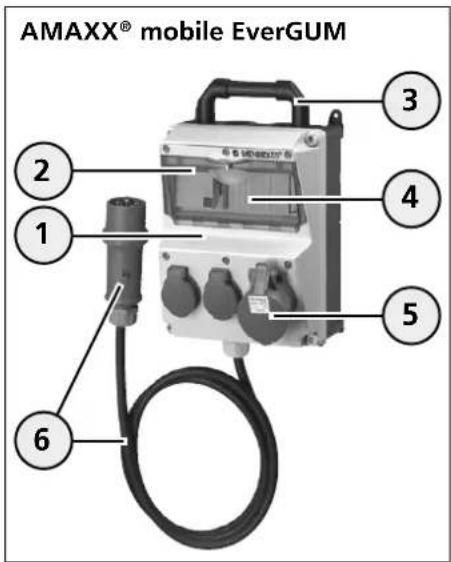
1 Enclosure
2 Inspection window
3 Carrying handle
4 Protective element
5 Sockets
6 Supply line with plug
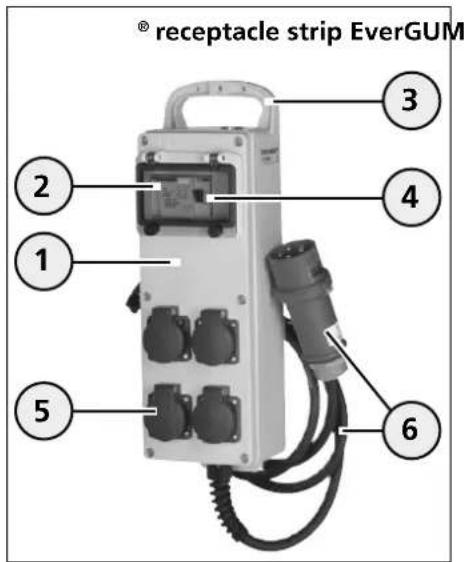
1 Enclosure
2 Inspection window
3 Carrying handle
4 Protective element
5 Sockets
6 Supply line with plug
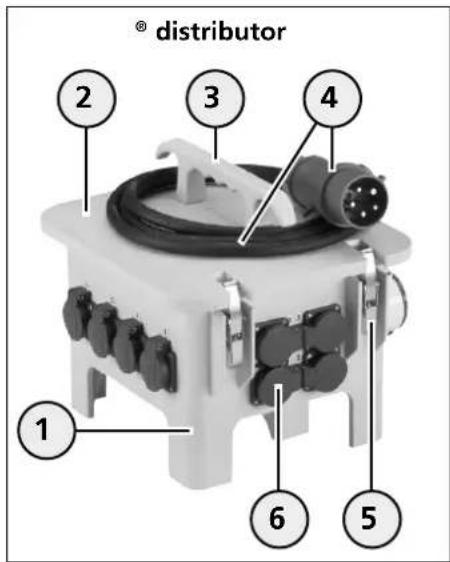
1 Enclosure with feet
2 Enclosure cover
3 Carrying handle
4 Supply line with plug or appliance plug
5 Stainless steel quick-release fasteners
6 Sockets
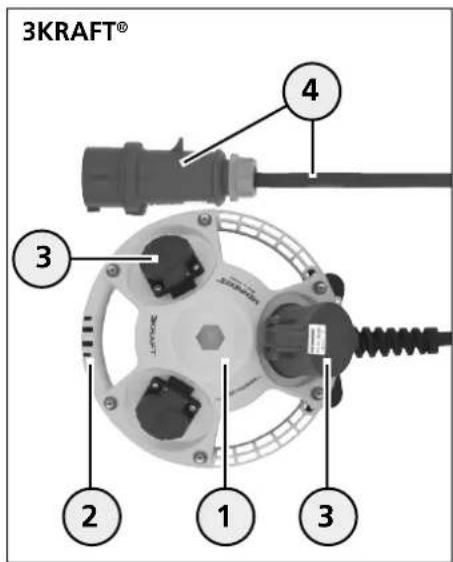
1 Enclosure
2 Carrying handle
3 Sockets
4 Supply line with plug
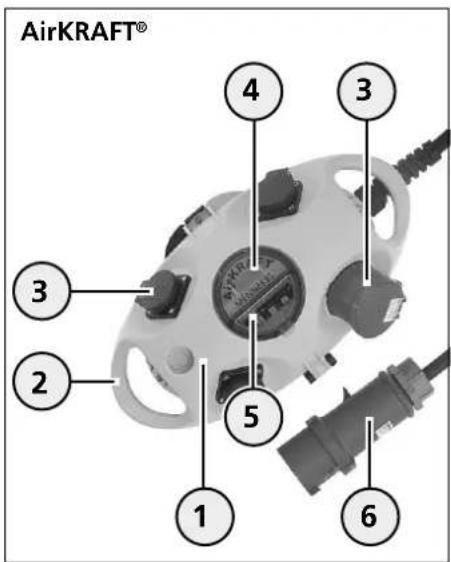
1 Enclosure
2 Carrying handle
3 Sockets
4 Inspection window
5 Protective element
6 Supply line with plug
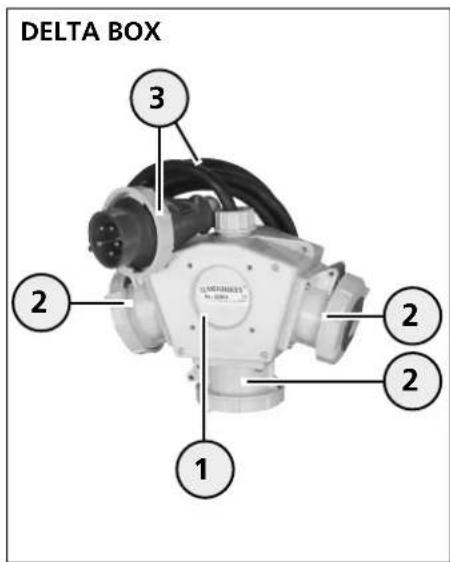
1 Enclosure
2 Sockets
3 Supply line with plug
4.2 Device variants
The mobile receptacle combinations can differ from each other due to customer-specific and/or country-specific specifications, for example, in size, shape, and features. In addition, components (such as receptacles) can be installed that have visual, functional, and operating-relevant differentiating characteristics.
Possible differentiating characteristics:
-Enclosure size / enclosure material / enclosure colour
-Enclosure with / without inspection window
-Inspection window with / without knurled screws
-
Inspection window or enclosure cover with / without locking capability by means of padlock (optional)
-
Different supply lines, plugs and appliance plugs (e.g. CEE plugs Schuko® plugs)
-
Different receptacles
-With / without protective elements (e.g. residual current devices)
-Protection class version
For easier identification of the device, the function identification (numbering) is additionally provided on the outside of certain devices, this however may not necessarily be consistent with the normative equipment identification.
Further information on the specific device types and information on the equipment and accessories can be found in the current MENNEKES product catalogue on online at www.MENNEKES.de.
5. Setting-up process
5.1 Unpacking the device
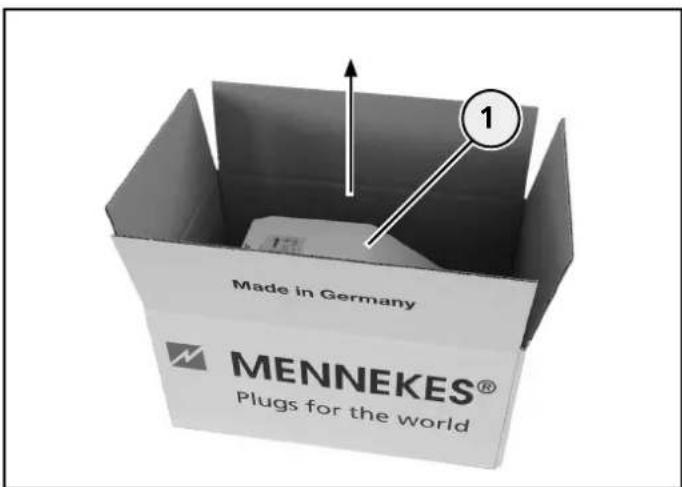
Unpack the device
- Do not use sharp or pointed objects for opening the package to avoid damage to the device.
- Open the packaging and take out the device (1).
- Store the packaging (e.g. for return shipment of the device if there is damage) or dispose of it in accordance with applicable national regulations.
5.2 Checking the device for damage sustained during transportation
- After unpacking, check the device for transport damage.
- If you determine that there is transport damage, contact your dealer.
- Do not use a device that shows signs of damage.
5.3 Returning the device
If you want to return the device, use the original packaging or a suitable, safe transport container.
5.4 Placing the device in service
The local ambient conditions must be taken into account for safe operation of the device.
Please refer to the "Technical Data" chapter.
Before using the device, ensure for yourself that the connection data of the device agrees with the grid data. The device must only be operated in agreement with the local grid data.
See Rating plate

Warning
Danger due to an unsuitable or missing fuse
When using a device outdoors with unsuitable or missing fusing via a residual current device, injuries due to electric shock can occur.
- Only use the device outdoors if the device or the supplying receptacle is fused via a suitable residual current device.
- Contact a qualified electrician if in doubt.
5.4.1 Checking and switching on protective elements
- If your device is equipped with D-type fuse links, check the fuses for completeness and firm seat before each startup.
- If necessary insert missing in suitable D-type fuse links.
- Replace defective D-type fuse links with new ones.
- Hand tighten all D-type fuse links.
- Switch on the protective elements (residual current devices and line protection switches).
6e chapter "Operation - protective elements"
5.4.2 Connecting the consumer
- Connect the consumer.
Please refer to the "Operation" chapter.
6. Operation

Danger
Risk of sustaining injury due to damaged device
There is a risk of sustaining major injury or death if the device is damaged.
- Do not use the device if there is external damage.
- Mark the possibly damaged device, so that no other person will continue to use it.
- Have a qualified electrician rectify the damage without delay.
- Have an electrician take the device out of service if necessary.
6.1 Transporting the device
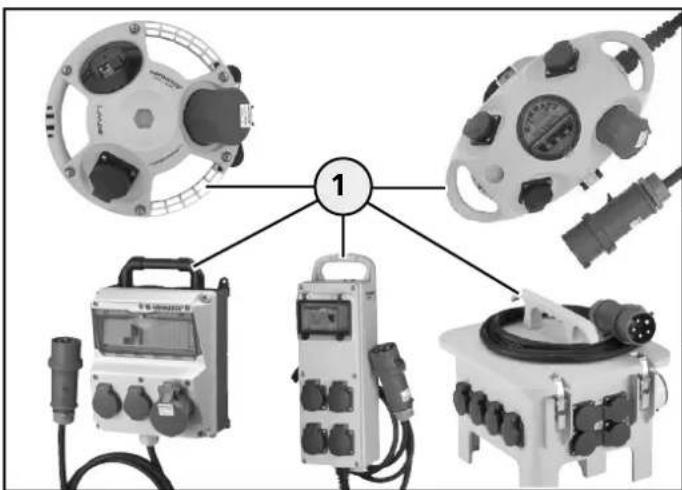
Transporting the device
The mobile receptacle combinations for the most part have a carrying handle for easy and safe transport.
- Always transport the device using the carrying handle (1) to avoid injury or device damage.
6.2 Pay attention to the operating position
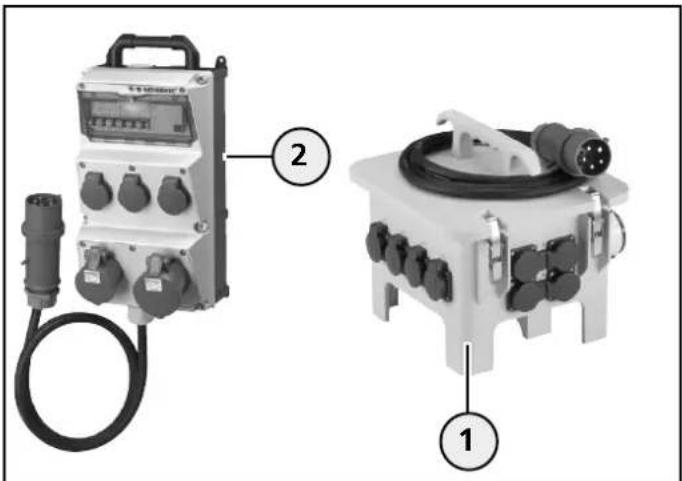
Pay attention to the operating position (example: AMAXX® mobile EverGUM® distributor)
During operation, the position of device operation must be observed and complied with. EverGUM® distributor must be placed on the stand feet. All other devices are placed on the rear of the enclosure so that the hinged receptacle covers opens upward and allows the plugs of the consumers to be connected.
- During operation keep the device in a clean and dry location.
- Ensure that the device is not standing in water (puddles).
- Place the EverGUM® distributor on the stand feet (1).
- Place the devices (2) (AMAXX® mobile, AirKRAFT®, 3KRAFT®, DELTA BOX, EverGUM® receptacle strip) on the rear of the enclosure.
6.3 Protective element
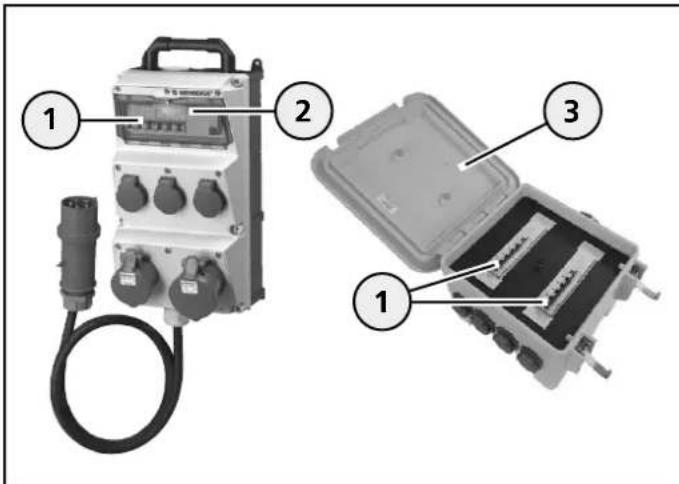
Protective element
For the most part the receptacle combinations are equipped with protective elements (1) (D-type fuse links, RCDs, etc. The protective elements are behind an inspection window 2 or enclosure cover (3) as is the case with the EverGUM distributor.
- Open the inspection window or the enclosure cover (EverGUM® distributor), to reach the protective elements. See the following chapter
6.4 Opening/Closing the window
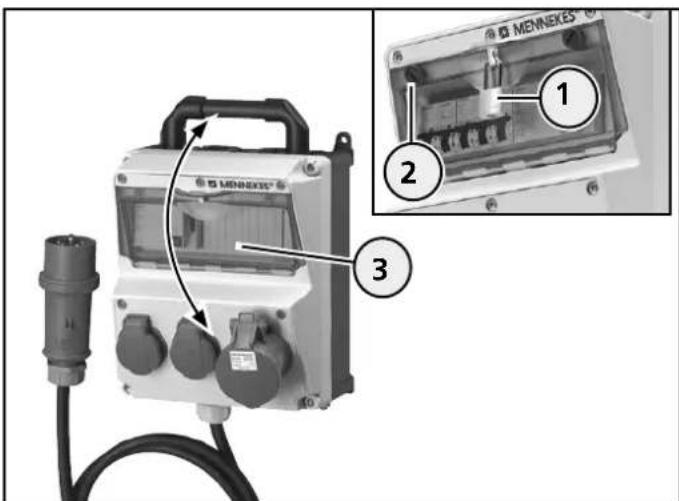
Opening/Closing the window
Depending on the version of the device, the inspection window can be fitted with or without knurled screws, and optionally it can be equipped with a padlock. Operation is described using the AMAXX® mobile device as the example; operation is comparable for the device variants.
Opening
If applicable, remove the padlock (1).
- Turn the knurled screws (2) counter-clockwise to loosen them.
- Swing the inspection window upward (3).
Closing
- Swing the inspection window (3) downward until it engages in the enclosure.
- Tightened the knurled screws (2) to restore the protection class effect.
- Lock the inspection window, with the padlock if it is present (1).
6.5 Opening, closing the enclosure cover on the EverGUM® distributor
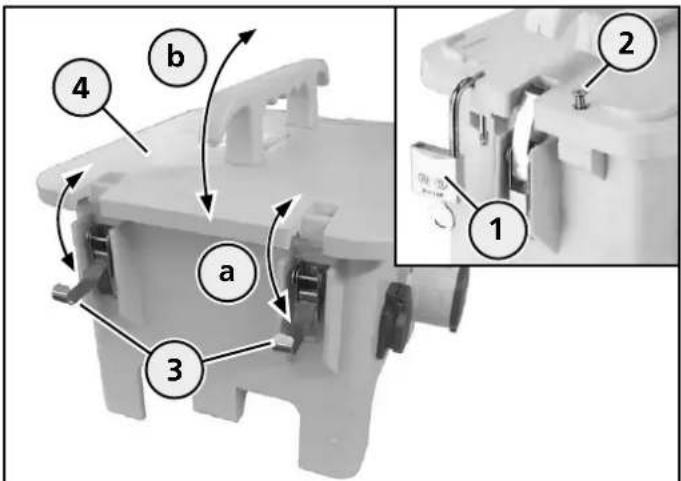
Open the enclosure cover
Opening
- If present, remove the padlock (1) or the screw (2).
- Undo the quick-release fasteners (3) (a).
- Swing the enclosure cover (4) upward (b).
Closing
- Swing the enclosure cover (4) downward(b).
- Use the quick-release fasteners to lock the enclosure cover (3) (a).
- Lock the enclosure cover with the padlock, if present (1), or the screw (2).
6.6 Maintaining the protection class
The mobile receptacle combinations can be equipped on a country specific basis with different attached receptacles, and they can be designed in different protection classes (e.g. IP 44 or IP 67).
To maintain the protection class of the device, only electrical consumers of the same protection class design must be combined and operated with the receptacle combination, (example: Connect an IP 67 plug of a consumer to an IP 67 receptacle of the receptacle combination).
Information on the protection class of your receptacle combination can be found in the "Technical Data" chapter or on the rating plate of the device.
- Before use, check which protection class design corresponds to the receptacle combination and the consumers that will be connected.
- Connect consumers with the same protection class and a suitable plug device to the device in order to avoid reducing the effect of the protection class.
i If a plug of protection class IP 44 is inserted into a receptacle combination of protection class IP 67, the receptacle combination only meets the requirements of protection class IP 44!
Consequence: limited protection function! Pay particular attention with IP 44 protection class devices and when using the device outdoors.
6.7 Particularities concerning the consumers to be connected
6.7.1 Plug systems
0 Attention
Material damage due to an unsuitable consumer
When connecting a consumer with unsuitable plug connections fire can occur due to deficient contacting of the components.
- Only connect consumers with suitable plug connections on the device.
Consumers with Schuko > IP 44 / IP 54 plugs (IP 66, IP 68 / DWD) when plugged into IP 44 / IP 54 Schuko mobile receptacle combinations or couplings do not achieve adequate contacting due to the design.
The same applies for AC adapters and right angle plugs. These devices must not be operated together. The Schuko® receptacles and couplings in question are marked indicated via a plug symbol (1) (see Fig.).

Plug symbol
You must be able to plug the plug of the consumer completely into the receptacle. A suitable plug is characterized by its firm seat (similar to a "locking in place") in the receptacle.
Thus proper contacting of the plug and socket connection is ensured.
Schuko® plugs must have a perimeter ridge on the plug enclosure to achieve the required seal and to comply with the maintain the protection class in plug-in status.
- Only connect consumers with suitable plug and socket connections on the receptacle combination.
- Do not connect any consumers with right angle plugs or AC adapters on the device.
6.7.2 All current sensitive residual current devices (RCDs) (type B)
The receptacle combinations can be customer-specifically equipped with a residual current device (RCD) "type B" that is only intended for very specific application cases and also must only be used for the specific application cases.
The following instructions must always be complied with for safe use.
The devices in question are marked with a sticker (see Fig.).
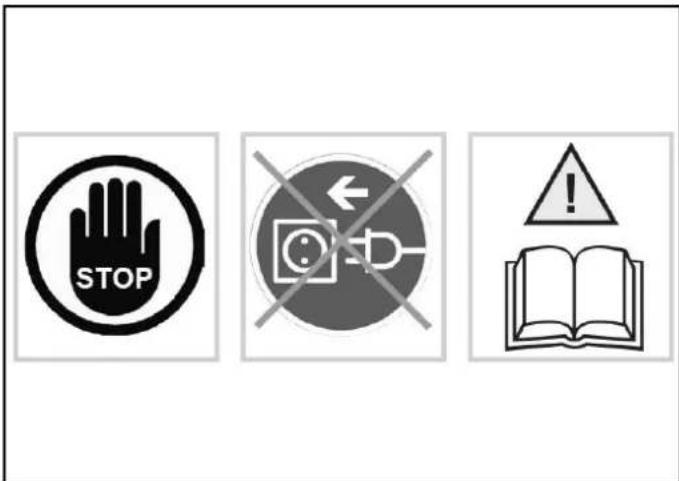
Sticker (indicates residual current device (RCD) "type B")
- Before using the device have a qualified electrician check the electrical installation to determine whether the device, or the consumers to be connected, can be operated together.
- Contact a qualified electrician
Electrical equipment or consumers (e.g., welding systems, pumps, vibrating machines, etc.) that are controlled via a frequency converter can generate smooth DC residual currents.
Off-the-shelf residual current devices with an AC triggering characteristic, or that are type A, cannot detect these residual currents; this means that proper triggering of the residual current device is not ensured and the risk of electric shock increases if there is a fault.
This means that electrical equipment or type B consumers with residual current devices must not be connected and operated downstream of type A residual current devices!

Warning
Danger of injury due to unsuitable residual current devices
If a frequency-controlled consumer with a type B residual current device is connected to a piece of electrical equipment or a receptacle combination with a type A residual current device, there is danger of injury due to electric shock.
- Check, or have a qualified electrician check to determine the residual current devices the electrical equipment item or the consumer to be connected has.
- Only connect suitable consumers to the receptacle combination.
- Contact a qualified electrician if in doubt.
6.8 Connecting the consumer
Connecting a consumer is described using the DELTA BOX in protection class IP 44 and IP 67 design as the example. The procedure is comparable for device variants.

Warning
Risk of sustaining injury due to unintentional startup of electrical consumers
Electrical consumers (e.g. drill) that are already switched on via their own On/Off switch and that are connected to the receptacle combination can start up autonomously and cause injuries.
- Only switch an electrical consumer off via its own On/Off switch before connecting it to the receptacle combination.
6.8.1 Connecting consumers on the device in protection class IP 44
- Open the hinged lid of the socket and completely insert the plug of the electrical consumer.
- Check the plug for firm seat.
6.8.2 Connecting consumers on the device in protection class IP 67
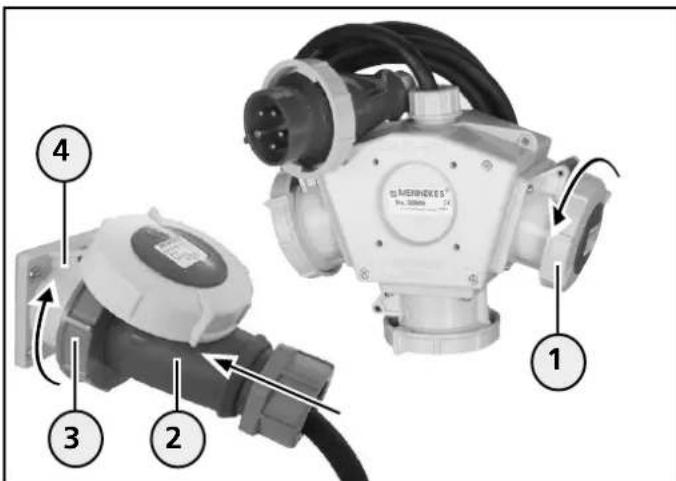
Connect consumer (example: DELTA BOX)
- Open the closed hinged lid (1) by turning it counterclockwise.
- Open the hinged lid of the socket and completely insert the plug (2) of the electrical consumer.
- Tighten the bayonet ring (3) of the plug at the socket (4) by turning it clockwise (so that the protection class requirements are met).
- Switch on the electrical consumer.
6.9 Removing electrical consumers
Removal of a connected consumer on the device is described using the DELTA Box and protection class IP 44 and IP 67 as the example. The procedure is comparable for all other devices.

Warning
Risk of injury due to improper operation
Improper operation may cause damage to the device, which may result in injuries.
Always disconnect the plug by pulling at the plug enclosing of the connected plug to remove it from the socket.
- Ensure that the cables are not kinked, pinched or run over, and will not make contact with external heat sources.
6.9.1 Removing consumers from the device in protection class IP 44
- First switch off the connected electrical consumer.
- Then slightly raise the hinged lid of the socket and pull the plug out of the socket.
6.9.2 Removing consumers from the device in protection class IP 67
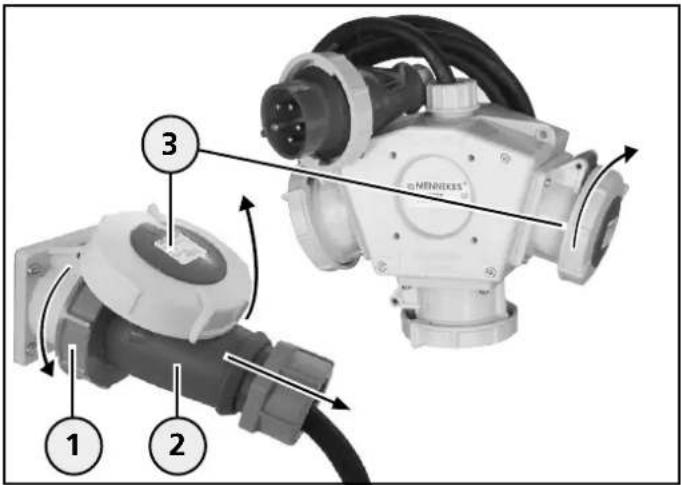
Removing consumers (example DELTA BOX)
- First switch off the connected electrical consumer.
- Loosen the bayonet ring (1) of the plug (2) by turning it counter-clockwise.
- Then slightly raise the hinged lid (3) of the socket and pull the plug out of the socket.
- Turn the hinged lid (3) clockwise to close it so that it is hand-tight and to ensure that the protection class requirements are met again.
7. Taking the device out of service
7.1 Taking the device out of service
- Remove the connected consumers from the device. Please refer to the "Operation" chapter
- If necessary clean the device before storing it.
- If necessary coil up the supply line.
- Store the device safely in a clean and dry location.
8. Cleaning
The device can be cleaned with a dry cloth or a damp cloth, depending on application conditions and soiling.
However, dry cleaning in regular intervals is recommended in order to prevent persistent soiling on the surfaces.
- First remove all connected electrical consumers from the device, before starting cleaning tasks.
Please refer to the "Operation" chapter.
Danger
Risk of sustaining injury due to electric shock
There is a risk of sustaining major injury or death when working on or with live components.
- Only execute tasks on the device after you have disconnected it from the power supply and have unplugged the plug.
- Only clean the device and the components (e.g. sockets) externally.
- Do not open the device and keep the sockets closed.
8.1 Cleaning with a dry cloth
For dry cleaning, a brush and a clean cleaning cloth may be used.
- Remove any existing dust and soil with a brush first.
- Then thoroughly wipe off the device with a clean, dry cloth.
8.2 Cleaning with a damp cloth
Attention
Material damage due to incorrect cleaning agents
The use of unsuitable cleaning agents, cleaning devices and excessive use of water may cause damage to the device.
- Obtain prior approval from MENNEKES for cleaning agents you would like to use.
- Only clean the device and the components (e.g. sockets) externally.
- Do not open the device and keep the sockets closed.
- Avoid the use of running water.
- Ensure that water cannot reach live parts.
- Do not use high-pressure cleaning appliances.
For damp cleaning, clean water is to be used exclusively.
- Remove any existing dust and soil with a brush first.
- Then thoroughly wipe off the device with a clean damp cloth.
9. Maintenance
Regular inspection and maintenance tasks support trouble-free and safe operation of the device and contribute to increasing the service life. Thus any fault sources can be detected early on and hazards can be avoided.
MENNEKES recommends that you visually inspect the device for external damage (e.g. missing or defective components, material alterations, etc.) and its proper functioning regularly. If defects are detected on the device they must be rectified without delay. A damaged, faulty device must not be used because the risk of electric shock or material damage (e.g. through fire) can be increased).

Danger
Risk of sustaining injury due to electric shock
Danger of severe or fatal injury when touching energized components.
- Only execute tasks on the device after you have disconnected it from the power supply and have unplugged the plug.
9.1 Maintenance
The maintenance tasks can be executed by non-specialised persons. However if you are unsure commission a qualified electrician to perform the tasks.
9.1.1 Checking the device for damage
- Visually check the device for external damage (e.g. missing components, material alterations, cracks in the enclosure, cuts or cracks in the sheathing of the supply line, etc.).
- Check the proper functioning of the socket's hinged cover and the inspection window.
- Have hinged covers or inspection windows which are damaged or cannot be closed correctly replaced by a qualified electrician.
- If you notice any damage to the device, consult a qualified electrician immediately.
- Do not continue to use the defective device.
- Have an electrician repair the device correctly or take it out of service.
9.1.2 Checking the screw locking devices

Danger
Risk of sustaining injury due to electric shock
When replacing a D-type fuse link, energized components can be touched. There is danger of severe or fatal injury.
- Only replace a D-type fuse link after you have disconnected the device from the power supply and have unplugged the power plug.
- If your device is equipped with D-type fuse links check them for firm seat.
- If necessary, tighten them manually.
- Replace defective screw locking devices with new, equivalent safety elements.
- Contact a qualified electrician if in doubt.
9.1.3 Checking residual current devices (RCDs)
The residual current devices (RCDs) can vary in appearance and operation.
Usually, they are checked by actuating a test button by means of which the residual current device is triggered. After triggering, the triggering lever of the residual current device must be returned to its initial position.
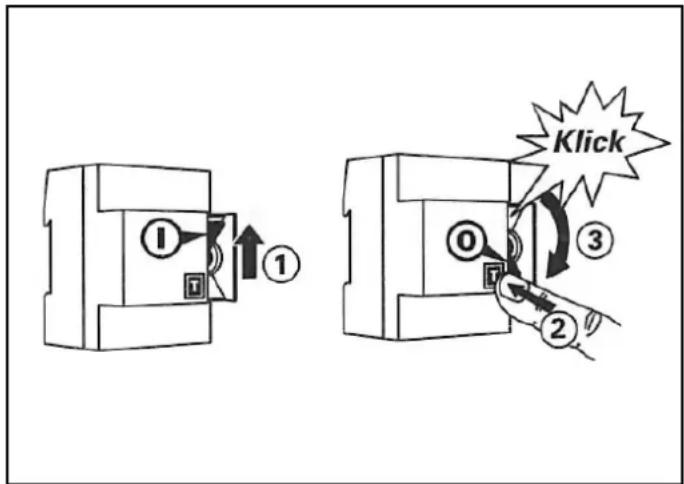
Checking the residual current device (RCD)
- Actuate the test, button (T) (2).
The residual current device triggers (3) (click!) - Return the triggering lever (1) to its initial position.
- If any faults occur during the checking, immediately consult a qualified electrician.
- Do not continue to use the defective device.
9.1.4 Cleaning the device
- Regularly clean the device in order to prevent persistent soiling on its surfaces.
Please refer to the "Cleaning" chapter.
10. Maintenance
The activities described in this chapter may only be carried out by a qualified electrician!
10.1 Device inspection in a non-commercial environment
For long-lasting and safe operation we recommend that you have have an electrician inspect the device for proper condition at regular intervals.
- Have an electrician inspect the device for proper condition at regular intervals.
- Should damage to the device occur during its use contact a qualified electrician.
- Have a qualified electrician rectify the damage without delay.
- Comply with the applicable national statutory regulations and provisions in the respective country of installation.
10.2 Device inspection in a commercial environment
When using the device in a commercial environment, the operator / user of the device must have a qualified electrician check the proper condition of the device regularly.
Should damage to the device occur during its use, the damage must be rectified immediately.
- Have an electrician inspect the device at regular intervals.
- Comply with the applicable national statutory regulations and provisions in the respective country of installation.
Tasks to be executed by a qualified electrician
Danger
Risk of sustaining injury due to electric shock
Danger of severe or fatal injury when touching energized components.
-
Only execute tasks on the device after you have disconnected it from the power supply and have unplugged the power plug.
-
Check the device for damage.
- Properly rectify any device damage.
- For repairs only use original spare parts from MENNEKES.
After the repair check the device for proper function. - If re-commissioning the device is not likely due to damage, and with regard to further safe use, the device must no longer be placed in service.
11. Faults

Warning
Risk of sustaining injury due to unintentional start-up of electrical consumers
Electrical consumers, connected to the receptacle combination, may automatically start up upon reactivation of a tripped protective device and cause injury.
- Activate a protective device only after all connected consumers have been switched off or disconnected from the receptacle combination.
11.1 Troubleshooting
- Open the inspection window or the enclosure cover (EverGUM® distributor) on the device to reach the protective elements.
Please refer to the "Operation" chapter.
11.1.1 Residual current devices (RCDs)
A residual current device (FI) is triggered
- Visually check the receptacle combination and connected electrical consumers for defects.
YES - a defect is present on the receptacle combination or on the consumer:
-
Take the defective receptacle combination out of service and do not use it anymore.
-
Take the defective consumer out of operation and do not use it anymore.
-
Have an electrician rectify the problem.
NO - a defect is not present:
- Reactivate the residual current device (FI).
The residual current device triggers again!
- Take the receptacle combination out of service and do not use it anymore.
- Take the consumer out of operation and not use it anymore.
- Have an electrician rectify the problem.
11.1.2 Miniature circuit breaker and screw locking device
A miniature circuit breaker and a screw locking device are triggered

Danger
Risk of sustaining injury due to electric shock
When replacing a D-type fuse link, energized components can be touched. There is danger of severe or fatal injury.
-
Only replace a D-type fuse link after you have disconnected the device from the power supply and have unplugged the power plug.
-
Visually check the receptacle combination and connected electrical consumers for defects.
YES - a defect is present on the receptacle combination or on the consumer:
- Take the defective receptacle combination out of service and do not use it anymore.
- Take the defective consumer out of operation and do not use it anymore.
- Have an electrician rectify the problem.
NO - a defect is not present:
- Switch the miniature circuit breaker back on
- Unplug the power plug of the device and insert a new equivalent D-type fuse link fuse.
The miniature circuit breaker or the D-type fuse link triggers again!
- Take the receptacle combination out of service and do not use it anymore.
- Take the consumer out of operation and not use it anymore.
- Have an electrician rectify the problem.
12. Storage and disposal
12.1 Storing the device
For proper storage and to ensure trouble-free operation of the device at a later time, the following points must be observed:
- Clean the device before placing it into storage.
Please refer to the "Cleaning" chapter.
- Pack the device in the original packaging or a suitable cardboard box.
- Store the device in a dry and temperature-controlled room at a temperature range 0^ C to +40^ C .
12.2 Disposing of the device
When the device reaches the end of its useful life it must be properly disposed of. Do not dispose of the device in the usual household waste. In accordance with European Directive 2002/96/EC concerning Waste Electrical and Electronic Equipment and its implementation in national law, electrical devices that are no longer capable of being used must be collected separately and recycled in an environmentally responsible manner.
Moreover, the applicable national statutory regulations and provisions in the respective country of installation must also be complied with for its disposal.
13. Technical Data
13.1 Name Plate
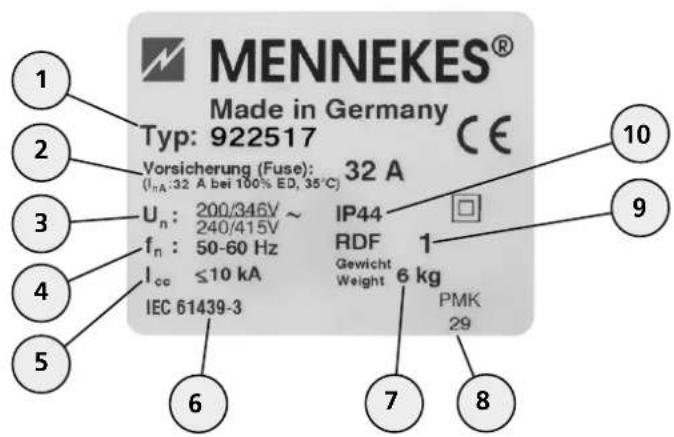
Example:
No. Explanation
1 Part number
2 Max. fuse protection for supply line, +1 nA
3 Rated voltage
4 Frequency
5 Rated short-circuit current
6 Product standard
7 Weight of device
8 Manufacturing code
9 Rated diversity factor (RDF)
10 Protection class (IP)
13.1/1
Apart from the rating plate information also observe the device-specific connected loads.
Se chapter "Appendix"
13.2 Device dimensions
The device dimensions and other product information is provided in the current MENNEKES product catalogue or on the Internet at www.MENNEKES.de.
13.3 Ambient conditions
For safe and trouble-free operation of the device the local ambient conditions must be taken into account.
Warning
Danger of injury due to unsuitable ambient conditions
Unsuitable ambient conditions can damage the device, which increases the risk of electric shock.
- Only operate the device under suitable ambient conditions.

Attention
Material damage due to unsuitable ambient conditions
Unsuitable ambient conditions can result in device damage (e.g. due to decreasing capacity of the device).
-
Pay attention to the local ambient conditions for safe operation of the device.
-
Only operate the device if the grid data agrees with the grid data on the rating plate.
- Only use the device outdoors if it is safeguarded via a suitable residual current device.
- Prevent water from penetrating into the device, water ingress increases the risk of electric shock.
- Do not use the device in explosive areas in which combustible fluids, gases or dusts are present - danger of explosion and fire!
- To prevent overload and thus to prevent device damage, do not cover the device.
Permissible ambient temperatures for operation
| Indoor and Outdoor Installation | ||
| Min. Max | Mean Value | for 24-hour Period |
| - 25 °C +40 °C not exceeding +35 °C | ||
| 13.3 / 1 | ||