BLAUPUNKT BPA 3022 M - Car stereo

BPA 3022 M - Car stereo BLAUPUNKT - Free user manual and instructions

Find the device manual for free BPA 3022 M BLAUPUNKT in PDF.

📄 72 pages English EN 💬 AI Question
Notice BLAUPUNKT BPA 3022 M - page 13

Download the instructions for your Car stereo in PDF format for free! Find your manual BPA 3022 M - BLAUPUNKT and take your electronic device back in hand. On this page are published all the documents necessary for the use of your device. BPA 3022 M by BLAUPUNKT.

USER MANUAL BPA 3022 M BLAUPUNKT

Frequenzbereich von 87,5 bis 108 MHz von 522 bis 1620 KHz IF 10,7 MHz 450 KHz Empndlichkeit 4 µV (S/N = 30 dB) 36 dBµV (S/N = 20 dB) Trennung der Stereokanäle >25 dB / PROBLEMBEHEBUNG DESafety notes The car sound system was manufactured according to the state of the art and established safety guidelines. Even so, dangers may occur if you do not observe the safety notes in these instructions. Read these instructions carefully and completely before using the car sound system. Keep the instructions at a location so that they are always accessible to all users. Always pass on the car sound system to third parties together with these instructions. In addition, observe the instructions of the devices used in conjunction with this car sound system. General safety notes Observe the following note to protect yourself against injuries: Do not modify or open the device. Use as directed This sound system is intended for installation and operation in a vehicle with 12 V vehicle system voltage. Observe the output limits of the device. Repairs and installation, if necessary, should be performed by a specialist. Installation instructions You may only install the car sound system yourself if you are experienced in installing car sound systems and are very familiar with the electrical system of the vehicle. For this purpose, observe the wiring diagram in these instructions. Installing the device must not obstruct or block the function of any airbags, other safety devices or controls. Declaration of conformity The Blaupunkt Competence Center Car Multimedia - Evo Sales GmbH declares that the device complies with the basic requirements and the other relevant regulations of the directive 2014/53/EU. The declaration of conformity can be found on the Internet under www.blaupunkt.com. Cleaning notes Solvents, cleaning and scouring agents as well as dashboard spray and plastics care product may contain ingredients that will damage the surface of the car sound system. Use only a dry or slightly moistened cloth for cleaning the car sound system. Disposal notes Do not dispose of your old unit in the household trash! Use the return and collection systems available to dis-pose of the old device, the remote control and exhausted batteries. Scope of delivery The scope of delivery includes: Main unit BPA 3022 M Remote control ISO connectors Installation screws Operating manual

ATTENTIONS OF INSTALLATION

1. Please read the instruction manual carefully before installing the unit.

2. Make sure to connect other wires before power on the unit.

3. To avoid short circuit. Please make sure all the exposed wires are insulated.

4. Please x all the wires after installation.

5. Please make connection to the player accordingly to this instruction manual.

Wrong connection may cause damage to the unit.

6. This player only t for 12V DC device.

HDMI attention: Please use good quality HDMI cable. The overall length (front and rear) should not exceed 12 feet. WIRING CONNECTION

1. This player can only be used by + 12V DC.

2. Do not connect the battery terminal until the player is fully well installed.

3. Please make sure to connect the yellow wire to the positive of the battery (+).

4. When change the fuse please make sure that the specications are same.

5. Using good quality speakers with 4 - 8 ohm can achieve the best eect of the

BASIC OPERATION Turn on/o the unit and Mute function Press /MUTE knob to turn on the unit. When the unit is on. Shortly press this knob for mute on/o. Press and hold this button to turn o the unit. Audio and setting menu adjustment Press and hold SRC/MENU button into the menu as below: BAS->TRE->BAL->EQ(o/pop/rock/clas)->LOUD(on/o)->CLK HH->CLK MM->IR(on/o) ->CT(indep/sync)->BEEP(on/o)->P_VOL(13)->DX(LOC)->STE- REO(MONO) In each item rotate the VOL knob to set them. IR (ON/OFF): IR ON: The unit can be switched on by IR remote control. The system is in high power consumption status. IR OFF: The unit can not be switched on by IR remote control. The system is in low power consumption status. CT (INDEP/SYNC): CT INDEP: The clock works independently. CT SYNC: The clock will be synchronized to the received RDS station’s time. Note: When the clock was set in the menu, The CT is set to INDEP mode automatically. BEEP (ON/OFF): Turn on/o the beep sound when buttons are pressed. P-VOL: Setting the power on volume. If the volume at switch-o is lower than the P-VOL, the unit will set the volume to the value of the switch-o volume when it is switched on. If the volume at shutdown is greater than the P-VOL, the volume will be restored to the P-VOL value when the unit is switched on. Bluetooth speaker search Press and hold BT button shows “SEARCH..”. Seconds later shows the Bluetooth device name. Rotate VOL knob to show next one. When the desired Bluetooth speaker name was shown on LCD. Press VOL knob to pair. If the pairing is succeed, it shows BOX ON. Important note: Despite numerous tests with various Bluetooth devices, compatibility with all Bluetooth devices available on the market cannot be guaranteed. Bluetooth speaker signal transmit operation Shortly press BT button to stop/transmit the signal to the Bluetooth speaker. It shows BOX OFF/ON. Note: Although Blaupunkt checks the compatibility of dierent Bluetooth speakers with care, a awless function with all models on the market cannot be guaranteed. Zone 1 and Zone 2 operation Shortly press Zone 1 (or ZONE 2) button to unable/enable Zone 1 (or ZONE 2) volume. Hold Zone 1 (or ZONE 2) button to mute Zone 1 (or ZONE 2) sound. Hold it again to mute o. Information or Clock priority Shortly press DIS button to change the clock priority or information priority. Note: In FM band, when received a RDS station shortly press DIS button to show the STATION NAME/CLOCK/FREQUENCY. Clock setting In CLK HH/CLK MM item of the menu. Rotate VOL knob to set the hour/minute. Head phone operation There is a 3.5 mm head phone jack in the front panel. It is following the zone 1’s operation. RADIO OPERATION Receive a radio station Press SRC/MENU button to select FM1->FM2->MW mode. Shortly press / button to receive the desired radio station. Press and hold / button for manual tuning the frequency. Manually store station & recall preset station Receiving a desired station. Press and hold one of the preset buttons (1 - 6) for 2 seconds. The current station is stored into the number button. Shortly press the preset button (1 - 6) to directly listen the station that saved in the corresponding preset button. DAB OPERATION Press SRC/MENU button switch to DAB1 or DAB2 source. Selecting station Press / button to select up/down station. Manually store station and recall preset station When received a desired station. Press and hold 1 - 6 button for 2 seconds to store this station to corresponding number. Shortly press the preset button (1 -

6) to directly listen the station that saved in the corresponding preset button.

USB OPERATION When an USB driver was inserted to the unit, the unit will play the MP3/WMA le automatically. If an USB drive is already inserted in the unit, keep pressing SRC/MENU button shortly until the USB mode display appears. Select le Press / button to skip to next/previous le. Hold / button to fast forward or fast reverse. Play/Pause Press 1 button to pause/playing the le. Repeat function Press 3 RPT button to select RPT mode: RPT ONE/RPT FOLD/RPT ALL(default) RPT ONE: Repeat the same le. RPT FOLD: Repeat all les of the folder. RPT ALL: Repeat all les. RANDOM Press 4 RDM button to choose RDM on/o. RDM on: Playing all les in random order. RDM o: Turn o the random function. Directory+/- function Press DIR+/DIR- button to select next/previous folder to play. Search song Press and hold button shows NUM 0000. Rotating VOL (or directly enter number) to select the numbers then press VOL to play. Please note the 7/8/9/0 as: BT = 7, = 8, = 9, DIS = 0.

AUX IN 1/2 OPERATION

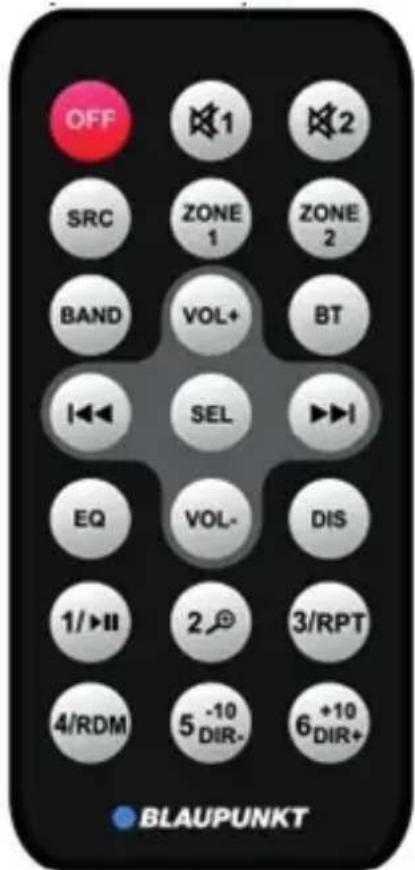
AUX IN 1 for front panel 3.5 mm jack. AUX IN 2 for RCA in back of the unit. Pressing SRC/MENU button to switch to AUX IN1 (2) mode when Connecting the audio signal to the unit . BLUETOOTH OPERATION Pairing On mobile phone, select the Bluetooth item searching the Bluetooth device. “BLAUPUNKT” should appear in the list, select “BLAUPUNKT” and then input password “0000” if it needs a password. When successful paired, the BT mark will be displayed on the display. Bluetooth Audio Press SRC/MENU button to switch to BT MUSIC mode. It will play a song of your mobile phone automatically. Press key to pause/play the song. Press / button to select next/previous song. HDMI OPERATION The front HDMI port is pass through to the rear HDMI port. The HDMI playback is therefore not aected. V-IN and V-OUT RCA connector In the back of the unit the V-IN connector is pass through to the V-OUT connector. REMOTE CONTROL When IR is set to ON in the setting menu. OFF : The unit can be switched ON and OFF. VOL+: Volume up VOL- : Volume down 1 : Zone 1 MUTE ON/OFF 2 : Zone 2 MUTE ON/OFF Other operation please reference the description above GENARAL Power Supply Requirements : DC 12 Volts, Negative Ground Chassis Dimensions : 129 (W) x 112 (D) x 65 (H) Tone Controls - Bass (at 100 Hz) : ±10 dB - Treble (at 10 kHz) : ±10 dB Maximum Output Power : 4 x 40 watts Current Drain : 10 Ampere (max.)

Frequenzbereich von 87,5 bis 108 MHz von 522 bis 1620 KHz IF 10,7 MHz 450 KHz Empndlichkeit 4 µV (S/N = 30 dB) 36 dBµV (S/N = 20 dB) Trennung der Stereokanäle >25 dB / PROBLEMBEHEBUNG DESafety notes The car sound system was manufactured according to the state of the art and established safety guidelines. Even so, dangers may occur if you do not observe the safety notes in these instructions. Read these instructions carefully and completely before using the car sound system. Keep the instructions at a location so that they are always accessible to all users. Always pass on the car sound system to third parties together with these instructions. In addition, observe the instructions of the devices used in conjunction with this car sound system. General safety notes Observe the following note to protect yourself against injuries: Do not modify or open the device. Use as directed This sound system is intended for installation and operation in a vehicle with 12 V vehicle system voltage. Observe the output limits of the device. Repairs and installation, if necessary, should be performed by a specialist. Installation instructions You may only install the car sound system yourself if you are experienced in installing car sound systems and are very familiar with the electrical system of the vehicle. For this purpose, observe the wiring diagram in these instructions. Installing the device must not obstruct or block the function of any airbags, other safety devices or controls. Declaration of conformity The Blaupunkt Competence Center Car Multimedia - Evo Sales GmbH declares that the device complies with the basic requirements and the other relevant regulations of the directive 2014/53/EU. The declaration of conformity can be found on the Internet under www.blaupunkt.com. Cleaning notes Solvents, cleaning and scouring agents as well as dashboard spray and plastics care product may contain ingredients that will damage the surface of the car sound system. Use only a dry or slightly moistened cloth for cleaning the car sound system. Disposal notes Do not dispose of your old unit in the household trash! Use the return and collection systems available to dis-pose of the old device, the remote control and exhausted batteries. Scope of delivery The scope of delivery includes: Main unit BPA 3022 M Remote control ISO connectors Installation screws Operating manual

ATTENTIONS OF INSTALLATION

1. Please read the instruction manual carefully before installing the unit.

2. Make sure to connect other wires before power on the unit.

3. To avoid short circuit. Please make sure all the exposed wires are insulated.

4. Please x all the wires after installation.

5. Please make connection to the player accordingly to this instruction manual.

Wrong connection may cause damage to the unit.

6. This player only t for 12V DC device.

HDMI attention: Please use good quality HDMI cable. The overall length (front and rear) should not exceed 12 feet. WIRING CONNECTION

1. This player can only be used by + 12V DC.

2. Do not connect the battery terminal until the player is fully well installed.

3. Please make sure to connect the yellow wire to the positive of the battery (+).

4. When change the fuse please make sure that the specications are same.

5. Using good quality speakers with 4 - 8 ohm can achieve the best eect of the

BASIC OPERATION Turn on/o the unit and Mute function Press /MUTE knob to turn on the unit. When the unit is on. Shortly press this knob for mute on/o. Press and hold this button to turn o the unit. Audio and setting menu adjustment Press and hold SRC/MENU button into the menu as below: BAS->TRE->BAL->EQ(o/pop/rock/clas)->LOUD(on/o)->CLK HH->CLK MM->IR(on/o) ->CT(indep/sync)->BEEP(on/o)->P_VOL(13)->DX(LOC)->STE- REO(MONO) In each item rotate the VOL knob to set them. IR (ON/OFF): IR ON: The unit can be switched on by IR remote control. The system is in high power consumption status. IR OFF: The unit can not be switched on by IR remote control. The system is in low power consumption status. CT (INDEP/SYNC): CT INDEP: The clock works independently. CT SYNC: The clock will be synchronized to the received RDS station’s time. Note: When the clock was set in the menu, The CT is set to INDEP mode automatically. BEEP (ON/OFF): Turn on/o the beep sound when buttons are pressed. P-VOL: Setting the power on volume. If the volume at switch-o is lower than the P-VOL, the unit will set the volume to the value of the switch-o volume when it is switched on. If the volume at shutdown is greater than the P-VOL, the volume will be restored to the P-VOL value when the unit is switched on. Bluetooth speaker search Press and hold BT button shows “SEARCH..”. Seconds later shows the Bluetooth device name. Rotate VOL knob to show next one. When the desired Bluetooth speaker name was shown on LCD. Press VOL knob to pair. If the pairing is succeed, it shows BOX ON. Important note: Despite numerous tests with various Bluetooth devices, compatibility with all Bluetooth devices available on the market cannot be guaranteed. Bluetooth speaker signal transmit operation Shortly press BT button to stop/transmit the signal to the Bluetooth speaker. It shows BOX OFF/ON. Note: Although Blaupunkt checks the compatibility of dierent Bluetooth speakers with care, a awless function with all models on the market cannot be guaranteed. Zone 1 and Zone 2 operation Shortly press Zone 1 (or ZONE 2) button to unable/enable Zone 1 (or ZONE 2) volume. Hold Zone 1 (or ZONE 2) button to mute Zone 1 (or ZONE 2) sound. Hold it again to mute o. Information or Clock priority Shortly press DIS button to change the clock priority or information priority. Note: In FM band, when received a RDS station shortly press DIS button to show the STATION NAME/CLOCK/FREQUENCY. Clock setting In CLK HH/CLK MM item of the menu. Rotate VOL knob to set the hour/minute. Head phone operation There is a 3.5 mm head phone jack in the front panel. It is following the zone 1’s operation. RADIO OPERATION Receive a radio station Press SRC/MENU button to select FM1->FM2->MW mode. Shortly press / button to receive the desired radio station. Press and hold / button for manual tuning the frequency. Manually store station & recall preset station Receiving a desired station. Press and hold one of the preset buttons (1 - 6) for 2 seconds. The current station is stored into the number button. Shortly press the preset button (1 - 6) to directly listen the station that saved in the corresponding preset button. DAB OPERATION Press SRC/MENU button switch to DAB1 or DAB2 source. Selecting station Press / button to select up/down station. Manually store station and recall preset station When received a desired station. Press and hold 1 - 6 button for 2 seconds to store this station to corresponding number. Shortly press the preset button (1 -

6) to directly listen the station that saved in the corresponding preset button.

USB OPERATION When an USB driver was inserted to the unit, the unit will play the MP3/WMA le automatically. If an USB drive is already inserted in the unit, keep pressing SRC/MENU button shortly until the USB mode display appears. Select le Press / button to skip to next/previous le. Hold / button to fast forward or fast reverse. Play/Pause Press 1 button to pause/playing the le. Repeat function Press 3 RPT button to select RPT mode: RPT ONE/RPT FOLD/RPT ALL(default) RPT ONE: Repeat the same le. RPT FOLD: Repeat all les of the folder. RPT ALL: Repeat all les. RANDOM Press 4 RDM button to choose RDM on/o. RDM on: Playing all les in random order. RDM o: Turn o the random function. Directory+/- function Press DIR+/DIR- button to select next/previous folder to play. Search song Press and hold button shows NUM 0000. Rotating VOL (or directly enter number) to select the numbers then press VOL to play. Please note the 7/8/9/0 as: BT = 7, = 8, = 9, DIS = 0.

AUX IN 1/2 OPERATION

AUX IN 1 for front panel 3.5 mm jack. AUX IN 2 for RCA in back of the unit. Pressing SRC/MENU button to switch to AUX IN1 (2) mode when Connecting the audio signal to the unit . BLUETOOTH OPERATION Pairing On mobile phone, select the Bluetooth item searching the Bluetooth device. “BLAUPUNKT” should appear in the list, select “BLAUPUNKT” and then input password “0000” if it needs a password. When successful paired, the BT mark will be displayed on the display. Bluetooth Audio Press SRC/MENU button to switch to BT MUSIC mode. It will play a song of your mobile phone automatically. Press key to pause/play the song. Press / button to select next/previous song. HDMI OPERATION The front HDMI port is pass through to the rear HDMI port. The HDMI playback is therefore not aected. V-IN and V-OUT RCA connector In the back of the unit the V-IN connector is pass through to the V-OUT connector. REMOTE CONTROL When IR is set to ON in the setting menu. OFF : The unit can be switched ON and OFF. VOL+: Volume up VOL- : Volume down 1 : Zone 1 MUTE ON/OFF 2 : Zone 2 MUTE ON/OFF Other operation please reference the description above GENARAL Power Supply Requirements : DC 12 Volts, Negative Ground Chassis Dimensions : 129 (W) x 112 (D) x 65 (H) Tone Controls - Bass (at 100 Hz) : ±10 dB - Treble (at 10 kHz) : ±10 dB Maximum Output Power : 4 x 40 watts Current Drain : 10 Ampere (max.)

Frequenzbereich von 87,5 bis 108 MHz von 522 bis 1620 KHz IF 10,7 MHz 450 KHz Empndlichkeit 4 µV (S/N = 30 dB) 36 dBµV (S/N = 20 dB) Trennung der Stereokanäle >25 dB / PROBLEMBEHEBUNG DESafety notes The car sound system was manufactured according to the state of the art and established safety guidelines. Even so, dangers may occur if you do not observe the safety notes in these instructions. Read these instructions carefully and completely before using the car sound system. Keep the instructions at a location so that they are always accessible to all users. Always pass on the car sound system to third parties together with these instructions. In addition, observe the instructions of the devices used in conjunction with this car sound system. General safety notes Observe the following note to protect yourself against injuries: Do not modify or open the device. Use as directed This sound system is intended for installation and operation in a vehicle with 12 V vehicle system voltage. Observe the output limits of the device. Repairs and installation, if necessary, should be performed by a specialist. Installation instructions You may only install the car sound system yourself if you are experienced in installing car sound systems and are very familiar with the electrical system of the vehicle. For this purpose, observe the wiring diagram in these instructions. Installing the device must not obstruct or block the function of any airbags, other safety devices or controls. Declaration of conformity The Blaupunkt Competence Center Car Multimedia - Evo Sales GmbH declares that the device complies with the basic requirements and the other relevant regulations of the directive 2014/53/EU. The declaration of conformity can be found on the Internet under www.blaupunkt.com. Cleaning notes Solvents, cleaning and scouring agents as well as dashboard spray and plastics care product may contain ingredients that will damage the surface of the car sound system. Use only a dry or slightly moistened cloth for cleaning the car sound system. Disposal notes Do not dispose of your old unit in the household trash! Use the return and collection systems available to dis-pose of the old device, the remote control and exhausted batteries. Scope of delivery The scope of delivery includes: Main unit BPA 3022 M Remote control ISO connectors Installation screws Operating manual

ATTENTIONS OF INSTALLATION

1. Please read the instruction manual carefully before installing the unit.

2. Make sure to connect other wires before power on the unit.

3. To avoid short circuit. Please make sure all the exposed wires are insulated.

4. Please x all the wires after installation.

5. Please make connection to the player accordingly to this instruction manual.

Wrong connection may cause damage to the unit.

6. This player only t for 12V DC device.

HDMI attention: Please use good quality HDMI cable. The overall length (front and rear) should not exceed 12 feet. WIRING CONNECTION

1. This player can only be used by + 12V DC.

2. Do not connect the battery terminal until the player is fully well installed.

3. Please make sure to connect the yellow wire to the positive of the battery (+).

4. When change the fuse please make sure that the specications are same.

5. Using good quality speakers with 4 - 8 ohm can achieve the best eect of the

BASIC OPERATION Turn on/o the unit and Mute function Press /MUTE knob to turn on the unit. When the unit is on. Shortly press this knob for mute on/o. Press and hold this button to turn o the unit. Audio and setting menu adjustment Press and hold SRC/MENU button into the menu as below: BAS->TRE->BAL->EQ(o/pop/rock/clas)->LOUD(on/o)->CLK HH->CLK MM->IR(on/o) ->CT(indep/sync)->BEEP(on/o)->P_VOL(13)->DX(LOC)->STE- REO(MONO) In each item rotate the VOL knob to set them. IR (ON/OFF): IR ON: The unit can be switched on by IR remote control. The system is in high power consumption status. IR OFF: The unit can not be switched on by IR remote control. The system is in low power consumption status. CT (INDEP/SYNC): CT INDEP: The clock works independently. CT SYNC: The clock will be synchronized to the received RDS station’s time. Note: When the clock was set in the menu, The CT is set to INDEP mode automatically. BEEP (ON/OFF): Turn on/o the beep sound when buttons are pressed. P-VOL: Setting the power on volume. If the volume at switch-o is lower than the P-VOL, the unit will set the volume to the value of the switch-o volume when it is switched on. If the volume at shutdown is greater than the P-VOL, the volume will be restored to the P-VOL value when the unit is switched on. Bluetooth speaker search Press and hold BT button shows “SEARCH..”. Seconds later shows the Bluetooth device name. Rotate VOL knob to show next one. When the desired Bluetooth speaker name was shown on LCD. Press VOL knob to pair. If the pairing is succeed, it shows BOX ON. Important note: Despite numerous tests with various Bluetooth devices, compatibility with all Bluetooth devices available on the market cannot be guaranteed. Bluetooth speaker signal transmit operation Shortly press BT button to stop/transmit the signal to the Bluetooth speaker. It shows BOX OFF/ON. Note: Although Blaupunkt checks the compatibility of dierent Bluetooth speakers with care, a awless function with all models on the market cannot be guaranteed. Zone 1 and Zone 2 operation Shortly press Zone 1 (or ZONE 2) button to unable/enable Zone 1 (or ZONE 2) volume. Hold Zone 1 (or ZONE 2) button to mute Zone 1 (or ZONE 2) sound. Hold it again to mute o. Information or Clock priority Shortly press DIS button to change the clock priority or information priority. Note: In FM band, when received a RDS station shortly press DIS button to show the STATION NAME/CLOCK/FREQUENCY. Clock setting In CLK HH/CLK MM item of the menu. Rotate VOL knob to set the hour/minute. Head phone operation There is a 3.5 mm head phone jack in the front panel. It is following the zone 1’s operation. RADIO OPERATION Receive a radio station Press SRC/MENU button to select FM1->FM2->MW mode. Shortly press / button to receive the desired radio station. Press and hold / button for manual tuning the frequency. Manually store station & recall preset station Receiving a desired station. Press and hold one of the preset buttons (1 - 6) for 2 seconds. The current station is stored into the number button. Shortly press the preset button (1 - 6) to directly listen the station that saved in the corresponding preset button. DAB OPERATION Press SRC/MENU button switch to DAB1 or DAB2 source. Selecting station Press / button to select up/down station. Manually store station and recall preset station When received a desired station. Press and hold 1 - 6 button for 2 seconds to store this station to corresponding number. Shortly press the preset button (1 -

6) to directly listen the station that saved in the corresponding preset button.

USB OPERATION When an USB driver was inserted to the unit, the unit will play the MP3/WMA le automatically. If an USB drive is already inserted in the unit, keep pressing SRC/MENU button shortly until the USB mode display appears. Select le Press / button to skip to next/previous le. Hold / button to fast forward or fast reverse. Play/Pause Press 1 button to pause/playing the le. Repeat function Press 3 RPT button to select RPT mode: RPT ONE/RPT FOLD/RPT ALL(default) RPT ONE: Repeat the same le. RPT FOLD: Repeat all les of the folder. RPT ALL: Repeat all les. RANDOM Press 4 RDM button to choose RDM on/o. RDM on: Playing all les in random order. RDM o: Turn o the random function. Directory+/- function Press DIR+/DIR- button to select next/previous folder to play. Search song Press and hold button shows NUM 0000. Rotating VOL (or directly enter number) to select the numbers then press VOL to play. Please note the 7/8/9/0 as: BT = 7, = 8, = 9, DIS = 0.

AUX IN 1/2 OPERATION

AUX IN 1 for front panel 3.5 mm jack. AUX IN 2 for RCA in back of the unit. Pressing SRC/MENU button to switch to AUX IN1 (2) mode when Connecting the audio signal to the unit . BLUETOOTH OPERATION Pairing On mobile phone, select the Bluetooth item searching the Bluetooth device. “BLAUPUNKT” should appear in the list, select “BLAUPUNKT” and then input password “0000” if it needs a password. When successful paired, the BT mark will be displayed on the display. Bluetooth Audio Press SRC/MENU button to switch to BT MUSIC mode. It will play a song of your mobile phone automatically. Press key to pause/play the song. Press / button to select next/previous song. HDMI OPERATION The front HDMI port is pass through to the rear HDMI port. The HDMI playback is therefore not aected. V-IN and V-OUT RCA connector In the back of the unit the V-IN connector is pass through to the V-OUT connector. REMOTE CONTROL When IR is set to ON in the setting menu. OFF : The unit can be switched ON and OFF. VOL+: Volume up VOL- : Volume down 1 : Zone 1 MUTE ON/OFF 2 : Zone 2 MUTE ON/OFF Other operation please reference the description above GENARAL Power Supply Requirements : DC 12 Volts, Negative Ground Chassis Dimensions : 129 (W) x 112 (D) x 65 (H) Tone Controls - Bass (at 100 Hz) : ±10 dB - Treble (at 10 kHz) : ±10 dB Maximum Output Power : 4 x 40 watts Current Drain : 10 Ampere (max.)

DESafety notes The car sound system was manufactured according to the state of the art and established safety guidelines. Even so, dangers may occur if you do not observe the safety notes in these instructions. Read these instructions carefully and completely before using the car sound system. Keep the instructions at a location so that they are always accessible to all users. Always pass on the car sound system to third parties together with these instructions. In addition, observe the instructions of the devices used in conjunction with this car sound system. General safety notes Observe the following note to protect yourself against injuries: Do not modify or open the device. Use as directed This sound system is intended for installation and operation in a vehicle with 12 V vehicle system voltage. Observe the output limits of the device. Repairs and installation, if necessary, should be performed by a specialist. Installation instructions You may only install the car sound system yourself if you are experienced in installing car sound systems and are very familiar with the electrical system of the vehicle. For this purpose, observe the wiring diagram in these instructions. Installing the device must not obstruct or block the function of any airbags, other safety devices or controls. Declaration of conformity The Blaupunkt Competence Center Car Multimedia - Evo Sales GmbH declares that the device complies with the basic requirements and the other relevant regulations of the directive 2014/53/EU. The declaration of conformity can be found on the Internet under www.blaupunkt.com. Cleaning notes Solvents, cleaning and scouring agents as well as dashboard spray and plastics care product may contain ingredients that will damage the surface of the car sound system. Use only a dry or slightly moistened cloth for cleaning the car sound system. Disposal notes Do not dispose of your old unit in the household trash! Use the return and collection systems available to dis-pose of the old device, the remote control and exhausted batteries. Scope of delivery The scope of delivery includes: Main unit BPA 3022 M Remote control ISO connectors Installation screws Operating manual

ATTENTIONS OF INSTALLATION

1. Please read the instruction manual carefully before installing the unit.

2. Make sure to connect other wires before power on the unit.

3. To avoid short circuit. Please make sure all the exposed wires are insulated.

4. Please x all the wires after installation.

5. Please make connection to the player accordingly to this instruction manual.

Wrong connection may cause damage to the unit.

6. This player only t for 12V DC device.

HDMI attention: Please use good quality HDMI cable. The overall length (front and rear) should not exceed 12 feet. WIRING CONNECTION

1. This player can only be used by + 12V DC.

2. Do not connect the battery terminal until the player is fully well installed.

3. Please make sure to connect the yellow wire to the positive of the battery (+).

4. When change the fuse please make sure that the specications are same.

5. Using good quality speakers with 4 - 8 ohm can achieve the best eect of the

BASIC OPERATION Turn on/o the unit and Mute function Press /MUTE knob to turn on the unit. When the unit is on. Shortly press this knob for mute on/o. Press and hold this button to turn o the unit. Audio and setting menu adjustment Press and hold SRC/MENU button into the menu as below: BAS->TRE->BAL->EQ(o/pop/rock/clas)->LOUD(on/o)->CLK HH->CLK MM->IR(on/o) ->CT(indep/sync)->BEEP(on/o)->P_VOL(13)->DX(LOC)->STE- REO(MONO) In each item rotate the VOL knob to set them. IR (ON/OFF): IR ON: The unit can be switched on by IR remote control. The system is in high power consumption status. IR OFF: The unit can not be switched on by IR remote control. The system is in low power consumption status. CT (INDEP/SYNC): CT INDEP: The clock works independently. CT SYNC: The clock will be synchronized to the received RDS station’s time. Note: When the clock was set in the menu, The CT is set to INDEP mode automatically. BEEP (ON/OFF): Turn on/o the beep sound when buttons are pressed. P-VOL: Setting the power on volume. If the volume at switch-o is lower than the P-VOL, the unit will set the volume to the value of the switch-o volume when it is switched on. If the volume at shutdown is greater than the P-VOL, the volume will be restored to the P-VOL value when the unit is switched on. Bluetooth speaker search Press and hold BT button shows “SEARCH..”. Seconds later shows the Bluetooth device name. Rotate VOL knob to show next one. When the desired Bluetooth speaker name was shown on LCD. Press VOL knob to pair. If the pairing is succeed, it shows BOX ON. Important note: Despite numerous tests with various Bluetooth devices, compatibility with all Bluetooth devices available on the market cannot be guaranteed. Bluetooth speaker signal transmit operation Shortly press BT button to stop/transmit the signal to the Bluetooth speaker. It shows BOX OFF/ON. Note: Although Blaupunkt checks the compatibility of dierent Bluetooth speakers with care, a awless function with all models on the market cannot be guaranteed. Zone 1 and Zone 2 operation Shortly press Zone 1 (or ZONE 2) button to unable/enable Zone 1 (or ZONE 2) volume. Hold Zone 1 (or ZONE 2) button to mute Zone 1 (or ZONE 2) sound. Hold it again to mute o. Information or Clock priority Shortly press DIS button to change the clock priority or information priority. Note: In FM band, when received a RDS station shortly press DIS button to show the STATION NAME/CLOCK/FREQUENCY. Clock setting In CLK HH/CLK MM item of the menu. Rotate VOL knob to set the hour/minute. Head phone operation There is a 3.5 mm head phone jack in the front panel. It is following the zone 1’s operation. RADIO OPERATION Receive a radio station Press SRC/MENU button to select FM1->FM2->MW mode. Shortly press / button to receive the desired radio station. Press and hold / button for manual tuning the frequency. Manually store station & recall preset station Receiving a desired station. Press and hold one of the preset buttons (1 - 6) for 2 seconds. The current station is stored into the number button. Shortly press the preset button (1 - 6) to directly listen the station that saved in the corresponding preset button. DAB OPERATION Press SRC/MENU button switch to DAB1 or DAB2 source. Selecting station Press / button to select up/down station. Manually store station and recall preset station When received a desired station. Press and hold 1 - 6 button for 2 seconds to store this station to corresponding number. Shortly press the preset button (1 -

6) to directly listen the station that saved in the corresponding preset button.

USB OPERATION When an USB driver was inserted to the unit, the unit will play the MP3/WMA le automatically. If an USB drive is already inserted in the unit, keep pressing SRC/MENU button shortly until the USB mode display appears. Select le Press / button to skip to next/previous le. Hold / button to fast forward or fast reverse. Play/Pause Press 1 button to pause/playing the le. Repeat function Press 3 RPT button to select RPT mode: RPT ONE/RPT FOLD/RPT ALL(default) RPT ONE: Repeat the same le. RPT FOLD: Repeat all les of the folder. RPT ALL: Repeat all les. RANDOM Press 4 RDM button to choose RDM on/o. RDM on: Playing all les in random order. RDM o: Turn o the random function. Directory+/- function Press DIR+/DIR- button to select next/previous folder to play. Search song Press and hold button shows NUM 0000. Rotating VOL (or directly enter number) to select the numbers then press VOL to play. Please note the 7/8/9/0 as: BT = 7, = 8, = 9, DIS = 0.

AUX IN 1/2 OPERATION

AUX IN 1 for front panel 3.5 mm jack. AUX IN 2 for RCA in back of the unit. Pressing SRC/MENU button to switch to AUX IN1 (2) mode when Connecting the audio signal to the unit . BLUETOOTH OPERATION Pairing On mobile phone, select the Bluetooth item searching the Bluetooth device. “BLAUPUNKT” should appear in the list, select “BLAUPUNKT” and then input password “0000” if it needs a password. When successful paired, the BT mark will be displayed on the display. Bluetooth Audio Press SRC/MENU button to switch to BT MUSIC mode. It will play a song of your mobile phone automatically. Press key to pause/play the song. Press / button to select next/previous song. HDMI OPERATION The front HDMI port is pass through to the rear HDMI port. The HDMI playback is therefore not aected. V-IN and V-OUT RCA connector In the back of the unit the V-IN connector is pass through to the V-OUT connector. REMOTE CONTROL When IR is set to ON in the setting menu. OFF : The unit can be switched ON and OFF. VOL+: Volume up VOL- : Volume down 1 : Zone 1 MUTE ON/OFF 2 : Zone 2 MUTE ON/OFF Other operation please reference the description above GENARAL Power Supply Requirements : DC 12 Volts, Negative Ground Chassis Dimensions : 129 (W) x 112 (D) x 65 (H) Tone Controls - Bass (at 100 Hz) : ±10 dB - Treble (at 10 kHz) : ±10 dB Maximum Output Power : 4 x 40 watts Current Drain : 10 Ampere (max.)

Frequenzbereich von 87,5 bis 108 MHz von 522 bis 1620 KHz IF 10,7 MHz 450 KHz Empndlichkeit 4 µV (S/N = 30 dB) 36 dBµV (S/N = 20 dB) Trennung der Stereokanäle >25 dB / PROBLEMBEHEBUNGSafety notes The car sound system was manufactured according to the state of the art and established safety guidelines. Even so, dangers may occur if you do not observe the safety notes in these instructions. Read these instructions carefully and completely before using the car sound system. Keep the instructions at a location so that they are always accessible to all users. Always pass on the car sound system to third parties together with these instructions. In addition, observe the instructions of the devices used in conjunction with this car sound system. General safety notes Observe the following note to protect yourself against injuries: Do not modify or open the device. Use as directed This sound system is intended for installation and operation in a vehicle with 12 V vehicle system voltage. Observe the output limits of the device. Repairs and installation, if necessary, should be performed by a specialist. Installation instructions You may only install the car sound system yourself if you are experienced in installing car sound systems and are very familiar with the electrical system of the vehicle. For this purpose, observe the wiring diagram in these instructions. Installing the device must not obstruct or block the function of any airbags, other safety devices or controls. Declaration of conformity The Blaupunkt Competence Center Car Multimedia - Evo Sales GmbH declares that the device complies with the basic requirements and the other relevant regulations of the directive 2014/53/EU. The declaration of conformity can be found on the Internet under www.blaupunkt.com. Cleaning notes Solvents, cleaning and scouring agents as well as dashboard spray and plastics care product may contain ingredients that will damage the surface of the car sound system. Use only a dry or slightly moistened cloth for cleaning the car sound system. Disposal notes Do not dispose of your old unit in the household trash! Use the return and collection systems available to dis-pose of the old device, the remote control and exhausted batteries. Scope of delivery The scope of delivery includes: Main unit BPA 3022 M Remote control ISO connectors Installation screws Operating manual

ATTENTIONS OF INSTALLATION

1. Please read the instruction manual carefully before installing the unit.

2. Make sure to connect other wires before power on the unit.

3. To avoid short circuit. Please make sure all the exposed wires are insulated.

4. Please x all the wires after installation.

5. Please make connection to the player accordingly to this instruction manual.

Wrong connection may cause damage to the unit.

6. This player only t for 12V DC device.

HDMI attention: Please use good quality HDMI cable. The overall length (front and rear) should not exceed 12 feet. WIRING CONNECTION

1. This player can only be used by + 12V DC.

2. Do not connect the battery terminal until the player is fully well installed.

3. Please make sure to connect the yellow wire to the positive of the battery (+).

4. When change the fuse please make sure that the specications are same.

5. Using good quality speakers with 4 - 8 ohm can achieve the best eect of the

BASIC OPERATION Turn on/o the unit and Mute function Press /MUTE knob to turn on the unit. When the unit is on. Shortly press this knob for mute on/o. Press and hold this button to turn o the unit. Audio and setting menu adjustment Press and hold SRC/MENU button into the menu as below: BAS->TRE->BAL->EQ(o/pop/rock/clas)->LOUD(on/o)->CLK HH->CLK MM->IR(on/o) ->CT(indep/sync)->BEEP(on/o)->P_VOL(13)->DX(LOC)->STE- REO(MONO) In each item rotate the VOL knob to set them. IR (ON/OFF): IR ON: The unit can be switched on by IR remote control. The system is in high power consumption status. IR OFF: The unit can not be switched on by IR remote control. The system is in low power consumption status. CT (INDEP/SYNC): CT INDEP: The clock works independently. CT SYNC: The clock will be synchronized to the received RDS station’s time. Note: When the clock was set in the menu, The CT is set to INDEP mode automatically. BEEP (ON/OFF): Turn on/o the beep sound when buttons are pressed. P-VOL: Setting the power on volume. If the volume at switch-o is lower than the P-VOL, the unit will set the volume to the value of the switch-o volume when it is switched on. If the volume at shutdown is greater than the P-VOL, the volume will be restored to the P-VOL value when the unit is switched on. Bluetooth speaker search Press and hold BT button shows “SEARCH..”. Seconds later shows the Bluetooth device name. Rotate VOL knob to show next one. When the desired Bluetooth speaker name was shown on LCD. Press VOL knob to pair. If the pairing is succeed, it shows BOX ON. Important note: Despite numerous tests with various Bluetooth devices, compatibility with all Bluetooth devices available on the market cannot be guaranteed. Bluetooth speaker signal transmit operation Shortly press BT button to stop/transmit the signal to the Bluetooth speaker. It shows BOX OFF/ON. Note: Although Blaupunkt checks the compatibility of dierent Bluetooth speakers with care, a awless function with all models on the market cannot be guaranteed. Zone 1 and Zone 2 operation Shortly press Zone 1 (or ZONE 2) button to unable/enable Zone 1 (or ZONE 2) volume. Hold Zone 1 (or ZONE 2) button to mute Zone 1 (or ZONE 2) sound. Hold it again to mute o. Information or Clock priority Shortly press DIS button to change the clock priority or information priority. Note: In FM band, when received a RDS station shortly press DIS button to show the STATION NAME/CLOCK/FREQUENCY. Clock setting In CLK HH/CLK MM item of the menu. Rotate VOL knob to set the hour/minute. Head phone operation There is a 3.5 mm head phone jack in the front panel. It is following the zone 1’s operation. RADIO OPERATION Receive a radio station Press SRC/MENU button to select FM1->FM2->MW mode. Shortly press / button to receive the desired radio station. Press and hold / button for manual tuning the frequency. Manually store station & recall preset station Receiving a desired station. Press and hold one of the preset buttons (1 - 6) for 2 seconds. The current station is stored into the number button. Shortly press the preset button (1 - 6) to directly listen the station that saved in the corresponding preset button. DAB OPERATION Press SRC/MENU button switch to DAB1 or DAB2 source. Selecting station Press / button to select up/down station. Manually store station and recall preset station When received a desired station. Press and hold 1 - 6 button for 2 seconds to store this station to corresponding number. Shortly press the preset button (1 -

6) to directly listen the station that saved in the corresponding preset button.

USB OPERATION When an USB driver was inserted to the unit, the unit will play the MP3/WMA le automatically. If an USB drive is already inserted in the unit, keep pressing SRC/MENU button shortly until the USB mode display appears. Select le Press / button to skip to next/previous le. Hold / button to fast forward or fast reverse. Play/Pause Press 1 button to pause/playing the le. Repeat function Press 3 RPT button to select RPT mode: RPT ONE/RPT FOLD/RPT ALL(default) RPT ONE: Repeat the same le. RPT FOLD: Repeat all les of the folder. RPT ALL: Repeat all les. RANDOM Press 4 RDM button to choose RDM on/o. RDM on: Playing all les in random order. RDM o: Turn o the random function. Directory+/- function Press DIR+/DIR- button to select next/previous folder to play. Search song Press and hold button shows NUM 0000. Rotating VOL (or directly enter number) to select the numbers then press VOL to play. Please note the 7/8/9/0 as: BT = 7, = 8, = 9, DIS = 0.

AUX IN 1/2 OPERATION

AUX IN 1 for front panel 3.5 mm jack. AUX IN 2 for RCA in back of the unit. Pressing SRC/MENU button to switch to AUX IN1 (2) mode when Connecting the audio signal to the unit . BLUETOOTH OPERATION Pairing On mobile phone, select the Bluetooth item searching the Bluetooth device. “BLAUPUNKT” should appear in the list, select “BLAUPUNKT” and then input password “0000” if it needs a password. When successful paired, the BT mark will be displayed on the display. Bluetooth Audio Press SRC/MENU button to switch to BT MUSIC mode. It will play a song of your mobile phone automatically. Press key to pause/play the song. Press / button to select next/previous song. HDMI OPERATION The front HDMI port is pass through to the rear HDMI port. The HDMI playback is therefore not aected. V-IN and V-OUT RCA connector In the back of the unit the V-IN connector is pass through to the V-OUT connector. REMOTE CONTROL When IR is set to ON in the setting menu. OFF : The unit can be switched ON and OFF. VOL+: Volume up VOL- : Volume down 1 : Zone 1 MUTE ON/OFF 2 : Zone 2 MUTE ON/OFF Other operation please reference the description above GENARAL Power Supply Requirements : DC 12 Volts, Negative Ground Chassis Dimensions : 129 (W) x 112 (D) x 65 (H) Tone Controls - Bass (at 100 Hz) : ±10 dB - Treble (at 10 kHz) : ±10 dB Maximum Output Power : 4 x 40 watts Current Drain : 10 Ampere (max.)

Frequency Coverage 87.5 to 108 MHz 522 to 1620 KHz IF 10.7 MHz 450 KHz Sensitivity 4 µV (S/N = 30 dB) 36 dBµV (S/N = 20 dB) Stereo Separation >25 dB / TROUBLE SHOOTING ENSafety notes The car sound system was manufactured according to the state of the art and established safety guidelines. Even so, dangers may occur if you do not observe the safety notes in these instructions. Read these instructions carefully and completely before using the car sound system. Keep the instructions at a location so that they are always accessible to all users. Always pass on the car sound system to third parties together with these instructions. In addition, observe the instructions of the devices used in conjunction with this car sound system. General safety notes Observe the following note to protect yourself against injuries: Do not modify or open the device. Use as directed This sound system is intended for installation and operation in a vehicle with 12 V vehicle system voltage. Observe the output limits of the device. Repairs and installation, if necessary, should be performed by a specialist. Installation instructions You may only install the car sound system yourself if you are experienced in installing car sound systems and are very familiar with the electrical system of the vehicle. For this purpose, observe the wiring diagram in these instructions. Installing the device must not obstruct or block the function of any airbags, other safety devices or controls. Declaration of conformity The Blaupunkt Competence Center Car Multimedia - Evo Sales GmbH declares that the device complies with the basic requirements and the other relevant regulations of the directive 2014/53/EU. The declaration of conformity can be found on the Internet under www.blaupunkt.com. Cleaning notes Solvents, cleaning and scouring agents as well as dashboard spray and plastics care product may contain ingredients that will damage the surface of the car sound system. Use only a dry or slightly moistened cloth for cleaning the car sound system. Disposal notes Do not dispose of your old unit in the household trash! Use the return and collection systems available to dis-pose of the old device, the remote control and exhausted batteries. Scope of delivery The scope of delivery includes: Main unit BPA 3022 M Remote control ISO connectors Installation screws Operating manual

ATTENTIONS OF INSTALLATION

1. Please read the instruction manual carefully before installing the unit.

2. Make sure to connect other wires before power on the unit.

3. To avoid short circuit. Please make sure all the exposed wires are insulated.

4. Please x all the wires after installation.

5. Please make connection to the player accordingly to this instruction manual.

Wrong connection may cause damage to the unit.

6. This player only t for 12V DC device.

HDMI attention: Please use good quality HDMI cable. The overall length (front and rear) should not exceed 12 feet. GENERAL NOTES WIRING CONNECTION

1. This player can only be used by + 12V DC.

2. Do not connect the battery terminal until the player is fully well installed.

3. Please make sure to connect the yellow wire to the positive of the battery (+).

4. When change the fuse please make sure that the specications are same.

5. Using good quality speakers with 4 - 8 ohm can achieve the best eect of the

BASIC OPERATION Turn on/o the unit and Mute function Press /MUTE knob to turn on the unit. When the unit is on. Shortly press this knob for mute on/o. Press and hold this button to turn o the unit. Audio and setting menu adjustment Press and hold SRC/MENU button into the menu as below: BAS->TRE->BAL->EQ(o/pop/rock/clas)->LOUD(on/o)->CLK HH->CLK MM->IR(on/o) ->CT(indep/sync)->BEEP(on/o)->P_VOL(13)->DX(LOC)->STE- REO(MONO) In each item rotate the VOL knob to set them. IR (ON/OFF): IR ON: The unit can be switched on by IR remote control. The system is in high power consumption status. IR OFF: The unit can not be switched on by IR remote control. The system is in low power consumption status. CT (INDEP/SYNC): CT INDEP: The clock works independently. CT SYNC: The clock will be synchronized to the received RDS station’s time. Note: When the clock was set in the menu, The CT is set to INDEP mode automatically. BEEP (ON/OFF): Turn on/o the beep sound when buttons are pressed. P-VOL: Setting the power on volume. If the volume at switch-o is lower than the P-VOL, the unit will set the volume to the value of the switch-o volume when it is switched on. If the volume at shutdown is greater than the P-VOL, the volume will be restored to the P-VOL value when the unit is switched on. Bluetooth speaker search Press and hold BT button shows “SEARCH..”. Seconds later shows the Bluetooth device name. Rotate VOL knob to show next one. When the desired Bluetooth speaker name was shown on LCD. Press VOL knob to pair. If the pairing is succeed, it shows BOX ON. Important note: Despite numerous tests with various Bluetooth devices, compatibility with all Bluetooth devices available on the market cannot be guaranteed. Bluetooth speaker signal transmit operation Shortly press BT button to stop/transmit the signal to the Bluetooth speaker. It shows BOX OFF/ON. Note: Although Blaupunkt checks the compatibility of dierent Bluetooth speakers with care, a awless function with all models on the market cannot be guaranteed. Zone 1 and Zone 2 operation Shortly press Zone 1 (or ZONE 2) button to unable/enable Zone 1 (or ZONE 2) volume. Hold Zone 1 (or ZONE 2) button to mute Zone 1 (or ZONE 2) sound. Hold it again to mute o. Information or Clock priority Shortly press DIS button to change the clock priority or information priority. Note: In FM band, when received a RDS station shortly press DIS button to show the STATION NAME/CLOCK/FREQUENCY. Clock setting In CLK HH/CLK MM item of the menu. Rotate VOL knob to set the hour/minute. Head phone operation There is a 3.5 mm head phone jack in the front panel. It is following the zone 1’s operation. RADIO OPERATION Receive a radio station Press SRC/MENU button to select FM1->FM2->MW mode. Shortly press / button to receive the desired radio station. Press and hold / button for manual tuning the frequency. Manually store station & recall preset station Receiving a desired station. Press and hold one of the preset buttons (1 - 6) for 2 seconds. The current station is stored into the number button. Shortly press the preset button (1 - 6) to directly listen the station that saved in the corresponding preset button. DAB OPERATION Press SRC/MENU button switch to DAB1 or DAB2 source. Selecting station Press / button to select up/down station. Manually store station and recall preset station When received a desired station. Press and hold 1 - 6 button for 2 seconds to store this station to corresponding number. Shortly press the preset button (1 -

6) to directly listen the station that saved in the corresponding preset button.

USB OPERATION When an USB driver was inserted to the unit, the unit will play the MP3/WMA le automatically. If an USB drive is already inserted in the unit, keep pressing SRC/MENU button shortly until the USB mode display appears. Select le Press / button to skip to next/previous le. Hold / button to fast forward or fast reverse. Play/Pause Press 1 button to pause/playing the le. Repeat function Press 3 RPT button to select RPT mode: RPT ONE/RPT FOLD/RPT ALL(default) RPT ONE: Repeat the same le. RPT FOLD: Repeat all les of the folder. RPT ALL: Repeat all les. RANDOM Press 4 RDM button to choose RDM on/o. RDM on: Playing all les in random order. RDM o: Turn o the random function. Directory+/- function Press DIR+/DIR- button to select next/previous folder to play. Search song Press and hold button shows NUM 0000. Rotating VOL (or directly enter number) to select the numbers then press VOL to play. Please note the 7/8/9/0 as: BT = 7, = 8, = 9, DIS = 0.

AUX IN 1/2 OPERATION

AUX IN 1 for front panel 3.5 mm jack. AUX IN 2 for RCA in back of the unit. Pressing SRC/MENU button to switch to AUX IN1 (2) mode when Connecting the audio signal to the unit . BLUETOOTH OPERATION Pairing On mobile phone, select the Bluetooth item searching the Bluetooth device. “BLAUPUNKT” should appear in the list, select “BLAUPUNKT” and then input password “0000” if it needs a password. When successful paired, the BT mark will be displayed on the display. Bluetooth Audio Press SRC/MENU button to switch to BT MUSIC mode. It will play a song of your mobile phone automatically. Press key to pause/play the song. Press / button to select next/previous song. HDMI OPERATION The front HDMI port is pass through to the rear HDMI port. The HDMI playback is therefore not aected. V-IN and V-OUT RCA connector In the back of the unit the V-IN connector is pass through to the V-OUT connector. REMOTE CONTROL When IR is set to ON in the setting menu. OFF : The unit can be switched ON and OFF. VOL+: Volume up VOL- : Volume down 1 : Zone 1 MUTE ON/OFF 2 : Zone 2 MUTE ON/OFF Other operation please reference the description above GENARAL Power Supply Requirements : DC 12 Volts, Negative Ground Chassis Dimensions : 129 (W) x 112 (D) x 65 (H) Tone Controls - Bass (at 100 Hz) : ±10 dB - Treble (at 10 kHz) : ±10 dB Maximum Output Power : 4 x 40 watts Current Drain : 10 Ampere (max.)

Frequency Coverage 87.5 to 108 MHz 522 to 1620 KHz IF 10.7 MHz 450 KHz Sensitivity 4 µV (S/N = 30 dB) 36 dBµV (S/N = 20 dB) Stereo Separation >25 dB / TROUBLE SHOOTING ENSafety notes The car sound system was manufactured according to the state of the art and established safety guidelines. Even so, dangers may occur if you do not observe the safety notes in these instructions. Read these instructions carefully and completely before using the car sound system. Keep the instructions at a location so that they are always accessible to all users. Always pass on the car sound system to third parties together with these instructions. In addition, observe the instructions of the devices used in conjunction with this car sound system. General safety notes Observe the following note to protect yourself against injuries: Do not modify or open the device. Use as directed This sound system is intended for installation and operation in a vehicle with 12 V vehicle system voltage. Observe the output limits of the device. Repairs and installation, if necessary, should be performed by a specialist. Installation instructions You may only install the car sound system yourself if you are experienced in installing car sound systems and are very familiar with the electrical system of the vehicle. For this purpose, observe the wiring diagram in these instructions. Installing the device must not obstruct or block the function of any airbags, other safety devices or controls. Declaration of conformity The Blaupunkt Competence Center Car Multimedia - Evo Sales GmbH declares that the device complies with the basic requirements and the other relevant regulations of the directive 2014/53/EU. The declaration of conformity can be found on the Internet under www.blaupunkt.com. Cleaning notes Solvents, cleaning and scouring agents as well as dashboard spray and plastics care product may contain ingredients that will damage the surface of the car sound system. Use only a dry or slightly moistened cloth for cleaning the car sound system. Disposal notes Do not dispose of your old unit in the household trash! Use the return and collection systems available to dis-pose of the old device, the remote control and exhausted batteries. Scope of delivery The scope of delivery includes: Main unit BPA 3022 M Remote control ISO connectors Installation screws Operating manual

ATTENTIONS OF INSTALLATION

1. Please read the instruction manual carefully before installing the unit.

2. Make sure to connect other wires before power on the unit.

3. To avoid short circuit. Please make sure all the exposed wires are insulated.

4. Please x all the wires after installation.

5. Please make connection to the player accordingly to this instruction manual.

Wrong connection may cause damage to the unit.

6. This player only t for 12V DC device.

HDMI attention: Please use good quality HDMI cable. The overall length (front and rear) should not exceed 12 feet. WIRING CONNECTION

1. This player can only be used by + 12V DC.

2. Do not connect the battery terminal until the player is fully well installed.

3. Please make sure to connect the yellow wire to the positive of the battery (+).

4. When change the fuse please make sure that the specications are same.

5. Using good quality speakers with 4 - 8 ohm can achieve the best eect of the

BASIC OPERATION Turn on/o the unit and Mute function Press /MUTE knob to turn on the unit. When the unit is on. Shortly press this knob for mute on/o. Press and hold this button to turn o the unit. Audio and setting menu adjustment Press and hold SRC/MENU button into the menu as below: BAS->TRE->BAL->EQ(o/pop/rock/clas)->LOUD(on/o)->CLK HH->CLK MM->IR(on/o) ->CT(indep/sync)->BEEP(on/o)->P_VOL(13)->DX(LOC)->STE- REO(MONO) In each item rotate the VOL knob to set them. IR (ON/OFF): IR ON: The unit can be switched on by IR remote control. The system is in high power consumption status. IR OFF: The unit can not be switched on by IR remote control. The system is in low power consumption status. CT (INDEP/SYNC): CT INDEP: The clock works independently. CT SYNC: The clock will be synchronized to the received RDS station’s time. Note: When the clock was set in the menu, The CT is set to INDEP mode automatically. BEEP (ON/OFF): Turn on/o the beep sound when buttons are pressed. P-VOL: Setting the power on volume. If the volume at switch-o is lower than the P-VOL, the unit will set the volume to the value of the switch-o volume when it is switched on. If the volume at shutdown is greater than the P-VOL, the volume will be restored to the P-VOL value when the unit is switched on. Bluetooth speaker search Press and hold BT button shows “SEARCH..”. Seconds later shows the Bluetooth device name. Rotate VOL knob to show next one. When the desired Bluetooth speaker name was shown on LCD. Press VOL knob to pair. If the pairing is succeed, it shows BOX ON. Important note: Despite numerous tests with various Bluetooth devices, compatibility with all Bluetooth devices available on the market cannot be guaranteed. Bluetooth speaker signal transmit operation Shortly press BT button to stop/transmit the signal to the Bluetooth speaker. It shows BOX OFF/ON. Note: Although Blaupunkt checks the compatibility of dierent Bluetooth speakers with care, a awless function with all models on the market cannot be guaranteed. Zone 1 and Zone 2 operation Shortly press Zone 1 (or ZONE 2) button to unable/enable Zone 1 (or ZONE 2) volume. Hold Zone 1 (or ZONE 2) button to mute Zone 1 (or ZONE 2) sound. Hold it again to mute o. Information or Clock priority Shortly press DIS button to change the clock priority or information priority. Note: In FM band, when received a RDS station shortly press DIS button to show the STATION NAME/CLOCK/FREQUENCY. Clock setting In CLK HH/CLK MM item of the menu. Rotate VOL knob to set the hour/minute. Head phone operation There is a 3.5 mm head phone jack in the front panel. It is following the zone 1’s operation. RADIO OPERATION Receive a radio station Press SRC/MENU button to select FM1->FM2->MW mode. Shortly press / button to receive the desired radio station. Press and hold / button for manual tuning the frequency. Manually store station & recall preset station Receiving a desired station. Press and hold one of the preset buttons (1 - 6) for 2 seconds. The current station is stored into the number button. Shortly press the preset button (1 - 6) to directly listen the station that saved in the corresponding preset button. DAB OPERATION Press SRC/MENU button switch to DAB1 or DAB2 source. Selecting station Press / button to select up/down station. Manually store station and recall preset station When received a desired station. Press and hold 1 - 6 button for 2 seconds to store this station to corresponding number. Shortly press the preset button (1 -

6) to directly listen the station that saved in the corresponding preset button.

USB OPERATION When an USB driver was inserted to the unit, the unit will play the MP3/WMA le automatically. If an USB drive is already inserted in the unit, keep pressing SRC/MENU button shortly until the USB mode display appears. Select le Press / button to skip to next/previous le. Hold / button to fast forward or fast reverse. Play/Pause Press 1 button to pause/playing the le. Repeat function Press 3 RPT button to select RPT mode: RPT ONE/RPT FOLD/RPT ALL(default) RPT ONE: Repeat the same le. RPT FOLD: Repeat all les of the folder. RPT ALL: Repeat all les. RANDOM Press 4 RDM button to choose RDM on/o. RDM on: Playing all les in random order. RDM o: Turn o the random function. Directory+/- function Press DIR+/DIR- button to select next/previous folder to play. Search song Press and hold button shows NUM 0000. Rotating VOL (or directly enter number) to select the numbers then press VOL to play. Please note the 7/8/9/0 as: BT = 7, = 8, = 9, DIS = 0.

AUX IN 1/2 OPERATION

AUX IN 1 for front panel 3.5 mm jack. AUX IN 2 for RCA in back of the unit. Pressing SRC/MENU button to switch to AUX IN1 (2) mode when Connecting the audio signal to the unit . BLUETOOTH OPERATION Pairing On mobile phone, select the Bluetooth item searching the Bluetooth device. “BLAUPUNKT” should appear in the list, select “BLAUPUNKT” and then input password “0000” if it needs a password. When successful paired, the BT mark will be displayed on the display. Bluetooth Audio Press SRC/MENU button to switch to BT MUSIC mode. It will play a song of your mobile phone automatically. Press key to pause/play the song. Press / button to select next/previous song. HDMI OPERATION The front HDMI port is pass through to the rear HDMI port. The HDMI playback is therefore not aected. V-IN and V-OUT RCA connector In the back of the unit the V-IN connector is pass through to the V-OUT connector. REMOTE CONTROL When IR is set to ON in the setting menu. OFF : The unit can be switched ON and OFF. VOL+: Volume up VOL- : Volume down 1 : Zone 1 MUTE ON/OFF 2 : Zone 2 MUTE ON/OFF Other operation please reference the description above GENARAL Power Supply Requirements : DC 12 Volts, Negative Ground Chassis Dimensions : 129 (W) x 112 (D) x 65 (H) Tone Controls - Bass (at 100 Hz) : ±10 dB - Treble (at 10 kHz) : ±10 dB Maximum Output Power : 4 x 40 watts Current Drain : 10 Ampere (max.)

Frequency Coverage 87.5 to 108 MHz 522 to 1620 KHz IF 10.7 MHz 450 KHz Sensitivity 4 µV (S/N = 30 dB) 36 dBµV (S/N = 20 dB) Stereo Separation >25 dB / TROUBLE SHOOTING ENSafety notes The car sound system was manufactured according to the state of the art and established safety guidelines. Even so, dangers may occur if you do not observe the safety notes in these instructions. Read these instructions carefully and completely before using the car sound system. Keep the instructions at a location so that they are always accessible to all users. Always pass on the car sound system to third parties together with these instructions. In addition, observe the instructions of the devices used in conjunction with this car sound system. General safety notes Observe the following note to protect yourself against injuries: Do not modify or open the device. Use as directed This sound system is intended for installation and operation in a vehicle with 12 V vehicle system voltage. Observe the output limits of the device. Repairs and installation, if necessary, should be performed by a specialist. Installation instructions You may only install the car sound system yourself if you are experienced in installing car sound systems and are very familiar with the electrical system of the vehicle. For this purpose, observe the wiring diagram in these instructions. Installing the device must not obstruct or block the function of any airbags, other safety devices or controls. Declaration of conformity The Blaupunkt Competence Center Car Multimedia - Evo Sales GmbH declares that the device complies with the basic requirements and the other relevant regulations of the directive 2014/53/EU. The declaration of conformity can be found on the Internet under www.blaupunkt.com. Cleaning notes Solvents, cleaning and scouring agents as well as dashboard spray and plastics care product may contain ingredients that will damage the surface of the car sound system. Use only a dry or slightly moistened cloth for cleaning the car sound system. Disposal notes Do not dispose of your old unit in the household trash! Use the return and collection systems available to dis-pose of the old device, the remote control and exhausted batteries. Scope of delivery The scope of delivery includes: Main unit BPA 3022 M Remote control ISO connectors Installation screws Operating manual

ATTENTIONS OF INSTALLATION

1. Please read the instruction manual carefully before installing the unit.

2. Make sure to connect other wires before power on the unit.

3. To avoid short circuit. Please make sure all the exposed wires are insulated.

4. Please x all the wires after installation.

5. Please make connection to the player accordingly to this instruction manual.

Wrong connection may cause damage to the unit.

6. This player only t for 12V DC device.

HDMI attention: Please use good quality HDMI cable. The overall length (front and rear) should not exceed 12 feet. WIRING CONNECTION

1. This player can only be used by + 12V DC.

2. Do not connect the battery terminal until the player is fully well installed.

3. Please make sure to connect the yellow wire to the positive of the battery (+).

4. When change the fuse please make sure that the specications are same.

5. Using good quality speakers with 4 - 8 ohm can achieve the best eect of the

BASIC OPERATION Turn on/o the unit and Mute function Press /MUTE knob to turn on the unit. When the unit is on. Shortly press this knob for mute on/o. Press and hold this button to turn o the unit. Audio and setting menu adjustment Press and hold SRC/MENU button into the menu as below: BAS->TRE->BAL->EQ(o/pop/rock/clas)->LOUD(on/o)->CLK HH->CLK MM->IR(on/o) ->CT(indep/sync)->BEEP(on/o)->P_VOL(13)->DX(LOC)->STE- REO(MONO) In each item rotate the VOL knob to set them. IR (ON/OFF): IR ON: The unit can be switched on by IR remote control. The system is in high power consumption status. IR OFF: The unit can not be switched on by IR remote control. The system is in low power consumption status. CT (INDEP/SYNC): CT INDEP: The clock works independently. CT SYNC: The clock will be synchronized to the received RDS station’s time. Note: When the clock was set in the menu, The CT is set to INDEP mode automatically. BEEP (ON/OFF): Turn on/o the beep sound when buttons are pressed. P-VOL: Setting the power on volume. If the volume at switch-o is lower than the P-VOL, the unit will set the volume to the value of the switch-o volume when it is switched on. If the volume at shutdown is greater than the P-VOL, the volume will be restored to the P-VOL value when the unit is switched on. Bluetooth speaker search Press and hold BT button shows “SEARCH..”. Seconds later shows the Bluetooth device name. Rotate VOL knob to show next one. When the desired Bluetooth speaker name was shown on LCD. Press VOL knob to pair. If the pairing is succeed, it shows BOX ON. Important note: Despite numerous tests with various Bluetooth devices, compatibility with all Bluetooth devices available on the market cannot be guaranteed. Bluetooth speaker signal transmit operation Shortly press BT button to stop/transmit the signal to the Bluetooth speaker. It shows BOX OFF/ON. Note: Although Blaupunkt checks the compatibility of dierent Bluetooth speakers with care, a awless function with all models on the market cannot be guaranteed. Zone 1 and Zone 2 operation Shortly press Zone 1 (or ZONE 2) button to unable/enable Zone 1 (or ZONE 2) volume. Hold Zone 1 (or ZONE 2) button to mute Zone 1 (or ZONE 2) sound. Hold it again to mute o. Information or Clock priority Shortly press DIS button to change the clock priority or information priority. Note: In FM band, when received a RDS station shortly press DIS button to show the STATION NAME/CLOCK/FREQUENCY. Clock setting In CLK HH/CLK MM item of the menu. Rotate VOL knob to set the hour/minute. Head phone operation There is a 3.5 mm head phone jack in the front panel. It is following the zone 1’s operation. RADIO OPERATION Receive a radio station Press SRC/MENU button to select FM1->FM2->MW mode. Shortly press / button to receive the desired radio station. Press and hold / button for manual tuning the frequency. Manually store station & recall preset station Receiving a desired station. Press and hold one of the preset buttons (1 - 6) for 2 seconds. The current station is stored into the number button. Shortly press the preset button (1 - 6) to directly listen the station that saved in the corresponding preset button. DAB OPERATION Press SRC/MENU button switch to DAB1 or DAB2 source. Selecting station Press / button to select up/down station. Manually store station and recall preset station When received a desired station. Press and hold 1 - 6 button for 2 seconds to store this station to corresponding number. Shortly press the preset button (1 -

6) to directly listen the station that saved in the corresponding preset button.

USB OPERATION When an USB driver was inserted to the unit, the unit will play the MP3/WMA le automatically. If an USB drive is already inserted in the unit, keep pressing SRC/MENU button shortly until the USB mode display appears. Select le Press / button to skip to next/previous le. Hold / button to fast forward or fast reverse. Play/Pause Press 1 button to pause/playing the le. Repeat function Press 3 RPT button to select RPT mode: RPT ONE/RPT FOLD/RPT ALL(default) RPT ONE: Repeat the same le. RPT FOLD: Repeat all les of the folder. RPT ALL: Repeat all les. RANDOM Press 4 RDM button to choose RDM on/o. RDM on: Playing all les in random order. RDM o: Turn o the random function. Directory+/- function Press DIR+/DIR- button to select next/previous folder to play. Search song Press and hold button shows NUM 0000. Rotating VOL (or directly enter number) to select the numbers then press VOL to play. Please note the 7/8/9/0 as: BT = 7, = 8, = 9, DIS = 0.

AUX IN 1/2 OPERATION

AUX IN 1 for front panel 3.5 mm jack. AUX IN 2 for RCA in back of the unit. Pressing SRC/MENU button to switch to AUX IN1 (2) mode when Connecting the audio signal to the unit . BLUETOOTH OPERATION Pairing On mobile phone, select the Bluetooth item searching the Bluetooth device. “BLAUPUNKT” should appear in the list, select “BLAUPUNKT” and then input password “0000” if it needs a password. When successful paired, the BT mark will be displayed on the display. Bluetooth Audio Press SRC/MENU button to switch to BT MUSIC mode. It will play a song of your mobile phone automatically. Press key to pause/play the song. Press / button to select next/previous song. HDMI OPERATION The front HDMI port is pass through to the rear HDMI port. The HDMI playback is therefore not aected. V-IN and V-OUT RCA connector In the back of the unit the V-IN connector is pass through to the V-OUT connector. REMOTE CONTROL When IR is set to ON in the setting menu. OFF : The unit can be switched ON and OFF. VOL+: Volume up VOL- : Volume down 1 : Zone 1 MUTE ON/OFF 2 : Zone 2 MUTE ON/OFF Other operation please reference the description above GENARAL Power Supply Requirements : DC 12 Volts, Negative Ground Chassis Dimensions : 129 (W) x 112 (D) x 65 (H) Tone Controls - Bass (at 100 Hz) : ±10 dB - Treble (at 10 kHz) : ±10 dB Maximum Output Power : 4 x 40 watts Current Drain : 10 Ampere (max.)

Frequency Coverage 87.5 to 108 MHz 522 to 1620 KHz IF 10.7 MHz 450 KHz Sensitivity 4 µV (S/N = 30 dB) 36 dBµV (S/N = 20 dB) Stereo Separation >25 dB / TROUBLE SHOOTING ENSafety notes The car sound system was manufactured according to the state of the art and established safety guidelines. Even so, dangers may occur if you do not observe the safety notes in these instructions. Read these instructions carefully and completely before using the car sound system. Keep the instructions at a location so that they are always accessible to all users. Always pass on the car sound system to third parties together with these instructions. In addition, observe the instructions of the devices used in conjunction with this car sound system. General safety notes Observe the following note to protect yourself against injuries: Do not modify or open the device. Use as directed This sound system is intended for installation and operation in a vehicle with 12 V vehicle system voltage. Observe the output limits of the device. Repairs and installation, if necessary, should be performed by a specialist. Installation instructions You may only install the car sound system yourself if you are experienced in installing car sound systems and are very familiar with the electrical system of the vehicle. For this purpose, observe the wiring diagram in these instructions. Installing the device must not obstruct or block the function of any airbags, other safety devices or controls. Declaration of conformity The Blaupunkt Competence Center Car Multimedia - Evo Sales GmbH declares that the device complies with the basic requirements and the other relevant regulations of the directive 2014/53/EU. The declaration of conformity can be found on the Internet under www.blaupunkt.com. Cleaning notes Solvents, cleaning and scouring agents as well as dashboard spray and plastics care product may contain ingredients that will damage the surface of the car sound system. Use only a dry or slightly moistened cloth for cleaning the car sound system. Disposal notes Do not dispose of your old unit in the household trash! Use the return and collection systems available to dis-pose of the old device, the remote control and exhausted batteries. Scope of delivery The scope of delivery includes: Main unit BPA 3022 M Remote control ISO connectors Installation screws Operating manual

ATTENTIONS OF INSTALLATION

1. Please read the instruction manual carefully before installing the unit.

2. Make sure to connect other wires before power on the unit.

3. To avoid short circuit. Please make sure all the exposed wires are insulated.

4. Please x all the wires after installation.

5. Please make connection to the player accordingly to this instruction manual.

Wrong connection may cause damage to the unit.

6. This player only t for 12V DC device.

HDMI attention: Please use good quality HDMI cable. The overall length (front and rear) should not exceed 12 feet. WIRING CONNECTION

1. This player can only be used by + 12V DC.

2. Do not connect the battery terminal until the player is fully well installed.

3. Please make sure to connect the yellow wire to the positive of the battery (+).

4. When change the fuse please make sure that the specications are same.

5. Using good quality speakers with 4 - 8 ohm can achieve the best eect of the

OPERATION BASIC OPERATION Turn on/o the unit and Mute function Press /MUTE knob to turn on the unit. When the unit is on. Shortly press this knob for mute on/o. Press and hold this button to turn o the unit. Audio and setting menu adjustment Press and hold SRC/MENU button into the menu as below: BAS->TRE->BAL->EQ(o/pop/rock/clas)->LOUD(on/o)->CLK HH->CLK MM->IR(on/o) ->CT(indep/sync)->BEEP(on/o)->P_VOL(13)->DX(LOC)->STE- REO(MONO) In each item rotate the VOL knob to set them. IR (ON/OFF): IR ON: The unit can be switched on by IR remote control. The system is in high power consumption status. IR OFF: The unit can not be switched on by IR remote control. The system is in low power consumption status. CT (INDEP/SYNC): CT INDEP: The clock works independently. CT SYNC: The clock will be synchronized to the received RDS station’s time. Note: When the clock was set in the menu, The CT is set to INDEP mode automatically. BEEP (ON/OFF): Turn on/o the beep sound when buttons are pressed. P-VOL: Setting the power on volume. If the volume at switch-o is lower than the P-VOL, the unit will set the volume to the value of the switch-o volume when it is switched on. If the volume at shutdown is greater than the P-VOL, the volume will be restored to the P-VOL value when the unit is switched on. Bluetooth speaker search Press and hold BT button shows “SEARCH..”. Seconds later shows the Bluetooth device name. Rotate VOL knob to show next one. When the desired Bluetooth speaker name was shown on LCD. Press VOL knob to pair. If the pairing is succeed, it shows BOX ON. Important note: Despite numerous tests with various Bluetooth devices, compatibility with all Bluetooth devices available on the market cannot be guaranteed. Bluetooth speaker signal transmit operation Shortly press BT button to stop/transmit the signal to the Bluetooth speaker. It shows BOX OFF/ON. Note: Although Blaupunkt checks the compatibility of dierent Bluetooth speakers with care, a awless function with all models on the market cannot be guaranteed. Zone 1 and Zone 2 operation Shortly press Zone 1 (or ZONE 2) button to unable/enable Zone 1 (or ZONE 2) volume. Hold Zone 1 (or ZONE 2) button to mute Zone 1 (or ZONE 2) sound. Hold it again to mute o. Information or Clock priority Shortly press DIS button to change the clock priority or information priority. Note: In FM band, when received a RDS station shortly press DIS button to show the STATION NAME/CLOCK/FREQUENCY. Clock setting In CLK HH/CLK MM item of the menu. Rotate VOL knob to set the hour/minute. Head phone operation There is a 3.5 mm head phone jack in the front panel. It is following the zone 1’s operation. RADIO OPERATION Receive a radio station Press SRC/MENU button to select FM1->FM2->MW mode. Shortly press / button to receive the desired radio station. Press and hold / button for manual tuning the frequency. Manually store station & recall preset station Receiving a desired station. Press and hold one of the preset buttons (1 - 6) for 2 seconds. The current station is stored into the number button. Shortly press the preset button (1 - 6) to directly listen the station that saved in the corresponding preset button. DAB OPERATION Press SRC/MENU button switch to DAB1 or DAB2 source. Selecting station Press / button to select up/down station. Manually store station and recall preset station When received a desired station. Press and hold 1 - 6 button for 2 seconds to store this station to corresponding number. Shortly press the preset button (1 -

6) to directly listen the station that saved in the corresponding preset button.

USB OPERATION When an USB driver was inserted to the unit, the unit will play the MP3/WMA le automatically. If an USB drive is already inserted in the unit, keep pressing SRC/MENU button shortly until the USB mode display appears. Select le Press / button to skip to next/previous le. Hold / button to fast forward or fast reverse. Play/Pause Press 1 button to pause/playing the le. Repeat function Press 3 RPT button to select RPT mode: RPT ONE/RPT FOLD/RPT ALL(default) RPT ONE: Repeat the same le. RPT FOLD: Repeat all les of the folder. RPT ALL: Repeat all les. RANDOM Press 4 RDM button to choose RDM on/o. RDM on: Playing all les in random order. RDM o: Turn o the random function. Directory+/- function Press DIR+/DIR- button to select next/previous folder to play. Search song Press and hold button shows NUM 0000. Rotating VOL (or directly enter number) to select the numbers then press VOL to play. Please note the 7/8/9/0 as: BT = 7, = 8, = 9, DIS = 0.

AUX IN 1/2 OPERATION

AUX IN 1 for front panel 3.5 mm jack. AUX IN 2 for RCA in back of the unit. Pressing SRC/MENU button to switch to AUX IN1 (2) mode when Connecting the audio signal to the unit . BLUETOOTH OPERATION Pairing On mobile phone, select the Bluetooth item searching the Bluetooth device. “BLAUPUNKT” should appear in the list, select “BLAUPUNKT” and then input password “0000” if it needs a password. When successful paired, the BT mark will be displayed on the display. Bluetooth Audio Press SRC/MENU button to switch to BT MUSIC mode. It will play a song of your mobile phone automatically. Press key to pause/play the song. Press / button to select next/previous song. HDMI OPERATION The front HDMI port is pass through to the rear HDMI port. The HDMI playback is therefore not aected. V-IN and V-OUT RCA connector In the back of the unit the V-IN connector is pass through to the V-OUT connector. REMOTE CONTROL When IR is set to ON in the setting menu. OFF : The unit can be switched ON and OFF. VOL+: Volume up VOL- : Volume down 1 : Zone 1 MUTE ON/OFF 2 : Zone 2 MUTE ON/OFF Other operation please reference the description above GENARAL Power Supply Requirements : DC 12 Volts, Negative Ground Chassis Dimensions : 129 (W) x 112 (D) x 65 (H) Tone Controls - Bass (at 100 Hz) : ±10 dB - Treble (at 10 kHz) : ±10 dB Maximum Output Power : 4 x 40 watts Current Drain : 10 Ampere (max.)

Frequency Coverage 87.5 to 108 MHz 522 to 1620 KHz IF 10.7 MHz 450 KHz Sensitivity 4 µV (S/N = 30 dB) 36 dBµV (S/N = 20 dB) Stereo Separation >25 dB / TROUBLE SHOOTING ENSafety notes The car sound system was manufactured according to the state of the art and established safety guidelines. Even so, dangers may occur if you do not observe the safety notes in these instructions. Read these instructions carefully and completely before using the car sound system. Keep the instructions at a location so that they are always accessible to all users. Always pass on the car sound system to third parties together with these instructions. In addition, observe the instructions of the devices used in conjunction with this car sound system. General safety notes Observe the following note to protect yourself against injuries: Do not modify or open the device. Use as directed This sound system is intended for installation and operation in a vehicle with 12 V vehicle system voltage. Observe the output limits of the device. Repairs and installation, if necessary, should be performed by a specialist. Installation instructions You may only install the car sound system yourself if you are experienced in installing car sound systems and are very familiar with the electrical system of the vehicle. For this purpose, observe the wiring diagram in these instructions. Installing the device must not obstruct or block the function of any airbags, other safety devices or controls. Declaration of conformity The Blaupunkt Competence Center Car Multimedia - Evo Sales GmbH declares that the device complies with the basic requirements and the other relevant regulations of the directive 2014/53/EU. The declaration of conformity can be found on the Internet under www.blaupunkt.com. Cleaning notes Solvents, cleaning and scouring agents as well as dashboard spray and plastics care product may contain ingredients that will damage the surface of the car sound system. Use only a dry or slightly moistened cloth for cleaning the car sound system. Disposal notes Do not dispose of your old unit in the household trash! Use the return and collection systems available to dis-pose of the old device, the remote control and exhausted batteries. Scope of delivery The scope of delivery includes: Main unit BPA 3022 M Remote control ISO connectors Installation screws Operating manual

ATTENTIONS OF INSTALLATION

1. Please read the instruction manual carefully before installing the unit.

2. Make sure to connect other wires before power on the unit.

3. To avoid short circuit. Please make sure all the exposed wires are insulated.

4. Please x all the wires after installation.

5. Please make connection to the player accordingly to this instruction manual.

Wrong connection may cause damage to the unit.

6. This player only t for 12V DC device.

HDMI attention: Please use good quality HDMI cable. The overall length (front and rear) should not exceed 12 feet. WIRING CONNECTION

1. This player can only be used by + 12V DC.

2. Do not connect the battery terminal until the player is fully well installed.

3. Please make sure to connect the yellow wire to the positive of the battery (+).

4. When change the fuse please make sure that the specications are same.

5. Using good quality speakers with 4 - 8 ohm can achieve the best eect of the

BASIC OPERATION Turn on/o the unit and Mute function Press /MUTE knob to turn on the unit. When the unit is on. Shortly press this knob for mute on/o. Press and hold this button to turn o the unit. Audio and setting menu adjustment Press and hold SRC/MENU button into the menu as below: BAS->TRE->BAL->EQ(o/pop/rock/clas)->LOUD(on/o)->CLK HH->CLK MM->IR(on/o) ->CT(indep/sync)->BEEP(on/o)->P_VOL(13)->DX(LOC)->STE- REO(MONO) In each item rotate the VOL knob to set them. IR (ON/OFF): IR ON: The unit can be switched on by IR remote control. The system is in high power consumption status. IR OFF: The unit can not be switched on by IR remote control. The system is in low power consumption status. CT (INDEP/SYNC): CT INDEP: The clock works independently. CT SYNC: The clock will be synchronized to the received RDS station’s time. Note: When the clock was set in the menu, The CT is set to INDEP mode automatically. BEEP (ON/OFF): Turn on/o the beep sound when buttons are pressed. P-VOL: Setting the power on volume. If the volume at switch-o is lower than the P-VOL, the unit will set the volume to the value of the switch-o volume when it is switched on. If the volume at shutdown is greater than the P-VOL, the volume will be restored to the P-VOL value when the unit is switched on. Bluetooth speaker search Press and hold BT button shows “SEARCH..”. Seconds later shows the Bluetooth device name. Rotate VOL knob to show next one. When the desired Bluetooth speaker name was shown on LCD. Press VOL knob to pair. If the pairing is succeed, it shows BOX ON. Important note: Despite numerous tests with various Bluetooth devices, compatibility with all Bluetooth devices available on the market cannot be guaranteed. Bluetooth speaker signal transmit operation Shortly press BT button to stop/transmit the signal to the Bluetooth speaker. It shows BOX OFF/ON. Note: Although Blaupunkt checks the compatibility of dierent Bluetooth speakers with care, a awless function with all models on the market cannot be guaranteed. Zone 1 and Zone 2 operation Shortly press Zone 1 (or ZONE 2) button to unable/enable Zone 1 (or ZONE 2) volume. Hold Zone 1 (or ZONE 2) button to mute Zone 1 (or ZONE 2) sound. Hold it again to mute o. Information or Clock priority Shortly press DIS button to change the clock priority or information priority. Note: In FM band, when received a RDS station shortly press DIS button to show the STATION NAME/CLOCK/FREQUENCY. Clock setting In CLK HH/CLK MM item of the menu. Rotate VOL knob to set the hour/minute. Head phone operation There is a 3.5 mm head phone jack in the front panel. It is following the zone 1’s operation. RADIO OPERATION Receive a radio station Press SRC/MENU button to select FM1->FM2->MW mode. Shortly press / button to receive the desired radio station. Press and hold / button for manual tuning the frequency. Manually store station & recall preset station Receiving a desired station. Press and hold one of the preset buttons (1 - 6) for 2 seconds. The current station is stored into the number button. Shortly press the preset button (1 - 6) to directly listen the station that saved in the corresponding preset button. DAB OPERATION Press SRC/MENU button switch to DAB1 or DAB2 source. Selecting station Press / button to select up/down station. OPERATION Manually store station and recall preset station When received a desired station. Press and hold 1 - 6 button for 2 seconds to store this station to corresponding number. Shortly press the preset button (1 -

6) to directly listen the station that saved in the corresponding preset button.

USB OPERATION When an USB driver was inserted to the unit, the unit will play the MP3/WMA le automatically. If an USB drive is already inserted in the unit, keep pressing SRC/MENU button shortly until the USB mode display appears. Select le Press / button to skip to next/previous le. Hold / button to fast forward or fast reverse. Play/Pause Press 1 button to pause/playing the le. Repeat function Press 3 RPT button to select RPT mode: RPT ONE/RPT FOLD/RPT ALL(default) RPT ONE: Repeat the same le. RPT FOLD: Repeat all les of the folder. RPT ALL: Repeat all les. RANDOM Press 4 RDM button to choose RDM on/o. RDM on: Playing all les in random order. RDM o: Turn o the random function. Directory+/- function Press DIR+/DIR- button to select next/previous folder to play. Search song Press and hold button shows NUM 0000. Rotating VOL (or directly enter number) to select the numbers then press VOL to play. Please note the 7/8/9/0 as: BT = 7, = 8, = 9, DIS = 0.

AUX IN 1/2 OPERATION

AUX IN 1 for front panel 3.5 mm jack. AUX IN 2 for RCA in back of the unit. Pressing SRC/MENU button to switch to AUX IN1 (2) mode when Connecting the audio signal to the unit . BLUETOOTH OPERATION Pairing On mobile phone, select the Bluetooth item searching the Bluetooth device. “BLAUPUNKT” should appear in the list, select “BLAUPUNKT” and then input password “0000” if it needs a password. When successful paired, the BT mark will be displayed on the display. Bluetooth Audio Press SRC/MENU button to switch to BT MUSIC mode. It will play a song of your mobile phone automatically. Press key to pause/play the song. Press / button to select next/previous song. HDMI OPERATION The front HDMI port is pass through to the rear HDMI port. The HDMI playback is therefore not aected. V-IN and V-OUT RCA connector In the back of the unit the V-IN connector is pass through to the V-OUT connector. REMOTE CONTROL When IR is set to ON in the setting menu. OFF : The unit can be switched ON and OFF. VOL+: Volume up VOL- : Volume down 1 : Zone 1 MUTE ON/OFF 2 : Zone 2 MUTE ON/OFF Other operation please reference the description above GENARAL Power Supply Requirements : DC 12 Volts, Negative Ground Chassis Dimensions : 129 (W) x 112 (D) x 65 (H) Tone Controls - Bass (at 100 Hz) : ±10 dB - Treble (at 10 kHz) : ±10 dB Maximum Output Power : 4 x 40 watts Current Drain : 10 Ampere (max.)

Frequency Coverage 87.5 to 108 MHz 522 to 1620 KHz IF 10.7 MHz 450 KHz Sensitivity 4 µV (S/N = 30 dB) 36 dBµV (S/N = 20 dB) Stereo Separation >25 dB / TROUBLE SHOOTING ENSafety notes The car sound system was manufactured according to the state of the art and established safety guidelines. Even so, dangers may occur if you do not observe the safety notes in these instructions. Read these instructions carefully and completely before using the car sound system. Keep the instructions at a location so that they are always accessible to all users. Always pass on the car sound system to third parties together with these instructions. In addition, observe the instructions of the devices used in conjunction with this car sound system. General safety notes Observe the following note to protect yourself against injuries: Do not modify or open the device. Use as directed This sound system is intended for installation and operation in a vehicle with 12 V vehicle system voltage. Observe the output limits of the device. Repairs and installation, if necessary, should be performed by a specialist. Installation instructions You may only install the car sound system yourself if you are experienced in installing car sound systems and are very familiar with the electrical system of the vehicle. For this purpose, observe the wiring diagram in these instructions. Installing the device must not obstruct or block the function of any airbags, other safety devices or controls. Declaration of conformity The Blaupunkt Competence Center Car Multimedia - Evo Sales GmbH declares that the device complies with the basic requirements and the other relevant regulations of the directive 2014/53/EU. The declaration of conformity can be found on the Internet under www.blaupunkt.com. Cleaning notes Solvents, cleaning and scouring agents as well as dashboard spray and plastics care product may contain ingredients that will damage the surface of the car sound system. Use only a dry or slightly moistened cloth for cleaning the car sound system. Disposal notes Do not dispose of your old unit in the household trash! Use the return and collection systems available to dis-pose of the old device, the remote control and exhausted batteries. Scope of delivery The scope of delivery includes: Main unit BPA 3022 M Remote control ISO connectors Installation screws Operating manual

ATTENTIONS OF INSTALLATION

1. Please read the instruction manual carefully before installing the unit.

2. Make sure to connect other wires before power on the unit.

3. To avoid short circuit. Please make sure all the exposed wires are insulated.

4. Please x all the wires after installation.

5. Please make connection to the player accordingly to this instruction manual.

Wrong connection may cause damage to the unit.

6. This player only t for 12V DC device.

HDMI attention: Please use good quality HDMI cable. The overall length (front and rear) should not exceed 12 feet. WIRING CONNECTION

1. This player can only be used by + 12V DC.

2. Do not connect the battery terminal until the player is fully well installed.

3. Please make sure to connect the yellow wire to the positive of the battery (+).

4. When change the fuse please make sure that the specications are same.

5. Using good quality speakers with 4 - 8 ohm can achieve the best eect of the

BASIC OPERATION Turn on/o the unit and Mute function Press /MUTE knob to turn on the unit. When the unit is on. Shortly press this knob for mute on/o. Press and hold this button to turn o the unit. Audio and setting menu adjustment Press and hold SRC/MENU button into the menu as below: BAS->TRE->BAL->EQ(o/pop/rock/clas)->LOUD(on/o)->CLK HH->CLK MM->IR(on/o) ->CT(indep/sync)->BEEP(on/o)->P_VOL(13)->DX(LOC)->STE- REO(MONO) In each item rotate the VOL knob to set them. IR (ON/OFF): IR ON: The unit can be switched on by IR remote control. The system is in high power consumption status. IR OFF: The unit can not be switched on by IR remote control. The system is in low power consumption status. CT (INDEP/SYNC): CT INDEP: The clock works independently. CT SYNC: The clock will be synchronized to the received RDS station’s time. Note: When the clock was set in the menu, The CT is set to INDEP mode automatically. BEEP (ON/OFF): Turn on/o the beep sound when buttons are pressed. P-VOL: Setting the power on volume. If the volume at switch-o is lower than the P-VOL, the unit will set the volume to the value of the switch-o volume when it is switched on. If the volume at shutdown is greater than the P-VOL, the volume will be restored to the P-VOL value when the unit is switched on. Bluetooth speaker search Press and hold BT button shows “SEARCH..”. Seconds later shows the Bluetooth device name. Rotate VOL knob to show next one. When the desired Bluetooth speaker name was shown on LCD. Press VOL knob to pair. If the pairing is succeed, it shows BOX ON. Important note: Despite numerous tests with various Bluetooth devices, compatibility with all Bluetooth devices available on the market cannot be guaranteed. Bluetooth speaker signal transmit operation Shortly press BT button to stop/transmit the signal to the Bluetooth speaker. It shows BOX OFF/ON. Note: Although Blaupunkt checks the compatibility of dierent Bluetooth speakers with care, a awless function with all models on the market cannot be guaranteed. Zone 1 and Zone 2 operation Shortly press Zone 1 (or ZONE 2) button to unable/enable Zone 1 (or ZONE 2) volume. Hold Zone 1 (or ZONE 2) button to mute Zone 1 (or ZONE 2) sound. Hold it again to mute o. Information or Clock priority Shortly press DIS button to change the clock priority or information priority. Note: In FM band, when received a RDS station shortly press DIS button to show the STATION NAME/CLOCK/FREQUENCY. Clock setting In CLK HH/CLK MM item of the menu. Rotate VOL knob to set the hour/minute. Head phone operation There is a 3.5 mm head phone jack in the front panel. It is following the zone 1’s operation. RADIO OPERATION Receive a radio station Press SRC/MENU button to select FM1->FM2->MW mode. Shortly press / button to receive the desired radio station. Press and hold / button for manual tuning the frequency. Manually store station & recall preset station Receiving a desired station. Press and hold one of the preset buttons (1 - 6) for 2 seconds. The current station is stored into the number button. Shortly press the preset button (1 - 6) to directly listen the station that saved in the corresponding preset button. DAB OPERATION Press SRC/MENU button switch to DAB1 or DAB2 source. Selecting station Press / button to select up/down station. OPERATION Manually store station and recall preset station When received a desired station. Press and hold 1 - 6 button for 2 seconds to store this station to corresponding number. Shortly press the preset button (1 -

6) to directly listen the station that saved in the corresponding preset button.

USB OPERATION When an USB driver was inserted to the unit, the unit will play the MP3/WMA le automatically. If an USB drive is already inserted in the unit, keep pressing SRC/MENU button shortly until the USB mode display appears. Select le Press / button to skip to next/previous le. Hold / button to fast forward or fast reverse. Play/Pause Press 1 button to pause/playing the le. Repeat function Press 3 RPT button to select RPT mode: RPT ONE/RPT FOLD/RPT ALL(default) RPT ONE: Repeat the same le. RPT FOLD: Repeat all les of the folder. RPT ALL: Repeat all les. RANDOM Press 4 RDM button to choose RDM on/o. RDM on: Playing all les in random order. RDM o: Turn o the random function. Directory+/- function Press DIR+/DIR- button to select next/previous folder to play. Search song Press and hold button shows NUM 0000. Rotating VOL (or directly enter number) to select the numbers then press VOL to play. Please note the 7/8/9/0 as: BT = 7, = 8, = 9, DIS = 0.

AUX IN 1/2 OPERATION

AUX IN 1 for front panel 3.5 mm jack. AUX IN 2 for RCA in back of the unit. Pressing SRC/MENU button to switch to AUX IN1 (2) mode when Connecting the audio signal to the unit . BLUETOOTH OPERATION Pairing On mobile phone, select the Bluetooth item searching the Bluetooth device. “BLAUPUNKT” should appear in the list, select “BLAUPUNKT” and then input password “0000” if it needs a password. When successful paired, the BT mark will be displayed on the display. Bluetooth Audio Press SRC/MENU button to switch to BT MUSIC mode. It will play a song of your mobile phone automatically. Press key to pause/play the song. Press / button to select next/previous song. HDMI OPERATION The front HDMI port is pass through to the rear HDMI port. The HDMI playback is therefore not aected. V-IN and V-OUT RCA connector In the back of the unit the V-IN connector is pass through to the V-OUT connector. REMOTE CONTROL When IR is set to ON in the setting menu. OFF : The unit can be switched ON and OFF. VOL+: Volume up VOL- : Volume down 1 : Zone 1 MUTE ON/OFF 2 : Zone 2 MUTE ON/OFF Other operation please reference the description above GENARAL Power Supply Requirements : DC 12 Volts, Negative Ground Chassis Dimensions : 129 (W) x 112 (D) x 65 (H) Tone Controls - Bass (at 100 Hz) : ±10 dB - Treble (at 10 kHz) : ±10 dB Maximum Output Power : 4 x 40 watts Current Drain : 10 Ampere (max.)

Frequency Coverage 87.5 to 108 MHz 522 to 1620 KHz IF 10.7 MHz 450 KHz Sensitivity 4 µV (S/N = 30 dB) 36 dBµV (S/N = 20 dB) Stereo Separation >25 dB / TROUBLE SHOOTING ENSafety notes The car sound system was manufactured according to the state of the art and established safety guidelines. Even so, dangers may occur if you do not observe the safety notes in these instructions. Read these instructions carefully and completely before using the car sound system. Keep the instructions at a location so that they are always accessible to all users. Always pass on the car sound system to third parties together with these instructions. In addition, observe the instructions of the devices used in conjunction with this car sound system. General safety notes Observe the following note to protect yourself against injuries: Do not modify or open the device. Use as directed This sound system is intended for installation and operation in a vehicle with 12 V vehicle system voltage. Observe the output limits of the device. Repairs and installation, if necessary, should be performed by a specialist. Installation instructions You may only install the car sound system yourself if you are experienced in installing car sound systems and are very familiar with the electrical system of the vehicle. For this purpose, observe the wiring diagram in these instructions. Installing the device must not obstruct or block the function of any airbags, other safety devices or controls. Declaration of conformity The Blaupunkt Competence Center Car Multimedia - Evo Sales GmbH declares that the device complies with the basic requirements and the other relevant regulations of the directive 2014/53/EU. The declaration of conformity can be found on the Internet under www.blaupunkt.com. Cleaning notes Solvents, cleaning and scouring agents as well as dashboard spray and plastics care product may contain ingredients that will damage the surface of the car sound system. Use only a dry or slightly moistened cloth for cleaning the car sound system. Disposal notes Do not dispose of your old unit in the household trash! Use the return and collection systems available to dis-pose of the old device, the remote control and exhausted batteries. Scope of delivery The scope of delivery includes: Main unit BPA 3022 M Remote control ISO connectors Installation screws Operating manual

ATTENTIONS OF INSTALLATION

1. Please read the instruction manual carefully before installing the unit.

2. Make sure to connect other wires before power on the unit.

3. To avoid short circuit. Please make sure all the exposed wires are insulated.

4. Please x all the wires after installation.

5. Please make connection to the player accordingly to this instruction manual.

Wrong connection may cause damage to the unit.

6. This player only t for 12V DC device.

HDMI attention: Please use good quality HDMI cable. The overall length (front and rear) should not exceed 12 feet. WIRING CONNECTION

1. This player can only be used by + 12V DC.

2. Do not connect the battery terminal until the player is fully well installed.

3. Please make sure to connect the yellow wire to the positive of the battery (+).

4. When change the fuse please make sure that the specications are same.

5. Using good quality speakers with 4 - 8 ohm can achieve the best eect of the

BASIC OPERATION Turn on/o the unit and Mute function Press /MUTE knob to turn on the unit. When the unit is on. Shortly press this knob for mute on/o. Press and hold this button to turn o the unit. Audio and setting menu adjustment Press and hold SRC/MENU button into the menu as below: BAS->TRE->BAL->EQ(o/pop/rock/clas)->LOUD(on/o)->CLK HH->CLK MM->IR(on/o) ->CT(indep/sync)->BEEP(on/o)->P_VOL(13)->DX(LOC)->STE- REO(MONO) In each item rotate the VOL knob to set them. IR (ON/OFF): IR ON: The unit can be switched on by IR remote control. The system is in high power consumption status. IR OFF: The unit can not be switched on by IR remote control. The system is in low power consumption status. CT (INDEP/SYNC): CT INDEP: The clock works independently. CT SYNC: The clock will be synchronized to the received RDS station’s time. Note: When the clock was set in the menu, The CT is set to INDEP mode automatically. BEEP (ON/OFF): Turn on/o the beep sound when buttons are pressed. P-VOL: Setting the power on volume. If the volume at switch-o is lower than the P-VOL, the unit will set the volume to the value of the switch-o volume when it is switched on. If the volume at shutdown is greater than the P-VOL, the volume will be restored to the P-VOL value when the unit is switched on. Bluetooth speaker search Press and hold BT button shows “SEARCH..”. Seconds later shows the Bluetooth device name. Rotate VOL knob to show next one. When the desired Bluetooth speaker name was shown on LCD. Press VOL knob to pair. If the pairing is succeed, it shows BOX ON. Important note: Despite numerous tests with various Bluetooth devices, compatibility with all Bluetooth devices available on the market cannot be guaranteed. Bluetooth speaker signal transmit operation Shortly press BT button to stop/transmit the signal to the Bluetooth speaker. It shows BOX OFF/ON. Note: Although Blaupunkt checks the compatibility of dierent Bluetooth speakers with care, a awless function with all models on the market cannot be guaranteed. Zone 1 and Zone 2 operation Shortly press Zone 1 (or ZONE 2) button to unable/enable Zone 1 (or ZONE 2) volume. Hold Zone 1 (or ZONE 2) button to mute Zone 1 (or ZONE 2) sound. Hold it again to mute o. Information or Clock priority Shortly press DIS button to change the clock priority or information priority. Note: In FM band, when received a RDS station shortly press DIS button to show the STATION NAME/CLOCK/FREQUENCY. Clock setting In CLK HH/CLK MM item of the menu. Rotate VOL knob to set the hour/minute. Head phone operation There is a 3.5 mm head phone jack in the front panel. It is following the zone 1’s operation. RADIO OPERATION Receive a radio station Press SRC/MENU button to select FM1->FM2->MW mode. Shortly press / button to receive the desired radio station. Press and hold / button for manual tuning the frequency. Manually store station & recall preset station Receiving a desired station. Press and hold one of the preset buttons (1 - 6) for 2 seconds. The current station is stored into the number button. Shortly press the preset button (1 - 6) to directly listen the station that saved in the corresponding preset button. DAB OPERATION Press SRC/MENU button switch to DAB1 or DAB2 source. Selecting station Press / button to select up/down station. Manually store station and recall preset station When received a desired station. Press and hold 1 - 6 button for 2 seconds to store this station to corresponding number. Shortly press the preset button (1 -

6) to directly listen the station that saved in the corresponding preset button.

USB OPERATION When an USB driver was inserted to the unit, the unit will play the MP3/WMA le automatically. If an USB drive is already inserted in the unit, keep pressing SRC/MENU button shortly until the USB mode display appears. Select le Press / button to skip to next/previous le. Hold / button to fast forward or fast reverse. Play/Pause Press 1 button to pause/playing the le. Repeat function Press 3 RPT button to select RPT mode: RPT ONE/RPT FOLD/RPT ALL(default) RPT ONE: Repeat the same le. RPT FOLD: Repeat all les of the folder. RPT ALL: Repeat all les. RANDOM Press 4 RDM button to choose RDM on/o. RDM on: Playing all les in random order. RDM o: Turn o the random function. Directory+/- function Press DIR+/DIR- button to select next/previous folder to play. Search song Press and hold button shows NUM 0000. Rotating VOL (or directly enter number) to select the numbers then press VOL to play. Please note the 7/8/9/0 as: BT = 7, = 8, = 9, DIS = 0.

AUX IN 1/2 OPERATION

AUX IN 1 for front panel 3.5 mm jack. AUX IN 2 for RCA in back of the unit. Pressing SRC/MENU button to switch to AUX IN1 (2) mode when Connecting the audio signal to the unit . BLUETOOTH OPERATION Pairing On mobile phone, select the Bluetooth item searching the Bluetooth device. “BLAUPUNKT” should appear in the list, select “BLAUPUNKT” and then input password “0000” if it needs a password. When successful paired, the BT mark will be displayed on the display. Bluetooth Audio Press SRC/MENU button to switch to BT MUSIC mode. It will play a song of your mobile phone automatically. Press key to pause/play the song. Press / button to select next/previous song. HDMI OPERATION The front HDMI port is pass through to the rear HDMI port. The HDMI playback is therefore not aected. V-IN and V-OUT RCA connector In the back of the unit the V-IN connector is pass through to the V-OUT connector. REMOTE CONTROL When IR is set to ON in the setting menu. OFF : The unit can be switched ON and OFF. VOL+: Volume up VOL- : Volume down 1 : Zone 1 MUTE ON/OFF 2 : Zone 2 MUTE ON/OFF Other operation please reference the description above OPERATION GENARAL Power Supply Requirements : DC 12 Volts, Negative Ground Chassis Dimensions : 129 (W) x 112 (D) x 65 (H) Tone Controls - Bass (at 100 Hz) : ±10 dB - Treble (at 10 kHz) : ±10 dB Maximum Output Power : 4 x 40 watts Current Drain : 10 Ampere (max.)

Frequency Coverage 87.5 to 108 MHz 522 to 1620 KHz IF 10.7 MHz 450 KHz Sensitivity 4 µV (S/N = 30 dB) 36 dBµV (S/N = 20 dB) Stereo Separation >25 dB / TROUBLE SHOOTING ENSafety notes The car sound system was manufactured according to the state of the art and established safety guidelines. Even so, dangers may occur if you do not observe the safety notes in these instructions. Read these instructions carefully and completely before using the car sound system. Keep the instructions at a location so that they are always accessible to all users. Always pass on the car sound system to third parties together with these instructions. In addition, observe the instructions of the devices used in conjunction with this car sound system. General safety notes Observe the following note to protect yourself against injuries: Do not modify or open the device. Use as directed This sound system is intended for installation and operation in a vehicle with 12 V vehicle system voltage. Observe the output limits of the device. Repairs and installation, if necessary, should be performed by a specialist. Installation instructions You may only install the car sound system yourself if you are experienced in installing car sound systems and are very familiar with the electrical system of the vehicle. For this purpose, observe the wiring diagram in these instructions. Installing the device must not obstruct or block the function of any airbags, other safety devices or controls. Declaration of conformity The Blaupunkt Competence Center Car Multimedia - Evo Sales GmbH declares that the device complies with the basic requirements and the other relevant regulations of the directive 2014/53/EU. The declaration of conformity can be found on the Internet under www.blaupunkt.com. Cleaning notes Solvents, cleaning and scouring agents as well as dashboard spray and plastics care product may contain ingredients that will damage the surface of the car sound system. Use only a dry or slightly moistened cloth for cleaning the car sound system. Disposal notes Do not dispose of your old unit in the household trash! Use the return and collection systems available to dis-pose of the old device, the remote control and exhausted batteries. Scope of delivery The scope of delivery includes: Main unit BPA 3022 M Remote control ISO connectors Installation screws Operating manual

ATTENTIONS OF INSTALLATION

1. Please read the instruction manual carefully before installing the unit.

2. Make sure to connect other wires before power on the unit.

3. To avoid short circuit. Please make sure all the exposed wires are insulated.

4. Please x all the wires after installation.

5. Please make connection to the player accordingly to this instruction manual.

Wrong connection may cause damage to the unit.

6. This player only t for 12V DC device.

HDMI attention: Please use good quality HDMI cable. The overall length (front and rear) should not exceed 12 feet. WIRING CONNECTION

1. This player can only be used by + 12V DC.

2. Do not connect the battery terminal until the player is fully well installed.

3. Please make sure to connect the yellow wire to the positive of the battery (+).

4. When change the fuse please make sure that the specications are same.

5. Using good quality speakers with 4 - 8 ohm can achieve the best eect of the

BASIC OPERATION Turn on/o the unit and Mute function Press /MUTE knob to turn on the unit. When the unit is on. Shortly press this knob for mute on/o. Press and hold this button to turn o the unit. Audio and setting menu adjustment Press and hold SRC/MENU button into the menu as below: BAS->TRE->BAL->EQ(o/pop/rock/clas)->LOUD(on/o)->CLK HH->CLK MM->IR(on/o) ->CT(indep/sync)->BEEP(on/o)->P_VOL(13)->DX(LOC)->STE- REO(MONO) In each item rotate the VOL knob to set them. IR (ON/OFF): IR ON: The unit can be switched on by IR remote control. The system is in high power consumption status. IR OFF: The unit can not be switched on by IR remote control. The system is in low power consumption status. CT (INDEP/SYNC): CT INDEP: The clock works independently. CT SYNC: The clock will be synchronized to the received RDS station’s time. Note: When the clock was set in the menu, The CT is set to INDEP mode automatically. BEEP (ON/OFF): Turn on/o the beep sound when buttons are pressed. P-VOL: Setting the power on volume. If the volume at switch-o is lower than the P-VOL, the unit will set the volume to the value of the switch-o volume when it is switched on. If the volume at shutdown is greater than the P-VOL, the volume will be restored to the P-VOL value when the unit is switched on. Bluetooth speaker search Press and hold BT button shows “SEARCH..”. Seconds later shows the Bluetooth device name. Rotate VOL knob to show next one. When the desired Bluetooth speaker name was shown on LCD. Press VOL knob to pair. If the pairing is succeed, it shows BOX ON. Important note: Despite numerous tests with various Bluetooth devices, compatibility with all Bluetooth devices available on the market cannot be guaranteed. Bluetooth speaker signal transmit operation Shortly press BT button to stop/transmit the signal to the Bluetooth speaker. It shows BOX OFF/ON. Note: Although Blaupunkt checks the compatibility of dierent Bluetooth speakers with care, a awless function with all models on the market cannot be guaranteed. Zone 1 and Zone 2 operation Shortly press Zone 1 (or ZONE 2) button to unable/enable Zone 1 (or ZONE 2) volume. Hold Zone 1 (or ZONE 2) button to mute Zone 1 (or ZONE 2) sound. Hold it again to mute o. Information or Clock priority Shortly press DIS button to change the clock priority or information priority. Note: In FM band, when received a RDS station shortly press DIS button to show the STATION NAME/CLOCK/FREQUENCY. Clock setting In CLK HH/CLK MM item of the menu. Rotate VOL knob to set the hour/minute. Head phone operation There is a 3.5 mm head phone jack in the front panel. It is following the zone 1’s operation. RADIO OPERATION Receive a radio station Press SRC/MENU button to select FM1->FM2->MW mode. Shortly press / button to receive the desired radio station. Press and hold / button for manual tuning the frequency. Manually store station & recall preset station Receiving a desired station. Press and hold one of the preset buttons (1 - 6) for 2 seconds. The current station is stored into the number button. Shortly press the preset button (1 - 6) to directly listen the station that saved in the corresponding preset button. DAB OPERATION Press SRC/MENU button switch to DAB1 or DAB2 source. Selecting station Press / button to select up/down station. Manually store station and recall preset station When received a desired station. Press and hold 1 - 6 button for 2 seconds to store this station to corresponding number. Shortly press the preset button (1 -

6) to directly listen the station that saved in the corresponding preset button.

USB OPERATION When an USB driver was inserted to the unit, the unit will play the MP3/WMA le automatically. If an USB drive is already inserted in the unit, keep pressing SRC/MENU button shortly until the USB mode display appears. Select le Press / button to skip to next/previous le. Hold / button to fast forward or fast reverse. Play/Pause Press 1 button to pause/playing the le. Repeat function Press 3 RPT button to select RPT mode: RPT ONE/RPT FOLD/RPT ALL(default) RPT ONE: Repeat the same le. RPT FOLD: Repeat all les of the folder. RPT ALL: Repeat all les. RANDOM Press 4 RDM button to choose RDM on/o. RDM on: Playing all les in random order. RDM o: Turn o the random function. Directory+/- function Press DIR+/DIR- button to select next/previous folder to play. Search song Press and hold button shows NUM 0000. Rotating VOL (or directly enter number) to select the numbers then press VOL to play. Please note the 7/8/9/0 as: BT = 7, = 8, = 9, DIS = 0.

AUX IN 1/2 OPERATION

AUX IN 1 for front panel 3.5 mm jack. AUX IN 2 for RCA in back of the unit. Pressing SRC/MENU button to switch to AUX IN1 (2) mode when Connecting the audio signal to the unit . BLUETOOTH OPERATION Pairing On mobile phone, select the Bluetooth item searching the Bluetooth device. “BLAUPUNKT” should appear in the list, select “BLAUPUNKT” and then input password “0000” if it needs a password. When successful paired, the BT mark will be displayed on the display. Bluetooth Audio Press SRC/MENU button to switch to BT MUSIC mode. It will play a song of your mobile phone automatically. Press key to pause/play the song. Press / button to select next/previous song. HDMI OPERATION The front HDMI port is pass through to the rear HDMI port. The HDMI playback is therefore not aected. V-IN and V-OUT RCA connector In the back of the unit the V-IN connector is pass through to the V-OUT connector. REMOTE CONTROL When IR is set to ON in the setting menu. OFF : The unit can be switched ON and OFF. VOL+: Volume up VOL- : Volume down 1 : Zone 1 MUTE ON/OFF 2 : Zone 2 MUTE ON/OFF Other operation please reference the description above GENARAL Power Supply Requirements : DC 12 Volts, Negative Ground Chassis Dimensions : 129 (W) x 112 (D) x 65 (H) Tone Controls - Bass (at 100 Hz) : ±10 dB - Treble (at 10 kHz) : ±10 dB Maximum Output Power : 4 x 40 watts Current Drain : 10 Ampere (max.)

Frequency Coverage 87.5 to 108 MHz 522 to 1620 KHz IF 10.7 MHz 450 KHz Sensitivity 4 µV (S/N = 30 dB) 36 dBµV (S/N = 20 dB) Stereo Separation >25 dB / TROUBLE SHOOTING SPECIFICATION Symptom Cause Solution No power The car ignition switch is not on. If the power supply is connected to the car accessory circuits, but the engine is not moving, switch the ignition key to “ACC”.

The fuse is blown. Replace the fuse. No sound Volume is set to minimum. Adjust volume to a desired level. Wiring is not properly connected. Check wiring connection. The operation keys do not work. The built-in microcomputer is not operating properly due to noise. Press the reset button. The radio does not work. The radio station automatic selection does not work. The antenna cable is not connected. Insert the antenna cable firmly. The signals are too weak. Select a station manually. No playback of the phone music APP. Unit is paired with another mobile phone.

) Exit APP and turn on APP again.

Intervallo di frequenza da 87,5 a 108 MHz da 522 a 1620 KHz IF 10.7 MHz 450 KHz Sensibilità 4 µV (S/N = 30 dB) 36 dBµV (S/N = 20 dB) Separazione dei canali stereo >25 dB / RISOLUZIONE DEI PROBLEMISafety notes The car sound system was manufactured according to the state of the art and established safety guidelines. Even so, dangers may occur if you do not observe the safety notes in these instructions. Read these instructions carefully and completely before using the car sound system. Keep the instructions at a location so that they are always accessible to all users. Always pass on the car sound system to third parties together with these instructions. In addition, observe the instructions of the devices used in conjunction with this car sound system. General safety notes Observe the following note to protect yourself against injuries: Do not modify or open the device. Use as directed This sound system is intended for installation and operation in a vehicle with 12 V vehicle system voltage. Observe the output limits of the device. Repairs and installation, if necessary, should be performed by a specialist. Installation instructions You may only install the car sound system yourself if you are experienced in installing car sound systems and are very familiar with the electrical system of the vehicle. For this purpose, observe the wiring diagram in these instructions. Installing the device must not obstruct or block the function of any airbags, other safety devices or controls. Declaration of conformity The Blaupunkt Competence Center Car Multimedia - Evo Sales GmbH declares that the device complies with the basic requirements and the other relevant regulations of the directive 2014/53/EU. The declaration of conformity can be found on the Internet under www.blaupunkt.com. Cleaning notes Solvents, cleaning and scouring agents as well as dashboard spray and plastics care product may contain ingredients that will damage the surface of the car sound system. Use only a dry or slightly moistened cloth for cleaning the car sound system. Disposal notes Do not dispose of your old unit in the household trash! Use the return and collection systems available to dis-pose of the old device, the remote control and exhausted batteries. Scope of delivery The scope of delivery includes: Main unit BPA 3022 M Remote control ISO connectors Installation screws Operating manual

ATTENTIONS OF INSTALLATION

1. Please read the instruction manual carefully before installing the unit.

2. Make sure to connect other wires before power on the unit.

3. To avoid short circuit. Please make sure all the exposed wires are insulated.

4. Please x all the wires after installation.

5. Please make connection to the player accordingly to this instruction manual.

Wrong connection may cause damage to the unit.

6. This player only t for 12V DC device.

HDMI attention: Please use good quality HDMI cable. The overall length (front and rear) should not exceed 12 feet. WIRING CONNECTION

1. This player can only be used by + 12V DC.

2. Do not connect the battery terminal until the player is fully well installed.

3. Please make sure to connect the yellow wire to the positive of the battery (+).

4. When change the fuse please make sure that the specications are same.

5. Using good quality speakers with 4 - 8 ohm can achieve the best eect of the

BASIC OPERATION Turn on/o the unit and Mute function Press /MUTE knob to turn on the unit. When the unit is on. Shortly press this knob for mute on/o. Press and hold this button to turn o the unit. Audio and setting menu adjustment Press and hold SRC/MENU button into the menu as below: BAS->TRE->BAL->EQ(o/pop/rock/clas)->LOUD(on/o)->CLK HH->CLK MM->IR(on/o) ->CT(indep/sync)->BEEP(on/o)->P_VOL(13)->DX(LOC)->STE- REO(MONO) In each item rotate the VOL knob to set them. IR (ON/OFF): IR ON: The unit can be switched on by IR remote control. The system is in high power consumption status. IR OFF: The unit can not be switched on by IR remote control. The system is in low power consumption status. CT (INDEP/SYNC): CT INDEP: The clock works independently. CT SYNC: The clock will be synchronized to the received RDS station’s time. Note: When the clock was set in the menu, The CT is set to INDEP mode automatically. BEEP (ON/OFF): Turn on/o the beep sound when buttons are pressed. P-VOL: Setting the power on volume. If the volume at switch-o is lower than the P-VOL, the unit will set the volume to the value of the switch-o volume when it is switched on. If the volume at shutdown is greater than the P-VOL, the volume will be restored to the P-VOL value when the unit is switched on. Bluetooth speaker search Press and hold BT button shows “SEARCH..”. Seconds later shows the Bluetooth device name. Rotate VOL knob to show next one. When the desired Bluetooth speaker name was shown on LCD. Press VOL knob to pair. If the pairing is succeed, it shows BOX ON. Important note: Despite numerous tests with various Bluetooth devices, compatibility with all Bluetooth devices available on the market cannot be guaranteed. Bluetooth speaker signal transmit operation Shortly press BT button to stop/transmit the signal to the Bluetooth speaker. It shows BOX OFF/ON. Note: Although Blaupunkt checks the compatibility of dierent Bluetooth speakers with care, a awless function with all models on the market cannot be guaranteed. Zone 1 and Zone 2 operation Shortly press Zone 1 (or ZONE 2) button to unable/enable Zone 1 (or ZONE 2) volume. Hold Zone 1 (or ZONE 2) button to mute Zone 1 (or ZONE 2) sound. Hold it again to mute o. Information or Clock priority Shortly press DIS button to change the clock priority or information priority. Note: In FM band, when received a RDS station shortly press DIS button to show the STATION NAME/CLOCK/FREQUENCY. Clock setting In CLK HH/CLK MM item of the menu. Rotate VOL knob to set the hour/minute. Head phone operation There is a 3.5 mm head phone jack in the front panel. It is following the zone 1’s operation. RADIO OPERATION Receive a radio station Press SRC/MENU button to select FM1->FM2->MW mode. Shortly press / button to receive the desired radio station. Press and hold / button for manual tuning the frequency. Manually store station & recall preset station Receiving a desired station. Press and hold one of the preset buttons (1 - 6) for 2 seconds. The current station is stored into the number button. Shortly press the preset button (1 - 6) to directly listen the station that saved in the corresponding preset button. DAB OPERATION Press SRC/MENU button switch to DAB1 or DAB2 source. Selecting station Press / button to select up/down station. Manually store station and recall preset station When received a desired station. Press and hold 1 - 6 button for 2 seconds to store this station to corresponding number. Shortly press the preset button (1 -

6) to directly listen the station that saved in the corresponding preset button.

USB OPERATION When an USB driver was inserted to the unit, the unit will play the MP3/WMA le automatically. If an USB drive is already inserted in the unit, keep pressing SRC/MENU button shortly until the USB mode display appears. Select le Press / button to skip to next/previous le. Hold / button to fast forward or fast reverse. Play/Pause Press 1 button to pause/playing the le. Repeat function Press 3 RPT button to select RPT mode: RPT ONE/RPT FOLD/RPT ALL(default) RPT ONE: Repeat the same le. RPT FOLD: Repeat all les of the folder. RPT ALL: Repeat all les. RANDOM Press 4 RDM button to choose RDM on/o. RDM on: Playing all les in random order. RDM o: Turn o the random function. Directory+/- function Press DIR+/DIR- button to select next/previous folder to play. Search song Press and hold button shows NUM 0000. Rotating VOL (or directly enter number) to select the numbers then press VOL to play. Please note the 7/8/9/0 as: BT = 7, = 8, = 9, DIS = 0.

AUX IN 1/2 OPERATION

AUX IN 1 for front panel 3.5 mm jack. AUX IN 2 for RCA in back of the unit. Pressing SRC/MENU button to switch to AUX IN1 (2) mode when Connecting the audio signal to the unit . BLUETOOTH OPERATION Pairing On mobile phone, select the Bluetooth item searching the Bluetooth device. “BLAUPUNKT” should appear in the list, select “BLAUPUNKT” and then input password “0000” if it needs a password. When successful paired, the BT mark will be displayed on the display. Bluetooth Audio Press SRC/MENU button to switch to BT MUSIC mode. It will play a song of your mobile phone automatically. Press key to pause/play the song. Press / button to select next/previous song. HDMI OPERATION The front HDMI port is pass through to the rear HDMI port. The HDMI playback is therefore not aected. V-IN and V-OUT RCA connector In the back of the unit the V-IN connector is pass through to the V-OUT connector. REMOTE CONTROL When IR is set to ON in the setting menu. OFF : The unit can be switched ON and OFF. VOL+: Volume up VOL- : Volume down 1 : Zone 1 MUTE ON/OFF 2 : Zone 2 MUTE ON/OFF Other operation please reference the description above GENARAL Power Supply Requirements : DC 12 Volts, Negative Ground Chassis Dimensions : 129 (W) x 112 (D) x 65 (H) Tone Controls - Bass (at 100 Hz) : ±10 dB - Treble (at 10 kHz) : ±10 dB Maximum Output Power : 4 x 40 watts Current Drain : 10 Ampere (max.)

ITSafety notes The car sound system was manufactured according to the state of the art and established safety guidelines. Even so, dangers may occur if you do not observe the safety notes in these instructions. Read these instructions carefully and completely before using the car sound system. Keep the instructions at a location so that they are always accessible to all users. Always pass on the car sound system to third parties together with these instructions. In addition, observe the instructions of the devices used in conjunction with this car sound system. General safety notes Observe the following note to protect yourself against injuries: Do not modify or open the device. Use as directed This sound system is intended for installation and operation in a vehicle with 12 V vehicle system voltage. Observe the output limits of the device. Repairs and installation, if necessary, should be performed by a specialist. Installation instructions You may only install the car sound system yourself if you are experienced in installing car sound systems and are very familiar with the electrical system of the vehicle. For this purpose, observe the wiring diagram in these instructions. Installing the device must not obstruct or block the function of any airbags, other safety devices or controls. Declaration of conformity The Blaupunkt Competence Center Car Multimedia - Evo Sales GmbH declares that the device complies with the basic requirements and the other relevant regulations of the directive 2014/53/EU. The declaration of conformity can be found on the Internet under www.blaupunkt.com. Cleaning notes Solvents, cleaning and scouring agents as well as dashboard spray and plastics care product may contain ingredients that will damage the surface of the car sound system. Use only a dry or slightly moistened cloth for cleaning the car sound system. Disposal notes Do not dispose of your old unit in the household trash! Use the return and collection systems available to dis-pose of the old device, the remote control and exhausted batteries. Scope of delivery The scope of delivery includes: Main unit BPA 3022 M Remote control ISO connectors Installation screws Operating manual

ATTENTIONS OF INSTALLATION

1. Please read the instruction manual carefully before installing the unit.

2. Make sure to connect other wires before power on the unit.

3. To avoid short circuit. Please make sure all the exposed wires are insulated.

4. Please x all the wires after installation.

5. Please make connection to the player accordingly to this instruction manual.

Wrong connection may cause damage to the unit.

6. This player only t for 12V DC device.

HDMI attention: Please use good quality HDMI cable. The overall length (front and rear) should not exceed 12 feet. WIRING CONNECTION

1. This player can only be used by + 12V DC.

2. Do not connect the battery terminal until the player is fully well installed.

3. Please make sure to connect the yellow wire to the positive of the battery (+).

4. When change the fuse please make sure that the specications are same.

5. Using good quality speakers with 4 - 8 ohm can achieve the best eect of the

BASIC OPERATION Turn on/o the unit and Mute function Press /MUTE knob to turn on the unit. When the unit is on. Shortly press this knob for mute on/o. Press and hold this button to turn o the unit. Audio and setting menu adjustment Press and hold SRC/MENU button into the menu as below: BAS->TRE->BAL->EQ(o/pop/rock/clas)->LOUD(on/o)->CLK HH->CLK MM->IR(on/o) ->CT(indep/sync)->BEEP(on/o)->P_VOL(13)->DX(LOC)->STE- REO(MONO) In each item rotate the VOL knob to set them. IR (ON/OFF): IR ON: The unit can be switched on by IR remote control. The system is in high power consumption status. IR OFF: The unit can not be switched on by IR remote control. The system is in low power consumption status. CT (INDEP/SYNC): CT INDEP: The clock works independently. CT SYNC: The clock will be synchronized to the received RDS station’s time. Note: When the clock was set in the menu, The CT is set to INDEP mode automatically. BEEP (ON/OFF): Turn on/o the beep sound when buttons are pressed. P-VOL: Setting the power on volume. If the volume at switch-o is lower than the P-VOL, the unit will set the volume to the value of the switch-o volume when it is switched on. If the volume at shutdown is greater than the P-VOL, the volume will be restored to the P-VOL value when the unit is switched on. Bluetooth speaker search Press and hold BT button shows “SEARCH..”. Seconds later shows the Bluetooth device name. Rotate VOL knob to show next one. When the desired Bluetooth speaker name was shown on LCD. Press VOL knob to pair. If the pairing is succeed, it shows BOX ON. Important note: Despite numerous tests with various Bluetooth devices, compatibility with all Bluetooth devices available on the market cannot be guaranteed. Bluetooth speaker signal transmit operation Shortly press BT button to stop/transmit the signal to the Bluetooth speaker. It shows BOX OFF/ON. Note: Although Blaupunkt checks the compatibility of dierent Bluetooth speakers with care, a awless function with all models on the market cannot be guaranteed. Zone 1 and Zone 2 operation Shortly press Zone 1 (or ZONE 2) button to unable/enable Zone 1 (or ZONE 2) volume. Hold Zone 1 (or ZONE 2) button to mute Zone 1 (or ZONE 2) sound. Hold it again to mute o. Information or Clock priority Shortly press DIS button to change the clock priority or information priority. Note: In FM band, when received a RDS station shortly press DIS button to show the STATION NAME/CLOCK/FREQUENCY. Clock setting In CLK HH/CLK MM item of the menu. Rotate VOL knob to set the hour/minute. Head phone operation There is a 3.5 mm head phone jack in the front panel. It is following the zone 1’s operation. RADIO OPERATION Receive a radio station Press SRC/MENU button to select FM1->FM2->MW mode. Shortly press / button to receive the desired radio station. Press and hold / button for manual tuning the frequency. Manually store station & recall preset station Receiving a desired station. Press and hold one of the preset buttons (1 - 6) for 2 seconds. The current station is stored into the number button. Shortly press the preset button (1 - 6) to directly listen the station that saved in the corresponding preset button. DAB OPERATION Press SRC/MENU button switch to DAB1 or DAB2 source. Selecting station Press / button to select up/down station. Manually store station and recall preset station When received a desired station. Press and hold 1 - 6 button for 2 seconds to store this station to corresponding number. Shortly press the preset button (1 -

6) to directly listen the station that saved in the corresponding preset button.

USB OPERATION When an USB driver was inserted to the unit, the unit will play the MP3/WMA le automatically. If an USB drive is already inserted in the unit, keep pressing SRC/MENU button shortly until the USB mode display appears. Select le Press / button to skip to next/previous le. Hold / button to fast forward or fast reverse. Play/Pause Press 1 button to pause/playing the le. Repeat function Press 3 RPT button to select RPT mode: RPT ONE/RPT FOLD/RPT ALL(default) RPT ONE: Repeat the same le. RPT FOLD: Repeat all les of the folder. RPT ALL: Repeat all les. RANDOM Press 4 RDM button to choose RDM on/o. RDM on: Playing all les in random order. RDM o: Turn o the random function. Directory+/- function Press DIR+/DIR- button to select next/previous folder to play. Search song Press and hold button shows NUM 0000. Rotating VOL (or directly enter number) to select the numbers then press VOL to play. Please note the 7/8/9/0 as: BT = 7, = 8, = 9, DIS = 0.

AUX IN 1/2 OPERATION

AUX IN 1 for front panel 3.5 mm jack. AUX IN 2 for RCA in back of the unit. Pressing SRC/MENU button to switch to AUX IN1 (2) mode when Connecting the audio signal to the unit . BLUETOOTH OPERATION Pairing On mobile phone, select the Bluetooth item searching the Bluetooth device. “BLAUPUNKT” should appear in the list, select “BLAUPUNKT” and then input password “0000” if it needs a password. When successful paired, the BT mark will be displayed on the display. Bluetooth Audio Press SRC/MENU button to switch to BT MUSIC mode. It will play a song of your mobile phone automatically. Press key to pause/play the song. Press / button to select next/previous song. HDMI OPERATION The front HDMI port is pass through to the rear HDMI port. The HDMI playback is therefore not aected. V-IN and V-OUT RCA connector In the back of the unit the V-IN connector is pass through to the V-OUT connector. REMOTE CONTROL When IR is set to ON in the setting menu. OFF : The unit can be switched ON and OFF. VOL+: Volume up VOL- : Volume down 1 : Zone 1 MUTE ON/OFF 2 : Zone 2 MUTE ON/OFF Other operation please reference the description above GENARAL Power Supply Requirements : DC 12 Volts, Negative Ground Chassis Dimensions : 129 (W) x 112 (D) x 65 (H) Tone Controls - Bass (at 100 Hz) : ±10 dB - Treble (at 10 kHz) : ±10 dB Maximum Output Power : 4 x 40 watts Current Drain : 10 Ampere (max.)

ITSafety notes The car sound system was manufactured according to the state of the art and established safety guidelines. Even so, dangers may occur if you do not observe the safety notes in these instructions. Read these instructions carefully and completely before using the car sound system. Keep the instructions at a location so that they are always accessible to all users. Always pass on the car sound system to third parties together with these instructions. In addition, observe the instructions of the devices used in conjunction with this car sound system. General safety notes Observe the following note to protect yourself against injuries: Do not modify or open the device. Use as directed This sound system is intended for installation and operation in a vehicle with 12 V vehicle system voltage. Observe the output limits of the device. Repairs and installation, if necessary, should be performed by a specialist. Installation instructions You may only install the car sound system yourself if you are experienced in installing car sound systems and are very familiar with the electrical system of the vehicle. For this purpose, observe the wiring diagram in these instructions. Installing the device must not obstruct or block the function of any airbags, other safety devices or controls. Declaration of conformity The Blaupunkt Competence Center Car Multimedia - Evo Sales GmbH declares that the device complies with the basic requirements and the other relevant regulations of the directive 2014/53/EU. The declaration of conformity can be found on the Internet under www.blaupunkt.com. Cleaning notes Solvents, cleaning and scouring agents as well as dashboard spray and plastics care product may contain ingredients that will damage the surface of the car sound system. Use only a dry or slightly moistened cloth for cleaning the car sound system. Disposal notes Do not dispose of your old unit in the household trash! Use the return and collection systems available to dis-pose of the old device, the remote control and exhausted batteries. Scope of delivery The scope of delivery includes: Main unit BPA 3022 M Remote control ISO connectors Installation screws Operating manual

ATTENTIONS OF INSTALLATION

1. Please read the instruction manual carefully before installing the unit.

2. Make sure to connect other wires before power on the unit.

3. To avoid short circuit. Please make sure all the exposed wires are insulated.

4. Please x all the wires after installation.

5. Please make connection to the player accordingly to this instruction manual.

Wrong connection may cause damage to the unit.

6. This player only t for 12V DC device.

HDMI attention: Please use good quality HDMI cable. The overall length (front and rear) should not exceed 12 feet. WIRING CONNECTION

1. This player can only be used by + 12V DC.

2. Do not connect the battery terminal until the player is fully well installed.

3. Please make sure to connect the yellow wire to the positive of the battery (+).

4. When change the fuse please make sure that the specications are same.

5. Using good quality speakers with 4 - 8 ohm can achieve the best eect of the

BASIC OPERATION Turn on/o the unit and Mute function Press /MUTE knob to turn on the unit. When the unit is on. Shortly press this knob for mute on/o. Press and hold this button to turn o the unit. Audio and setting menu adjustment Press and hold SRC/MENU button into the menu as below: BAS->TRE->BAL->EQ(o/pop/rock/clas)->LOUD(on/o)->CLK HH->CLK MM->IR(on/o) ->CT(indep/sync)->BEEP(on/o)->P_VOL(13)->DX(LOC)->STE- REO(MONO) In each item rotate the VOL knob to set them. IR (ON/OFF): IR ON: The unit can be switched on by IR remote control. The system is in high power consumption status. IR OFF: The unit can not be switched on by IR remote control. The system is in low power consumption status. CT (INDEP/SYNC): CT INDEP: The clock works independently. CT SYNC: The clock will be synchronized to the received RDS station’s time. Note: When the clock was set in the menu, The CT is set to INDEP mode automatically. BEEP (ON/OFF): Turn on/o the beep sound when buttons are pressed. P-VOL: Setting the power on volume. If the volume at switch-o is lower than the P-VOL, the unit will set the volume to the value of the switch-o volume when it is switched on. If the volume at shutdown is greater than the P-VOL, the volume will be restored to the P-VOL value when the unit is switched on. Bluetooth speaker search Press and hold BT button shows “SEARCH..”. Seconds later shows the Bluetooth device name. Rotate VOL knob to show next one. When the desired Bluetooth speaker name was shown on LCD. Press VOL knob to pair. If the pairing is succeed, it shows BOX ON. Important note: Despite numerous tests with various Bluetooth devices, compatibility with all Bluetooth devices available on the market cannot be guaranteed. Bluetooth speaker signal transmit operation Shortly press BT button to stop/transmit the signal to the Bluetooth speaker. It shows BOX OFF/ON. Note: Although Blaupunkt checks the compatibility of dierent Bluetooth speakers with care, a awless function with all models on the market cannot be guaranteed. Zone 1 and Zone 2 operation Shortly press Zone 1 (or ZONE 2) button to unable/enable Zone 1 (or ZONE 2) volume. Hold Zone 1 (or ZONE 2) button to mute Zone 1 (or ZONE 2) sound. Hold it again to mute o. Information or Clock priority Shortly press DIS button to change the clock priority or information priority. Note: In FM band, when received a RDS station shortly press DIS button to show the STATION NAME/CLOCK/FREQUENCY. Clock setting In CLK HH/CLK MM item of the menu. Rotate VOL knob to set the hour/minute. Head phone operation There is a 3.5 mm head phone jack in the front panel. It is following the zone 1’s operation. RADIO OPERATION Receive a radio station Press SRC/MENU button to select FM1->FM2->MW mode. Shortly press / button to receive the desired radio station. Press and hold / button for manual tuning the frequency. Manually store station & recall preset station Receiving a desired station. Press and hold one of the preset buttons (1 - 6) for 2 seconds. The current station is stored into the number button. Shortly press the preset button (1 - 6) to directly listen the station that saved in the corresponding preset button. DAB OPERATION Press SRC/MENU button switch to DAB1 or DAB2 source. Selecting station Press / button to select up/down station. Manually store station and recall preset station When received a desired station. Press and hold 1 - 6 button for 2 seconds to store this station to corresponding number. Shortly press the preset button (1 -

6) to directly listen the station that saved in the corresponding preset button.

USB OPERATION When an USB driver was inserted to the unit, the unit will play the MP3/WMA le automatically. If an USB drive is already inserted in the unit, keep pressing SRC/MENU button shortly until the USB mode display appears. Select le Press / button to skip to next/previous le. Hold / button to fast forward or fast reverse. Play/Pause Press 1 button to pause/playing the le. Repeat function Press 3 RPT button to select RPT mode: RPT ONE/RPT FOLD/RPT ALL(default) RPT ONE: Repeat the same le. RPT FOLD: Repeat all les of the folder. RPT ALL: Repeat all les. RANDOM Press 4 RDM button to choose RDM on/o. RDM on: Playing all les in random order. RDM o: Turn o the random function. Directory+/- function Press DIR+/DIR- button to select next/previous folder to play. Search song Press and hold button shows NUM 0000. Rotating VOL (or directly enter number) to select the numbers then press VOL to play. Please note the 7/8/9/0 as: BT = 7, = 8, = 9, DIS = 0.

AUX IN 1/2 OPERATION

AUX IN 1 for front panel 3.5 mm jack. AUX IN 2 for RCA in back of the unit. Pressing SRC/MENU button to switch to AUX IN1 (2) mode when Connecting the audio signal to the unit . BLUETOOTH OPERATION Pairing On mobile phone, select the Bluetooth item searching the Bluetooth device. “BLAUPUNKT” should appear in the list, select “BLAUPUNKT” and then input password “0000” if it needs a password. When successful paired, the BT mark will be displayed on the display. Bluetooth Audio Press SRC/MENU button to switch to BT MUSIC mode. It will play a song of your mobile phone automatically. Press key to pause/play the song. Press / button to select next/previous song. HDMI OPERATION The front HDMI port is pass through to the rear HDMI port. The HDMI playback is therefore not aected. V-IN and V-OUT RCA connector In the back of the unit the V-IN connector is pass through to the V-OUT connector. REMOTE CONTROL When IR is set to ON in the setting menu. OFF : The unit can be switched ON and OFF. VOL+: Volume up VOL- : Volume down 1 : Zone 1 MUTE ON/OFF 2 : Zone 2 MUTE ON/OFF Other operation please reference the description above GENARAL Power Supply Requirements : DC 12 Volts, Negative Ground Chassis Dimensions : 129 (W) x 112 (D) x 65 (H) Tone Controls - Bass (at 100 Hz) : ±10 dB - Treble (at 10 kHz) : ±10 dB Maximum Output Power : 4 x 40 watts Current Drain : 10 Ampere (max.)

Manual assistant
Powered by ChatGPT
Waiting for your message
Product information

Brand : BLAUPUNKT

Model : BPA 3022 M

Category : Car stereo