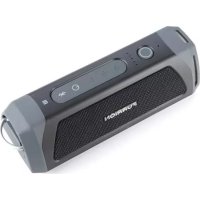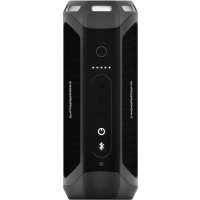
LIT FBS012NBL - Speaker Furrion - Free user manual and instructions
Find the device manual for free LIT FBS012NBL Furrion in PDF.



| Product Type | Portable Bluetooth Speaker |
| Dimensions (L x W x H) | 194.5 x 73.6 x 58 mm |
| Rated Power | 2 x 10 W RMS |
| Bluetooth Version | 4.1 (CSR 8670) |
| Maximum Bluetooth Range | 10 m (33 ft) |
| Battery Life | Up to 15 hours (depending on volume and content) |
| Battery Capacity | 7.4 V / 1800 mAh (Integrated Li-ion) |
| Charging Time | ~3.5 h on charging base, ~5 h via micro-USB |
| Waterproof Rating | IPX7 (resists immersion up to 1 m for 30 min) |
| Flashlight | Yes, >500 lumens, focusable |
| SOS Function | Yes (audible alarm and light flashing) |
| Stereo Mode | Two speakers can be paired for stereo sound |
| Hands-free Kit | Yes (built-in microphone for calls) |
| Voice Assistants | Compatible with Siri and Google Now |
| Auxiliary Input | 3.5 mm AUX IN jack |
| Number of Speakers | 2 speakers of 39-40 mm |
| Signal-to-Noise Ratio | ≥80 dB |
| Total Harmonic Distortion | ≤1% |
| Operating Temperature Range | -10 °C to 45 °C |
| Care and Cleaning | Clean with a dry cloth; do not use abrasive solvents |
| Safety | Do not open, do not expose to excessive heat, use only the supplied charger |
| Spare Parts and Repairability | Non-removable battery; no user-serviceable parts inside |
| General Information | 1 year warranty; manufactured by Furrion |
Frequently Asked Questions - LIT FBS012NBL Furrion
User questions about LIT FBS012NBL Furrion
0 question about this device. Answer the ones you know or ask your own.
Ask a new question about this device
Download the instructions for your Speaker in PDF format for free! Find your manual LIT FBS012NBL - Furrion and take your electronic device back in hand. On this page are published all the documents necessary for the use of your device. LIT FBS012NBL by Furrion.
USER MANUAL LIT FBS012NBL Furrion
FCC Statement. 5
Important Battery Precautions. 6
IC Statement 6
Care of the Environment. 6
Product Features 7
Getting Started 8
What's in the Box 8
Installation 8
Wall-Mount Charging Base Installation (FBS012NBC-XX only) .... 8
Before Using 9
Charging your Speaker 9
Tabletop Charging Base Installation (FBS012NBC-XX only) 9
Operation 10
Turn On/Off your Speaker 10
Pairing your Speaker to a Mobile Device. 10
Playing Audio 11
Using Party Mode 11
Using the Speaker 12
Using Google Now and Siri Service 12
Using Flashlight. 12
Using SOS 12
Care and Maintenance 13
Using AUX IN. 13
Reset 13
Troubleshooting 14
Specifications 15
Warranty. 16
Welcome Important Safety Instructio
Thank you for purchasing this Furrion Bluetooth Speaker. Before operating your new device, please read these instructions carefully. This instruction manual contains information for safe use, installation and maintenance of the device.
Please keep this instruction manual in a safe place for future reference. This will ensure safe use and reduce the risk of injury. Be sure to pass on this manual to new owners of this device.
The manufacturer does not accept responsibility for any damages due to not observing these instructions.
If you have any questions regarding our products, please contact us at support@furrion.com
s

CAUTION
RISK OF ELECTRIC SHOCK DO NOT OPEN

CAUTION: TO REDUCE THE RISK OF ELECTRIC SHOCK, DO NOT REMOVE COVER (OR BACK). NO USER-SERVICEABLE PARTS INSIDE. REFER SERVICING TO QUALIFIED SERVICE PERSONNEL.

This 'bolt of lightning' indicates uninsulated material within your unit may cause an electrical shock. For the safety of everyone in your household, please do not remove product covering.

The 'exclamation mark' calls attention to features for which you should read the enclosed literature closely to prevent operating and maintenance problems.
Important Safety Instructions
- Read these instructions.
- Keep these instructions.
- Heed all warnings
- Follow all instructions.
- Clean only with a dry cloth.
- Do not block any of the ventilation openings. Install in accordance with the manufacturer's instructions.
- Do not install near any heat sources such as radiators, heat registers, stoves or other apparatus (including amplifiers) that produce heat.
- Do not defeat the safety purpose of the polarized or grounding-type plug. A polarized plug has two blades with one wider than the other. A grounding type plug has two blades and a third grounding prong. The wide blade or the third prong are provided for your safety. When the provided plug does not fit into your outlet, consult an electrician for replacement of the obsolete outlet.
- Protect the power cord from being walked on or pinched, particularly at plugs, convenience receptacles and the point where they exit from the apparatus.
- Only use attachments/accessories specified by the manufacturer.
- Use only with a cart, stand, tripod, bracket or table specified by the manufacturer or sold with the apparatus. When a cart is used, use caution when moving the cart/apparatus combination to avoid injury
from tip-over.
- Unplug this apparatus during lightning storms or when unused for long periods of time.
- Refer all servicing to qualified service personnel. Servicing is required when the apparatus has been damaged in any way, such as if the power-supply cord or plug is damaged, liquid has been spilled or objects have fallen into the apparatus, or when the apparatus has been exposed to rain or moisture, does not operate normally, or has been dropped.
- Do not expose batteries to excessive heat such as sunshine, fire or the like.
FCC Statement
WARNING: Changes or modifications not expressly approved by the party responsible for compliance could void the user's authority to operate the equipment.
NOTE: This equipment has been tested and found to comply with the limits for a Class B digital device, pursuant to Part 15 of the FCC Rules. These limits are designed to provide reasonable protection against harmful interference in a residential installation. This equipment generates, uses and can radiate radio frequency energy and, if not installed and used in accordance with the instructions, may cause harmful interference to radio communications. However, there is no

Important Safety Instructions
guarantee that interference will not occur in a particular installation. If this equipment does cause harmful interference to radio or television reception, which can be determined by turning the equipment off and on, the user is encouraged to try to correct the interference by one or more of the following measures:
Reorient or relocate the receiving antenna.
- Increase the separation between the equipment and receiver.
- Connect the equipment into an outlet on a circuit different from that to which the receiver is connected.
- Consult an experienced radio/TV technician for help.
Important Battery Precautions
This device contains a non-removable Lithium-ion battery. The battery must be recycled or disposed of properly. Contact your local waste management office for information on battery recycling or disposal.
IC Statement
This device complies with Industry Canada licence-exempt RSS standard(s). Operation is subject to the following two conditions: (1) this device may not cause interference, and (2) this device must accept any interference, including interference that may cause undesired operation of the device.
Care of the Environment
Your product is designed and manufactured with high quality materials and components, which can be recycled and reused.
Never dispose of your product with other household waste. Please familiarize yourself with the local rules on the separate collection of electrical and electronic products and batteries.
The correct disposal of these products helps prevent potentially negative consequences on the environment and human health.
Your product contains batteries which cannot be disposed of with normal household waste.
Product Features
Getting Started Installation
What's in the Box
Make sure you have all the following items included in the packaging. If any item is damaged or missing contact place of purchase.
-
Bluetooth Speaker x1
USB Charging Cable x1
Wireless Charging Dock* -
For FBS012NBC-XX model only
NOTE: The contents included may be different base on the kit you purchased. Please take the actual product as standard.
Wall-Mount Charging Base Installation (FBS012NBC-XX only)
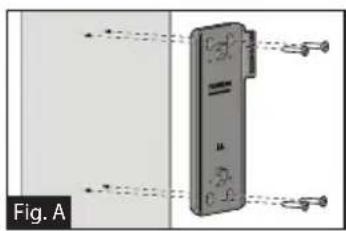
- Select a suitable position that is not susceptible to moisture.
- Install the speaker charging base onto the wall and secure with 4 tapping screws provided. (Fig. A)
NOTE: Make sure the word Furrion inside the charging base is facing up while installing.
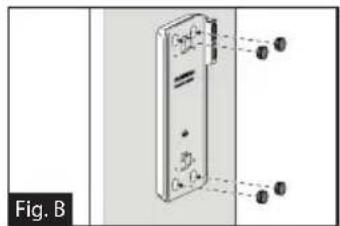
- Install 4 rubber caps provided over the screw holes. (Fig. B)
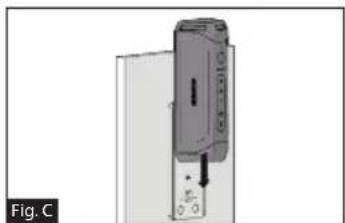
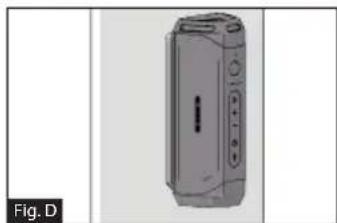
- Slide the speaker into the charging base until securely attached onto the charging base as shown below. Do not installed inersed. (Fig. C and Fig. D)
Installation Before Using
Tabletop Charging Base Installation (FBS012NBC-XX only)
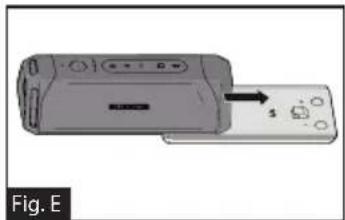
- Slide the speaker into the charging base until securely attached onto the charging base as shown below. Do not installed inersed. (Fig. E)
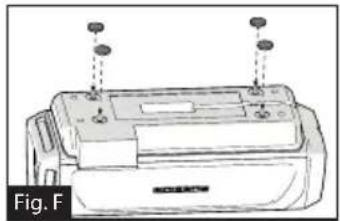
- Turnover the speaker with the bottom of the charging base facing up and install 4 rubber feet onto the charging base as shown. [Fig. F]
Charging your Speaker
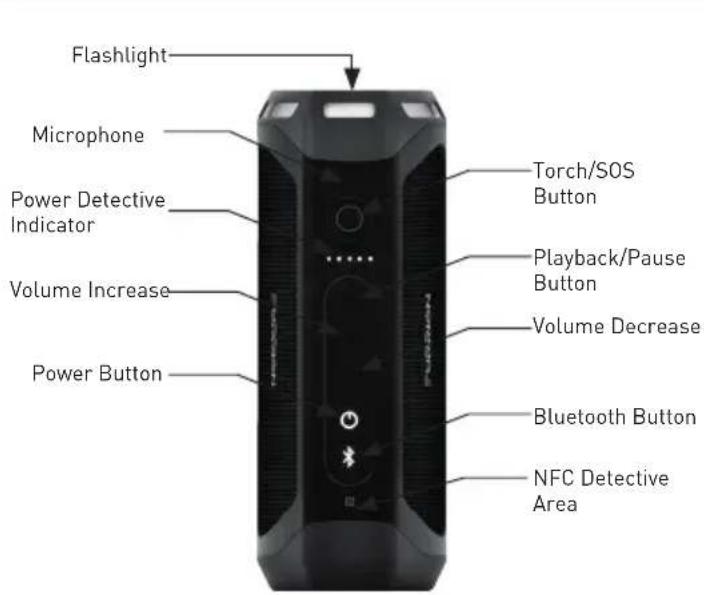
Before using the speaker, you must charge the device for a minimum of 5 hours using Micro USB Charing Port or 3.5 hours (minimum) using the charging base. You may check the power level by short pressing the button before operating your speaker each time. The power indicator will be illuminated in white for 3 seconds to show the current power level and then disappear.
-5 Light: 80% -100%
-4 Light: 60%-80%
-3 Light: 40% -60%
-2 Light: 20% - 40%
-1 Light: 0-20%
It is recommended you fully charge the battery before using for the first time. The speaker can be charged in three ways:
If a genuine Furrion charging base is installed, place the speaker into the charging base to charge. The speaker will be fully charged in approximately 3.5 hours.
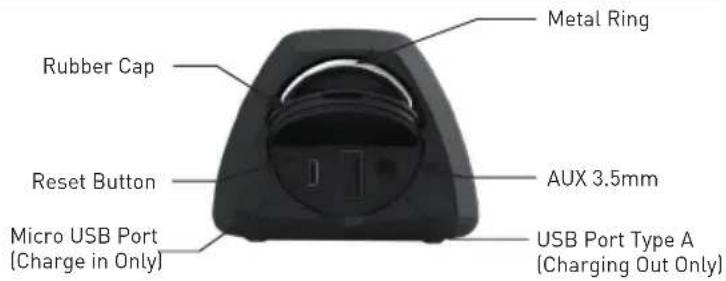
- Lift to open the rubber cap at the end of the speaker. Connect one end of the adapter to the Micro USB Port on the speaker and the other end to a 5V DC outlet. The speaker will be fully charged in approximately 5 hours.

Before Using
- Connect one end of the provided power adapter to the power inlet at the bottom of the speaker, connect the other end to a 5V DC power source. The speaker will be fully charged in approximately 3.5 hours. NOTE: The button remains white during the charging process and turns off after fully charged.
Operation
Turn On/Off your Speaker
Turning On: When speaker is in Off mode
- Press and hold the button for 3 seconds. A 'power on' tone will sound. The LED will flash white for a second and then disappear.
Turning Off: When speaker is in On mode
- Press and hold the button for 3 seconds. A 'power off' tone will sound.
NOTES:
- If the speaker is not connected to a source device and is not plugged into a power source, the speaker turns off after 15 minutes of inactivity.
- If the speaker is not connected to a source device and is plugged into a power source, the speaker turns off after 30 minutes of inactivity.
- If the speaker is connected to a source device and is not plugged into a power source, the speaker turns off after 1 hour of inactivity.
- If the speaker is connected to a source device and is plugged into a power source, the speaker turns off after 1 hour of inactivity.
Pairing your Speaker to a Mobile Device
Prior to using the speaker for the first time, you must pair it with a mobile device. The following steps describe the pairing instructions for a typical mobile device. Refer to your device's owners manual for details.
Operation
if necessary.
Pairing your device with Bluetooth
- Place the speaker to the Bluetooth enabled device no more than 33 feet [10 meters] apart. Make sure the speaker is in 'On' mode.
- Press and hold button for one second until the button is illuminated and flashing white.
- Activate your mobile device's Bluetooth function by referring to your mobile device's user guide for details. Find the device named "Furrion LIT" in your mobile Bluetooth device's list and select to connect.
NOTE: The button will flash white during the searching process. If connected successfully, the button will be illuminated in white for 3 seconds and then disappear.
- Press and hold the button for 3 seconds to cancel the pairing mode. NOTE: The speaker will automatically remember the last 10 paired devices. Press both and buttons for 5 seconds to clear the memory.
Pairing your Speaker with NFC
- Enable your mobile device for NFC pairing. Refer to your device's owner's manual for details if necessary.
- Place the mobile device close to the NFC detective area on the speaker. Search "Furrion LIT" from the available NFC devices list.
- Confirm the connection on your device.
Playing Audio
Make sure at least one mobile device has been connected to the speaker before playing audio.
- Press and hold the button until the 'power on' tone sounds, the speaker will be connected to the mobile devices automatically if it has been previously paired.
- Use the controls on your mobile device to control the audio playback or use the buttons on the speaker to pause audio, navigate tracks and control volume.
Pres button to pause or resume the playback. - Press + button to increase the audio volume. Press and hold + button to go to the next track.
- Press - button to decrease the audio volume. Press and hold - button to go to the previous track.
Using Party Mode
Two speakers can be paired for stereo.
- Identify which speaker will be the main speaker and which speaker will be the auxiliary speaker. Your device only needs to pair with the main speaker.
- Pair your device with the main speaker. See section "Pairing your Speaker to a Mobile Device" for details.

Operation
- With the auxiliary speaker on, press both + buttons on the auxiliary speaker until tone sounds.
NOTE: Do not put the auxiliary speaker into device pairing mode. - Press both + buttons on the main speaker (the speaker that is paired with your mobile device) until tone sounds. The main speaker and the auxiliary speaker will be connected automatically within approximately 10 seconds and a tone sounds. The speakers will be in stereo mode.
- Press button on either speaker to pause or resume audio. Press + or - buttons on either speaker to increase or decrease the volume.
- To exit party mode, press and hold the power button on either speaker to turn the speaker off.
Using the Speaker
When the speaker is paired to a device and a call is received, the incoming call tone will sound. If there is audio playing when a call is answered, the audio will pause and only the call will be audible. When the call is ended, audio will resume.
Answering a call:
To answer an incoming call, press button on the speaker.
Reject a call:
To reject an incoming call, press and hold button on the speaker.
Ending a call:
To end an active call, press button on the speaker.
Mute a call:
- During a call, press both + and - buttons to mute the call, press again to resume.
Using Google Now® and Siri® Service
Press and hold button to activate the Google Now and Siri function. Press again to end.
Using Flashlight
Your speaker can be used as a flashlight. When your speaker is in On mode, short press button to turn on the flashlight, press again to turn off.
Using SOS
- Press and hold button to turn on the SOS signal. The flashlight will be turned on and flash every 2 seconds and the devices connected will end automatically.
- When SOS light is in on mode, press button to turn on/off the buzzer.
- Press and hold button for 3 seconds to quit the SOS mode. The
Operation Care and Maintenance
speaker will return to Bluetooth mode and reconnect to the last connected device automatically.
Using AUX IN
- Plug one end of a 3.5mm-to-3.5mm cable (not included) into your mobile device, just like you would a pair of headphones.
- Lift and open the rubber cap at the end of the speaker and plug the other end of the cable into the AUX IN port.
- Use your mobile device to control media playback.
- Use your mobile device or use the buttons on the speaker to pause audio, navigate tracks and control volume.
NOTE: If more than one device is paired to the speaker with Bluetooth, the wired device takes precedence over a Bluetooth device connection.
Reset
- Lift and open the rubber cap at the end of the speaker.
-
Press the reset button using a sharp object.
-
Do not use abrasive cleaning solvents to clean the speaker.
- Do not expose the speaker to high temperatures.
-
Do not attempt to disassemble the speaker, as it does not contain serviceable components inside.
-
If you do not use the speaker for long periods, be sure to store it in a dry place, free from extreme temperature, humidity and dust.
- Only use the Furrion supplied charger when charging the speaker.
- Only charge the speaker's built-in battery in accordance with the instructions in this user guide.
- Avoid charging the speaker in extreme high or low temperatures.
Troubleshooting
| Issue Solution | |
| No power Recharge your speaker. | |
| No sound | Adjust volume on the connected device or on the speaker. |
| When you listen to audio through Bluetooth, make sure that no audio input cable is connected to the AUX IN socket. | |
| Make sure that your Bluetooth device is within the effective operational range. | |
| No response from the speaker | Restart the speaker. |
| Poor audio quality after connection with a Bluetooth enabled device. | The Bluetooth reception is poor. Move the device closer to this product or remove any obstacles between them. |
| Issue Solution | |
| Cannot connect with the device | The Bluetooth function of the device is not enabled. Refer to the user manual of the device for how to enable the function. |
| This product is already connected with another Bluetooth enabled device. Disconnect that device and try again. | |
| The paired device connects and disconnects constantly | Bluetooth reception is poor. Move the device closer to this product or remove any obstacles between them. |
| For some devices, Bluetooth connection may be deactivated automatically as a power-saving feature. This does not indicate any malfunction of this product. | |
Specifications
| Technical Specifications | |
| Dimension (L/M/S) 194.5 x 73.6 x 58 mm | |
| Speaker Enclosure Type 39-40mm x 2 | |
| Rated Power 10W x2 RMS | |
| Signal to Noise Ratio >=80dB | |
| System Total Harmonic Distortion 1% | |
| Bluetooth Version STEREO CSR 8670 (4.1) | |
| Bluetooth Maximum Communication Range | 10m |
| Bluetooth Frequency Band 2.4GHz | |
| Operation Temperature Range 45 | °C to -10°C |
| Battery Capacity 7.4v/1800mAh | |
| Torch Light Effect Focus | |
| Torch Light Standard >500 Lumens | |
| Technical Specifications | |
| Waterproof IPX 7 | |
| Playtime Up to 15 hours playtime (play | ytime can vary depending on volume level and audio content! |
Warranty
Furrion warrants for a period of 1 year from date of retail purchase by the original end-use purchaser, that this product, when delivered to you in new condition, in original packaging, from a Furrion authorized reseller and used in normal conditions, is free from any defects in manufacturing, materials, and workmanship. In case of such defect, Furrion shall replace or repair the product at no charge to you. This warranty does not cover: products where the original serial numbers have been removed, altered or cannot readily be determined; damage or loss caused by accident, misuse, abuse, neglect, product modification, failure to follow instructions in owner's manual, commercial or industrial use; damage or loss caused to the decorative surface of product; to any data, software or information; and normal wear and tear. This warranty only protects the original end-user ("you") and is not transferrable; any attempt to transfer this warranty shall make it immediately void. This warranty is only valid in the country of purchase.
THIS WARRANTY AND REMEDIES SET FORTH ABOVE ARE EXCLUSIVE AND IN LIEU OF ALL OTHER WARRANTYES, REMEDIES AND CONDITIONS, WHETHER ORAL OR WRITTEN, EXPRESS OR IMPLIED. FURRION SPECIFICALLY DISCLAIMS ANY AND ALL IMPLIED WARRANTYES, INCLUDING, WITHOUT LIMITATION, WARRANTYES OF MERCHANTABILITY AND FITNESS FOR A PARTICULAR PURPOSE. IF FURRION CANNOT LAWFULLY DISCLAIMER IMPLIED WARRANTYES UNDER THIS LIMITED WARRANTY, ALL SUCH WARRANTYES, INCLUDING
WARRANTIES OF MERCHANTABILITY AND FITNESS FOR A PARTICULAR PURPOSE ARE LIMITED IN DURATION TO THE DURATION OF THIS WARRANTY.
No Furrion reseller, agent, or employee is authorized to make any modification, extension, or addition to this warranty.
FURRION IS NOT RESPONSIBLE FOR DIRECT, INDIRECT, SPECIAL, INCIDENTAL OR CONSEQUENTIAL DAMAGES RESULTING FROM ANY BREACH OF WARRANTY OR CONDITION, OR UNDER ANY OTHER LEGAL THEORY, INCLUDING BUT NOT LIMITED TO LOST PROFITS, DOWNTIME, GOODWILL, DAMAGE TO OR REPLACEMENT OF ANY EQUIPMENT OR PROPERTY, ANY COSTS OF RECOVERING, REPROGRAMMING, OR REPRODUCING ANY PROGRAM OR DATA STORED IN OR USED WITH FURRION PRODUCTS. FURRION'S TOTAL LIABILITY IS LIMITED TO THE REPAIR OR REPLACEMENT OF THIS PRODUCT PURSUANT TO THE TERMS OF THIS WARRANTY.
SOME STATES DO NOT ALLOW THE EXCLUSION OR LIMITATION OF INCIDENTAL OR CONSEQUENTIAL DAMAGES OR EXCLUSIONS OR LIMITATIONS ON THE DURATION OF IMPLIED WARRANTYES OR CONDITIONS, SO THE ABOVE LIMITATIONS OR EXCLUSIONS MAY NOT APPLY TO YOU. THIS WARRANTYY GIVES YOU SPECIFIC LEGAL RIGHTS, AND YOU MAY ALSO HAVE OTHER RIGHTS THAT VARY BY STATE OR WHERE APPLICABLE IN THE COUNTRIES WHERE FURRION HAS NON
Warranty
US/CANADIAN AUTHIZED DEALERSJ COUNTRY. NO ACTION OR CLAIM TO ENFORCE THIS WARRANTY SHALL BE COMMENCED AFTER THE EXPIRATION OF THE WARRANTY PERIOD.
Keep your receipt, delivery slip, or other appropriate payment record to establish the warranty period. Service under this warranty must be obtained by contacting Furrion at warranty@furrion.com
Product features or specifications as described or illustrated are subject to change without notice.
Contenu
Contenu 18
Pairing your device with Bluetooth
Furrion Innovation Center & Institute of Technology
52567 Independence Ct., Elkhart, IN 46514, USA Toll free:1-888-354-5792
Email: support@furrion.com
2007 2017 Furrion Ltd. Furion, the Furion logo and Furion LIT are trademarks licensed for use by Furion Ltd. and registered in the U.S. and other countries. The Bluetooth word mark and logo are registered trademarks of Bluetooth SIG, Inc. N-Mark is a trademark of NFC Forum, Inc. registered in the U.S. and other countries. Google Now is a trademark of Google, Inc. registered in the U.S. and other countries. Sini is a trademark of Apple, Inc. registered in the U.S. and other countries.