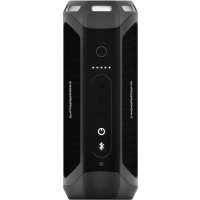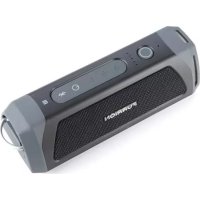
LIT FBS012NVPBL - Speaker Furrion - Free user manual and instructions
Find the device manual for free LIT FBS012NVPBL Furrion in PDF.



| Product Type | Portable Bluetooth Speaker |
| Brand | Furrion |
| Model | LIT FBS012NVPBL |
| Dimensions (L × W × H) | 194.5 × 73.6 × 58 mm |
| Connectivity | Bluetooth 4.1 (A2DP, AVRCP, HFP), NFC |
| Ports | Micro-USB port (charging), AUX 3.5 mm jack, USB Type A port (charging output) |
| Speaker | 2 × 39 mm + 2 passive radiators |
| Rated Power | 10 W × 2 RMS |
| Signal-to-Noise Ratio | ≥ 80 dB |
| Total Harmonic Distortion | 1% |
| Battery | Lithium-ion 7.4 V / 1800 mAh |
| Battery Life | Up to 15 hours (depending on volume) |
| Charging Time | ~3.5 h (base) or ~5 h (micro-USB) |
| Waterproof Rating | IPX7 |
| Flashlight | >500 lumens, adjustable focus |
| Bluetooth Range | Up to 10 m |
| Main Functions | Audio playback, stereo mode, hands-free kit, Google Now/Siri, flashlight, SOS |
| Package Contents | Speaker, bike/rail mount, Velcro strap, lanyard, installation guide, warranty card |
| Care and Cleaning | Clean with a dry cloth. Do not use abrasive solvents. |
| Safety | Do not open the device. Use only the provided charger. Avoid extreme temperatures. |
| Repairability | No user-serviceable parts. Contact a qualified technician. |
| General Information | Manufactured by Furrion Ltd. FCC, IC, CE markings. |
Frequently Asked Questions - LIT FBS012NVPBL Furrion
User questions about LIT FBS012NVPBL Furrion
0 question about this device. Answer the ones you know or ask your own.
Ask a new question about this device
Download the instructions for your Speaker in PDF format for free! Find your manual LIT FBS012NVPBL - Furrion and take your electronic device back in hand. On this page are published all the documents necessary for the use of your device. LIT FBS012NVPBL by Furrion.
USER MANUAL LIT FBS012NVPBL Furrion
natural_image
Black electronic device with speaker grille and control buttons (no visible text or symbols)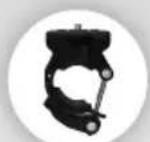
[Rail /Bike Mount] / [Support pour rail/vite] [Soporte para riet/bicicleta] / [Schienen- / Fahrrad halterung] [Encaze de calha/bicicleta] / [Supporte per binario/bicicletta]
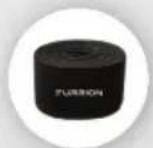
[Velcro Strap] / [Céurroie Velcro] [Correa de velcro] / [Klottband] [Correia de velcro] / [Cinturino in velcro]
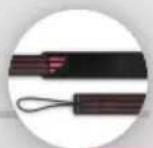
(Hand Strap) / (Dragonne) (Correa de mano) / (Handschlaufe) (Correia para transporte) / (Cinghia da polso)
Portable Bluetooth® Speaker Haut-parleur portable Bluetooth® Parlante portátil Bluetooth® Tragbarer Bluetooth®-Lautsprecher Altifalante Bluetooth® Portátil Altoparlante Bluetooth® portatile
Quick Start Guide & User's Manual Guide de démarrage rapide et guide de l'utilisateur Guía de inicio rápido y manual del usuario Schnellstarthandbuch und Benutzerhandbuch Guía de Início Rápido e Manual do Utilizador Guida rapida e Manuale per l'utente
Model/Modèle/Modelo/Modell/Modelo/Modello: FBS012NVP-BL/FBS012NVP-PS FBS012NVP-SB/FBS012NVP-OP
Contents
Contents 1
Welcome 2
Important Safety Instructions....2
FCC Statement....3
Important Battery Precautions....4
IC Statement 4
Care of the Environment....4
For all products except those with wireless operation:....4
For all products with wireless operation: 4
Product Features 5
Getting Started 6
What's in the box 6
Installation 6
Rail/Bike Mount Installation....7
Before Using 8
Charging your Speaker 8
Operation....9
Turn On/Off your Speaker 9
Pairing your Speaker to a Mobile Device....9
Playing Audio 10
Using Party Mode 10
Using the Speaker 11
Using Google Now® and Siri® Service 11
Using Flashlight....11
Using SOS 11
Using AUX IN....12
Reset 12
Care and Maintenance 12
Troubleshooting....13
Specifications 14
Welcome Important Safety Instruction
Thank you for purchasing this Furrion Bluetooth® Speaker. Before operating your new device, please read these instructions carefully. This instruction manual contains information for safe use, installation and maintenance of the device.
Please keep this instruction manual in a safe place for future reference. This will ensure safe use and reduce the risk of injury. Be sure to pass on this manual to new owners of this device.
The manufacturer does not accept responsibility for any damages due to not observing these instructions.
If you have any questions regarding our products, please contact us at support@furrion.com
s

CAUTION
RISK OF ELECTRIC SHOCK DO NOT OPEN

CAUTION: TO REDUCE THE RISK OF ELECTRIC SHOCK, DO NOT REMOVE COVER (OR BACK). NO USER-SERVICEABLE PARTS INSIDE. REFER SERVICING TO QUALIFIED SERVICE PERSONNEL.

This 'bolt of lightning' indicates uninsulated material within your unit may cause an electrical shock. For the safety of everyone in your household, please do not remove product covering.

The ‘exclamation mark’ calls attention to features for which you should read the enclosed literature closely to prevent operating and maintenance problems.
Important Safety Instructions
- Read these instructions.
- Keep these instructions.
- Heed all warnings.
- Follow all instructions.
- Clean only with a dry cloth.
- Do not block any of the ventilation openings. Install in accordance with the manufacturer's instructions.
- Do not install near any heat sources such as radiators, heat registers, stoves or other apparatus (including amplifiers) that produce heat.
- Do not defeat the safety purpose of the polarized or grounding-type plug. A polarized plug has two blades with one wider than the other. A grounding type plug has two blades and a third grounding prong. The wide blade or the third prong are provided for your safety. When the provided plug does not fit into your outlet, consult an electrician for replacement of the obsolete outlet.
- Protect the power cord from being walked on or pinched, particularly at plugs, convenience receptacles and the point where they exit from the apparatus.
- Only use attachments/accessories specified by the manufacturer.
-
Use only with a cart, stand, tripod, bracket or table specified by the manufacturer or sold with the apparatus. When a cart is used, use caution when moving the cart/apparatus combination to avoid injury from tip-over.
-
Unplug this apparatus during lightning storms or when unused for long periods of time.
- Refer all servicing to qualified service personnel. Servicing is required when the apparatus has been damaged in any way, such as if the power-supply cord or plug is damaged, liquid has been spilled or objects have fallen into the apparatus, or when the apparatus has been exposed to rain or moisture, does not operate normally, or has been dropped.
- Do not expose batteries to excessive heat such as sunshine, fire or the like.
FCC Statement

WARNING: Changes or modifications not expressly approved by the party responsible for compliance could void the user's authority to operate the equipment.
NOTE: This equipment has been tested and found to comply with the limits for a Class B digital device, pursuant to Part 15 of the FCC Rules. These limits are designed to provide reasonable protection against harmful interference in a residential installation. This equipment generates, uses and can radiate radio frequency energy and, if not installed and used in accordance with the instructions, may cause harmful interference to radio communications. However, there is no guarantee that interference will not occur in a particular installation.
Important Safety Instructions
If this equipment does cause harmful interference to radio or television reception, which can be determined by turning the equipment off and on, the user is encouraged to try to correct the interference by one or more of the following measures:
• Reorient or relocate the receiving antenna.
- Increase the separation between the equipment and receiver.
- Connect the equipment into an outlet on a circuit different from that to which the receiver is connected.
- Consult an experienced radio/TV technician for help.
Important Battery Precautions
This device contains a non-removable Lithium-Ion battery. The battery must be recycled or disposed of properly. Contact your local waste management office for information on battery recycling or disposal.
IC Statement
This device complies with Industry Canada licence-exempt RSS standard(s). Operation is subject to the following two conditions: (1) this device may not cause interference, and (2) this device must accept any interference, including interference that may cause undesired operation of the device.
Care of the Environment
Your product is designed and manufactured with high quality materials and components, which can be recycled and reused.
Never dispose of your product with other household waste. Please familiarize yourself with the local rules on the separate collection of electrical and electronic products and batteries.
The correct disposal of these products helps prevent potentially negative consequences on the environment and human health.
Your product contains batteries which cannot be disposed of with normal household waste.
For all products except those with wireless operation:
FURRION hereby declares that this equipment is in compliance with the EMC 2014/30/EU Directive, LVD 2014/35/EU Directive, ErP 2009/125/EC Directive and RoHS 2011/65/EU Directive. The declaration of conformity may be consulted in the support section of our Website, accessible from www.furrion.com
For all products with wireless operation:
FURRION hereby declares that this equipment is in compliance with the essential requirement and other relevant provision of Directive 2014/53/EU, ErP 2012/27/EU Directive and RoHS 2011/65/EU Directive. The declaration of conformity may be consulted in the support section of our Website, accessible from www.furrion.com
Product Features
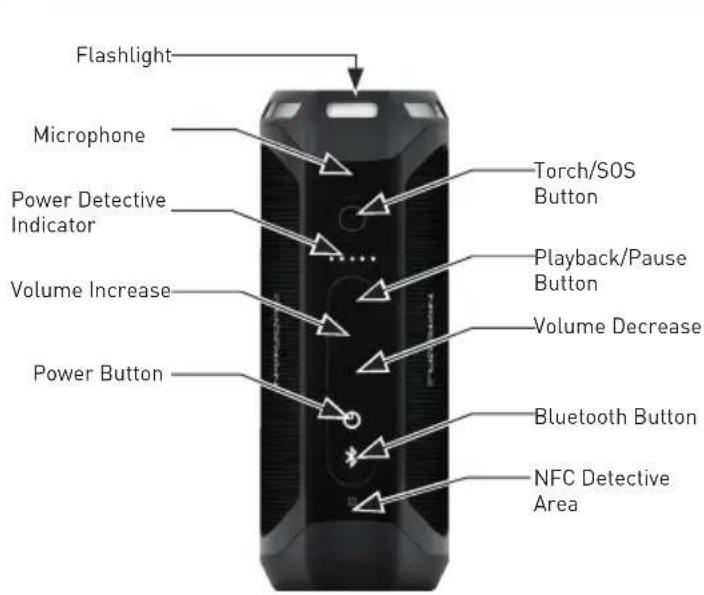
text_image
Flashlight Microphone Power Detective Indicator Volume Increase Power Button Torch/SOS Button Playback/Pause Button Volume Decrease Bluetooth Button NFC Detective Area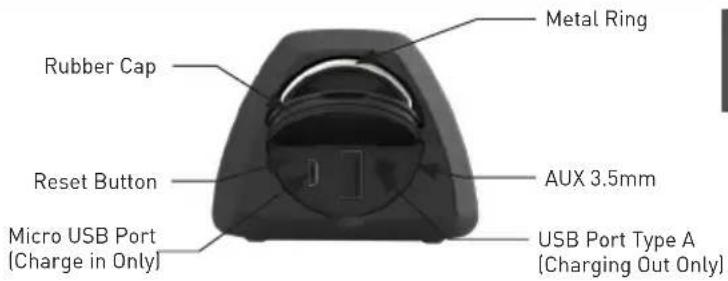
text_image
Rubber Cap Reset Button Micro USB Port (Charge in Only) Metal Ring AUX 3.5mm USB Port Type A (Charging Out Only)Getting Started Installation
What's in the box
Make sure you have all the following items included in the packaging. If any items are damaged or missing, please contact your dealer.
- Bluetooth Speaker x1
- Rail /Bike Mount x 1
- Velcro Strap x 1
- Hand Strap x 1
• Installation Guide x 1 - Warranty Card x 1
NOTE: The contents included may be different base on the kit you purchased. Please take the actual product as standard.
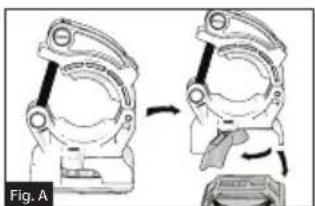
- Fully rotate the bike mount lock handle to release the strap mount from the bike mount. (Fig. A)
- Turn the Bluetooth speaker over so the bottom side is facing up. Install the strap mount by screwing into the speaker. (Fig. B)
natural_image
Diagram showing two mechanical assembly steps, one with a tool and the other with a handle (no text or symbols)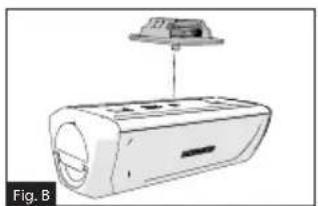
natural_image
Diagram of a device with a top component and labeled Fig. B, showing internal components without any text or symbols.Installation
Rail/Bike Mount Installation
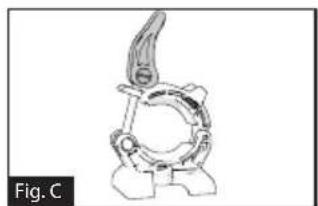
- Lift the bike mount lock and rotate counterclockwise until the bike mount can be fully opened. (Fig. C and Fig. D)
natural_image
Line drawing of a mechanical component with a curved handle and circular base (no text or symbols)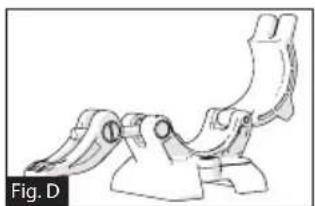
natural_image
Technical line drawing of a mechanical clamp or bracket assembly (no text or symbols)- Select where you are going to mount your speaker and install the bike mount onto the bike. (Fig. E) WARNING: Make sure the bike mount is fully secured by rotating the bike mount lock clockwise. The minimum diameter of the mounting pole is 78 " (22 mm), and maximum is 1516 " (33 mm).
- Align the strap mount installed under the speaker with the bike mount base and pull the bike mount lock handle to fix the speaker onto the bike. (Fig. F)
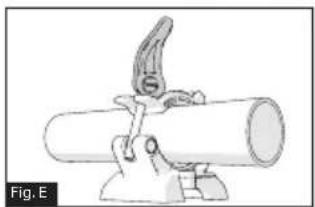
natural_image
Mechanical clamp holding a cylindrical pipe fitting (no text or symbols visible)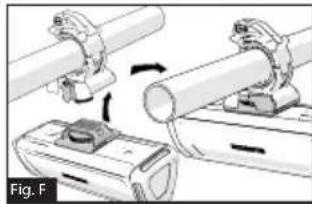
natural_image
Mechanical assembly diagram showing two pipe fittings and a clamp mechanism (no text or symbols)Velcro Strap Installation
Thread the velcro strap through the strap mount installed under the speaker and wrap to the place you would like to locate your speaker. (Fig. G and Fig. H)
NOTE: Make sure the Furrion logo is facing outside while wrapping the velcro strap.
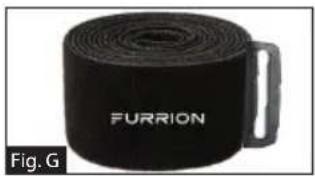
natural_image
Black cylindrical object labeled 'FURRION' with a handle, shown as Figure G (no additional text or symbols visible)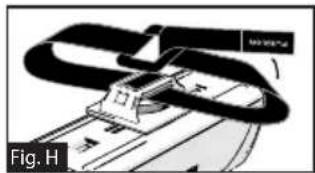
text_image
Fig. HInstallation Before Using
Hand Strap Installation
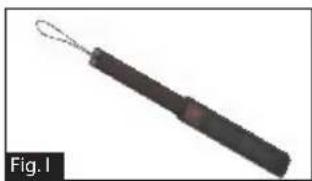
Tie the end of the hand strap, with thin cord, to the metal ring on the speaker. Wrap the other end around your wrist. (Fig. I and Fig. J)
natural_image
Close-up of a black-handled tool with a loop handle, labeled Fig.1 (no text or symbols on the object itself)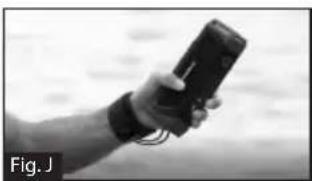
natural_image
Hand holding a handheld device, possibly a smartwatch or sensor, with no visible text or symbols on the device itself.Charging your Speaker
Before using the speaker, you must charge the device for a minimum of 5 hours using Micro USB Charing Port or 3.5 hours (minimum) using the charging base. You may check the power level by short pressing the button before operating your speaker each time. The power indicator will be illuminated in white for 3 seconds to show the current power level and then disappear.
-5 Light: 80%-100%
-4 Light: 60%-80%
-3 Light: 40%-60%
-2 Light: 20%-40%
-1 Light: 0-20%
It is recommended you fully charge the battery before using for the first time. The speaker can be charged in three ways:
- If a genuine Furrion charging base is installed, place the speaker into the charging base to charge. The speaker will be fully charged in approximately 3.5 hours.
- Lift to open the rubber cap at the end of the speaker. Connect one end of the adapter to the Micro USB Port on the speaker and the other end to a 5V DC outlet. The speaker will be fully charged in approximately 5 hours.
Before Using
- Connect one end of the provided power adapter to the power inlet at the bottom of the speaker, connect the other end to a 5V DC power source. The speaker will be fully charged in approximately 3.5 hours. NOTE: The button remains white during the charging process and turns off after fully charged.
Operation
Turn On/Off your Speaker
Turning On: When speaker is in Off mode
- Press and hold the button for 1 seconds. A 'power on' tone will sound. The LED will flash white for a second and then disappear.
Turning Off: When speaker is in On mode
- Press and hold the button for 1 seconds. A 'power off' tone will sound.
NOTES:
- If the speaker is not connected to a source device and is not plugged into a power source, the speaker turns off after 15 minutes of inactivity.
- If the speaker is not connected to a source device and is plugged into a power source, the speaker turns off after 30 minutes of inactivity.
- If the speaker is connected to a source device and is not plugged into a power source, the speaker turns off after 1 hour of inactivity.
- If the speaker is connected to a source device and is plugged into a power source, the speaker turns off after 1 hour of inactivity.
Pairing your Speaker to a Mobile Device
Prior to using the speaker for the first time, you must pair it with a mobile device. The following steps describe the pairing instructions for a typical mobile device. Refer to your device's owners manual for details if necessary.
Operation
Pairing your device with Bluetooth
- Place the speaker to the Bluetooth enabled device no more than 33 feet (10 meters) apart. Make sure the speaker is in 'On' mode.
- Press and hold button for one second until the button is illuminated and flashing white.
- Activate your mobile device's Bluetooth function by referring to your mobile device's user guide for details. Find the device named "Furrion LIT" in your mobile Bluetooth device's list and select to connect. NOTE: The button will flash white during the searching process. If connected successfully, the button will be illuminated in white for 3 seconds and then disappear.
- Press and hold the button for 3 seconds to cancel the pairing mode.
NOTE: The speaker will automatically remember the last 10 paired devices. Press both *and - buttons for 5 seconds to clear the memory.
Pairing your Speaker with NFC
- Enable your mobile device for NFC pairing. Refer to your device's owner's manual for details if necessary.
- Place the mobile device close to the NFC detective area on the speaker. Search "Furrion LIT" from the available NFC devices list.
- Confirm the connection on your device.
Playing Audio
Make sure at least one mobile device has been connected to the speaker before playing audio.
- Press and hold the button until the 'power on' tone sounds, the speaker will be connected to the mobile devices automatically if it has been previously paired.
- Use the controls on your mobile device to control the audio playback or use the buttons on the speaker to pause audio, navigate tracks and control volume.
- Press button to pause or resume the playback.
- Press + button to increase the audio volume. Press and hold + button to go to the next track.
- Press - button to decrease the audio volume. Press and hold - button to go to the previous track.
Using Party Mode
Two speakers can be paired for stereo.
- Identify which speaker will be the main speaker and which speaker will be the auxiliary speaker. Your device only needs to pair with the main speaker.
- Pair your device with the main speaker. See section "Pairing your Speaker to a Mobile Device" for details.
Operation
- With the auxiliary speaker on, press both and + buttons on the auxiliary speaker until tone sounds.
NOTE: Do not put the auxiliary speaker into device pairing mode. - Press both and + buttons on the main speaker (the speaker that is paired with your mobile device) until tone sounds. The main speaker and the auxiliary speaker will be connected automatically within approximately 10 seconds and a tone sounds. The speakers will be in stereo mode.
- Press button on either speaker to pause or resume audio. Press + or - buttons on either speaker to increase or decrease the volume.
- To exit party mode, press and hold the power button on either speaker to turn the speaker off.
Using the Speaker
When the speaker is paired to a device and a call is received, the incoming call tone will sound. If there is audio playing when a call is answered, the audio will pause and only the call will be audible. When the call is ended, audio will resume.
Answering a call:
- To answer an incoming call, press button on the speaker.
Reject a call:
- To reject an incoming call, press and hold button on the speaker.
Ending a call:
• To end an active call, press button on the speaker.
Mute a call:
- During a call, press both + and - buttons to mute the call, press again to resume.
Using Google Now® and Siri® Service
Press and hold ▶ button to activate the Google Now and Siri function. Press again to end.
Using Flashlight
Your speaker can be used as a flashlight. Short press button to turn on the flashlight, press again to turn off.
Using SOS
- Press and hold ○ button to turn on the SOS signal. The flashlight will be turned on and flash every 2 seconds and the devices connected will end automatically.
- When SOS light is in on mode, press button to turn on/off the
Operation
buzzer.
- Press and hold button for 3 seconds to quit the SOS mode. The speaker will return to Bluetooth mode and reconnect to the last connected device automatically.
Using AUX IN
- Plug one end of a 3.5mm-to-3.5mm cable (not included) into your mobile device, just like you would a pair of headphones.
- Lift and open the rubber cap at the end of the speaker and plug the other end of the cable into the AUX IN port.
- Use your mobile device to control media playback.
- Use your mobile device or use the buttons on the speaker to pause audio, navigate tracks and control volume.
NOTE: If more than one device is paired to the speaker with Bluetooth, the wired device takes precedence over a Bluetooth device connection.
Reset
- Lift and open the rubber cap at the end of the speaker.
- Press the reset button using a sharp object.
Care and Maintenance
- Do not use abrasive cleaning solvents to clean the speaker.
- Do not expose the speaker to high temperatures.
- Do not attempt to disassemble the speaker, as it does not contain serviceable components inside.
- If you do not use the speaker for long periods, be sure to store it in a dry place, free from extreme temperature, humidity and dust.
- Only use the Furrion supplied charger when charging the speaker.
- Only charge the speaker's built-in battery in accordance with the instructions in this user guide.
- Avoid charging the speaker in extreme high or low temperatures.
Troubleshooting
| Issue Solution | |
| No power Recharge your speaker. | |
| No sound | Adjust volume on the connected device or on the speaker. |
| When you listen to audio through Bluetooth, make sure that no audio input cable is connected to the AUX IN socket. | |
| Make sure that your Bluetooth device is within the effective operational range. | |
| No response from the speaker | Restart the speaker. |
| Poor audio quality after connection with a Bluetooth enabled device. | The Bluetooth reception is poor. Move the device closer to this product or remove any obstacles between them. |
| Issue Solution | |
| Cannot connect with the device | The Bluetooth function of the device is not enabled. Refer to the user manual of the device for how to enable the function. |
| This product is already connected with another Bluetooth enabled device. Disconnect that device and try again. | |
| The paired device connects and disconnects constantly | Bluetooth reception is poor. Move the device closer to this product or remove any obstacles between them. |
| For some devices, Bluetooth connection may be deactivated automatically as a power-saving feature. This does not indicate any malfunction of this product. | |
Specifications
English
| Technical Specifications | |
| Dimension (L/M/S) 194.5 x 73.6 x 58 mm | |
| Speaker Driver 2 x 39mm + 2 x passive radiator | |
| Rated Power 10W x2 RMS | |
| Signal to Noise Ratio >=80dB | |
| System Total Harmonic Distortion | 1% |
| Bluetooth Version 4.1 | |
| Support AVRCP 1.4, A2DP V1.2 | HFP V1.6 |
| Bluetooth Maximum Communication Range | 10m |
| Technical Specifications | |
| Operation Temperature Range | 45°C to -10°C |
| Battery Capacity 7.4v/1800mAh | |
| Torch Light Effect Focus | |
| Torch Light Standard >500 Lumens | |
| Waterproof IPX 7 | |
| Playtime | Up to 15 hours playtime (playtime can vary depending on volume level and audio content) |
| Bluetooth Transmitter Frequency Range | 2.4GHz (2.402-2.480GHz) |
| Bluetooth Transmitter Power | ≤ 3.88dBm |
Contenu
Contenu 15
Bienvenue....16
natural_image
Diagram showing two mechanical components before and after a change, with no visible text or symbols.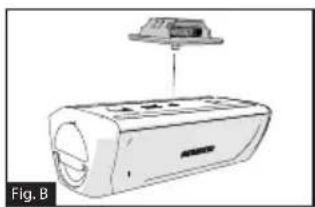
natural_image
Diagram of a device with a top component and labeled Fig. B, showing no text or symbols on the device itself.natural_image
Line drawing of a mechanical component with a curved top and circular base (no text or symbols)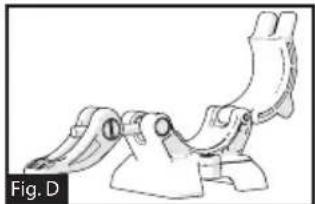
natural_image
Technical line drawing of a mechanical clamp or bracket assembly (no text or symbols)natural_image
Mechanical clamp holding a cylindrical pipe fitting (no text or symbols visible)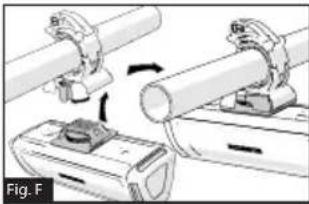
natural_image
Mechanical assembly diagram showing two cylindrical components being inserted into a base plate (no text or symbols visible)natural_image
Black cylindrical object labeled 'FURRION' with a handle, shown as Figure G (no other text or symbols visible)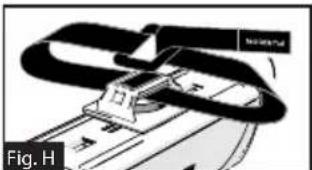
text_image
Fig. HInstallation de la dragonne
natural_image
Black-handled tool with loop handle and handle, labeled Fig.1 (no text or symbols on the object itself)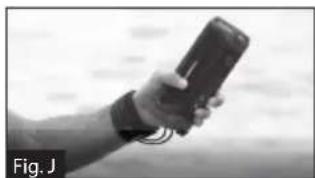
natural_image
Hand holding a handheld device with cables, blurred background (no visible text or symbols)Avant l'utilisation
natural_image
Mechanical assembly diagram showing two stages of a clamp or bracket mechanism (no text or symbols)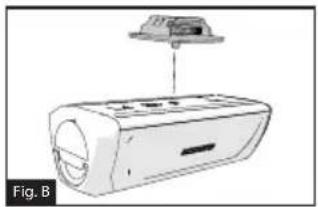
natural_image
Diagram of a portable air conditioner unit with a top-mounted fan above it, labeled Fig. B (no text or symbols on the device itself)natural_image
Mechanical component diagram labeled Fig. C, showing a curved mechanical part with no visible text or symbols.natural_image
Technical line drawing of a mechanical clamp or bracket assembly (no text or symbols)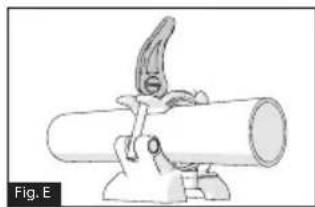
natural_image
Mechanical assembly diagram showing a clamp inserted into a cylindrical pipe (no text or symbols)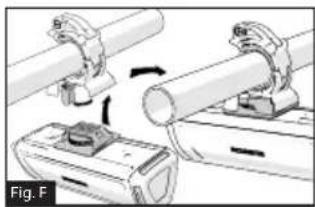
natural_image
Mechanical assembly diagram showing two clamping arms interacting with a motor (no text or symbols visible)natural_image
Black cylindrical object labeled 'FURRION' with a handle, shown as Figure G (no additional text or symbols visible)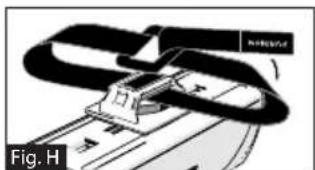
natural_image
Mechanical assembly diagram showing a clamping mechanism with no visible text or symbolsInstalación
natural_image
Close-up of a black-handled tool with a loop handle, labeled Fig.1 (no text or symbols on the object itself)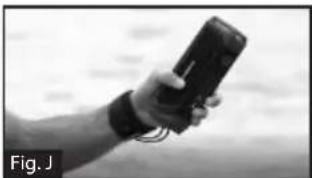
natural_image
Hand holding a handheld device, possibly a handheld electronic device, against a blurred background (no visible text or symbols)Antes de usar
Carga del parlante
Pairing your device with Bluetooth
natural_image
Mechanical assembly diagram showing a device being rotated, with no visible text or symbols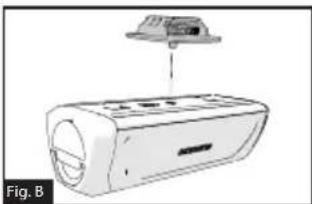
natural_image
Diagram of a car air conditioner unit with a top-mounted fan above it, labeled Fig. B (no text or symbols on the device itself)natural_image
Line drawing of a mechanical component with a curved handle and circular base (no text or symbols)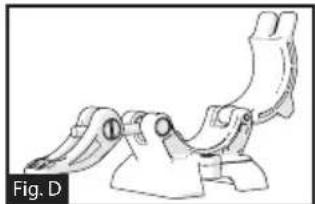
natural_image
Technical line drawing of a mechanical clamp or bracket component (no text or symbols)natural_image
Mechanical assembly diagram showing a lever pressing down on a cylindrical pipe (no text or symbols visible)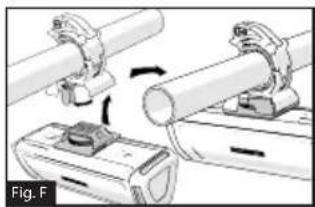
natural_image
Mechanical assembly diagram showing two clamping components with rotating parts (no text or symbols)natural_image
Roll of black Furrion cable with handle, labeled Fig. G (no additional text or symbols)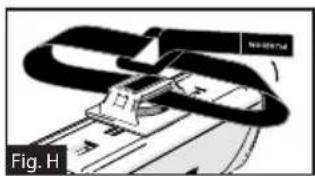
natural_image
Mechanical assembly diagram showing a clamping mechanism with no visible text or symbolsnatural_image
Close-up of a black-handled tool with a loop handle, labeled Fig. I (no text or symbols on the object itself)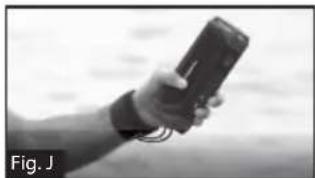
natural_image
Hand holding a handheld device, possibly a mobile phone or smart meter, with no visible text or symbols on the device itself.Vor der Verwendung
natural_image
Diagram showing two mechanical assembly steps, one with a curved arrow indicating motion (no text or symbols)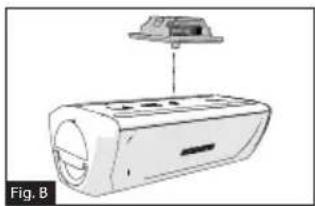
natural_image
Diagram of a device with a top component and labeled Fig. B, showing internal components without any text or symbols.Instalação
Instalacão do encaixe de calha/bicicleta
natural_image
Mechanical component diagram labeled Fig. C, showing a curved mechanical assembly with no visible text or symbols.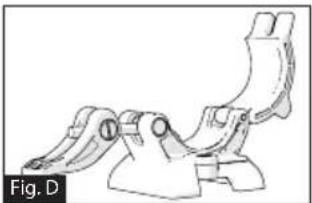
natural_image
Technical line drawing of a mechanical bracket component (no text or symbols)natural_image
Mechanical assembly diagram showing a lever pressing down on a cylindrical pipe (no text or symbols)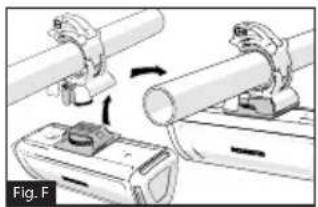
natural_image
Mechanical assembly diagram showing two pipe fittings with clamps and a base component (no text or symbols)natural_image
Roll of black Furrion-branded mechanical component (no text or symbols on body)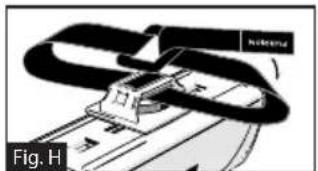
natural_image
Mechanical assembly diagram showing a clamping mechanism with no visible text or symbolsnatural_image
Close-up of a black-handled tool with a loop handle, labeled Fig. I (no text or symbols on the tool itself)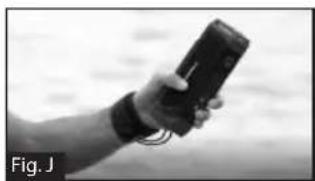
natural_image
Hand holding a handheld device with a strap, against a blurred background (no visible text or symbols)Carregar o altifalante
natural_image
Diagram showing two mechanical assembly steps, one with a curved arrow indicating rotation (no text or symbols present)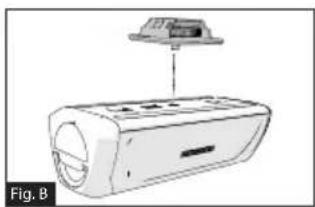
natural_image
Diagram of a device with a top-mounted component and labeled Fig. B (no text or symbols on the device itself)Installazione
natural_image
Line drawing of a mechanical component with a curved handle and circular base (no text or symbols)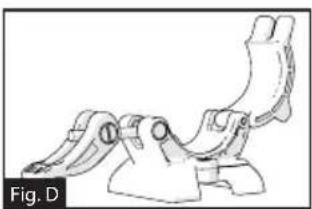
natural_image
Technical line drawing of a mechanical clamp or bracket component (no text or symbols)natural_image
Simple line drawing of a pipe clamp or clamp device attached to a cylindrical pipe (no text or symbols)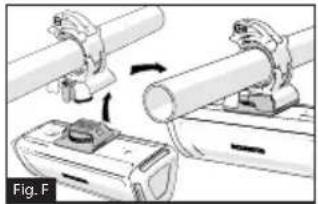
natural_image
Mechanical assembly diagram showing two pipes being inserted into a housing (no text or symbols)natural_image
Roll of black Furrion sensor device with handle, labeled Fig. G (no additional text or symbols visible)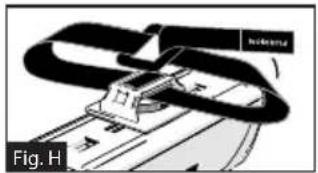
text_image
Fig. HInstallazione
natural_image
Close-up of a black-handled tool with a loop handle, labeled Fig. I (no text or symbols on the object itself)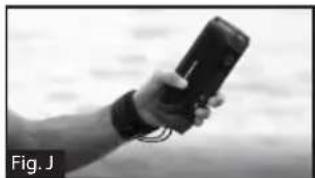
natural_image
Hand holding a handheld device outdoors (no visible text or symbols)Prima dell'utilizzo
Furrion Innovation Center & Institute of Technology
● 52567 Independence CL, Elkhart, IN 46514, USA ● Toll free: 1-800-789-3341
- Email: support@turrion.com
©2007-2020 Furrion Ltd. Furrion®, the Furrion logo and Furrion LIT™ are trademarks licensed for use by Furrion Ltd. and registered in the U.S. and other countries. The Bluetooth word mark and logo are registered trademarks of Bluetooth SIG, Inc. N-Mark is a trademark of NFC Forum, Inc. registered in the U.S. and other countries. Google Now is a trademark of Google, Inc. registered in the U.S. and other countries. Siri is a trademark of Apple, Inc. registered in the U.S. and other countries.