PBY3 - Power bank Aukey - Free user manual and instructions
Find the device manual for free PBY3 Aukey in PDF.


| Product type | External battery (power bank) |
| Brand | Aukey |
| Model | PBY3 |
| Battery capacity | 30000 mAh |
| Battery type | Lithium polymer (Li-Po) |
| Charging technologies | Qualcomm Quick Charge 3.0 and adaptive AiPower |
| Output ports | 2x USB-A (1x QC 3.0, 1x AiPower) + 1x USB-C |
| USB 1 output (QC 3.0) | 5V-6.5V/3A, 6.5V-9V/2A, 9V-12V/1.5A |
| USB 2 output (AiPower) | 5V/2.4A max |
| USB-C output | 5V/3A |
| Micro USB input | 5V/2.4A |
| USB-C input | 5V/3A |
| Dimensions | 150.5 x 84 x 29 mm |
| Weight | 580 g |
| Built-in flashlight | Yes, activation by long press on the button |
| Battery indicator | 3-color LED (red, green, white) |
| Protection | Protection against overcharge and excessive discharge |
| Maintenance | Recharge at least once every three months; do not expose to water or heat |
| Warranty | 24 months |
| Package content | Power bank, USB cable 20 cm, warranty card, user manual |
Frequently Asked Questions - PBY3 Aukey
User questions about PBY3 Aukey
0 question about this device. Answer the ones you know or ask your own.
Ask a new question about this device
Download the instructions for your Power bank in PDF format for free! Find your manual PBY3 - Aukey and take your electronic device back in hand. On this page are published all the documents necessary for the use of your device. PBY3 by Aukey.
USER MANUAL PBY3 Aukey
natural_image
Abstract geometric logo with a large letter A and diagonal stripes (no text or symbols)AUKEY
Introduction Manual
30000mAh Type-C Power Bank
with Qualcomm® Quick Charge™ 3.0 Technology
text_image
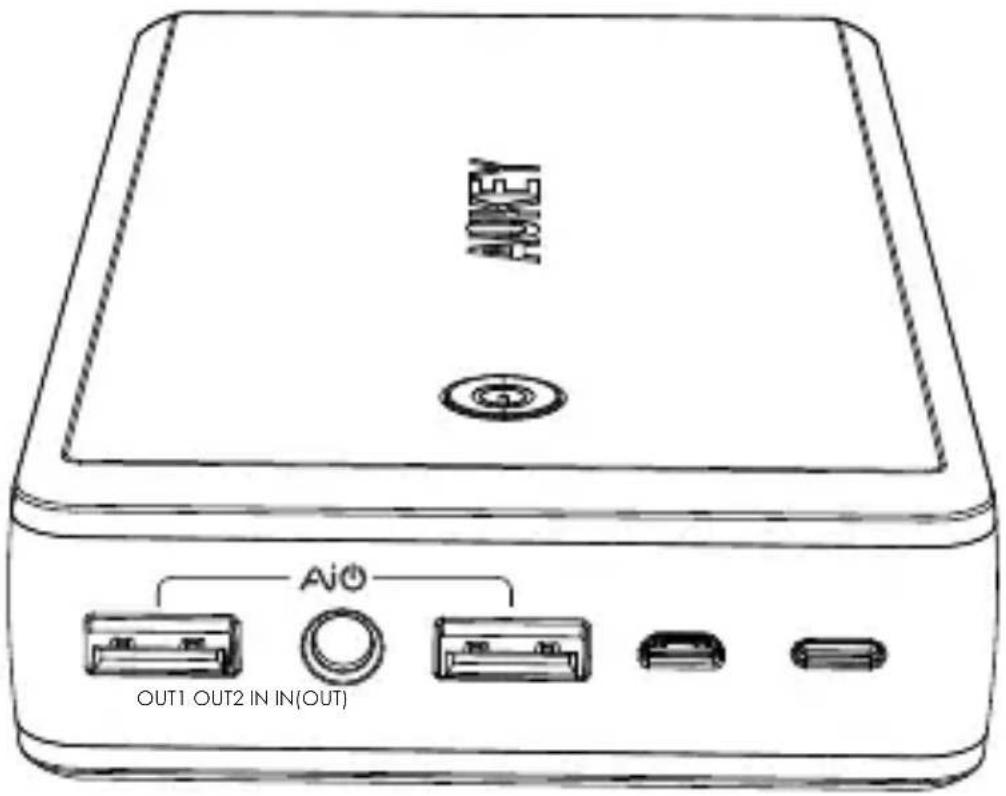
AOUT AI0 OUT1 OUT2 IN IN{OUT}Model: PB-Y3
Contents
Model: PB-Y3
English 01 - 05
Deutsch 06 - 10
Français 14 - 15
Español 16 - 20
Italiano 21 - 25
日本語 26 - 30
Introduction
Thank you for choosing the AUKEY 30000mAh Type-C Power Bank with Qualcomm® Quick Charge™ 3.0 Technology. Please read this manual carefully as it contains some important information. If you need any further assistance, please contact our Support Team at support@aukey.com.
Package Contents
• AUKEY 30000mAh Type-C Power Bank
• 20cm USB-A to Type-C Cable
- Warranty Card
- User Manual
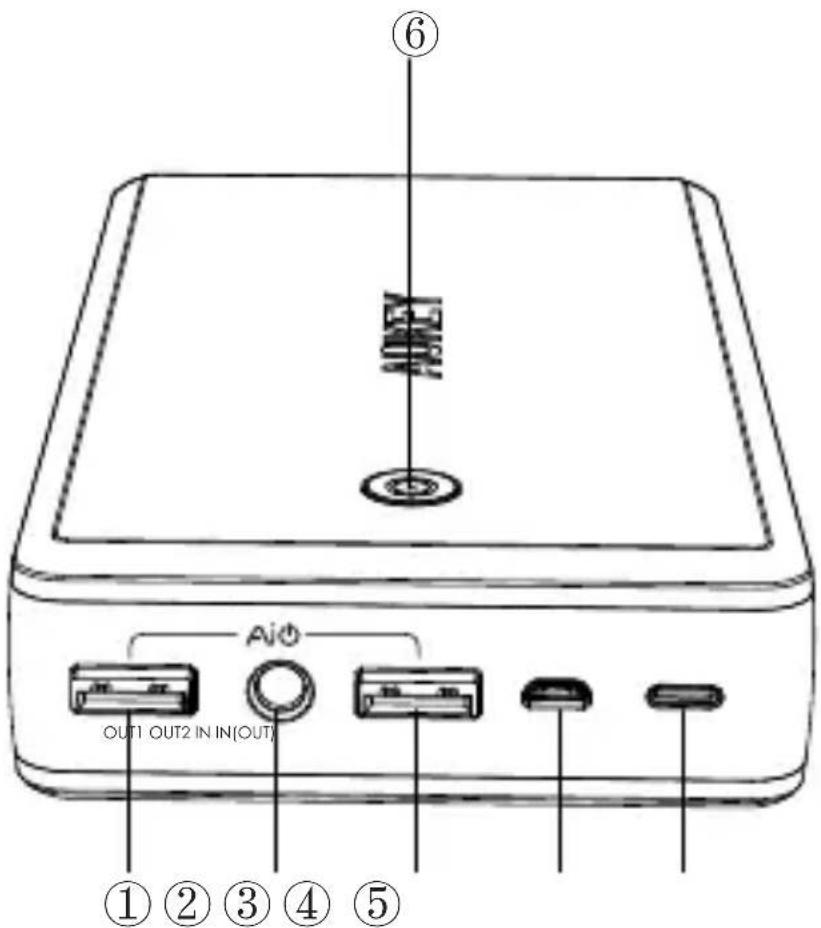
Product Diagram
- USB Output1: Quick Charge 3.0
- Flashlight
- USB Output2: AiPower Port
- Micro-USB Input
- Type-C Input / Output
- Power Indicator Button
text_image
① ② ③ ④ ⑤ OUT1 OUT2 IN IN(OUT) AiOTechnical Specifications
| Model | PB-Y3 |
| Technology | Qualcomm® Quick ChargeTM 3.0 TechnologyAiPower Adaptive Charging Technology5V 3A USB Type-C Input/Output |
| Capacity | 30000mAh |
| Battery Type | Li-Polymer |
| Output 1 | DC 5V-6.5V/3A 6.5V-9V/2A 9V-12V/1.5A |
| Output 2 | DC 5V 2.4A |
| Micro USB Input | DC 5V 2.4A |
| Type C Output/Input | DC 5V 3A |
| Dimension | 150.5 x 84 x 29mm / 5.9" x 3.3" x 1.1" |
| Weight | 580g / 20.4oz |
What is AiPower Technology?
- AUKEY AiPower Adaptive Charging Technology gives all your USB powered devices exactly what they need with up to 2.4A per Ai USB Port.
- The signature green AiPower USB Port found on AUKEY chargers and power banks is engineered to provide the safest maximum recharge rate for all your different devices whether Android, iOS, Bluetooth headphones, cameras, or even other power banks.
What is Qualcomm® Quick Charge™ 3.0 Technology?
High Efficiency:
Quick Charge 3.0 Technology is engineered to refuel devices up to four times faster than conventional charging. It is 38 % more efficient than Quick Charge 2.0 Technology .
Flexible Structure:
With a more granular range of voltages (200mV increments from 3.6V to 20V), your Quick Charge 3.0 compatible device can target one of dozens of suitable power levels.
Universal Charging:
Backward compatible with Quick Charge 1.0 and Quick Charge 2.0 devices, Quick Charge 3.0 supports all USB standards from A to C.
Battery Indicator Light
Press the power button once to check the remaining battery level. Battery level is indicated by the color of the LED indicator light.
| Red | Green | White |
| 0 - 30% | 30% - 70% | 70% - 100% |
Charging your Power Bank
Before using for the first time, please fully charge your AUKEY Power Bank.
- Connect the Micro-USB &/or USB-C charging cable to the Micro-USB port &/or USB-C port.
- Connect your cable(s) to a USB charging adapter (like an AUKEY wall charger).
- A green battery indicator light means your Power Bank is charging, when it reaches 100% the light will turn white.
Using your Power Bank to Charge your Devices
To charge your USB powered devices:
- Connect the USB & Type-C charging cable to your device charging port.
- Press the power button to start charging.
- Use USB Output 1 to charge Quick Charge 3.0/2.0 compatible devices or non-Quick Charge devices. Output 2 can charge any USB device at up to 5V 2.4A. The USB-C port can output up to 5V 3A to compatible USB-C devices.
Note:
The LED indicator will be dormant after your devices charging 15 seconds to prevent unnecessary battery drain, and the power bank will shut off automatically when your devices fully charged to prevent over charging.
Using the Flashlight
Press and hold the power button for two to three seconds to turn on/off the flashlight.
Caution
- Please charge your Power Bank at least once every three months.
- NOT waterproof. Please keep away from water, liquid, and moisture.
- Keep away from fire, direct sunlight, and extreme heat.
- Please dispose of batteries according to local environmental laws.
- For optimal performance, please do not charge and discharge your Power Bank at the same time.
FAQs and Solutions
- I have connected my Power Bank to my device, but it is not charging?
• Make sure your Power Bank is fully charged.
- Make sure the connection between your Power Bank and your device is secure.
- Try a different charging cable.
- Try a different connection sequence.
- Can I use my Power Bank to charge my devices which are not Quick Charge compatible?
Yes. You can use this Power Bank to charge any USB devices that charge at 5V / 9V / 12V. However, charging speeds will not be as fast as Quick Charge compatible devices.
- How do I know whether my device is Quick Charge compatible?
Please check Qualcomm's Quick Charge website for a comprehensive list of compatible devices.
4. Can I use this Power Bank to charge three devices at the same time?
Yes, you can charge three devices at the same time via the two USB-A ports + the USB-C port.
5. How fast will this Power Bank charge my device?
Charging speeds depend on several factors, but most important is the speed that your device's original manufacturer engineered it to charge at. If your device is Quick Charge 2.0 or 3.0 compatible, it will charge up to 75% faster than other devices.
Warranty
AUKEY provides a 24 Month Warranty on all products starting from the date of original purchase. If the device fails due to manufacturer defects, please contact us to launch a warranty claim with your order number at:
support@aukey.com (US Amazon orders) or
support.uk@aukey.com (UK Amazon orders) or
support.ca@aukey.com (Canada Amazon orders)
For all other inquiries, please contact our support team at the applicable address above. Be sure to include your order number so we can provide you with the best service and resolve your issue quickly.
For products not purchased through Amazon, please contact the point of sale where you purchased your product for service claims.
Einführung
text_image
QR code image containing encoded data, no visible human-readable textQualcomm Quick Charge is a product of Qualcomm Technologies, Inc. Qualcomm is a trademark of Qualcomm Incorporated, registered in the United States and other countries. Quick Charge is a trademark of Qualcomm Incorporated. All Qualcomm Incorporated trademarks are used with permission.
AUKEY International Ltd.
www.aukey.com | support@aukey.com
No.102, Building P09, Electronic Trade Center
Huanan City, Pinghu Town, Longgang District
Shenzhen, Guangdong 518111 CN

text_image
CE RoHSMade in China