PBY22 - Power bank Aukey - Free user manual and instructions
Find the device manual for free PBY22 Aukey in PDF.


| Product type | External battery / Power bank |
| Brand | Aukey |
| Model | PB-Y22 |
| Capacity | 10,000 mAh / 37 Wh |
| Battery type | Lithium polymer |
| Dimensions | 107 x 69 x 24 mm |
| Weight | 235 g |
| Charging technologies | USB Power Delivery 2.0, Qualcomm Quick Charge 3.0, AiPower |
| Micro-USB input | 5 V/2 A |
| Lightning input | 5 V/2 A, 9 V/2 A |
| USB-C input (PD 2.0) | 5 V/3 A, 9 V/2 A |
| USB-C output (PD 2.0) | 5 V/3 A, 9 V/2 A, 12 V/1.5 A |
| USB output (QC 3.0) | 5 V-6.5 V/3 A, 6.5 V-9 V/2 A, 9 V-12 V/1.5 A |
| Total output power | 18 W |
| Box contents | External battery, USB-A to C cable, user manual, warranty card |
| Main features | Fast charging PD 2.0 and QC 3.0, low current mode, LED battery level indicator |
| Maintenance | Keep away from liquids and heat sources. Recharge every 3 months. Do not charge a device while the battery is charging. |
| Safety | Built-in protections against overcharging, short circuits, and excessive temperatures |
| General information | Manufacturer's warranty, support via support.eu@aukey.com |
Frequently Asked Questions - PBY22 Aukey
User questions about PBY22 Aukey
0 question about this device. Answer the ones you know or ask your own.
Ask a new question about this device
Download the instructions for your Power bank in PDF format for free! Find your manual PBY22 - Aukey and take your electronic device back in hand. On this page are published all the documents necessary for the use of your device. PBY22 by Aukey.
USER MANUAL PBY22 Aukey
10000mAh Universal Power Bank with Power Delivery 2.0 and Qualcomm® Quick Charge™ 3.0
Contents
| English | 01~05 |
| Deutsch | 06~10 |
| Français | 11~15 |
| Espanol | 16~20 |
| Italiano | 21~25 |
| 日本語 | 26~30 |
Thank you for purchasing the AUKEY PB-Y22 10000mAh Universal Power Bank with Power Delivery 2.0 and Qualcomm® Quick Charge™ 3.0 Technology. Please read this user manual carefully and keep it for future reference. If you need any assistance, please contact our support team with your product model number and Amazon order number.
Package Contents
10000mAh Universal Power Bank
USB-A to C Cable
User Manual
Warranty Card
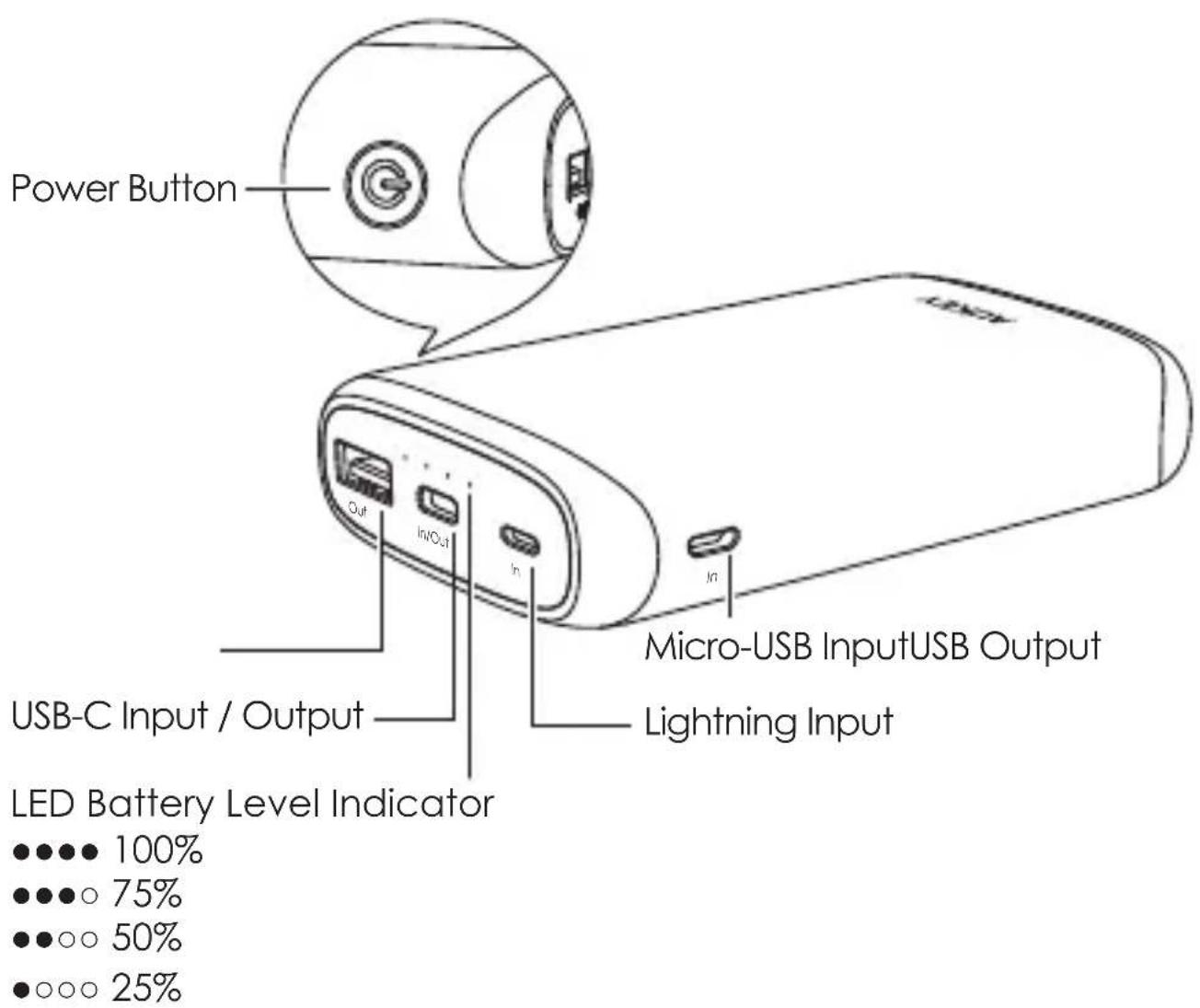
Product Diagram
Specifications
| Model PB-Y22 | |
| Technology | USB Power Delivery 2.0, Qualcomm® Quick Charge™ 3.0, AiPower |
| Capacity | 10000mAh / 37Wh |
| Battery Type | Lithium polymer |
| Micro-USB Input | DC 5V 2A |
| Lightning Input | DC 5V 2A, 9V 2A |
| USB-C Input (Power Delivery 2.0) | DC 5V 3A, 9V 2A |
| USB-C Output (Power Delivery 2.0) | DC 5V 3A, 9V 2A, 12V 1.5A |
| USB Output (Quick Charge 3.0) | DC 5V-6.5V 3A, 6.5V-9V 2A, 9V-12V 1.5A |
| Total Power Output | 18W |
| Dimensions | 107 x 69 x 24mm / 4.21" x 2.72" x 0.94" |
| Weight | 235g / 8.29oz |
What is USB Power Delivery (PD)?
USB Power Delivery is a new, universal multi-voltage charging standard that dynamically negotiates power output over a USB Type-C connection to safely and efficiently recharge a wide range of compatible devices.
To get USB PD, the following are required:
Device (phone, tablet, laptop) that supports USB PD
USB-C charger with USB PD
USB-C to C cable
What is Quick Charge 3.0?
Charge compatible devices up to four times faster than conventional charging. Quick Charge 3.0 is engineered to refuel devices twice as fast as Quick Charge 1.0 and is up to 38% more efficient than Quick Charge 2.0. Backward-compatible with Quick Charge 2.0/1.0 devices.
Getting Started
Charging the Power Bank
Fully charge your power bank before first use.
- Connect the included USB-A to C cable / a Micro-USB cable / Lightning cable to a USB charger or charging port
- Connect the other end to the USB-C / Micro-USB / Lightning input port on the power bank
- Unplug the power bank when fully charged
Charging Your Device
- Connect the charging cable to your device's charging port
- Connect the other end to a USB output port on PB-Y22
- Unplug your device when fully charged
- To check the remaining battery level, press the power button
Low-Current Charging Mode
This mode is customized to charge low-current devices (below 60mA). Try switching to this mode if a low-powered device (such as a fitness tracker or wireless headphones) isn't charged in the standard charging mode.
- Double-press the power button to enter or exit low-current charging mode. The LED indicator lights will flash sequentially while charging in this mode and display battery level when exiting it
- After 2 hours of charging in this mode, power bank automatically switches back to standard charging mode and turns off
- To end charging early, exit low-current charging mode. However, extra charging in this mode won't harm your device battery
Product Care & Use
- Keep away from liquids and extreme heat
- Don't charge your devices while recharging the power bank
- Recharge the PB-Y22 at least once every 3 months
- Dispose of battery according to local environmental law
- The PB-Y22 doesn't accept simultaneous Micro-USB, Lightning, and USB-C power input
Warranty & Customer Support
For questions, support, or warranty claims, contact us at the address below that corresponds with your region. Please include your Amazon order number and product model number.
Amazon US order: support.us@aukey.com
Amazon EU order: support.eu@aukey.com
Amazon CA order: support.ca@aukey.com
Amazon JP order: support.jp@aukey.com
*Please note, AUKEY can only provide after sales service for products purchased directly from AUKEY. If you have purchased from a different seller, please contact them directly for service or warranty issues.
Amazon EU orders: support.eu@aukey.com
www.aukey.com | support@aukey.com
No.102, Building P09, Electronics Trade Center
Huanan City, Pinghu Town, Longgang District
Shenzhen, Guangdong, 518111, CN


Made in China


Brand : Aukey
Model : PBY22
Category : Power bank