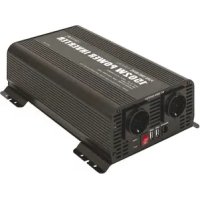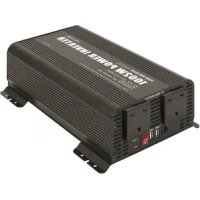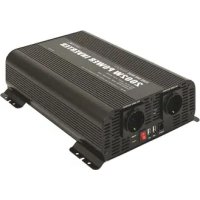
PSW 2002 W - Power inverter GYS - Free user manual and instructions
Find the device manual for free PSW 2002 W GYS in PDF.



| Product Type | Pure sine wave inverter (UPS) converter |
| Input Voltage | 12 V DC or 24 V DC depending on model |
| Output Voltage | 230 V AC |
| Rated Power | 2000 W |
| USB Port | Yes, 5 V / 2.1 A (power only) |
| Built-in Protections | Undervoltage, overvoltage, overload, overtemperature, short-circuit |
| Fan | Automatic (active if load >30% or temperature >60°C) |
| Remote Control | Yes, with digital display (input voltage and output power) |
| Battery Cables Included | Yes, red (positive) and black (negative), length 48 cm |
| Cable Cross-section (12 V model) | 22 mm² |
| Cable Cross-section (24 V model) | 12 mm² |
| Ground Terminal | Yes |
| Recommended Use | Indoor, do not expose to rain |
| Cleaning | Dry cloth, no solvents |
| Warranty | 2 years (parts and labor) |
| Typical Applications | Power tools, office equipment, household appliances, solar installations, marine |
Frequently Asked Questions - PSW 2002 W GYS
User questions about PSW 2002 W GYS
0 question about this device. Answer the ones you know or ask your own.
Ask a new question about this device
Download the instructions for your Power inverter in PDF format for free! Find your manual PSW 2002 W - GYS and take your electronic device back in hand. On this page are published all the documents necessary for the use of your device. PSW 2002 W by GYS.
USER MANUAL PSW 2002 W GYS
INSTRUCTIONS DE SECURITE

PSW 1002 W / 1502 W / 2002 W

PSW 1002 W / 1502 W / 2002 W


Input display Output display
Raccordement

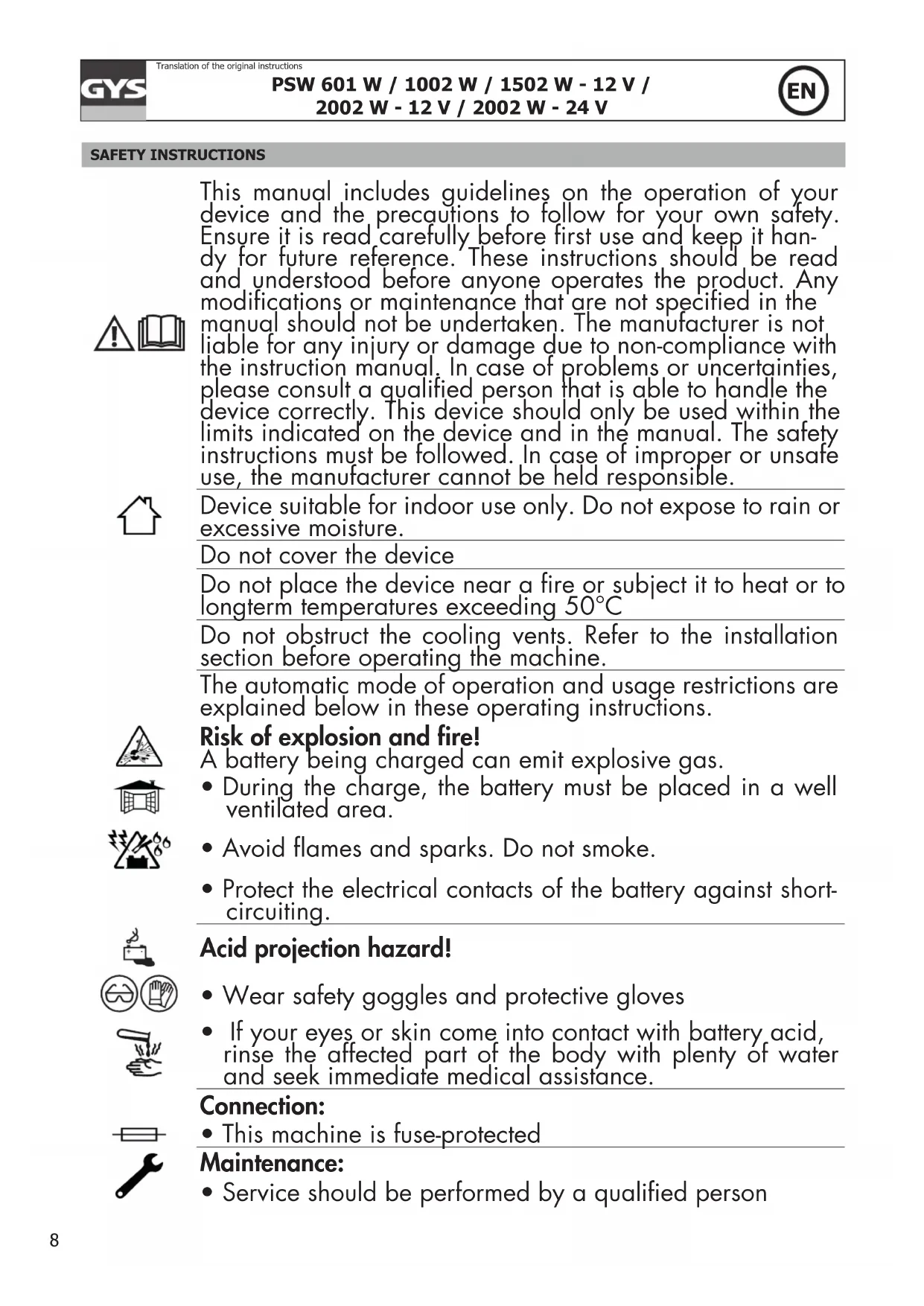
| This manual includes guidelines on the operation of your device and the precautions to follow for your own safety. Ensure it is read carefully before first use and keep it handy for future reference. These instructions should be read and understood before anyone operates the product. Any modifications or maintenance that are not specified in the manual should not be undertaken. The manufacturer is not liable for any injury or damage due to non-compliance with the instruction manual. In case of problems or uncertainties, please consult a qualified person that is able to handle the device correctly. This device should only be used within the limits indicated on the device and in the manual. The safety instructions must be followed. In case of improper or unsafe use, the manufacturer cannot be held responsible. | |
| Device suitable for indoor use only. Do not expose to rain or excessive moisture. | |
| Do not cover the device | |
| Do not place the device near a fire or subject it to heat or to longterm temperatures exceeding 50°C | |
| Do not obstruct the cooling vents. Refer to the installation section before operating the machine. | |
| The automatic mode of operation and usage restrictions are explained below in these operating instructions. | |
| Risk of explosion and fire!A battery being charged can emit explosive gas. | |
| • During the charge, the battery must be placed in a well ventilated area. | |
| • Avoid flames and sparks. Do not smoke. | |
| • Protect the electrical contacts of the battery against short-circuiting. | |
| Acid projection hazard! | |
| • Wear safety goggles and protective gloves | |
| • If your eyes or skin come into contact with battery acid, rinse the affected part of the body with plenty of water and seek immediate medical assistance. | |
| Connection: • This machine is fuse-protected | |
| Maintenance: • Service should be performed by a qualified person |

- Under no circumstances should solvents or other aggressive cleaning agents be used.
- Clean the device's surfaces with a soft, dry cloth.
Regulations:
C E
The device complies with European Directive.
The certificate of compliance is available on our website.
- EAC conformity mark (Eurasian Economic Commission)
EAC
- Equipment in compliance with British requirements. The British Declaration of Conformity is available on our website (see home page).
UK CA
- Equipment in conformity with Moroccan standards.
The declaration C_ (CMIM) of conformity is available on our website (see cover page).

Disposal:
This product should be disposed of at an appropriate recycling facility. Do not dispose of in domestic waste.
DESCRIPTION
The inverter converter PSW (Pure Sinus Wave) is a device that converts a DC voltage of 12 V or 24 V into an AC voltage of 230 V. This product is widely used for various applications such as vehicles, structures and mobile devices for telecommunications, public safety, emergency, etc.
This converter has the advantage of being small, lightweight, stable and highly efficient in conversion. It is equipped with 5 protections: input under/overvoltage protection, overload protection, overtemperature protection, output short-circuit protection.
STRUCTURE INTRODUCTION
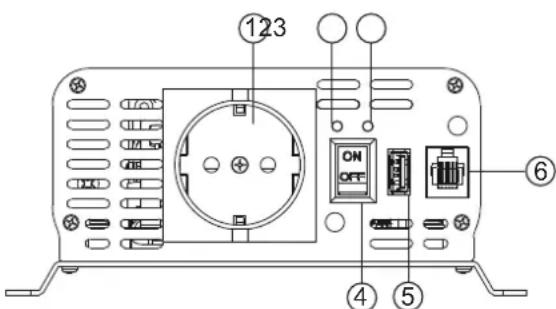
PSW 601 W
1- AC Output Sockets
2- Power Indicator (Green)
3-Fault Indicator (Red)
4-ON/OFFSwitch
5-USB Output
6- Remote Port
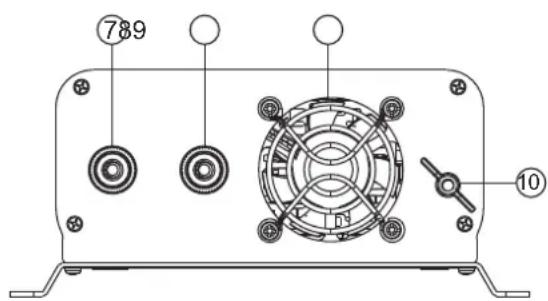
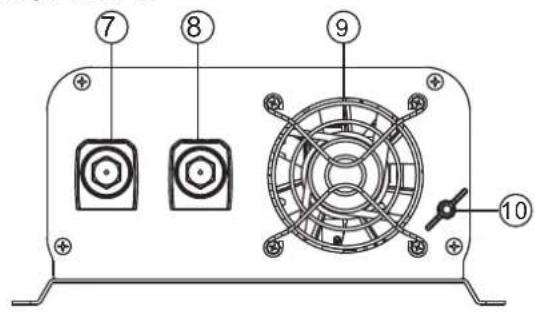
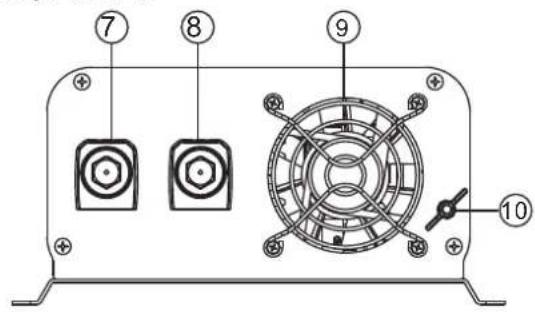
7-DC Input + Terminal (Red)
8-DC Input - Terminal (Black)
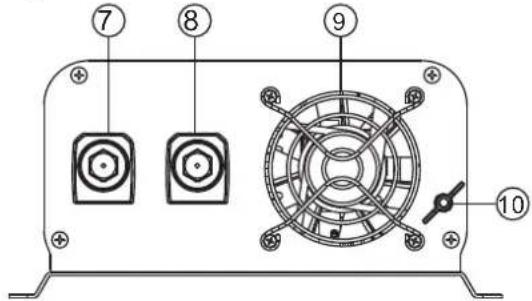
9-FAN
10-Earth
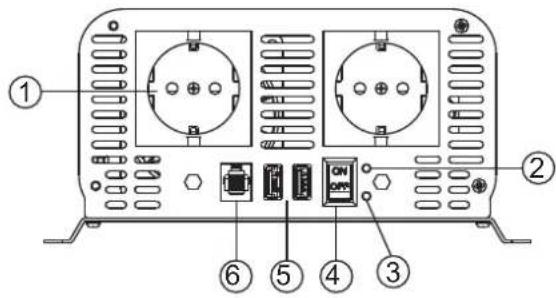
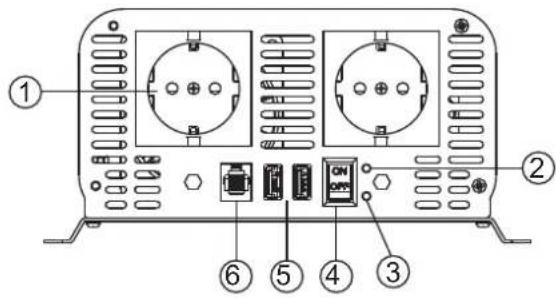
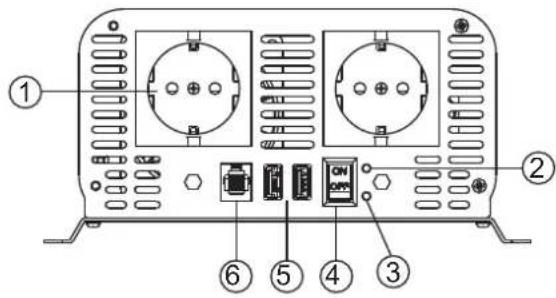
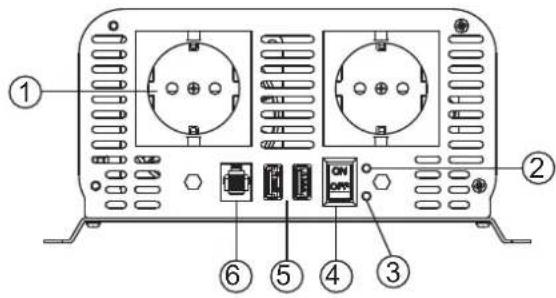
PSW 1002 W / 1502 W / 2002 W
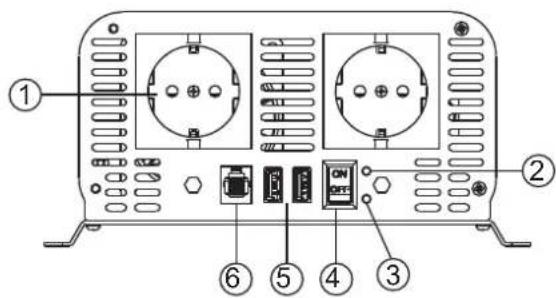
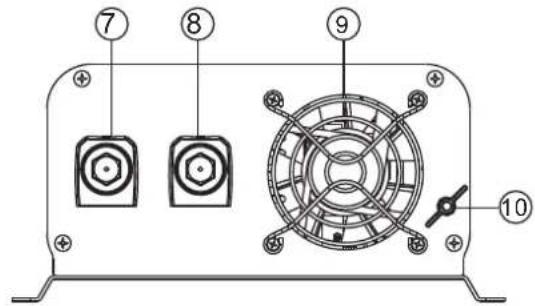
1- AC Output Sockets
2- Power Indicator (Green)
3-Fault Indicator (Red)
4-ON/OFF Switch 9-FAN
5- USB Output 10-Earth
6- Remote Port
7-DC Input + Terminal (Red)
8-DC Input - Terminal (Black)
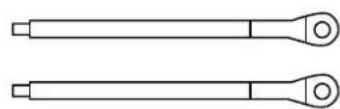
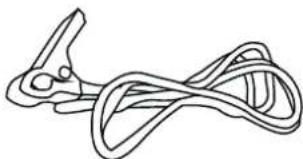
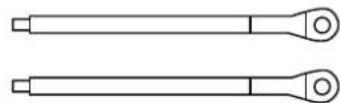
Battery cables (red = positive; black = negative) Earth clamp (green and yellow cable)
| Converter Ref Ref UK Cable length/section | |||
| PSW 601W - 12 V | 067332 | 067349 | 6 mm²/48 cm (red + black) |
| PSW 1002W - 12 V | 067356 | 067363 | 10 mm²/48 cm (red + black) |
| PSW 1502W - 12 V | 067370 | 067387 | 16 mm²/48 cm (red + black) |
| PSW 2002W - 12 V | 067394 | 067400 | 22 mm²/48 cm (red + black) |
| PSW 2002W - 24 V | 067417 | 067424 | 12 mm²/48 cm (red + black) |
APPLICATION INSTRUCTION
- Scope of application:
a. Only use for class appliance
Electric power tool series Electric Saw,Drilling machine,lapping machine,sandblast machine,Stamping machina,grass eliminator,air compressor;
Office equipment: Computer, printer, displayer, duplicator, scanistor, facsimile apparatus...
Household appliances: dust collector, fan, fluorescent lamp, filament lamp, sewing machine;
Kitchen series: Microwave oven, refrigerator, freezer, coffe machine, blender, ice machine; hot oven;
Commerical installation series: Metal halogen light, high voltagesodium lam, watercraft, cars, solar energy and wind power generation;
Electric Field series:TV, radio,game player,VCR,power amplifier;monitoring equipment,servicer,satellite communication equipments
Notice: While using please follow the related power of the inverter, do not over load. It is better to keep the inverter work at 85% of its related power.
b. Scope of electric appliance that inapplicability with the USB
Only for inverters with USB port;
USB is only for charging, do not have date exchange function;
Before charging please check carefully if the charging current of the appliance is under the inverters current, if it is exceed the charging current of the inverter please do not use, or it may destroy the USB port.
Some appliance must charging use certain charger, please don't charge with USB port.
- To save energy, the fan will not work unless the under two situations:
The fan will work when the load is exceed 30% of the related power of the inverter;
When the inside temperature of the inverter exceeds 60 degree, fan work.
- About extended cable using:
We do not recommend use extended cable between the inverter and the battery, because it will cause loss of DC electricity and affect the effect of the inverter.
If you must use an extension cable, we recommend using high quality cables with larger cross-sections to reduce the risk of electrical losses.
CONNECTION

- Make sure that the input voltage of the converter corresponds to the battery voltage (12 V or 24 V).
- Until it is indicated to switch it on, the converter should remain switched off.
- Connect the converter to the battery with the cables supplied.
-
Observe the following steps in order.
-
Connect the black cable to the negative terminal of the converter and then the red cable to the positive terminal of the converter.

After each connection, replace the red and black plastic covers. They prevent the connections from coming into contact with metal parts and causing a short circuit.
- Connect the black cable to the negative terminal of the battery, and then connect the red cable to the positive terminal of the battery.

Check the connection before the next step. Do not invert the connection as this may damage the converter.
- Set the switch to the «ON» position, the green light will come on, the product is ready for use. If the alarm goes off, switch off the product and refer to the list of alerts.
DISCONNECTION
To disconnect the converter, follow the steps below in order:
- Disconnect the red terminal from the battery terminals, then the black terminal.
- Disconnect the red cable from the positive terminal of the converter, then the black cable from the negative terminal of the converter.

Once each cable has been disconnected, replace the red and black plastic covers on the converter connectors.
REMOTE CONTROL
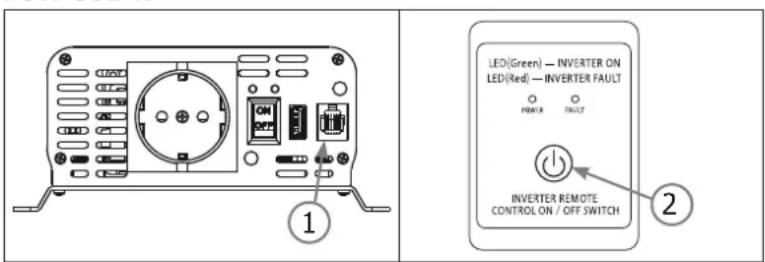
PSW 601 W

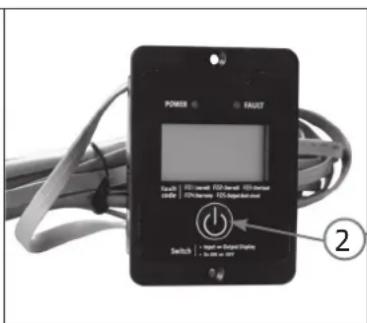
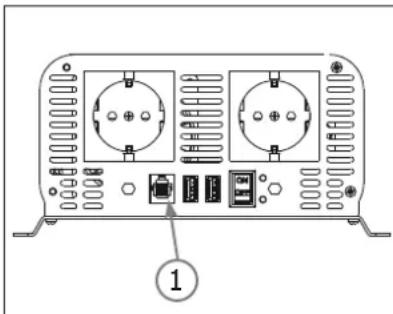
PSW 1002 W / 1502 W / 2002 W
Connection

The monitoring remote control must be connected to the converter when it is not energised.
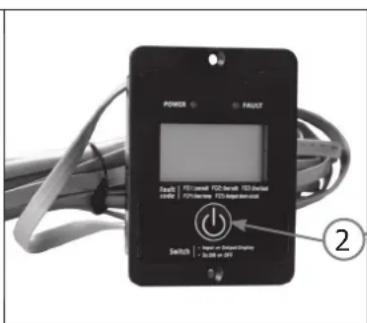
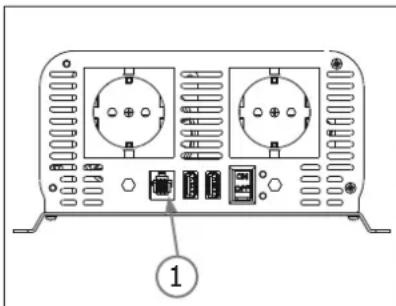
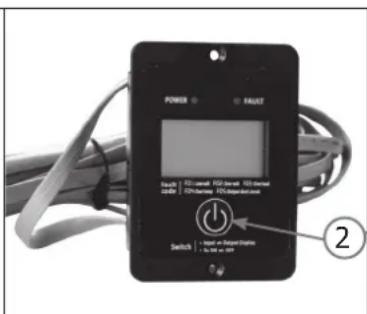
- Connect the remote control to the converter (1).
The remote control can be fixed once the connection has been established.
On/Off button
The remote control allows the converter to be controlled remotely (max. 5 m).

The On/Off function of the remote control only works if the main switch of the converter is set to Off.
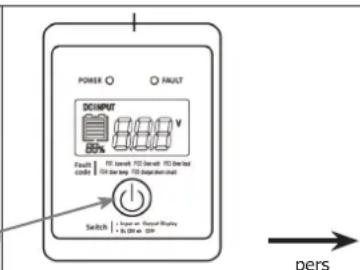
- Press the button (2) for a long time ( >3 s). The converter lights up, the Power LED turns green.
- Repeat the same operation to switch off the inverter.
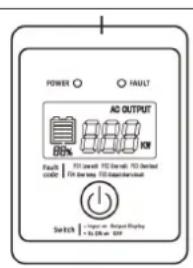
Digital display (remote control PSW 1002W / 1502W / 2002W)
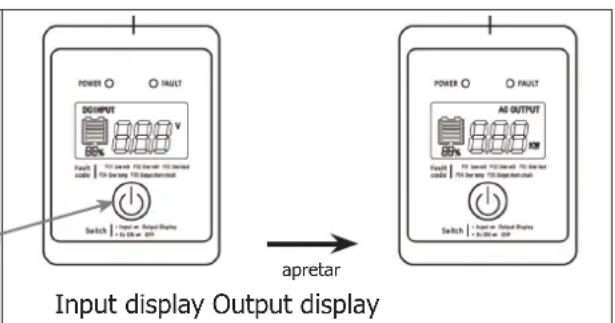
- The "INPUT DISPLAY" screen gives information about the battery voltage.
- The "OUTPUT DISPLAY" screen informs about the power consumption of the device connected to the converter.
A simple press of the button (2) switches between the two displays.
Indicators
The green indicator is the power indicator. The red indicator indicates a fault :
| F01 F02 F03 F04 F05 | |||
| Low volt Over volt Over load Over temp | Output short-circuit |
PROTECT FUNCTION AND START WORK METHOD
| Function | State description | Restart work method | ||
| LED light alarm | AC output | |||
| Input low voltage alarm | Green: on Red: off | Alarm | AC have output | When the voltage of the batter return to the related voltage, alarm stop automatically. |
| Input low voltage shut down | Green: on Red: on | Alarm | No AC output | When the voltage of the batter return to the related voltage the inverter will restart work, green light on, red light off. |
| Input over voltage protection | Green: on Red: on | Alarm | No AC output | When the voltage of the batter return to the related voltage the inverter will restart work, green light on, red light off. |
| Over load protection | Green: on Red: on | Alarm | No AC output | Reduce the load to related rang the inverter will restart work, green light on, red light off. |
| Over temperature shut down | Green: on Red: on | Alarm | No AC output | When the inside temperature return to related rang, inverter will restart work, green light on ,red light off. |
| Output short circuit | Green: on Red: on | Alarm | No AC output | When short circuit stopped, inverter restart to work automatically. |

VOLTAGE AND TEMPERATURE PERFORMANCE

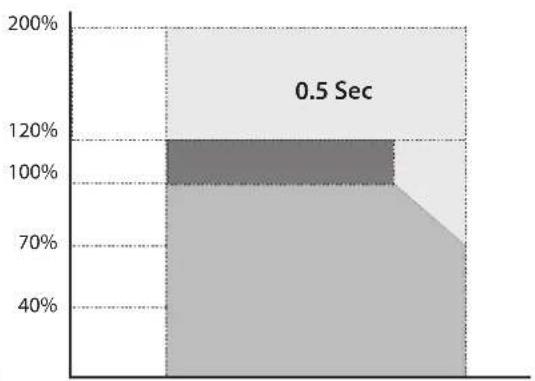
Power vs. output voltage Power vs. temperature
WARRANTY
The warranty covers faulty workmanship for 2 years from the date of purchase (parts and labour).
The warranty does not cover:
- Transit damage.
Normal wear of parts (eq.: cables, clamps, etc.). - Damages due to misuse (power supply error, dropping of equipment, disassembling).
- Environment related failures (pollution, rust, dust).
In case of failure, return the unit to your distributor together with:
- The proof of purchase (receipt etc ...)
- A description of the fault reported
PSW 1002 W / 1502 W / 2002 W


PSW 1002 W / 1502 W / 2002 W

Verbindung

PSW 1002 W / 1502 W / 2002 W

PSW 1002 W / 1502 W / 2002 W
Conexión

PSW 1002 W / 1502 W / 2002 W

1- BbIXoHbIe pa3bEmbl NepemEHHO TOka 6-BbIHOCHO npT.
2- INdikatop nHTaHn (3eJeHb) 7-BxOД nHTaHn NOCToHHORo ToKa "+KJIemma (KpaChbI)
3- INDnKaTOp HncnPabHoctn (Kpachb) 8-BXoD NOCTOHHoro ToKa "-" KIeMma (YePb)
4-BKJI/BblKI 9-BeHTnIaTOp
5-USB-BbIXoD 10Ha3eMJIeHne
Ka6eIaKKymyIaTopa (KpaChbI = NOIOXKeIbHbI; UepHbI = OTPuCaTeIbHbI)

KlEmMa 3a3eMJIeHnra (3eJIeHbI n JKeJIbI Ka6enb).
KoHBePTeP Ref Ref UK DInHa/ceKuJa Ka6eJr
PSW 601W - 12 V 067332 067349 6 mm²/48 cm (KpaChb+epHb)
PSW 1002W - 12 V 067356 067363 10 mm²/48 cm (kpachny + yepnby)
PSW 1502W - 12 V 067370 067387 16 mm²/48 cm (kpachbni + uehbn)
PSW 2002W - 12 V 067394 067400 22 mm²/48 cm (kpachbni + uehbni)
PSW 2002W - 24 V 067417 067424 12 mm²/48 cm (kpacnb + chepb)
OBJACTb PIPMEHEHnI INpyTne OBJACTn PIPMEHEHnI
1.06naCTb npImeHnra
a) PekomehnyeMoE nCnoJIb3OBAHne:
- 3ЛeКТРИЧЕСКЕ ИНСТРУМЕТВI (HANPIMEP, 3ЛeKТРОПИА, CBEPLO, WIIINΦOBALBHA MaWHa, KOMNpeCCOP).
- OΦисhoe obopудоване (HanpIMep, KOMNbIOTep, npINHTep, MOHITop, Фakc, cKaHep, lamna)
- Pπb6opby (Hapnimep, nbileoc, BeHTnIaTOp, IBeHna MaunHa, MKNpoBOLHOBa neyb, XOJODINbHnK, MOp03nIbHa KaMepa, KoefeBapka, 6JIeHep, NbDorehePapot).
KOMMepueckne oBekTbI (HaPnMep, ypRHObl, ABToMO6nN, coJIHeuHbIe, BETPnHbIe nIN pa3nUHbIe cyda MOpCKoro Tnna).
Pa3nHbIe 3JIeKTPoPnB6Opbl: TeneBn3Op, paNo, irpoBaJ npNCTaBka, ycInTeB, o6OpydoBaHne Ira BndeOna6IouHeHn nn TeKeOMMyHnKaun.
ПРИМЕЧАНЕ: Поберп Te MaKcMaJIbHyIO MoUHOCt b PpeO6pa3OBaTeIЯ. PeKOMeHdyETcR ИСпОЛьЗOBaTb npodyKT Ha 85%.
PSW 1002 W / 1502 W / 2002 W


Input display Output display
C83b

KoHTpOJIbHbI nIyIbT dOJIxHeN 6bITb NODKIIoueH K Ipeo6pa3OBaTeIIO, eCIN OH He BkIoUeH.
1.Подклочи Te nIbT dIcTaHcuHOrO ynpaBHeNk ppeo6pa3ObaTeIIO (1).
Iocne yctaHOBHeHn CoeHNHeHn MOxHo NIOKJIQUHTb NylbT NCTaHcNOHHOro YnpabHeHn.
Khonka BkIIOueHn/BBIKIOueHn
ДиctанционhoeуnpablenieNo3BolraeYnpabTb npeo6pa3ObaTeIemДиctanzioHNO(Makc.5M).

Функия Bк/Быкл nььтднstанционногу npablenya pa6otaet TolykoВ TOM clyuae, ecn rnaBbHne nepeKluoyateIb npeo6pa3OBaTeIyctahOBInB noLoKeHne BbykI.
- Haxmnte ydepxnbate KhONky (2) B TeueHne dInTeJbHoro BpeMeHN (> 3 c). INBepTop 3aropaetc, CBeToNDnD nTahna 3aropaeTc 3eHeblm.
- NOBTOPHTy Jxhe onepaunu, yTO6bI BbIKHouTb Ipeo6pa3OBAteJIb.
LcnpoBoi dncnlei (yIbT dntaHIOHO ynpabJeHra 1002W/1502W/2002W)
CINCOK INPEDyIPEXEHN
| Зашита | ГосydарстVENьий | Поссаня | ||
| Светонод Си | Нал Треови | Выхону ток переменогу тoka | ||
| Сигнай Треови по заликовпатаню | 3elenны: Да Кpacни:.net | Да Дa | Lorsque la tension returne à la normale, l'alarme stoppe automatiquement. | |
| Откlioчине рри посяженим наразожени | 3elenны: Дa Кpacни:.net | Дa.net | Lorsque la tension returne à la normale, le convertis-seur redémarre automatiquement. | |
| Откlioчине рри посяженин наразожени | 3elenны: Дa Кpacни:.net | Дa.net | Lorsque la tension returne à la normale, le convertis-seur redémarre automatiquement. | |
| Выразанце пегертузки | 3elenны: Дa Кpacни:.net | Дa.net | La puissance demandée par l'appareil branché au convertisseur est trop importante, il faut réduire la charge. | |
| Откlioчине от пегерва | 3elenны: Дa Кpacни:.net | Дa.net | Lorsque la température returne à la normale, le convertisseur redémarre automatiquement. | |
| превател корOTКOTO замыkanия | 3elenны: Дa Кpacни:.net | Дa.net | Lorsque le problème de court-circuit est résolu, le convertisseur redémarre automatiquement. | |

PABOYHE XAPAKTEPNCTIKN IIO HANPRXKEHNIO N TEMNEPATYPE
MouHOCb IpoTnB BbIXoHOrO HAnpXKeHHa MoUHOCTb KaK FyHKuIa TempepaTypbI
TAPAHTR
TapaHTn paCnpocTppaHReTc H a IIO6o 3aBODCKO DeΦeKT NIN 6pak B TeueHne 2x JET C daTbI NOKyPkn N3dEInna (3anuactn npabooa cnna).
TapaHTnHe pacnpoctpaHReTcHa:
- JIO6bIe NIONOMKn, BbI3BaHHbIe TpaHcTnOpTnpOBkoN.
- HopMaJIbHbIи3Hoc DeTaeNei (HanpImep : ka6eJI, 3axKIMbl I T.d.).
CnyuHnepaBnIbHorOncnoIb3OBaHn(oun6ka nITaHn,naeHne,pa36Opka).
Cnyuany BbIXoJa n3 cTpo n3-3a Okpykaioe cpebl (3aqrpa3HeHne Bo3dyxa, Kopp03n, Tbl).
PnBbIXoJe n3 cTpo, o6paTntecb B NYKTK NOKyKnAnnapaTa C npdeBraHHeHcNeDyUoxN DOkyMeHTOB:
- DOKUMENT, NOITBepKdaUcHNI KOKyIKY (C daToH): KACCOBbI YeK, INBOIC....
-ONINCAHNEIPOLOMKN.
BELANGRIJKE VEILIGHEIDSINSTRUCTIES

PRODUCTENDIAGRAMMENKABELS

PSW 601 W
PSW 1002 W / 1502 W / 2002 W
1-Uitgang wisselstroom
2-Voedingslampje (Groen)
3- Storingslampje (Rood)
4-Schakelaar ON/OFF 9-Ventilator
5 - USB ingang 10- Land
6- Ingang afstand
PSW 1002 W / 1502 W / 2002 W


Input display Output display
Aansluiting

PSW 1002 W / 1502 W / 2002 W

PSW 1002 W / 1502 W / 2002 W

Collegamento