LCD Gysmatic FlipFlap Goggle 3 - Safety glasses GYS - Free user manual and instructions
Find the device manual for free LCD Gysmatic FlipFlap Goggle 3 GYS in PDF.



| Product type | LCD auto-darkening welding mask |
| Brand and model | GYS LCD Gysmatic FlipFlap Goggle 3 |
| Filter dimensions | 135.2 x 62.8 x 0.5 mm |
| Field of view | 130.8 x 58.5 mm |
| Weight | 578 g |
| Power supply | Solar cells + 2 CR2032 lithium batteries (3 V) |
| Light shade (rest) | Level 3 |
| Dark shade (welding) | Cut mode: 4-8 / Weld mode: 8-13 |
| Switching time (light to dark) | 0.08 ms |
| Operating temperature | -5 °C to +55 °C |
| Storage temperature | -10 °C to +60 °C |
| Compatible welding processes | MMA (stick welding), TIG (>2 A), MIG, grinding (Grind) |
| Forbidden processes | Oxyacetylene, laser, gas |
| Available adjustments | Sensitivity, shade (manual and automatic), return delay (progressive or automatic), Cut/Weld mode, test function |
| Special functions | Anti-glare interference, automatic sensitivity, progressive return (GRADUAL) |
| Headgear | Ergolift+ with 3 adjustable balance points, anti-perspirant headband |
| Maintenance | Clean the filter with a soft cloth; clean the shell with neutral detergent; replace damaged protective screens |
| Available spare parts | Outer and inner protective screens, filter, headgear, anti-perspirant headband |
| Battery replacement | Extractor included, CR2032 batteries, replace once a year |
| Safety standards | EN 175:1997, EN 166:2001, EN 379+A1:2009, EU Regulation 2016/425 |
| Warranty | 2 years |
| Recommended lifespan | 5 years (depending on usage, cleaning and storage) |
Frequently Asked Questions - LCD Gysmatic FlipFlap Goggle 3 GYS
User questions about LCD Gysmatic FlipFlap Goggle 3 GYS
0 question about this device. Answer the ones you know or ask your own.
Ask a new question about this device
Download the instructions for your Safety glasses in PDF format for free! Find your manual LCD Gysmatic FlipFlap Goggle 3 - GYS and take your electronic device back in hand. On this page are published all the documents necessary for the use of your device. LCD Gysmatic FlipFlap Goggle 3 by GYS.
USER MANUAL LCD Gysmatic FlipFlap Goggle 3 GYS
text_image
Labeled diagram of a mechanical device with numbered parts for identificationtext_image
1 Unlock Press A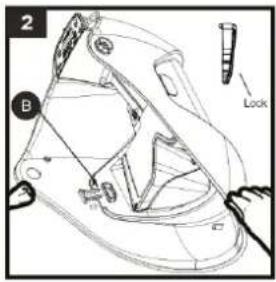
text_image
2 B Lock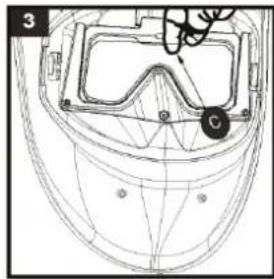
natural_image
Technical line drawing of a helmet with safety goggles and a marked point C (no text or symbols)REPLACEMENT DU FILTRE
text_image
6This user's manual includes information on the operation of the equipment and the precautions to be followed for the user's safety. Please read it carefully before first use and keep it in a safe place for future reference. These instructions must be read and understood before any operation. Any modification or maintenance not indicated in the manual must not be undertaken. Any damage to persons or property caused by use not in accordance with the instructions in this manual shall not be borne by the manufacturer. In the event of a problem or uncertainty, consult a qualified person to handle the product correctly.
Use the welding helmet only for eye and face protection against harmful ultra violet and infrared radiation, sparks and spatter from welding.

Never look directly at welding arcs without eye protection when the arc is initiated. Failure to do so may cause painful inflammation of the cornea and potentially irreversible damage to the lens which may result in cataracts.
Look out! Danger of injury if a person wearing a mask and goggles is hit by particles thrown at high speed.
The mask, filter and shields do not guarantee unlimited protection against major shocks or impacts, explosive mechanisms or corrosive liquids. Avoid welding or cutting in these severe environments.
Do not weld or cut above his head with this mask.
Move his face away from the smoky area. Use forced ventilation or local exhaust to remove smoke.
Oxyacetylene, laser or gas welding and cutting is not permitted with this mask.
Before each use :
- Carefully inspect the mask and its UV/IR filter.
- Replace worn or damaged parts immediately.
- Replace filter lenses or face shields if they are cracked or scratched to prevent damage to the user's eyes.
The headband can potentially cause allergies in sensitive individuals.
The operating temperatures of the optoelectronic filter are from -5^ to +55^ .
The opto-electronic filter in the mask is not waterproof and will not function properly if it has been in contact with water.
The welding mask must be moved carefully to avoid damage to the filter, guards and/or protective shell.
Maintenance :
- Do not place heavy objects or tools on or in the facepiece to avoid damage to the filter or face shields.
Mask storage temperatures range from -10°C to +60°C.
- Clean the Optoelectronic Filter with a clean cotton or special lens cloth.
- Regularly clean and change the guard screens.
- Clean the inside and outside of the mask with a neutral detergent-disinfectant. Do not use solvents.
- Make sure that the sensors and cell are not obstructed by dust or debris.
- We recommend using the mask and visors for 5 years. The length of use depends on various factors such as type of use, cleaning, storage and maintenance.
BEFORE WELDING
-Check that the welding helmet is in good condition and headband adjustment.
-Check whether the front cover lens, the front frame and filter are inserted and fixed in place. In case of anomalie, please proceed to its reconditioning.
-Make sure that the sensors and the cell are not obstructed by dust or debris.
-Make sure that the protection films on both screens are removed.
-Check that the protection level matches your welding processes. Please refer to the following chart to help your choice (cf. welding process board)
OPERATION


The opto-electronic GYSMATIC FLIP-FLAP GOGGLE 3 welding helmet instantaneously switches from light to dark state when a welding arc is struck and switches back to the light state when the arc stops.
text_image
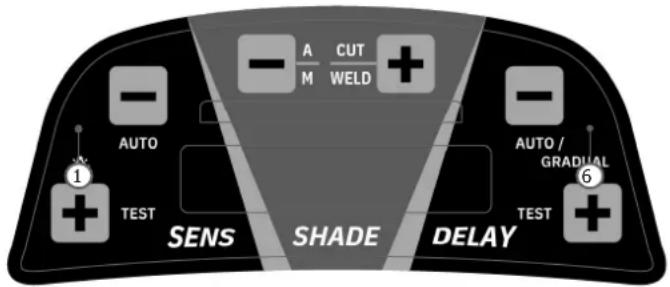
AUTO 1 TEST SENS SHADE DELAY A CUT M WELD + - - AUTO / GRADUAL 6 TEST- Increase the sensitivity level
- Sensitivity gear is reduced
- Decrease the shade number
- Increase the shade number
- Decrease the delay time
- Increase the delay time
| 1 | SENSITIVITY | · Sensitivity adjustment :- Welding process: «Max» position for low amperage TIG rprocess / Medium range for most application.- «+» : Short press function : To increase the sensitivity level. Long press function : Turn on or off the anti-light interference function.- «-»: Short press function : Sensitivity gear is reduced. Long press function: In cutting or welding mode, turn on or off the automatic function.When the function is on, the SENS area on the screen will display «AUTO» characters, and the sensitivity numbers will increase from 0 to 7, and finally display the appropriate sensitivity.- When pressing «-» and «+» (SENS) simultaneously, the TEST function is activated. |
| 2 | SHADE | · Shade adjustment:The shade area is used to adjust the shade according to the selected adjustment range (4-8 or 8-13).- «-» : Short Press function : Decrease the shade number. Long Press function : In the welding mode, turn on/off automatic shade function. In the automatic mode (A), the button «-» & «+» can adjust the automatic shade number from -2 to+2.- «+» : Short Press function : Increase the shade number. Long Press function : change into cut or welding working mode.CAUTION: Make sure to switch back to «WELD» mode before any welding operation. |
GYSMATIC FLIP-FLAP GOGGLE 3
| 3 | DELAY | Delay: Time to get the clear state back.Delay is designed for slower switching time to clear state to eliminate remained bright rays.- «-»: Short Press function: Decrease the delay time. Long Press function: Enter or exit the automatic delay function. After the automatic delay function is enabled, the DELAY area on the screen will display «AUTO» characters. The gear numbers on the screen can adjust from -9 to +9.- «+»: Short Press function: Decrease the delay time. Long Press function: Enter or exit the «Gradual» function. In the weld mode, when gradual return function is enabled, the screen of DELAY area will show "G".- When pressing «-» and «++» (DELAY) simultaneously, the TEST function is activated. |
PRECAUTIONS
- The welding helmet is suitable for use with virtually all welding processes except Oxy-Acetylene welding, laser welding and gas.
- Standard protective screens must be installed on both inside and outside surfaces of the module. Failure to use protective screens may constitute a safety hazard or result in irreparable damage to the module.
| Clear shade 3 | |
| Dark shade Cut : 4-8 / Weld : | 8-13 |
| Filter dimension 110x90x8.5 mm | |
| Reaction speed 0.08 ms | |
| Power supply Solar + battery | |
| Weight 578 gr | |
| Field of vision 130.8x58.5 mm | |
| Applications MMA / TIG >2A / | MIG / Grind |
| Warranty 1 | 2 years |
| Application temperature -5°C / + 55°C | |
| Storage temperature -10°C / | + 60°C |
HEADBAND ADJUSTMENT
natural_image
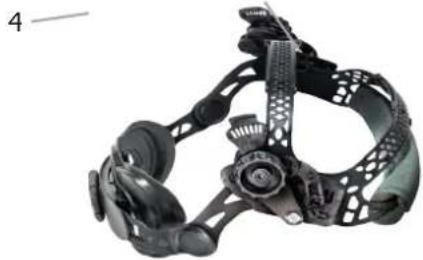
Close-up of a black mechanical headgear with attached fasteners and a circular component (no visible text or symbols)The headband Ergolift+ is lightweight and ergonomic. Its 3 points adjustable balance design provides more flexibility and comfort.
1- Headband adjustment
2- Headband slider(with 3 slots)
3- Block washer adjustment
4- Longitudinal adjustment
MAINTENANCE
- Expiration date: No expiration date for this product but the state of the GYSMATIC FLIP-FLAP GOGGLE 3 welding helmet must be checked before each use.
• The GYSMATIC FLIP-FLAP GOGGLE 3 must not be dropped - Do not put any heavy tools/objects in or on the helmet in order not to damage the filter or the protective screens.
The deterioration of the optoelectronic filter or its protective screen can reduce the vision field or the protection level. Replace the damaged parts. - Do not use any tools or other sharp objects to remove any components of filter or helmet. Doing so may damage filter or helmet, preventing proper function, possibly causing injury or cancellation of the warranty.
REPLACEMENT OF INSIDE AND OUTSIDE PROTECTIVE SCREENS
text_image
1 A Unlock Press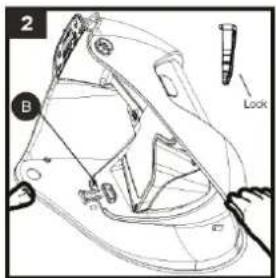
text_image
2 B Lock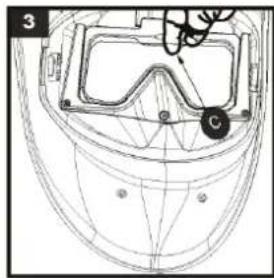
natural_image
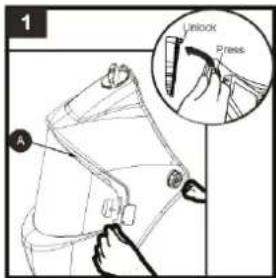
Technical line drawing of a helmet with safety goggles and a labeled point (no text or symbols)- Unlock the snap joint of protection plate if it is locked (A). Press the snap joint for protection plate and then take out the plate (A).
- Change another protection plate and insert the snap joint (make sure "a" side close to the helmet) and then lock it (B).
- Insert a finger into the semicircular hole and pull out the inner protection lens (C). Remove protection film from lens. Place inside protection lens (C) back into the front of the helmet by inserting one side of the lens into either side slot and then bend the lens just enough that it will slip into the other side slot.
REPLACING BATTERIE
text_image
4 D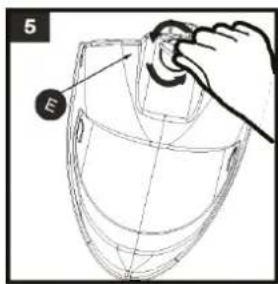
text_image
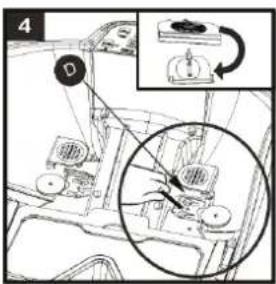
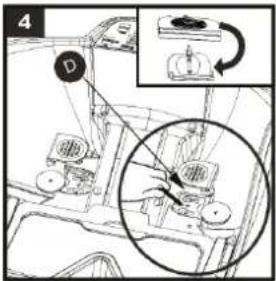
5 EThe opto-electronic filter requires one 3V lithium battery (CR2032). Follow the instructions below to change batteries:
- Using the battery remover to take out the battery (D).
- Change the battery and then put them back.
- We recommend to replace the battery once a year.
CAUTION
- Recycle used lithium batteries. In Europe, batteries are considered as dangerous waste.
- Do not throw in the bin. To drop off only in collection point for used batteries.
REPLACING FILTER
natural_image
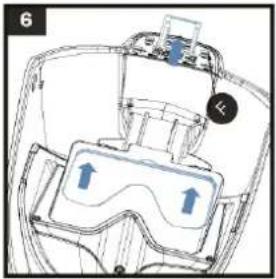
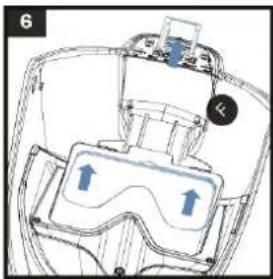
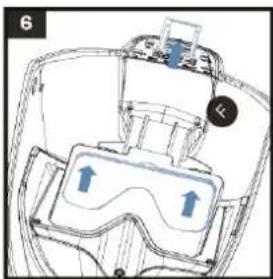
Diagram of a device interior with labeled components and directional arrows (no readable text or symbols)The entire filters moves up automatically (F).
SYMPTOMS AND SOLUTIONS
| The optoelectronic filter does not work. | Activate the solar charge by exposing the cell to the light between 20 to 30 minutes - Check and change battery if necessary. |
| Check that the range 4-8 or 8-13 with the «WELD» button. | |
| Filter stays dark after the weld arc is extinguished or when no arc is present. | Check and clean detectors if needed.Adjust sensitivity knob to the lower position (level 1). If the welding place is extremely bright, it is recommended to reduce light level. |
| Uncontrolled and sparkling switching: The filter lightens and darkens when welding. | Check arc sensors are not blocked from direct access to the arc light. Set the sensitivity level to 5. |
| Side of the filter is lighter than the center of viewing area. | It is a natural feature of LCD's, this symptom is not dangerous for the eyes. However for a maximum comfort, try to keep an view angle at around 90^ . |
SAFETY LABEL
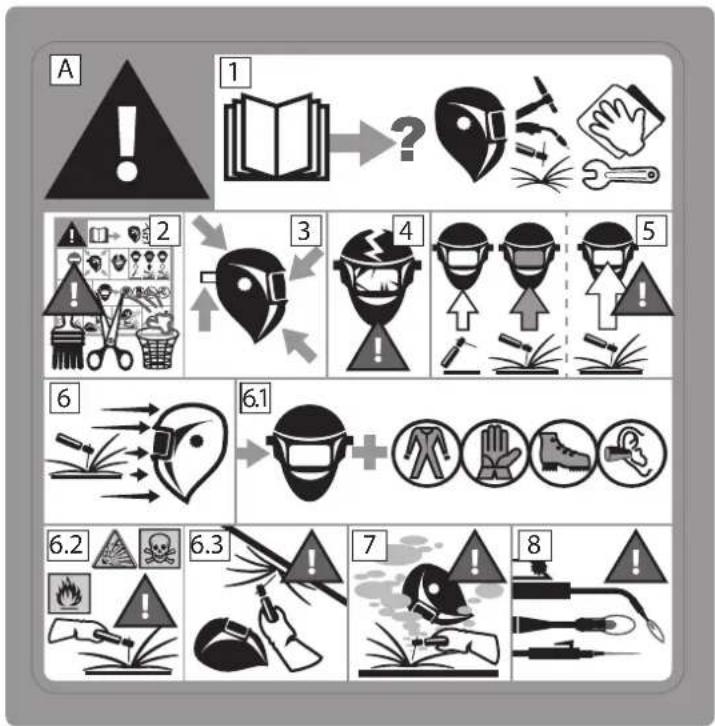
This label is displayed inside the welding helmet. It is important that the user understands the safety symbols signification. The list numbers match image numbers.
flowchart
graph TD
    A["Warning"] --> B["1: Book"]
    B --> C["?"]
    C --> D["3: Head"]
    D --> E["4: Hazard"]
    E --> F["5: Hand"]
    F --> G["6: Head"]
    G --> H["6.1: Hazard"]
    H --> I["7: Hazard"]
    I --> J["8: Welding"]
    J --> K["9: Hazard"]
Legend :
A. Warning ! Beware ! There are possible dangers as per the different symbols.
1. Read the instructions carefully before using the product or before welding.
2. Do not remove the warning label and do not paint on it.
3. Follow settings instructions and maintenance of the filter, the protective screens, the headband and the hood.
4. Inspect the helmet and the UV/IR filter carefully. Replace damaged or worn parts immediately. Cracked, scratched, filter glasses and protective screens decrease protection. Replace them immediately to avoid damaging your eyes.
5. Warning, if the UV/IR filter does not tint whilst welding or cutting, stop immediately and consult the user manual.
6. Arc radiation can cause eyes and skin burns.
6.1. Use a welding helmet with a good filtration or opacity. Wear complete protective clothing..
6.2. The helmet, filter and protective screen do not guarantee unlimited protection against, shocks, impacts, explosions or corrosive liquid. Avoid welding or cutting in rough environment.
6.3. Do not weld or cut above your head with this helmet.
7. Keep your head away from the smoke-filled area. Use a forced ventilation or a local aspiration system to eliminate smoke.
8. The oxyacetylene welding-cutting, laser or gas is not authorised with this helmet.
text_image
Labeled diagram of a mechanical device with numbered parts for identificationtext_image
1 Unlock Press A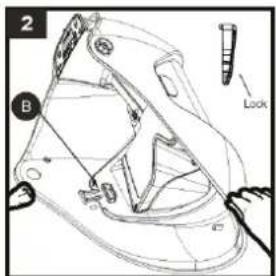
text_image
2 B Look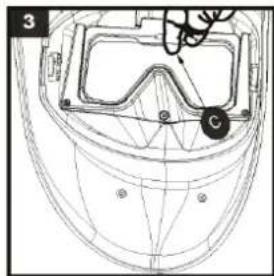
natural_image
Technical line drawing of a helmet with visible components and alignment lines (no text or symbols)natural_image
Line drawing of a helmet with a hand adjusting the top part (no text or symbols)natural_image
Diagram of a device interior with labeled components and directional arrows (no readable text or symbols)text_image
Labeled diagram of a mechanical device with numbered parts for identificationtext_image
1 A F Unlock Press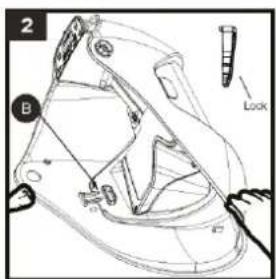
text_image
2 B Look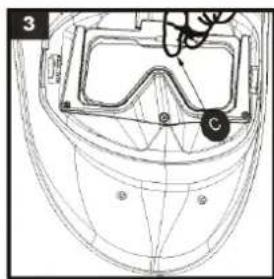
natural_image
Technical line drawing of a helmet with safety goggles and a circular component labeled 'C' (no text or symbols beyond label)REEMPLAZO DE LA PILA
text_image
4 D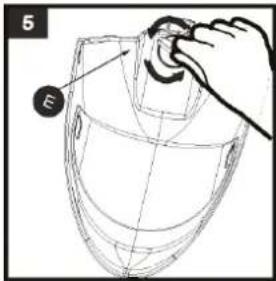
text_image
5 Enatural_image
Diagram of a device interior with labeled components and directional arrows (no readable text or symbols)flowchart
graph TD
    A["Warning"] --> B["1: Book"]
    B --> C["2: Hand"]
    C --> D["3: Arrow pointing to helmet"]
    D --> E["4: Headlamp with hand"]
    E --> F["5: Shoe with up arrows"]
    F --> G["6: Triggering helmet"]
    G --> H["6.1: Headlamp + shoes"]
    H --> I["7: Cover in water with tools"]
    I --> J["8: Welding tools"]
Leyenda :
text_image
Labeled diagram of a mechanical device with numbered parts for identificationtext_image
1 Unlock Press A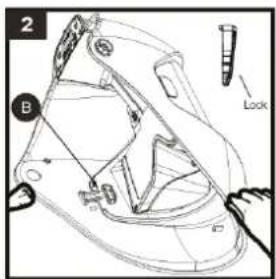
text_image
2 B Look ID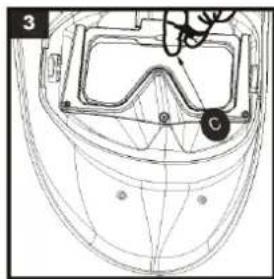
natural_image
Technical line drawing of a helmet with safety goggles and a labeled point C (no text or symbols present)- Unlock the snap joint of protection plate if it is locked (A). Press the snap joint for protection plate and then take out the plate (A).
- Change another protection plate and insert the snap joint (make sure "a" side close to the helmet) and then lock it (B).
- Insert a finger into the semicircular hole and pull out the inner protection lens (C). Remove protection film from lens. Place inside protection lens (C) back into the front of the helmet by inserting one side of the lens into either side slot and then bend the lens just enough that it will slip into the other side slot.
ЗАМЕНА ФИЛЬТРА
natural_image
Diagram of a device interior with labeled components and directional arrows (no readable text or symbols)text_image
Labeled diagram of a mechanical device with numbered parts for identificationtext_image
1 Unlock Press A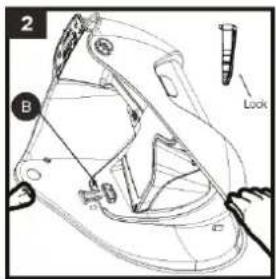
text_image
2 B Look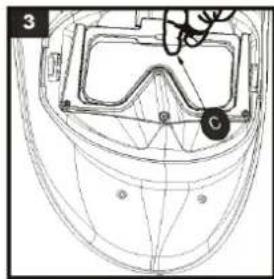
natural_image
Technical line drawing of a helmet with safety goggles and a labeled point C (no text or symbols present)text_image
Labeled diagram of a mechanical device with numbered parts for identificationtext_image
1 A UNLOCK Press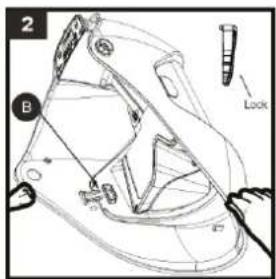
text_image
2 B Look A2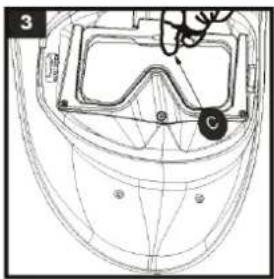
natural_image
Line drawing of a football helmet with visible front, side, and perspective views (no text or symbols)text_image
Technical diagram showing mechanical assembly with labeled components and a magnified inset highlighting a specific section.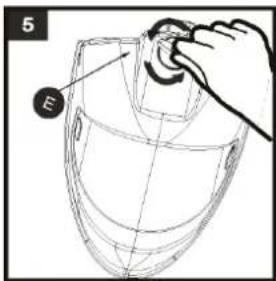
text_image
5 Enatural_image
Technical diagram of a mechanical device with two transparent components and directional arrows indicating motion (no text or symbols)flowchart
graph TD
    A["Warning"] --> B["1: Book"]
    B --> C["2: Hazard"]
    C --> D["3: Place"]
    D --> E["4: Head"]
    E --> F["5: Hand"]
    F --> G["6: Hazard"]
    G --> H["6.1: Face"]
    H --> I["7: Work Injury"]
    I --> J["8: Hazard"]
Legenda:
EN Manufacturer identification
EN Variations in Luminous transmittance class
EN Angle dependence of luminous transmittance class (optional)
EN Number of standard
DE Normung
natural_image
Close-up of a mechanical head assembly with numbered parts (4 and 5), no visible text or symbols on the device itself.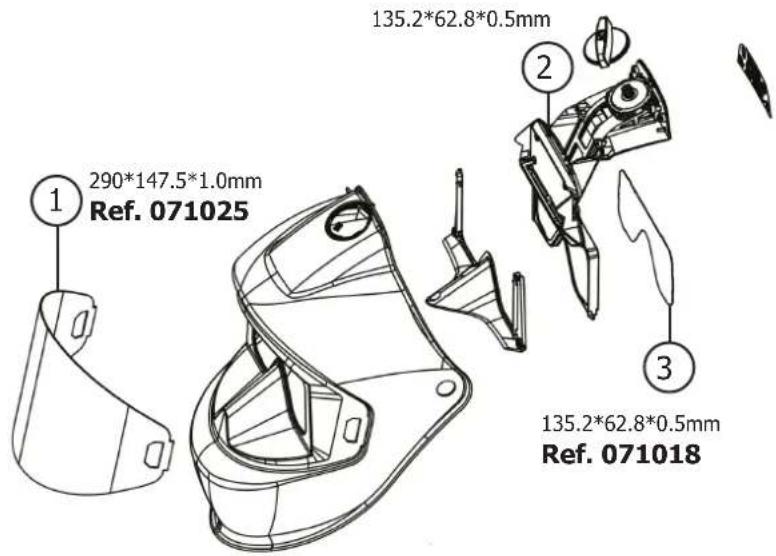
text_image
1 290*147.5*1.0mm Ref. 071025 2 135.2*62.8*0.5mm ① ② ③ 135.2*62.8*0.5mm Ref. 071018| GARANTIE / WARRANTY / GARANTIE / GARANTÍA / ГАРАНТИЯ / GARANTIE / GARANZIA | |
| FR | La garantie couvre tous défauts ou vices de fabrication pendant 2 ans, à compter de la date d'achat (pièces et main d'oeuvre).La garantie ne couvre pas :Toutes autres avaries dues au transport.Présence de grattons : travail sans vitre de protection (écran de garde)Verres cassésLes incidents dus à un mauvais usage (chute, démontage).En cas de défaut/panne, retourner l'appareil à votre distributeur, en y joignant :un justificatif d'achat daté (ticket de sortie de caisse, facture....)une note explicative de la panne/défaut. |
| UK | The warranty covers faulty workmanship for 2 years from the date of purchase (parts and labour).The warranty does not cover:Transit damage.Presence of scrapers: work without protective glass (guard screen)Damages due to misuse (dropping of equipment, disassembling).broken glassesIn case of failure, return the unit to your distributor together with:The proof of purchase (receipt etc ... )A description of the fault reported |
| DE | Die Garantieleistung des Herstellers erfolgt ausschließlich bei Fabrikations- oder Materialfehlern, die binnen 24 Monate nach Kauf angezeigt werden (Nachweis Kaufbeleg).Die Garantie erstreckt sich nicht auf :Alle anderen Schäden durch den Transport.Vorhandensein von Kratzern: Arbeiten ohne Schutzglas (Schutzschirm)Zerbrochene GläserVorfälle durch Missbrauch (Sturz, Demontage).Die Reparatur erfolgt erst nach Erhalt einer schriftlichen Akzeptanz (Unterschrift) des zuvor vorgelegten Kostenvoranschlages durch den Besteller. Im Fall einer Garantieleistung trägt GYS ausschließlich die Kosten für den Rückversand an den Fachhändler. |
| ES | La garantía cubre todos los defectos o vicios de fabricación durante 2 años, a partir de la fecha de compra (piezas y mano de obra)La garantía no cubre :Cualquier otro daño debido al transporte.Presencia de arañazos: trabajo sin cristal de protección (pantalla de protección)Gafas rotasIncidentes por mal uso (caída, desmontaje).En caso de fallo, regresen la maquina a su distribuidor, adjuntando:Un justificativo de compra con fecha (recibo, factura...)Una nota explicativa del fallo |
| RU | Гарантия распространяется на любой заводской дефект или брак в течение 2х лет с даты покупки изделия (запчасти и рабочая сила).Гарантия не распространяется на :Любые другие повреждения при транспортировке.Hаличие царапин: работа без защитного стекла (защитный экран)Разбитые очкиИнциденты, связанные с неправильным использованием (падение, демонтаж).При выходе из строя, обратитесь в пункт покупки аппарата с предъявлением следующих документов:документ, подтверждающий покупку (с датой): кассовый чек, инвойс....описание поломки. |
| NL | De garantie dekt alle gebreken en fabricagefouten gedurende twee jaar vanaf de aankoopdatum (onderdelen en arbeidsloon).De garantie dekt niet:Elke andere schade als gevolg van transport.Aanwezigheid van krassen: werken zonder beschermend glas (beschermrooster)Gebroken glazenIncidenten door verkeerd gebruik (vallen, afbreken).In geval van storing moet het apparaat teruggestuurd worden naar uw distributeur, samen met:Een gedateerd aankoopbewijs (betaalbewijs, factuur ... ).Een beschrijving van de storing. |
| IT | La garanzia copre qualsiasi difetto di fabbricazione per 2 anni, a partire dalla data d'acquisto (pezzi e mano d'opera).La garanzia non copre :Eventuali altri danni dovuti al trasporto.Presenza di graffi: lavoro senza vetro di protezione (schermo di protezione)Occhiali rottiIncidenti dovuti ad un uso improprio (caduta, smontaggio).In caso di guasto, rinviare il dispositivo al distributore, allegando:la prova d'acquisto con data (scontrino, fattura...)una nota esplicativa del guasto. |
DÉCLARATION DE CONFORMITÉ / DECLARATION OF CONFORMITY / KONFORMITÄTSERKLÄRUNG / DECLARACIÓN DE CONFORMIDAD / СЕРТИФИКАТ СООТВЕТСТВИЯ / VERKLARING VAN OVEREENSTEMMING / DICHIARAZIONE DI CONFORMITÀ
UK The welding helmet GYSMATIC FLIP-FLAP GOGGLE 3 complies with (UE) 2016/425. This confirmity is established in compliance with EN 175 : 1997, EN 166 : 2001, and EN 379+A1 : 2009. Filter model : AWS PANOR GF Model of the helmet : PANOR GF