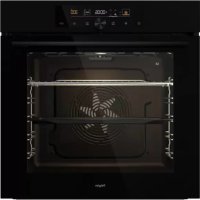
O500MAT - Oven Pelgrim - Free user manual and instructions
Find the device manual for free O500MAT Pelgrim in PDF.


| Product type | Built-in oven |
| Brand | Pelgrim |
| Model | O500MAT |
| Dimensions (W x H x D) | Approx. 60 x 60 x 55 cm |
| Weight | Approx. 35 kg |
| Power supply | 230 V / 50 Hz, max power approx. 3.5 kW |
| Capacity | Approx. 70 liters |
| Cooking functions | Convection, convection + bottom heat, hot air + top heat, double grill, natural convection, slow cooking, pizza, airbake, defrosting, reheating, etc. |
| Automatic modes | 22 automatic programs (biscuits, pizza, poultry, etc.) |
| Provided equipment | Grid, shallow baking tray, perforated sheet (depending on model), temperature probe |
| Cooking levels | 5 grid levels with wire guides (sliding depending on model) |
| Lighting | Halogen lamp 25 W, G9, 230 V |
| Cleaning | AquaClean program, manual cleaning with soft cloth and soap |
| Child safety | Control lock via light button (5 seconds) |
| Door | Assisted closing with damping, removable for window cleaning |
| Repairability index | Spare parts available (bulb, probe, guides, etc.) |
Frequently Asked Questions - O500MAT Pelgrim
User questions about O500MAT Pelgrim
0 question about this device. Answer the ones you know or ask your own.
Ask a new question about this device
Download the instructions for your Oven in PDF format for free! Find your manual O500MAT - Pelgrim and take your electronic device back in hand. On this page are published all the documents necessary for the use of your device. O500MAT by Pelgrim.
USER MANUAL O500MAT Pelgrim
Halogenlamp:G9,230V,25W
Informations, consels, astuces, ourecommendations

ATTENTION!
Attention-danger

Nousvousrecommandonsvivementdelireattentivementcettenotice.
Tablesdesmatieres
Interrupteursurlaportedufour
(selonlemodele)
Instructions for use Oven
Wethankyouforyourtrustandthepurchaseofourappliance.
Thisdetailed instruction manualissuppliedtomaketheuseofthisproducteasier.The instructionsshouldallowyoutolearnaboutyournewapplianceasquicklyaspossible.
Makesureyouhavereceivedanundamagedappliance.Ifyoudofindtransportdamage, pleasecontactthesellerfromwhichyoupurchasedtheappliance,ortheregional warehousefromwhichtiwassupplied.Thetelephonenumbercanbefoundonthe invoiceoronthedeliverynote.
Instructions for installation and connection are supplied on separate sheet.
Thefollowingsymbolsareusedthroughoutthemanualandtheyhavethefollowingmeanings:

INFORMATION!
Information, advice, tip, or recommendation

WARNING!
Warning-generaldanger

Itisimportantthatyoucarefullyreadtheinstructions.
Contents
Safety precautions 4
Other important safety warnings 6
Appliance description 7
Rating plate - product information 7
Control unit 8
Appliance equipment 9
Control lights 9
Guides 9
Oven door switch 10
Cooling fan 10
Oven equipment and accessories 10
Before first use 12
Switching on for the first time 13
Choosing the settings 14
PROFESSIONAL MODE (pro bake) 14
AUTOMATIC MODE (auto bake) 19
22CHOOSII
Child lock 22
Starting the cooking process 24
24Endofco
Choosing the general settings 25
General tips and advice for baking 27
Cooking with a temperature probe 28
30Recomm
Cleaning and maintenance 31
32Usingthe
33Removin
33Removin
Replacing the bulb 35
Troubleshooting table 36
Special warnings and fault reporting 36
Disposal 37
Cooking test 38
Safety precautions

IMPORTANTSAFETYPRECAUTIONS-CAREFULLYREAD THEINSTRUCTIONSandSAVETHEMFORFUTURE REFERENCE.
Appliance must be connected to fixed wiring which has incorporated means of disconnection. Fixed wiring must be made in accordance with the wiring rules.
Meansfordisconnectionmustbeincorporatedinthefixed wiringinaccordancewiththewiringrules.
Theappliance mustnotbeinstalledbehindadecorativedoor inordertoavoidoverheating.
If the supply cord is damaged, it must be replaced by the manufacturer, its service agents similarly qualified persons in order to avoid a hazard (only for appliances supplied with connection cord).
Duringusetheappliancebecomeshot.Careshouldbetaken toavoidtouchingtheheatingelementsinsidetheoven.
Thisappliancecanbeusedbychildrenaged8yearsandabove, andbypersonswithreducedphysical,sensoryormental capabilitiesorlackofexperienceandknowledge,iftheyhave beengivensupervisionorinstructionconcerningtheuseofthe applianceinasafeway,andiftheyunderstandthehazards involved.Childrenshallnotplaywiththeappliance.Cleaning andusermaintenanceshallnotbedonebychildrenwithout supervision.
WARNING: Accessible parts may become hot during use. Young children should be kept away.
WARNING: The appliance and some of its accessible parts may become very hot during use. Careshouldbetakentoavoid touching heating elements. Children less than 8 years of age shall be kept away unless continuously supervised.
Theapplianceisnotintendedtobecontrolledbyexternaltimers orseparateremotecontrollsystem.
Onlyusethetemperatureproberecommendedforuseinthis oven.
Donotuseharshabrasivecleanersorsharpmetalscrapersto cleantheovendoorglass/theglassofhingedlidsofthehob (asappropriate),sincetheycansscratchthesurface,whichmay resultinshatteringoftheglass.
Donotusesteamcleanersorhigh- pressurecleanerstoclean theapplianceasthismayresultinanelectricshock.
WARNING: Before replacing the lightbulb, makes sure the appliance has been disconnected from the mainspower, in order to prevent the hazard of an electric shock.
Neverpourwaterdirectlyonthebottomoftheovencavity. Temperaturedifferencescouldresultindamagetotheenameel coating.
Otherimportantsafty warnings
Theapplianceisintendedforhouseholduse.Donotuseitforanyotherpurpose,suchasroomheating, dryingofpetsortheranimals,paper,fabrics,herbsetc.Asthismayleadtoinjuryorfirehazard.
Appliance must be connected to fixed wiring which has incorporated means of disconnection. Fixed wiring must be made in accordance with the wiring rules.
Donotlifttheappliancebyholdingitbythedoorhandle.
Ovendoorhingesmaybedamagedwhununderexcessiveload.Donotstandorsitontheopenoven door,anddonotleanagainstit.Also,donotplaceanyheavyobjectsontotheovendoor.
If the powercordsoftherappliancesplacednearthisappliancegetentangledintheovendoor, they canbedamaged, which turn can result in short circuit. Therefore, makes sure the powercordsof other appliances are always satasafedistance.
Ovendoorbecomeveryhotduringoperation.Athirdglassisinstalledforextraprotection,reducing thetemperatureoftheoutsidesurface(onlywithsomemodels).
Makesuretheventsarenevercoveredobstructedinanyotherway.
Donotlinetheovencavitywithaluminiumfoil, anddonotplaceanybakingtraysorthercookware ontheovenbottom. This wouldobstructandreduceaircirculationintheoven,slowdownthebaking process, anddestroytheenameelcoating.
Werecommendyouavoidopeningtheovendoorduringbaking,asthisincreasespowerconsumption andincreasescondensateaccumulation.
Attheendofthebakingprocess, and during baking, be careful when opening the ovendoor, asthere is dangerofscalding.
Topreventlimescaleaccumulation,leavetheovendooropenafterbakingorusingtheoven,toallow theovencavitytocooldowntoroomtemperature.
Cleantheovenwhenithascompletelycooledown.
Eventualmismatchesincolourshadesbetweendifferentappliancesorcomponentsswithasingledesignlinemayoccurdetovariousfactors,suchasdifferentanglesunderwhichtheappliancesareobserved,differentcolouredbackgrounds,materials,androomillumination.
Neverpourwaterontotheovencavitybottom. Temperaturedifferencescouldresultindamagetothenamelcoating.
Donotusetheapplianceifitisdamaged.Callanaauthorizedservicecentre.

WARNING!
Carefullyreadtheinstructionsforusebeforeconnectingtheappliance.Repairorany warrantyclaimresultingfromincorrectconnectionoruseoftheapplianceshallnotbe coveredbythewarranty.
Applianancedescription

INFORMATION!
Appliancefunctionsandequipmentdependonthemodel.
Basicequipmentofyourapplianceincludeswireguides,shallowbakingtray,andawirerack.
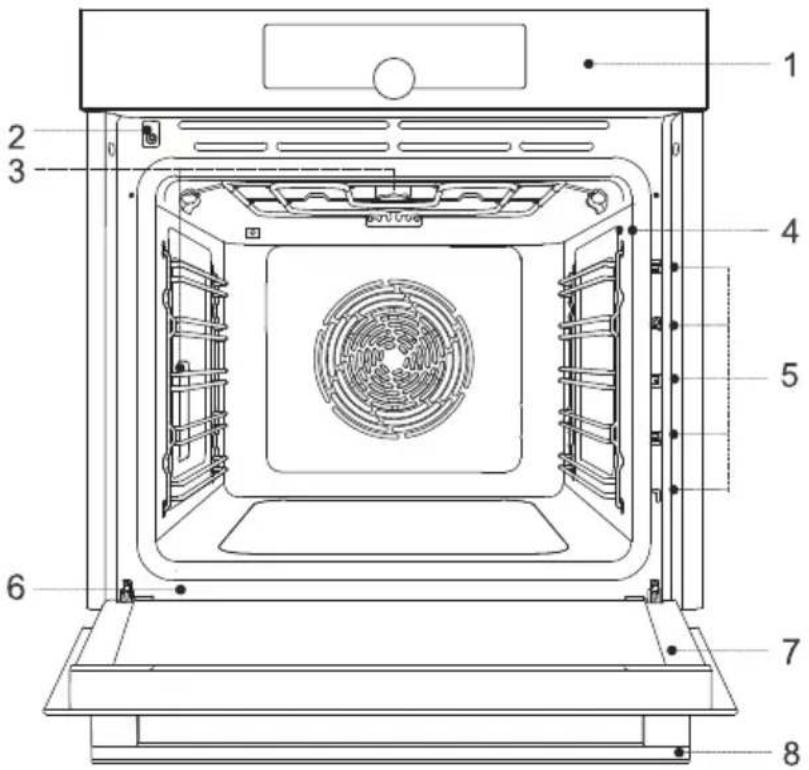
5Guides-cookinglevels1Controlunit
6Ratingplate2Doorswitch
7Ovendoor3Lighting
8Doorhandle4Temperatureprobesocket
Ratingplate-productinformation
Aratingplatewithbasicinformationabouttheapplianceisattachedtotheedgeoftheoven.Precise informationonappliancetypeandmodelcanalsobefoundonthewarrantysheet.

6QRcode(dependently)2Model
7Technicalinformation3Type
8Complianceindications/symbols4Brand
Controlunit
(dependentlymodel)
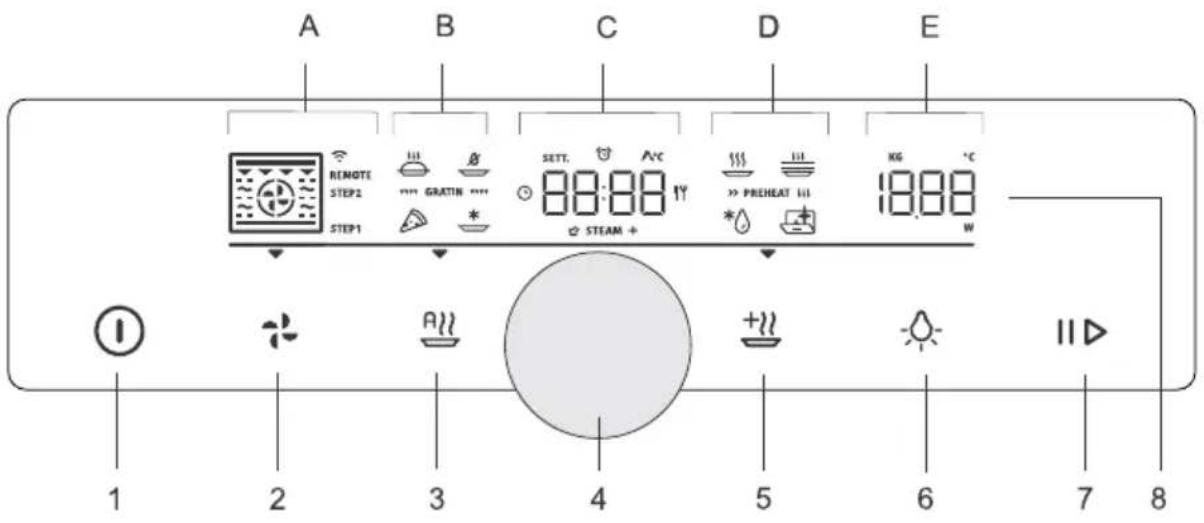
1.onloffkey
2.(probake)professionalmodekey
3.(autobake)automaticmodekey
4.settingsselectionandconfirmationknob -rotateheknobtochooseasetting -presstheknobtoconfirmthesetting
5.(extrabake)keyforextrafunctionsandgeneralappliancesettings
6.(light)keyforswitchingtheovenlightingonandoff
7.startStopkeyforstartingorpausing,andconfirmingsettings
8.Displayunit:
A.bakingsystems,stepmode(STEP),connectivity(WIFI,REMOTE)
B.specialbakingsystems,automaticprograms,gratins
C.clock,timerfunctions,temperatureprobe,bakingtime
Dpecialprograms,preheating
E. temperature, weight

INFORMATION!
Forbetterkeyresponse, touchthekeyswithlargeareaofyourfingertip.Eachtimeyoupress akey, thiswillbeacknowledgedbyashortacousticsignal(ifthefunctionisavailable).
Applianceequipment
Controllights
Oven light: oven light is switched on when you open or close the oven door, when you switch on the oven, at the end of the baking process, and when you touch the ovenlight key on the control unit.
Guides
Theguidesallowcookingorbakingon5racklevels.
The height levels of guides into which the racks can be inserted shall be counted from bottom up.
- Guidelevels4and5areintendedforgrilling/broiling.
- When inserting equipment, it should be correctly rotated.
Wireguides
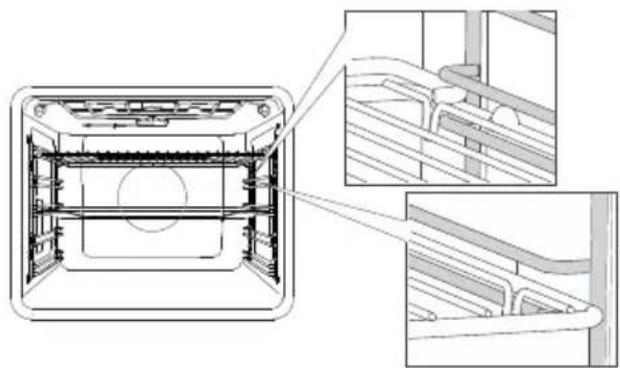
Incaseofwireguides,alwaysinsertthewire rackandthebakingtrayintotheslotbetween theupperandlowerpartofeachguidelevel.
Fixedpull-outguides
(dependentlymodel)
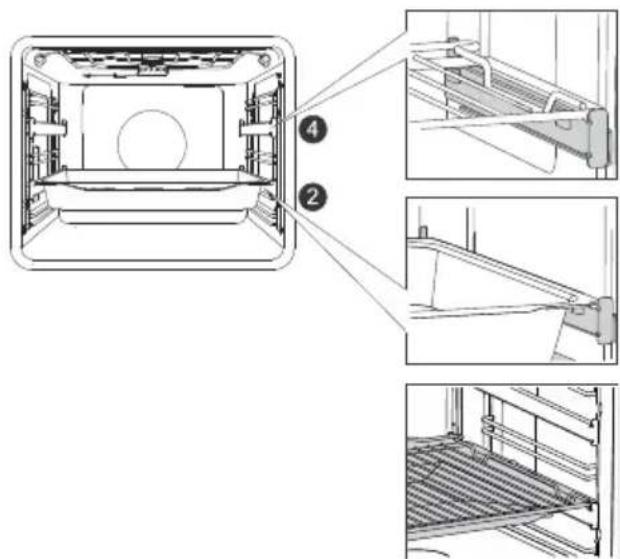
Pull-outguidesmaybefittedforthe2ndand 4thlevel.
Incaseoffixedpull-outguides,placetherack orbakingtrayontotheguide.Youcanplace thewirerackdirectlyontoabakingtray(shallow ordeepall-purposebakingtray)andplaceboth ontothesameguide;inthiscase,thebaking trayactsasadriptyra.
Click-onpull-outguides
(dependentlymodel)
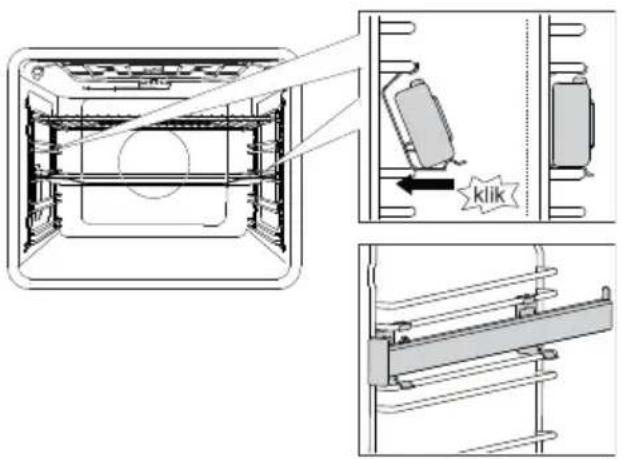
Theclick-onpull-outguidecanbeinsertedinto anyspacebetweentwowireguides.
Placetheguidesymmetricallyontothewireguidesontheleftandtherightsideoftheoven cavity.First, hooktheupperclipoftheguide underthewireofthewireguide. Then,press thelowercliptotherightpositionuntilyou hearaCLICK.
NOTE: The guidescanbeattachedtoany heightbetweentwolevelsof wireguides.

INFORMATION!
Theclick-onpull-outguidescannotbemountedontoguideswithfixeddouble-levelpartial extension. They can, however, be mounted on single-level partially extendibleguides, to levels 3-4 and 4-5.
Makesurethepull-outguideiscorrectlyrotatedandthatitextendsoutwards,i.e.outfromthe oven.
Ovendoorswitch
Dependingonthemodel)
Iftheovendoorisopenedduringovenoperation,theswitchturnsofftheheaterandfanintheoven cavity. Whenthedoorisclosed,theswitchturnstheapplianceoperationbackon.

WARNING!
Usingtheovenwiththedooropenandthedoorswitchengaged(closed)isnotallowed. Theovenwillsignalanerror, anditwillhavetobereset.
Coolingfan
Theapplianceisfittedwithacoolingfanthatcoolsthehousing,thedoor,andtheappliancecontrol unit. Aftertheovenisswitchedoff, the cooling fan continuesto operate forashortwhileinorderto cooldowntheoven.
Ovenepartmentandaccessories
Dependingonthemodel)

TheWIRERACKisusedforgrilling/broilingorassupportforapan,bakingtrayorbakingdishwiththefoodyouarebaking.


INFORMATION!
Thereisasafetylatchonthewirerack. Therefore,thewirerackhastobelifted slightlyatthefrontwhenpullingitoutfrom theoven.
SHALLOWBAKINGTRAYisusedforflatand smallpastry.ltcanalsobeusedasadriptray.

WARNING!
Theshallowbakingtraymaydeformas
itheatsupintheoven.Onceitcools
down,itreturnstotheinitialshape.
Suchdeformationdoesnotaffectits
function.

TheAIRFRYBAKINGTRAYisusedforcooking withsystemsthatfeaturesteaminjectionand forAirBake.TheperforationimprovesAirBake aroundthefoodforacrispiercrust. Whencookingfoodwithhighliquidcontent (water,fat),placetheshallowbakingtrayor all-purposedeepbakingtrayoneracklowerto serveasdriptyr.

TemperaturePROBE(BAKESensor).

WARNING!
The appliance and some of the accessible partstendto heatup during cooking.
Beforefirstuse
- Removeovenaccessoriesandanypackaging.cardboard,polystyrenefoam)fromtheoven.
- Wipetheovenaccessoriesandinteriorwithadampcloth.Donotuseabrasiveoraggressive clothsorcleaners.
- Heatanemptyovenforapproximatelyonehourwiththetopandbottomheatersystemata temperatureof250°C. The characteristic "newovenscent" willbereleased; therefore, ventilated theoormthoroughlyduringthisprocess.
Switchingonforthefirsttime
Afterconnectingyourapplianceorafteranextendedpoweroutage,12:00willflashonthedisplay.
First,chooseandconfirmthefollowingbasicsettings.

INFORMATION!
Change them by rotating the KNOB. To confirm the desired setting, press the KNOB or touch the key.

1.CLOCKSETTING
Settheclock/timeofday.First,setandconfirmtheminutes;thenset andconfirmthehours.

INFORMATION!
Tosetoradjusttheclocklateron,seechapterExtrafunctions.

2.ACOUSTICSIGNALVOLUME
Mediumvolumeisthedefaultsetting.ThesignVoLandthecurrenlyset valuefortheacousticsignalvolumewillappearonthedisplayunit.Rotate theKNOBtoincreaseordecreassethekeyvolume.
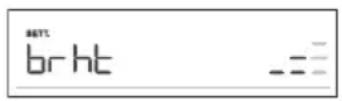
3.DISPLAYDIMMER
Mediumlightintensityisthedefaultsetting.Thesignbrhtandthecurrentlysetvalueforthedisplaylightintensitywillappearonthedisplayunit.RotatetheKNOBtoincreaseordecreaselightingintensity.
Afteryouconfirmtheselectedsettings, theclockwillappearthedisplayunit. The applianceisin standbymode.
Choosingthesettings
Theinterfaceallowschoosingseveraloperatingsmodes:
Professionalmode(probake)
Automaticmode(autobake)
-Extrafunctions(extrabake)
- Stepprogram(STEP)intheprofessionalmode(probake)
Automaticprogramsinautomaticmode(autobake)

INFORMATION!
- RotatetheKNOBtoscrollthroughesettings.
- First, confirm these selected setting by pressing the KNOB; then, changethe setting.
- ConfirmeachsettingbypressingtheKNOB.
- Alineandanarrowindicatethelocationoftheparameterthatyouarelookingtoset.
PressthekeTostarttheprogram.
Operationofthekey
-brieftouch:switchtheovenonoroff,stopthesbakingprocessorfunction.
-longtouch:theovenswitchestolowpowerconsumption(powersaving)mode.
NokeyorKNOBareactive,exceptforthekey.Toswitchthontheoven,long-touchthis key.

PROFESSIONALMODE(probake)
This function allows setting the baking parameters - baking system, temperature, fast preheating, and bakingtime-freely, attheuser's discretion.
Touchthekeyandsetthefollowing:
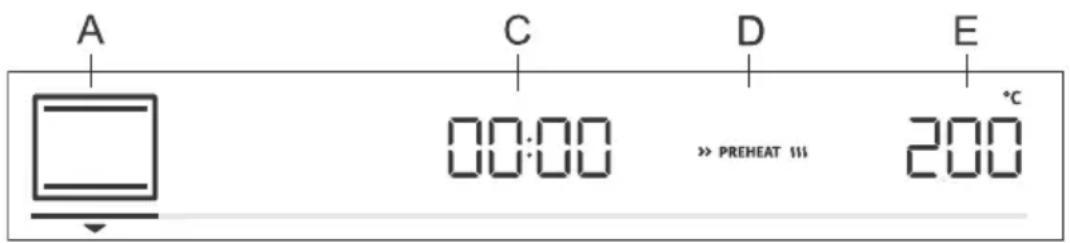
A.bakingsystem
C.programduration
D.preheating
E. temperature
Additionally, the following canbeset:
-timerfunctions(seechapterTimerfunctions)
-stepbakingmode(STEP)(seechapterStepprogram)
-gradin(GRATIN)(seechapterStartingthecookingprocess)
Fastpreheat
Usethefastpreheatingfunctionifyouwishtoheattheoventothedesiredtemperatureasquicklyas possible.
Toactivatefastpreheating,rotatetheKNOBtothesetting(seeimageLabelD).Confirm theselection.RotatetheKNOBtoselectthefullylitsignandconfirmit.Thefunctionisnowactivated.
When the selected temperature is reached, the preheating process stops and an acoustic signal is emitted. door will appear on the display unit. Open the door and insert the food. The program will automatically continue baking with selected settings.
INFORMATION!
When the fast preheat function is activated, delayed start function cannot be used.
Appliance functions and equipment depend on the model.
UseSymbol
HOTAIR
Hot air allows better flow of hot air around the food. This way, it dries out the surface and creates a thicker crust. Use this system to cook meat, pastry and vegetables, and to dry food on a single rack or multiple racks simultaneously.
HOTAIRANDBOTTOMHEATER
This system is optimal for baking homemade pizza and pastry with higher water content. Use it to bake on a single rack, when you want the food to be done faster and to be crunchy.
HOTAIRANDTOPHEATER
This cooking method results in a crunchy crust without added fat. This is a healthy version of fast-food frying, with fewer calories in the cooked food. Suitable for smaller cuts of meat, fish, vegetables, and frozen products ready for frying (French fries, chicken nuggets).
GRILLWITHHOTAIR
Hot air allows better flow of hot air around the food. This will dry out the surface. In combination with the grill heater/broiler, this will also result in a more intensive colour.
For faster baking of meat and vegetables.
TURBOBAKE
For dishes where even crispiness from all sides is desirable. The system is also suitable as the first step in the step baking mode, as it allows quick browning of the surface in the first stage and slow baking in the second stage. The meat will be juicy with a nicely browned crust.
LARGEGRILL
Use this system to grill large amounts of flat-shaped food like toast, open sandwiches, grill sausages, steaks, fish, skewers etc., as well as for cooking au gratin and for browning the crust. The heaters mounted on the top of the oven cavity evenly heat the entire surface.
Maximum allowed temperature: 240^
TOPANDBOTTOMHEATER
Use this system for conventional baking on a single rack, making soufflés, and baking at low temperatures (slow cooking).
GENTLEBAKING
For gentle and controlled slow cooking of delicate food (soft cuts of meat) and baking pastry with a crunchy bottom.
TOPANDBOTTOMHEATERWITHFAN
For even baking of food on a single rack, and for making soufflés.
Tablecontinuedfromlastpage
| UseSymbol | |
| LARGEGRILLWITHFAN Forroastingpoultryandlargercutsofmeatunderabroiler. | |
| LARGEGRILLANDBOTTOMHEATER Forfasterbakingonasinglerackandforcrisplybrowningthetopofyourpastry. | |
| GRILLWITHBOTTOMHEATERANDFAN Foroptimumbakingofyeast-leaveneddough,alltypesofbread,andfor preservation. |

INFORMATION!
Inthesesystems,itispossibletousethegratinfunction(seechapterStartingthecooking process).
Touchthekey to start the cooking process. Selected settings will appear on display unit.
TIMERFUNCTIONS
RotatetheKNOBtoselectthetimerfunctions.
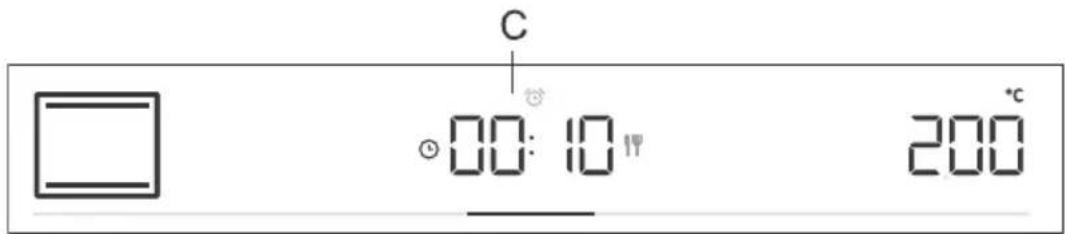

Timedcooking
Inthismode,youcanspecifythedurationofovenoperation(cooking time).
Thecookingdurationssymbolwill appearthedisplayunit ROTate theKNOBtosetthedesiredcookingtime.Confirmthesettingbypressing ontheKNOB.
Touchthekeytostartbaking.

Settingthedelayedstart

INFORMATION!
Delayedstartisnotpossiblewhenthepreheatingfunctionis activated.
Usethisfunctionwhenyouwishtostartcookingthefoodintheoven afteracertainperiodoftime.Placethefoodintotheoven,thensetthe systemandtemperature.Then,settheprogramdurationandthetime whenyouwishyourfooddone.
Example:
Currenttime:12:00(noon)
Cookingtime:2hours
Endofcooking:at18:00(6p.m.)
Thecookingdurationssymbolwillappearthedisplayunit.ChoosethesettingandconfirmitbypressingtheKNOB(inourcase,2:00).PresstheKNOBagainandrotateittoselectthesymbol.Confimhandsetthe timewhenyouwishyourfoodtobedone(inourcase,thisis18:00,or6p.m.).Desiredcookingendtimewillappearonthedisplayunit(18:00).ConfirmthesettingbypressingontheKNOB.
Touchthekeyostartbaking.
Whilewaitingtobebactivated, theovenswitchestoapartialstand-by (thedisplayunitgoesdark). Theovenwillswitchwiththeselected settingsautomatically (inourcaseat16:00,or4p.m.). Theovenwill switchoffatthesetime(inourcase, this is 18:00, or 6p.m.).

INFORMATION!
Cookingendtimeandtheclockwillalternateonthedisplayunit.
Afterthesetimeexpires, theovenwillautomaticallystopoperating.
Sign End and 00.00 will alternate on the display unit. An acoustic signal willbeemitted, whichcanbeturnedoffbytouchinganykey. Afterone minute, theacousticsignalwillbeswitchedoffautomatically.

WARNING!
Thisfunctionisnotsuitableforfoodrequiringfastpreheating.
Perishablefoodshouldnotbekeptintheovenforalongtime. Beforeusingthismode,checkwhethertheclockonthe applianceisaccuratelyset.

Minutemindersetting
Theminitemindercanbeusedindependentlyofovenoperation.The longestpossiblesettingis24hours.Duringthelastminute,theminite minderisdisplayedinseconds.
RotatetheKNOBtoselectthesymbolandconfirmyoursetting. RotatetheKNOBandsettheminuteminderduration.Confirmthesetting bypressingontheKNOB.

INFORMATION!
Theselecttimerfunctioncanberesetto00:00bylong-pressingtheKNOB.

INFORMATION!
Themostrecentlyusedtimerfunctionvaluescanbestoredandofferedaspresetvaluesthe nexttimeyouusethetimer.Asafactorysetting,thisfunctionisoff,butitcanbeactivated(see chapterSelectingextrafunctions,Adaptivefunction).
STEPPROGRAM
This function allows baking intwostepsorstages(twoconsecutivebakingstepsarecombinedina singlecookingprocess).
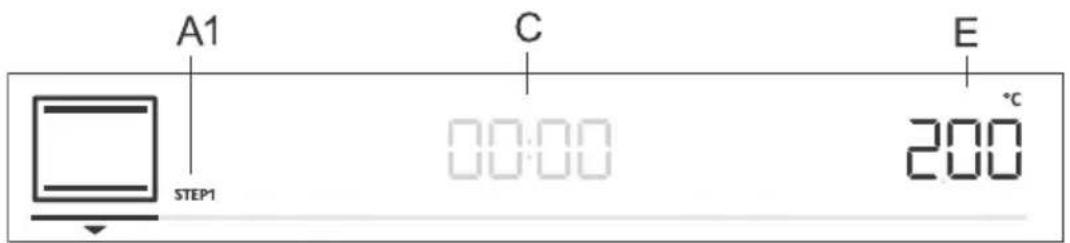
A1.firstcookingstepSTEP1,(STEP2)
C.programduration/endofprogram(seechapterTimerFunctions)
E. temperature
Step:STEP1
Inthemode,setthebakingsystemandtemperature.Youcanalsochoosetherapidpreheating function.Then,setthebakingdurationforSTEP1(seechapterTimerFunctions).Confirmthesetting bypressingontheKNOB.

INFORMATION!
InSTEP1, you can set the delayed start; however, if you do not activate fast preheating.
Step:STEP2
Pressandholdthekey.STEP2(secondcookingstep)willappearthedisplayunit(thefirst onehasalreadybeenset).Setthebakingsystem,temperature,andduration.Confirmthesettingby pressingontheKNOB.
Ifyouwish,youcanalsomodifySTEP1orSTEP2beforestartingthem.
TouchthekeyandselectSTEP1.Nowyouchangethesettings.Then,dothesamefor STEP2.
Todeletesthestepmode,pressandholdthekey.

Touchthekey to startbaking. The oven first startsto operate with the settings selected for STEP1. WhentheSTEP1 is done, STEP2 is activated.

AUTOMATICMODE(autobake)
Inthismode,youmaychoosebetweenspecialbakingsystemsorautomaticprograms(presetprograms forparticulartypesoffood).
Specialbakingsystems
Touchthekeyandsettthefollowing:
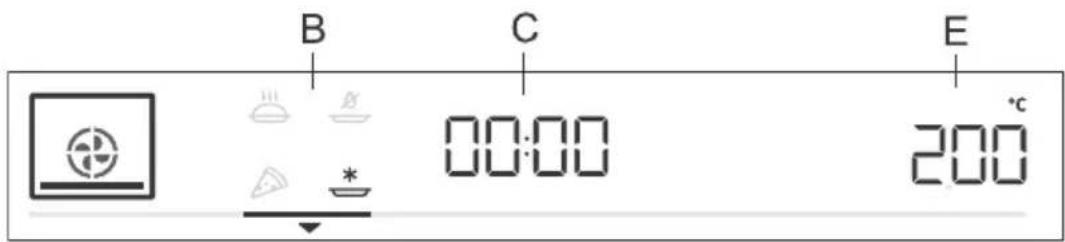
B.specialbakingsystems
C.programduration(seechapterTimerfunctions)
E. temperature
RotatetheKNOBandchooseyoursettings.Presetvalueswillbedisplayed:Youcanchangethe temperatureandprogramduration.
| UseSymbol | |
| * | BAKINGFROZENFOOD 1) Thismethodallowsbakingfrozenfoodinashorterperiodoftimewithout pre-heating.Optimumforpre-bakedfrozenproducts(bakeryproducts,croissants, lasagne,Frenchfries,chickennuggets),meatandvegetables. |
| PIZZASYTEM 1) Thissystemisoptimalforbakinghomemadepizzaandpastrywithhigherwater content.Useitobakeonasinglerack,whenyouwantthefoodtobedonefast andtobecrunchy. | |
| SLOWBAKING 2) Forgentle,slowandevencookingofmeat,fishandpastryonasinglerack.This cookingmethodwillleavethemeatwithahigherwatercontent,makingitjuicier andmoretender,whilepastrywillbeevenlybrowned/baked.Thissystemisused inthetemperaturerangebetween140°Cand220°C. | |
| AIRBAKE 1) Thiscookingmethodresultsinacrunchycrustwithoutaddedfat.Thisisahealthy versionoffast-foodfrying,withfewercaloriesinthecookedfood.Suitable for smallercutsofmeat,fish,vegetables,andfrozenproductsreadyforfrying(French fries,chickennuggets). |
1) Inthesesystems,itispossibletousethegratinfunction(seechapterStartingthecookingprocess).
2) ThisfunctionisusedfordeterminingtheenergyefficiencyclasspursuanttotheEN60350-1standard.
Fastpreheat
Cooking proceduresforsomedishesintheautobakemodealsoincludethefastpreheatingfunction. Thesignwillbefullylit. Whentheselectedtemperatureisreached, the preheatingprocessstopsand an acoustic signal is emitted. door will appear on the display unit. Open the door and insert the food. Theprogramwillautomaticallycontinuebakingwithselectedsettings.
Automaticprograms
Inthe automatic mode (autobake), you may choose between numerous automatic programs (the appliance will recommend the optimum cooking method, temperature, and cooking duration depending on the type of foods specified).
Pressandholdthekeyedisplaythecomputersonthedisplayunit(seetable).
Suggestedbakingsystem,temperatureanddurationcanalsobechangedatourdiscretion.Where possible,youcanalsosetheweightofthefood.
ConfirmyoursettingbypressingtheKNOB.Touchthekeytostartbaking.Presetvalueswill appearonthedisplayunit.
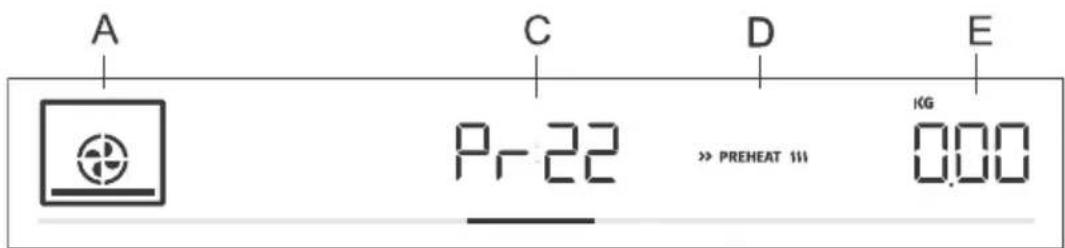
A.bakingsystem
Cautomaticprogramindication/programduration
D.fastpreheating
Eselectedamount
| TurningPreheatingl | |||||
| noyes3s | |||||
| noyes3s | |||||
| Pr03 | spongecake | wirerack | noyes2b | ||
| Pr04 | smallpastry | noyes2s | |||
| noyes2s | |||||
| Pr06 | applepie | wirerack | 2bakingpan/dishon | no | |
| Pr07 | apple strudel | shallow baking tray | 2 | no | no |
| Pr08 | chocolatesoufflé | wirerack | noyes3b | ||
| Pr09 | rising and proofing | shallow baking tray | 2 | no | no |
| noyes2s | |||||
| Pr11 | porkroast | wirerack | 2smallbakingdishon | no | |
| Pr12 | roastedbeef | wirerack | 2smallbakingdishon | no | |
| Pr13 | poultry-whole | tray | 2wirerackwithadrip | after2/3of cooking time | |
Tablecontinuedfromlastpage
| TurningPreheatingl | |||||
| Pr14 | poultry-smaller pieces | tray | no3wirerafter2/3adfip cooking time | ||
| meatloafPr15 | wirerack | nono2bakingpan/ | |||
| Pr16 | oven-bakedbeef steak | tray | no4wirerafter2/3adfip cooking time | ||
| Pr17 | meat-slow cooking | wirerack | noyes2smallbakin | ||
| baked/grilledfishPr18 | tray | no4wirerafter2/3adfip cooking time | |||
| Pr19 | wedges | nono3shallowbak | |||
| VegetablesouffléPr20 | wirerack | nono2bakingpan/ | |||
| lasagnePr21 | wirerack | nono2bakingpan/ | |||
| shallowbal |

INFORMATION!
Gratinfunctioncanbeusedwithsomeautomaticprograms(seechapterStartingthecooking process).

CHOOSINGEXTRAFUNCTIONS(extrabake)
Touchthekey to displayextrafunctions with theirrespectivepresetvalues on the displayunit.
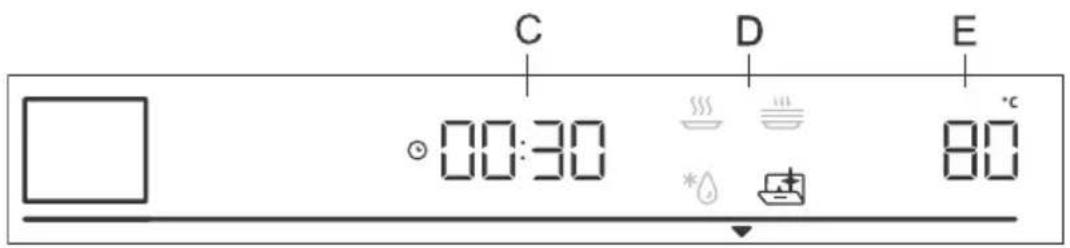
C.cookingduration
D.program
E.presettemperature
RotatetheKNOBandselecttheprogram.Presetvalueswillbedisplayed:Someprogramsallow settingthetemperatureandcookingtime.

INFORMATION!
RotatetheKNOBtoscrolthroughtheprograms.ConfirmeachsettingbypressingtheKNOB.

Aquaclean
Thisprogramallowseasyremovalofstainsfromtheoven(seechapters CleaningandMaintenance.)

Defrosting
Usethisfunctiontoslowlydefrostfrozenfood(cakes,pastry,bread, rolls,anddeep-frozenfruit).Presetprogramvaluesmaybechanged (temperature,cookingduration).
Halfway through the defrost time, the piece should be turned over, stirred and separated if they were frozentogather.

Reheating
Thisisusedtookeepwarmthefoodthathasalreadybeencooked.You maysetthe temperatureandreheatingstartandendtime.

Platewarming
Usethisfunctiontoreheatyourdinnerware(plates,cups)beforeserving foodinittokeepthefoodwarmlonger.Youmaysethetemperature andreheatingstartandendtime.
Childlock
To activate the child lock, press and hold (for 5 seconds) the light key . Loc will appear on the displayunit.Whenyoulong-pressthelightkeyagain,thechildlockisdeactivated.
If the child lock is activated with no timer function engaged (only clock is displayed), then the oven willnotoperate.
- If the child lock is activated after a timer function has been set, then the oven will operate normally; however, it will not be possible to change the settings.
- When the child lock is activated, cooking or baking systems (modes) or additional functions cannot bechanged. Thecooking/baking/roastingprocessscanonlybestoppedorswitchedoff.
- Child lock will remain active after the oven is switched off. To select a new system, the child lock must first bedeactivate.
Startingthecookingprocess
11
Startthecookingprocessbypressingthekey. II
Until the set temperature is reached for the first time, the current and the set temperature will alternate on the display unit. The temperatures symbol flashes at first. Whenthe desired temperature is reached, it goes off.

INFORMATION!
Ifnotimerfunctionisselected, cookingtimewillappearthedisplayunit. Ashortacoustic signalisemittedwhentheovenreachesthestelectedtemperature.
GRATIN
Extragratin
Youmayonlyactivatethisfunction10minutesafterthestartofthe cookingprocess(thesymbolwillapparantochondisplay unit).
PresstheKNOBtoopensettings.RotatetheKNOBtothesign
GRATIN and confirmyourselection.RotatetheKNOBagainand selectthefullylitsign.Confirmyourselection.Thefunctionisnow activated.Cookingtimeof10minutes(10:00)willappearonthedisplay unit.
Tochangetheduration,pressontheKNOBtwiceandrotateittoadjust thetime(max.30min).Confirmyourselection.
Thefunctionisusedinthelaststageofthecookingprocesswhenyou addsauce/wetrubordryrubontothefood,orwhenyouwishto additionallybrownthecrust.Agolden-browncrustwillformonthedish duringthegratinprocess,whichprotectsthefoodfromdryingout,while alsoimpartingamorepleasantappearanceandbetterflavour.

INFORMATION!
Thefunctioncanalsobeswitchedoffwhileitisinprogress.Rotate theKNOBtosetting.Choosethedimmedsignand confirmbypressingontheKNOB.
Endofcookingandswitchingofftheoven
Stopthecookingprocessbytouchingthekey.Endappearsondisplayunitandanacoustic signalisemitted.

INFORMATION!
Aftertheoperationiscompleted, alltimersettingsarealsostoppedanddeleted, except for the minuteminder. Timeofday(clock)willbedisplayed. Thecoolingfanwillcontinuetooperatefor awhile.
Aftertheuseoftheoven,somewatermaybeleftinthecondensatechannel(underneaththedoor).Wipethechannelwithaspongeoracloth.
Choosing the general settings
Press and hold the + key. SEt t will appear on the display unit for a few seconds. Then, the general settingsmenuwillappear.

INFORMATION!
RotatetheKNOBtoscrolthroughesettings.ConfirmeachsettingbypressingtheKNOBor thekey.

Clockdisplay
RotatetheKNOBtosettheclock.CLocwillappearonthedisplayunit. Afterconfirming,youcanchoosebetweenthe12hand24hclockdisplay. Confirm,thensettheclock/timeofday.First,settheminutes.Confirm, andthensetthehoursandconfirmagain.

Acousticsignalvolume
Choosebetweenthreeacousticsignalvolumelevels.RotatetheKNOB tochoosetheVoLsetting.Confirmthesettingandsetthevolume.There arefouravailablevolumelevels(zerobars-OFF,one,twoorthreebars).
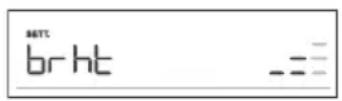
Displayillumination
Choosebetweenthreelevelsofdisplaylightintensity.RotatetheKNOB toselectthebrhtsetting.Confirmyourselectionandchooseloweror higherintensity.Therearethereavallableilluminationlevels(one,twoorthreebars).

Displayunit-nightmode
Thisfunctionwillautomaticallydimthedisplay(switchfromhightolow displayilluminationlevel)duringnighttime(8:00p.m.to6:00a.m.). ChoosethenGhtsetting.RotatetheKNOBtoswitchOnorOFF.

Standby
Thisfunctionswithestheclockdisplayonoroff.SelectthehidEsetting. RotatetheKNOBtoswitchOnorOFF.
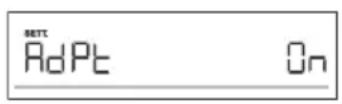
Adaptivefunction
Thefunctionallowsadjustingthesetcookingtemperatureandthe cookingtime.Asafactorydefault,thisfunctionisdeactivated,butyou canactIVATEit.
Whenthefunctionisactivated,themostrecentcookingtimeisdisplayed. Settingsforthemostrecentcookiningsessionlastingatleast1minute aretakenintoaccount.
AdPtwillappearthedisplayunit.Todeactivatethefunction,rotate theKNOBtopositionOFF.Followthesameproceduretoactivatethe function.Select"On"onthedisplayunit.
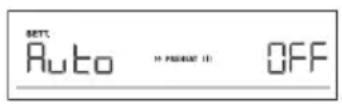
Automaticfastpreheating
Thisfunctionallowsautomaticadditionoffastpreheatingtothebaking systemsthatallowit.
RotatetheKNOBtoselecttheAutosetting.ChooseOnorOFF.
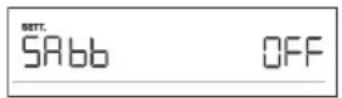
Sabbath
TheSabbathfunctionallowskeepingthefoodwarmtinehovenwithout havingtoswitchtheovenonoroff.
RotatetheKNOBtoselectSAbb.ChooseOnorOFF.
Settheduration(between24and72hours)andtemperature. Confirm eachsettingbypressingtheKNOB.
Ifyouwishtheovenlighttobeanallthetime,switchitonbytouching thesymbol.
Touchthekey to start the countdown. SAbbwill appear on the displayunit.
Allsoundsandoperation,exceptforthekey,willbedeactivated.

INFORMATION!
Incaseofapoweroutage,theSabbathmodewillbedeactivated andtheovenwillreturntotheinitialstate.
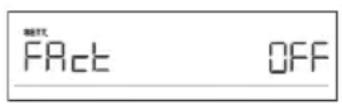
Factorysettings
Thisfunctionallowsresettingtheappliancetofactorysettings.FActwill appearonthedisplayunit.RotatetheKNOBtoselectrES.Pressthe
II keyuntiltheendoftheanimationtoconfirm.

WARNING!
Afterapoweroutageoraftertheapplianceisswitchedoff,additionalfunctionsettings willremainstoredfornomorethanafewminutes. Then, allsettings, except for the acoustic signal volume and displaydimmerwillberesettofactory defaults.
Generaltipsandadviceforbaking
- Removeallunnecessaryquipmentfromtheovenduringbaking
- Use equipment made of heat-resistant non-reflective materials (supplied baking trays and dishes, enamel-coatedcookware,temperedglasscookware).Bright-colouredmaterials(stainlesssteel oraluminium)materialsreflectheat. Asaresult, thermal processingoffoodinthemislesseffective.
- Always insert the baking sheets and trays to the end of the guides. When baking on the wire rack, placethebakingdishesortraysinthemmiddleoftherack.
- For optimum food preparation, werecommendobservingtheguidelinessspecifiedinthecooking table.Choosethelowerspecifiedtemperatureandtheshortestspecifiedcookingtime.Whenthis timeexpires,checktheresultsandthenadjustthesettingsasnecessary.
- Unlessitisabsolutelynecessary, donotopentheovendoorduringbaking.
- Donotplatzebakingtraysdirectlyontotheovencavitybottom.
- Do not use the all-purpose deep baking tray on the 1st guide level while the appliance is operating.
- Donotcovertheovencavitybottomormthewirerackwithaluminiumfoil.
- Withlongercookingprograms,youcanswitchchofftheovenapproximately10minutesbefore the endofcookingtimetomakeuseoftheaccumulatedheat.
Alwaysplacethebakingdishesontothewirerack. - When baking on several levels at the same time, insert the all-purpose deep baking tray into the lowerlevel.
- Whencookingaccordingtonorecipesfromoldercookbooks,usethebottomandtopheatersystem (asinconventionalovens)andsetthetemperature 10^ Clowerthanspecifiedintherecipe.
- If you are using parchment paper, make sure it is resistant to high-temperatures. Always trim it accordingly. Parchmentpaperpreventsthefoodfromstickingtothebakingtrayandmakesiteasiertoremovethefoodfromthebakingtray.
- Whencookinglargercutsofmeatorpastrywithhigherwatercontent,alotofsteamwill be generatedinsidetheoven,whichturnmaycondenseonteovendoor.Thisisanormal phenomenonwhichwillnotaffecttheoperationoftheappliance. Afterthecookingprocess,wipe thedoorandthedoorglassdry.
- When baking directly on the wire rack, insert the all-purpose deep tray one level lower to serve asadripray.
Fast preheating of the oven: If you are using the fast preheating function, do not insert the food into the oven until the oven is fully heated. Temperature has as substantial effect on the final result. Fast preheating is recommended for delicate cutof meat (sirloin), and for yeast-leavened and sponge dough that require as shortter baking time. Heating an empty oven consumes a lot of energy. Therefore, if possible, were recommend cooking several dishes in succession, or making several dishes simultaneously.
GentleBake: Allows slow and controlled cooking at a low temperature. The meat juices are distributed evenly, and themeatremainsjuicyandtender. The GentleBakeslowcookingmethodissuitable for delicatebonelessmeatcuts. Beforeslowcooking, searthemeathoroughlyfromallsidesinafrying pan.
Cookingwithatemperatureprobe (BAKESENSOR)
(dependentlymodel)
The temperature probe allows for accurate monitoring of the core temperature of the food during cooking.

WARNING!
Thetemperatureprobeshouldnotbeindirectvicinityoftheheatingelements.
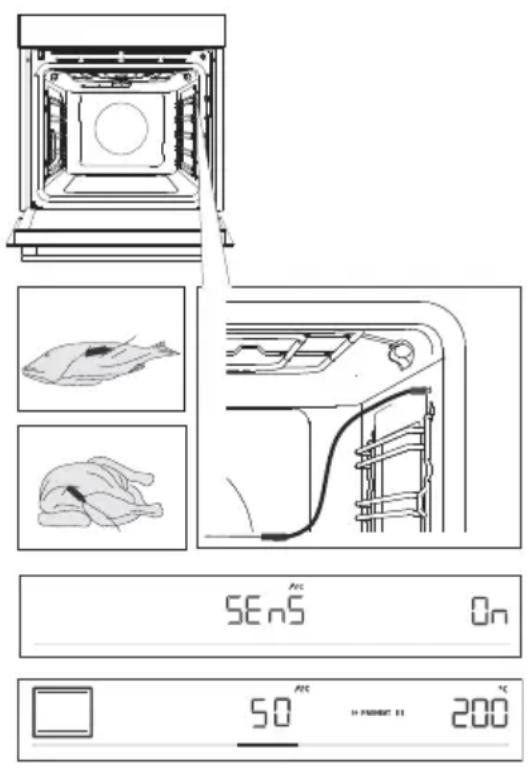
1 Stickthemetalendoftheprobeinto the thickestpartofthefood.
2Plugtheprobleplugintothesocketlocated intheupper-rightcorneratthefrontoftheoven cavity(seefigure).SEnSwillappearonthe displayunit.Toactivatethefunction,rotatethe KNOBtopositionOn.Followthesame proceduretodeactivatethefunction.Selected Offonthedisplayunit.
NOTE:ToentertheSEnSmenu,stopthe currentcookingprocessandconnecttheprobe tothesocket.Whenyouinserttheprobeinto thesocket,thepreviouslyselectedorpreset functionsontheovenaredeleted.
3 Choosethedesiredsystemandcooking temperature(inthetemperaturerangeofupto 230^) .Probeoperationssymbolandthepreset temperaturewillappearonthedisplayunit.To changethetemperature,rotatetheKNOB. Selectthedesiredfinalcoretemperatureofthe food(inthetemperaturerangebetween30and 99^)
NOTE: When using the probe, setting the cooking time is not possible.
4 Confirmthesettingbypressing the key.
5 Whenthesetcoretemperatureisreached, theovenwillstopoperating.Endwillappear onthedisplayunit.Anacousticsignalwill be heardwhichyoumayturnoffbytouchingany key. Afteroneminute, theacousticsignalwill beswitchedoffautomatically.

INFORMATION!
During the cooking process, set and current food core temperature alternate on the display unit. You may change the cooking temperature or the target food core temperature during the cooking process.
Correctuseoftheprobe,bytypeoffood:
- poultry:sticktheprobeinthethickestpartofthebreast;
- redmeat:sticktheprobeintoaleanpartthatisnotmarbledwithfat;
- smallerchunkswithbone:stickthemintoanareaalongthebone;
- fish:sticktheprobebehindthehead, towardsthespine.

WARNING!
Afteruse, carefully remove the probe from the food, unplug from the socket in the oven cavity, and clean it.
IfSEnSappearsonthedisplayunitwhenthetemperatureprobeisnotconnected,cleanthesocket.Tryconnectinganddisconnectingthetemperatureprobeseveraltimesina row.

INFORMATION!
If youdonotusetheprobe,removeitfromtheoven.
Recommendeddonenesslevelsfordifferenttypesofmeat
| Typeoffood | blue (raw) | medium rare | medium | medium well | welldone |
| BEEF | |||||
| 68-7359-6553-584 | |||||
| 63-6658-6254-574 | |||||
| 63-6658-6254-574 | |||||
| 71-7466-6860-635 | |||||
| VEAL | |||||
| 63-6658-6254-574 | |||||
| 63-6658-6254-574 | |||||
| PORK | |||||
| 75-8565-70//roast | |||||
| /60-69//pork,loi meatloaf | |||||
| 80-85///meat | |||||
| LAMB | |||||
| 77-8072-7666-716 | |||||
| MACHINE | |||||
| 77-8072-7666-716 | |||||
| GOATMEAT | |||||
| 77-8072-7666-716 | |||||
| POULTRY | |||||
| 82-90///poultry,wh poultry,br | |||||
| 62-65///poultry | |||||
| FISHANDSEAFOOD | |||||
| /62-65///trout | |||||
| /55-60///tuna | |||||
| /52-55///salmon | |||||
Cleaningandmaintenance

WARNING!
Beforecleaning,unplugtheappliancefromthepowermainsandwaitfortheapplianceto cooldown.
Children should not clean the appliance or perform maintenance tasks without proper supervision.
Foreasiercleaning,ovencavityandbakingtrayarecoatedwithspecialenamelforassmoothandresistantsurface.
Regularlycleantheapplianceanduseawarmwaterandhanddishwashingliquidtoremovelarger impuritiesandlimescale.Useacleanssoftclothspongecloth.
Appliance exterior: use hot soapsuds and a soft cloth to remove impurities, then wipe the surfaces dry.
Appliance interior: for stubborn dirt and grime, use conventional oven cleaners. When using such cleaners, thoroughly wipethe appliancewithawetclothremoveallcleanerresidue.
Accessoriesandguides:cleanwithhotsoapsudsandadampcloth.Forstubborndirtandgrime, werecommendpriorsoakinganduseofabrush.

INFORMATION!
Neveruseaggressiveorabrasivecleanersandaccessories(abrasivespongesanddetergents, stainandrustremovers,scrapersforglassceramicplates).
Ovenepquipmentisdishwasher-safe.
Foodresidue(fat,sugar,protein)canigniteduringtheuseoftheappliance.Therefore,remove largerchunksofdirtfromtheoveninteriorandaccessoriesbeforeeachuse.
UsingtheAquacCleanprogramtocleantheoven
Thisprogrammakesiteasiertoremoveanystainsfrominsidetheoven.
Thefunctionisthemosteffectiveifusedregularly,aftereachuse.
Beforerunningthecleaningprogram,removeallargevisiblechunksofdirtandfoodresiduesfrom theovencavity.
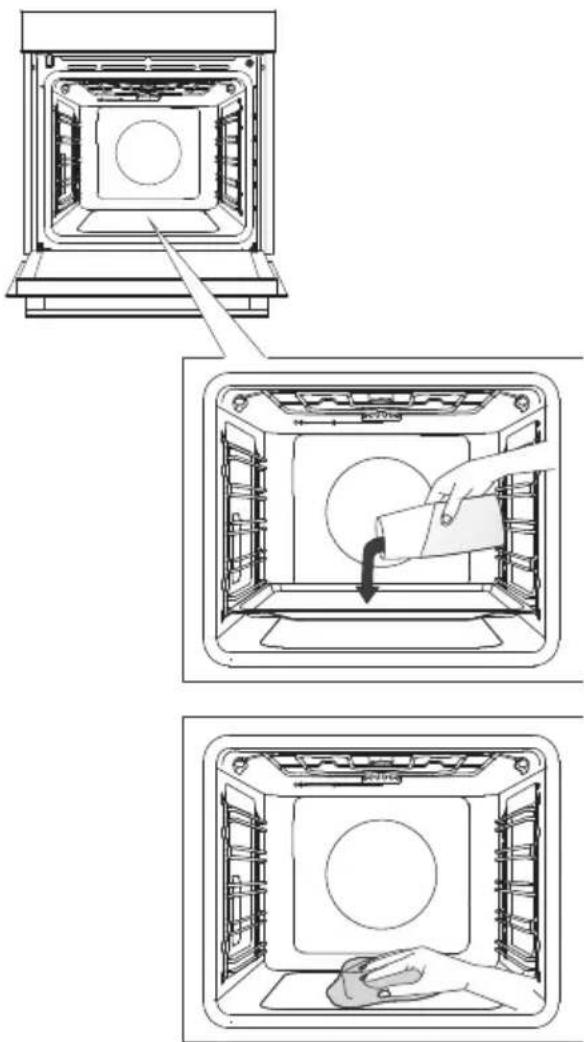
1 Inserttheshallowbakingtrayintothefirst guidelevelandpour0.4litresofhotwaterinto it.
2 Touchthekeyedisplayextra functionsonthedisplayunit.RotatetheKNOB tothesymbol.Presetvalueswillappear onthedisplayunit.
3Theprogramwilloperatefor30minutes. Whentheprogramiscomplete,Endwillappear onthedisplayunit.
4 Whentheprogramiscompleted, carefully removed the baking tray, using oven mitts (there can still besomewater on the baking tray). Wipedownthestainswith dampcloth and soapsuds. Thoroughly wipetheappliance with awetcloth to remove all cleaner residue.

WARNING!
UsetheAquaCleansystemwhentheovenhasfullycooledown.
Removingwireandfixedpull-out(extendible)guides
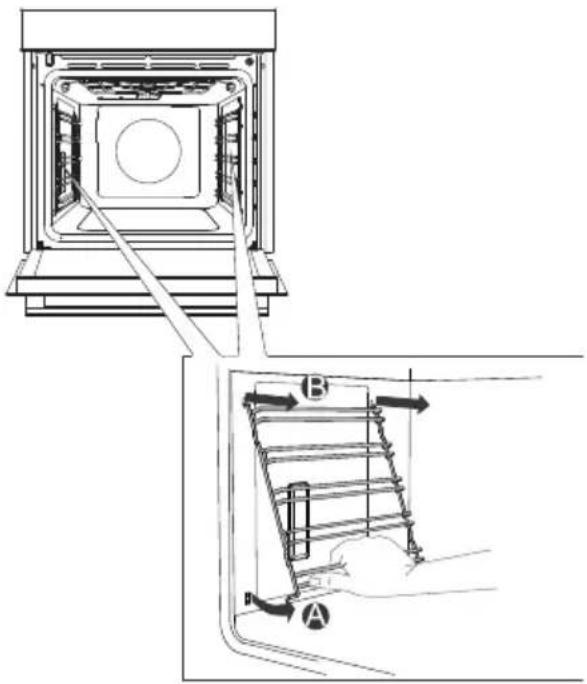
AHoldtheguidesbythebottomsideand pullthemtowardsthecenteroftheovencavity.
BRemovethemfromtheopeningsatthetop.
INFORMATION!
Whenremovingtheguides,takecarenot todamagetheenamelcoating.
Removingandreplacingtheovendoorglasspanes
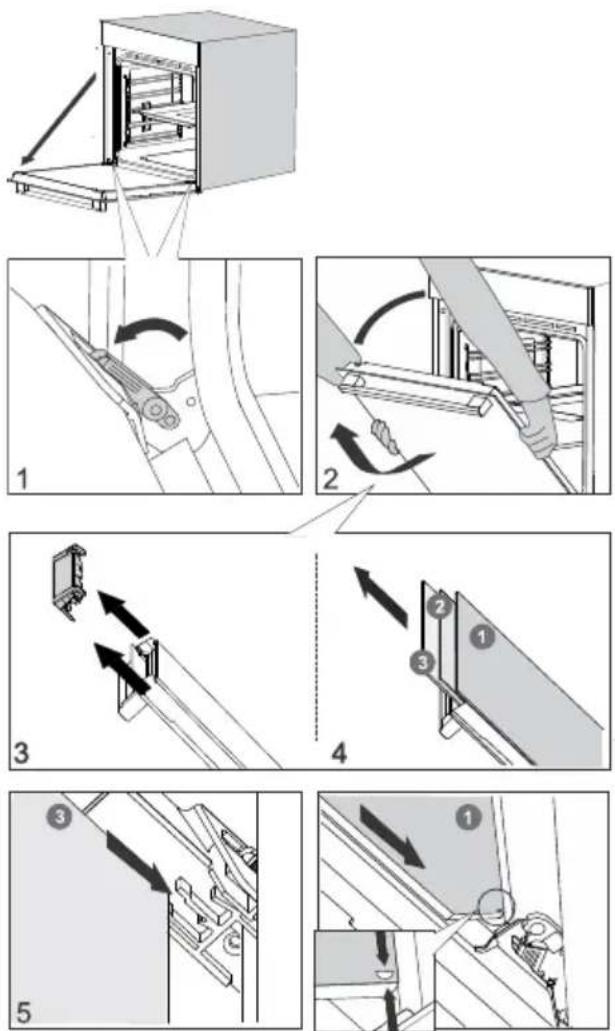
1 First, fullyopenthedoor(asfarasitwillgo).
2Ovendoorisattachedtotheingeswith specialsupportsthatalsoincludesaftetyevers. Rotatethesafetyeverstowardsthedoorby 90^ .Slowlyclosethedoortoa45°angle (relativetohepositionofthefullycloseddoor); then,liftthedoorandpullitout.
Ovendoorglasspanecanbecleanedfrom theinside,butithastoberemovedfromthe appliancedoorfirst.First,proceedasdescribed underitem2,butdonotremoveit.
3Removetheairguide.Holditontheleftandright-handsideofthedoorwithyourhands.Removeitbyslightlypullingittowardsyou.
4Holdthedoorglassattheupperedgeand removeit.Tothesameforthesecondthird glasspane(dependentlyhemodel).
5Toreplacetheglasspanes,observethe reverseorder.

INFORMATION!
Toreplacethedoor, followthereverseorder. Ifthedoordoesnotopenorcloseproperly, make surethenotchesonthehingesarealignedwiththehingebeds.

WARNING!
Theovendoorhingecanclosewithconsiderableforce.Therefore,alwaysrotateboth safetyleverstothesupportwhenfittingorremovingtheappliancedoor.
Softdoorclosingandopening
(dependentlymodel)
Ovendoorisfitted withasystemthatdampensthedoorclosingforce,startingatthea75°angle.It allowssimple,quiet,andgentleopeningandclosingofthedoor.Agentlepush(toa15°anglerelative tothecloseddoorposition)isenoughforthedoortocloseautomaticallyandsoftly.

WARNING!
If the force applied to closethedooristoosrong, the effect of the system is reduced or the system will be bypassedforsafety.
Replacingthebulb
Thebulbisconsumableandthereforenotcoveredbywarranty.Beforereplacingthebulb,remove allaccessoriesfromtheoven.
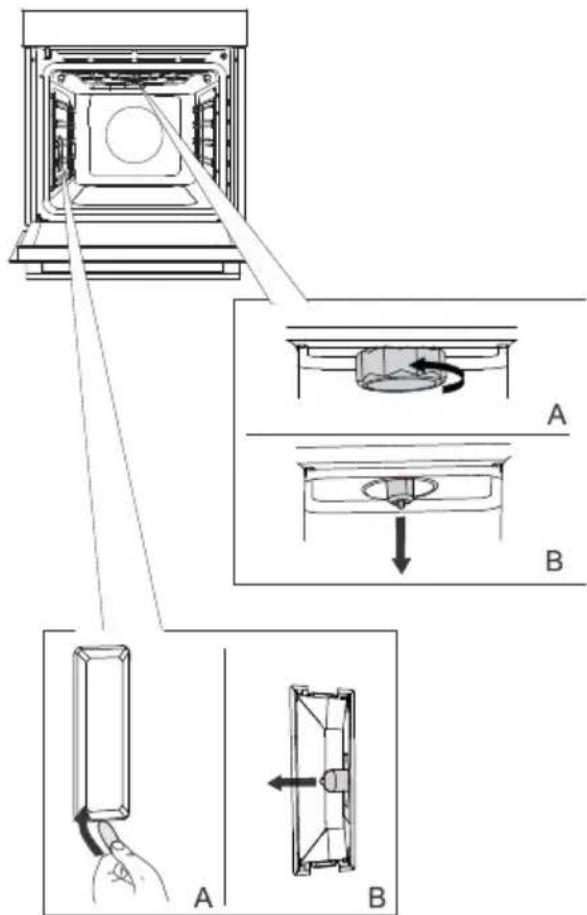
Halogenlamp:G9,230V,25W
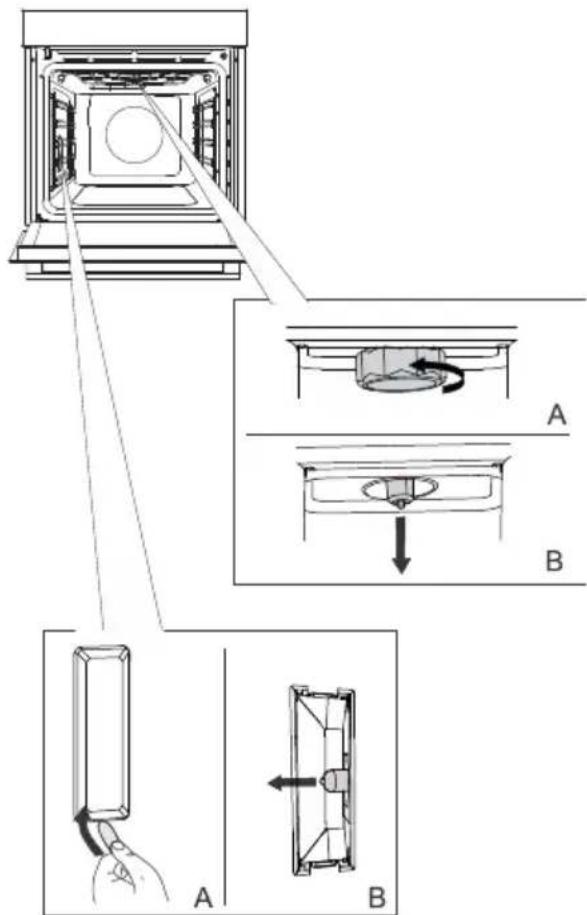
1 Unscrewandremovethecover(in anti-clockwisedirection).Removethehalogen bulb.
2 Useaflatplastictooltoremovethecover. Removethehalogenbulb.
- INFORMATION!
Takecarenottodamagetheename coating. Useprotectiontoavoidburningyourself.

WARNING!
Onlyreplacethelightbulbwhentheapplianceisdisconnectedfrompowersupply.
Troubleshootingtable
Special warningsandfaultreporting
Duringthewarrantypeperiod,onlyaservicecenterauthorizedbythemanufaturermaycarryout anyrepairs.
Beforemakinganyrepairs,makesuretheapplianceisdisconnectedfromthepowermainseitherby removingthefuseorbydisconnectingthepowerplugfromthewalloutlet.
Anyunauthorizedrepairsoftheappliancemayresultinelectricshockandshortcircuithazard;therefore, donotperformthem.Leavesuchworktoanexpertoraservicetechnician.
Incaseofminorproblemswithapplianceoperation,checkthismanualtoseeifyoucanfixtheproblem yourself.
Iftheapplianceisnotoperatingsproperlyoratalduetoinappropriateoperationorhandling,avsit fromaservicetechniciansshallnotbefreeofcharge,evenduringthewarrantyperiod.
Savetheinstructionsforfuturereferenceandpassthemontoanysubsequentownersorsusersofthe appliance.
Followingissomeadviceonrectifyingsomecommonproblems.
| CauseProblem-error | |
| Callaservicetechnician. Themainfuseinyourhometripsoften. | |
| Theovenlightingdoesnetwork. | Theprocessofchangingthelightbulbintheovenis describedinthechapterReplacingthebulb. |
| Controlunitisnotresponding, the screenisfrozen. | Disconnecttheappliancefromthepowermainsforafew minutes(undotheuseorswitchoffthemainsswitch); then,reconnecttheapplianceandswitchiton. |
| ErrorCodeErrXisdisplayed. Incaseofadouble-digiterrorcode, ErXXwillbedisplayed. | Thereisanerrorintheelectricmoduleoperation. Disconnecttheappliancefromthepowermainsforafew minutes. Iftheerroristillindicated, callaservicetechnician. |
If the problems persist despite observing the above advice, call an authorized servicetechnician. Repairoranywarranty claim resulting from incorrect connection or use of the appliances shall not be covered by the warranty. In this case, the user will cover the cost of repair.
Disposal
Ourproductpackagingismadeofenvironmentallyfriendlymaterialsthat canberecycled,disposedof,ordestroyedwithoutanyhazardtothe environment.Tothisend,packagingmaterialsarelabelledappropriately.
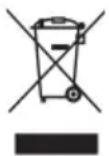
Thesymbolontheproductoritspackagingindicatesthattheproduct shouldnotbetreatedasnormalhouseholdwaste.Taketheproductto anauthorizedcollectioncentreforwasteelectricandelectronic equipmentprocessing.
Correctdisposal of the product will help prevent any negative effects on the environment and health of people, which could occur in incorrect product removal. Ford detailed information on removal and processing of the product, please contact therelevant municipal body in charge of waste management, your wasted disposalservice, or the store where you bought the product.
Wereservetherighttoanychangesanderrorsintheinstructionsforuse.
Cookingtest
EN60350-1:Onlyuseequipmentssuppliedbythemanufacturer. Alwaysinsertthebakingtrayallthewaytotheendpositiononthewireguide.Placepastryorcakes bakedin mouldsasshowninthemeasure.
Preheattheapplianceuntilitreachesettemperature.Donotusetherapidpreheatmode.
Preheattheappliancefor10minutes.Donotusetherapidpreheatmode.
**Turnafter2/3ofcookingtime.
| BAKING | ||||||
| EquipmentDish | mould placement | °C | min | |||
| biscuits/cookies -slingerack | 25-401503shallow | owbaking | ||||
| biscuits/cookies -slingerack | 35-50135*3shallow | baskin | ||||
| cookies-two racks/levels | 25-40140*2,4shallow | baskin | ||||
| cookies-three racks/levels | 45-601351,4,5shallow | baskin | ||||
| cupcakes-slingerack | 3shallowbakingtray | 160-170 | 20-30 | |||
| cupcakes-slingerack | 20-30155*3shallow | baskin | ||||
| cupcakes-two racks/levels | 30-45140*1,5shallow | baskin | ||||
| cupcakes-three racks/levels | 30-50140-1501,8,5shallow | |||||
| spongecake | roundmetalmould,diameter26cm/wirerack | 45-551502 | ||||
| spongecake | roundmetalmould,diameter26cm/wirerack | 45-551602 | ||||
| spongecake-two racks/levels | 2×roundmetalmould,diameter26cm/wirerack | ○○ | 2,4 | 170* | 45-55 | |
| applepie | 2×roundmetalmould,diameter20cm/wirerack | ○○ | 160**2 | 70-120 | ||
| applepie | 2×roundmetalmould,diameter20cm/wirerack | ○○ | 1602 | 70-120 | ||
| BROILING | ||||||
| EquipmentDish | mould placement | °C | °min | |||
| 4-7max5wireracktoasted | ||||||
| pljeskavica (mincedmeat patty) | wirerack+shallowbaking sheetasdTripray | 5 | 230 | 25-40 *** | ||

The appliance rating label is located on the inside of the appliance.
When contacting the service department, have the complete type number to hand.
You will find the addresses and phone numbers of the service organisation on the guarantee card.
Pelgrim