
OVM824RVS - Oven Pelgrim - Free user manual and instructions
Find the device manual for free OVM824RVS Pelgrim in PDF.


Pick your language and provide your email: we'll send you a specifically translated version.
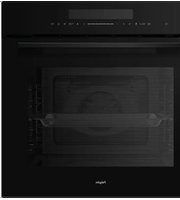
| Product Type | Built-in Electric Oven |
| Brand | Pelgrim |
| Model | OVM824RVS |
| Energy Efficiency Class | A+++ |
| Energy Consumption (Conventional) | 0.83 kWh/cycle |
| Energy Consumption (Fan Forced) | 0.62 kWh/cycle |
| Usable Volume | 50 L |
| Dimensions (Height x Width x Depth) | 595 x 595 x 575 mm (approx.) |
| Weight | Approx. 35 kg |
| Power Supply | 230 V / 50 Hz |
| Oven Functions | Conventional, Fan Forced, Grill, Defrost, Pizza, Bottom Heat |
| Temperature Range | 50 °C – 275 °C |
| Control Type | Electronic with Touch Controls |
| Display | LED Digital Display |
| Cleaning Method | Hydrolytic (Steam) Cleaning |
| Safety Features | Child Lock, Automatic Shut-off, Cool Touch Door |
| Interior Light | Yes, Halogen |
| Number of Shelves | 2 |
| Accessories Included | Baking Tray, Wire Rack, Meat Probe |
| Repairability Index | ≥ 8.0 / 10 |
Frequently Asked Questions - OVM824RVS Pelgrim
How do I preheat the Pelgrim OVM824RVS oven?
Turn the function selector to the desired mode and set the temperature using the controls. Once the oven reaches the set temperature, a signal (beep) will sound or the indicator light will turn off. For best results, preheat for at least 10 minutes.
What cleaning methods are available for this oven?
The Pelgrim OVM824RVS features a hydrolytic cleaning system. Pour about 200 ml of water into the bottom of the cold oven, select the cleaning function, and run it for 30 minutes at 100 °C. Wipe away loosened residues with a damp cloth after cooling.
Can I use aluminum foil in the oven?
Avoid covering the heating elements or the oven bottom with aluminum foil, as it can trap heat and damage the oven. Small pieces on the baking tray are acceptable, but ensure proper air circulation.
What should I do if the oven does not heat up?
First, check that the oven is properly plugged in and the circuit breaker is on. Ensure the function and temperature are correctly set. If it still doesn't heat, the heating element or thermostat may be faulty; contact service.
How do I activate the child lock?
Press and hold the child lock button (usually denoted by a key icon) for 3-5 seconds until a lock symbol appears on the display. To deactivate, repeat the same step.
What is the correct installation procedure?
The oven must be installed by a qualified technician. Ensure the power supply matches the rating plate. The oven should be placed in a built-in cabinet with proper ventilation. Refer to the full manual for cutout dimensions.
How do I replace the interior light bulb?
Disconnect the oven from power. Remove the glass cover (usually by twisting or unscrewing). Replace the halogen bulb (25 W, G9 cap) with a new one of the same type. Reattach the cover and reconnect power.
Why is the oven not heating evenly?
Uneven heating can be caused by overcrowding, using the wrong shelf position, or a malfunctioning fan. Ensure the fan is running in fan-forced mode. Also, check that the door seals are intact.
What accessories are included with the OVM824RVS?
The oven comes with a baking tray, a wire rack, and a meat probe for precise cooking. Additional trays can be purchased as optional extras.
How do I set the clock and timer?
Press the clock button to enter time setting mode. Use the '+' and '-' buttons to adjust hours and minutes. Press 'clock' again to confirm. The timer can be set similarly using the timer button.
User questions about OVM824RVS Pelgrim
0 question about this device. Answer the ones you know or ask your own.
Ask a new question about this device
No questions yet. Be the first to ask one.
Download the instructions for your Oven in PDF format for free! Find your manual OVM824RVS - Pelgrim and take your electronic device back in hand. On this page are published all the documents necessary for the use of your device. OVM824RVS by Pelgrim.
USER MANUAL OVM824RVS Pelgrim
natural_image
European Union flag with twelve yellow stars on a blue background (no text or symbols)natural_image
Simple line icon of a washing machine connected to a plug (no text or symbols)A+++
A++
A+
A
B
C
D


natural_image
Simple line icon of a laptop with four arrows on screen (no text or symbols)50L

0,83 kWh/cycle*

0,62 kWh/cycle*


Manual assistant
Powered by Anthropic
Waiting for your message
Product information
Brand : Pelgrim
Model : OVM824RVS
Category : Oven