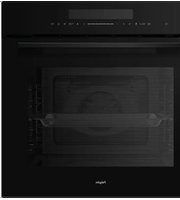
OVP436RVS - Oven Pelgrim - Free user manual and instructions
Find the device manual for free OVP436RVS Pelgrim in PDF.


Pick your language and provide your email: we'll send you a specifically translated version.
| Product Type | Built-in Electric Oven |
| Brand | Pelgrim |
| Model | OVP436RVS |
| Finish | Stainless Steel |
| Installation | Built-in |
| Dimensions (H x W x D) | 595 x 595 x 548 mm |
| Oven Capacity | 70 Litres |
| Power Source | Electric |
| Rated Power | 2.95 kW |
| Voltage / Frequency | 220-240 V / 50 Hz |
| Number of Functions | 8 |
| Oven Functions | Conventional, Fan-forced, Grill, Fan Grill, Defrost, Low-heat, etc. |
| Temperature Range | 50 °C – 250 °C |
| Control Type | Digital timer with rotary knobs |
| Display | LED display |
| Door Type | Drop-down, triple glazed cool touch |
| Interior Light | Halogen |
| Interior Coating | Enamel, easy-clean |
| Safety Features | Child lock, auto shut-off, cool touch door |
| Accessories Included | Wire shelf, baking tray, grill rack |
| Spare Parts Availability | Original Pelgrim spare parts for up to 10 years after purchase |
| Repairability Index | High (9/10) |
Frequently Asked Questions - OVP436RVS Pelgrim
How do I set the clock on the Pelgrim OVP436RVS oven?
Press and hold the clock function button for 3 seconds until the time flashes. Use the +/- knobs to adjust the hours and minutes, then press the button again to confirm.
What should I do if the oven does not heat up?
Make sure the oven is properly connected to a power source and the timer is not in a pre-set delay. Check the circuit breaker. If the problem persists, the heating element may be defective – contact a qualified technician.
How do I clean the interior of the oven?
Remove loose dirt with a soft sponge and warm water. Use a mild detergent to clean the enamel surfaces. Avoid abrasive pads and aggressive chemical cleaners that can damage the coating. The oven door can be removed for easier cleaning.
Can I replace the oven lamp myself?
Yes, but you must first disconnect the oven from the mains. Replace the faulty bulb with a new 250°C heat-resistant lamp (e.g. E14 / 15W). Consult the manual for the exact bulb type and replacement steps.
How do I activate the child lock?
Press the child lock icon on the control panel for about 3 seconds. A symbol will appear on the display. To deactivate, press and hold the same icon again until the symbol disappears.
Which oven function is best for baking a cake?
Use the fan-forced (convection) function at 160-170°C for even heat distribution. This function is ideal for cakes and multi-level baking. Always preheat the oven as recommended in recipes.
My oven shows an error code. What does it mean?
Error codes indicate sensor failures or temperature issues. Note the code and consult the trouble-shooting section of your manual. In most cases, turning the oven off for a few minutes and restarting it will reset the system. If the code persists, contact Pelgrim service.
How do I set the cooking duration and timer?
Use the timer button to select the cooking duration. Set the desired hours and minutes with the +/- knobs. When the time ends, the oven will automatically switch off if the duration function is used. The timer can be set independently for a reminder.
How do I remove the oven door for cleaning?
Open the door fully and lift the clips on the hinges. Slowly close the door to about 20° and pull it towards you. To install, place the hinges in the slots and push the door up until the locks click back. Be careful not to strain the hinges.
Is the Pelgrim OVP436RVS energy efficient?
This oven features an energy class A rating (consumer model) and is designed for efficient use. With fan-forced cooking and good insulation, it can reduce energy consumption compared to conventional ovens.
User questions about OVP436RVS Pelgrim
0 question about this device. Answer the ones you know or ask your own.
Ask a new question about this device
No questions yet. Be the first to ask one.
Download the instructions for your Oven in PDF format for free! Find your manual OVP436RVS - Pelgrim and take your electronic device back in hand. On this page are published all the documents necessary for the use of your device. OVP436RVS by Pelgrim.
USER MANUAL OVP436RVS Pelgrim



Manual assistant
Powered by Anthropic
Waiting for your message
Product information
Brand : Pelgrim
Model : OVP436RVS
Category : Oven