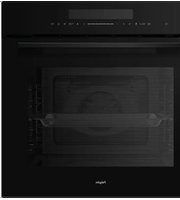
OVM536MAT - Oven Pelgrim - Free user manual and instructions
Find the device manual for free OVM536MAT Pelgrim in PDF.


Pick your language and provide your email: we'll send you a specifically translated version.
| Product type | Built-in oven |
| Brand | Pelgrim |
| Model | OVM536MAT |
| Dimensions (W x H x D) | 59.5 x 59.5 x 55 cm |
| Useful volume | 71 L |
| Total power | 3400 W |
| Power supply | 230 V / 50 Hz |
| Energy class | A+ |
| Cooking type | Convection, grill, bottom+top heat |
| Number of functions | 8 cooking functions |
| Cleaning | Pyrolysis automatic |
| Cool door | Yes, triple glazing |
| Child safety | Control lock |
| Automatic shut-off | Yes |
| Display | Digital display |
| Net weight | 35 kg |
| Color | Stainless steel |
| Included accessories | 1 grid, 1 drip tray, 1 roasting pan |
| Lighting | Halogen lamp |
| Repairability | Repairability index: 8.1/10 |
Frequently Asked Questions - OVM536MAT Pelgrim
How to use the pyrolysis function?
Remove all accessories and residues. Close the door, select the Pyrolysis program and start it. The temperature rises to about 500°C. After the cycle, wait for cooling and wipe off the ashes.
What to do if the oven does not heat?
Check that the oven is properly plugged in and that the circuit breaker has not tripped. If the problem persists, contact customer service.
How to replace the oven light bulb?
Unplug the oven. Remove the glass cover by turning. Replace with a compatible 40W halogen bulb. Reinstall the cover.
How to set the time?
Press the Clock button until the digits flash. Use the +/- buttons to set the hours and minutes. Confirm with the Clock button.
How to lock the controls?
Press and hold the Lock button (often symbolized by a padlock) for 3 seconds. A sound signal confirms activation.
What does error code E4 mean?
The E4 code indicates a temperature sensor problem. Try resetting the oven by unplugging it for 5 minutes. If the code reappears, call a technician.
How to clean the glass door?
Use a non-abrasive glass cleaner and a soft cloth. Avoid products containing chlorine. For the interior, use the pyrolysis cleaning cycle.
Can aluminum foil be used?
Yes, but avoid direct contact with the walls. Place it on the grid or in a dish. Never cover the bottom of the oven to prevent overheating.
How to defrost food?
Use the Defrost function (often at low temperature with fan). Place food on the middle grid. Time varies according to weight.
Where to find spare parts?
Spare parts are available from authorized dealers or on the official Pelgrim website. Enter the model OVM536MAT to find the correct references.
User questions about OVM536MAT Pelgrim
0 question about this device. Answer the ones you know or ask your own.
Ask a new question about this device
No questions yet. Be the first to ask one.
Download the instructions for your Oven in PDF format for free! Find your manual OVM536MAT - Pelgrim and take your electronic device back in hand. On this page are published all the documents necessary for the use of your device. OVM536MAT by Pelgrim.
USER MANUAL OVM536MAT Pelgrim



Manual assistant
Powered by Anthropic
Waiting for your message
Product information
Brand : Pelgrim
Model : OVM536MAT
Category : Oven