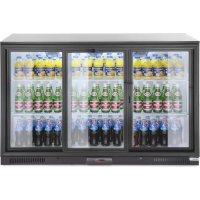
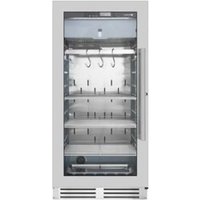
235836 - Refrigerator Arktic - Free user manual and instructions
Find the device manual for free 235836 Arktic in PDF.



| Product type | Professional beverage refrigerator |
| Brand | Arktic |
| Model | 235836 |
| Dimensions (W x D x H) | 1335 x 500 x 900 mm |
| Net weight | 75 kg |
| Power supply | 220-240 V ~ 50 Hz, 1.5 A |
| Energy class | E |
| Temperature range | 2 °C to 10 °C |
| Refrigerant | R600a (80 g) |
| Capacity | 303 L |
| Number of shelves | 6 |
| Maximum load per shelf | 8 kg |
| Interior light | Yes, with switch |
| Defrost | Automatic every 6 hours |
| Door type | Glass door with handle and lock |
| Climate class | N-ST |
| Noise level | < 70 dB(A) |
| Protection class | I (earthing required) |
| Warranty | 12 months (excluding wear parts) |
Frequently Asked Questions - 235836 Arktic
User questions about 235836 Arktic
0 question about this device. Answer the ones you know or ask your own.
Ask a new question about this device
Download the instructions for your Refrigerator in PDF format for free! Find your manual 235836 - Arktic and take your electronic device back in hand. On this page are published all the documents necessary for the use of your device. 235836 by Arktic.
USER MANUAL 235836 Arktic
You should read this user manual carefully before using the appliance.
Keep these instructions with the appliance.
For indoor use only.
IcnoB30BaTbToBkoBnOmeeHnX.
Tia xpnon ovo ae eowteipko xwo.


Thank you for purchasing this Arktic appliance. Read this manual carefully, paying particular attention to the safety regulations outlined below, before installing and using this appliance for the first time.
Safety regulations
- This appliance is intended for commercial use only.
- Only use the appliance for the intended purpose it was designed for as described in this manual.
- The manufacturer is not liable for any damage caused by incorrect operation and improper use.
- Keep the appliance and electrical plug away from water and other liquids. In the event the appliance falls into water, immediately remove the power plug from the socket. Do not use the appliance until it has been checked by a certified technician. Failure to follow these instructions will cause life threatening risks.
- Never attempt to open the housing of the appliance by yourself.
- Do not insert objects into the housing of the appliance.
- Do not touch the plug with wet or damp hands.
- Danger of electric shock! Do not attempt to repair the appliance by yourself, repairs are only to be conducted by qualified personnel.
- Never use a damaged appliance! When it's damaged, disconnect the appliance from the socket and contact the retailer.
- Warning! Do not immerse the electrical parts of the appliance in water or other liquids.
- Never hold the appliance under running water.
- Regularly check the power plug and cord for any damage. When damaged it must be replaced by a service agent or similarly qualified person in order to avoid danger or injury.
- Make sure the cord does not come in contact with sharp or hot objects and keep it away from open fire. Never pull the power cord to unplug it from the socket, always pull the plug instead.
- Make sure that the power cord and/or extension cord do not cause a trip hazard.
- Never leave the appliance unattended during use.
- Warning! As long as the plug is in the socket the appliance is connected to the power source.
- Turn off the appliance before unplugging it from the socket.
- Connect the power plug to an easily accessible electrical socket so that in case of emergency the appliance can be unplugged immediately.
- Never carry the appliance by the cord.
- Do not use any extra devices that are not supplied together with the appliance.
- Only connect the appliance to an electrical outlet with the voltage and frequency mentioned on the appliance label.
-
Never use accessories other than those recommended by the manufacturer. Failure to do so could pose a safety risk to the user and could damage the appliance. Only use original parts and accessories.
-
This appliance should not be operated by persons with reduced physical, sensory or mental capabilities, or persons that have a lack of experience and knowledge.
- This appliance should, under any circumstances, not be used by children.
- Keep the appliance and its power cord out of reach of children.
- WARNING: ALWAYS switch off the appliance and unplug from power socket before cleaning, maintenance or storage.
Special Safety Regulations
- This appliance is not intended to cool down the beverages or to store them in a long period of time. They should be cooled down first (< 6^) before placing in the appliance.
- All technical activities like installation, maintenance or repair work must be performed by qualified service personnel only.
- WARNING: Do not use mechanical devices or other means to accelerate the defrosting process, other than those recommended by the manufacturer.
- WARNING: Do not damage the refrigerant circuit.

Caution! Risk of fire! The refrigerant used is R600a in this appliance. It is a flammable refrigerant which is environmentally friendly. Although it is flammable, it does not damage the ozone layer and does not increase the greenhouse effect. The use of this coolant has, however, led to a slight increase in the noise level of the appliance. In addition to the noise of the compressor, you might be able to hear the coolant flowing around the system. This is unavoidable, and does not have any adverse effect on the performance of the appliance. Care must be taken during the transportation and setting up of the appliance that no parts of the cooling system are damaged. Leaking coolant can damage the eyes.
- The foam blowing agent used is Cyclopentane in this appliance. It is highly flammable.
- WARNING: Keep all ventilation openings in the appliance enclosure clear of obstruction. Provide sufficient ventilation in the surrounding structure when building-in. Never block the air flow suction and air outlet in order to keep air circulation.
- WARNING: Do not use electrical appliances inside the food storage compartments of the appliance, unless they are of the type recommended by the manufacturer.
- Place the appliance on a clean, stable, dry, level surface only.
- Keep the appliance away from any hot surfaces and open flames. Protect the appliance against heat, dust, direct sunlight, moisture, dripping and splashing water.
- During use, keep 10cm around the appliance free for ventilation.
- Do not use hard utensils on the glass surface. Do not use water jets or steam cleaners during cleaning, do not immerse the whole appliance in water as the parts will get wet and electric shock might be resulted.
- Do not place articles on top of the appliance. Do not place objects with open sources of fire (e.g. candles) on top or beside the appliance. Do not place objects filled with water (e.g. vases) on or near the appliance.
-
Never cover the appliance during use. This may cause a fire hazard.
-
Do not wash the appliance with water. Washing can cause leakages and increase the risk of electric shock.
- Do not make any additional openings on the appliance. Do not install any gadgets in the appliance.
- Do not overload the racks inside to avoid damage. Max. loading of each rack is about 8kg.
- Do not attempt to climb up to the top of the appliance.
- CAUTION! Handle the glass surfaces with care; protect them from impacts to avoid damage to property and personal injury.
Installing the appliance
- The appliance should not be tipped over an angle of 45^ . After installing the appliance, wait for 2 hours before connecting it to the electrical power supply to switch on. The same applies if the appliance is moved at a later date.
- The appliance must always be installed in a dry environment.
- When installing, leave at least 10cm clearance to the rear and to the left and right for adequate ventilation. Leaving less room for ventilation may affect the efficiency.
- We strongly recommend to install the appliance in a place with good natural ventilation to increase ventilation properties.
Electrical components and other dangers
- No other appliances should be plugged into the same socket as with this appliance.
- Do not place any dangerous products, such as fuel, alcohol, paint, flammable or explosives, etc. inside or near the appliance as it may result a fire hazard.
- Do not store any medications in the appliance.
- Wait about 5 minutes before switch on the appliance again after the appliance has been switched off or unplugged from the electrical power supply.
- Do not wash the appliance with water. Washing can cause leakage and increase the risk of electric shock. No any parts/accessories can be under dishwasher.
Intended use
- This appliance is intended for professional use.
-
This appliance is designed only to keep beer, including beverages, under cool state and to display them for retail sale in restaurants, canteens, other commercial enterprises such as bakeries, butcheries, supermarkets, etc. Any other use may lead to damage of the appliance or personal injury.
-
Operating the appliance for any other purpose shall be deemed a misuse of the device. The user shall be solely liable for improper use of the device.
EN
Grounding installation
This appliance is classified as protection class I and must be connected to a protective ground. Grounding reduces the risk of electric shock by providing an escape wire for the electric current.
This appliance is fitted with a power cord that has a grounding wire and grounded plug. The plug must be plugged into an outlet that is properly installed and grounded.
Main parts of the appliance

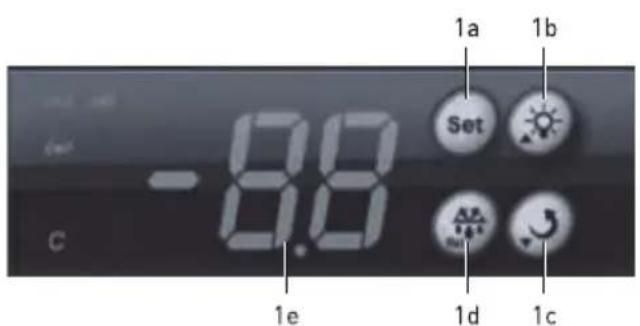
- Digital control panel
a. Set button for setting temperature
b. Increase setting of temperature
For 233924 and 233931: Light ON/OFF
c. Decrease setting of temperature
d. Confirm setting / manual defrost
e. Temperature digits
- Air vents
3.Shelf - Glass door handle
- Light
- Door key lock
- ON / OFF switch for the light [226568, 233900, 233917, 235829, 235836]
Remark: The content of this manual applies for all listed items unless specified otherwise. The outlook and appearance may vary from the shown illustrations.
Indicator light status description
| Symbol indicator Status Description | ||
| set | ON Under setting mode | |
| OFF Operating under the setting condition | ||
| out | ON Compressor works and cooling active | |
| OFF Compressor not works and cooling inactive | ||
| FLASH Preparing cooling process | ||
| C | ON Under refrigeration process | |
| def | ON Under defrost process | |
Set the temperature
- Plug into a suitable electrical outlet.
- When set indicator light is OFF, press and hold 1a. button for 3 to 4 seconds until SE is shown on the display. Then, release the 1a. button & press 1a. button again.
- Next, press 1b. button to increase the setting temperature by 1^ or press 1c. button to decrease by 1^ .
Switch the light ON/OFF
For 233924 and 233931
- Press 1b. button to switch ON the light.
- Press 1b. button again to switch OFF the light.
After that, press 1d. button to confirm the setting and exit.
Note:
- If no button is pressed within 30 seconds, the newly set temperature will be stored automatically.
The temperature setting ranges from 2^ to 10^
For 226568, 233900, 233917, 235829 and 235836 Press ON/OFF switch inside the cabinet to control the light.

EN
Loading the appliance
- Always let the appliance reach the set temperature before placing or beverages inside the appliance. Check the cooling temperature display and additionally put hand into the compartment to feel the actual temperature.
- Always cool down the beverages to their intended temperature (< 6^) before storing in the appliance.
Defrost
- The appliance will start defrost process automatically for every 6 hours.
Shelf height adjustment
The height of each shelf can be adjusted.
- Distribute the food evenly with sufficient surrounding spacings go ensure proper air circulation.
- Do not exceed the maximum shelf load stated in the technical specification.
-
Ensure the doors are always properly shut and reduced the times of opening doors to minimum.
-
When def indicator is ON, the appliance is under defrost process.
- Adjust the height of each shelf according to the height of the items.
Installation instructions
- Remove the appliance from the carton box, then remove the external and internal packaging and wrapping.
- Check to make sure the appliance is undamaged. In case of incomplete delivery and damages, DO NOT use the appliance. Please contact supplier (See Warranty).
- Let the appliance stand upright for about 2 hours. This is to reduce the malfunction of the cooling system from improper handling during transportation.
-
Clean interior surface with warm water and soft cloth. (See = = > Cleaning and Maintenance).
-
Place the appliance on a horizontal, stable and heat resist surface that is safe against water splashes.
- Optimum working ambient temperature is between 16^ and 30^ . Otherwise, the functionality will be limited.
- Ensure that there is sufficient ventilation. Keep a minimum distance of 10cm around the appliance. Do not block the ventilation holes.
- For energy savings, always make sure the door is closed.
Operation
Placement
- Place the appliance on a stable and level surface/ floor.
-
Ensure the appliance is properly levelled using a water spirit level (not supplied). Use furniture levelling wedges, if you detect the appliance is not levelled or wobbling.
-
Let the appliance rest in its intended position for about 2 hours before operating to prevent damages to the cooling circuit through shaken refrigerant.
EN
Switching the appliance ON/OFF
- The appliance is switched ON once it is connected to the suitable electrical power supply. Simply unplug to switch OFF the appliance.
-
A sound will be heard when connected to the power supply.
-
Wait at least 5 minutes before plug in again the after unplug the appliance or power sudden break.
- Unplug the appliance when not in use.
Cleaning and Maintenance
Attention: Always unplug the appliance from the electrical power outlet before cleaning & maintenance.
Cleaning
- The exterior and interior surfaces can be cleaned with a damp cloth and a little detergent.
-
Racks can be removed and washed in water.
-
Do not use water jet or steam cleaner for cleaning and do not push the appliance under the water.
- No any parts can be cleaned in the dishwasher.
- Clean the appliance regularly.
| Parts How to clean Remark | ||
| All accessories such as racks, rack holders, etc. | Soak in warm, soapy water for about 10 to 20 minutes.Rinse under running water thoroughly. | Dry all parts well at last. |
| External glass surfaces | Wipe clean with a soft cloth and a little neutral detergent. Make sure no water or moisture enters inside the of the appliance. | |
| Interior glass surfaces | Remove any food deposits.Wipe clean with a soft cloth and a little mild detergent. Make sure no water or moisture enters inside the of the appliance. | |
| Glass door |
Putting the appliance out of reach for a long period of time
- Attention: Always unplug the appliance from the electrical power outlet.
-
Remove all the food and beverage inside the appliance.
-
Clean the appliance as described in Cleaning. (See => Cleaning).
- Store the appliance in a cool, clean place and keep out of reach of the children.
EN
Troubleshooting
If the appliance does not function properly, please check the below table for the solution. If you are still unable to solve the problem, please contact the supplier/service provider.
| Problems Possible | cause Possible solution | |
| The appliance does not start cooling after connect to electrical power supply. | Thermal cut-out activated | Contact with the supplier/service provider for repair. |
| The compressor is defective. | ||
| The power plug is connected correctly with the power supply outlet. | Check the connection and make sure all the connections are correctly connected. | |
| Cooling is not enough. | The appliance is under strong sunlight radiation or close to a heat source. | Move the appliance a new location to avoid direct sunlight. |
| The doors are not properly closed or the sealing gasket is defective. | Close the doors properly. | |
| Too much food is placed inside the appliance. | Place less food inside the appliance. | |
| Surrounding ventilation is insufficient. | Check that if sufficient ventilation is provided by allowing at least 10cm away from other objects or wall. | |
| Too much noise | The appliance is not placed horizontally. | Check to make sure the appliance is placed horizontally. |
| The appliance touches surrounding wall or other objects. | Check to make sure that at least 10cm away from other objects or wall. | |
| There are some loose parts inside the appliance. | Contact with the supplier/service provider for repair. |
EN
Technical specification
| Item no. 226568 233900 233917 233924 233931 235829 235836 | |||||||
| Operating voltage and frequency | 220-240V~50Hz | ||||||
| Rated current 1,0 A 1,7 A 1,5 A 1,0 A 1,5 A | |||||||
| Setting temperature range 2°C to 10°C | |||||||
| Recommended temperature setting | 4°C | ||||||
| Protection class I | |||||||
| Noise level < 70 dB (A) | |||||||
| Refrigerant used and injection quantity | R600a / 40g R600a / $0g R600a / 60g | R600a / 80g R600a / 50g R600a / 80g | |||||
| Energy efficiency class | D | D | E | D | E | ||
| Foam blowing agent | Cyclopentane | ||||||
| Power of the light | 4W | 6W | 24W | 6W | 9W | ||
| Climate class | N-ST | ||||||
| Inside cabinet capacity | 126L | 93L | 197L | 293L | 448L | 200L | 303L |
| Number of Shelves | 3 | 2 | 4 | 5 | 10 | 4 | 6 |
| Maximum shelf load | 8kg | ||||||
| Net weight (approx.) | 40kg | 35kg | 54kg | 77kg | 100kg | 54kg | 75kg |
| Outer dimension | 600x530x(H)900mm | 500x500x(H)900mm | 900x500x(H)900mm | 600x515x(H)1820mm | 900x515x(H)1820mm | 900x500x(H)900mm | 1335x500x(H)900mm |
Remark: Technical specification is subjected to change without prior notification.
NOTE: Energy class is in accordance with operation in climates with a maximum temperature of 25^ and maximum humidity of 60% .
Circuit diagram (226568, 233900, 233917, 235829)
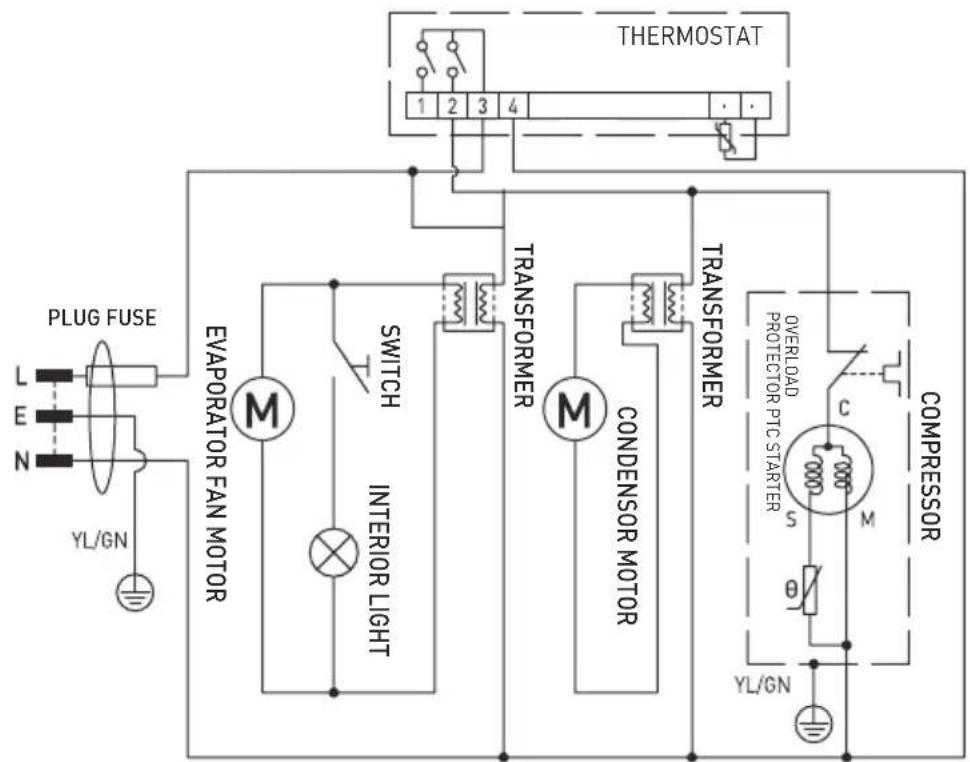
EN

Circuit diagram (233924)


Circuit diagram (235836)

Warranty
Any defect affecting the functionality of the appliance which becomes apparent within one year after purchase will be repaired by free repair or replacement provided the appliance has been used and maintained in accordance with the instructions and has not been abused or misused in any way. Your statutory rights are not affected. If the appliance is claimed under warranty, state where and
when it was purchased and include proof of purchase (e.g. receipt).
In line with our policy of continuous product development we reserve the right to change the product, packaging and documentation specifications without notice.
Discarding & Environment
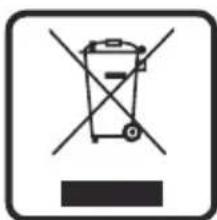
When decommissioning the appliance, the product must not be disposed of with other household waste. Instead, it is your responsibility to dispose to your waste equipment by handing it over to a designated collection point. Failure to follow this rule may be penalized in accordance with applicable regulations on waste disposal. The separate collection and recycling of your waste equipment at the time of disposal will help conserve natural re
sources and ensure that it is recycled in a manner that protects human health and the environment.
For more information about where you can drop off your waste for recycling, please contact your local waste collection company. The manufacturers and importers do not take responsibility for recycling, treatment and ecological disposal, either directly or through a public system.
EN
He npebbwaTe MaKcMaJIbHyO emKOCTb noJKN, yka3aHHyIO B TexHnuecko CneuNfKaun.
- Y6eIInTeCb, yTo IBePb npaBnIbHO 3aKpbIta n He 3a-6bIbaIte CBeCTN K MmHmMy eE OTKpbITne.
Pa3mopaxnBaHne
- YcTpoIcTBo aBTOMaTHueckn 3aNyckaet npOcecc pa3MopaxNBAHn KaKdIe 6 yacOB.
-ПодсВETКаKHONКи def o603Haayaet,ЧTo HaayanC npoecc pa3MopaxnBaHn.
YCTaHOBKa BbICOTbI NOJOK
CyueCTByeT BO3MOXHOCTb N3MeHHTb BbICOTy paCNOIOJKeHnI NOJOK.
- ⅢmeHnte BBICOTy pa3MeueHnnoJOK B 3aBnCmOCTN OT npOdyKTOB, pAcNoJoxeHHbIX BHyTpnuycTpoiCTBa.
Hnctpykun no yctaHOBe
- ɪЗBsɪkeɪte yctpoɪcTBO n3 KapToHnoɪ Kopo6kɪn, CHɪmɪte BHyɪtpeHHIOU n ḤapyʌKhyɪʊ yɪnaKOBky n 3aʌntbl.
- Поберп, He порждени устpoистwo.В clyuae He noJHOnДocTaBKN nIn nobpeKdEnnA, HE nCnoJIb3yIte ystpoiCTBO n HemeJleHNo CBa-JXITecb c noctabuikom (CMotpn ]apaHTnia).
OCTaBbTe ycTpoNcTBo B BepTnKaJIbHOM noIoo-KeHHn npImepHo Ha 2 yaca. 3To DeiCtBne HAnpaBHeNo Ha yMeHbWeHne CTepeHn HapUeHHn B paBoTe cnCTembl OxJaXdEHHn B Cclyae HePpAbBnIbHO O6paSeHHn C ycTpoNcTBom BO BpeM TpaHCnOpTnpOBKn. -
Помоут e hapхьie NOBepxHocTN MЯгко Tka-HbIO, CMoeyHHoB B TeNIO BOe. (CMOTpN OuNTKa n o6cIyKuBaHne).
-
IomeCTIte yCTpoiCTBO Ha poBHyO yCToHcyuHO NOBepxHocTb, CTOnKyIO K BblcOKm TEMnepaTypam N XnDkM 6pb3ram.
Pa6oay TemnepaTypa OkpykaIoUe CpebldoJxHa coCTabTb ot 16^ do 30^ B npotHBHom cIyae yCTpoiCTBO moXe pa6oTaB HenpaBUNbHO. - 06ecneyte Heo6xOIMMyo BeHTnlaIIO. 06cneybTe no KpaHHei Mepe 10-caHTmEtpoBbI 3a3Op BOKpyr ycTpoIcTba. He 3aKpbBaIe Te BeHTnJIauOnHHbIe OTBepCTnI.
- Дя захоними зангий BCERda слдnte 3a Tem, утобblдеврь 6ыla зakpbita.
3Kcnnyataaia
YcTaHOBKa yCTpoiCtBa
- Tomecnte yctpoiCTBO Ha ycToHByIO n poBHyIO NOBepxHOCTb NnHa NoI.
-
UcnoIb3yIte ypoBeHb (He noCTaBJIeTcYcTpOuCTBOM), uTo6bl y6eIITbcra, uTo ycTpOuCTBO npaBnIbHO BbIpOBHeHo.
-
Паран haалOM kCnIyatauH NOCTBte yctpoN CTBO B BepTKaJIbHOM NIOJoxeHn NpIMepHo Ha c 2 yaca, uTo6bI n36exKaTb NOBpeKdEHN KONTpa OxJaXdEHN I3-3a He npabUbHOro pacnpedeH Hn XlaIaIaREHTa.
BkIoueHne N BbIKIoueHne ycTpoiCTBa (ON/OFF)
- UcpoCTBO BKIOUaETC NOcne NOKIOUeHn BUNKN K NOxOJaIeN 3JIeKTPuYeCKoN po3eTKe. UTo6bl BbIKIOUHTb yCTPOCTBO,OTKIOUHTe BUNKy ceTeBOrO IHHpyoT PO3eTKN.
-
Прп подклioчени К nICTOчнky nHTaHЯ уCTpoI-CTBOИЗДаeТ 3ВуКOBОсгнан.
-
После отcoeINHeHЯ устpoиCTBa nIиВ сlyuae BHe3aHOrO npepbIBaHЯ пTuHЯ, noDoxdTe He Mehee 5 mHyT, npexde yem noBtOpHo noJ-KnHouHTb uStpoiCTBO K cETn.
- Ecnn yctpoiCTBO He nCnOJIb3yETc, BblbTe BNkky n3 p03eTKN.
OuNTka n TexHnueeCKoe o6cnyKnBaHne
3ameuHne:peoocnKoIyXoOOMBcerdaOTKJIouaTeyCTpoiCTBOOTcTNIHTAHNBAHIMaBUNKyU3 p03eTKN.
OuInCTka
EcIn ycTpoiCTBO He pa6oTaETdoJXHbIM o6pa30M, 6paTntecb K npNBedeHHoH Hxke Ta6nue, TTo6bl HaHTn npaBnIbHoe peWeHne. EcIn BbI He moKeTe peuNTb npo6JIeMy, 6paTntecb K nocTabuNky.
6pa30m, KOToPbI He BpeDeH IJIa 3OpOBBy N OkpyKaUoUeN CpeDbI.
Hendi Food Service Equipment GmbH
Ehring 15
Hendi Food Service Equipment Romania S.R.L.
Str. 13 decembris 94A, Hala 14
Braşov, 500164, Romania
Tel: +40 268 320330
Email: office@hendi.ro
PKS Hendi South East Europe SA
5 Metsavou Str.
18346 Moschato, Athens, Greece
Tel: +30 210 4839700
Email: info@pks-hendi.com
Hendi Italia S.R.L.
Via Leonardo da Vinci 4
39100 Bolzano [BZ], Italy
Tel: +39 800 727 438
Email: office.italy@hendi.eu
Hendi HK Ltd.
1208, 12/F Exchange Tower
33 Wang Chiu Road, Kowloon Bay, Hong Kong
Tel: +852 2154 2618
Email: info-hk@hendi.eu
FindHendi on internet:
www.hendi.eu
www.facebook.com/HendiToolsforChefs
www.linkedin.com/company/hendi-food-service-equipment-b.v.
www.youtube.com/HendiEquipment
- Changes, printing and typesetting errors reserved.
- Änderungen und Druckfehler vorbehalten.
Wijzigingen en drukfouten voorbehouden. -
Producent zastrzega sare prawo do zmian oraz btedow drukarskich winstrukcji.
-
Variations et fautes d'impression réservés.
- Errori di cambiamenti, di stampa e di impaginazione riservati.
- Drepturi rezervate cu privire la modificari si gresei de imprimare.
-ImMeHeHHa,neHAtuBepCTK0wn6Kn3aunuehbl.
-Me enipuaen aaiayaw,aaBw eKtunwnc kaltoiaei0eiaic
- Safety regulations
- Special Safety Regulations
- Installing the appliance
- Electrical components and other dangers
- Intended use
- Grounding installation
- Main parts of the appliance
- Set the temperature
- Switch the light ON/OFF
- Loading the appliance
- Defrost
- Shelf height adjustment
- Installation instructions
- Operation
- Placement
- EN
- Switching the appliance ON/OFF
- Cleaning and Maintenance
- Cleaning
- Putting the appliance out of reach for a long period of time
- Troubleshooting
- Warranty
- Discarding & Environment
- Pa3mopaxnBaHne
- YCTaHOBKa BbICOTbI NOJOK
- Hnctpykun no yctaHOBe
- 3Kcnnyataaia
- YcTaHOBKa yCTpoiCtBa
- BkIoueHne N BbIKIoueHne ycTpoiCTBa (ON/OFF)
- OuNTka n TexHnueeCKoe o6cnyKnBaHne
- OuInCTka
- Hendi Food Service Equipment GmbH
- Hendi Food Service Equipment Romania S.R.L.
- PKS Hendi South East Europe SA
- Hendi Italia S.R.L.
- Hendi HK Ltd.
- FindHendi on internet:
Brand : Arktic
Model : 235836
Category : Refrigerator