222997 - Slow cooker SousVideTools - Free user manual and instructions
Find the device manual for free 222997 SousVideTools in PDF.



| Product Type | Immersion Circulator |
| Brand | SousVideTools |
| Model | 222997 |
| Rated Voltage | 220-240 V~ |
| Rated Frequency | 50 Hz |
| Rated Power | 2300 W |
| Temperature Range | 5 - 95 °C / 41 - 203 °F |
| Temperature Accuracy | ±0.07 °C |
| Timer | 5 min - 99 h 59 min |
| Capacity | 80 L |
| Display | HD Touchscreen 114.3 mm |
| Connectivity | Built-in Wi-Fi |
| Compatible App | iVide Plus (iOS 9.3.5+, Android 4.3+) |
| Protection Rating | IPX7 (immersion 1 m, 30 min) |
| Weight | 2.2 kg |
| Dimensions | 140 x 143 x 302 mm |
| Warranty | 2 years |
| Main Functions | Sous vide cooking, keep warm, automatic cleaning |
| Safety | Automatic shut-off, overheating protection, water level detection |
| Maintenance | Vinegar cleaning every 20 uses or 100 hours |
| Repairability | Repair by professional only |
Frequently Asked Questions - 222997 SousVideTools
User questions about 222997 SousVideTools
0 question about this device. Answer the ones you know or ask your own.
Ask a new question about this device
Download the instructions for your Slow cooker in PDF format for free! Find your manual 222997 - SousVideTools and take your electronic device back in hand. On this page are published all the documents necessary for the use of your device. 222997 by SousVideTools.
USER MANUAL 222997 SousVideTools
iVide PLUS THERMAL CIRCULATOR
USER GUIDE / BENUTZERHANDBUCH / MANUALE D'ISTRUZIONI / NOTICE D'UTILISATION / MANUAL DEL USUARIO / MANUAL DO USUÁRIO / OΔΗΓΙΕΣ ΧΡΗΣΗΣ / MANUAL DE INSTRUCTIUNI / INSTRUKCJA OBSŁUGI / GEBRUIKERSHANDLEIDING / BRUKERMANUAL / ANVÄNDARMANUAL / BRUGERVEJLEDNING

sousvide tools.com
CONTENTS / INHALT / INDICE / TABLE DES MATIÈRES / CONTENIDO / CONTEÚDO /
EN // USER GUIDE
About the iVide 4
Safety 4
Technical Parameters 5
Product Function 5-6
Product Structure 7
Control with the APP 8
Operating Instructions 9
Maintenance 9
How to Clean 10
Troubleshooting 10
Warranty and After Sales Service 11
CE Certificate 12
DE // BENUTZERHANDBUCH
Der iVide 13
Sicherheit 13
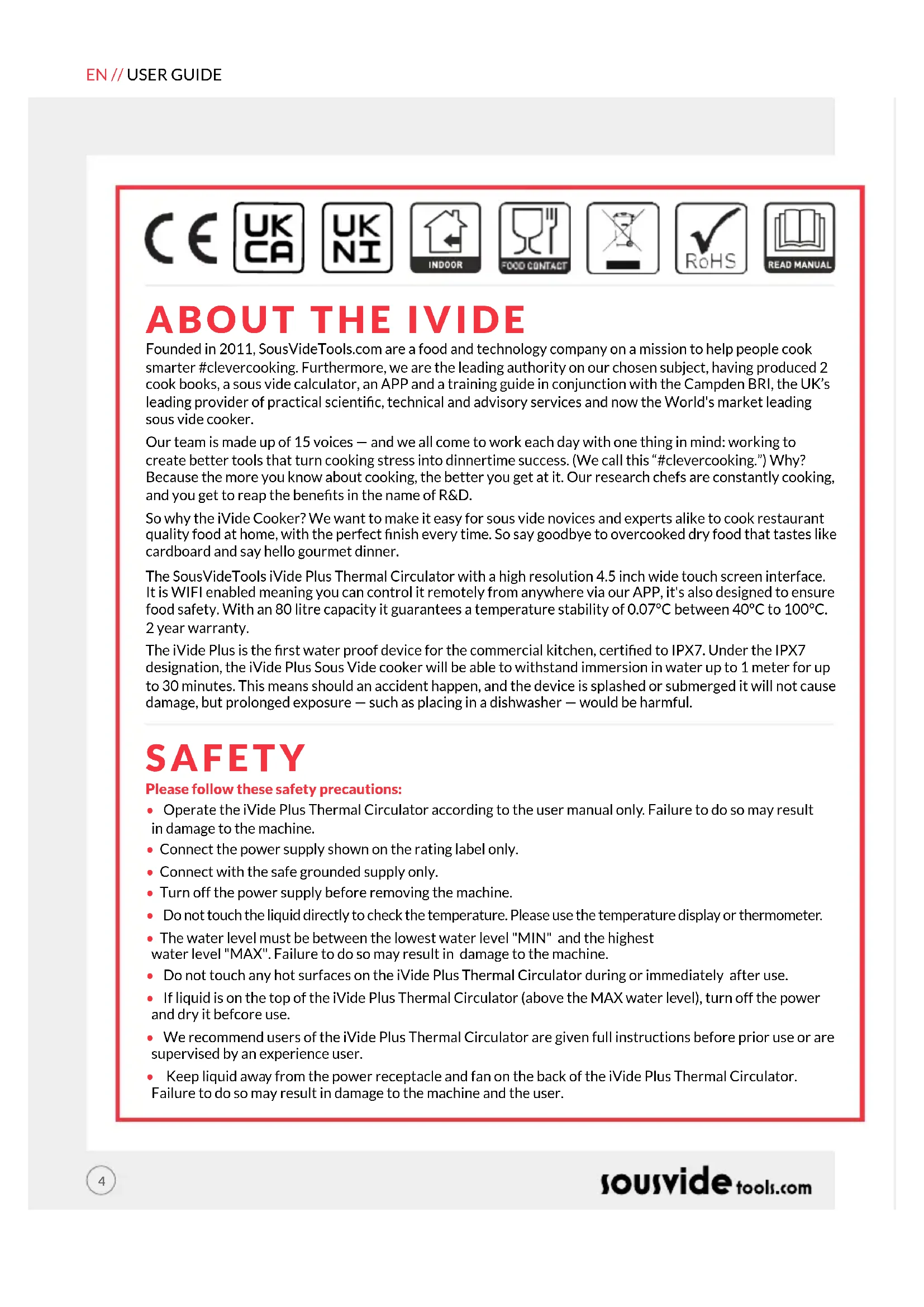
Founded in 2011, SousVideTools.com are a food and technology company on a mission to help people cook smarter #clevercooking. Furthermore, we are the leading authority on our chosen subject, having produced 2 cook books, a sous vide calculator, an APP and a training guide in conjunction with the Campden BRI, the UK's leading provider of practical scientific, technical and advisory services and now the World's market leading sous vide cooker.
Our team is made up of 15 voices — and we all come to work each day with one thing in mind: working to create better tools that turn cooking stress into dinnertime success. (We call this “#clevercooking.”) Why? Because the more you know about cooking, the better you get at it. Our research chefs are constantly cooking, and you get to reap the benefits in the name of R&D.
So why the iVide Cooker? We want to make it easy for sous vide novices and experts alike to cook restaurant quality food at home, with the perfect finish every time. So say goodbye to overcooked dry food that tastes like cardboard and say hello gourmet dinner.
The SousVideTools iVide Plus Thermal Circulator with a high resolution 4.5 inch wide touch screen interface. It is WIFI enabled meaning you can control it remotely from anywhere via our APP, it's also designed to ensure food safety. With an 80 litre capacity it guarantees a temperature stability of 0.07° C between 40° C to 100° C. 2 year warranty.
The iVide Plus is the first water proof device for the commercial kitchen, certified to IPX7. Under the IPX7 designation, the iVide Plus Sous Vide cooker will be able to withstand immersion in water up to 1 meter for up to 30 minutes. This means should an accident happen, and the device is splashed or submerged it will not cause damage, but prolonged exposure — such as placing in a dishwasher — would be harmful.
SAFETY
Please follow these safety precautions:
- Operate the iVide Plus Thermal Circulator according to the user manual only. Failure to do so may result in damage to the machine.
- Connect the power supply shown on the rating label only.
- Connect with the safe grounded supply only.
- Turn off the power supply before removing the machine.
- Do not touch the liquid directly to check the temperature. Please use the temperature display or thermometer.
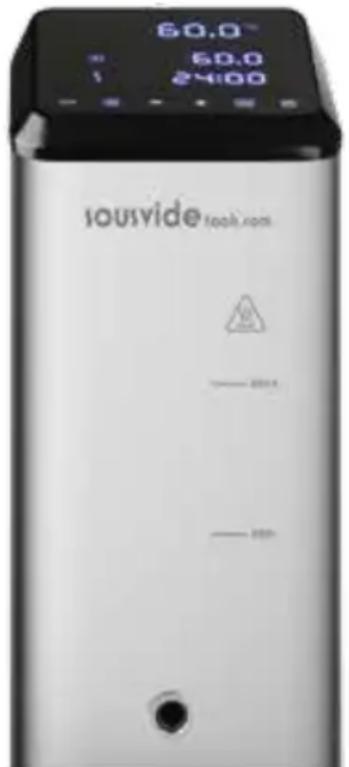
- The water level must be between the lowest water level "MIN" and the highest water level "MAX". Failure to do so may result in damage to the machine.
- Do not touch any hot surfaces on the iVide Plus Thermal Circulator during or immediately after use.
- If liquid is on the top of the iVide Plus Thermal Circulator (above the MAX water level), turn off the power and dry it before use.
- We recommend users of the iVide Plus Thermal Circulator are given full instructions before prior use or are supervised by an experience user.
- Keep liquid away from the power receptacle and fan on the back of the iVide Plus Thermal Circulator. Failure to do so may result in damage to the machine and the user.
TECHNICAL PARAMETERS
Rated voltage 220-240V\~
Rated frequency 50HZ
Rated power 2300W
Temperature setting range 5 - 95°C / 41 - 203°F
Time setting range 5 min - 99 hours 59 minutes
Display accuracy 0.1
Size
5.5"x5.6"x11.9"(140x143x302mm)
Weight
2.2Kg
PRODUCT FUNCTION
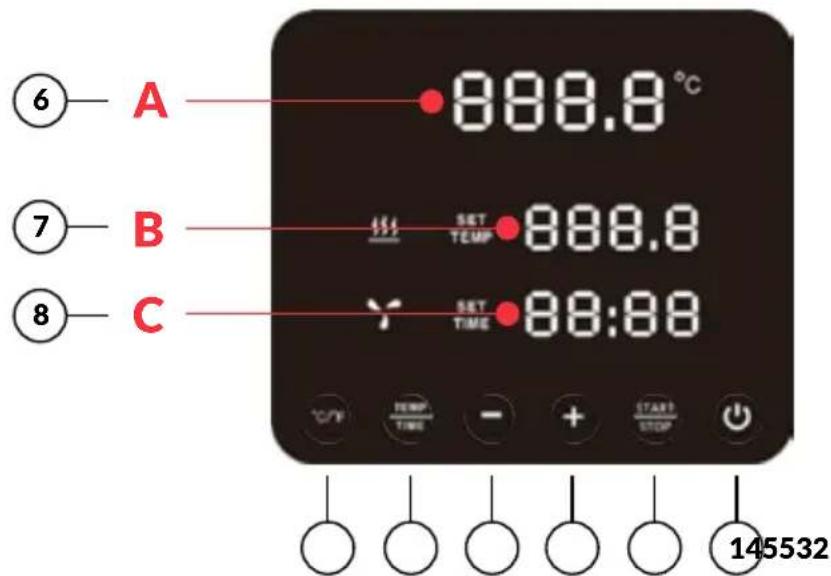
1. Power
- When the power is turned on, the button and indicator light will display. The machine will switch to the power saving mode after 2 seconds.
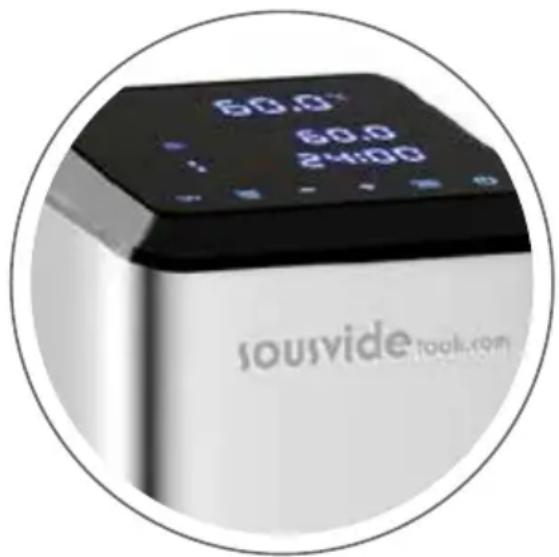
- In the power saving mode, press the power button to wake up the machine and enter standby mode. At this time, the digital reading (A) shows the current water temperature, the digital reading (B) shows the previous one. The target temperature set in the working process, the digital reading (C) shows the last working process' set working hours.
- In ON mode (the button indicator is fully illuminated), press this button to enter the power saving mode. This can also be pressed during the cooking process to enter the power saving mode directly.
PRODUCT FUNCTION
2. °C/°F
Temperature unit switch button
- Click on °C / °F to select the temperature display unit of the machine. Please select celsius or fahrenheit.
3. TEMP / TIME
Temperature, time adjustment switch button
- Click on TEMP / TIME to toggle the temperature or time setting. When the temperature digital reading (B) is flashing, set the desired target temperature with + and -. When the time digital reading (C) is flashing, the desired target time can be set with + and -.
* If no time or temperature has been set after the digital reading flashes 10 times, the iVide Plus Thermal Circulator will exit the TEMP / TIME option. If you need to reset click TEMP / TIME again to enter the required details.
* To display the set time and temperature, press the TEMP / TIME button for 3 seconds.
4. START / STOP
Start/stop button
- In standby mode, click START/STOP to start working.
- In work mode, click START/STOP to stop working.
5. + -
Adjustment button
- To adjust the temperature or time, click on TEMP / TIME, select your required option and use the + and - buttons to adjust.
6. Temperature Digital Reading (A)
• Display real time working temperature.
7. Temperature Digital Reading (B)
- Display the set operating temperature.
8. Time Digital Reading (C)
• In standby mode, the set target time is displayed.
- In working mode, the remaining working time is displayed.
PRODUCT STRUCTURE
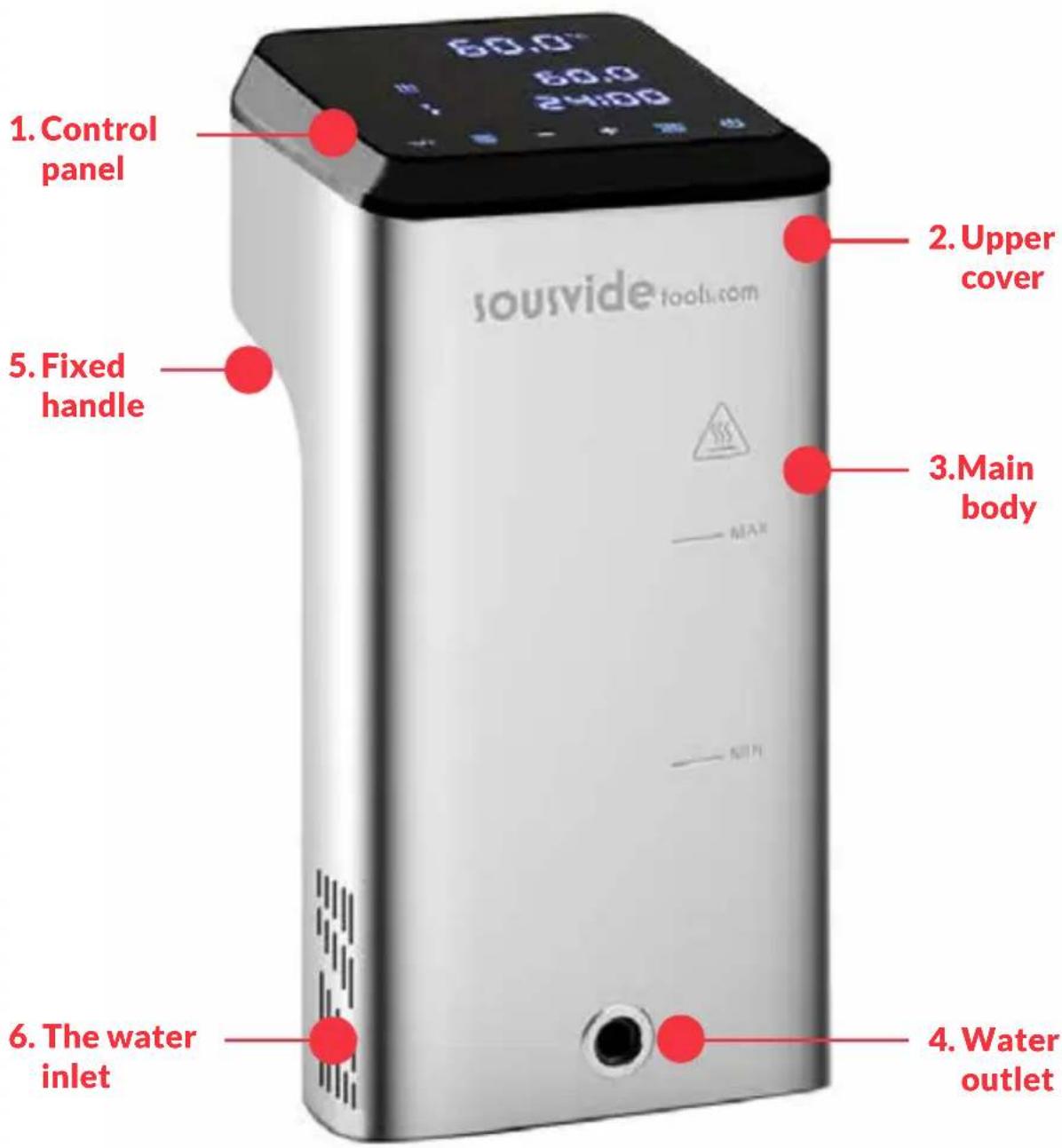
THE APP
Downloading The iVide Plus Thermal Circulator APP
If the iVide Plus Thermal Circulator APP has not yet been downloaded, it can be downloaded from the Apple Store (IOS) or Google Play (Android). It is compatible with IOS version 9.3.5 and later. It is compatible with Android version 4.3 and later.
Note: Please check with your mobile phone or device's manufacturer if you have a question about downloading APP.
Six Steps To Configure The iVide Plus Thermal Circulator APP
Installing theiVide Plus Thermal Circulator APP is quick, in contrast to some other apps. The iVide APPS allows instant use, providing the necessary information exactly when you need it. We have developed a completely new approach to this kind of applications because every moment in the kitchen should be unforgettable. The APP is compatible with the iVide Plus Thermal Circulator with Wi-Fi. The App makes cooking with the iVide Plus Thermal Circulator incredibly easy. Simply select the food, adjust the settings, and press Start.
Six Easy Steps
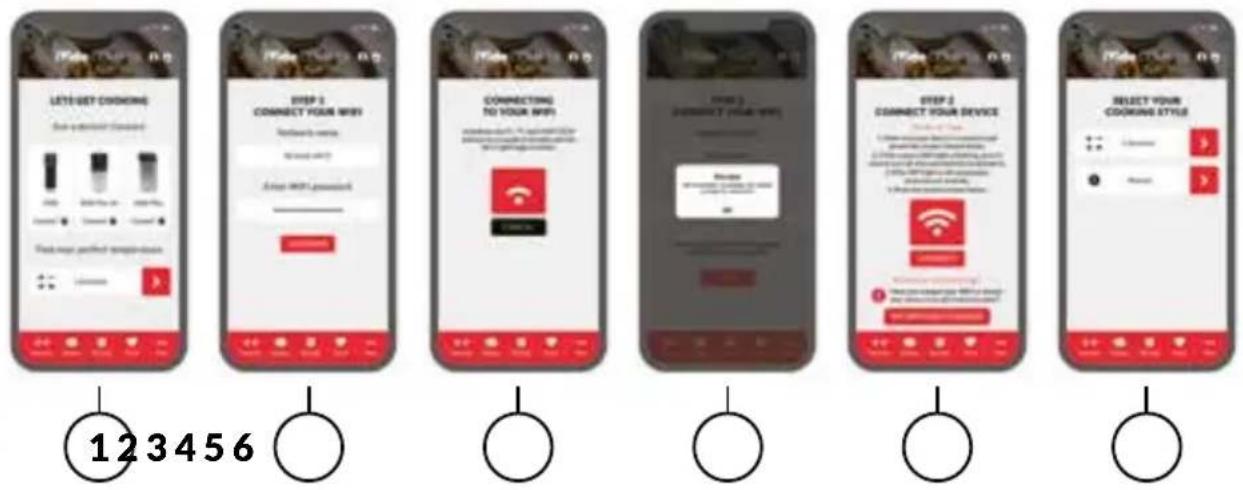
1 Select the appliance you want to use, and press "CONNECT".
2 The app will detect a connected Wi-Fi network. Enter the password and press 'Confirm'.
3 The application starts searching for the iVide Plus Thermal Circulator. Hold down the °C / °F and START/ STOP buttons for a couple of seconds until the Wi-Fi light begins to flash. Wait until the appliance finishes automatic configuration.
4 At the end, you will see a message confirming the appliance is ready to be connected.
5 Make sure the Wi-Fi light has stopped flashing and then press the 'Connect' button. If you need help, read the hints and tips on the display.
6 Congratulations! The iVide Plus Thermal Circulator has just been configured! Enjoy your cooking!
Note:The Apple and iPhone logos are trademarks of Apple Inc., registered in the USA and other countries. Apple Store is a service mark of Apple Inc. Android; Google Play and Google Play logo are trademarks of Google Inc.
OPERATING INSTRUCTIONS
1 Start by attaching the iVide Plus Thermal Circulator to the cooking vessel. Turn the knob counterclockwise, form a gap between the main body and the knob, insert the machine into the cooking vessel and tighten the knob clockwise to secure the machine.
2 Add water to the cooking vessel, ensuring the water level is between the minimum water level and the max water level.
3 Connect the power to turn on and illuminate the digital display. The iVide Plus Thermal Circulator will enter the power saving mode after 2 seconds. After this time, press the power button to put the machine into ON mode.
4 Click °C/°F to select the temperature display unit. The default is °C. Your selected temperature unit will be remembered for next time you use the machine.
5 Click TEMP /TIME to select the temperature or time and set the target value with the + and - keys.
6 After the setting is complete, click START/STOP to start the machine. After the temperature in the cooking vessel reaches the required temperature, the time digital reading (C) starts counting down - now add your vacuum packed food for constant temperature cooking.
7 After the cooking is finished, the iVide Plus Thermal Circulator will beep. Click START/ STOP to turn off. Note: If there is no operation, the machine will emit a continuous beep after 20 seconds, while the water temperature will remain at the preset temperature.
8 Take your vacuum packed food out. The food is now ready for the next process.
9 After using the iVide Plus Thermal Circulator, turn off and store in a safe place.
DON'T FORGET: Before Sous Vide cooking, the food must be vacuum packed. The water level (after the food is put in) should be higher than the MIN, but lower than the MAX marked on the machine. To avoid damaging the machine, drain the water after use and clean the water bath.
MAINTENANCE
To avoid burning, please make sure that the iVide Plus Thermal Circulator is turned off and cooled down to room temperature before cleaning.
1 Place the iVide Plus Thermal Circulator vertically after cleaning, do not place it horizontally or upside down.
2 During cleaning, do not damage the components inside the machine. Once the components are damaged, please ask a specialist to check and repair. Do not attempt unauthorised repairs as this may result in an accident.
3 Empty the old water after each use. Refill with fresh water when you next use the iVide Plus Thermal Circulator. If the water is reused, mineral substance may damage the components.
4 Remove the back cover of the iVide Plus Thermal Circulator to clean the heat tube and probe if the discharge capacity reduces or the components have collected dirt. It is recommended to clean the iVide Plus Thermal Circulator every 20 times or after 100 hours of use.
5 Do not put a hot iVide Plus Thermal Circulator in to cool water as this may cause damage. The iVide Plus Thermal Circulator should be cooled down to room temperature and put into cold water to use.
HOW TO CLEAN
Preparation
iVide Plus Thermal Circulator can be cleaned with food grade vinegar (white vinegar, apple vinegar, etc.)
Why the need to clean?
Normal tap water contains minerals which when the water is heated to a certain temperature will create a scale on the heater or surface of the machine. In this case, the scale will affect the performance of the machine. It is recommended to clean the machine every 20 times or after 100 hours of use. You can clean the machine according to your actual needs due to different water in different areas.
How to clean
1 Fill the container (up to the MAX line) with water. Add 5g vinegar into the water.
2 Turn on the iVide Plus Thermal Circulator, set the working temperature to 80° C ( 176° F) and the time to 3 hours (03:00). Click START/STOP. After 3 hours, the machine will beep and switch off.
*Quick cleaning procedure: Hold down the START/STOP and - buttons. The digital reading (B) will show the set temperature 80°C, the digital reading (C) will show the set time 3:00. Release the button and the digital reading (B) & (C) will flash 10 times. Click the START/STOP button to start the cleaning operation.
3 Check if the machine is clean. If the machine is not clean then add more vinegar and start the process again. If the machine is clean, please drain the vinegar from the machine, wash the machine with fresh water, dry and store away.
TROUBLESHOOTING
| Error code | Cause of issue | Troubleshooting |
| E01 | The water level is lower than the lowest water level or higher than the highest water level | Turn off the power. If the water level is too low, add the right amount of water to the container; if the water level is too high, remove the water from the container. |
| E02 | 1. Whether the heating pipe is normal;2. Whether the internal wiring of the machine is normal;3. Is the temperature sensor normal? | Need to ask a professional for repair |
| LP | The machine suddenly loses power during normal cooking |
** During the use of the machine, if any other problems arise, please speak to a specialist. Do not attempt unauthorised repairs as this may result in an accident.
WARRANTY & AFTER SALES SERVICE
1 Make sure the working platform is flat, clean and tidy.
2 Warranty is limited to damage caused by production defects.
3 The cost of parts and maintenance will be charged due to improper use or other non-product quality problems.
4 Please keep the purchase vouchers.
Maintenance Card
First Name:
Last Name:
Phone:
Email:
Address:
Machine Model:
Purchase Date:
Supplier:
Repair Record
Date Cause By
CE CERTIFICATE
European Declaration of Conformity

Marking we
Gastronomy Plus Ltd t/a Sousvidetools.com
Central Barn
Claughton Business Park
Hornby Road
Claughton
Lancaster
United Kingdom
declare under our sole responsibility that the product
Article: Sous Vide Circulator
Trademark: sousvide tools.com
Model no.: SVT-01006 & SVT-01006EU
To which this declaration relates is in conformity with the following harmonized standards
EN 60950-1: 2006+A11(2009)+A1(2010)+A12
(2011)+A2(2013)
EN 62479: 2010
EN 55014-1:2006/A2:2011
EN 55014-2:2015
EN 61000-3-2:2014
EN 61000-3-3:2013
ETSI EN 301 489-01 V2.l.1 (2017-02)
ETSI EN 301 489-17 V3.l.1 (2017-02)
EN 300 328 V2.l.1: 2016-11
EN 60335-1:2012/All:2014
EN 60335-2-74:2003/A2:2009
EN 62233:2008
Following the provisions of
2014/53/EU (RED directive) 2014/30/EU (EMC directive) 2014/35/EU (LVD directive)
01.10.2020
Date / Place Name: Alex Shannon
Alex Shannon
Position: Managing Director








ÜBER DEN IVIDE
1. Stromversorgung
Claughton Business Park
Hornby Road
Claughton
Lancaster
United Kingdom
1. Accensione
Claughton Business Park
Hornby Road
Claughton
Lancaster
United Kingdom
1. Bouton "Power"
Claughton Business Park
Hornby Road
Claughton
Lancaster
United Kingdom
1. Alimentación
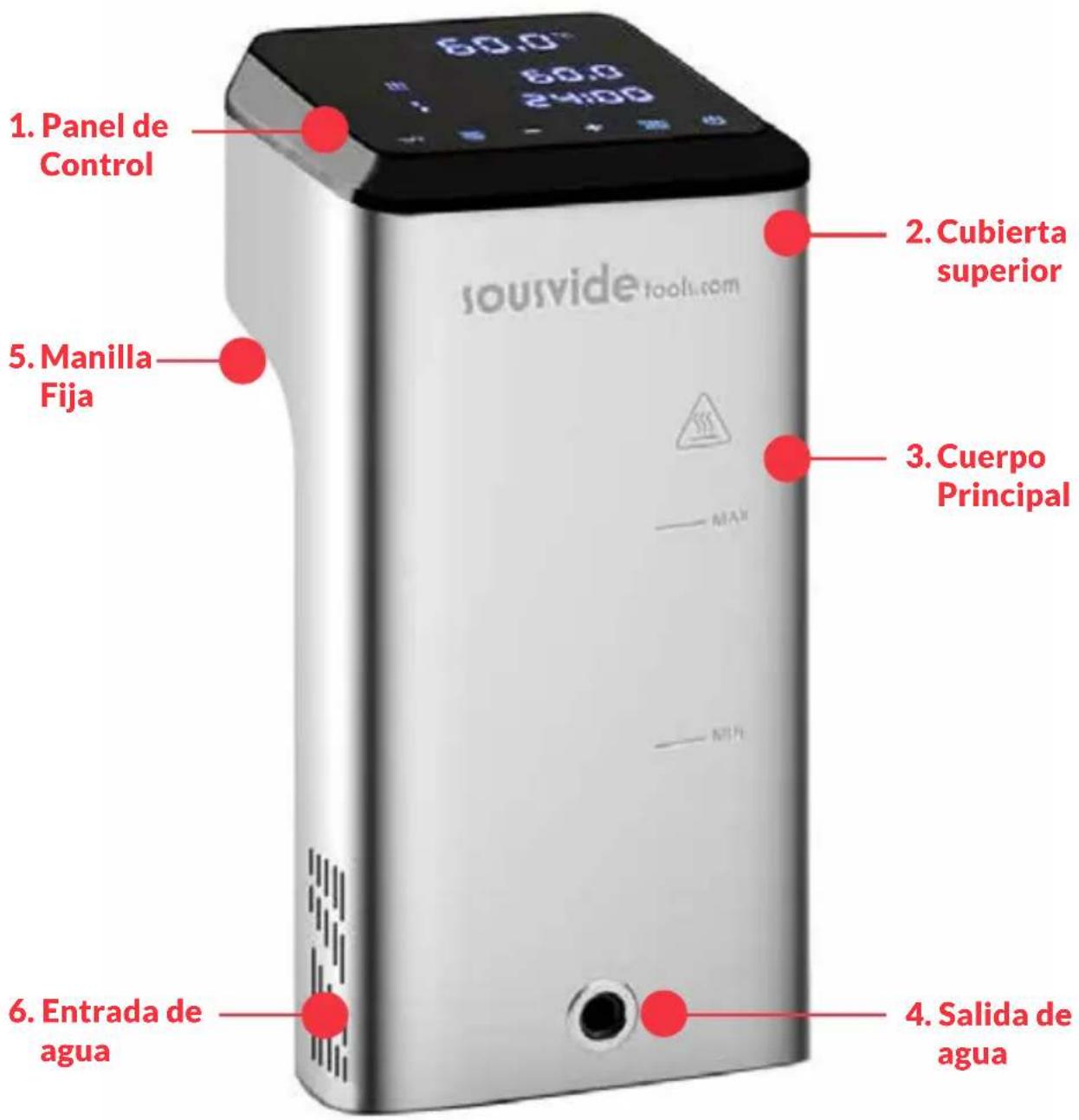
ESTRUCTURA DEL PRODUCTO
Claughton Business Park
Hornby Road
Claughton
Lancaster
United Kingdom
1. Potência
Claughton Business Park
Hornby Road
Claughton
Lancaster
United Kingdom
Data / Local Nome: Alex Shannon
Alex Shannon
Claughton Business Park
Hornby Road
Claughton
Lancaster
United Kingdom
1. Putere
STRUCTURA PRODUSULUI
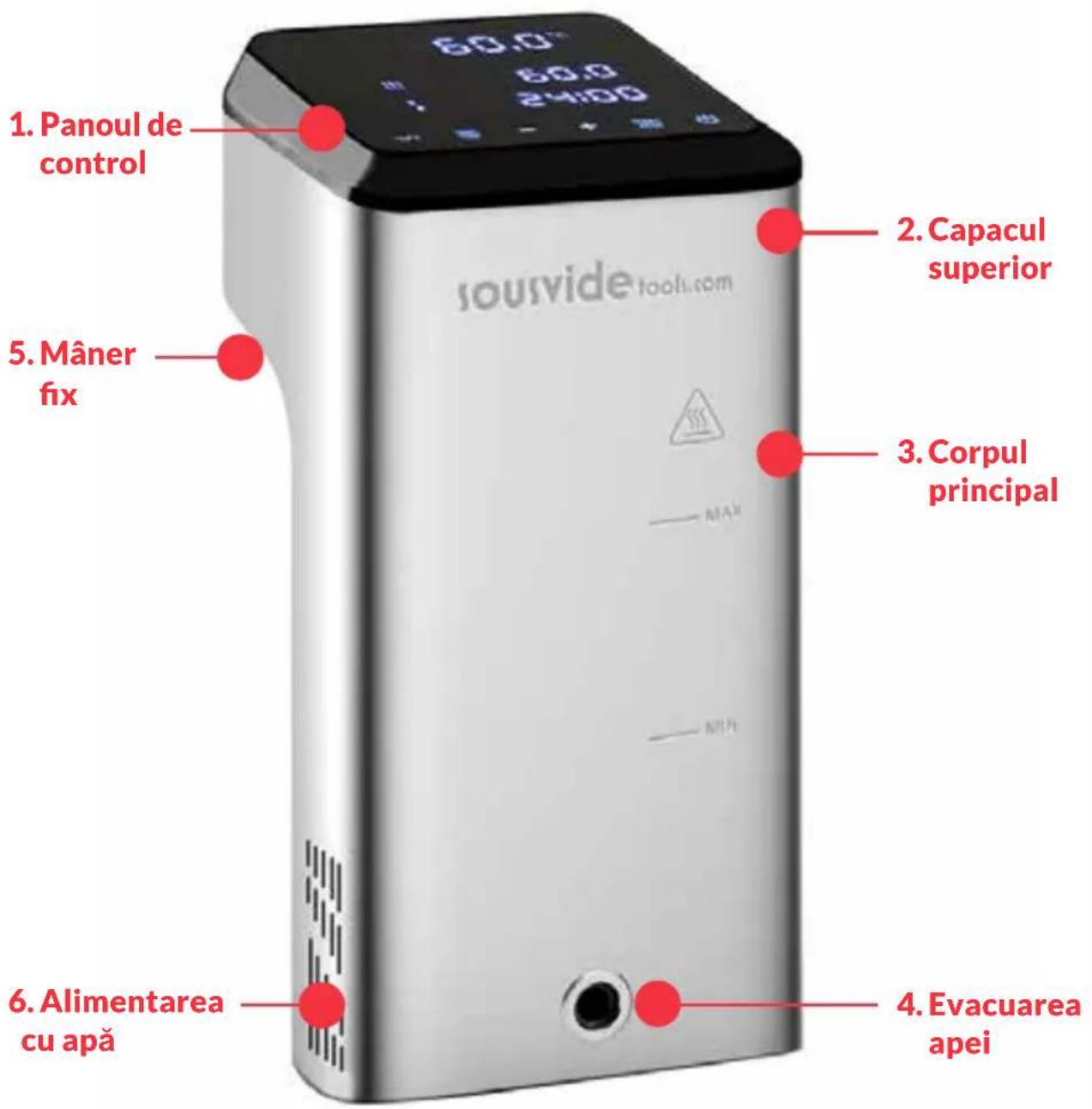
APLICAȚIA MOBILĂ
Claughton Business Park
Hornby Road
Claughton
Lancaster
United Kingdom
1. Moc
GWARANCJA I SERWIS POGWARANCYJNY
Claughton Business Park
Hornby Road
Claughton
Lancaster
United Kingdom
1. Power
Claughton Business Park
Hornby Road
Claughton
Lancaster
United Kingdom
1. Strøm/ På
Claughton Business Park
Hornby Road
Claughton
Lancaster
United Kingdom
1. Ström
GARANTI- OCH SERVICE EFTER FÖRSÄLJNING
Claughton Business Park
Hornby Road
Claughton
Lancaster
United Kingdom
1.Strøm
Knap for at tilpasse
SÅDAN B∅R APPARATET RENG∅RES
Forberedelse
Claughton Business Park
Hornby Road
Claughton
Lancaster
United Kingdom
erklærer under vores eneste ansvar, at produktet
Artikel: Sous Vide Circulator
sousvide tools.com
HEADQUARTERS
Central Barn, Claughton Business Park,
Hornby Road, Claughton, Lancaster, LA2 9JX
0800 678 5001
01524 770 060
enquiries@sousvidetools.com
www.sousvidetools.com

- IVIDE PLUS THERMAL CIRCULATOR
- CONTENTS / INHALT / INDICE / TABLE DES MATIÈRES / CONTENIDO / CONTEÚDO
- EN // USER GUIDE
- DE // BENUTZERHANDBUCH
- SAFETY
- PLEASE FOLLOW THESE SAFETY PRECAUTIONS
- TECHNICAL PARAMETERS
- PRODUCT FUNCTION
- POWER
- °C/°F
- TEMPERATURE UNIT SWITCH BUTTON
- TEMP / TIME
- TEMPERATURE, TIME ADJUSTMENT SWITCH BUTTON
- START / STOP
- START/STOP BUTTON
- ADJUSTMENT BUTTON
- TEMPERATURE DIGITAL READING (A)
- TEMPERATURE DIGITAL READING (B)
- TIME DIGITAL READING (C)
- PRODUCT STRUCTURE
- THE APP
- DOWNLOADING THE IVIDE PLUS THERMAL CIRCULATOR APP
- SIX STEPS TO CONFIGURE THE IVIDE PLUS THERMAL CIRCULATOR APP
- SIX EASY STEPS
- OPERATING INSTRUCTIONS
- MAINTENANCE
- HOW TO CLEAN
- PREPARATION
- WHY THE NEED TO CLEAN
- WARRANTY & AFTER SALES SERVICE
- MAINTENANCE CARD
- REPAIR RECORD
- CE CERTIFICATE
- EUROPEAN DECLARATION OF CONFORMITY
- ÜBER DEN IVIDE
- STROMVERSORGUNG
- ACCENSIONE
- BOUTON "POWER
- ALIMENTACIÓN
- POTÊNCIA
- PUTERE
- STRUCTURA PRODUSULUI
- APLICAȚIA MOBILĂ
- MOC
- GWARANCJA I SERWIS POGWARANCYJNY
- STRØM/ PÅ
- STRÖM
- GARANTI- OCH SERVICE EFTER FÖRSÄLJNING
- 1.STRØM
- KNAP FOR AT TILPASSE
- SÅDAN B∅R APPARATET RENG∅RES
- FORBEREDELSE
- SOUSVIDE TOOLS.COM
- HEADQUARTERS
Brand : SousVideTools
Model : 222997
Category : Slow cooker