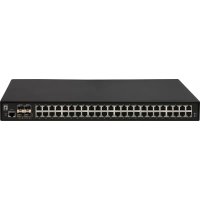
GTL5291 - Switch LEVELONE - Free user manual and instructions
Find the device manual for free GTL5291 LEVELONE in PDF.



| Product Type | Manageable network switch |
| Brand | LevelOne |
| Model | GTL5291 |
| Dimensions (approx.) | 440 x 200 x 44 mm (19-inch rack standard) |
| Weight (approx.) | 2.5 kg |
| Power Supply | AC 100-240 V, 50/60 Hz |
| Power Consumption (estimated) | 20 W |
| Interfaces | RJ-45 10/100/1000Base-T ports (24 ports) RS-232 console port |
| Main Features | Management via web interface and CLI Default IP address: 192.168.1.1 Default credentials: admin/admin VLAN and QoS support (depending on firmware) 19-inch rack mount or desktop |
| Initial Configuration | Console connection: 38400 bps, 8 data bits, no parity, 1 stop bit, no flow control |
| Operating Temperature | -10 °C to 50 °C |
| Operating Humidity | 10% to 90% (non-condensing) |
| Package Contents | Main unit, power cord, quick installation guide, declaration of conformity, L-shaped mounting brackets |
| Maintenance and Cleaning | Clean with a soft, dry cloth. Disconnect before cleaning. Avoid liquids. |
| Safety | Install in a dry place, away from direct sunlight and sources of electromagnetic interference. Ensure adequate ventilation. |
| Spare Parts and Repairability | No user-serviceable parts. Contact authorized after-sales service for any repairs. |
Frequently Asked Questions - GTL5291 LEVELONE
User questions about GTL5291 LEVELONE
0 question about this device. Answer the ones you know or ask your own.
Ask a new question about this device
Download the instructions for your Switch in PDF format for free! Find your manual GTL5291 - LEVELONE and take your electronic device back in hand. On this page are published all the documents necessary for the use of your device. GTL5291 by LEVELONE.
USER MANUAL GTL5291 LEVELONE
Quick Installation Guide
( Managed Commercial Grade Switches )

text_image
level oneContent
English 2
Deutsch....5
Français 9
Español....12
Italiano 16
Português 20
This Quick Installation Guide only describes the most basic situations and settings. All detailed information is described in the user manual.
English
Package Contents
This product is provided with the following accessories in the box; please check them carefully. If any of the accessories is missing or damaged, please contact with your local dealer timely.
| Serial number | Name | Quantity | Note |
| 1 | Master unit | 1 | Required |
| 2 | Power cord | 1 | Required |
| 3 | Quick Installation Guide | 1 | Required |
| 4 | Declaration of Conformity | 1 | Required |
| 5 | L-shaped bracket and other | 1 | Required |
Preparing for installation
For smooth installation, please prepare the following items:
● Installation tools, including: Phillips screwdriver, anti static wrist strap, etc.
- Connecting cables, such as network cable, optical fiber, optical fiber module, etc.
● Related devices, such as electrical outlets, HUB, switch, router, etc.
The installation environment for the switch must meet the following requirements:
- The switch must avoid direct sunlight, away from heat and sources of strong electromagnetic interference.
- The switch must be placed in a cool, dry place, and there should be enough gap for heat dissipation all around for the purpose of ventilation and heat dissipation.
- The switch must work in the indoor environment with a temperature of -10^ 50^ and humidity of 10% 90% without condensation.
Equipment Installation
1. Installed in the rack
Install the switch on a 19-inch standard rack, and the installation steps are as follows:
- Check the grounding and stability of the rack;
- Install the two L-shaped brackets in the accessories on both sides of the switch panel, and fix them with the screws in the accessories;
- Place the switch in the appropriate location of the rack, and support it using a tray;
- Secure the L-shaped brackets on the guide slots fixed at both ends of the rack, to ensure that the switch can be mounted on the rack in astable, horizontal manner;
- Use a power cord to connect the switch power connector with the powersocket.
2. Installed on the working table
Install the switch on a working table, and the installation steps are as follows:
- Place the switch with its bottom up on a sufficiently large, stable and properly-grounded working table;
- Flip over the switch, and place it on the working tablestably;
- Use a power cord to connect the switch power connector with the power socket.
- The switch uses 100-240V, 50/60Hz AC, and make sure that both power supply and grounding are normal before power on.
- After power on, please check the switch's power indicator (Power) is on, and if so, it indicates that the power supply is connected properly.
- Do not place heavy objects on the top of the switch.
Perform Initial Configuration
- Connect PC to the switch console port using console cable.
- Configure the PC's serial port: 38400 bps, 8 characters, no parity, one stop bit, 8 data bits, and no flow control.
- Log in to the CLI using default settings: Username "admin" and password "admin."
Note: For further information on switch configuration, refer to the CLI Reference Guide and Web Management Guide.
Logging on to the equipment
- Connect the RJ-45 interface cable of a switch with a computer using a network cable.
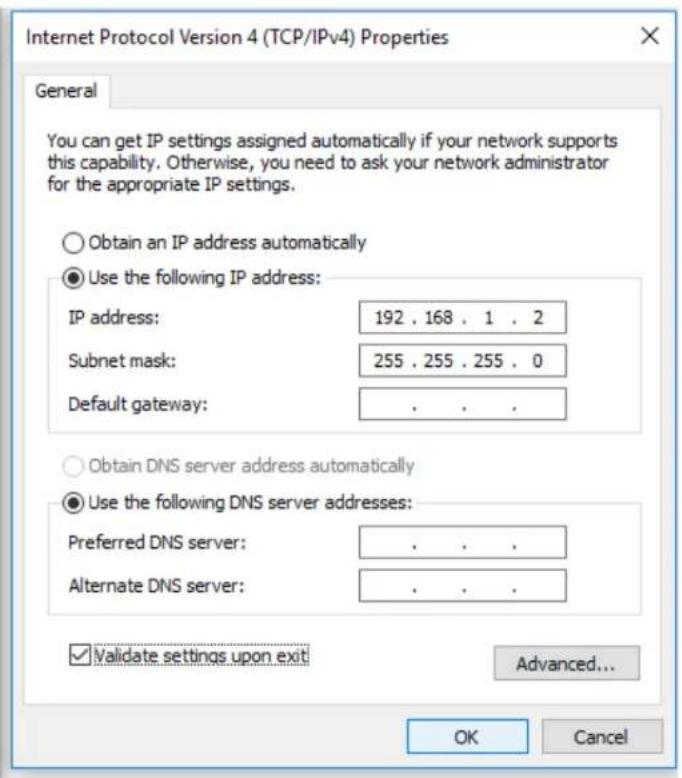
- Set the TCP/IP properties of the computer, see the Appendix: Setting up yourcomputer.
- Logging on to the equipment: Open a browser and type 192.168.1.1 in the address bar, and then press Enter; in the pop-up login interface, enter the factory logon username "admin", password "admin" and click OK.

text_image
192.168.1.1 File Edit View Favorites Tools HelpAppendix: Setting up your computer
Windows
- Click Start—> Control Panel—> Network and Internet—> Network and Sharing Center—> Change adapter settings, right click Local connection and select Properties;
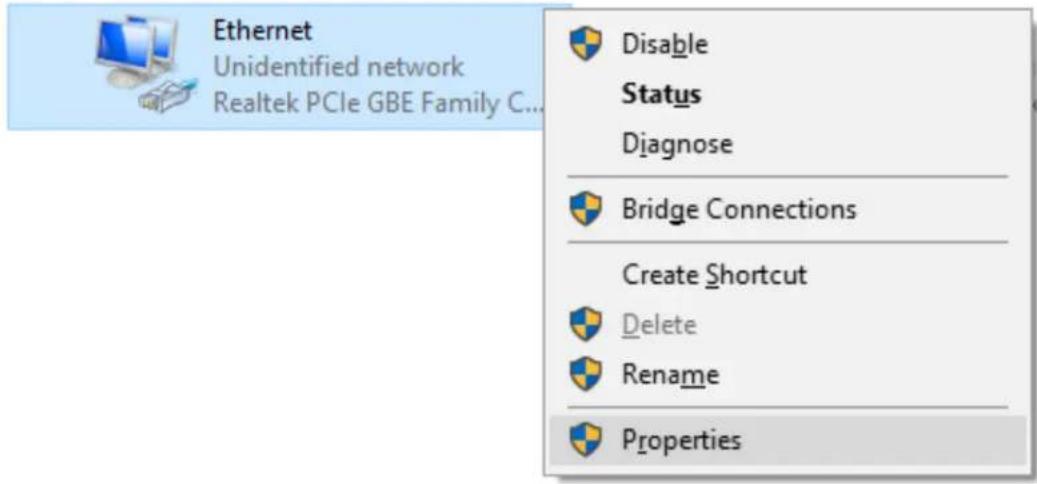
text_image
Ethernet Unidentified network Realtek PCIe GBE Family C... Disable Status Diagnose Bridge Connections Create Shortcut Delete Rename Properties- Double-click Internet Protocol 4 (TCP/IPv4);
- Set the computer's IP address: The computer's IP address should be any one of the following free IP addresses 192.168.1.2 \~ 192.168.1.250, and then click OK, to return to the previous page, click OK.
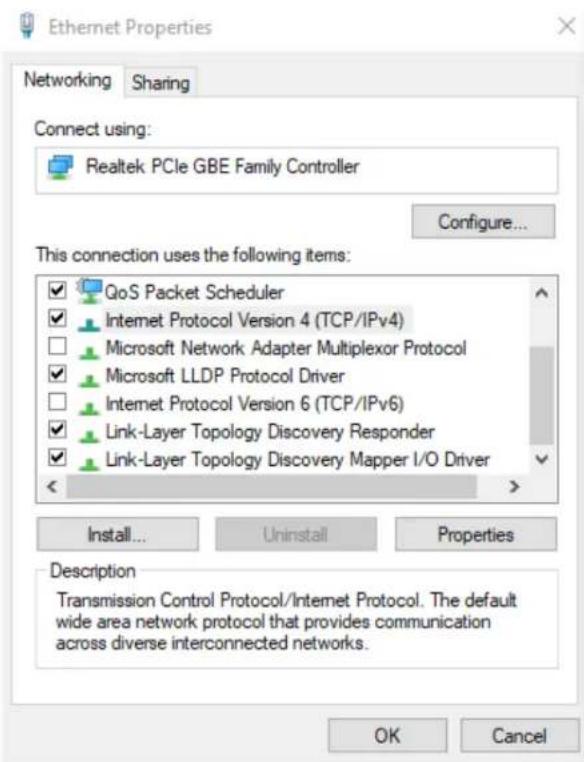
text_image
Ethernet Properties Networking Sharing Connect using: Realtek PCIe GBE Family Controller Configure... This connection uses the following items: ✓ QoS Packet Scheduler ✓ Internet Protocol Version 4 (TCP/IPv4) □ Microsoft Network Adapter Multiplexor Protocol ✓ Microsoft LLDP Protocol Driver □ Internet Protocol Version 6 (TCP/IPv6) ✓ Link-Layer Topology Discovery Responder ✓ Link-Layer Topology Discovery Mapper I/O Driver Install... Uninstall Properties Description Transmission Control Protocol/Internet Protocol. The default wide area network protocol that provides communication across diverse interconnected networks. OK Cancel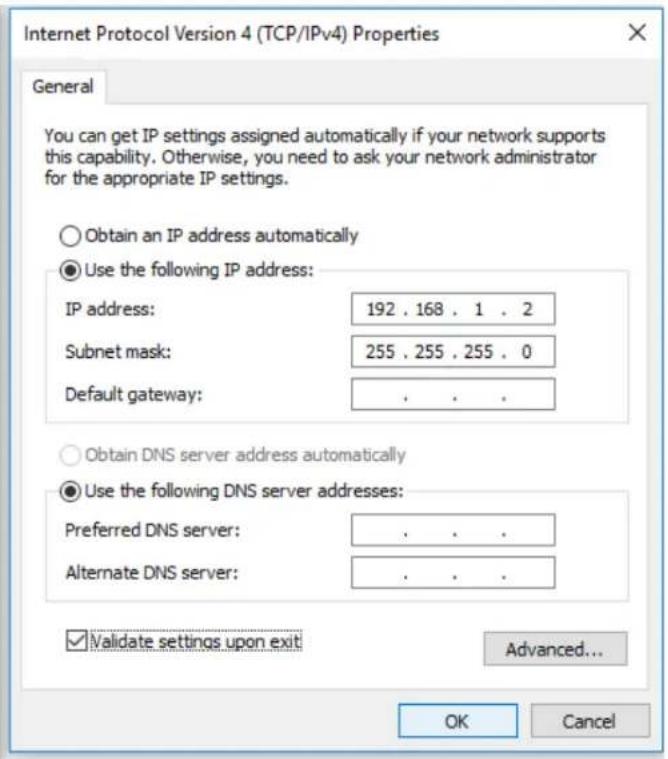
text_image
Internet Protocol Version 4 (TCP/IPv4) Properties General You can get IP settings assigned automatically if your network supports this capability. Otherwise, you need to ask your network administrator for the appropriate IP settings. Obtain an IP address automatically Use the following IP address: IP address: 192 . 168 . 1 . 2 Subnet mask: 255 . 255 . 255 . 0 Default gateway: . Obtain DNS server address automatically Use the following DNS server addresses: Preferred DNS server: . Alternate DNS server: . Validate settings upon exit Advanced... OK CancelDeutsch
Lieferumfang
text_image
Ethernet Unidentified network Realtek PCIe GBE Family C... Disable Status Diagnose Bridge Connections Create Shortcut Delete Rename Propertiestext_image
Ethernet Properties Networking Sharing Connect using: Realtek PCIe GBE Family Controller Configure... This connection uses the following items: ✓ QoS Packet Scheduler ✓ Internet Protocol Version 4 (TCP/IPv4) □ Microsoft Network Adapter Multiplexor Protocol ✓ Microsoft LLDP Protocol Driver □ Internet Protocol Version 6 (TCP/IPv6) ✓ Link-Layer Topology Discovery Responder ✓ Link-Layer Topology Discovery Mapper I/O Driver Install... Uninstall Properties Description Transmission Control Protocol/Internet Protocol. The default wide area network protocol that provides communication across diverse interconnected networks. OK Cancel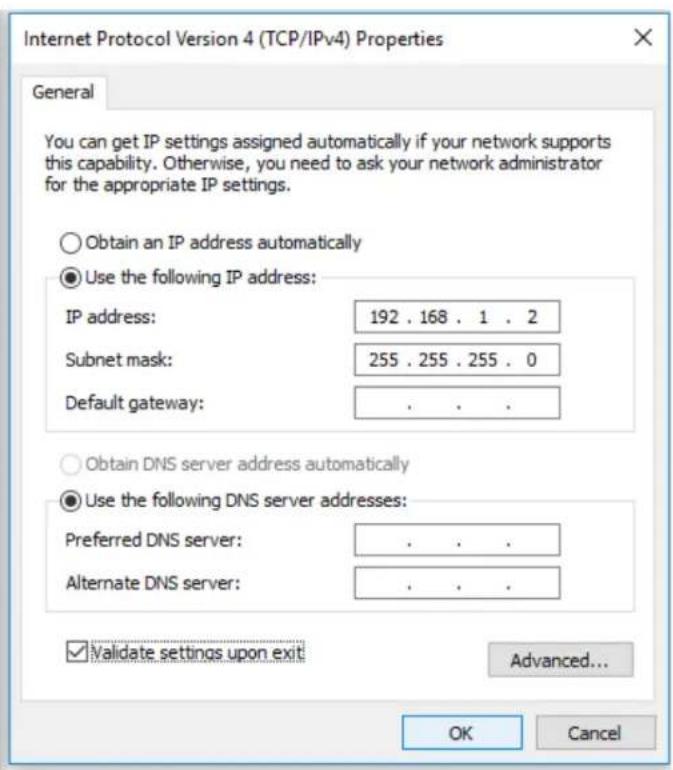
text_image
Internet Protocol Version 4 (TCP/IPv4) Properties General You can get IP settings assigned automatically if your network supports this capability. Otherwise, you need to ask your network administrator for the appropriate IP settings. Obtain an IP address automatically Use the following IP address: IP address: 192 . 168 . 1 . 2 Subnet mask: 255 . 255 . 255 . 0 Default gateway: . Obtain DNS server address automatically Use the following DNS server addresses: Preferred DNS server: . Alternate DNS server: . Validate settings upon exit Advanced... OK CancelFrançais
text_image
Ethernet Unidentified network Realtek PCIe GBE Family C... Disable Status Diagnose Bridge Connections Create Shortcut Delete Rename Propertiestext_image
Ethernet Properties Networking Sharing Connect using: Realtek PCIe GBE Family Controller Configure... This connection uses the following items: ✓ QoS Packet Scheduler ✓ Internet Protocol Version 4 (TCP/IPv4) □ Microsoft Network Adapter Multiplexor Protocol ✓ Microsoft LLDP Protocol Driver □ Internet Protocol Version 6 (TCP/IPv6) ✓ Link-Layer Topology Discovery Responder ✓ Link-Layer Topology Discovery Mapper I/O Driver Install... Uninstall Properties Description Transmission Control Protocol/Internet Protocol. The default wide area network protocol that provides communication across diverse interconnected networks. OK Cancel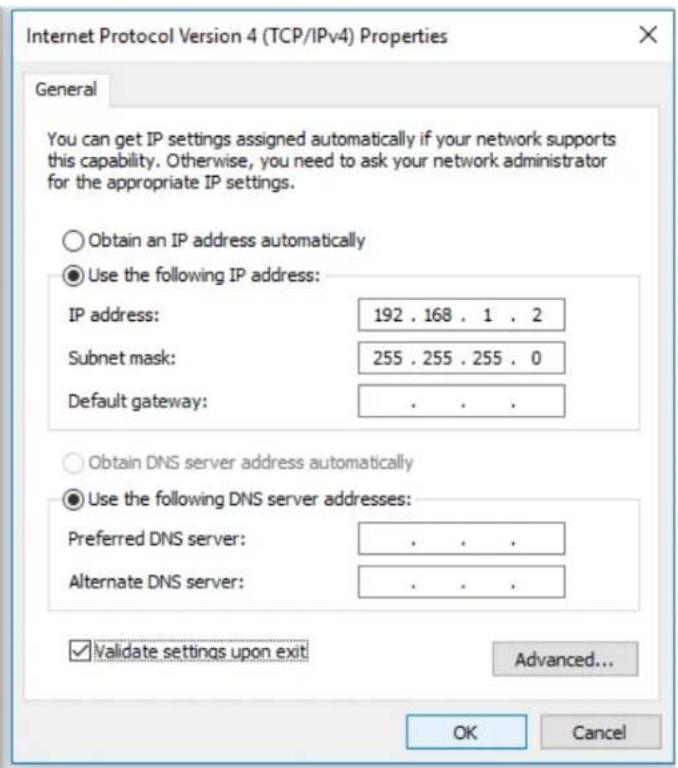
text_image
Internet Protocol Version 4 (TCP/IPv4) Properties General You can get IP settings assigned automatically if your network supports this capability. Otherwise, you need to ask your network administrator for the appropriate IP settings. Obtain an IP address automatically Use the following IP address: IP address: 192 . 168 . 1 . 2 Subnet mask: 255 . 255 . 255 . 0 Default gateway: . Obtain DNS server address automatically Use the following DNS server addresses: Preferred DNS server: . Alternate DNS server: . Validate settings upon exit Advanced... OK CancelEspañol
text_image
Ethernet Unidentified network Realtek PCIe GBE Family C... Disable Status Diagnose Bridge Connections Create Shortcut Delete Rename Propertiestext_image
Ethernet Properties Networking Sharing Connect using: Realtek PCIe GBE Family Controller Configure... This connection uses the following items: ✓ QoS Packet Scheduler ✓ Internet Protocol Version 4 (TCP/IPv4) □ Microsoft Network Adapter Multiplexor Protocol ✓ Microsoft LLDP Protocol Driver □ Internet Protocol Version 6 (TCP/IPv6) ✓ Link-Layer Topology Discovery Responder ✓ Link-Layer Topology Discovery Mapper I/O Driver Install... Uninstall Properties Description Transmission Control Protocol/Internet Protocol. The default wide area network protocol that provides communication across diverse interconnected networks. OK Cancel Internet Protocol Version 4 (TCP/IPv4) Properties General You can get IP settings assigned automatically if your network supports this capability. Otherwise, you need to ask your network administrator for the appropriate IP settings. ○ Obtain an IP address automatically ● Use the following IP address: IP address: 192 . 168 . 1 . 2 Subnet mask: 255 . 255 . 255 . 0 Default gateway: . ○ Obtain DNS server address automatically ● Use the following DNS server addresses: Preferred DNS server: . Alternate DNS server: . ✓ Validate settings upon exit Advanced... OK CancelItaliano
text_image
Ethernet Unidentified network Realtek PCIe GBE Family C... Disable Status Diagnose Bridge Connections Create Shortcut Delete Rename Propertiestext_image
Ethernet Properties Networking Sharing Connect using: Realtek PCIe GBE Family Controller Configure... This connection uses the following items: ✓ QoS Packet Scheduler ✓ Internet Protocol Version 4 (TCP/IPv4) □ Microsoft Network Adapter Multiplexor Protocol ✓ Microsoft LLDP Protocol Driver □ Internet Protocol Version 6 (TCP/IPv6) ✓ Link-Layer Topology Discovery Responder ✓ Link-Layer Topology Discovery Mapper I/O Driver Install... Uninstall Properties Description Transmission Control Protocol/Internet Protocol. The default wide area network protocol that provides communication across diverse interconnected networks. OK Cancel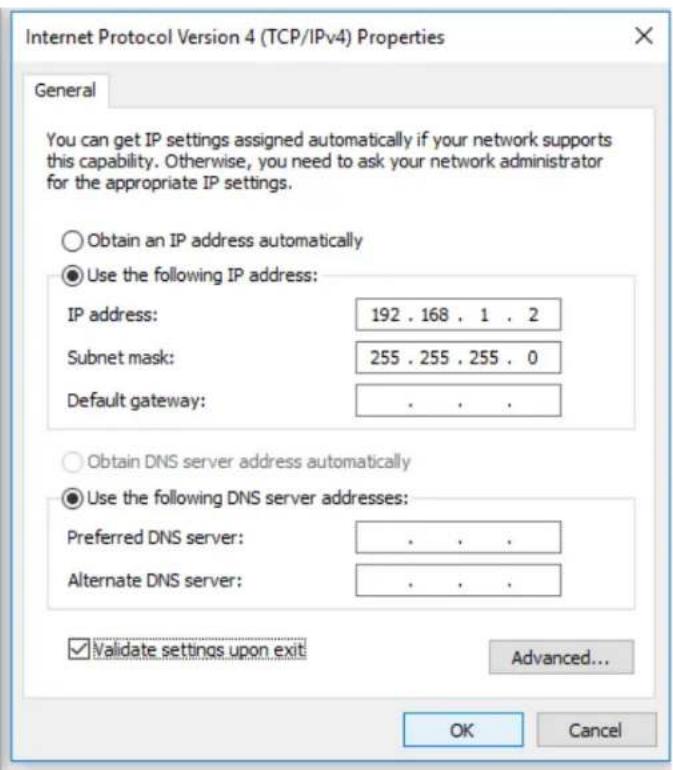
text_image
Internet Protocol Version 4 (TCP/IPv4) Properties General You can get IP settings assigned automatically if your network supports this capability. Otherwise, you need to ask your network administrator for the appropriate IP settings. Obtain an IP address automatically Use the following IP address: IP address: 192 . 168 . 1 . 2 Subnet mask: 255 . 255 . 255 . 0 Default gateway: . Obtain DNS server address automatically Use the following DNS server addresses: Preferred DNS server: . Alternate DNS server: . Validate settings upon exit Advanced... OK CancelPortuguês
text_image
Ethernet Unidentified network Realtek PCIe GBE Family C... Disable Status Diagnose Bridge Connections Create Shortcut Delete Rename Propertiestext_image
Ethernet Properties Networking Sharing Connect using: Realtek PCIe GBE Family Controller Configure... This connection uses the following items: ✓ QoS Packet Scheduler ✓ Internet Protocol Version 4 (TCP/IPv4) □ Microsoft Network Adapter Multiplexor Protocol ✓ Microsoft LLDP Protocol Driver □ Internet Protocol Version 6 (TCP/IPv6) ✓ Link-Layer Topology Discovery Responder ✓ Link-Layer Topology Discovery Mapper I/O Driver Install... Uninstall Properties Description Transmission Control Protocol/Internet Protocol. The default wide area network protocol that provides communication across diverse interconnected networks. OK Cancel