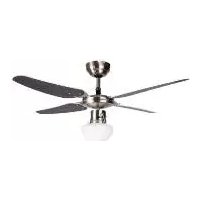
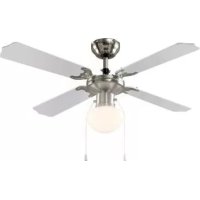
IAN 359538 - Ceiling fan Livarno Lux - Free user manual and instructions
Find the device manual for free IAN 359538 Livarno Lux in PDF.


| Product type | Ceiling fan with LED lighting |
| Brand | Livarno Lux |
| Model | IAN 359538 |
| Dimensions (body height) | 40.5 cm |
| Fan diameter | 105 cm |
| Weight | 4.2 kg |
| Power supply | 220–240 V~, 50 Hz |
| Total fan power | 50 W |
| Type of included LED bulb | E27, max. 4.9 W |
| Maximum bulb power | 60 W (E27) |
| Rotation speed (high) | 253 rpm |
| Speed levels | 3 (high, moderate, low) |
| Noise level | 43.5 dB(A) |
| Protection class | I (with protective conductor) |
| Protection rating | IP20 (dry indoor use) |
| Blade material | Wood (wood look) or white as desired |
| Main functions | LED lighting, 3 speeds, summer/winter mode (reverse rotation), pull switches |
| Minimum ceiling height | 2.50 m (blades at 2.3 m from floor) |
| Minimum wall distance | 0.6 m |
| Maximum ceiling slope | 30° |
| Warranty | 3 years |
| Package contents | Fan with LED, lampshade, 4 blades, brackets, mounting bracket, fixings, manual |
| Maintenance and cleaning | Dry lint-free cloth; do not immerse or use harsh detergents |
| Safety | Not suitable for dimmers; replace bulb when power is off; do not use outdoors |
Frequently Asked Questions - IAN 359538 Livarno Lux
User questions about IAN 359538 Livarno Lux
0 question about this device. Answer the ones you know or ask your own.
Ask a new question about this device
Download the instructions for your Ceiling fan in PDF format for free! Find your manual IAN 359538 - Livarno Lux and take your electronic device back in hand. On this page are published all the documents necessary for the use of your device. IAN 359538 by Livarno Lux.
USER MANUAL IAN 359538 Livarno Lux
Ceiling fan with LED light
Ceiling fan with LED light
Assembly, operating and safety instructions
Before reading, unfold the two pages with the illustrations and then familiarise yourself with all the functions of the unit.
GB/IE Assembly, operating and safety instructions Page 5
![graph TD A["Sun"] --> B["Wind Turbine"] B --> C["Water Flow"] C --> D["Pump"] style A fill:#f9f,stroke:#333 style B fill:#ccf,stroke:#333 style C fill:#cfc,stroke:#333 style D fill:#fcc,stroke:#333](/content/2026/03/572350/images/9bd248d616665f2378a0319ad196361d23d871719f703956e8ca061cff72347f.jpg)
![graph TD A["Light Bulb"] --> B["ON"] B --> C["Speaker Icon"] C --> D["Sound Light Icon"] D --> E["Screen Screen Icon"] E --> F["Light Bulb"] F --> G["ON"] G --> H["OFF"]](/content/2026/03/572350/images/9c1f50a8e1b2230b508a171c1968ec6b30bc7798423ccc3459da778d260ea79a.jpg)
List of pictograms used* Page 6
Introduction...... Page 6
Intended use Page 7
Scope of delivery Page 7
Parts description Page 7
Technical data Page 7
Safety Page 8
Safety notes Page 8
Preparation Page 9
Tools and materials required Page 9
Prior to installation Page 9
Assembly Page 9
Installing the product Page 10
Initial use Page 10
Switching the LED light on and off Page 10
Switching the ceiling fan on Page 11
Setting the right/left rotation ...... Page 11
Troubleshooting Page 11
Replacing the LED light bulb Page 11
Maintenance and cleaning ...... Page 12
Disposal Page 12
Declaration of conformity ...... Page 12
Warranty and service Page 12
Warranty Page 12
Service address Page 13
Warranty card Page 13
| List of pictograms used* | |||
 | Read the instructions! |  | For your safety! |
| [BWXD] | Safety notesInstructions for use | [2XBT] | Observe the warnings and safety information! |
 | This product is only suitable for use indoors, in dry and enclosed spaces. |  | Danger to life and risk of accidents for infants and children! |
| [2XYB] | Volt | ||
| [W250] | Alternating current/voltage |  | Warning! Danger of electric shock! |
 | Hertz (frequency) |  | Caution - hot surfaces! |
 | Watts (effective power) | ||
 | This ceiling fan with LED light is not suitable for dimmers or electronic switches. | [305T] | LED light bulb dimensions |
 | Thread E27 |  | 3 speed settings available |
 | E27 LED light bulb included | 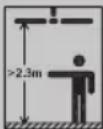 | The fan blades must be at least 2.3 m away from the floor |
 | Earth wire (protection class I) |  | Product complies with the product-specific applicable European directives. |
 | Only install the light bulb in a dry environment. |  | SGS / GS tested |
 | Protection type: no protection against water! Suitable for indoor use only. |  | Dispose of the packaging and the product in an environmentally friendly manner! |
 | UK Conformity Assessed | ||
Ceiling fan with LED light
* Further details, e.g. additional symbol explanations and technical information, can be found at www.edi-light.com
Introduction

Congratulations on the purchase of your new ceiling fan with LED light. You have chosen a high-quality product. Please be
sure to carefully read all the instructions for use. Unfold the pages with the illustrations. These instructions are a part of this ceiling fan with LED light and contain important information on setup and operation. Always observe all safety
information. Before using this product for the first time, verify that the correct voltage is present and that all parts are properly installed. If you have any questions or are unsure about operating the ceiling fan with LED light, please contact your retailer or the service centre. Please keep these instructions in a safe place and include them when passing this product on to others.
Intended use

This ceiling fan with LED light is solely suitable for use in dry, closed indoor spaces. It is not suitable for use in
bathrooms or other consistently damp areas. Neither is it suitable for use in tropical climates. This ceiling fan with LED light is only intended for private household use. Do not operate at temperatures over 40 °C.
- Scope of delivery
Always check that all parts are present and that the ceiling fan with LED light is in perfect condition immediately after unpacking.
1 Ceiling fan unit with LED light, 1 LED bulb, 1 lampshade, 4 fan blade holders, 4 fan blades, 1 mounting bracket, 1 mounting material (15 washers, 2 screws (ø 5 x 50 mm), 15 spring washers, 13 nuts, 13 screws (M5 x 15 mm), 2 dowels), 1 set of assembly and operating instructions. Instructions for use incl. guarantee card.
Parts description
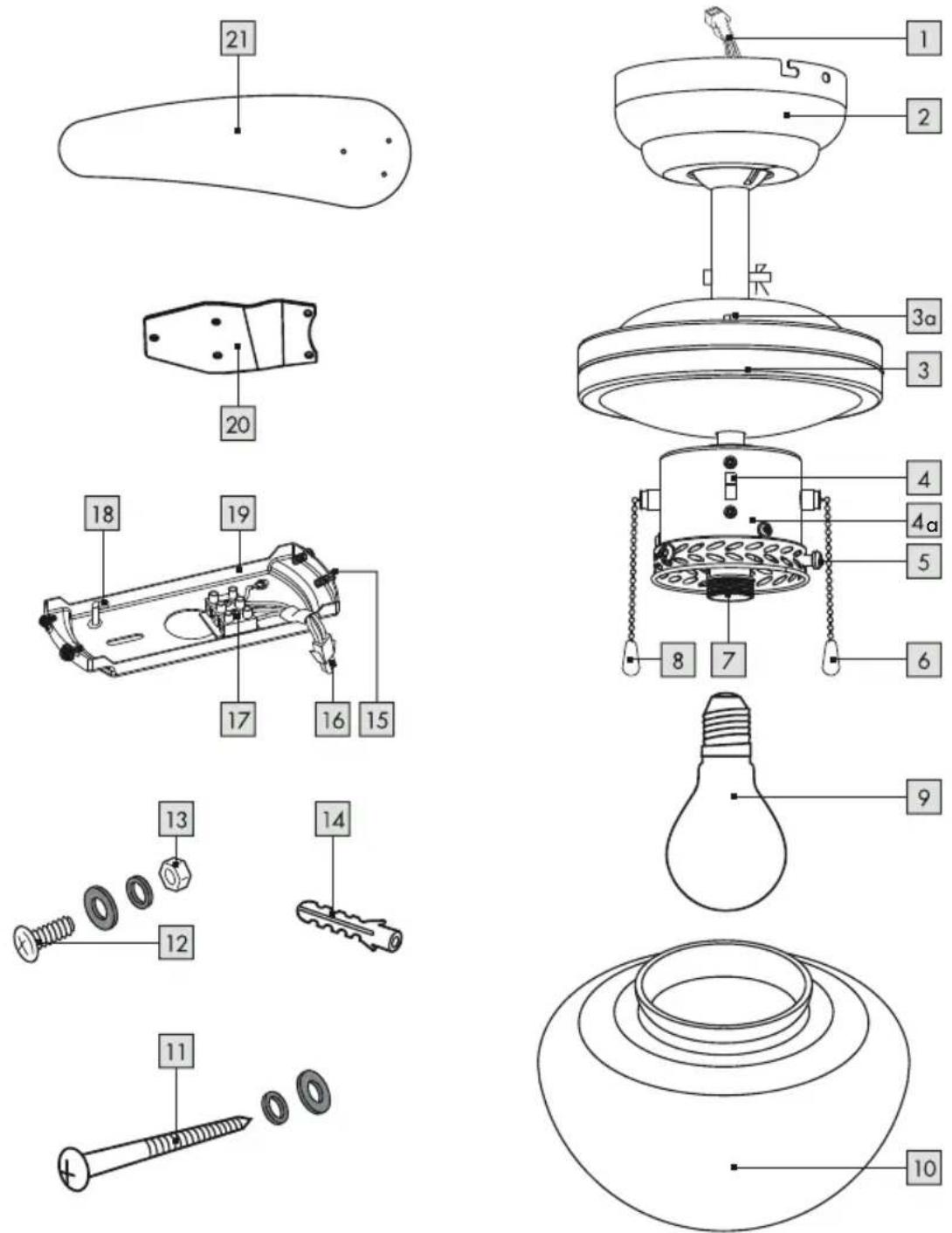
1 Connection cable (ceiling fan), 2 Cover, 3 Rotor housing, 3a Screw (rotor housing), 4 Direction of rotation switch, 4a Luminaire unit, 5 Thumb screw, 6 Pull switch (ceiling fan), 7 Socket, 8 Pull switch (light), 9 LED bulb, 10 Lampshade, 11 Screw with spring washer and washer (mounting bracket), 12 Screw with washer and spring washer
(fan blade)
13 Nut
14 Dowel
15 Fixing screw
16 Connection cable (mounting bracket)
17 Luster terminal
18 Hook
19 Mounting bracket
20 Fan blade holder
21 Fan blade
22 Mains cable (external)
Technical data
Item number: 55969
Operating voltage: 220-240 V~, 50 Hz
Total output (ceiling fan): 50W
Max. permissible light
bulb wattage: E27, max. 60W
Wattage in standby mode: 0W
Rotational speed: 253 rpm (high speed)
Noise level: 43.5 dB (A)
LED light bulb output: E27, max. 4.9 W
Dimensions: Body height: 40.5 cm
Ceiling fan
diameter: 105 cm

Protection class: I /
IP rating: IP20
Weight: 4.2 kg
The LED light source can be replaced by the end customer.
Distributor:
EDI Light GmbH
Heiligkreuz 22, 6136 Pill
AUSTRIA
www.edi-light.com
Safety

Safety notes
The information included in these instructions for use is for your own safety. Please read it carefully before installing the device and keep the instructions for later consultation. Damage due to failure to comply with these instructions for use will void the warranty! We assume no liability for consequential damage! We assume no liability for property damage or personal injury due to improper handling or failure to observe the safety information!

WARNING! RISK OF ACCIDENT AND DANGER TO LIFE FOR INFANTS AND
CHILDREN!
This ceiling fan with LED light may be used by children aged 8 years and up, as well as by persons with reduced physical, sensory or mental capacities, or those lacking experience and knowledge, as long as they are supervised or instructed in the safe use of the product and they understand the associated risks. Do not allow children to play with the product. Never allow children to clean or maintain this product unsupervised.
- Do not leave the product or packaging material lying unattended. Plastic films or bags, or plastic parts etc. can turn into dangerous toys for children.
Avoid the risk of fatal injury from electric shock
Ensure that any electrical installation is performed by a qualified electrician or a person trained to carry out electrical installations, in compliance with the applicable standards. Never use the product if it is damaged in any way. Remove the fuse or switch off the circuit breaker
(0 setting) in the fuse box prior to installation.
Always avoid any contact between the ceiling fan or the LED light and water or other liquids. Never open any of the electrical equipment or insert any objects into this equipment. Such interferences pose a risk of fatal injury from electric shock. Prior to installation, make sure that the available mains voltage corresponds to the required operating voltage of the ceiling fan (see "Technical data"). Be sure not to damage any wires during installation. Do not install the light on damp or conductive surfaces. This ceiling fan with LED light is not suitable for dimmers or electronic switches. Only insert the light bulb in a dry environment.


Prevent fire and injury hazards
CAUTION! RISK OF BURNS DUE TO HOT SURFACES! To prevent burns, ensure that the product has been switched off and has cooled down before touching the LED light. Illuminants become very hot.
- Do not look directly into the light source. Do not look at the light source with an optical instrument (e.g. magnifying glass).
- Replace defective light bulbs with new ones immediately. Before changing the light bulb, make sure that the circuit to which the product is connected is not live. To do so, remove the fuse or switch off the circuit breaker in the fuse box (position 0).
- Only use lamps of the specified type (see type plate and "Technical data").
- Allow the LED light to cool down for at least 15
minutes before replacing a defective bulb.
- Do not under any circumstances use the product to store or hang up other objects.
- Never use the connection cable to carry the weight of the product. WARNING! If you notice unusual oscillations, stop using the ceiling fan immediately and consult qualified personnel.
- Should doubts arise during assembly/use of the product, consult a qualified electrician. The replacement of safety suspension parts must be carried out by the manufacturer, his customer service representatives or suitably qualified persons.

For your safety!
- Install the ceiling fan in a location where it is protected from moisture and dirt. A ceiling height of at least 2.50 m is required for safe operation. The fan blades must be at least 2.3 m away from the floor and 0.6 m away from the nearest wall or item of furniture. The ceiling to which the product is mounted may slope by a maximum of 30°. Do not operate the ceiling fan if the ambient air temperature is over 40 °C.
- Unpack the ceiling fan carefully on a soft surface to avoid damaging the surface of the ceiling fan.
- Do not lay the motor housing on its side, as this could bend and damage the decor housing. ■ Always be alert! Always pay attention to what you are doing and always use common sense.
- Do not install the product if you are having difficulty concentrating or do not feel well. Before use, familiarise yourself with all the instructions and diagrams in these instructions, as well as with the product itself.
● Preparation
- Tools and materials required
The specified tools and materials are not included. The information and values specified are non-binding and are only provided as a reference. The nature of the material is determined by the specific local conditions.
- Pencil/marking tool
- Voltage tester
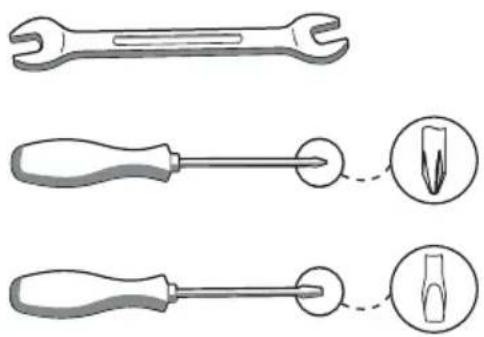
- Screwdriver
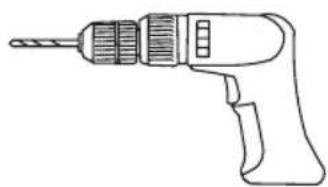
- Power drill
- Drill bit
- Side cutters
- Ladder
- Pliers
Note: DO NOT use power tools to tighten the screws. Excessive tightening can damage the thread of the screws.
Prior to installation
Prior to installation, familiarize yourself with all the instructions and diagrams in this manual as well as with the ceiling fan itself. Before installation, ensure that the circuit to which the product will be connected is not live. To do this, remove the fuse or switch off the circuit breaker (0 setting) in the fuse box. Prior to installation, make sure that the installation site is suitable to bear the weight of the product. Use a voltage tester to verify that cables are not live.
Assembly
Note: You will need a power drill for the installation work.
Note: Please also follow the instructions for your power drill.
WARNING! Please be sure not to drill into any electrical wiring, gas or water lines inside the
wall.
Installing the product
Note: Remove all packaging materials from the ceiling fan with LED light.
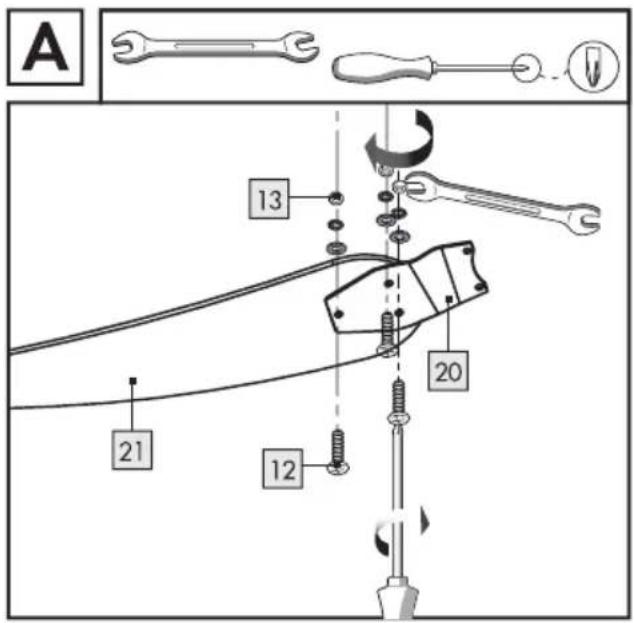
Fasten the fan blades to the fan blade holders using the nuts, spring lock washers, washers and screws (see Fig. A).
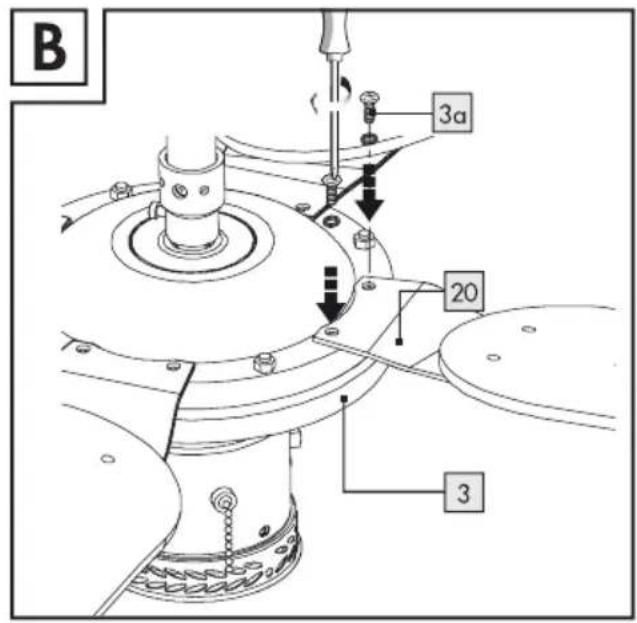
Remove the pre-installed screws 3a on the rotor housing 3.
Attach the fan blade holders to the rotor housing. To do this, use spring lock washers and the screws pre-installed on the rotor housing. Make sure that all the fan blades have either the side with the wenge effect or the white side facing downwards (see Fig. B).
Before continuing with the installation, remove the fuse or switch off the circuit breaker (0 setting) in the fuse box.
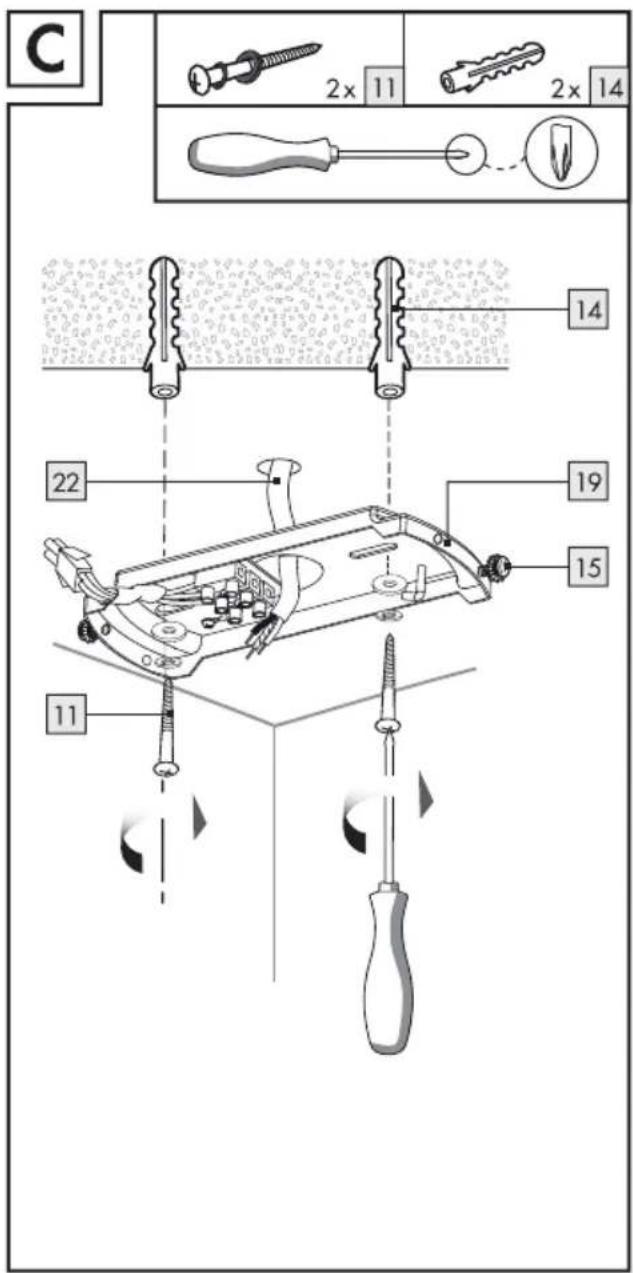
Unscrew the right-hand fixing screw 15, including the washer and tooth lock washer, which is located at the side of the mounting bracket 19. Unscrew the left-hand fixing screw 15 including the washer and the tooth lock washer. Mark the drill holes using the holes in the mounting bracket 19 intended for the screws 11 as a guide.
Now drill the fixing holes. Make sure that you do not damage the power cord (external) 22, water pipes or electrical cables.
Insert the dowels into the drilled holes (see Fig. C). If necessary, use a hammer to help you.
IMPORTANT! Before mounting the ceiling fan, make sure that the mounting location has a load capacity of at least 45 kg.
Guide the power cord (external) through the intended central hole in the mounting bracket 19. Attach the mounting bracket 19 using the washers, spring lock washers and screws 11 provided (see Fig. C).
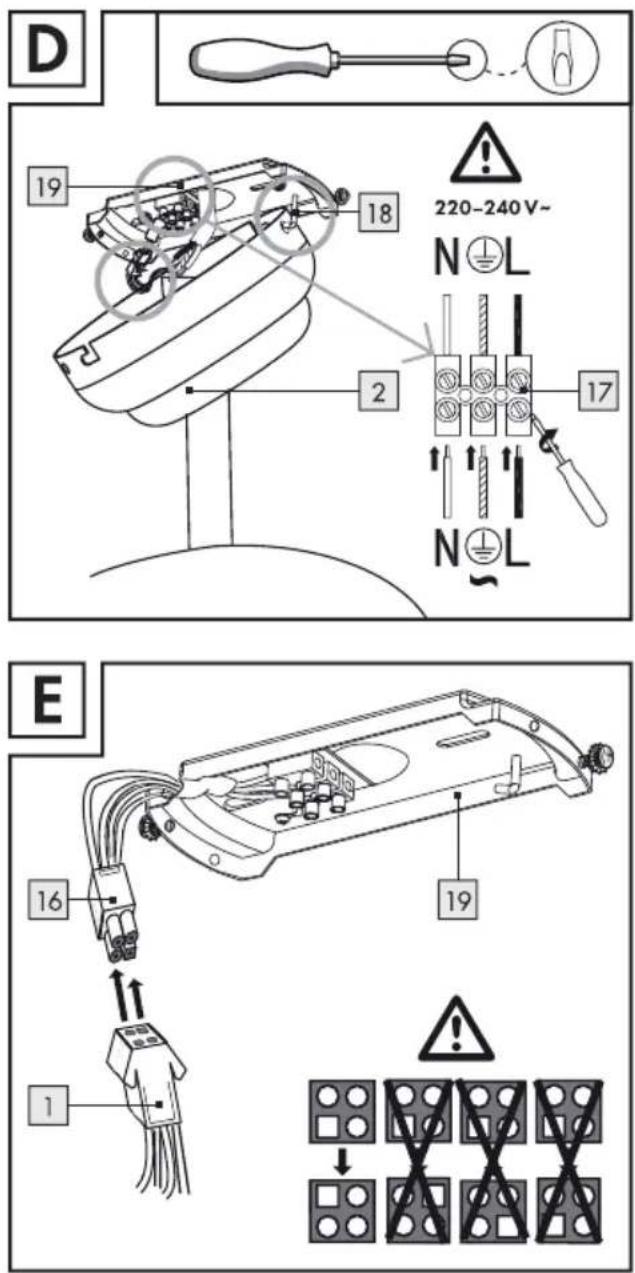
Using one of the holes intended for this purpose, hang the cover 2 on the hook 18 on the mounting bracket 19 (see Fig. D).
Connect the power cord (external) 22 with the lustre terminal 17 in the mounting bracket 19. Please also make sure that the colours of the connected wires match (black or brown live wire = L symbol, blue neutral wire = N symbol, protected ground wire = green-yellow (see Fig. D)).
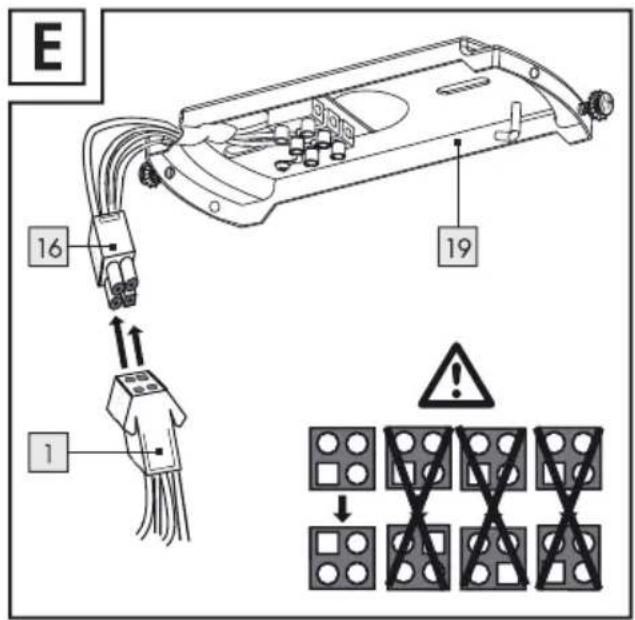
Insert the connection cable 16 of the mounting bracket 19 into the connection cable port 1 on the ceiling fan (see Fig. E).
Remove the cover 2 from the hook 18.
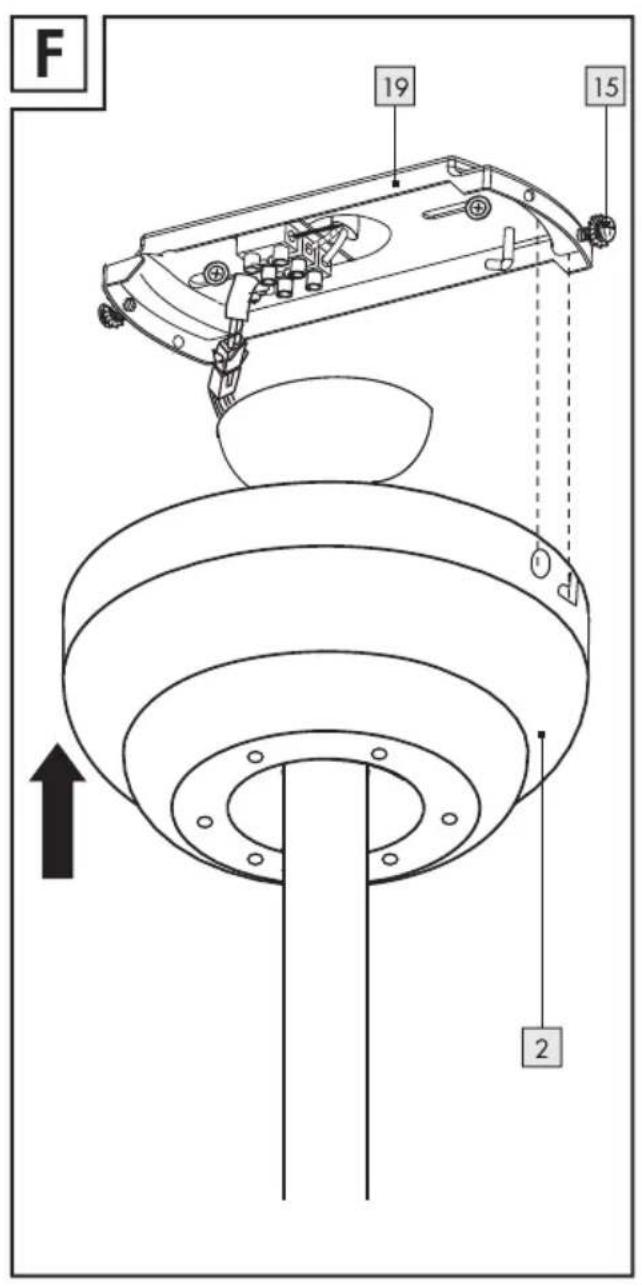
Now place the cover 2 on the mounting bracket 19 by guiding the fixing screws 15 into the grooves on the cover and then turning the cover 2 clockwise (see Fig. F).
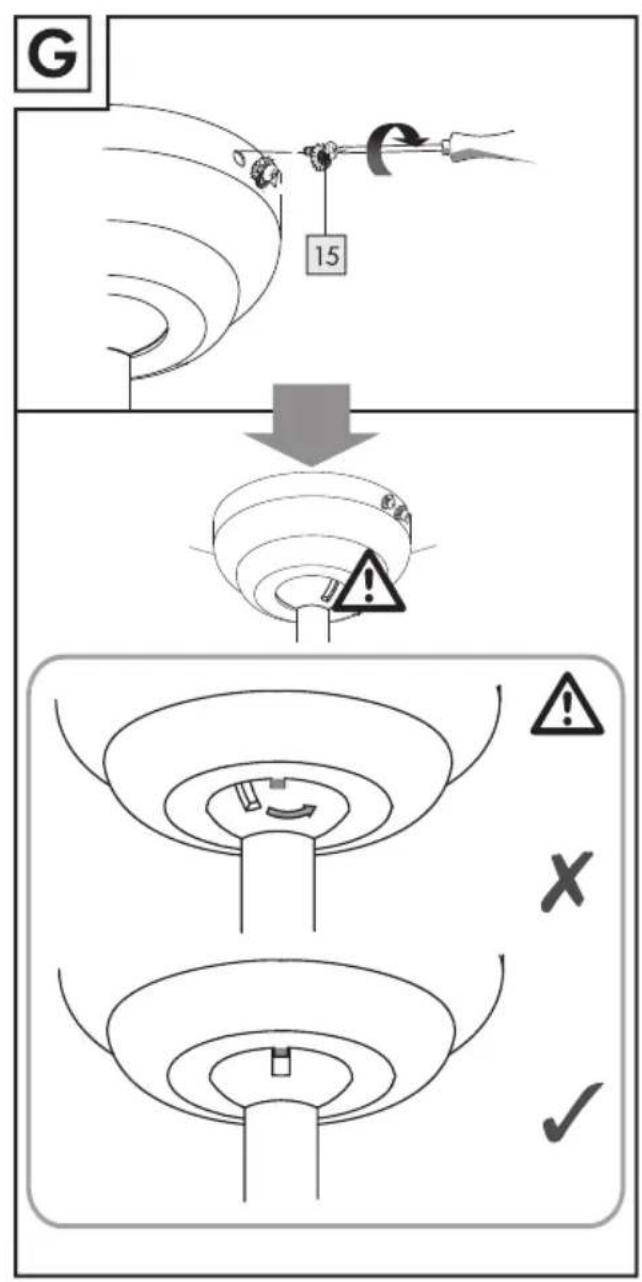
Now screw the product and the mounting bracket 19 together using the four fixing screws 15 and the spring lock washers and tooth lock washers. Ensure that it is positioned correctly. The nose must correspond with the groove (see Fig. G).
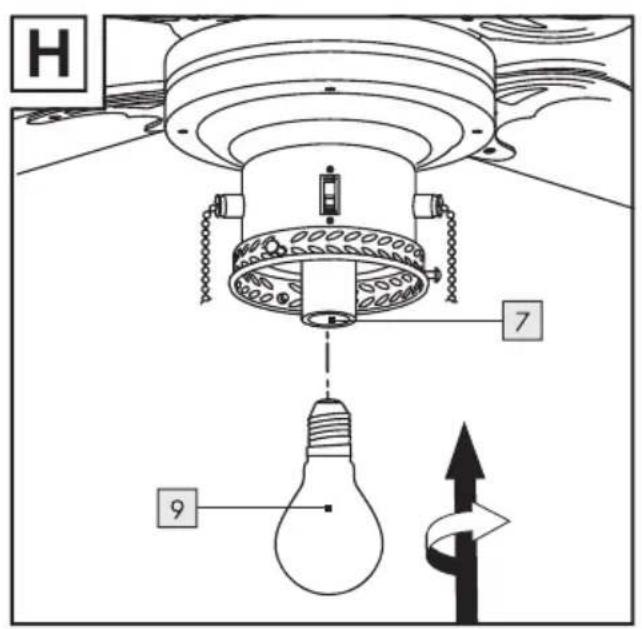
Screw the light bulb 9 clockwise into the socket 7 (see Fig. H).
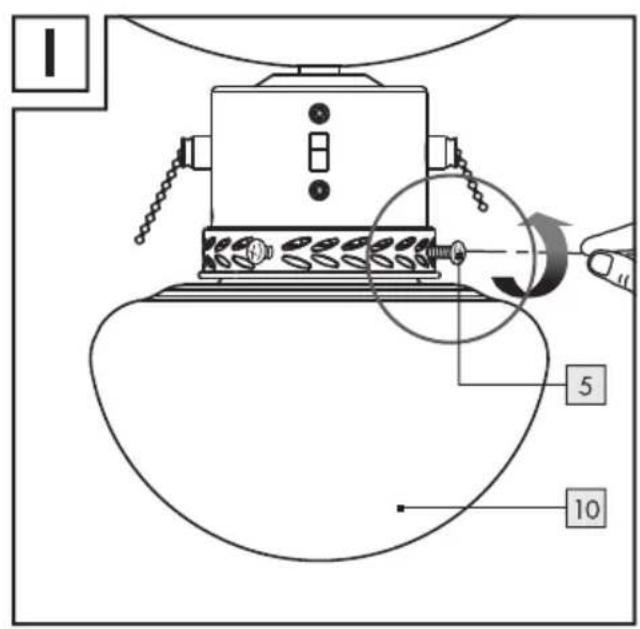
Attach the lampshade 10 on the light unit 4a. Use the pre-installed thumb screws 5 for this purpose (see Fig. I).
CAUTION! Do not use pliers to tighten the thumb screws 5. This could cause the glass of the lampshade 10 to crack. This could lead to injuries caused by splinters of glass.
Replace the fuse or switch on the circuit breaker (I setting) in the fuse box.
Your ceiling fan with LED light is now ready to use.
Initial use
● Switching the LED light on and off (see Fig. J)
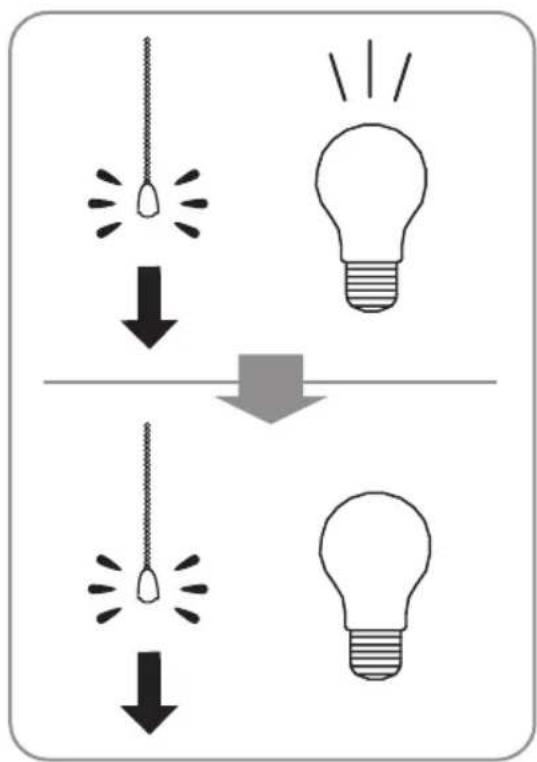
☐ Pull the pull switch 8 to switch the LED light
on.
☐ Pull the pull switch 8 again to switch the LED light off.
- Switching the ceiling fan on
(see Fig. J)
☐ Pull the pull switch to switch the ceiling fan on. The ceiling fan will run at high speed. ☐ Pull the pull switch again. The ceiling fan will run at medium speed. ☐ Pull the pull switch again. The ceiling fan will run at low speed. ☐ Pull the pull switch again to switch the ceiling fan off.
Setting the right/left rotation
(see Fig. J)
⚠️ CAUTION! RISK OF INJURY! Always switch the ceiling fan off and wait until it is still before using the rotation direction switch 4.
Operating the rotation direction switch while the ceiling fan is on can lead to injuries and/or material damage.
☐ In low temperatures, slide the rotation direction switch 4 upwards. The ceiling fan will distribute the warmth in the room.
☐ In high temperatures, slide the rotation direction switch 4 downwards. The ceiling fan will create a cooling flow of air.
Troubleshooting
| Error Reason Solution | ||
| Ceiling fan runs out of round and wobbles a lot during operation. | Different distances of the rotor blades to the ceiling, incorrectly mounted rotor blades. | ☐ Operate the ceiling fan for a longer period of time (several hours) and then check an even distance of the rotor blades to the ceiling.☐ If this does not achieve the desired effect, contact our service department. |
WARNING! If you notice unusual
oscillations, stop using the ceiling fan immediately and consult qualified personnel. Do not attempt to repair the ceiling fan yourself.
● Replacing the LED light bulb
WARNING! DANGER OF ELECTRIC SHOCK!
Before changing the light bulb, make sure that the power supply to which the product is connected is not live. To do so, remove the fuse or switch off the circuit breaker in the fuse box (position 0).
⚠️ CAUTION! RISK OF BURNS DUE TO
HOT SURFACES! Allow the LED light to cool
off completely.
☐ Remove the lampshade 10 from the lighting unit 4a by unscrewing the thumb screws 5. ☐ Use a clean, lint-free cloth to replace the bulb. ☐ Unscrew the defective LED light bulb from the socket 7 anti-clockwise. ☐ Screw the new LED light bulb 9 clockwise into the socket 7. ☐ Please refer to the chapter "Technical data" to find out which LED light bulb is required. Place the lampshade back on the lighting unit by screwing the thumb screws 5 (see Fig. I). ☐ Replace the fuse or switch on the circuit breaker (I setting) in the fuse box.
● Maintenance and cleaning
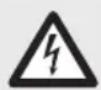
WARNING! DANGER OF ELECTRIC
SHOCK! Always disconnect the product from the mains before cleaning. To do so, remove the fuse or switch off the circuit breaker in the fuse box (position 0).
WARNING! DANGER OF
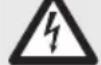
ELECTRIC SHOCK! To ensure electrical safety, never clean the product
with aggressive detergents or immerse it in water.

CAUTION! RISK OF BURNS DUE
TO HOT SURFACES! Allow the LED light to cool off completely.
☐ Do not use solvents, petrol, etc. Doing so would damage the product. ☐ Only clean with a dry, lint-free cloth. ☐ To clean the fan blades, use a feather duster in order to also clean the connections to the fan blade holders. ☐ Replace the fuse or switch on the circuit breaker (I setting) in the fuse box.
- Disposal
The packaging is made entirely of recyclable materials, which you may dispose of at local recycling facilities.
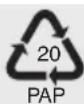
Observe the marking of the packaging materials for waste separation, which are marked with abbreviations (a) and
numbers (b) with following meaning:
1–7: plastics / 20–22: paper and fibreboard / 80–98: composite materials.

The product and packaging materials are recyclable, dispose of it separately for better waste treatment. The Triman
logo is valid in France only.

Contact your local refuse disposal authority for more details of how to dispose of your worn-out product.
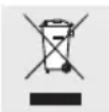
To help protect the environment, please dispose of the product properly when it has reached the end of its useful life and not in the household waste. Information on collection points and their opening hours can be obtained from your local authority.
- Declaration of conformity

This product fulfils the requirements of the applicable European and national directives. The relevant declarations and documents are held by the manufacturer. This product meets the requirements of the German Equipment and Product Safety Act.
We reserve the right to make technical and visual changes to the product in the interest of product improvement. Typographical and printing errors excepted.
This product contains a light source of energy efficiency class F.
- Warranty and service
Warranty
We provide a 3-year warranty from the date of purchase. Our products are manufactured using modern production methods and are subject to precise quality control. We guarantee that this product is in perfect condition. During the warranty period we will remedy any defects in material or manufacture free of charge. In the event of an unexpected defect, please return the carefully packaged product to the service address specified. The warranty does not extend to damage due to improper operation, or to wear parts and consumables. These can be ordered from the telephone number listed for a charge. Repairs not covered by the warranty (e.g. light bulbs) may also be requested at cost price from the service address
listed. The product will be repaired at the specified service location. Timely processing and returns can only be ensured by sending the product directly to this address. If you would like additional product information, need to order accessories or if you have a question about the service process, please contact our customer service department on the telephone number specified. Please include the item number (see "Technical data") when enquiring about the product.
IAN 359538 2107
Please have your receipt and item number (e.g. IAN 123456_7890) ready as your proof of purchase when enquiring about the product.
Service address
Great Britain & Ireland
EGLO UK LTD.
Unit 12 Cirrus Park, Lower Farm Road, Moulton Park Industrial Estate, NORTHAMPTON NN3 6UR
T: +44 1604 790 986
E: info-greatbritain@edi-light.com
Warranty card
Return address:
Name/First name:
Country/Postal code/City/Street address:
Phone number:
Item number/Description:
Purchase date/Point of purchase:
Description of the defect:
Date/Signature:
Non-warranty cases:
☐ Please return the un-repaired item, carriage paid.
Please inform me of the costs. Repair the product for a fee.

Rotational speed: max. 253 rpm
Note: DO NOT use power tools to tighten the screws. Excessive tightening can damage the thread of the screws.
(Edf. Best Point) 2°–16 A
San Fernando de Henares
28830 MADRID, ESPAÑA
T: +34 91 677 9044
E: info-spain@eglo.com
(loft ventilator): 50W
Max. permitted lamp wattage: E27, max. 60W
Power consumption in standby
mode: 0W
Speed: max. 253 rpm
Key to pictograms used* ...... Page 76
Introduction .... Page 76
Intended use .... Page 77
Scope of delivery .... Page 77
Description of parts .... Page 77
Technical data .... Page 77
Safety .... Page 78
Safety instructions .... Page 78
Preparation .... Page 79
Required tools and materials ....Page 79
Before installation ....Page 79
Assembly Page 79
- Pencil/marking tool
- Voltage tester
- Screwdriver
- Power drill
- Drill bit
- Side cutters
- Ladder
- Pliers
Legend of used pictograms* ...... Page 86
Introduction Page 86
ACCIDENTS FOR SMALL AND OLDER CHILDREN!
EDI Light Service Center
Kleinbahnstraße 35
E: info@edi-light.com
Austria
EDI Light Service Center
Heiligkreuz 22
6136 Pill, AUSTRIA
T: +43 5242 670 57
E: info@edi-light.com
Switzerland
EGLO Schweiz AG
Seetalstraße 142
6032 Emmen, SWITZERLAND
T: +41 41 268 69 59
E: info-switzerland@eglo.com
Warranty card
Sender:
Name/First name:

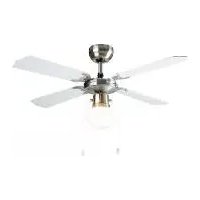
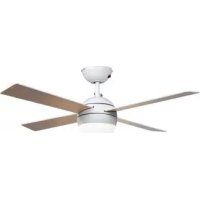
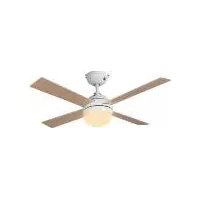
- CEILING FAN WITH LED LIGHT
- LIST OF PICTOGRAMS USED* PAGE 6
- INTRODUCTION...... PAGE 6
- SAFETY PAGE 8
- PREPARATION PAGE 9
- ASSEMBLY PAGE 9
- INITIAL USE PAGE 10
- TROUBLESHOOTING PAGE 11
- MAINTENANCE AND CLEANING ...... PAGE 12
- DISPOSAL PAGE 12
- DECLARATION OF CONFORMITY ...... PAGE 12
- WARRANTY AND SERVICE PAGE 12
- INTRODUCTION
- INTENDED USE
- SCOPE OF DELIVERY
- PARTS DESCRIPTION
- TECHNICAL DATA
- DISTRIBUTOR
- SAFETY
- SAFETY NOTES
- WARNING! RISK OF ACCIDENT AND DANGER TO LIFE FOR INFANTS AND
- CHILDREN
- AVOID THE RISK OF FATAL INJURY FROM ELECTRIC SHOCK
- PREVENT FIRE AND INJURY HAZARDS
- FOR YOUR SAFETY
- ● PREPARATION
- TOOLS AND MATERIALS REQUIRED
- PRIOR TO INSTALLATION
- ASSEMBLY
- INSTALLING THE PRODUCT
- INITIAL USE
- SWITCHING THE CEILING FAN ON
- (SEE FIG. J)
- SETTING THE RIGHT/LEFT ROTATION
- TROUBLESHOOTING
- WARNING! IF YOU NOTICE UNUSUAL
- ● REPLACING THE LED LIGHT BULB
- WARNING! DANGER OF ELECTRIC SHOCK
- ⚠️ CAUTION! RISK OF BURNS DUE TO
- OFF COMPLETELY
- ● MAINTENANCE AND CLEANING
- WARNING! DANGER OF ELECTRIC
- WARNING! DANGER OF
- CAUTION! RISK OF BURNS DUE
- DISPOSAL
- DECLARATION OF CONFORMITY
- WARRANTY AND SERVICE
- WARRANTY
- IAN 359538 2107
- SERVICE ADDRESS
- GREAT BRITAIN & IRELAND
- WARRANTY CARD
- KEY TO PICTOGRAMS USED* ...... PAGE 76
- INTRODUCTION .... PAGE 76
- SAFETY .... PAGE 78
- PREPARATION .... PAGE 79
- ASSEMBLY PAGE 79
- LEGEND OF USED PICTOGRAMS* ...... PAGE 86
- INTRODUCTION PAGE 86
- ACCIDENTS FOR SMALL AND OLDER CHILDREN
- AUSTRIA
- SWITZERLAND
Brand : Livarno Lux
Model : IAN 359538
Category : Ceiling fan