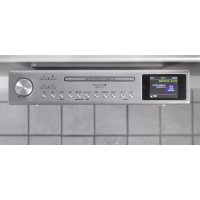
UR2180 - Hi-Fi System Soundmaster - Free user manual and instructions
Find the device manual for free UR2180 Soundmaster in PDF.

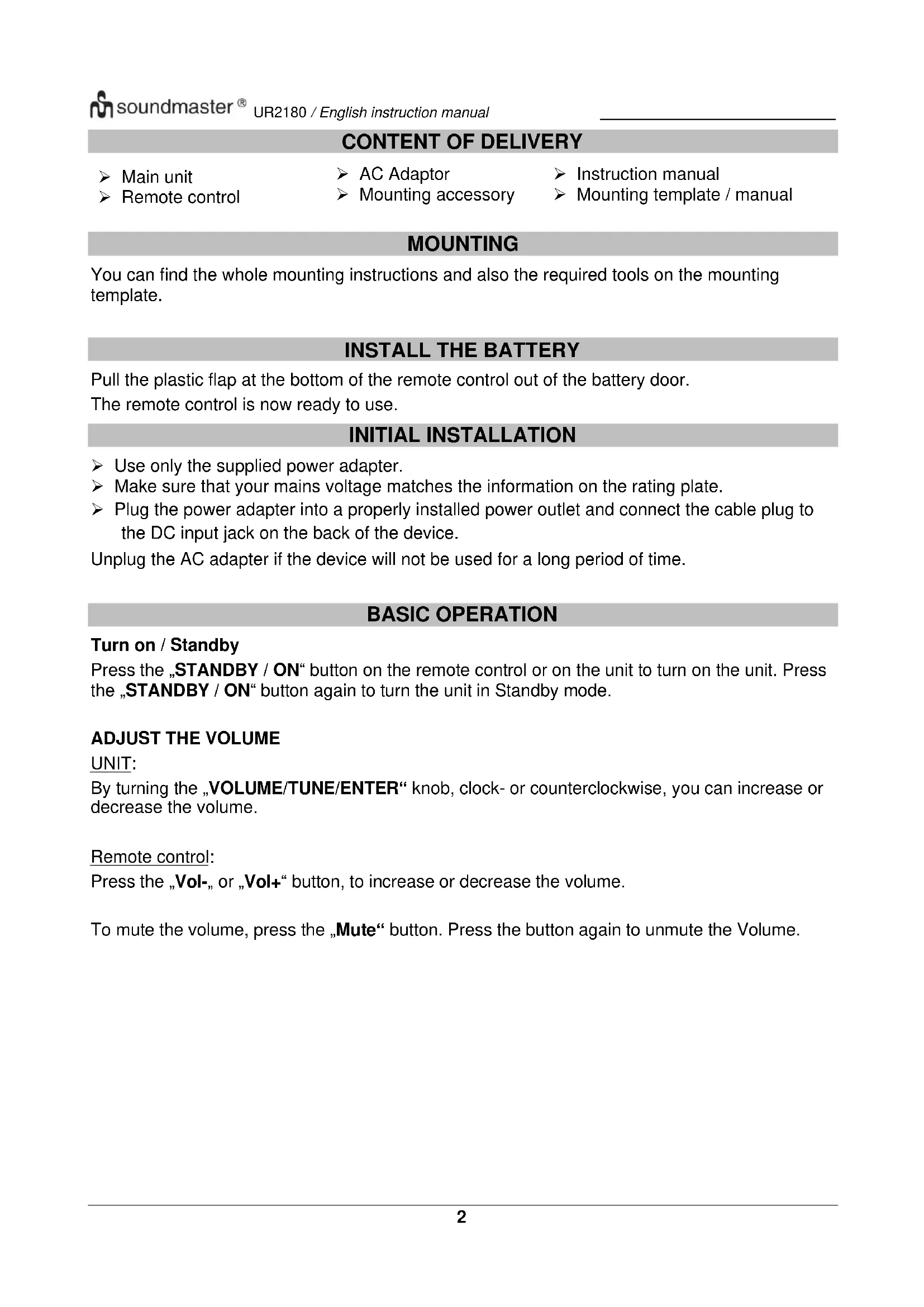


| Product type | Hi-Fi system |
| Brand | Soundmaster |
| Model | UR2180 |
| Power supply | DC 7.0 V / 1.6 A (mains adapter included) |
| Radio functions | DAB+ and FM (VHF) with automatic and manual search, 30 presets |
| Built-in players | CD (including MP3), USB |
| Connectivity | Bluetooth, AUX input (3.5 mm jack) |
| Display | Color TFT, brightness adjustment (3 levels) |
| Remote control | Yes, included, batteries provided |
| Alarms | 2 independent alarms (beep, DAB or FM) |
| Cooking timer | Yes, two timers (1 min and 5 min increments) |
| LED work light | Built-in, on/off via remote control or device |
| Equalizer | 8 presets: Normal, Classical, Pop, Rock, Jazz, Flat, Bass, My equalizer |
| Hands-free function | Yes (via Bluetooth) |
| Included accessories | Mains adapter, remote control, mounting accessories, mounting template, manual |
| Safety | Laser class 1, child protection (batteries), automatic standby |
| Maintenance | Clean with a dry cloth. Do not use detergents or abrasive cloths. |
| Repairability | Do not open the device. Refer all repairs to qualified personnel. |
Frequently Asked Questions - UR2180 Soundmaster
User questions about UR2180 Soundmaster
0 question about this device. Answer the ones you know or ask your own.
Ask a new question about this device
Download the instructions for your Hi-Fi System in PDF format for free! Find your manual UR2180 - Soundmaster and take your electronic device back in hand. On this page are published all the documents necessary for the use of your device. UR2180 by Soundmaster.
USER MANUAL UR2180 Soundmaster
DEUTSCH
ENGLISH
FRANÇAIS
NEDERLANDS
ITALIANO
ČEŠTINA
SLOVENSKÝ
Festsender speichern

Festsender speichern
Festsender speichern
Gleich wie DAB
Festsender abrufen
Gleich Wie DAB
FM Menü
natural_image
Simple black horizontal line with an upward arrow at the top-left corner (no text or symbols)CD
natural_image
Simple black horizontal line with an upward arrow at the top-left end (no text or symbols)Copyright by Woerlein GmbH, 90556 Cadolzburg, www.soundmaster.de
Do not dispose of this product with the normal household waste at the end of its life cycle. Return it to a collection point for the recycling of electrical and electronic devices. This is indicated by the symbol on the product, user manual or packaging
The materials are reusable according to their markings. By reusing, recycling or other forms of utilization of old devices and packaging you make an important contribution to the protection of our environment.
Please contact your local authorities for details about collection points.

WARNING
Risk of electric shock Do not open!

Caution: To reduce the risk of electric shock, do not remove the cover (or back). There are no user serviceable parts inside. Refer servicing to qualified service personnel.

This symbol indicates the presence of dangerous voltage inside the enclosure, sufficient enough to cause electric shock.

This symbol indicates the presence of important operating and maintenance instructions for the device
Used batteries are hazardous waste and NOT to be disposed of with the household waste! As a consumer you are legally obligated to return all batteries for environmentally responsible recycling – no matter whether or not the batteries contain harmful substances*)
Return batteries free of charge to public collection points in your community or shops selling batteries of the respective kind.
Only return fully discharged batteries
*) marked Cd = cadmium, Hg = mercury, Pb = lead
- Only use mercury and cadmium-free batteries.
- Used batteries are hazardous waste and NOT to be disposed of with the household waste!!!
- Keep batteries away from children. Children might swallow batteries.
- Contact a physician immediately if a battery was swallowed.
- Check your batteries regularly to avoid battery leakage.
- Batteries shall not be exposed to excessive heat such as sunshine, fire or the like.
- CAUTION: Danger of explosion if battery is incorrectly replaced
- Replace only with the same or equivalent type

WARNING
DO NOT INGEST BATTERY, CHEMICAL BURN HAZARD
This product contains a coin/button cell battery. If the coin/button cell battery is swallowed, it can cause severe internal burns in just 2 hours and can lead to death.
Keep new and used batteries away from children. If the battery compartment does not close securely, stop using the product and keep it away from children.
If you think batteries might have been swallowed or placed inside any part of the body, seek immediate medical attention.
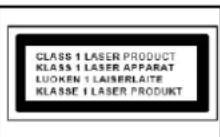
CAUTION - INVISIBLE LASER RADIATION WHEN OPENING THE COVER OR PRESSING THE SAFETY INTERLOCK. AVOID EXPOSURE TO THE LASER BEAM.
Safety, Environmental and Setup Instructions
- Use the device in dry indoor environments only.
- Protect the device from humidity.
- This apparatus is for moderate climates areas use, not suitable for use in tropical climates countries.
- No objects filled with liquids, such as vases, shall be placed on the apparatus.
- The mains plug or an appliance coupler is used as the disconnect device, the disconnect devices shall remain readily operable.
- Connect this device to a properly installed and earthed wall outlet only. Make sure the mains voltage corresponds with the specifications on the rating plate.
- Make sure the mains cable stays dry during operation. Do not pinch or damage the mains cable in any way.
- A damaged mains cable or plug must immediately be replaced by an authorized service center.
- In case of lightning, immediately disconnect the device from the mains supply.
- Children should be supervised by parents when using the device.
- Clean the device with a dry cloth only.
- Do NOT use CLEANING AGENTS or ABRASIVE CLOTHS!
- Do not expose the device to direct sunlight or other heat sources.
• Install the device at a location with sufficient ventilation in order to prevent heat accumulation. - Do not cover the ventilation openings!
- Install the device at a safe and vibration-free location.
- Install the device as far away as possible from computers and microwave units; otherwise radio reception may be disturbed.
- Do not open or repair the enclosure. It is not safe to do so and will void your warranty. Repairs only by authorized service/ customer center.
- No naked flame sources, such as lighted candles, should be placed on the unit.
- When you are necessary to ship the unit store it in its original package. Save the package for this purpose.
- In case of malfunction due to electrostatic discharge or fast transient (burst), remove and reconnect the power supply.
- If the unit is not using for a long period of time, disconnect it from the power supply by unplugging the power plug. This is to avoid the risk of fire.
- The device is equipped with a "Class 1 Laser". Avoid exposure to the laser beam as this could cause eye injuries.
LOCATION OF CONTROLS
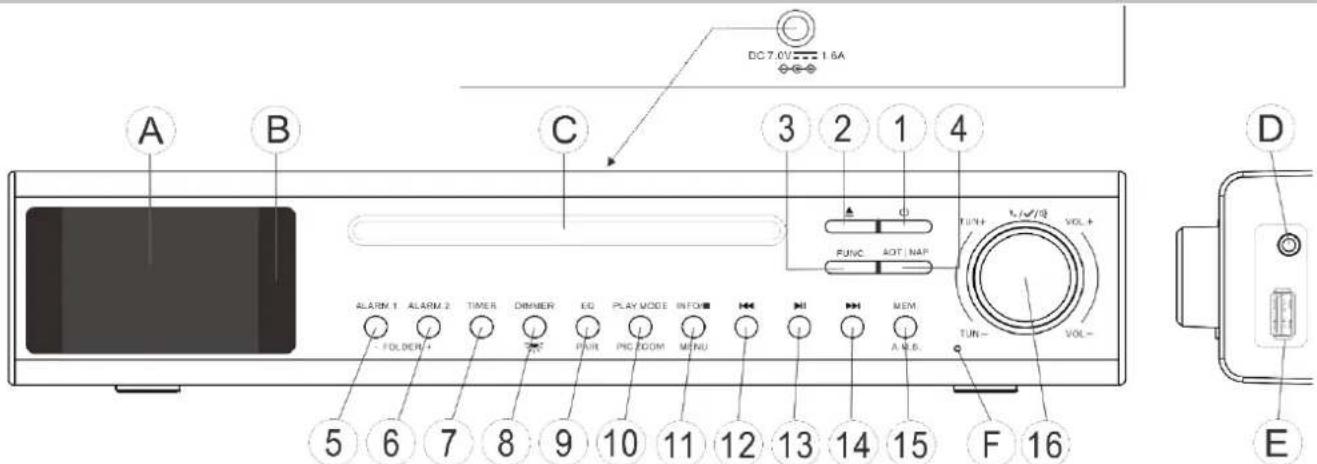
A TFT-Display
B INFRARED SENSOR
C CD-DOOR
D AUX-IN
E USB
F MIKROPHONE
1 ON / STANDBY
2 CD-DOOR OPEN
3 FUNCTION
4 AOT/NAP
5 ALARM 1
6 ALARM 2
7 TIMER
8 DIMMER / LED
9 EQ / PAIR
10 PLAY MODE / PIC ZOOM
11 INFO / STOP / MENU
12 SEARCH BACKWARD
13 PLAY / PAUSE
14 SEARCH FORWARD
15 MEM / A:M:S
16 VOLUME/TUNE/ENTER
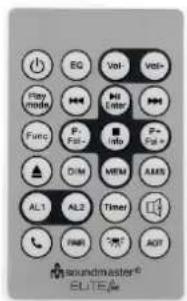
REMOTE CONTROL
| EQ | Vol- | Vol+ | |
| Play mode | Enter | ||
| Func | P-Fol - | Info | P+Fol + |
| DIM | MEM | AMS | |
| AL1 | AL2 | Timer | |
| PAIR AOT | |||
| ON / Standby | |
| EQ | Equalizer |
| VOL- | Volume - |
| VOL+ | Volume + |
| Play mode | Play mode |
| Skip backward / Down | |
| ▶/Enter | Play / Pause / Enter |
| Skip forward / UP | |
| Func | Function |
| P- / Fol- | Preset - / Folder - |
| ■ /INFO | Stop / Info |
| P+ / FOL+ | Preset+ / Folder + |
| CD Door open / close | |
| DIM | Display Dim level |
| MEM | Save preset |
| AMS | Auto Memory setup |
| AL1 | Alarm 1 |
| AL2 | Alarm 2 |
| Timer | Kitchentimer 1/2 |
| Mute | |
| Pick up / cancel call | |
| PAIR | Pair / unpair BT device |
| Workplace LED on / off | |
| AOT | Sleep on/off |
CONTENT OF DELIVERY
▶ Main unit
Remote control
AC Adaptor
Mounting accessory
▶ Instruction manual
Mounting template / manual
MOUNTING
You can find the whole mounting instructions and also the required tools on the mounting template.
INSTALL THE BATTERY
Pull the plastic flap at the bottom of the remote control out of the battery door. The remote control is now ready to use.
INITIAL INSTALLATION
➢ Use only the supplied power adapter.
Make sure that your mains voltage matches the information on the rating plate.
Plug the power adapter into a properly installed power outlet and connect the cable plug to the DC input jack on the back of the device.
Unplug the AC adapter if the device will not be used for a long period of time.
BASIC OPERATION
Turn on / Standby
Press the „STANDBY / ON“ button on the remote control or on the unit to turn on the unit. Press the „STANDBY / ON“ button again to turn the unit in Standby mode.
ADJUST THE VOLUME
UNIT:
By turning the „VOLUME/TUNE/ENTER“ knob, clock- or counterclockwise, you can increase or decrease the volume.
Remote control:
Press the „Vol-„ or „Vol+“ button, to increase or decrease the volume.
To mute the volume, press the „Mute“ button. Press the button again to unmute the Volume.
Choose function
You can choose between the following functions:
• DAB
• FM
- AUX
- Bluetooth
- USB
• CD
To navigate through these different functions, press the „Function“ button on the remote control or on the unit repeatedly, until the desired function is displayed.
Equalizer
With the equalizer, you can choose between the following different sound presets.:
- Normal
- Classic
- Pop
- Rock
- Jazz
- Flat
- Bass
• My EQ (Adjust treble and bass as desired)
To get into equalizer setting, press the „EQ“ button.
By turning the „VOLUME/TUNE/ENTER“ knob, you can choose between the displayed equalizer settings.
When the desired setting is displayed, press the „VOLUME/TUNE/ENTER“ knob to confirm.
DAB+
Choose the DAB function.
Scanning for DAB stations
If unit is turned on for the first time, it automatically starts a full scan for stations. After scan is complete, the unit starts to play the first station found.
If „No stations found“ is displayed, you can start a second scan.
- Press and hold the „INFO/STOP/MENU“ button until DAB Menu is displayed.
- Choose „Scan“ by turning the “VOLUME/TUNE/ENTER” knob and confirm by pressing it.
- Scan starts. The display shows the number of found stations and the status of process.
Station Selection
Press the “▶” or „◀◀” button to open the station list. Select the desired station by turning „VOLUME/TUNE/ENTER“ knob and press to confirm.
Save a station as preset
Press the „MEM / A.M.S“ button while the desired station is playing, to open the preset list.
Select by turning the „VOLUME/TUNE/ENTER“ knob the desired presetnumber and press the “VOLUME/TUNE / ENTER” knob to save the station as preset. “Favorite Station Set!” is displayed.
Press the "Alarm 1" or „Alarm 2" button to choose between the preset stations.
DAB Menu
Press and hold the „INFO/STOP/MENU“ button to enter the DAB menu.
- Scan
- Scan for DAB Stations.
- Manual tune
- Look for stations by using channel and frequency.
- Prune Inactive
○ Delete the inactive stations from you station list by choosing „Yes“.
UKW (FM)
Switch to FM function.
Auto scan
Press and hold the "MEM / A.M.S" button and the device will automatically start the search. The stations found are automatically saved in the preset station list.
To search for a station manually, press and hold the "VOLUME/TUNE/ENTER" knob and then rotate it. Tuning is done in 10kHz steps. Once you have reached the desired frequency, press and hold the "VOLUME/TUNE/ENTER" button again. Press and hold the „▶” or „◀◀” button to do a fast scan to the next receivable station.
Save a station as preset
Same as DAB
Recall a preset
Same as DAB
FM menu
In FM mode, press and hold "INFO/STOP/MENU" button to enter FM menu.
- Scan Setting
○ Choose between „All Stations“ and “Strong Stations” - Audio Settings
○ Choose between „Mono“ and „Stereo“
AUX
Choose AUX function
"AUX" allows you to play music from an external device directly on your device using a 3.5mm jack cable (not included).
To do this, connect one side of the 3.5mm jack cable to the AUX-IN socket on the device and the other side to the external device (e.g. a smartphone).
Play the music on your external device and use "VOLUME/TUNE/ENTER" to adjust the volume.
Bluetooth®
Choose Bluetooth® function
Pair
When you select Bluetooth® mode, the device activates pairing. Turn on your smartphone, tablet or Bluetooth® device to search for "UR2180".
After successful pairing, the device will make a notify sound and informations about the paired device will be displayed.
Unpair
To end BT pairing, you must turn off or disconnect your smartphone, tablet, or other Bluetooth® device.
Accept/reject calls
Press the " PICK UP / CANCEL CALL " button on the device or on the remote control to answer or hang up a call.
Press and hold the " PICK UP / CANCEL CALL " button to reject a call.
USB
Choose the „USB “function.
USB-Playback
Insert a USB stick into the designated USB socket on the side of the device. The device starts playing the first track automatically.
- To pause and resume playback, press "▶II" button
- Press the “▶▶” button to skip to the next track.
- To search forward press and hold the “▶” button.
- To skip back to the previous track, press the “◀◀” button.
- To search backwards, press and hold the “◀◀” button.
- To stop the playback, press the “■” button.
- To choose between the different folders of the USB, press the „ALARM 1 / FOLDER –, or „ALARM 2 / FOLDER + “button.
Press the „PLAY MODE “button repeatedly to select between following play modes:
(1) 1 Repeat track (2) Repeat all
(3) Random
(4) Off →
CD
Choose the CD function.
CD-Playback
Open the CD-Door by pressing the „▲“ button and put in a CD. Close the CD-Door again by pressing the „▲” button.
The units starts playing the first track on the CD.
● To pause and resume playback, press “▶II” button
- Press the “▶▶” button to skip to the next track.
- To search forward press and hold the “▶” button.
- To skip back to the previous track, press the “◀◀” button.
- To search backwards, press and hold the “◀◀” button.
- To stop the playback, press the “■” button.
- To choose between the different folders of the MP3-CD, press the „ALARM 1 / FOLDER –, or „ALARM 2 / FOLDER + “button.
Press the „PLAY MODE “button repeatedly to select between following play modes:
(1) 1 Repeat track (2) Repeat all
(3) Random
(4) Off →

WORKPLACE LED / DISPLAY DIMMER
Workplace LED
To switch the task lighting on and off on the underside of the device, press and hold the "DIMMER" button on the device or press the „” button on the remote control.
Display Dimmer
The display has 3 dimmer levels:
- Light
- Medium
- Dark
Press the "DIMMER" button repeatedly to choose between the dimmer levels.
KITCHENTIMER
With the help of the cooking timer, you can set a cooking time directly on your device.
Press the "TIMER" button on the device to open cooking timer 1 and a second time to open cooking timer 2.
Kitchentimer 1:
- Once you have opened the cooking timer view, you can set the timer in minute increments by turning the "VOLUME/TUNE/ENTER" button.
- Once you have set your desired time, press the "VOLUME/TUNE/ENTER" button to start the timer.
- As soon as the time has expired, a signal tone sounds.
Kitchentimer 2:
- Same as Kitchentimer 1, but in 5 Minute increments.
Cancel Kitchentimer
Press and hold the "TIMER" button, to cancel the running kitchentimer.
Deactivate Buzzer
Press the "TIMER" button to deactivate the buzzer.
ALARM
You have the option of setting 2 different alarm times.
- Press and hold the "Alarm 1" or "Alarm 2" button.
-
Use the "VOLUME/TUNE/ENTER" button to choose the options and press to confirm / change your selection.
-
Alarm: ON/OFF
- Time: Set the desired alarm time.
- Source: Choose between Buzzer, DAB and FM
- Repeat: Choose between Once, Daily, Weekend, Workdays
- Volume: Set your desired Alarm Volume
MAIN MENU
To enter the system menu, press and hold the "INFO/STOP/MENU" button in standby mode
The following menu options are now displayed for selection:
Time Date
Set Time/Date
Setting the current time and date
Set Hour system
Choose between 24-hour format and 12-hour format
Set Date format
Choose between following Date formats:
- TT-MM-JJJJ
- MM-TT-JJJJ
- JJJJ-MM-TT
Clock style
Choose between „Digital “and „Analog“
Auto Update
Choose whether or not the device updates the time and date automatically from the broadcast.
Language
Choose the preferred language from the language table
Factory Reset
Factory reset the device
SDA
Set a desired date for the appointment reminder
System Version
Shows the installed System version
3
The current version of the operating instructions can be downloaded from www.soundmaster.de
Subject to technical changes and missprints
Copyright by Woerlein GmbH, 90556 Cadolzburg, www.soundmaster.de
Duplication only with the express permission of Woerlein GmbH
CE
PROTECTION DE L'ENVIRONNEMENT

natural_image
Simple black horizontal line with an upward arrow at the top-left end (no text or symbols)CD
natural_image
Simple black horizontal line with an upward arrow at the top-left end (no text or symbols)LAMPE LED DE TRAVAIL/LUMINOSITÉ DE L'ÉCRAN
○ Selecteer "All Stations" of "Strong Stations"
- Audio-instellingen
○ Selecteer "Mono" of "Stereo"
AUX
natural_image
Simple black horizontal line with an upward arrow at the top-left corner (no text or symbols)CD
natural_image
Simple black horizontal line with an upward arrow at the top-left corner (no text or symbols)WERKPLEK-LED / DISPLAYDIMMER
Werkplek-led
- DD-MM-JJJJ
- MM-DD-JJJJ
- JJJJ-MM-DD
Klokstijl
natural_image
Simple black horizontal line with an upward arrow at the top-left end (no text or symbols)CD
natural_image
Simple black horizontal line with an upward arrow at the top-left end (no text or symbols)LED DEL PIANO DI LAVORO / REGOLAZIONE LUMINOSITA DISPLAY
LED piano di lavoro
C DVÍŘKA MECHANIKY CD
3 FUNKCE 11 INFORMACE/ZASTAVIT/NABÍDKA
D VSTUP AUX
4 AOT/NAP 12 VYHLEDAT ZPĚT
E USB
5 BUDÍK 1 13 PŘEHRÁT/POZASTAVIT
F MIKROFON
6 BUDÍK 2 14 VYHLEDAT VPŘED
7 ČASOVAČ 15 PAMĚŤ / A.M.S
8 ZTLUMENÍ/LED 16 HLASITOST/LADIT/ENTER
DÁLKOVÝ OVLADAČ
natural_image
Simple black horizontal line with an upward arrow at the top-left end (no text or symbols)CD
natural_image
Simple black horizontal line with an upward arrow at the top-left end (no text or symbols)PRACOVNÍ SVĚTLO LED / ZTLUMENÍ DISPLEJE
Pracovní světlo LED
natural_image
Simple black horizontal line with an upward arrow at the top-left end (no text or symbols)CD
Výber funkcie CD.
natural_image
Simple black horizontal line with an upward arrow at the top-left corner (no text or symbols)PRACOVNÁ KONTROLKA LED/STMIEVANIE DISPLEJA
PRACOVNÁ KONTROLKA LED
Copyright by Woerlein GmbH, 90556 Cadolzburg, www.soundmaster.de
D 90556 Cadolzburg, Germany
Tel: +49 9103 71 67 0
Fax: +49 9103 71 67 12
E-Mail: info@soundmaster.de
Internet: www.soundmaster.de
Hereby, Wörlein GmbH declares that this device is in compliance with the essential requirements and other relevant provisions of Directive 2014/53/EU.
A copy of the declaration of conformity can be obtained from the above address.


- Festsender speichern
- Festsender abrufen
- FM Menü
- CD
- WARNING
- Risk of electric shock Do not open!
- DO NOT INGEST BATTERY, CHEMICAL BURN HAZARD
- CAUTION - INVISIBLE LASER RADIATION WHEN OPENING THE COVER OR PRESSING THE SAFETY INTERLOCK. AVOID EXPOSURE TO THE LASER BEAM.
- CONTENT OF DELIVERY
- MOUNTING
- INSTALL THE BATTERY
- INITIAL INSTALLATION
- BASIC OPERATION
- Turn on / Standby
- ADJUST THE VOLUME
- UNIT:
- Remote control:
- Choose function
- Equalizer
- DAB+
- Scanning for DAB stations
- Station Selection
- Save a station as preset
- DAB Menu
- UKW (FM)
- Auto scan
- Recall a preset
- FM menu
- AUX
- Bluetooth®
- Pair
- Unpair
- Accept/reject calls
- USB
- USB-Playback
- CD-Playback
- WORKPLACE LED / DISPLAY DIMMER
- Workplace LED
- Display Dimmer
- KITCHENTIMER
- Kitchentimer 1:
- Kitchentimer 2:
- Cancel Kitchentimer
- Deactivate Buzzer
- ALARM
- MAIN MENU
- Time Date
- PROTECTION DE L'ENVIRONNEMENT
- LAMPE LED DE TRAVAIL/LUMINOSITÉ DE L'ÉCRAN
- WERKPLEK-LED / DISPLAYDIMMER
- Werkplek-led
- LED DEL PIANO DI LAVORO / REGOLAZIONE LUMINOSITA DISPLAY
- LED piano di lavoro
- PRACOVNÍ SVĚTLO LED / ZTLUMENÍ DISPLEJE
- Pracovní světlo LED
- PRACOVNÁ KONTROLKA LED/STMIEVANIE DISPLEJA
- PRACOVNÁ KONTROLKA LED
Brand : Soundmaster
Model : UR2180
Category : Hi-Fi System