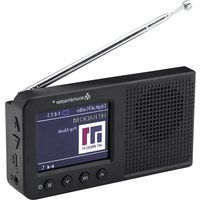
DAB175 - Radio Soundmaster - Free user manual and instructions
Find the device manual for free DAB175 Soundmaster in PDF.


Pick your language and provide your email: we'll send you a specifically translated version.
| Product Type | DAB+ / FM Digital Radio |
| Brand | Soundmaster |
| Model | DAB175 |
| Frequency Bands | DAB+ (Band III), FM (87.5-108 MHz) |
| Dimensions (W x H x D) | 18 x 12 x 7 cm |
| Weight | 0.6 kg (without batteries) |
| Power Supply | 4 AA batteries (LR6) or 5V DC mains adapter (not included) |
| Battery Life | Approximately 20 hours (with alkaline batteries) |
| Speaker | 1 x 3 W, mono |
| Display | Backlit LCD display |
| Main Functions | Automatic DAB/FM search, 20 presets, alarm, sleep timer, DAB information display |
| Connectors | 3.5 mm headphone jack, USB port (charging only), AUX input |
| Antenna | Telescopic antenna |
| Care and Cleaning | Clean with a soft, dry cloth. Do not use solvents. |
| Safety | Do not expose to moisture, heat sources, or open the device. |
| Spare Parts and Repairability | Standard batteries and mains adapter. For any repairs, contact an authorized service center. No spare parts available separately. |
| General Information | Portable radio for home or on-the-go listening. Compatible with DAB+ and FM. |
Frequently Asked Questions - DAB175 Soundmaster
How to turn the DAB175 radio on and off?
Press the Power button located on the top or front of the device. To turn off, press and hold the same button for 2 seconds.
How to perform an automatic DAB station search?
In DAB mode, press the Scan or Auto Tune button. The device will search for all available stations and store them automatically.
What type of batteries to use and how to replace them?
Use 4 AA alkaline batteries (LR6). Open the battery compartment on the back of the device, insert the batteries observing polarity (+/-), and close it.
Can I listen to the radio while plugged into mains power?
Yes, plug the mains adapter (5V DC, not included) into the power socket at the back. The radio will operate on mains power and the batteries will not be used.
How to set the alarm?
Press the Alarm button until the alarm icon flashes. Set the desired time using the +/- buttons and confirm. The alarm can be set to radio or buzzer.
How to use the sleep timer function?
Press the Sleep button repeatedly to select a duration (15, 30, 60, 90 minutes). The radio will turn off automatically after the chosen delay.
What to do if the radio does not pick up DAB stations?
Check that the telescopic antenna is fully extended. Perform a new automatic search. If the problem persists, move to an area with better reception.
Can I listen to my music via the AUX input?
Yes, connect your audio player (smartphone, MP3) to the AUX IN jack using a 3.5 mm cable. Select AUX mode with the Source button.
How to reset the radio to factory settings?
Press and hold the Menu button for 5 seconds, then select 'Factory Reset' or 'Reset'. Confirm with Select. All presets will be erased.
How to clean the device safely?
Disconnect the mains adapter and remove the batteries. Use a soft, slightly damp cloth (not wet) to wipe the exterior. Never use chemical or abrasive products.
User questions about DAB175 Soundmaster
0 question about this device. Answer the ones you know or ask your own.
Ask a new question about this device
No questions yet. Be the first to ask one.
Download the instructions for your Radio in PDF format for free! Find your manual DAB175 - Soundmaster and take your electronic device back in hand. On this page are published all the documents necessary for the use of your device. DAB175 by Soundmaster.
USER MANUAL DAB175 Soundmaster

Manual assistant
Powered by Anthropic
Waiting for your message
Product information
Brand : Soundmaster
Model : DAB175
Category : Radio