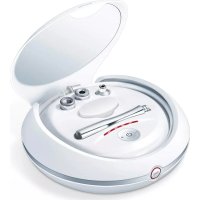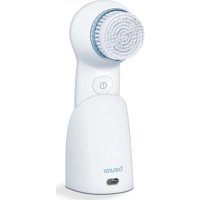
FC 46 - Face cleansing BEURER - Free user manual and instructions
Find the device manual for free FC 46 BEURER in PDF.


| Product type | Facial cleansing brush |
| Brand | Beurer |
| Model | FC 46 |
| Dimensions | 16 x 5.6 x 7.5 cm |
| Weight | Approx. 140 g |
| Power supply | 100-240 V~, 50/60 Hz, 0.5 A |
| Battery type | Rechargeable NiMH, 2.4 V, 600 mAh |
| Charging time | 6 hours (first charge) |
| Battery life | Several uses of one minute each |
| Functions | Vibration, pulsation, blue light anti-imperfections |
| Number of speeds | 3 (slow, normal, fast) |
| Timer | 1 minute with automatic shut-off, reminder every 20 seconds |
| Brush head | Soft, replaceable (ref. 605.08) |
| Intended use | Daily facial cleansing (all skin types) |
| Waterproof | Suitable for use in the bathtub or shower |
| Protection | Double protective insulation |
| Included accessories | 1 protective cap, 1 device, 1 brush head, 1 charging station, 1 power adapter, 1 instruction manual |
| Cleaning | Device and station with damp cloth, brush head under water |
| Brush replacement | Every 4 months |
| Warranty | 3 years |
| Manufacturer | Beurer GmbH, Germany |
| Contraindications | Do not use on wounds, irritations, after sunbathing or with steroids |
Frequently Asked Questions - FC 46 BEURER
User questions about FC 46 BEURER
0 question about this device. Answer the ones you know or ask your own.
Ask a new question about this device
Download the instructions for your Face cleansing in PDF format for free! Find your manual FC 46 - BEURER and take your electronic device back in hand. On this page are published all the documents necessary for the use of your device. FC 46 by BEURER.
USER MANUAL FC 46 BEURER
natural_image
White handheld electric brush with circular brush head and control buttons (no text or symbols visible)
DE Gesichtsbürste
Gebrauchsanweisung ...... 2
EN Facial brush
Instructions for use ....8
FR Brosse de visage
Mode d'emploi ....14
ES Cepillo facial
Instrucciones de uso...... 20
IT Spazzola facciale
Istruzioni per l'uso 26
TR Yüz Fırçası
Kullanım Kılavuzu ......32
RU Щетка для лица
Инструкция по применению...38
PL Szczoteczka do twarzy
Instrukcja obsługi .... 44
DEUTSCH

Read these instructions for use carefully and keep them for later use, be sure to make them accessible to other users and observe the information they contain.
Table of contents
- Included in delivery 8
- Signs and symbols 9
- Getting to know your device 9
- Intended use 10
- Warnings and safety notes.... 10
- Device description .... 10
- Initial use.... 11
7.1 Charging the device 11
7.2 Attaching the brush.... 11 - Use....11
- Cleaning 11
9.1 Cleaning the device and the charger.... 11
9.2 Cleaning the brush attachment 12
10.Disposal.... 12
11.Replacement parts and wearing parts.... 12
12.Troubleshooting.... 13
13.Technical data.... 13
14.Warranty/service 13
Dear customer,
Thank you for choosing one of our products. Our name stands for high-quality, thoroughly tested products for applications in the areas of heat, gentle therapy, blood pressure/diagnosis, weight, massage and air.
With kind regards,
Your Beurer team
1. Included in delivery
Check that the delivery has not been tampered with and make sure that all components are present. Before use, ensure that there is no visible damage to the device or accessories and that all packaging material has been removed. If you have any doubts, do not use the device and contact your retailer or the specified Customer Services address.
1 x protective cap 1 x hand-held device
1 x brush attachment 1 x charger
1 x mains adapter 1 x set of instructions for use
2. Signs and symbols
The following symbols appear in these instructions for use and on the device:
 | WARNINGWarning instruction indicating a risk of injury or damage to health |
 | IMPORTANTSafety note indicating possible damage to the device/accessory |
 | Suitable for use in a bath or shower |
 | Observe the instructions for use |
 | The device is double-protected |
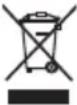 | Disposal in accordance with the Waste Electrical and Electronic Equipment EC Directive – WEEE |
 | Manufacturer |
 | NoteNote on important information |
 | Only use indoors |
  | Dispose of packaging in an environmentally friendly manner |

WARNING
- The device is only intended for domestic/private use, not for commercial use.
- This device may be used by children over the age of eight and by people with reduced physical, sensory or mental skills or a lack of experience or knowledge, provided that they are supervised or have been instructed on how to use the device safely, and are fully aware of the consequent risks of use.
- Children must not play with the device.
- Cleaning and user maintenance must not be performed by children unless supervised.
- If the mains connection cable of this device is damaged, it must be disposed of. If it cannot be removed, the device must be disposed of.
3. Getting to know your device
The Beurer FC 65 facial brush offers gentle, thorough cleansing of facial skin. The facial brush not only cleanses facial skin, it also improves circulation. As well as the vibration function, the facial brush also features a pulsation function for thorough and deep cleansing. In addition, the facial brush has a blue light which is ideal for treating facial blemishes and impurities.
4. Intended use
The device is only to be used on the human face (apart from the eye area).
Do not use the facial brush on animals. The device is not suitable for children under 8 years.
The device is only intended for the purpose described in these instructions for use. The manufacturer is not liable for damage resulting from improper or careless use.
5. Warnings and safety notes

WARNING
- Danger of suffocation by packaging material. Keep packaging material away from children.
- Before use, inspect the device and accessories for visible damage. If you have any doubts, do not use the device and contact your retailer or the specified Customer Services address.
- Keep the mains adapter away from water.
- Protect the device and the charger from knocks, damp, dust, chemicals, drastic changes in temperature and nearby sources of heat (ovens, heaters).
- To prevent damage to the eyes never look directly at the blue light!

WARNING
Do NOT use the device
- on broken skin.
- on open wounds.
- if you suffer from a skin disease or irritated skin.
- immediately after sunbathing.
- if you are taking medication that contains steroids.
Notes on handling rechargeable batteries
- If your skin or eyes come into contact with fluid from the battery cell, flush out the affected areas with plenty of water and seek medical assistance.
- Risk of explosion! Never throw batteries into a fire.
- Do not disassemble, split or crush the rechargeable batteries.
- Only use chargers specified in the instructions for use.
- Batteries must be charged correctly prior to use. The instructions from the manufacturer and the specifications in these instructions for use regarding correct charging must be observed at all times.
- Fully charge the battery prior to initial use (see Chapter 7.1).
- In order to achieve as long a battery service life as possible, fully charge the battery at least twice per year.

IMPORTANT
Only specialist personnel may perform repairs on electrical devices. Improper repairs may subject users to considerable danger. In the event of a fault or damage, have the device repaired by a certified specialist workshop.
6. Device description
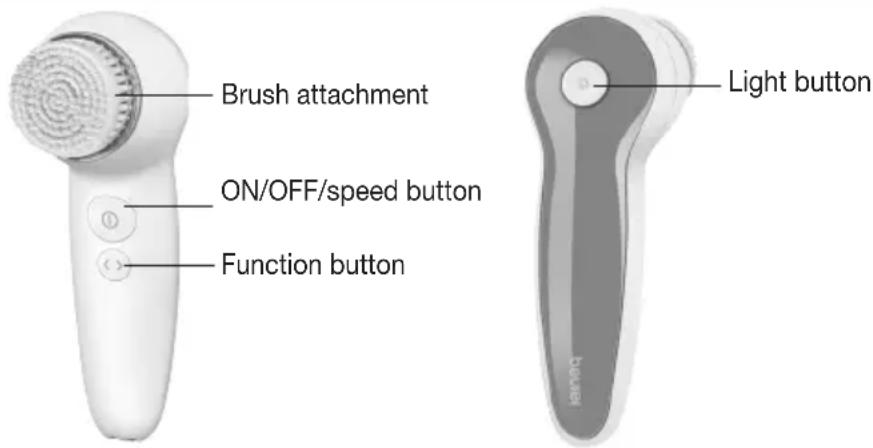
7. Initial use
7.1 Charging the device
Charge the device for at least 6 hours before initial operation. To do this, proceed as follows:
- Insert the mains cable into the charger.
- Plug the mains adapter into the socket.
- Insert the facial brush into the charger from above. Whilst charging, the blue LED light in the brush head flashes. As soon as the facial brush is fully charged, the blue LED light is lit permanently.
7.2 Attaching the brush
The device features a soft brush attachment.
- Fit the soft brush attachment onto the mounting fixture of the device from the front.
- To remove the brush attachment after use, pull it forwards.
8. Use
- Moisten the attached brush attachment with water. Never use the device with a dry brush attachment as this can irritate the skin.
- Apply the cleansing gel to your facial skin.
- To switch on the device, press and hold the ON/OFF/speed button for one second. The brush attachment will begin to vibrate.
- The device features a slow, medium and fast speed setting. To switch between the individual speed settings, briefly press the ON/OFF/speed button.
- Using the function button, select your desired function. The device has a vibration function for gentle facial cleansing and a pulsation function for thorough facial cleansing.
- If you have problem skin, you can switch on a blue light during use which combats skin impurities and blemishes. To add the blue light function, press the light button. If you have activated the pulsation function, the blue light pulsates and is not permanently lit.
- Now apply the device gently to your face and cleanse your facial skin using even movements to remove residue, dirt and dead skin cells.

Note
To ensure comfortable treatment, do not press the brush attachment too firmly against the skin. Treat each section of skin for a maximum of 20 seconds.
The brush features a 1-minute timer and stops every 20 seconds for 1 second to indicate that you should switch to cleansing a different area. The facial brush switches itself off automatically after 3x 20 seconds. The recommended application period per use is 1 minute.
- Switch off the device after use. To switch off the device, press and hold the ON/OFF/speed button for one second.
- Cleanse your face thoroughly with water to remove any residue from your skin.
- Pat your skin dry with a towel and then apply a moisturising cream using even, circular movements.
9. Cleaning

IMPORTANT
Before beginning cleaning, always pull the mains adapter out of the socket.
9.1 Cleaning the device and the charger
- Clean the device using only the methods specified.
- Clean the device after use with a soft, slightly damp cloth. If it is very dirty, you can also moisten the cloth with a mild soapy solution. Do not use any abrasive cleaning products.
- Clean the charger with a soft, slightly damp cloth from time to time.
-
Ensure that the device is fully dry before placing it into the charger.
-
Esure that no water enters the device or the charger. If this should happen, the device and the charger should only be used again once they have fully dried out.
- Protect the device from impacts, humidity, dust, chemicals, marked temperature fluctuations and nearby sources of heat (ovens, heaters).
9.2 Cleaning the brush attachment
- To clean the brush attachment, pull it forwards off the device.
- Clean the brush attachment thoroughly with water after each use.
10. Disposal
- Clean the charger from time to time with a soft, slightly damp cloth.
- The empty, completely flat rechargeable batteries must be disposed of using specially designated collection boxes, recycling points or electronics retailers. You are legally required to dispose of the rechargeable batteries.
- Remove the battery by removing the cover of the facial brush.
- The codes below are printed on rechargeable batteries containing harmful substances:
Pb = Battery contains lead,
Cd = Battery contains cadmium,
Hg = Battery contains mercury.
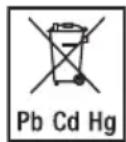
For environmental reasons, do not dispose of the device in the household waste at the end of its useful life. Dispose of the unit at a suitable local collection or recycling point. Dispose of the device in accordance with EC Directive – WEEE (Waste Electrical and Electronic Equipment). If you have any questions, please contact the local authorities responsible for waste disposal.
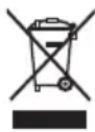
The device battery must be disposed of separately. The battery must not be disposed of with domestic waste.
To remove the battery, use a screwdriver to force open the cover for the brush attachment on the device. The battery located inside the device must then be disconnected from the device. Now remove the battery from the device and dispose of it at a suitable collection point. For information on disposal, please contact the authorised seller or the public authority responsible for waste disposal.
11. Replacement parts and wearing parts
Replacement parts and wearing parts are available from the corresponding listed service address under the stated material number.
| Brush type | 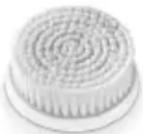 Brush attachment Brush attachment |
| Intended purpose Daily cleansing | |
| Skin type | All skin types |
| Replace | After 4 months |
| Item number and/or order number | 605.08 |
12. Troubleshooting
| Problem Solution | |
| The device does not charge. | Ensure that the charger is connected to a functioning socket and that the device is correctly positioned on the charger. If you have connected everything correctly and the device still fails to charge, contact Customer Services. |
| The device will not switch on. | When switching the device on, ensure that you press the ON/OFF button with sufficient force and hold the button down for a sufficient amount of time. Charge the device as described in these instructions for use. If it is still not possible to switch on the device, contact Customer Services. |
| The device does not cleanse as well as it did to begin with. | The brush is worn. Replace the brush. If you do not have any replacement brushes, they can be reordered (see “11. Replacement parts and wearing parts”). |
If you cannot find a solution to your problem here, contact our Customer Services.
13. Technical data
| Supply 100–240 V~; 50/60 Hz; 0.5 A | |
| Dimensions 16 x 5.6 x 7.5 cm | |
| Weight approx. 140 g | |
| Battery:Capacitynominal voltagetype designation | 600 mAh2.4VNiMH |
14. Warranty/service
In case of a claim under the warranty please contact your local dealer or the local representation which is mentioned in the list “service international”.
In case of returning the unit please add a copy of your receipt and a short report of the defect.
The following warranty terms shall apply:
- The warranty period for BEURER products is either 3 years or- if longer- the country specific warranty period from date of Purchase.
In case of a warranty claim, the date of purchase has to be proven by means of the sales receipt or invoice.
-
Repairs (complete unit or parts of the unit) do not extend the warranty period.
-
The warranty shall not be valid for damages because of
a. improper treatment, e.g. nonobservance of the user instructions.
b. repairs or tampering by the customer or unauthorised third parties.
c. transport from the manufacturer to the consumer or during transport to the service centre.
d. The warranty shall not be valid for accessories which are subject to normal wear and tear (cuff, batteries etc.).
- Liability for direct or indirect consequential losses caused by the unit are excluded even if the damage to the unit is accepted as a warranty claim.
FRANÇAIS