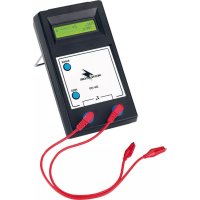
ZM100 - Measuring equipment Monacor - Free user manual and instructions
Find the device manual for free ZM100 Monacor in PDF.


| Product type | Impedance meter for speakers and 100 V lines |
| Brand | Monacor |
| Model | ZM100 |
| Display | LCD (STN) 2 × 16 characters |
| Measurement frequency | 1 kHz sinusoidal |
| Measurement ranges | 200 Ω, 2 kΩ, 20 kΩ, 200 kΩ |
| Resolution | 1 Ω (200 Ω), 10 Ω (2 kΩ), 100 Ω (20 kΩ), 1 kΩ (200 kΩ) |
| Main functions | Impedance measurement, 100 V power calculation, auto/manual range selection, value hold (HOLD), average measurement in noisy environment |
| Power supply | 4 batteries 1.5 V type R6 (AA) – alkaline recommended |
| Dimensions | 180 × 100 × 44 mm |
| Weight | 380 g |
| Operating temperature | 0 to 38 °C |
| Usage | Indoor only, protect from water and humidity |
| Cleaning | Soft dry cloth, no chemicals |
| Safety | Disconnect speakers from amplifier before measurement; do not measure on powered amplifier |
| Repairability | Repairs only by qualified professional |
| Warranty | Non-compliant use or unauthorized repair voids warranty |
Frequently Asked Questions - ZM100 Monacor
User questions about ZM100 Monacor
0 question about this device. Answer the ones you know or ask your own.
Ask a new question about this device
Download the instructions for your Measuring equipment in PDF format for free! Find your manual ZM100 - Monacor and take your electronic device back in hand. On this page are published all the documents necessary for the use of your device. ZM100 by Monacor.
USER MANUAL ZM100 Monacor
These instructions are intended for users with basic knowledge in 100 V audio technology. Please read the instructions carefully prior to operation and keep them for later reference.
1 Operating Elements and Connections
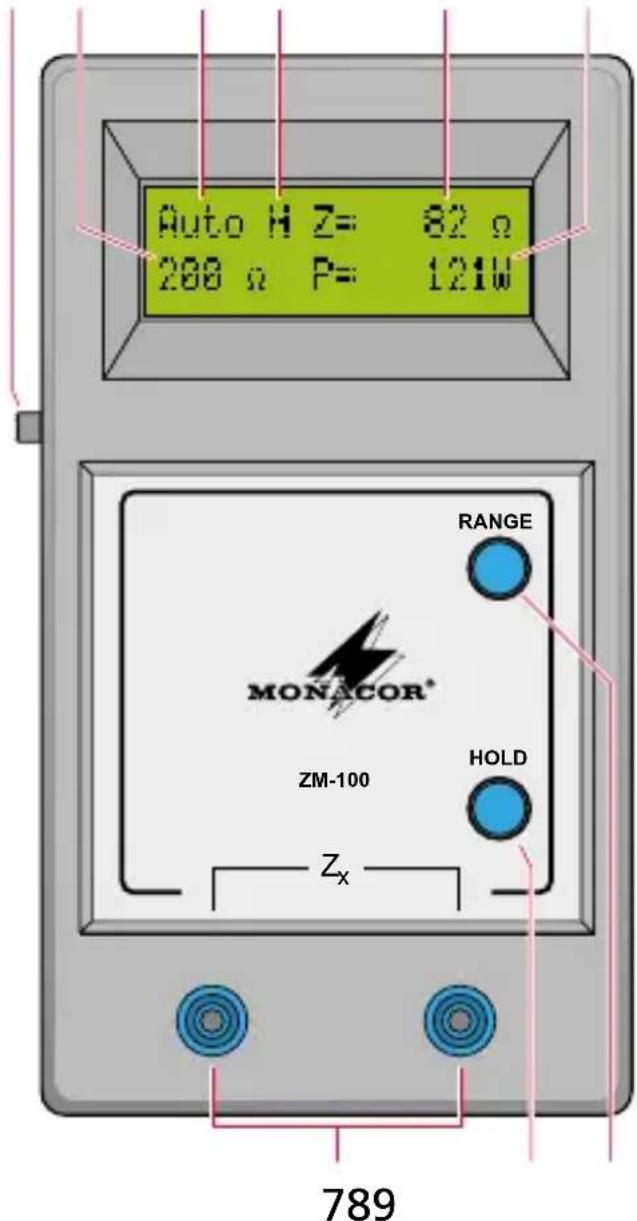
1 23546
1 Power switch
2 Indication of the present measuring range
3 Indication of operating mode
Auto: automatic selection of the measuring range
Man.: manual selection of the measuring range
4 HOLD indication; when freezing a reading or when measuring the average value
5 Indication of the impedance value measured
6 Indication of the corresponding power consumption at a 100V system
7 4 mm jacks for connecting the test leads
8 Button HOLD with two functions:
- automatic range selection: for freezing a measured value
- manual range selection: for starting a measurement of the average impedance value in a noisy environment
9 Button RANGE for manual range selection or for activating the automatic range selection
2 Safety Notes
This unit corresponds to all relevant directives of the EU and is therefore marked with
WARNING

During operation, there may be a hazard of contact with a dangerous voltage at the speaker terminals of an amplifier. Only perform measurements on speakers or speaker lines which are disconnected from the amplifier. If an amplifier is connected, this will result in measurement errors and may damage the meter. Switch off the amplifier before disconnecting the speakers from the amplifier.
- The meter is suitable for indoor use only. Protect it against dripping water and splash water, high air humidity, and heat (admissible ambient temperature range 0 - 38^ ).
- For cleaning only use a dry, soft cloth; never use water or chemicals.
- No guarantee claims for the meter and no liability for any resulting personal damage or material damage will be accepted if the meter is used for other purposes than originally intended, if it is not correctly connected, operated, or not repaired in an expert way, or if it is overloaded.

If the unit is to be put out of operation definitively, take it to a local recycling plant for a disposal which is not harmful to the environment.
3 Applications
The impedance meter ZM-100 serves for measuring the impedance (Z) of individual speakers and speaker lines. The processor-controlled measurement is made with a 1 kHz sinusoidal measuring tone. The meter will automatically select the most suitable measuring range, however, manual range selection is also possible. In addition to the impedance, the respective power consumption at a 100 V system is calculated and indicated. As speakers will not only convert electric
signals into sound but also convert the sound received into electric signals which will be superimposed on the measuring signal, measurement errors may occur in a noisy environment. Therefore, the meter is pro vid ed with a function which will minimize the effects of noise by calculating the average value and provide quite accurate results even in a noisy environment.
4 Operation
4.1 Inserting batteries
1) Open the battery compartment on the rear side of the meter by slid ing the cover upwards.
2) Insert four 1.5 V batteries of size AA as indicated in the battery compartment. We recommend alkaline batteries. Due to their lower volt age, it is not possible to use rechargeable batteries.
3) Close the battery compartment.

Never put batteries in the household waste. To protect the environment, always take them to a special waste disposal, e. g. collection container at your retailer.
4.2 Switching on the meter
1) Unfold the tilt stand on the rear side of the meter if this is more convenient for reading the display.
2) Switch on the meter with the switch (1).
3) For approx. 5 s, the software version and the present battery voltage will be displayed. With full batteries, the battery voltage will be ap prox. 6.3V . If it falls below 5.5V , the batteries will soon be exhaust ed and should be replaced. With a battery voltage of ≤ 5.1V , meas urements will be impossible with the meter. "Batterie leer" (Battery exhausted) will be displayed. In this case or if the display remains blank after switching on, the batteries must be replaced.
4) Always switch off the meter after operation, otherwise the batteries will be consumed unnecessarily.
If the meter is not used for a longer period, the batteries should be removed to prevent any damage to the meter in case of battery leakage.
5 Measurements
Make sure that the speaker or the speaker line to be measured is disconnected from the amplifier!
1) Connect the test leads to the two jacks (7). The polarity is insignificant in this case.
2) Hold /clamp the test tips /clamps of the test leads to the speaker or the speaker line.
3) Read the measured values. Starting from the highest measuring range, the meter will automatically select the most suitable range. The display will show the operating mode "Auto" (3), the measuring range selected (2), the impedance Z measured (5), and (except for the measuring range 200k ) the calculated power (6) which the speaker or the speaker line would consume at a 100V system.
If - - - - is displayed at (5) instead of an impedance value, the impedance measured is greater than 200 kΩ and cannot be indicated. This may also be caused by contact problems. Check the connections.
5.1 Manual selection of the measuring range
To switch off the automatic range selection and to select a given meas uring range, press the button RANGE (9).
At (3), "Man." will be displayed, and at (2), the measuring range "200 kΩ" will be indicated.
When pressing the button RANGE repeatedly, you will return via the measuring ranges "20 kΩ", "2 kΩ", and "200 Ω" to the automatic range selection [“Auto” will be displayed at (3) again].
If - - - - is displayed at (5) instead of an impedance value, the measuring range is exceeded. In this case, press the button RANGE repeat edly to select the next higher measuring range.
5.2 Freezing a measured value
Press the button HOLD (8) to freeze the reading. "H" (4) will be displayed. To return to the present value measured, press the button once again; the "H" will disappear. This function is only available with automatic range selection [“Auto” (3) will be displayed)]. With manual range selection, the button HOLD has a different function (see chapter 5.3).
5.3 Measurement in a noisy environment
External sound in a noisy environment may interfere with the measurement, indicated e. g. by a constant change of the reading. To minimize the effects of ambient noise on the measuring result, the ZM-100 is provided with a function for calculating the average value over a given time. This function can be called as follows:
1) Manually select the smallest possible measuring range with the button RANGE (9). (With a measuring range which is too high, the meas urement will not only be less accurate, the disturbance of the measurement by ambient noise will also be substantially increased.)
2) Press the button HOLD (8). "H" (4) will be displayed; this will start the function for measuring the average value.
3) Measure for a minimum of 20 seconds before reading the value; the longer the measurement, the more accurate the result.
4) To terminate the calculation of the average value and to return to the present reading, press the button HOLD once again; the "H" will disappear.
6 Specifications
Display: LC display (STN), alphanumeric, 2 × 16 characters
Measuring frequency: 1 kHz
Power supply: 4 × 1.5 V battery, size AA
Ambient temperature: 0 - 38^
Dimensions: 180 × 100 × 44 mm
Weight: 380g
Measuring ranges
| Range Resolution Power* Accuracy | |||
| 200 Ω 1 Ω | 50–10000W | 2 % + 1 digit | |
| 2 kΩ 10 Ω | 5–1000W | ||
| 20 kΩ 100 Ω | 0,5–100W | ||
| 200 kΩ 1 kΩ | — | ||
*referring to 100 V systems
Subject to technical modification.
All rights reserved by MONACOR® INTERNATIONAL GmbH & Co. KG. No part of this instruction manual may be reproduced in any form or by any means for any commercial use.