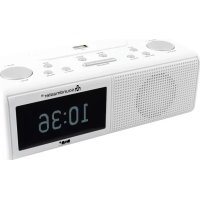
UR8350 - Radio Soundmaster - Free user manual and instructions
Find the device manual for free UR8350 Soundmaster in PDF.



| Product type | DAB+/FM clock radio |
| Brand | Soundmaster |
| Model | UR8350 |
| Mains power supply | 100-240 V~ 50/60 Hz, 0.3 A (adapter supplied) |
| Backup power supply | 4 AAA 1.5 V batteries (not included) |
| Frequency ranges | DAB+: 174.928-239.200 MHz; FM: 87.5-108 MHz |
| Number of presets | 10 DAB+, 10 FM |
| Headphone output power | 5 V (adapter) |
| Dimensions (approx.) | 200 mm x 120 mm x 60 mm |
| Weight (approx.) | 0.5 kg (without batteries) |
| Display | LCD screen with brightness adjustment |
| Main functions | DAB+ and FM radio, USB playback (flash drive), AUX input, 2 alarms, snooze, adjustable sleep timer |
| Inputs/Outputs | USB port (top), AUX IN (3.5 mm), headphone (3.5 mm), telescopic antenna |
| Cleaning | With a dry cloth only, no detergents |
| Safety | Do not open the device, risk of electric shock; use in a ventilated indoor area |
| Recycling | Do not dispose of with household waste; take to a collection point |
| Batteries | Remove batteries if not used for a long time; do not dispose of with household waste |
| Repairability | Repair only by an approved service center; do not open yourself |
| Included accessories | Mains adapter, instruction manual |
Frequently Asked Questions - UR8350 Soundmaster
User questions about UR8350 Soundmaster
0 question about this device. Answer the ones you know or ask your own.
Ask a new question about this device
Download the instructions for your Radio in PDF format for free! Find your manual UR8350 - Soundmaster and take your electronic device back in hand. On this page are published all the documents necessary for the use of your device. UR8350 by Soundmaster.
USER MANUAL UR8350 Soundmaster
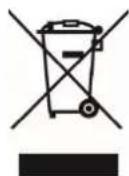
Do not dispose of this product with the normal household waste at the end of its life cycle. Return it to a collection point for the recycling of electrical and electronic devices. This is indicated by the symbol on the product, user manual or packaging
The materials are reusable according to their markings. By reusing, recycling or other forms of utilization of old devices you make an important contribution to the protection of our environment.
Please contact your local authorities for details about collection points.

WARNING
Risk of electric shock Do not open!

Caution: To reduce the risk of electric shock, do not remove the cover (or back). There are no user serviceable parts inside. Refer servicing to qualified service personnel.

This symbol indicates the presence of dangerous voltage inside the enclosure, sufficient enough to cause electric shock.

This symbol indicates the presence of important operating and maintenance instructions for the device
Used batteries are hazardous waste and NOT to be disposed of with the household waste! As a consumer you are legally obligated to return all batteries for environmentally responsible recycling - no matter whether or not the batteries contain harmful substances*)
Return batteries free of charge to public collection points in your community or shops selling batteries of the respective kind. Only return fully discharged batteries *) marked Cd = cadmium, Hg = mercury, Pb = lead
- Only use mercury and cadmium-free batteries.
- Used batteries are hazardous waste and NOT to be disposed of with the household waste!!!
- Keep batteries away from children. Children might swallow batteries.
- Contact a physician immediately if a battery was swallowed.
- Check your batteries regularly to avoid battery leakage.
- Batteries shall not be exposed to excessive heat such as sunshine, fire or the like.
- CAUTION: Danger of explosion if battery is incorrectly replaced
- Replace only with the same or equivalent type

To prevent possible hearing damage, do not listen at high volume levels for long periods
- Use the device in dry indoor environments only.
- Protect the device from humidity.
- This apparatus is for moderate climates areas use, not suitable for use in tropical climates countries.
- No objects filled with liquids, such as vases, shall be placed on the apparatus.
Safety, Environmental and Setup Instructions
- The mains plug or an appliance coupler is used as the disconnect device, the disconnect devices shall remain readily operable.
- Connect this device to a properly installed and earthed wall outlet only. Make sure the mains voltage corresponds with the specifications on the rating plate.
- Make sure the mains cable stays dry during operation. Do not pinch or damage the mains cable in any way.
- A damaged mains cable or plug must immediately be replaced by an authorized service center.
- In case of lightning, immediately disconnect the device from the mains supply.
Children should be supervised by parents when using the device. - Clean the device with a dry cloth only.
- Do NOT use CLEANING AGENTS or ABRASIVE CLOTHS!
- Do not expose the device to direct sunlight or other heat sources.
- Install the device at a location with sufficient ventilation in order to prevent heat accumulation.
- Do not cover the ventilation openings!
- Install the device at a safe and vibration-free location.
- Install the device as far away as possible from computers and microwave units; otherwise radio reception may be disturbed.
- Do not open or repair the enclosure. It is not safe to do so and will void your warranty. Repairs only by authorized service/ customer center.
- No naked flame sources, such as lighted candles, should be placed on the unit.
- When you are necessary to ship the unit store it in its original package. Save the package for this purpose.
- In case of malfunction due to electrostatic discharge or fast transient (burst), remove and reconnect the power supply.
- If the unit is not using for a long period of time, disconnect it from the power supply by unplugging the power plug. This is to avoid the risk of fire.
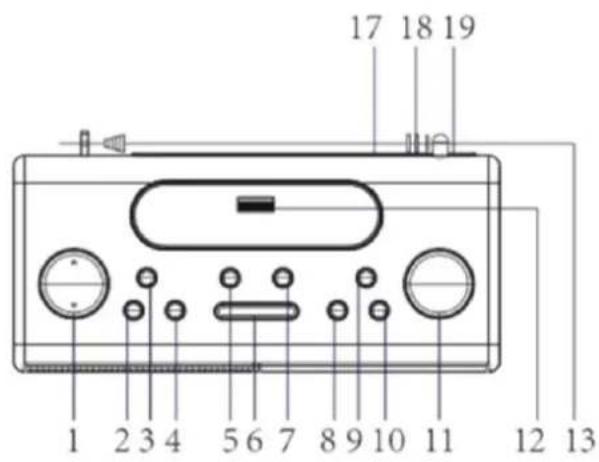
LOCATION OF CONTROLS
1 Volume Control
2 Standby
3 Scan /
4 Preset
5 Sleep
6 Snooze
7 Enter
8 Alarm
9 Info
10 Mode
11 Tune + / -
12 USB jack
13 Antenna
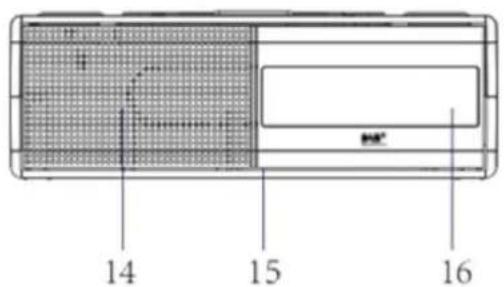
14 Speaker
15 Battery Compartment (at the bottom)
16 LCD Display
17 Earphone jack
18 AUX-IN jack
19 DC jack
POWER SUPPLY
Warning:
Before using the unit, please check that local main supply is compatible with the unit. Do not plug or unplug the power cable when your hands wet.
When planning not to use this unit for long periods of time disconnect the plug from the wall outlet and if insert batteries in the battery compartment put them out.
Insert the DC-plug with the end of the cable into the DC jack located at the rear of the unit and the AC-adapter into the wall outlet.
EMERGENCY USE WITH BATTERIES
To play your unit with batteries, the AC-adapter must be disconnected from the unit. Open the battery compartment and insert 4 "AAA" (LR03) batteries (not included) in the battery compartment. Close the battery compartment again.
The device can be operated fully functional for up to 24 hours in the event of a power failure and disconnected power supply cable via the inserted batteries.
Note: Check your batteries regularly. Old or discharged batteries should be replaced. If the unit is not to be used for longer time or is being used exclusively on AC electrical current, remove batteries from the battery compartment to avoid leakage.
BASIC OPERATION
Press the "STANDBY" button to turn the unit on or off.
Press the "VOL + / -" to increase or decrease the volume.
DAB MODE
For the best reception extend the telescopic antenna complete. If you start the DAB-mode the first time the unit will automatically search the stations which can be received.
Press the "MODE" button to select the DAB radio mode.
Auto search
Press the "SCAN" button, "Autotune Full Scan" will show on the display. The number of the of the DAB stations will be shown on the upper right corner and the unit will automatically play the first station. Press "TUNE / to choose the next or previous station.
Manual search
- During DAB mode, press and hold the "ENTER" button to select the manual tune. Press "TUNE / ▲" to manual tune the DAB channels.
- After setting press "ENTER" to confirm.
- Return to the main manual, "MAN" will be shown on the right top corner. Press "ENTER" to confirm. "DAB" will be shown on the right top corner.
- Then you can repeat from step 1 to set the other manual tune channels.
Preset DAB radio stations
- Choose the desired DAB radio station.
- Press and hold the "PRESET" button. "Preset Empty 1" will appear in the display, "1" is flashing in the display.
- Press "TUNE / ▲" to choose the desired station number (1-10). Then press the "ENTER" button to store it.
- Repeat the same procedures until all desired radio stations are stored.
Recall the saved radio stations
- Press the "PRESET" button and then the "TUNE / ▲" button to select the desired radio.
- Press the "ENTER" button to confirm.
Information display
The unit has DAB information modes which are shown on the bottom line of the display. Press the "INFO" button to see the available types:
Ensemble Frequency
Signal strength
Audio Bit Rate
Time/Date
Ensemble name
DLS (Dynamic Label Segment)
FM MODE
- Press the "MODE" button to select FM radio mode.
- Press the "SCAN" button to start the search. When a radio station is found, the frequency on the display will stop running and start playback automatically. If reception is not good, press the "TUNE / ▲" for fine tuning.
Switch between stereo and mono
During the FM radio mode press the "ENTER" button to select the audio mode "Auto" or "mono".
To store preset stations is the same as in DAB mode!
Information display
The unit has FM information modes which are shown on the bottom line of the display. Press the "INFO" button to see the available types:
PTY (program type)
Station frequency
Signal strength
Audio mode
Date and Time
Radio text
USB MODE
- Press the "MODE" button to select the USB mode. USB will be shown on the display.
- Insert an USB drive into the USB port at the top of the unit.
- The music will play automatically.
- Press the "SCAN" button to play or interrupt the playback.
- Press the "TUNE / button to select the track backward or forward.
- Press "PRESET" to choose Repeat one song / Repeat all songs / Random playing.
AUX-IN MODE
- Connect the external audio source to the AUX IN jack at the backside of the unit.
- Press the "MODE" button to select the AUX mode.
- Start the playback on your external audio source. Use the controls on your external device.
ALARM
Setting Alarm 1
- Turn the unit in Standby mode and press the "ALARM" button until the Alarm 1 menu is shown on the display.
- OFF or ON is flashing to indicate that it can be changed. Press "TUNE / ▲" to ON and press "ENTER" to confirm.
- The hour digits are flashing now. Press the "TUNE / ▲" to set the hour of the alarm time. Press "ENTER" to confirm.
- Now the minutes can be set. Press again "TUNE / to set the minutes and press "ENTER" again to confirm.
- Select the alarm tone (BEEP Tone1, BEEP Tone2, DAB, FM of USB) with the "TUNE▼/▲" buttons. Press the "ENTER" button to confirm.
- Adjust the wake-up volume with the "TUNE / buttons and press the "ENTER" button again for confirmation. The settings are saved.
Setting Alarm 2
- Turn the unit in Standby mode and press the "ALARM" button until the Alarm 2 menu is shown on the display.
- The other settings are the same as in ALARM 1.
Turn off the Alarm
To stop the alarm when he is activated, press the "ALARM" or "STANDBY" button to stop the alarm sound. The alarm will stopped until the next day. If you don't press the button the alarm sound will automatically stop after 59 minutes.
Turn off the alarm completely
- Press the "ALARM" button until the Alarm 1 or Alarm 2 menu is shown.
- Press the "TUNE / button to set the desired alarm to OFF and press "ENTER" to confirm.
Snoopze
When the alarm tone is on, press the "SNOOZE" button to temporally stop the alarm sound. The alarm tone sounds again after 9 minutes.
SLEEP
Press the "SLEEP" button to set the sleep timer. You can choose the following settings: OFF - 15 - 30 - 45 - 60 - 90 minutes.
- Turn the unit in Standby mode.
- Press and hold the "PRESET" button. "ACTIVE BACKLIGHT" is shown on the display.
- Adjust the desired brightness with the "TUNE / button.
- After 3 seconds the display changes to the "STANDBY BACKLIGHT". Adjust also the desired brightness with the "TUNE / button.
CLOCK SETTING
- Turn the unit in Standby mode.
- Press and hold the "ALARM" button until you see "SET CLOCK" and the date showing in the display.
- Press the "TUNE / button to adjust the date and time and at least press "ENTER" to confirm.
HEADPHONE
- Connect your 3.5mm headphone plug to the headphone jack at the backside of the unit.
- Turn the unit on and the music will come through your headphone. The sound is muted in this time over the loudspeaker.
NOTE: If a headache is connected also the alarm tone sounds over the headphone!
FACTORY RESET
Press and hold in DAB mode the "MODE" button until "Press ENTER Key to Reset" is shown on the display. Press the "ENTER" button to reset the unit.
TECHNICAL SPECIFICATION
Power supply : Use only the supplied power adapter
Power input : 100-240V~50/60Hz, 0,3A
Power output :5V-4
Battery supply : 4x DC 1.5V AAA type batteries (not included)
DAB+ range : 174.928 - 239.200MHz
FM range : 87.5 - 108MHz
Preset stations :10 DAB+, 10 FM
Technical changes and misprints reserved.
Copyright by Woerlein GmbH, 90556 Cadolzburg, www.soundmaster.de
Duplication only with the permission of Woerlein GmbH
CE
PROTECTION DE L'ENVIRONNEMENT

NASTAVENI JASU DISPLEJE
NASTAVENIE JASU DISPLEJA
- Prepnite prístroj do Pohotovostného režimu.
- Stlache a podrzte tlacidlo ,PRESET". Na displeji sa zobrazuje napiis ,ACTIVE BACKLIGHT".
- Tlacidlom ,TUNE▼/▲" nastavte požadovany jas.
- Po 3 sekundách sa napiis na displeji zmení na „STANDBY BACKLIGHT". Aj tu nastavte požadovany jas tlacidlom „TUNE“
NASTAVENIE HODIN
- Prepnite pristroj do Pohotovostného režimu.
- Stlache a podrzte tlacidlo „ALARM“, kym neuvidite napis „SET CLOCK“ a na displeji sa zobrazi datium.
- Stlacanim tlacidla "TUNE / " nastavte datum a cas a stlacenim tlacidla ,ENTER potvrde.
SLUCHADLA
D 90556 Cadolzburg, Germany
Tel: +49 9103 71 67 0
Fax: +49 9103 71 67 12
E-Mail: info@soundmaster.de
Internet: www.soundmaster.de
Hereby, Wörlein GmbH declares that this device is in compliance with the essential requirements and other relevant provisions of Directive 2014/53/EU.
A copy of the declaration of conformity can be obtained from the above address.
