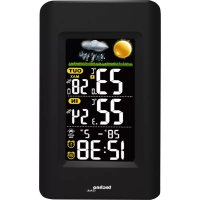
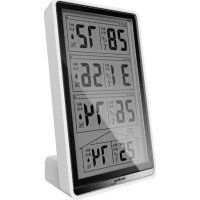
WS 6447 - Weather Station TECHNOLINE - Free user manual and instructions
Find the device manual for free WS 6447 TECHNOLINE in PDF.



| Product type | Wireless weather station with outdoor sensor |
| Brand | TECHNOLINE |
| Model | WS 6447 |
| Main power supply | 230 V AC mains adapter, DC plug |
| Backup power supply | 3 AAA alkaline batteries (not included) for the main unit |
| Outdoor sensor power supply | 2 AAA alkaline batteries (not included) |
| Indoor temperature range | 0 °C to +50 °C (32 °F to 122 °F) |
| Outdoor temperature range | -25 °C to +70 °C (-13 °F to 158 °F) |
| Indoor and outdoor humidity range | 20 % to 95 % |
| Temperature resolution | 0.1 °C (0.2 °F) |
| Relative humidity accuracy | 1 % |
| Time format | 12/24 hours |
| Alarms | 2 alarms with snooze function (adjustable repeat from 5 to 60 min) |
| Weather forecast | 6 symbols (sunny, partly cloudy, cloudy, rainy, stormy, frost warning), over 12 hours |
| Outdoor sensor range | Up to 50 m in open field (reduced by obstacles) |
| Max. number of outdoor sensors | 3 (channels 1, 2, 3) |
| Special functions | Adjustable auto backlight, max/min temperature display, auto channel scrolling |
| Cleaning and maintenance | Do not expose to extreme temperatures, water, dust; do not open the housing |
| Battery safety | Use non-rechargeable alkaline batteries; respect polarities; do not dispose of in fire |
| Repairability / Spare parts | Not specified; contact TECHNOLINE after-sales service |
| Dimensions and weight | Not specified |
| Warranty | Not specified |
Frequently Asked Questions - WS 6447 TECHNOLINE
User questions about WS 6447 TECHNOLINE
0 question about this device. Answer the ones you know or ask your own.
Ask a new question about this device
Download the instructions for your Weather Station in PDF format for free! Find your manual WS 6447 - TECHNOLINE and take your electronic device back in hand. On this page are published all the documents necessary for the use of your device. WS 6447 by TECHNOLINE.
USER MANUAL WS 6447 TECHNOLINE
A1 - Weather forecast A2 - Outdoor temperature / humidity
A3 - Indoor temperature / humidity A4 - Month and date
A5 - PM icon A6 - Time
A7 - RF icon A8 - Outdoor sensor channel
A9 - Auto dimmer A10 - ALARM 1/2
Part B - Case
B1-SNOOZE/AUTO DIMMER button B2-DOWN/°C/°F button
B3-MEM button B4-SET button
B5 - SENSOR / UP button B6 - ALARM SET / ON-OFF button
B7 - Battery compartment cover - insert 3x AAA batteries (not included)
B8 - Insert DC jack to power up your unit
B9 - AC/DC adapter B10 - AC wall socket
B11 - Stand / holder
Part C - Outdoor sensor
C1 - Stand / holder C2 - Fix at Channel 1
C3-Channel1 C4-Channel2
C5 - Channel 3 C6 - Insert 2× AAA batteries (not included)
QUICK SETUP
STEP1
Insert the AC/DC adaptor to any 230V AC household outlet. Then insert the DC jack to the left side of your unit. Your weather station will be powered on and backlight will be on permanently.
STEP2
Keep your weather station and wireless outdoor transmitter next to each other. Slide open the battery cover at the back of your wireless outdoor transmitter, then insert 2 × AAA new alkaline batteries to the battery compartment. Make sure the Channel selector switch is at 1 position. Replace the battery cover.
Make sure 1 (Channel 1) is displayed under the outdoor temperature. You can press / CHANNEL to select Channel 1.
Your weather station will receive data signal from the outdoor transmitter in few seconds. Then place your outdoor transmitter in a dry and shaded area.
STEP3
The weather station computes weather forecasts based on changes in air pressure. However, when using the weather station for the first time, it may take up to a few days of collecting sufficient information for more accurate forecasts. Manual setting of the weather forecast can slightly accelerate this process.
Please refer to the point "TO SET THE WEATHER STATION".
INSTALLING BACKUP BATTERIES TO YOUR UNIT
Your weather station requires 3 × AAA alkaline batteries to provide backup power to it in the event of a temporary power interruption.
- Place your unit face down on a flat surface.
- Slide and remove the battery cover at the bottom of your unit.
- Insert 3 "AAA" alkaline batteries into the battery compartment by observing the "+" and - polarity as indicated.
- Replace the battery cover.
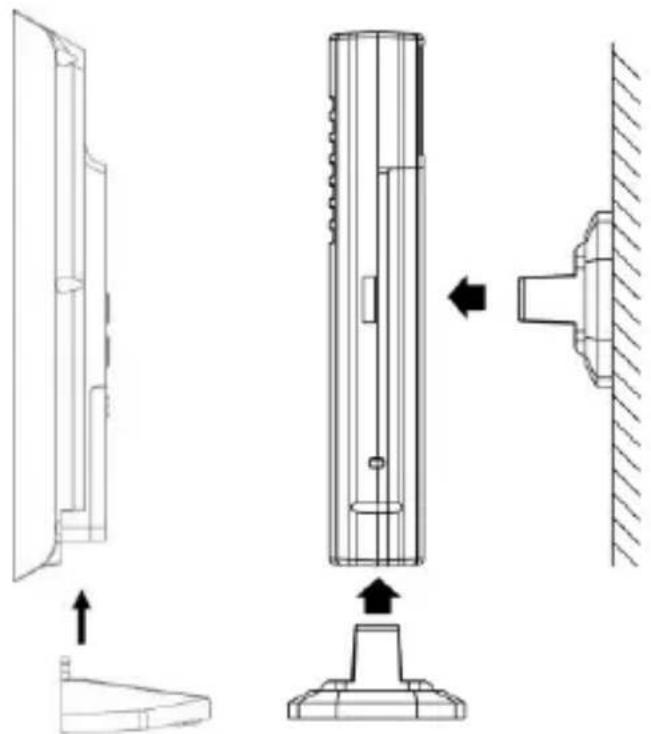
- Insert the holder to the bottom of your weather station for desktop.
Station Outdoor sensor
REMARKS:
Insert the holder to the bottom of the outdoor transmitter for desktop or insert it to the back of the transmitter for wall mount purpose.
- Keep in mind that your outdoor transmitter has a 50-meter open air transmission with no obstructions.
- Actual transmission range will vary depending on what is in the path of the signal. Each obstruction (roof, walls, floors, ceilings, thick trees, etc.) will effectively cut signal range in half.
TO SET THE WEATHER STATION
You can set your weather station in the sequence of time, 12/24HR, calendar, snooze duration and weather forecast condition:
- Press and hold the SET button until the hour digits flash. Press or button to set the hours. Press and hold / will accelerate your setting.
- Press the SET button again, the minute digits flash. Press or button to set the minutes. Press and hold / will accelerate your setting.
- Press the SET button again, the time digits change to "24Hr". Press or to select "12Hr" time format. When 12Hr time format is selected, PM indicator will be displayed.
- Press the SET button again, "2019" digits flash. Press or button to set the year.
- Press the SET button again, month digits flash. Press or button to set the month.
- Press the SET button again, date digits flash. Press or button to set the date.
- Press the SET button again, "m", "d", month-date digits flash. Press or to select month-date "m" and "d" or date-month "d" and "m" calendar display.
- Press the SET button again, "n05" flash. Press or button to set the snooze duration from 5 minutes to 60 minutes.
-
Press the SET button again, weather icons flash. Press / button to set the weather forecast condition according to the forecast on TV or internet.
-
Press the SET button again to return to normal mode, or it will return to normal mode in around 10 seconds if no further press of any other buttons.
WEATHER FORECAST ICONS
There are six possible types of weather icons that will be displayed:
| SUNNY | |
| SUNNY AND CLOUDY (PARTLY SUNNY) | |
| CLOUDY | |
| RAINY | |
| STORMY | |
| FROST ALERT | Frost Alert Icon appears when outdoor temperature is between +3°C to 0°C |
Remarks: Moving your weather station from one floor of a building to another floor will affect the accuracy of your weather station, which should operate at the same altitude all the time. If you move it to a new location, it will take 12 hours to get stable and accurate again.
Our weather station provides next 12 hours weather forecast. It may not match with the current weather condition outside.
TO SET ALARM 1 AND 2
-
At normal time display mode, press and hold the AL SET/ ON.OFF button, displayed and the alarm hour digit flash. Press or to set the hours of your desired alarm time.
-
Press the AL SET/ ON.OFF button again, the alarm minute digits flash. Press or button to set the minutes of your desired alarm time.
-
Press the AL SET/ ON.OFF button again, displayed and the alarm hour digit flash. Press or to set the hours of your desired alarm time.
- Press the AL SET/ ON.OFF button again, the alarm minute digits flash. Press or button to set the minutes of your desired alarm time.
- Press the AL SET/ON.OFF button again to complete set-up. If no key is pressed in approximate 10 seconds at any time during set-up, the clock will exit the alarm set-up mode.
TO TURN ON OR OFF YOUR DAILY ALARM
- At normal time display mode, press the AL SET/ ON.OFF button to turn on Alarm 1 only, ① appears on the LCD.
- Press the AL SET/ ON.OFF button again to turn on Alarm 2 only, ② appears on the LCD.
- Press the AL SET/ ON.OFF button again to turn on both Alarm 1 & 2, both ① and ② appear on the LCD.
- Press the AL SET/ ON.OFF button again to turn off both Alarm 1 & 2, both ① and ② disappear on the LCD.
TO USE SNOOZE ALARM
When time reaches your set alarm time, your weather station will give a beep sound to wake you up. The corresponding or will flash.
- Press Zz …… AUTO DIM SET once to stop the alarm temporarily and the corresponding ① or ② keeps flashing. The alarm will beep again according to your set snooze duration.
- When the alarm is sounding, press AL SET/ ON.OFF once and the alarm will stop for the day, 1 or become static, alarm will come on again at the same time next day.
Alarm Duration: 2 minutes
TO USE THE HI-LO-OFF DIMMER
At normal time display mode, press Zz ... to adjust the brightness (Hi/ Lo/ Off) of the LCD display. This can only be done when the AC/DC adaptor is being used.
TO DISPLAY TEMPERATURE IN DEGREE ° C OR ° F
Press the / ( / ) button to display temperature in ° C or °F
TO USE PROGRAMMABLE AUTO DIM BACKLIGHT
-
At normal time display mode, press and hold Zz ... button until the display shows AUTO DIM SET and “OFF” flashes. Press the or button to select “ON” to activate the auto dim backlight function.
-
Press Zz … button again, “0:00” flash, press ▲ or ▼ button to set auto dim starting time.
-
Press Zz … button once again, “8 Hr” flash, press ▲ or▼ button to set Auto Dim duration by 1 Hr steps from 1Hr to 12 Hr.
-
Press button once again (or if no key is pressed in around 10 seconds) to store the auto dim setting and return to normal time display remains on the LCD display.
TO READ MAXIMUM-MINIMUM IN-OUT TEMPERATURES AND HUMIDITIES
At normal time display mode, press MEM once to view the maximum indoor-outdoor temperatures and humidity records with "MAX" icons appearing on the display. Press again to view the minimum indoor-outdoor temperatures and humidity and the MIN icons appearing on the display. When the maximums or minimums are displayed, press and hold the MEM to reset both records and it will start to record the maximums and minimums again.
IF YOU LOSE THE OUTDOOR TEMPERATURE AND HUMIDITY
When the outdoor temperature and humidity digits show '---", the wireless transmission is either interrupted or lost. Press and hold the / CHANNEL button to start searching for the signal from the outdoor transmitter with the flashing.
If you continue to lose the outdoor temperature and humidity display, which could happen in extreme cold weather, try placing the transmitter in a different location until you have smooth transmission of temperature / humidity data.
HOW TO SYNCHRONIZE YOUR WEATHER STATION WITH ANOTHER OUTDOOR TRANSMITTER
- At the back of your weather station, Press / once. icon appears near your outdoor temperature and humidity.
- Press and hold / until the icon blinks, your weather station is searching for the signal of another outdoor transmitter at Channel 2.
- Slide open the battery door of your second transmitter, slide the switch to the middle position marked with 2, then insert two AAA batteries into the battery compartment by observing the correct + / - polarity. Replace the battery cover.
- The outdoor temperature and humidity of your second transmitter will appear on the LCD together with icon within few seconds. If the data still does not appear, take out and reinstall batteries to your second transmitter once.
- To synchronize your weather station with a third outdoor sensor, repeat the same step by choosing on your weather station and select 3 on the switch on your third transmitter.
AUTO SCROLLING THE OUTDOOR TEMPERATURE AND HUMIDITY OF DIFFERENT TRANSMITTER
Press / one at a time until the 1 icon flashes with a short beep tone. Then the outdoor temperature and humidity of different outdoor transmitter will be displayed for few seconds alternately
with 1 2 3
To stop the auto scrolling, press / once to go back to constant display of the temperature and humidity of the transmitter, the ic remains static on the display.
LOW BATTERY INDICATION OF YOUR OUTDOOR TRANSMITTER
The icon will appear to indicate the battery level of your outdoor transmitter is getting low. You may need to replace the batteries of your outdoor transmitter with new ones. Extreme cold weather (e.g. below 14°F ) will also cause low battery voltage.
| Problem | Solution |
| LCD is blank | 1. Replace fresh batteries in your weather station. 2. Make sure the AC/DC adaptor is plugged into an working AC outlet properly. 3. Make sure the DC jack is plugged in to the weather station properly. |
| No outdoor temperature and humidity is displayed | 1. Press and hold ▲ / □ on the weather station to search for outdoor temperature signal again. 2. Press and hold ▲ / □, then take out the batteries and reinstall with new ones to your outdoor transmitter. 3. Make sure the correct channel is selected on your weather station (default setting is □ Channel 1) 4. Observe if the Low Battery icon appears on the right of the outdoor temperature. If yes, replace batteries in outdoor transmitter with new alkaline batteries. 5. No other interfering sources are being used (such as computer monitors, TV sets, headphones, or speakers) in the path of signal from the outdoor sensor. The signal travels in a straight line, an electrical source near that “line” may cause interference. |
| Temperature and humidity are incorrect | 1. Make sure your main unit and the outdoor transmitter is away from sources of heat / cold / direct sunlight / rain. |
SPECIFICATIONS:
Temperature Range
Indoor +32°F to +122°F (0°C to +50°C) (display shows HH.H / LL.L if out of this range) Outdoor -13°F to +158°F (-25°C to +70°C) (display shows HH.H / LL.L if out of this range)
Humidity Range
Indoor 20% - 95%
Outdoor 20% - 95%
Temperature Resolution 0.2°F / 0.1°C
RH% Resolution 1%
Time format 24 hrs
Time 0:00
Alarm 1 and 2 6:00 am
Alarm Duration 2 minutes
Snoopze Duration 5 minutes
- Do not expose the unit to extreme temperature, water or direct sunlight.
- Avoid contact with any corrosive materials.
- Do not subject the unit to excessive force, dust or humidity.
- Do not open the inner back case or tamper with any components of this unit.
- Do not plug in any other AC/DC adaptor with incorrect specifications or voltage.
- Always place your outdoor transmitter in a dry and shaded area away from direct sunlight or rain.
Precautions
This main unit is intended to be used only indoors, the outdoor sensor is to be used outdoors.
- Do not subject the unit to excessive force or shock.
- Do not expose the unit to extreme temperatures, direct sunlight, dust or humidity.
- Do not immerse in water.
- Avoid contact with any corrosive materials.
- Do not dispose this unit in a fire as it may explode.
- Do not open the inner back case or tamper with any components of this unit.
Batteries safety warnings
- Use only alkaline batteries, not rechargeable batteries.
Install batteries correctly by matching the polarities (+ / - )
Always replace a complete set of batteries. - Never mix used and new batteries.
- Remove exhausted batteries immediately.
- Remove batteries when not in use.
- Do not recharge and do not dispose of batteries in fire as the batteries may explode.
- Ensure batteries are stored away from metal objects as contact may cause a short circuit.
- Avoid exposing batteries to extreme temperature or humidity or direct sunlight.
- Keep all batteries out of reach from children. They are a choking hazard.
Use the product only for its intended purpose!
Consideration of duty according to the battery law
Old batteries do not belong to domestic waste because they could cause damages of health and environment. You can return used batteries free of charge to your dealer and collection points. As end-user you are committed by law to bring back needed batteries to distributors and other collecting points!
Consideration of duty according to the law of electrical devices
This symbol means that you must dispose of electrical devices separated from the General household waste when it reaches the end of its useful life. Take your unit to your local waste collection point or recycling centre. This applies to all countries of the European Union, and to other European countries with a separate waste collection system.
B2 - OMLAAG/°C/°F-toets
B3-MEM-toets
B4 - SET-toets
B5 - SENSOR/OMHOOG-toets
B6 - ALARM SET/AAN/UIT-toets
- PART B - CASE
- PART C - OUTDOOR SENSOR
- QUICK SETUP
- STEP1
- STEP2
- STEP3
- INSTALLING BACKUP BATTERIES TO YOUR UNIT
- STATION OUTDOOR SENSOR
- REMARKS
- TO SET THE WEATHER STATION
- WEATHER FORECAST ICONS
- TO SET ALARM 1 AND 2
- TO TURN ON OR OFF YOUR DAILY ALARM
- TO USE SNOOZE ALARM
- TO USE THE HI-LO-OFF DIMMER
- TO DISPLAY TEMPERATURE IN DEGREE ° C OR ° F
- TO USE PROGRAMMABLE AUTO DIM BACKLIGHT
- TO READ MAXIMUM-MINIMUM IN-OUT TEMPERATURES AND HUMIDITIES
- IF YOU LOSE THE OUTDOOR TEMPERATURE AND HUMIDITY
- HOW TO SYNCHRONIZE YOUR WEATHER STATION WITH ANOTHER OUTDOOR TRANSMITTER
- AUTO SCROLLING THE OUTDOOR TEMPERATURE AND HUMIDITY OF DIFFERENT TRANSMITTER
- LOW BATTERY INDICATION OF YOUR OUTDOOR TRANSMITTER
- SPECIFICATIONS
- TEMPERATURE RANGE
- HUMIDITY RANGE
- PRECAUTIONS
- BATTERIES SAFETY WARNINGS
- CONSIDERATION OF DUTY ACCORDING TO THE BATTERY LAW
- CONSIDERATION OF DUTY ACCORDING TO THE LAW OF ELECTRICAL DEVICES
Brand : TECHNOLINE
Model : WS 6447
Category : Weather Station