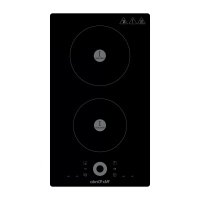
MXPI2612 - Cooker Mx Onda - Free user manual and instructions
Find the device manual for free MXPI2612 Mx Onda in PDF.



| Product Type | Built-in Induction Hob |
| Brand | Mx Onda |
| Model | MXPI2612 |
| Dimensions (W x D x H) | 288 x 520 x 56 mm |
| Cutout Dimensions (W x D) | 265 x 495 mm |
| Weight | 4.9 kg |
| Power Supply | 220-240 V ~ 50/60 Hz |
| Maximum Power | 3600 W |
| Number of Cooking Zones | 2 zones + flexible zone (fusion of the two left zones) |
| Surface Material | High-resistance ceramic glass |
| Controls | Touch electronic |
| Power Levels | 9 levels + Turbo function |
| Timer | Up to 99 minutes |
| Special Functions | FLEX mode, automatic safety shut-off, child lock, residual heat indicator, Stop & Go function |
| Pan Detection | Detection of small or non-induction-compatible pans |
| Care and Cleaning | Specific ceramic glass cleaner, scraper for stubborn dirt, avoid abrasive products |
| Safety | Child lock, automatic shut-off, overheat protection, overflow protection |
| Spare Parts and Repairability | Repair exclusively by a qualified technician. Parts available from the official Mx Onda technical service |
| General Information | Compliant with European directives 2014/30/EU and 2014/35/EU |
Frequently Asked Questions - MXPI2612 Mx Onda
User questions about MXPI2612 Mx Onda
0 question about this device. Answer the ones you know or ask your own.
Ask a new question about this device
Download the instructions for your Cooker in PDF format for free! Find your manual MXPI2612 - Mx Onda and take your electronic device back in hand. On this page are published all the documents necessary for the use of your device. MXPI2612 by Mx Onda.
USER MANUAL MXPI2612 Mx Onda
natural_image
Three identical cooking pots with crossed X marks, no text or symbols presentnatural_image
Two cooking pots with crossed arrows indicating heating or resistance (no text or symbols)natural_image
Simple line drawing of a cooking pot with a curved handle (no text or symbols)Recipientes especiales
USO DE LA PLACA
natural_image
Two hand-drawn diagrams showing a hand holding a circular object and a finger pressing a square button labeled B (no text or symbols beyond basic geometry)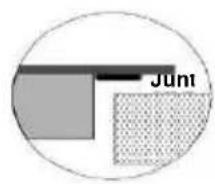
| Modelo | L(mm) | W(mm) | H(mm) | D(mm) | A(mm) | B(mm) | X(mm) |
| VC2650 | 590 | 520 | 52 | 48 | 555+5-0 | 495+5-0 | 50 min. |
| PI2660 | 590 | 520 | 56 | 52 | 555 +5-0 | 495+5-0 | 50 min. |
| PI2615 | 288 | 520 | 56 | 52 | 265+5-0 | 495+5-0 | 50 min |
natural_image
Diagram showing a rectangular object with a small inset view of a tool interacting with a flat surface (no text or symbols)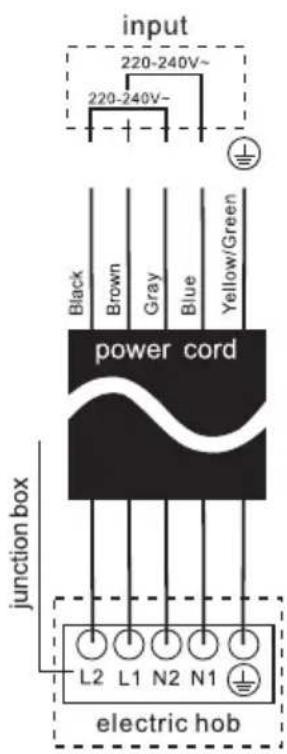

CARACTERÍSTICASTÉCNICAS
USER AND INSTALLATION MANUAL
Mx Onda
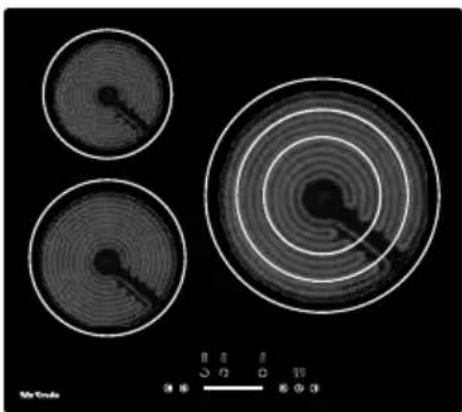
BUILT-IN VITROCERAMIC PLATE WITH THREE COOKING ZONES
INDUCTION HOB FOR RECESS WITH
THREE ZONES COOKING & FLEXIBLE ZONE
MODEL: MX-VC2650
MX-PI2660FLEX
MX-PI2615FLEX

natural_image
Three circular patterns with concentric rings and a central dark spot, displayed on a black background (no text or symbols)
natural_image
Pure electrical circuit lines without any symbols
natural_image
Pure electrical circuit lines without any symbolsCE
BEFORE USE, READ THIS MANUAL CAREFULLY
ATTENTION
THIS APPLIANCE WORKS WITH A VOLTAGE OF 240 V, TO AVOI POSSIBLE ELECTRIC SHOCK DO NOT TRY TO
OPEN IT. This device does not have any part that can be repaired yourself. In the event of a malfunction, do not manipulate it, go to MX ONDA Technical Service.
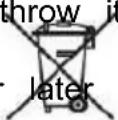
Once the useful life of this electrical product has expired, do not throw it away with household waste.
Deposit it in the appropriate container at a local recycling point for later recycling.

This product complies with the European RoHS Directive (2011/65/EU), on the restriction of the use of certain ha substances in electrical and electronic equipment.

INTRODUCTION
Congratulations on the purchase of your new built-in ceramic hob with three ONDA cooking zones model MX-VC2650, MX-PI2660FLEX and MX-PI2615 FLEX.
We recommend that you spend some time reading this User and Installation Manual to fully understand how to properly install it and how to use it. For installation, read the installation section.
Please read all safety instructions carefully before use and save this user an installation manual for future reference.
Among others, it incorporates the following features:
MX-VC2650
• High resistance ceramic glass.
• Maximum power: 5700 W
- Cooking zone 1: Cooking diameter: 165 mm
Power: 1200W
- Cooking zone 2: Cooking diameter: 200 mm
Power: 1800W
- Cooking zone 3: Cooking diameter: 150/220/300 mm
Power: 1050/1950/2700W
- Touch type electronic controls
- 9 power levels
- Timer up to 99 minutes
• Automatic safety shutdown
- Child lock
- Residual heat indication
MX-PI2660 FLEX
• High-strength ceramic glass.
• Maximum power: 6600 W
- Operation in stand-alone mode with 3 cooking zones or FLEX mode that combines the two left cooking zones to obtain a large cooking surface:
- Standalone mode operation:
- Zone 1 (top left): 180 mm cooking diameter, power 1300 W (1500 W turb mode)
- Zone 2 (lower left): 180 mm cooking diameter, power 1900 W (2200 W tu mode)
- Zone 3 (Right Zone): 280 mm cooking diameter, power 2300W (3000 W t mode)
• Operation in FLEX mode:
- Left area: 180 x 380 mm cooking surface, power 3000 W (3600 W turbo
- Touch-type electronic controls with waste heat indicator
• 9 power levels + turbo function
• Continuous heating at the low power level
• Detection of small to non-induction containers
• Automatic Safety Shut-Off & Child Lock
MX-PI2615 FLEX
• High-strength ceramic glass.
• Maximum power: 3600 W
- Operation in stand-alone mode with 2 cooking zones or FLEX mode that combines the two cooking zones to obtain a large cooking surface:
- Standalone mode operation:
- Zone 1 (top left): 180 mm cooking diameter, power 1300 W (1500 W turbo mode)
- Zone 2 (lower left): 180 mm cooking diameter, power 1900 W (2200 W turbo mode)
• Operation in FLEX mode:
- Left area: 180 x 380 mm cooking surface, power 3000 W (3600 W turbo mode)
- Touch-type electronic controls with waste heat indicator
• 9 power levels + turbo function
• Continuous heating at the low power level
• Detection of small to non-induction containers
BEFORE CONNECTING THE APPLIANCE
Your security is important for us. Please read this information before the board.
Installation (Electric Shock Hazard)
- Disconnect the appliance from the mains before carrying out any work or maintenance on it.
- Connection to a good ground wiring system is essential and mandatory.
- Modifications to the home wiring system should only be carried out a qualified electrician.
- Failure to follow this advice may result in electric shock or death.
Cutting Hazard
- Be careful: the edges of the panel are sharp.
- Failure to use caution may cause injuries or cuts.
Important safety instructions
- Read these instructions carefully before installing or using this appliance.
- No combustible products or products should be placed in this appliance at any time.
- Make this information available to the person responsible for installing the device, as it could reduce your installation costs.
- To avoid risks, this appliance must be installed in accordance with these installation instructions.
- This appliance should only be installed and grounded by a suitably qualified person.
- This apparatus must be connected to a circuit incorporating an isolation switch that provides complete disconnection from the power source.
- Failure to properly install the device may void warranty or liability claims.
Operation and maintenance
- Do not cook on a broken or cracked cooktop. If the surface of the cooking surface breaks or cracks, disconnect the hob from the ma socket (automatic) and contact a qualified technician.
- Turn off the hob and wait for it to cool completely before cleaning maintenance you must disconnect the hob from the mains.
- Failure to follow this advice may result in electric shock or death.
Health Hazard
- This device complies with electrical and electromagnetic safety regulations.
- However, people with pacemakers or other electrical implants (such as insulin pumps) should consult their doctor or the implant manufacturer before using this device to ensure that their implants are not affected by the electromagnetic field.
- Failure to follow this advice may result in death or significant damage to your health.
Hot Surface Hazard
- During use, accessible parts of this appliance will become hot end to cause burns.
- Do not allow your body, clothing or anything other than the appropriate cookware to come into contact with the ceramic glass until the surface is cool.
- Metal objects such as knives, forks, spoons and lids should not be placed on the countertop surface as they may become hot.
- Pan handles may be hot to the touch.
-
Check that the handles of the saucepans do not protrude from ot cooking zones that are on. Keep the handles out of the reach of children.
-
Keep children away.
- Failure to follow this advice may cause burns and scalds.
Cutting Hazard
- The sharp blade of a glass plate scraper is exposed when the safe cover is retracted. Use with great care and always store safely at out of reach of children.
- Failure to take the necessary precautions may cause injuries or cut
IMPORTANT SAFETY INSTRUCTIONS
- Never leave the appliance unattended when in use. When oil is overheated it can cause smoke and spills that can ignite.
- Never use your appliance as a work or storage surface.
- Never leave objects or utensils on the appliance.
- Do not place or leave magnetizable objects (e.g., credit cards, memory cards) or electronic devices (e.g., computers, MP3 players) near the device, as they may be affected by its electromagnetic fi
- Never use your appliance to heat or heat the room. After use, alw turn off the cooking zones and hob as described in this manual (using the touch controls).
- Do not allow children to play with the appliance or sit, stand or cl on the plate.
- Do not place toys or products that attract children's attention on the plate; children could climb on the plate and could be seriously injured
-
Do not leave children alone or unattended in the area where the appliance is used.
-
Children or persons with a disability that limits their ability to use the appliance must have a responsible and competent person to instruct them in its use. The instructor must be convinced that they can use the device without danger to themselves or their environment.
- Do not repair or replace any part of the appliance unless specifically recommended in the manual. All other services must be performed a qualified technician.
- Do not use a steam cleaner to clean the plate.
- Do not place or drop heavy objects on the plate. Do not lean or plate.
- Do not use pots, pans or saucepans with uneven edges or drag across the glass surface as this may scratch the glass surface.
- Do not use scouring pads or any other abrasive cleaning products clean the hob surface as they may scratch the glass surface.
- If the power cord is damaged, it must be replaced by the manufacturer or qualified personnel to avoid a hazard.
- This appliance is intended for home use only, not professional use MX ONDA will not accept any responsibility and the guarantee will void in case of improper use or failure to follow instructions.
- WARNING: The appliance and its accessible parts become hot during use. Care should be taken to avoid touching the cooking zones. Children under 8 years old should be kept away unless continually supervised.
- Children should not play with the appliance. Cleaning and maintenance should not be carried out by children without proper supervision.
-
This device can be used by children aged 8 years and older and persons with reduced physical, sensory or mental capabilities or lack of experience and knowledge if they have been given supervision instruction concerning use of the device in a safe manner and understand the instructions. dangers involved.
-
WARNING: Unattended cooking on a hotplate with grease or oil can be dangerous and cause a fire. NEVER try to put out a fire with turn off the appliance and then cover the flame for example with or a fire blanket.
- WARNING: Fire Hazard: Do not place or store products on cookin surfaces.
- WARNING: If the surface is cracked, turn off the appliance to avoid the possibility of electric shock and do not touch it to avoid cuttir ceramic glass.
- A steam cleaner should not be used.
- The appliance is not designed to be operated by means of an ext timer or a separate remote control system.
- CAUTION: The cooking process must be supervised. The short-term cooking process must be continuously monitored.
- WARNING: To prevent the plate from moving, safety anchors must installed. See installation instructions.
- WARNING: Use only cooktop protectors designed by the manufacturer of the cooking appliance or indicated by the appliance manufacturer in the appropriate instructions for use or cooktop protectors built into the appliance. The use of inappropriate protection can cause accidents.
- This appliance incorporates a ground connection for functional purposes only.
- Remove any protective film that may be on the glass surface.
CHARACTERISTICS OF THE CONTAINERS
Container Base Features
Pay special attention to the shape of the base, since it must be completely not use containers with uneven edges or curved bottoms.

natural_image
Three identical cooking pots with crossed-out X marks, no text or symbols presentMake sure the base of the container is smooth, rests flat against the glass the same size as the cooking zone. Use containers whose diameter is as la the selected zone graph. Always center the container on the cooking zone. The base of a container can influence the distribution of heat and therefore cooking result. Choosing a container with a better quality base will save us cooking time and energy.
Protect the glass surface
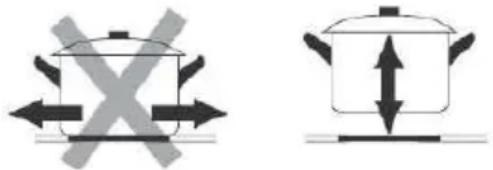
Always lift containers off the glass surface, do not slide it as this could sc the glass.
natural_image
Two cooking pots with crossed arrows indicating opposing pressure, one with a cross symbol and the other with a double-headed arrow (no text or labels)Empty containers or containers with a very thin base
Never place an empty container on the plate and turn it on, as this can ca container to overheat (due to excess heat) and damage the ceramic glass or plate itself. If the base of the container is very thin, it can also become ex hot, refrain from using this type of container.
INDUCTION COOKER (MX-PI2660 FELX y PI2615 FLEX)
Advantages of induction cooking
The induction cooker is a radical change in the traditional way of cooking food, the heat is generated directly in the container so the heat loss between the different elements (container, glass-ceramic glass plates, etc.) is eliminated.
- Decreased cooking time: the container heats up faster.
- Energy saving: by reducing the time to cook and/or fry. When the container is removed from the cooking zone, it automatically stops supplying
heat.
- Easier cleaning; Because the surface isn't as hot, spilled food doesn't burn as quickly.
Appropriate containers for induction
Ferromagnetic vessels
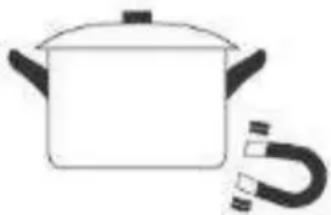
Suitable containers for induction cooking are those that are made of ferromagnetic material. They can be made of enamelled steel, cast iron or special stainless steel induction tableware.
To find out if a container is suitable for induction cooking, check that it is attracted by a magnet.
natural_image
Simple line drawing of a cooking pot with a handle (no text or symbols)Special Containers
There are other types of containers whose base is not entirely ferromagnetic. Before use, check the diameter of the base and that these containers are detected by the induction hob.
Vessels not suitable for induction
Never use containers made of normal stainless steel, glass, clay, copper, or aluminum.
Vessel Detection
The hob has a minimum limit of detection of the cooking zone that varies in e-cooking zone. For this reason, you should refrain from using containers whose base is smaller than the specified diameter.
If you turn on the hob without a container, with a container whose base is low than the specified one, or with a container that is not suitable for induction, the hob will not work, the indication " " will appear on the display.
Container Dimensions
The cooking zones have a minimum and maximum operating diameter, and automatically adapt to the diameter of the vessel. However, the bottom of the bowl should have a minimum diameter according to the corresponding cooking zone. To get the best efficiency out of your induction cooktop, place the base the bowl in the center of the cooking zone.
Cooking diameter of the upper left area: 180 mm ∅
Cooking diameter of the lower left area: 180 mm ∅
Cooking diameter of the right zone: 280 mm ∅
CONTROLS AND ELEMENTS MX-VC2650

- Small cooking zone Cooking diameter: 165 mm ∅ Power: 1200W
- Medium cooking zone Cooking diameter: 200 mm ∅ Power: 1800W
- Large cooking area Cooking diameter: 150/220/300 mm ∅ Power: 1050/1950/2700W
- Glass plate
- Dashboard
PANEL DE CONTROL

- Indication of the cooking zone
- Stop and continue button
- Child lock control button
- Heating level/timer slider
- Extended cooking zone selection button
- Timer selection button
- On/off button
CONTROLS AND ELEMENTS MX-PI2660 FLEX

- Upper left cooking zone: Cooking diameter: 180 mm ∅
Power: 1300 W (1500 W turbo mode) - Lower left cooking zone: Cooking diameter: 180 mm ∅
Power: 1900 W (2200 W turbo mode) - Flexible cooking zone: Maximum cooking surface: 180 x 380 mm ∅
Power: 3000 W (3600 W turbo mode) - Right cooking zone: Cooking diameter: 280 mm ∅
Power: 2300 W (3000 W turbo mode) - Glass Plate
- Control Panel
CONTROL PANEL

- Cooking zone selection button
- Flex Zone Function Control Button
- Stop & Continue control button
- Child Lock Control Button
- Cooking Level/Timer Slider
- Turbo Function Button
- Timer selection button
- Button ON/OFF
CONTROLS AND ELEMENTS MX-PI2615 FLEX

- Upper cooking zone: Cooking diameter: 180 mm ∅
Power: 1900 W (2200 W turbo mode)
- Lower cooking zone: Cooking diameter: 180 mm ∅
Power: 1300 W (1500 W turbo mode)
- Flexible cooking zone: Maximum cooking surface: 180 x 380 mm ∅
Power: 3000 W (3600 W turbo mode
-
Glass Plate
-
Control Panel

- Cooking zone selection button
- Stop & Continue control button
- Timer selection button
- Booster Function Button
- Cooking Level/Timer Slider
- Flex Zone Function Control Button
- Child Lock Control Button
- Button ON/OFF
• Controls respond to touch, so no pressure is necessary.
- Use the entire tip of your finger, not the tip. You will hear a beep each time a touch is detected.
- Make sure that the controls are always clean, dry, and that no object (for example, a utensil or cloth) is covering them. Even a thin layer of water can make the controls difficult to operate.

USE YOUR COOKER
To start cooking
After connecting the board to electricity and turning it on. Press and hold the ON/OFF control button for about 3 seconds until you hear a "beep" to turn on the plate on. Now the plate goes into Standby mode, all the heat.
The setting indicators and timer setting indicators show “-”
Place a container suitable for the chosen cooking zone.
Make sure the bottom of the container and the surface of the cooking zone are clean and dry.

natural_image
Simple line drawing of a hand pressing a button with a vertical line (no text or symbols)
natural_image
Simple line drawing of a cooking pot on a stand (no text or symbols)Set the heating level of the cooking zone.
Before adjusting the heat level, it is necessary to touch the Heating zone selection control button to select and activate the cooking zone you want to use. Heat Settings
The selected zone indicator flashes when it is active, then you could adjust its heat level lower:
Adjust the heat setting by sliding the slider.

Notes:
- After connecting to electricity, when it is turned on, the plate buzzer rings once,
All indicators turn on for 1 second and then turn off.
- When the plate is in standby mode, if not practiced within 1 minute, the electric plate will automatically turn off and the doorbell will beep.
- To turn on the hob, press the ON/OFF control button and hold it for about 3 seconds; To turn it off, you just need to press the ON/OFF button again.
- Power level can be adjusted from 0 to 9.
- The heat setting indicator for the selected zone flashes during setting.
After setting, the number flashes for 5 seconds and then stops flashing, then the setting will be confirmed.
To turn off the hob
- You can turn off the cooking zone by adjusting the heat setting to level 0, the indicator of which shows “-”.
- You can also turn off the entire board by touching the ON/OFF control button.

natural_image
Simple line drawing of a hand holding a circular object with a pointer, next to a small circle and a horizontal line (no text or symbols)FLEXIBLE COOKING ZONE MX-PI2660 FLEX y MX-PI2615 FLEX
Some models may have one or more flexible cooking zones. These flexible cooking zones can each be used as a single zone or as two separate zones, depending on the co-needs at any given time.
Each of the flexible areas consists of two independent inductors that can be controlled separately. When working as a single zone, a cookware is moved from one zone to within the flex area while maintaining the same power level of the zone where the ut originally placed, and the part that is not covered by the utensil automatically shuts d
Important: Be sure to place the cookware centered in the single cooking zone. For la rectangular, and elongated pots, be sure to place the pots centered in the cooking area covering both crosses.

Activate the flexible induction area.
To activate a flex area as a single large zone, first press either of the two cooking selection button for this flex area, then press the flex area control button. When the works, the indicator above the control knob of the corresponding flex area lights up a power level indicator flashes, you can adjust the power level of the flex area by sliding slider.
Disables the flexible induction area
To turn off the flex area when it's running, press either of the two cooking zone select button on this flex area; When the power level indicator flashes, press the flex control again. The indicator will turn off after you turn it off.
TURBO FUNCTION
Some models of induction cooktops may have one or more cooking zones with Turbo You can use the "Turbo" function to increase the power of the respective cooking zor maximum power for 5 minutes. This feature could reduce the cooking time, which is convenient for cooking when you are in a hurry!
Using the Turbo Function
- Tap the Heating Zone Select Control button to select the cooking zone in which y use the Turbo function.
- Tap the control button of the Turbo function, the heating zone The indicator will show "b" and flash for 5 seconds and then stop flashing, then the function will be activated.

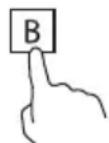
Note: The Turbo function increases the power considerably, so we recommend that you use it with caution as cooking times may vary and excess temperature may but food.
Note: Once the tube function is complete, the cooking zone will return to its original Cancel the Turbo feature
- Follow the above practice of the Turbo feature by turning it on once again when the feature is working, you could cancel the Turbo feature.
- You can also cancel the Turbo feature by adjusting the power level settings.
USING A GLASS CERAMIC PLATE WITH LARGE HEATING AREA
Some models of ceramic hobs may have one or more extended cooking zones (oval/double/triple zone); These extended zones can provide a larger cooking area and additional heat to accommodate different sizes of cooking vessels.
To use the extended zone when the board is working, follow the following:

- Select and activate the cooking zone you want to use extended zones:
Touch the heating zone selection control button to select and activate to make adjustments.
-
The central zone will turn on when the heating is first set. level for extended cooking zone.
-
When the heating zone is selected and active (power level indicator flashing), touch the extended zone control button to activate the extended heating element for a large heating area.
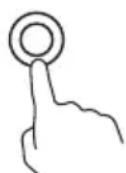
Notes:
- By continuously touching the control button, the extended zones will operate as follows:
-Dual zone: "Central-Dual-Central-Dual-Central Zone..."
-Triple zone: "Central-Dual-Triple-Central-Dual-Triple-Central Zone..."
- When Dual Zone is active, the LED indicator will show the heat setting. And “” alternatively; When Triple Zone is active, the LED indicator will show the power setting and “” alternately.
CHILD LOCK SAFETY CONTROL
- You can lock the controls to prevent unwanted use (for example, children accidental turning on the cooking zones) by activating the child lock function.
- When the controls are locked, except the ON/OFF control button and the child lock control button, all other touch control buttons are disabled.
Touch the child lock control button for about three seconds. The timer indicator will "Lo" and the child lock function will be active.
To unlock the controls
- Make sure the electric plate is turned on.
- Touch and hold the child lock control button for about 3 seconds, the doorbell ring and "Lo" disappears on the timer indicator, the child lock will be inactive.
- You can now start using your electric plate.
In child lock mode, all control buttons will be disabled except the ON/OFF button child lock button. You can always turn off the board with the ON/OFF control in ca emergency, but you must unlock the board first in the next operation.
Note: In the child lock function, if you turn off the hob without deactivating the child function. When you turn on the hob later, the child lock function will still be valid.
STOP AND GO FUNCTION
- Make cooking easy! When something unforeseen arises and your attention is required, you will waste time if you turn everything off. For this reason, this function will be useful on these occasions.
- The Stop and Go function can turn off all zones. When you go back, with one press of the button, the hob restarts where it was, to continue cooking.
Activate the Stop and Go function
- To activate the Stop and Go function, you can press the Stop and Go function once. Then all programmer settings are maintained and the hob stops heating, all setting indicators show "P".
Deactivate the Stop and Go function
To cancel the Stop and Go function, you can press the Stop and Go function again after returning. Then, all programmer settings will return to the way they were, the Stop and Continue "P" indicator will disappear from all indicators.

When the Stop and Go function is active, all control buttons are disabled except ON/OFF button and Stop and Go.
Note: The hob will automatically turn off if the Stop and Go function lasts more minutes.
TIMER
When the hob is on, you can use the timer in two different ways:
- You can use it as a minute tracker. In this case, the timer will not turn off a zone when the set time expires.
- You can set it to turn off one or more cooking zones.
- You can set the minute hand/timer up to 99 minutes.
Timer Description
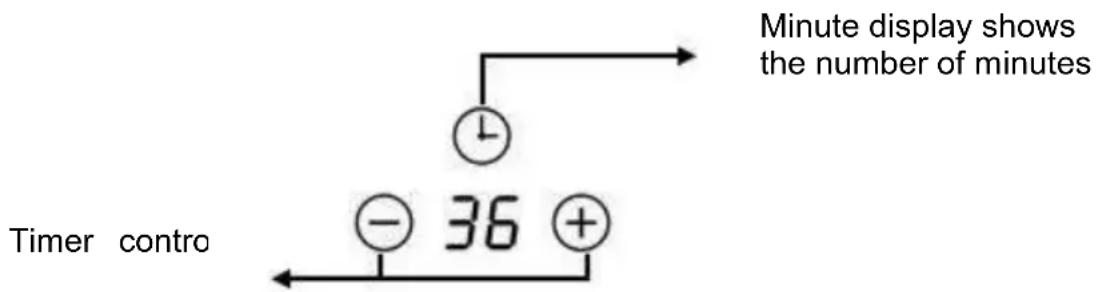
flowchart
graph TD
    A["Timer"] --> B["+"]
    B --> C["36"]
    D["Minute display shows the number of minutes"] --> E["Clock"]
    E --> F["+"]
    G["Timer contro"] --> H["-"]
    H --> I["36"]
Use the timer as a minute reminder
If you have not selected any cooking zone
- Touch the timer control button, the number on the timer indicator flashing.
- Touch the timer control button once, the single digit number on the timer indicator flashes, then adjust a single digit of the minute hand setting by sliding the slider.
- Press the timer control button again, the tens digit number on the timer indicator flashing, then adjust the tens digit minute timer setting by sliding the slider.
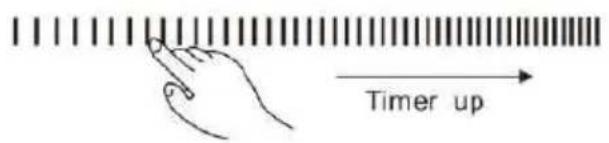
Note: By continuously touching the timer control button, the slider works with the following consequence: "Single digit-Tens digit -Confirm setting-Single digit-..."
-
When the minute hand is set, it will start counting down immediately, the screen will show the remaining time.
-
The buzzer will ring for 30 seconds and the timer indicator “- - “will be displayed when the timer time ends. Any efficient touch of control buttons during it would end up ringing the doorbell.
Set the timer to turn off the cooking zone
-
Touch the cooking zone selection control button to select the cooking zone for which you want to set the timer.
-
Touch the timer control button, the number on the timer indicator flashing.
-
Then adjust the timer settings.
- Touch the timer control button once, the single digit number on the timer indicator flashes, then adjust a single digit of the minute hand setting by sliding the slider.
- Press the timer control button again, the tens digit number on the timer indicator flashing, then adjust the tens digit minute timer setting by sliding the slider.

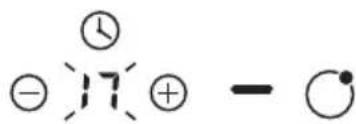
-
When the timer is set, it will start counting down immediately, the screen will show the remaining time.
-
When the cooking timer expires, the corresponding cooking zone cooking will turn off automatically.
Note: The red dot next to the power level indicator will illuminate for those zones that be set with a timer. You can check the timer settings of different timer-set cooking zone by activating this cooking zone.
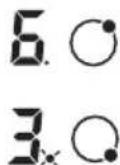
Note: If more than one cooking zone has a timer setting, the timer indicator will show the lowest time. The red dot next to the power level indicator will flash.
RESIDUAL HEAT WARNING
Be careful with hot surfaces
When the board has been running for some time, some residual heat will remain. The "H" appears on the setup indicator to warn you to stay away from him.
It can also be used as a power saving function:
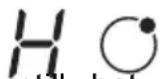
If you want to heat more pans, use the cooking zone that is still hot.
AUTOMATIC SAFETY SHUT OFF
Another safety feature of the board is the automatic shutdown. This happens every t you forget to turn off a cooking zone. Default shutdown times are shown in the foll table:
| Power level | 1 | 2 | 3 | 4 | 5 | 6 | 7 | 8 | 9 |
| Auto power off time (hours) | 8 | 8 | 8 | 4 | 4 | 4 | 2 | 2 | 2 |
PROTECTION AGAINST OVERHEATING
An equipped temperature sensor can monitor the temperature inside the plate. When excessive temperature is controlled, the hob will automatically stop its operation.
PROTECTION AGAINST OVERFLOW
For your safety, the programmer will automatically turn off the power if the liquid bolt you wet a cloth on the touch control panel. All control buttons will become invalid e on/off button and child lock unless you dry the touch control area.
COOKING GUIDELINES
Be careful when frying, as oil and fat heat up quickly, especially if you use the Turf function. At extremely high temperatures, oil and grease ignite spontaneously and this presents a fire hazard.
Cooking tips
Energy saving
- When the food comes to a boil, reduce the power.
- Using a lid will reduce cooking times and save energy by retaining heat.
- Minimize the amount of liquid or fat to reduce cooking times.
- Start cooking at a high power level and then reduce the power level when the food is heated.
COOKING SETTINGS
The following configurations are only indicative. The exact setting will depend on fact including your cookware and how much you are cooking.
Experiment with the board to find the configuration that best suits your needs.
TROUBLESHOOTING
| Problem | Possible Causes | What to do? |
| The induction hob won't turn on | No mains power | Make sure that the induction hob is plugged into the mains outlet and that the circuit breaker is the on position. Check to see if you have power the rest of your home. If you've checked everything and the problem persists, call a technician. |
| Touch buttons don't work properly | There may be a small film of water or liquid over the buttons or you may be using your fingertip when touching the buttons. | Make sure the control panel area is clean and Use your fingertip when you touch the controls. |
| Touch buttons don't work | Control panel is locked | To unlock the control panel, see the correspond section. |
| The surface of the plate is scratched | Kitchen containers can have edges or edges that deteriorate the plate.The utensils or cleaning products used are not adequate. | Use kitchen containers with a flat, smooth base.Refer to the section "The induction cooker" and the section on cleaning the induction hob. |
| Some containers make noises or clicking noises | Some containers have a sandwich base | This is normal and is due to the type of base vessel, this is normal and does not indicate an abnormality or failure. |
| The hob produces a humming sound when used at a high power level. | This is caused by induction cooking technology. | This is normal, the noise should be reduced or disappear completely when the power decreases |
| Fan noise coming from the induction hob. | The fan that cools the induction hob has been turned on.It prevents the hob from overheating, the fan can continue to run after turning off the induction hob. | This is normal and not a malfunction. Do not turn off the power to the induction hob while the fan running. |
| The containers are not heated and the indication appears on the display | The bowl is not suitable for induction, the base of the bowl is too small or it is not centered in the cooking area. | Use induction-friendly containers, with the base large enough to be detected, and focus on the cooking zone |
| The board has shut down unexpectedly, a tone sounds, and an error code is displayed on the screen. | Technical failure | Write down the error code and disconnect the power to the board using the circuit breaker or differential switch provided for this purpose.Contact your nearest MX ONDA Official Technical Service. |
CLEANING THE COOKTOP
Cleaning and maintenance
Important: Before carrying out any maintenance or cleaning work, DISCONNECT the appliance from the POWER supply and ensure that it is completely cool.
Clean the countertop surface
Wipe spills from countertop surface as soon as possible after use. Always make sur the surface is cool enough before cleaning.
Use a soft cloth or kitchen paper to clean the surface. If the spill has dried on the surface, you may need to use a specialized glass-ceramic glass cleaner, available in most supermarkets.
Do not use other abrasive cleaners and/or metal wool etc. as it may scratch the ceramic glass surface of your hob.
| Dirt type | How to clean | Important |
| Everyday dirt on the glass surface (fingerprints, marks, food stains, or non-sugar spills | 5. Disconnect the board's pow using the switch or differenti enabled for this purpose6. Use a ceramic cooktop cle while the surface is warm ( not hot).7. Rinse and dry the plate w clean cloth or paper towel.8. Reconnect the board to po | When you turn off the power the board, there will be no indication of hot surface,but the cooking zone may sti hot!Use special scouring pads for glass ceramic plates. Do use strong, corrosive or abras cleaning products that may damage the plate. Always rea the label to check if your cle or scrubber is suitable. Never leave residue on the surface,glass may stain. |
| Spills caused by sugary foods | Remove them immediately using a spatula or scraper suitable ceramic hobs, be careful with hot surfaces of the cooking zo1. Disconnect the board's power using the switch o differential enabled for this purpose2. Hold the spatula or scraper at a 30° angle and scr any dirt or spill onto a area of the plate.3. Wipe up any dirt or spills with a kitchen towel or paper towel. | Remove stains left by melting a sugary foods or spills as soon possible. If allowed to cool on glass, it may be difficult to cle even permanently damage the surface of the plate.Cutting Hazard: When the safety cover is retracted, the blade on scraper becomes sharp. Use wit great care and always store saf and out of reach of children. |
| Dirt and spill stains on control panel | 5. Disconnect the board's pow using the switch or differenti enabled for this purpose6. Clean the control panel are with a clean, damp sponge cloth.7. Dry the control panel area completely8. Reconnect the board to po | Liquid spills in the control panel area may cause the ceramic hob malfunction, the touch buttons m not function correctlyBe sure to clean and dry the panel area completely before connecting the board to power again. |
Maintenance of the Hob
If you find that something is wrong with your board, before contacting technical support or where you bought it, check the following:
- No power reaching the device:
- Check if there is a power outage in your apartment;
- Check if the appliance is properly connected to electricity;
- Has the timer setting elapsed?
- If it reaches the longest cooking time and turns off automatically;
- If there is boiling liquid on the touch control panel and overflow protection devices automatically;
- Touch control panel buttons cannot be active:
- Whether in "Child Lock", "Lo" is displayed on the timer screen;
- Whether liquid/wet cloth on the touch control panel, active overflow protection;
- After cooking, an "H" appears on the screen:
-This is normal. The hob has residual heat warning safety functions. It will remain up surface is cool enough to touch.
- After shutdown, the induction hob fan continues to work for a while:
-This is normal, this is to help the appliances cool completely.
- Some pans make crackling or clicking noises while using the induction hob:
-This is normal, it is the sound of the induction coils during operation and depending construction of your cookware, the click may be slightly different.
- The glass is scratching:
-Check if you are using inappropriate cookware, such as cookware with rough edges.
-Check if abrasive or inappropriate scouring pads or cleaning products are being used
- The heating element of the ceramic hob alternately turns on and off when in open
-This is a normal and natural characteristic of glass ceramic. The ceramic hob program together with the thermostat or thermocouple on the heating element, can control the operation of the hob at the set power level and prevent overheating by alternately to heating element on and off.
-If you work at the highest power level, the heating element will continue to turn on certain time and then turn on/off alternately.
-If you work at another lower power level, the heating element will alternately turn o at a certain frequency from the beginning according to the power setting of the cook
ERROR MESSAGES
| Problem | Possible causes | To do? |
| E1/E2 | Abnormal supply voltage | Please check if the power supply is normTurn on after the power supply is normal. |
| E3 | Pan sensor high temperature | Check if there is no liquid in the pan,fill it with liquid and then restart. |
| E5 | IGBT temperature sensor high temperature | Please restart after the induction cooktopcools down. |
FACILITY
Make a hole in the countertop based on the following suggestions:
- You must leave at least a minimum of 5 cm around the hole, free of oil (furniture, appliances, etc.).
• The thickness of the countertop is at least 30 mm. - Choose heat-resistant countertop material to avoid deformation caused by h radiation from the glass-ceramic hob.


natural_image
Simple geometric diagram showing a shaded rectangle inside a circle, with a dotted pattern on the right side (no text or symbols)| Model | L(mm) | W(mm) | H(mm) | D(mm) | A(mm) | B(mm) | X(mm) | |
| VC2650 | 590 | 520 | 52 | 48 | 555+5-0 | 495+5-0 | 50 min. | |
| PI2660 | 590 | 520 | 56 | 52 | 555 +5-0 | 495+5-0 | 50 min. | |
| PI2615 | 288 | 520 | 56 | 52 | 265+5-0 | 495+5-0 | 50 min |
Under any circumstances, make sure that the ceramic hob is well ventilated at that the air inlet and outlet are not blocked.
Make sure the ceramic hob is in good working order. As shown below:
Note: The safety distance between the glass-ceramic plate and the cabinet o extractor hood above the glass-ceramic plate must be at least 760 mm.
| A(mm) | B(mm) | C(mm) | D | E |
| 760 | 50 mm | 20 mm | Air entrance | Air vent 5mm |
Before inserting the hob into the kitchen worktop opening, the supplied foam gasket a plastic bag) must be placed on the bottom of the hob.
Do not install the plate without the foam gasket!
The gasket must be fixed to the countertop by the following method:
- Remove the protective film from the gasket.
- Then place the gasket on the bottom of the glass, next to the edge.
- The gasket must be placed along the entire edge of the glass and must not c the corners.
- When installing the gasket, make sure that the glass does not come into contact any sharp objects.

Before installing the ceramic or induction hob, make sure that
- The countertop surface is smooth and level, and no structural elements interfere with space requirements.
- The countertop is made of heat-resistant material.
- If the ceramic hob is installed on top of an oven, the oven must have a cooling fan.
- The facility will comply with all permitting requirements and applicable rules and regulations.
- The electrical installation complies with local safety rules and regulations and incorporates a suitable isolating switch or circuit breaker that provides total disconnection from the electrical network.
- The isolating switch or circuit breaker must be suitable and provide an air g contact separation of 3 mm on all poles (or on all live [phase] conductors local wiring rules allow this variation from requirements)
- The isolation switch is easily accessible to the user.
- Consult a licensed electrician or local authorities regarding installation and statutes if you have questions about installation.
- Use heat-resistant, easy-to-clean finishes (such as ceramic tile) for wall surfaces surrounding the countertop.
When completing the installation of the hob make sure that...
- The power cord is not accessible through drawer or drawer doors.
- There is adequate flow of fresh air from the outside of the cabinet to the of the countertop.
- If the ceramic hob is installed over a drawer or cupboard space, a thermal protection barrier is installed under the base of the hob.
- The isolation switch is easily accessible by the user.
•
Before placing the fixing brackets.
The unit must be placed on a stable and smooth surface (use the packa not apply force to the controls that protrude from the plate.
Easy Fit Kits
There is a pack of easy installation kits for each plate, including clips and screws. Look for the easy fit kit package first.
Attach the clips to the countertop: Insert the fixing clips into the reserved fixing holes on 2 sides of the shell, fix the clip to the shell with screw, and then insert the countertop into the cabinet/work surface.

natural_image
Diagram showing a rectangular object with a lid and a magnified inset of a tool on a surface (no text or symbols)Attach the plate to the cabinet: Insert the plate into the cabinet/work surface as shown below, the side-mounted clips can secure your plate sturdily.

Precautions
- The ceramic hob must be installed by authorized electricians or qualified technicians. Please never perform the operation on your own.
- The ceramic hob cannot be installed directly on a dishwasher, refrigerat freezer, washing machine or dryer, as moisture can damage the electronic components of the ceramic hob.
- The glass-ceramic plate will be installed so that better heat radiation can be ensured to improve its reliability.
- The wall and the induced heating zone on the table surface must with the heat.
- To avoid any damage, the countertop must be heat resistant.
CONNECTION OF THE VITROCERAMIC PLATE OR INDUCTION HOB TO THE ELECTRICAL MAINS

The ceramic hob must be installed by a licensed electrician or a suitably qualified technician.
Before connecting the ceramic hob to the mains, check that:
- The electrical installation where you are going to connect the glass-ceramic plate must be suitable for the power consumed by the glass-ceramic plate.
- The voltage must correspond to the nominal value specified in the characteristics described in this manual.
- The section of the power cables must withstand the current specified on rating plate.
To connect the ceramic hob to the mains outlet, you should not use adapter reducers or splitters, as these devices can heat up and cause a fire.
The power cable of the ceramic hob must not touch any part or area where acquires high temperatures and must be placed so that the temperature will exceed 75^ C at any point.
- If the cable is damaged or needs to be replaced, this must be done by after-sales technician using the appropriate tools, to avoid accidents.
- If the appliance is connected directly to the mains, an omnipolar circuit breaker must be installed with a minimum gap of 3 mm between the contact
- The installer must ensure that the correct electrical connection has been made and that it complies with safety regulations.
- The cable must not be bent or compressed.
- The cable should be checked periodically and replaced only by a qualified technician.
Check with a licensed and qualified electrician for proper electrical installation. Any modification to the electrical installation must be carried out only by a licensed electrician.
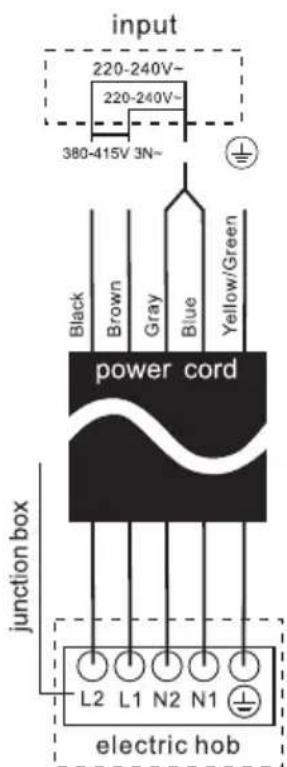
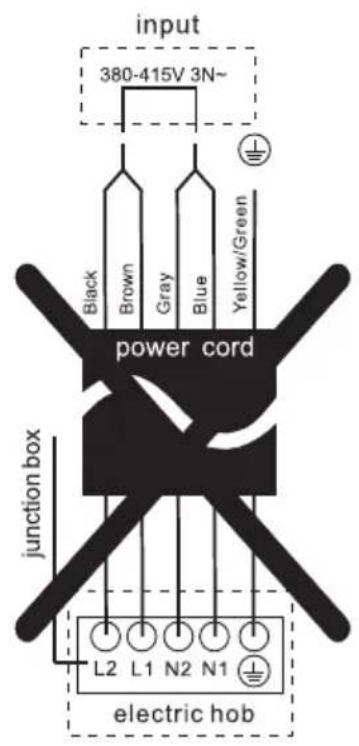
The electrical connection of the ceramic hob must be made in accordance with current regulations and protected by a single-pole magneto-thermal or automatic switch. The connection is shown below:
- If the cable is damaged, to be replaced or replaced, the operation must be carried out by an Official Mx Onda Technical Service.
- If the ceramic hob is connected directly to the mains, a single-pole switch m be installed with a minimum opening of 3 mm between the contacts.
- The authorized installer must ensure that the correct electrical connection has been made and that it complies with safety regulations.
- The cable must not be bent or compressed.
- The cable should be checked regularly and replaced only by authorized technicians.
- The yellow/green wire of the power cable must be connected to the ground the mains socket.
- The manufacturer is not responsible for any accident resulting from the use of an ungrounded appliance or defective grounding continuity.
- If the device has a power outlet, it must be installed so that the power outl accessible.

SPECIFICATIONS
MX-VC2650
Supply voltage Consumption
Cooking surface Large
cooking zone
Maximum Power
Cooking Diameter
Medium cooking zone
220 - 240 V \~ 50/60 Hz
5700 W
High-strength ceramic glass
1050/1950/2700 W
150/220/300 mm ∅
Maximum power 1800 W
Cooking diameter 200 mm ∅
Small cooking zone
Maximum Power Cooking
Diameter
1200 W
165 mm ∅
Controls
Power Levels
Timer
Dimensions
Recess dimensions for recess Weig
Touch
9 levels
Up to 99 minutes
590 x 520 x 51 mm (l, a, alto)
555 x 495 mm (l, a)
9,3 Kg
SPECIFICATIONS Mx-PI2660 FLEX
Supply voltage
220 - 240 V \~ 50/60 Hz
Maximum power consumption
6600 W
Cooking surface High-strength ceramic glass
Zone 1 (upper left)
Maximum power 1300 W (1500 W turbo mode)
Cooking diameter 180 mm ∅
Zone 2 (lower left)
Maximum power
1900 W (2200 W turbo mode)
Cooking diameter
180 mm ∅
Zone 3 (right zone)
Maximum power 2300 W (3000 W turbo mode)
Cooking diameter 280 mm ∅
Operation in FLEX mode
Maximum power
3000 W (3600 turbo mode)
Cooking surface
180 x 380 mm
Touch Controls
Power Levels: 9 Levels
Timer Up to 99 minutes
Dimensions
590 x 520 x 56 mm (L, H, H)
Recess dimensions
555 x 495 mm (L, H)
Weight
8.6 Kg
SPECIFICATIONS
Supply voltage 220 - 240 V \~ 50/60 Hz
Maximum power consumption 3600 W
Cooking surface High-strength ceramic glass
Zone 1 (upper)
Maximum power 1900 W (2200 W turbo mode)
Cooking diameter 180 mm ∅
Zone 2 (lower)
Maximum power 1300 W (1500 W turbo mode)
Cooking diameter 180 mm ∅
Operation in FLEX mode
Maximum power 3000 W (3600 turbo mode)
Cooking surface 180 x 380 mm
Touch Controls
Power Levels: 9 Levels
Timer Up to 99 minutes
Dimensions 288 x 520 x 56 mm (L, H, H)
Recess dimensions 265 x 495 mm (L, H)
Weight 4.9 Kg
Technical specifications subject to change without notice.
This product complies with European Directives 2014/30/EC (EMC) on Electromagnetic Compatibility and 2014/35/EC (LVD) on low voltage safety.
"MX, MX ONDA" and its logos are registered trademarks of MX ELECTRO
Information and Technical Service telephone number: 91 358 07 33
C / Matabueyes, 7 nave 1A 19
Cabanillas del Campo
(Guadalajara)
E-MAIL: mxsat@mxonda.es
http://www.mxonda.es
natural_image
Three circular patterns with concentric rings and radial lines, displayed against a black background (no text or symbols)
natural_image
Pure electrical circuit lines without any symbols
natural_image
Pure electrical circuit lines without any symbolsCE
ANTES DE USAR, LEIA ATENTAMENTE ESTE MAI
ATENÇÃO
ESTE APARELHO FUNCIONA COM UMA TENSÃO DE 240 V, PAR EVITAR POSSÍVEIS CHOQUES ELÉTRICOS NÃO TENTE
natural_image
Three identical cooking pots with crossed-out X marks, no text or symbols presentnatural_image
Simple line drawing of a cooking pot with a coiled tube (no text or symbols)natural_image
Line drawing of a cooking pot on a stand (no text or symbols)natural_image
Two hand-drawn diagrams: one showing a hand holding a circular object, the other showing a finger pressing a square labeled B (no text or symbols present)| Modelo | L(mm) | W(mm) | H(mm) | D(mm) | A(mm) | B(mm) | X(mm) |
| VC2650 | 590 | 520 | 52 | 48 | 555+5-0 | 495+5-0 | 50 min. |
| PI2660 | 590 | 520 56 52 | 555 +5-0 | 495+5-0 | 50 min. | ||
| PI2615 | 288 520 | 56 52 265+5 | -0 | 495+5-0 | 50 min |
natural_image
Diagram showing a rectangular object with a small inset image of a tool interacting with it, no text or symbols present.


ESPECIFICAÇÕES
MX-VC2650
natural_image
Three circular patterned screens on a black background, no text or symbols visible
natural_image
Pure electrical circuit lines without any symbols
natural_image
Pure vertical line pattern with horizontal stripes, no text or symbols presentCE
AVANT UTILISATION, LISEZ ATTENTIVEMENT CE MANU
ATTENTION
natural_image
Simple line drawing of a cooking pot with a U-shaped magnet nearby (no text or symbols)Conteneurs spéciaux
natural_image
Three identical cooking pots with crossed X marks, no text or symbols presentnatural_image
Two cooking pots with crossed arrows indicating heating or resistance, no text or symbols presentRécipients vides ouéciipients à base tès fine
UTILISATION DE LA PLAQUE
Activez la zone d'induction flexible.
natural_image
Two hand-drawn diagrams: one showing a hand holding a circular object, the other showing a finger pressing a square labeled B (no text or symbols present)FONCTION D'ARRÊT ET DE CONTINUATION

| Model | L(mm) | W(mm) | H(mm) | D(mm) | A(mm) | B(mm) | X(mm) |
| VC2650 | 590 | 520 | 52 | 48 | 555+5-0 | 495+5-0 | 50 min. |
| PI2660 | 590 | 520 | 56 | 52 | 555 +5-0 | 495+5-0 | 50 min. |
| PI2615 | 288 | 520 | 56 | 52 | 265+5-0 | 495+5-0 | 50 min |
natural_image
Diagram showing a rectangular object with a small inset view of a tool interacting with it, no text or symbols present.

SPÉCIFICATIONS
MX-VC2650
natural_image
Three circular patterned screens on a black background, no text or symbols visible
natural_image
Pure electrical circuit lines without any symbols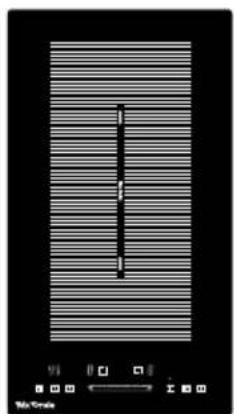
natural_image
Pure vertical line pattern with horizontal stripes, no text or symbols presentCE
PRIMA DELL'USO, LEGGERE ATTENTAMENTE QUESTO MANUA
ATTENZIONE
natural_image
Three identical cooking pots with crossed-out X marks, no text or symbols presentnatural_image
Two cooking pots with directional arrows indicating heating or cooling (no text or symbols)UTILIZZO DELLA PIASTRA
natural_image
Simple line drawing of a finger pressing a circular button with a vertical line, labeled with number 3 (no text or symbols on the diagram itself)natural_image
Simple line drawing of a cooking pot on a stand (no text or symbols)natural_image
Two hand-drawn diagrams: one showing a hand holding a circular object, the other showing a finger pressing a square labeled B (no text or symbols present)BLOCCO DEL PANNELLO DI CONTROLLO
| Modello | L(mm) | W(mm) | H(mm) | D(mm) | A(mm) | B(mm) | X(mm) |
| VC2650 | 590 | 520 | 52 | 48 | 555+5-0 | 495+5-0 | 50 min. |
| PI2660 | 590 | 520 | 56 | 52 | 555 +5-0 | 495+5-0 | 50 min. |
| PI2615 | 288 | 520 | 56 | 52 | 265+5-0 | 495+5-0 | 50 min |
natural_image
Diagram showing a rectangular object with a magnified inset of its exterior panel and internal components (no text or symbols)KOCHEN & FLEXIBLE ZONE
MODELL: MX-VC2650
MX-PI2660FLEX
MX-PI2615FLEX
natural_image
Three circular patterns with concentric rings and radial lines, displayed against a black background (no text or symbols)
natural_image
Pure electrical circuit lines without any symbols
natural_image
Pure vertical line pattern with no text, numbers, or symbolsCE
LESEN SIE DIESES HANDBUCH VOR DEM GEBRAUCH SORGFÄLTIG DURCH
AUFMERKSAMKEIT
natural_image
Simple line drawing of a cooking pot with a coiled tube (no text or symbols)Spezielle Container
natural_image
Simple line drawing of a cooking pot with crossed X marks (no text or symbols)
natural_image
Simple line drawing of a cooking pot with crossed X marks (no text or symbols)
natural_image
Symbolic illustration of a cooking pot with crossed arrows indicating pressure or resistance (no text or labels)
VERWENDUNG DER VITROCERAMIC-PLATTE
natural_image
Simple line drawing of a cooking pot on a stand (no text or symbols)natural_image
Two hand-drawn diagrams: one showing a circular object with a dot, the other showing a finger pressing a labeled square (no text or symbols)-Dual-Zone: "Central-Dual-Central-Dual-Central Zone..."
-Triple Zone: "Central-Dual-Triple-Central-Dual-Triple-Central Zone..."
| Model | L(mm) | W(mm) | H(mm) | D(mm) | A(mm) | B(mm) | X(mm) |
| VC2650 | 590 5 | 20 52 48 | 555+5-0 | 495+5-0 | 50 min. | ||
| PI2660 | 590 | 520 56 52 | 555 +5-0 | 495+5-0 | 50 min. | ||
| PI2615 | 288 | 520 56 | 52 265+5 | -0 | 495+5-0 | 50 min |
natural_image
Diagram showing a rectangular object with a lid and a magnified inset of a mechanical component (no text or symbols)
- Recipientes especiales
- USO DE LA PLACA
- CARACTERÍSTICASTÉCNICAS
- USER AND INSTALLATION MANUAL
- Mx Onda
- BUILT-IN VITROCERAMIC PLATE WITH THREE COOKING ZONES
- INDUCTION HOB FOR RECESS WITH
- THREE ZONES COOKING & FLEXIBLE ZONE
- ATTENTION
- INTRODUCTION
- MX-VC2650
- MX-PI2660 FLEX
- MX-PI2615 FLEX
- BEFORE CONNECTING THE APPLIANCE
- Installation (Electric Shock Hazard)
- Cutting Hazard
- Important safety instructions
- Operation and maintenance
- Health Hazard
- Hot Surface Hazard
- CHARACTERISTICS OF THE CONTAINERS
- Container Base Features
- Protect the glass surface
- Empty containers or containers with a very thin base
- INDUCTION COOKER (MX-PI2660 FELX y PI2615 FLEX)
- Advantages of induction cooking
- Appropriate containers for induction
- Vessels not suitable for induction
- Vessel Detection
- Container Dimensions
- CONTROLS AND ELEMENTS MX-VC2650
- CONTROLS AND ELEMENTS MX-PI2660 FLEX
- CONTROL PANEL
- CONTROLS AND ELEMENTS MX-PI2615 FLEX
- USE YOUR COOKER
- To start cooking
- Notes:
- To turn off the hob
- FLEXIBLE COOKING ZONE MX-PI2660 FLEX y MX-PI2615 FLEX
- Activate the flexible induction area.
- Disables the flexible induction area
- TURBO FUNCTION
- Using the Turbo Function
- USING A GLASS CERAMIC PLATE WITH LARGE HEATING AREA
- To use the extended zone when the board is working, follow the following:
- CHILD LOCK SAFETY CONTROL
- To unlock the controls
- STOP AND GO FUNCTION
- Activate the Stop and Go function
- Deactivate the Stop and Go function
- TIMER
- Use the timer as a minute reminder
- Set the timer to turn off the cooking zone
- RESIDUAL HEAT WARNING
- Be careful with hot surfaces
- AUTOMATIC SAFETY SHUT OFF
- PROTECTION AGAINST OVERHEATING
- PROTECTION AGAINST OVERFLOW
- COOKING GUIDELINES
- Cooking tips
- Energy saving
- COOKING SETTINGS
- CLEANING THE COOKTOP
- Clean the countertop surface
- Maintenance of the Hob
- ERROR MESSAGES
- FACILITY
- Do not install the plate without the foam gasket!
- Before installing the ceramic or induction hob, make sure that
- When completing the installation of the hob make sure that...
- Before placing the fixing brackets.
- Easy Fit Kits
- Precautions
- CONNECTION OF THE VITROCERAMIC PLATE OR INDUCTION HOB TO THE ELECTRICAL MAINS
- SPECIFICATIONS
- SPECIFICATIONS Mx-PI2660 FLEX
- ATENÇÃO
- ESPECIFICAÇÕES
- Récipients vides ouéciipients à base tès fine
- UTILISATION DE LA PLAQUE
- Activez la zone d'induction flexible.
- FONCTION D'ARRÊT ET DE CONTINUATION
- SPÉCIFICATIONS
- ATTENZIONE
- UTILIZZO DELLA PIASTRA
- BLOCCO DEL PANNELLO DI CONTROLLO
- KOCHEN & FLEXIBLE ZONE
- AUFMERKSAMKEIT
- Spezielle Container
- VERWENDUNG DER VITROCERAMIC-PLATTE
Brand : Mx Onda
Model : MXPI2612
Category : Cooker