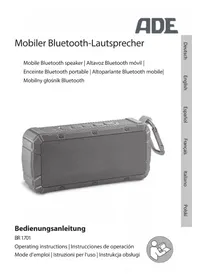
BR 1701 - Hi-fi system ADE - Free user manual and instructions
Find the device manual for free BR 1701 ADE in PDF.



| Product type | Portable Bluetooth speaker |
| Weight | 330 g |
| Battery life | Approximately 6 to 7 hours |
| Charging time | Approximately 4 to 5 hours |
| Battery | Lithium-ion polymer 3.7 V / 2200 mAh |
| Power | 2 x 3 W RMS |
| Protection rating | IPX6 (powerful water jets) |
| Bluetooth version | 4.1 |
| Bluetooth range | Approximately 10 meters |
| Connectivity | Bluetooth, AUX input 3.5 mm |
| Hands-free function | Yes, with built-in microphone |
| Carabiner | Yes, for attaching |
| RESET function | Press and hold the Power button for 8 seconds |
| Cleaning | Slightly damp cloth, avoid moisture inside |
| Safety | Non-removable battery, do not expose to fire, do not immerse |
| Warranty | 2 years (material or manufacturing defects) |
Frequently Asked Questions - BR 1701 ADE
User questions about BR 1701 ADE
0 question about this device. Answer the ones you know or ask your own.
Ask a new question about this device
Download the instructions for your Hi-fi system in PDF format for free! Find your manual BR 1701 - ADE and take your electronic device back in hand. On this page are published all the documents necessary for the use of your device. BR 1701 by ADE.
USER MANUAL BR 1701 ADE
22089 Hamburg, Germany
You have chosen to purchase a high-quality product from the ADE brand, which combines intelligent functions with an exceptional design. This Bluetooth speaker is your robust companion for good sound. The many years of experience of the ADE brand ensure a high technical standard and proven quality.
We wish you a vibrant listening experience!
Your ADE Team
Scope of Delivery
- Bluetooth speaker
USB connection cable
Audio cable with 3.5mm jack - Operating Manual
Table of Contents
Scope of Delivery 20
General Information 22
Intended Use 23
Safety 23
Overview 26
Charging the battery 27
Connecting to Bluetooth device (pairing) 28
Turning the speaker on and off. 29
Audio playback via Bluetooth 29
Making a call 30
Audio playback via AUX 31
Using the snap hook 32
RESET function 32
Cleaning. 32
Fault/Remedy 33
Technical Data 34
Declaration of Conformity 35
Warranty 35
Disposal 36
About this manual

This operating manual describes how to safely use and care for your products. Keep this operating manual in a safe place in case you would like to refer to it later. If you pass this item on to someone else, pass on this manual as well. Failure to observe the recommendations in this operating manual can lead to injuries or damage to your product.
Explanation of symbols

This symbol, combined with the word DANGER, warns against serious injury.

This symbol, combined with the word WARNING, warns against moderate and mild injuries.

This symbol, combined with the word NOTE, warns against material damage.

This symbol signifies additional information and general advice.
Intended Use
- This speaker is designed for audio playback via Bluetooth or an audio cable. You can use smartphones, tablet PCs, laptops or MP3 players as playback devices.
The device is not suitable for commercial use. - The speaker must be operated under moderate climatic conditions.
Safety
Children must not play with the item.
- The device contains a lithium-ion battery. Avoid dismantling, throwing into fire or short-circuiting the battery. Risk of explosion! Protect the built-in battery from excessive heat. The battery is firmly installed in the device and cannot and must not be replaced or removed. Improper removal of the battery may result in a risk of explosion. If the battery is defective, contact our service or a specialist workshop.
DANGER for Children
- Keep packaging material away from children. Risk of choking if swallowed.
DANGER from electricity
- Do not make any modifications to the item or to the connection cable. Only allow repairs to be carried out at a specialist workshop, since inexpertly repaired devices can present hazards to the user.
- Do not open the housing and do not insert any objects into the housing apertures.
- Do not place any containers filled with liquids on or near the device. The container may tip over and the leaking fluid may adversely affect the electrical safety.
WARNING of burns/fire
- Do not operate the device near naked flames (e.g. candles) and do not place any burning candles on or near the device.
- While charging, the device may become hot. When charging, place the device in a well-ventilated area and do not cover it.
Note on material damage
- The speaker is protected from moisture, but neither it nor the supplied cables should be immersed in water or other liquids. Protect the device from excessive moisture, direct sunlight and dirt.
- Do not connect the speaker to a speaker output of a separate power amplifier. This would damage the speaker.
- Condensation may occur inside the speaker if you move it from a very cold place to a very warm one. Wait a few hours before turning on the speaker.
- Keep magnetic stripe ID cards, credit cards, etc. away from the device. The magnets installed in the speaker could damage them.
- Never use harsh, scouring or abrasive cleaning agents or the like to clean the speaker. Doing so may scratch the surfaces.
- The speaker has feet at its bottom. Since surfaces are made of various materials and are treated with diverse care products, it cannot be completely ruled out that some of these substances contain constituents that attack and soften the feet of the device. Place a non-slip pad under the speaker, if necessary.
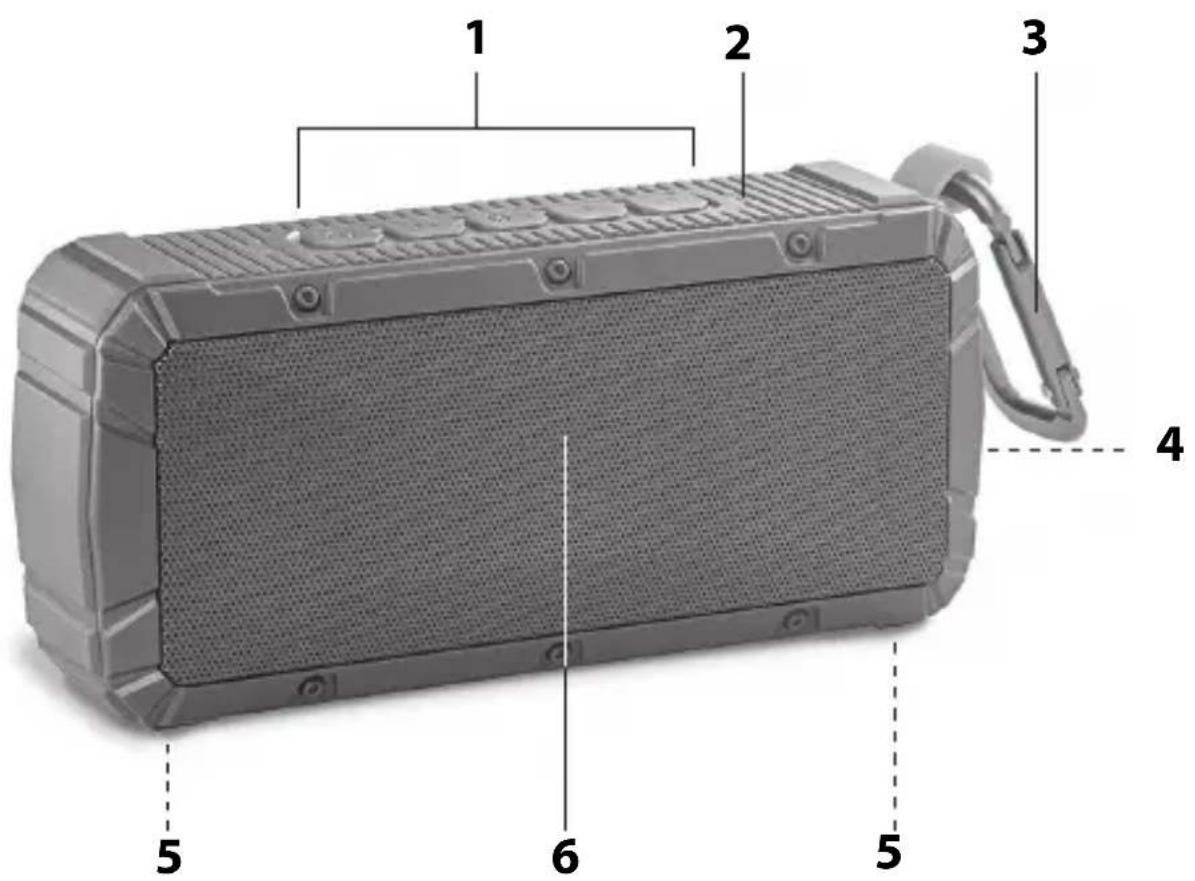
1 Operating buttons
2 Bluetooth light
3 Snap hook
4 Rubber locking tab with connection sockets:
AUX: Connection socket for external device via 3.5 mm jack (cable included in the scope of delivery)
DC IN: Connection socket for USB charging cable (cable included in the scope of delivery)
5 Foot
6 Speaker
Charging the battery
-
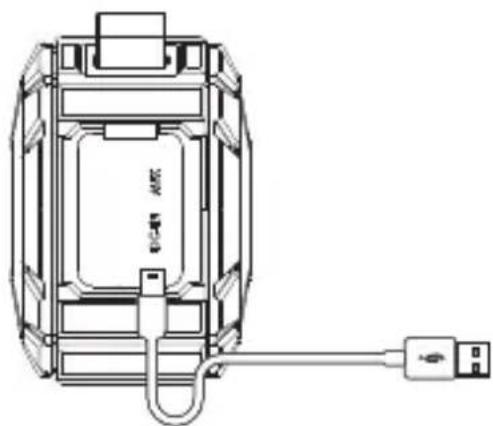
Open the rubber locking flap on the side.
-
Connect the supplied USB connection cable to the DC IN USB port of the speaker and to the USB socket of a computer (PC, tablet, laptop) or a USB charger.
As soon as the red power indicator above the DC IN connection socket goes off, the battery is charged. The charging time during the first use is approx. 4-5 hours. When the battery is fully charged, the operating time is approx. 6-7 hours (depending on volume, ambient temperature etc.). Pay attention to the following:
- The battery must be recharged when the power indicator above the DC IN connection socket flashes red.
- You can already use the speaker while charging. However, this will extend the charging time.
- The battery should be charged at least once a month, even when not in use.
- The longest capacity is ensured at room temperature. The operating time is reduced at low temperatures.
Connecting to Bluetooth device (pairing)

If you are prompted for a password: enter "0000".
- Always follow the operating instructions of your mobile device.
- When pairing, do not plug the audio cable into the AUX socket.
- If you have not pressed any button within 15 minutes while pairing, the speaker will turn off to save energy.
- The Bluetooth transmission range is approx. 10 metres.
Establishing connection
- Press and hold down the button until a melody sounds and the Bluetooth light flashes blue.
- Enable the Bluetooth function on your mobile device and start the search.
- Select "V3-E" from the list and connect the devices.
Once the devices are connected, a short beep will sound and the Bluetooth light stops flashing and stays blue constantly.
Pay attention to the following:
-
If you turn the speaker off and then on again, it will reconnect automatically to the Bluetooth device when the latter is nearby and the Bluetooth function is enabled. Once the Bluetooth device has been found, you will hear a short beep.
-
If you have connected a device in parallel via the AUX socket, its playback will be prioritised and the Bluetooth connection will be interrupted automatically. If you remove the plug from the AUX socket again, the playback via Bluetooth will continue automatically shortly thereafter.
Terminating the connection
Only one device at a time can be connected to the Bluetooth Speaker. If you wish to connect another device to the speaker, you must first terminate the existing connection.
-To do this, terminate the existing Bluetooth connection on the mobile device or press and hold down the button for approx. 2 seconds.
As soon as the Bluetooth light flashes blue, the connection will be terminated and the speaker can be connected to another (or the same) mobile device.
Turning the speaker on and off
-To turn the speaker on and later off again, press and hold down the button for a few seconds.
Audio playback via Bluetooth
- Turn on the speaker.
- Start audio playback on the mobile device.
Overview of the speaker buttons:

- Press briefly - interrupt playback and continue

-
Press briefly - next track
-
Press and hold down - increase volume

- Press once briefly - start track from the beginning
- Press twice briefly - previous track
- Press and hold down - decrease volume

You can also enable these functions via your mobile device.
Making a call
The speaker is equipped with a built-in microphone (next to the button) and can therefore also be used as a hands-free kit. For a Bluetooth connection, the current audio playback will be interrupted.
- To accept the incoming call, press the 3 button.
The call will be transmitted via the speaker and you can speak freely.
To end the call, press again.

You can...
- ... accept and end the call as usual via your smartphone.
- ... select on your smartphone whether the call should be transmitted directly to the speaker or whether private calls should better be answered on the smartphone. For details, refer to the operating instructions of your smartphone.
After the call via the speaker, the audio playback can resume automatically depending on your smartphone.
- Decline a call - press twice.
- Redial - press twice to radial the last dialled phone number.
Audio playback via AUX
Mobile audio devices without the Bluetooth function can be connected directly to the speaker using the supplied audio cable.
- Turn off the speaker, if necessary.
- Use the audio cable to connect the audio device to the 3.5 mm AUX jack socket of the speaker.
- Use the ① button to turn on the speaker.
- Start playback on the audio device.
- Set the desired volume on the speaker and external audio device.
Pay attention to the following:
- Use the button to mute the speaker.
-
If you connect the audio cable to the speaker during audio playback via Bluetooth, it will switch automatically to the AUX input.
-
In AUX mode, the phone function is disabled.
-
The track control is carried out exclusively via the external audio device.
Using the snap hook
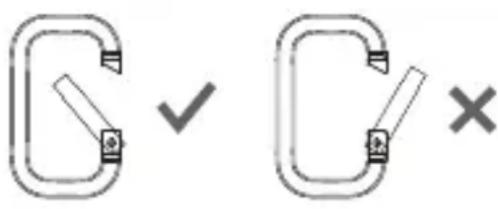
The snap hook can be used to carry the speaker on a belt loop.
Do not use the snap hook for other purposes than intended!
RESET function
The device can stop responding due to electromagnetic radiation in the environment.
-In this case, press and hold down the button for approx. 8 seconds to reset.
After that, the speaker will respond again as usual.
Cleaning
- Clean the speaker with a slightly damp cloth and mild detergent. Make sure that no moisture penetrates the device.
Fault/Remedy
| Fault Possible Cause | |
| No function. | •Charge the speaker battery, if necessary. •If the battery is fully charged: Perform a RESET. |
| No audio playback. | •Check whether playback has been interrupted (press ➔). •Is volume on the playback device and/or speaker set too low? •Is the plug inserted into the AUX connection socket? |
| No Bluetooth connection. | •Is your mobile device Bluetooth enabled? Please follow its operating instructions. •Is the Bluetooth function disabled? •Check that the speaker actually appears in the Bluetooth list of the mobile device. When pairing, place both devices close to each other and remove other devices with radio transmission from your nearest environment. |
Technical Data
Model: Bluetooth speaker BR 1701
Battery: Lithium-ion battery
3.7 V = 2200 mA h
Charging time: approx. 4-5 hours
Playback time: approx. 6-7 hours
Power: 2x 3 W RMS
Protection class: IPX6 (protection against strong water jet)
Bluetooth version: 4.1
Weight: 330 grammes
Max. transmission 4 dBm power:
Transmission frequency: 2.4 GHz
Distributor: Waagen-Schmitt GmbH
Hammer Steindamm 27-29
22089 Hamburg, Germany
Our products are constantly being refined and improved. For this reason, design and technical modifications are possible at any time.
Declaration of Conformity
Waagen-Schmitt GmbH hereby declares that the Bluetooth speaker BR 1701 complies with EU directives 2014/53/EU and 2011/65/EU.
The full text of the EU Declaration of Conformity is available at the following Internet address:
The declaration loses its validity if modifications have been made to the device without our approval.
Hamburg, February 2018
Waagen-Schmitt GmbH
Hammer Steindamm 27-29
22089 Hamburg, Germany

Warranty
Dear Valued Customer,
The company Waagen-Schmitt GmbH guarantees for 2 years from the purchase date the cost-free rectification of defects on the basis of material or fabrication errors through repair or exchange.
In the event of a warranty claim, please return the product with the proof of purchase (stipulating the reason for claim) to your dealer.
Disposing of the packaging

Dispose of the packaging with similar materials. Put cardboard with waste paper, foil with recyclable materials.
Disposing of the product
Dispose of the product in accordance with the regulations that apply in your country.
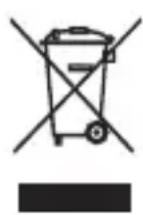
Devices must not be disposed of in normal household waste
At the end of its life, the product must be disposed of in an appropriate way. In this way, valuable materials contained in the device will be recycled and the burden on the environment avoided. Hand in the old device at a collection point for electronic waste or at a recycling depot. For more information, contact your local waste disposal firm or your local administrative body.
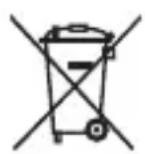
Recyclable and disposable batteries do not belong in household waste
All batteries must be handed in at a collection point in your community, suburb, or at the retailer. Such batteries can thus be disposed of in an environmentally friendly way.
Attention!
This device contains a battery that is permanently installed for safety reasons and cannot be removed without destroying the housing. Improper dismantling entails a safety risk. Therefore, you should return the device unopened to the collection point, and the device and the battery should be disposed of properly. Information on collection points receiving used equipment free of charge can be obtained from your local authority or municipal administration.
;Estimada/o cliente!
Chere cliente, cher client!
Lecture audio via AUX
Chere cliente, cher client,
- Scope of Delivery
- Table of Contents
- About this manual
- Explanation of symbols
- Intended Use
- Safety
- DANGER for Children
- DANGER from electricity
- WARNING of burns/fire
- Note on material damage
- Charging the battery
- Connecting to Bluetooth device (pairing)
- Establishing connection
- Terminating the connection
- Turning the speaker on and off
- Audio playback via Bluetooth
- Overview of the speaker buttons:
- Making a call
- You can...
- Audio playback via AUX
- Using the snap hook
- RESET function
- Cleaning
- Fault/Remedy
- Technical Data
- Declaration of Conformity
- Warranty
- Disposing of the packaging
- Disposing of the product
- Devices must not be disposed of in normal household waste
- Recyclable and disposable batteries do not belong in household waste
- Attention!
- ;Estimada/o cliente!
- Chere cliente, cher client!
- Lecture audio via AUX
Brand : ADE
Model : BR 1701
Category : Hi-fi system