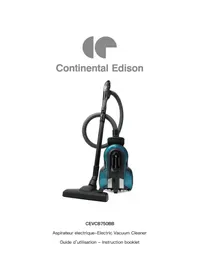
CEVCB750BB - Vacuum Cleaner CONTINENTAL EDISON - Free user manual and instructions

Find the device manual for free CEVCB750BB CONTINENTAL EDISON in PDF.

📄 27 pages English EN 💬 AI Question
Notice CONTINENTAL EDISON CEVCB750BB - page 15
View the manual : Français FR English EN

Questions des utilisateurs sur CEVCB750BB CONTINENTAL EDISON

0 question sur cet appareil. Repondez a celles que vous connaissez ou posez la votre.

Poser une nouvelle question sur cet appareil

L'email reste privé : il sert seulement à vous prévenir si quelqu'un répond à votre question.

Aucune question pour l'instant. Soyez le premier à en poser une.

Download the instructions for your Vacuum Cleaner in PDF format for free! Find your manual CEVCB750BB - CONTINENTAL EDISON and take your electronic device back in hand. On this page are published all the documents necessary for the use of your device. CEVCB750BB by CONTINENTAL EDISON.
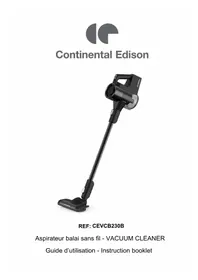
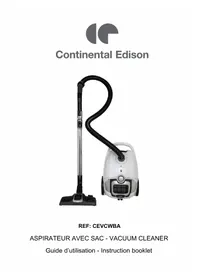
USER MANUAL CEVCB750BB CONTINENTAL EDISON

1. Read this manual carefully before

using appliance for first time.

2. Read instructions in this user manual

3. Before using appliance, check that

voltage in your area corresponds with that indicated in the technical specifications at the end of this manual.

4. Check also that your appliance is

connected to mains socket and conforms to applicable electricity standards.

5. Never use your vacuum cleaner, if

the electric supply to your residence does not conform to applicable electricity standards.

6. This appliance is designed for use

exclusive indoor at home.

7. This appliance should never be used

for any purpose other than that for which it was designed.

8. Always unplug appliance from the

mains when not in use and before moving it for cleaning and maintenance.

9. The appliance should not be

switched on, if it shows signs of wear.EN-

10. Do not use vacuum cleaner in damp

conditions, outdoors or with wet hands.

11. In order to prevent electrocution,

never immerse appliance, power cable or electric plug in water or any other liquid. Cleaning should be carried out only by using a dry or slightly damp cloth.

13. Switch off and unplug before

cleaning, maintenance and changing filters or accessories.

14. Never leave appliance unattended

during operation. Keep it out of reach of children.

15. Do not use vacuum cleaner without

16. Check that filters and dust

compartment are correctly positioned before use.

17. Check that filters are dry before

18. Vacuum cleaner should only be used

to clean dry materials. Never use it to clean damp material, water or any other liquid.

19. Never use it to clean hot or burning

material, ash, cigarettes, plaster, sharp objects, embers and the like.

21. Do not expose appliance to a source

of heat or dampness.

22. Power cable should never be placed

near a heat source or on sharp edging.

23. Never unplug by tugging power

24. Use an electric extension, only after

checking it is in perfect condition.

25. Do not insert any object into vacuum

cleaner, because this might damage or block it.

26. This appliance should be installed in

line with national installation regulations.

27. Unplug appliance in the following

situations: - Something unusual happens during operation.

Power cable is worn or defective. - Before cleaning and maintenance. - Appliance evidences visible signs of wear. - After use.

28. This appliance can be used by

children aged from 8 and above and persons with reduced physical, sensory or mental capabilities or lack of experience and knowledge if they have been given supervision or instruction concerning use of the appliance in a safe way andEN-

understand the hazards involved. Children shall not play with the appliance. Cleaning and user maintenance shall not be made by children unless they are old than 8 and supervised.

29. Keep the appliance and its cord out

of reach of children less than 8.

30. For maintenance, please refer to

31. If the supply cord is damaged, it must

be replaced by the manufacturer, its service agent or similarly qualified persons in order to avoid a danger.

32. This appliance is intended to be used

in household and similar applications such as : - staff kitchen areas in shops, offices and other working environments; - farm houses; - by clients in hotels, motels and other residential type environments; - bed and breakfast type environments.EN-

IMPORTANT Model: CEVCB750BB The radio frequency band for transmitter and receiver is 433.05MHz to 434.79Mhz Maximum radio frequency power:<10mW The undersigned,CONTINENTAL EDISON,declare remote control bagless vacuum cleaner Model:CEVB750BB conform to directive 2014/53/UE. The full text of the EU Conformity Declaration can be found at: www.continentaledison.fr IF YOUR APPLIANCE HAS BEEN DROPPED, HAVE IT CHECKED BY A PROFESSIONNAL BEFORE USING AGAIN. INTERNAL DAMAGE MAY CAUSE ACCIDENTS. IN THE CASE OF PROBLEMS AND REPAIRS OF ALL TYPES CALL THE LOCAL DISTRIBUTOR’S AFTER-SALES SERVICE DEPARTMENT, THE MANUFACTURER, THEIR AFTER-SALES SERVICE OR A SIMILARLY QUALIFIED PERSON, IN ORDER TO PREVENT RISKS.

GETTING TO KNOW YOUR APPLIANCE

1 On/off pedal 7 Dust tank 2 Cord rewinding pedal 8 Base 3 Parking position for floor brush 9 Rotating wheel 4 LED display 10 Hose socket 5 Dust tank release button 11 Handle 6 Big wheel

Assembling vacuum cleaner Note: always remove the power plug from the wall outlet before assembling or removing accessories.

1. Attaching the flexible hose into the hose socket, push in until you hear a

“click”, indicating it is locked.

2. Fitting the metal telescopic tube to the curved wand of the hose.

3. Fitting the floor brush to the metal telescopic tube. Adjust the tube to the

4. For replacing the batteries, remove the battery holder first and then insert

the batteries and refit the holder. Battery specification: AAA 1.5V Alkaline Battery x 2pcs (not included) Button function introduction Note: once all attachments are in place, unwind a sufficient length of cable and insert the plug into the wall outlet. A yellow mark on the power cord shows the Remove battery holder Insert the batteries Refit the holderEN-

ideal cable length. Do not pull the power cord beyond the red mark.

1. Insert the power plug into the wall outlet.

Press the on/off pedal on the unit to turn on the appliance or press the on/off button on the remote control handle. The LED display shows “ ”. To adjust the suction power of the appliance, press the speed control button “+” / “-” on the remote control handle. The LED display shows “ ” or “ ” once the suction power reaches min power or max power.

2. To rewind the power cord, press the cord rewinding pedal with one hand and

guide the power cord with the other hand to ensure that it does not whip causing damage or injury. Remote control handle LED display Note: the negative ions function will be turned on automatically once appliance is on On/off button Speed control button Power indicator “MIN” suction power indicator “MAX” suction power indicator Dust full indicator Negative ions indicatorEN-

by pressing the pedal or button of the appliance. This function is to clean the outlet air during vacuuming.

CLEANING AND MAINTENANCE

When the LED display shows “ ”. It means the dust tank is full.

1. Unplug the appliance and press the dust tank release button on the dust cup

2. Lift the dust tank up.

3. Press knob on low end of the dust tank to open the dust tank cover.

Carry and move away the cleaner: Note: this appliance has a special feature for handle, there is a handle at the front. Removing & cleaning sponge filter, centric filter and air outlet HEPA filter

Always unplug the appliance from electrical outlet before getting out the dust tank. a. Sponge filter

1. Press the dust tank release button on the dust cup arm.

2. Lift dust tank up.

3. Take out the sponge filter for cleaning and changing.

1. Press the dust tank release button on the dust cup arm.

2. Disassemble the dust tank as following pictures show.

3. Clean the centric filter.

4. Assemble the dust tank.

c. Air outlet HEPA filter

1. Press the air outlet grid knob to open.

2. Take out the air outlet HEPA filter for clean and change.

ATTENTION! “On” indicator flashing once power-on, it means the appliance is in standby mode. You can choose to press the pedal on the appliance’s body to start working or press the button on the remote control handle. It will work on max power and negative ions when start the appliance first time. You can adjust the power by the remote control handle as there are high-low grades of power to choose from. If you turn on the machine by the pedal, it will resume the mode first time (max power, negative ion). If you turn on by the button on the remote control handle, it will resume the mode last time.EN-

The appliance is featured with dust full indicator, it will flash once the dust tank is full. The sponge filter material in the cleaner will became dusty over time. This is normal and will not affect the performance of the filter. If the sponge filter is so dusty that suction does not return to 100%, then we suggest that the filter be removed then rinsed under the faucet and allowed to dry for 24 hours by airing not near the fire or some high temperature objects before refitting into the vacuum. This should be done once every six months or when suction appears to be reduced obviously. Important: Please note that there is a safety switch inside the vacuum to prevent the unit from being run with high vacuum rate. If the vacuum is too high, the safety switch will be turned on. In this case, it can minimize the vacuum rate and protect the motor from being broken. Note: The suction hole must be open, free of any obstructions at all times. Otherwise, the motor will overheat and could become damaged. Product sheet Trade Mark Continental Edison Reference CEVCB750BB Model no. CD-1D10-7 Supply Voltage 220-240V~ 50-60Hz Rated Input Power 750 W Disposal and environmental responsibility If you wish to dispose of your electric appliance, either to replace it or because it is no longer used, remember to consider the environment. Ask for information from the local authorities, because there do exist a number of environmentally helpful recycling centres.EN-

If this logo appears on the product, it means disposal of the appliance is covered by directive 2012/19/CE dated 4 July 2012 concerning waste electrical and electronic equipment (WEEE). Any dangerous substances contained in electric and electronic equipment may have potential effects on the environment and human health during reprocessing. As a result, at the end of the useful life of this appliance it should not be disposed of with unsorted municipal waste. Your role as end consumer is essential in terms of reusing, recycling or obtaining other types of value-creation from it. You have a choice of systems for collection and trade-in organised by local authorities (recycling centres) and distributors. You are obliged to make use of these choices. Continental Edison 120-126 Quai de Bacalan CS 11584 33000 Bordeaux France

Manual assistant
Powered by ChatGPT
Waiting for your message
Product information

Brand : CONTINENTAL EDISON

Model : CEVCB750BB

Category : Vacuum Cleaner