 ManualGo.com
IAN 328031 - Lighting Livarno Lux - Free user manual and instructions
Find the device manual for free IAN 328031 Livarno Lux in PDF.



Download the instructions for your Lighting in PDF format for free! Find your manual IAN 328031 - Livarno Lux and take your electronic device back in hand. On this page are published all the documents necessary for the use of your device. IAN 328031 by Livarno Lux.
USER MANUAL IAN 328031 Livarno Lux
Set of assembly instructions and instructions for use
Battery compartment cover
Button: reduce brightness
Button: increase brightness
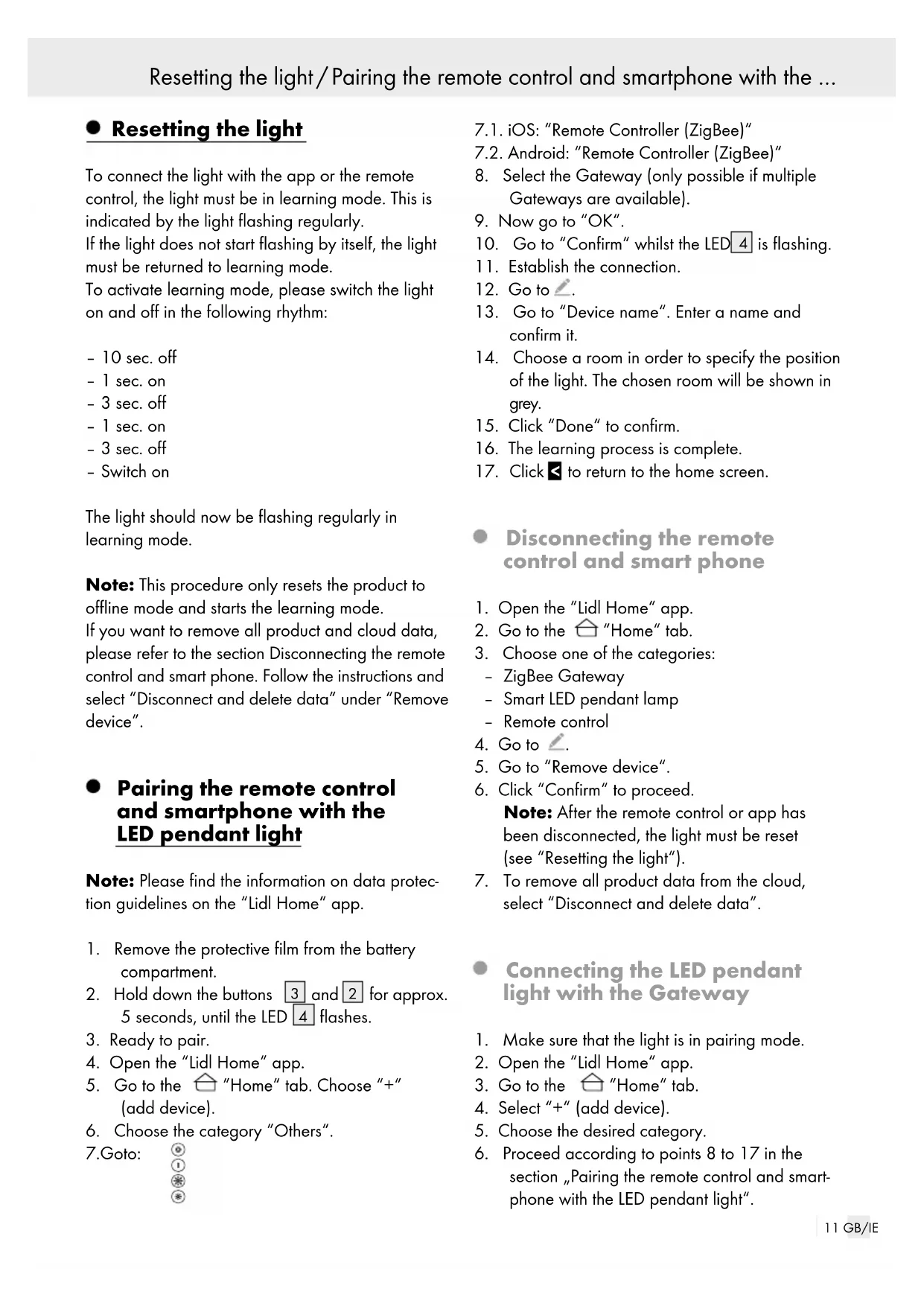
Wall plugs Scope of delivery 1 Remote control 2 Wall plugs 2 Screws 2 Self-adhesive pads Technical data Model number: 14149005L / 14149006L ZigBee: Version: 3.0 Compatible: iOS 9.0 / Android 5.0 Frequency: 2.4 GHz ISM Band Max. transmitting power: <+ 10 dBm Remote control: Range: 9 m Battery: 1 x CR 2450 Max. transmitting power: 13 dBm Frequency: 2.4‒2.485 GHz Resetting the light / Pairing the remote control and smartphone with the …11 GB/IE Parts description / Technical data Resetting the light / Pairing the remote control and smartphone with the … Resetting the light To connect the light with the app or the remote control, the light must be in learning mode. This is indicated by the light flashing regularly. If the light does not start flashing by itself, the light must be returned to learning mode. To activate learning mode, please switch the light on and off in the following rhythm: – 10 sec. off – 1 sec. on – 3 sec. off – 1 sec. on – 3 sec. off – Switch on The light should now be flashing regularly in learning mode. Note: This procedure only resets the product to offline mode and starts the learning mode. If you want to remove all product and cloud data, please refer to the section Disconnecting the remote control and smart phone. Follow the instructions and select “Disconnect and delete data” under “Remove device”. Pairing the remote control and smartphone with the LED pendant light Note: Please find the information on data protec- tion guidelines on the “Lidl Home“ app.
1. Remove the protective film from the battery
for approx. 5 seconds, until the LED
4. Open the “Lidl Home“ app.
8. Select the Gateway (only possible if multiple
10. Go to “Confirm“ whilst the LED
11. Establish the connection.
of the light. The chosen room will be shown in grey.
15. Click “Done“ to confirm.
16. The learning process is complete.
to return to the home screen. Disconnecting the remote control and smart phone
3. Choose one of the categories:
5. Go to “Remove device“.
6. Click “Confirm“ to proceed.
Note: After the remote control or app has been disconnected, the light must be reset (see “Resetting the light“).
7. To remove all product data from the cloud,
select “Disconnect and delete data”. Connecting the LED pendant light with the Gateway
1. Make sure that the light is in pairing mode.
2. Open the “Lidl Home“ app.
6. Proceed according to points 8 to 17 in the
section „Pairing the remote control and smart- phone with the LED pendant light“.12 GB/IE Pairing the remote control with the LED pendant light
1. Go to the tab “all devices“ and select the
3. Choose the desired light.
4. Click “Finish“ to confirm.
App functions Note: Make sure that you are always operating the current version of the app on your smartphone. Update the app if necessary. Note: To use voice control, the light must be con- nected online with the “Lidl Home“ app and the “Google Home“ app. The following modes are available via app control Switching on and off – Remaining time: Set up a timer
: Switch on and off – Programme: Create schedules for when the lights should be switched on and off automatically White – Touch arc: Adjust light colour from 3,000 K to 6,000 K – Touch panel: Adjust light intensity from 1 % to 100 % Scene – Night: warm, soft light – Reading: neutral light – Working: cold white light – Leisure: bright, warm light – Adding a scene: to save custom-designed lighting setups Remote control functions Switch on
Select the colour temperature
is already paired with the gateway, you will need to reset the LED pendant light
(see “Reset lamp“). You can control up to 30 LED pendant lights in sync with one remote control. Only one remote control can be connected per light. Each light must be connected individually. Repeat the process for each individual light. Remove the protective film from the battery compartment
will flash slowly. Wait 3 minutes until the LED pendant light
stops flashing. Hold the remote control
near the LED pendant light
for 3 seconds. The LED
should now start flashing. If pairing was successful, the LED
will light up for approx. 2 seconds. The LED pendant light
will flash three times. … / App functions / Remote control functions / Pairing the remote control ... ... / Replacing the battery / Wall mounting (optional) / Cleaning the remote control13 GB/IE … / App functions / Remote control functions / Pairing the remote control ... Unpairing the remote control from the LED pendant light (without gateway / app) Switch the light on. Hold the remote control
near the LED pendant light
for 3 seconds. The LED
should now start flashing. If unpairing was successful, the LED
will light up for approx. 2 seconds. The LED pendant light
will flash three times. Replacing the battery
Remove the battery cover
Remove the drained battery. Insert a new bat- tery into the battery compartment
. The plus symbol (+) on the battery must be facing out- wards. Close the battery compartment cover
SHOCK! Be careful not to damage any cables or pipes when drilling. Use a voltage / metal detector. Mark the 2 drill holes using the holes
intended for the screws. Drill the holes. Insert the wall plugs
into the holes. Mount the wall bracket
If you want to attach the wall bracket
to a smooth surface, stick the enclosed self-adhesive pads
to the intended points on the wall bracket
Remove the protective film from the self-adhesive pads
in the chosen location. Cleaning the remote control Do not use solvents, petrol, etc. These would damage the remote control. Before cleaning, remove the battery from the battery compartment
Clean the remote control with a damp cloth. Replace the battery in the battery compartment after cleaning
... / Replacing the battery / Wall mounting (optional) / Cleaning the remote control14 GB/IE Declaration of conformity Declaration of conformity This product fulfils the requirements of the applicable European and national directives (Directive 2014/53/EU, Ecodesign directive 2009 / 125 / EC, RoHS directive 2011 / 65 / EU). Conformity has been verified. The relevant declarations and docu- ments are held by the manufacturer. Brilo ner Leuchten GmbH & Co. KG hereby declar
in. De led-pen- dellamp