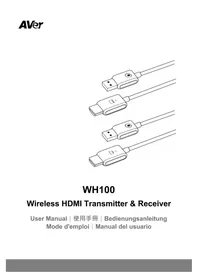
WH100 - Document camera AVer - Free user manual and instructions
Find the device manual for free WH100 AVer in PDF.


| Product type | Wireless HDMI transmitter-receiver kit |
| Brand | AVer |
| Model | WH100 |
| Connectivity | Wi-Fi 5 GHz (IEEE 802.11n) |
| Interface | HDMI (input/output) |
| Output resolution | Up to 1080p 60 Hz |
| HDCP support | HDCP 1.4 |
| Transmission distance | Up to 30 meters in open space |
| Latency | 40 to 60 ms (depending on network interference) |
| Display modes | Mirror or extend screen |
| Antenna | 1T1R integrated |
| Power supply | 5 V / 0.5 A (USB 5 V/1 A adapter recommended) via USB-A port |
| Dimensions (transmitter/receiver) | 677 x 18 x 6 mm |
| Net weight (each cable) | 50 g |
| Operating temperature | 0°C to +35°C |
| Storage temperature | -20°C to +70°C |
| Operating humidity | 10% to 90% non-condensing |
| Certifications | CE, NCC, RoHS, REACH, WEEE |
| Compatibility | AVer visualizers F17+, M70W, F50+, M90UHD and other HDMI sources |
| Package contents | Transmitter, receiver, quick start guide |
| Maintenance and cleaning | Unplug before cleaning; use a soft dry cloth |
| Safety | May heat up during extended use; turn off before disconnecting |
| Repairability | Parts not available; reset possible via pairing hole |
Frequently Asked Questions - WH100 AVer
User questions about WH100 AVer
0 question about this device. Answer the ones you know or ask your own.
Ask a new question about this device
Download the instructions for your Document camera in PDF format for free! Find your manual WH100 - AVer and take your electronic device back in hand. On this page are published all the documents necessary for the use of your device. WH100 by AVer.
USER MANUAL WH100 AVer
natural_image
Line drawings of four connected USB connectors with cable ties (no text or symbols)WH100
Wireless HDMI Transmitter & Receiver
Europe – EU Declaration of Conformity
This device complies with the essential requirements of the Radio Equipment Directive (2014/53/EU).
The following test methods have been applied in order to prove presumption of conformity with the essential requirements of the Radio Equipment Directive (2014/53/EU)
低功率電波輻射性電機管理辦法
Receiver (R-1) Transmitter (H-1)

CCAL23LP0880T0

CCAL23LP0890T0
Disclaimer
No warranty or representation, either expressed or implied, is made with respect to the contents of this documentation, its quality, performance, merchantability, or fitness for a particular purpose. Information presented in this documentation has been carefully checked for reliability; however, no responsibility is assumed for inaccuracies. The information contained in this documentation is subject to change without notice.
In no event will AVer Information Inc. be liable for direct, indirect, special, incidental, or consequential damages arising out of the use or inability to use this product or documentation, even if advised of the possibility of such damages.
Trademarks
“AVer” is a trademark owned by AVer Information Inc. Other trademarks used herein for description purpose only belong to each of their companies.
Copyright
©2025 AVer Information Inc. All rights reserved. | September 23, 2025
All rights of this object belong to AVer Information Inc. Reproduced or transmitted in any form or by any means without the prior written permission of AVer Information Inc. is prohibited. All information or specifications are subject to change without prior notice.
More Help
For FAQs, technical support, software and user manual download, please visit:
Download Center: https://www.aver.com/download-center
Technical Support: https://www.aver.com/technical-support
Contact Information
Headquarters
AVer Information Inc.
8F, No.157, Da-An Rd.,
Tucheng Dist., New Taipei City
236042, Taiwan
Tel: +886 (2) 2269 8535
USA Branch Office
AVer Information Inc., Americas
44061 Nobel Drive, Fremont, CA
94538, USA
Tel: +1 (408) 263 3828
Toll-free: +1 (877) 528 7824
Europe Branch Office
AVer Information Europe B.V.
Westblaak 134, 3012 KM,
Rotterdam, The Netherlands
Tel: +31 (0) 10 7600 550
Japan Branch Office
アバー・インフォメーション株式会社
Vietnam Branch Office
Công ty TNHH AVer Information (Việt Nam)
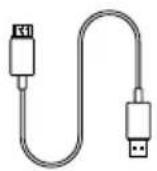
Transmitter
HDMI to USB-A Cable
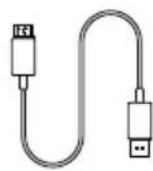
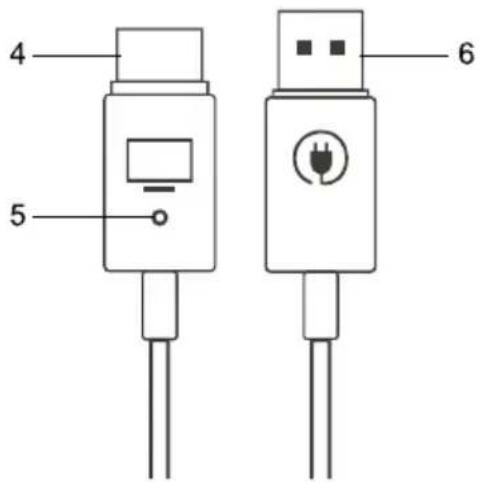
Receiver
HDMI to USB-A Cable
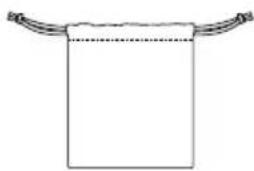
natural_image
Simple line drawing of a rectangular object with curved top handles and a dotted line at the bottom (no text or symbols)Pouch
Quick Start Guide
Parts Info
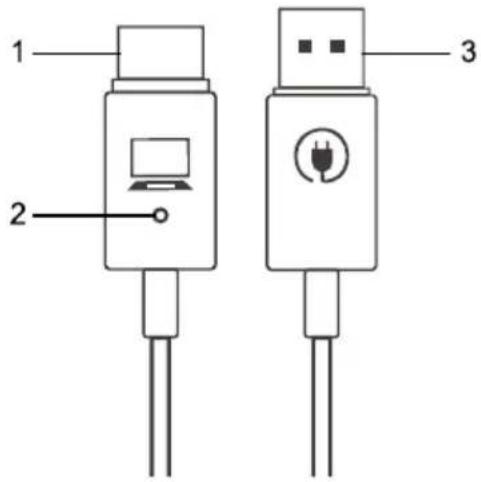
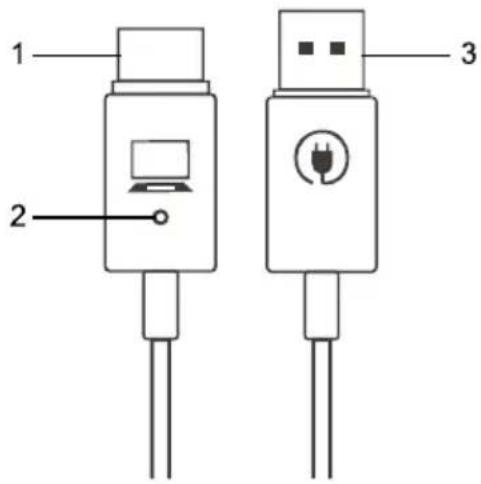
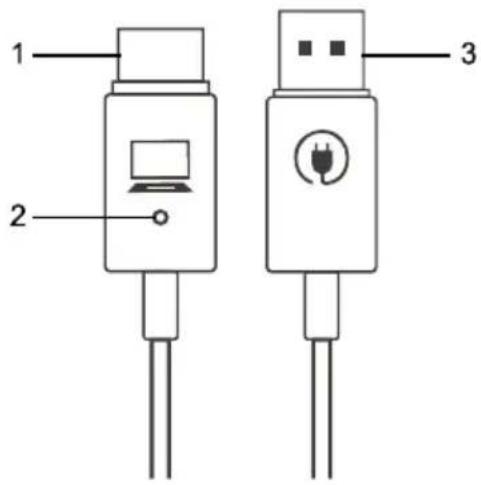
Transmitter
- HDMI
- Pair/Reset Hole
- USB-A for power supply
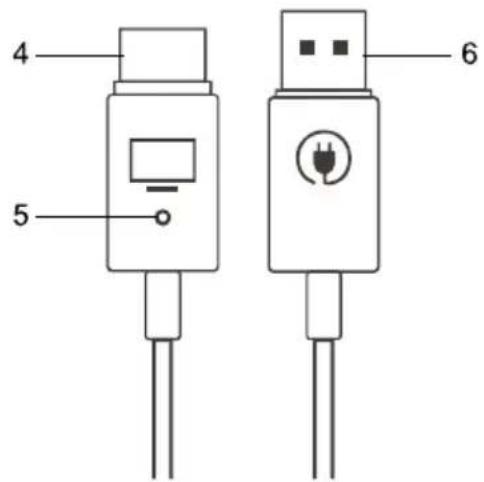
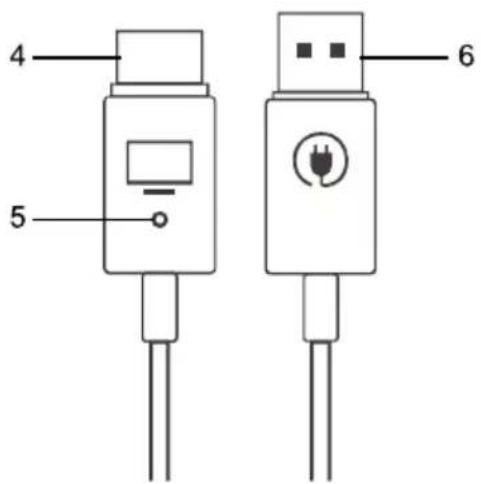
Receiver
- HDMI
- Pair/Reset Hole
- USB-A for power supply
Supported AVer Devices
Flexible Arm Visualizer
Mechanical Arm Visualizer
F17+
M70W
F50+
M90UHD
Screen Mirroring
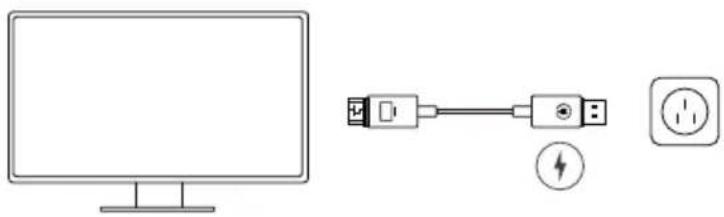
1. Connect the receiver.
Plug the receiver into your monitor and power source (5V/1A power adapter not included).
natural_image
Simple line drawing of a monitor and two connected electrical outlets (no text or symbols)2. Connect the transmitter.
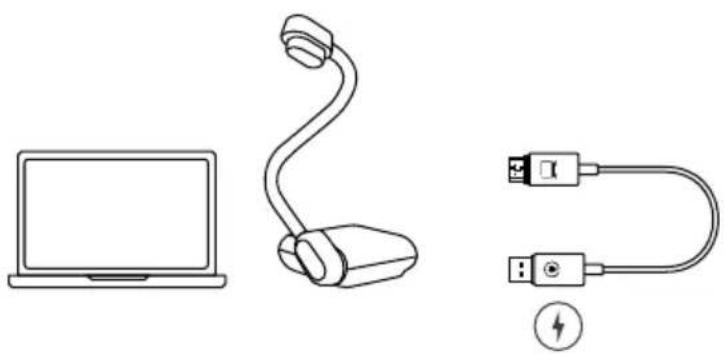
Plug the transmitter into your computer or visualizer (document camera) and power source. The transmitter can be powered via computer or visualizer.
natural_image
Line drawings of a laptop, a microphone, and a USB cable with a lightning bolt symbol (no text or labels)3. Start mirroring.
Mirroring starts automatically after a few seconds. Unplug the transmitter to stop, and plug it back in to restart. If mirroring doesn't start, refer to
Attention!
The WH100 may become hot during extended use. To avoid burns, turn off your computer or visualizer to stop screen mirroring before unplugging cables. Wait for the cables to cool down before handling.
Re-Pair the Transmitter and Receiver
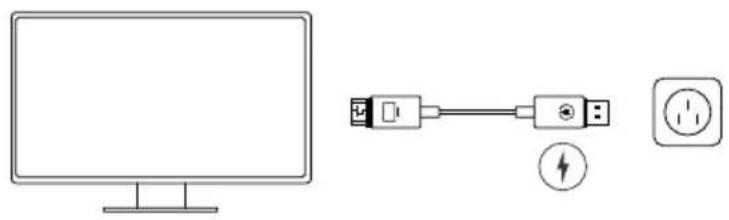
1. Connect the receiver.
Plug the receiver into your monitor and power source (5V/1A power adapter not included).
natural_image
Diagram showing a monitor connected to a power outlet via a cable, with a lightning bolt symbol indicating the connection point (no text or labels present)2. Turn on Pairing Mode for the
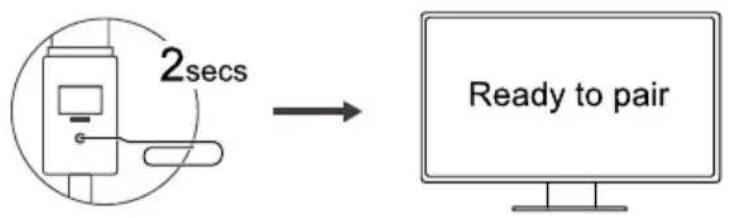
receiver.
Insert a paper clip into the pair/reset hole, push in and hold for 2 seconds until the monitor reads "Release the hole to pair with transmitter," then release the hole. The monitor then reads "Ready to pair."
flowchart
graph LR
    A["Device with 2secs"] --> B["Monitor"]
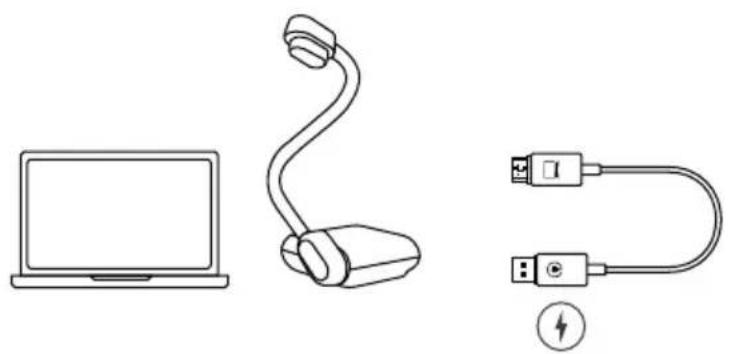
3. Connect the transmitter.
Plug the transmitter into your computer or visualizer (document camera) and power source. The transmitter can be powered via computer or visualizer.
natural_image
Line drawings of a laptop, a handheld device with cable, and a USB cable with a lightning bolt (no text or symbols)4. Re-pair the transmitter.
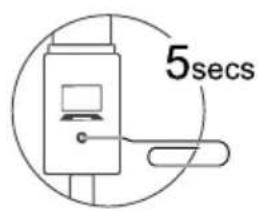
Insert a paper clip into the pair/reset hole, push in and hold for 5 seconds until the light goes off to complete pairing.
Re-pairing doesn't work?
Your transmitter and receiver are paired at the factory and ready to use out of the box. If you're mixing cables from different boxes and re-paring doesn't work, try resetting the cables:
- Keep the transmitter and receiver connected to their respective devices and power sources.
- Transmitter: Insert a paper clip into the pair/reset hole, push in and hold for 20 seconds to reset.
Receiver: Insert a paper clip into the pair/reset hole, push in and hold for 10 seconds to reset. - Try re-pairing again.
Specifications
Transmitter & Receiver
| Antenna 1T1R (on board) | |
| Connectivity | Wi-Fi 5 Ghz |
| Interface | HDMI |
| Output Resolution Up to 1080p 60Hz | |
| HDCP Support HDCP 1.4 | |
| Network | IEEE 802.11n |
| Screen Mirror/ Extend Yes | |
| Latency | 40-60msThe level of network interference can affect latency performance. |
| Transmission Distance Up to 30m | |
| Connector Type | Transmitter: HDMI x1, USB-A x1Receiver: HDMI x1, USB-A x1 |
| Power Input | 5V/0.5A (5V/1A USB adapter recommended) |
| Dimension 677mm*18mm*6mm | |
| Net Weight 50g | |
Environmental Requirements
| Operating Temperature Conditions | The product is capable of continuous reliable operation when operating in ambient temperature of 0 °C to +35°C. |
| Non-Operating Temperature Conditions | Neither subassemblies is damaged nor the operational performance be degraded when restored to the operating temperature after exposing to storage temperature in the range of -20 °C to +70 °C. |
| Operating Humidity conditions | The product is capable of continuous reliable operation when subjected to relative humidity in the range of 10% and 90% non-condensing. |
| Non-Operating Humidity Conditions | The product is not to be damaged nor the performance be degraded after exposure to relative humidity ranging from 5% to 90% non-condensing. |
Certification Requirements
| EMC/Safety CE, NCC | |
| Other RoHS, REACH, WEEE |
Specifications are subject to change without prior notice.
包装内容物
natural_image
Simple line drawing of a rectangular object with curved top handles and a dotted line inside, no text or symbols present.束口袋
快速使用指南
部位名稱
發射器
natural_image
Simple line drawing of a monitor connected to a plug and a socket (no text or symbols)2. 連接發射器。
natural_image
Line drawings of a laptop, a handheld device with cable, and a separate U-shaped cable with USB port (no text or symbols)3. 開始鏡像。
natural_image
Diagram showing a monitor connected to a power outlet via a cable, with a lightning bolt symbol indicating the connection point (no text or labels present)2. 開啟接收器的配對模式。
flowchart
graph LR
    A["Device with 2 secs"] --> B["Computer screen"]
    style A fill:#f9f,stroke:#333
    style B fill:#ccf,stroke:#333
3. 連接發射器。
natural_image
Line drawings of a laptop, a handheld device with cable, and a USB cable with a lightning bolt (no text or symbols)4. 重新配對發射器。
natural_image
Simple line drawing of a rectangular object with curved ends and a dotted line, no text or symbols present.Beutel
Kurzanleitung
Teileinfo
Sender
natural_image
Diagram showing a computer monitor connected to a power outlet via cable, with a fuse and plug symbol nearby (no text or labels)natural_image
Line drawings of a laptop, a desktop computer with cable, and a separate U-shaped USB cable with a lightning bolt symbol (no text or labels)natural_image
Diagram showing a monitor connected to a power outlet via a cable, with a lightning bolt symbol indicating the connection point (no text or labels present)natural_image
Line drawings of a laptop, a USB cable, and a USB connector (no text or symbols)natural_image
Simple line drawing of a rectangular object with curved ends and a dotted line, no text or symbols present.Poche
natural_image
Diagram showing a computer monitor connected to a power outlet via a cable, with a fuse and plug symbol nearby (no text or labels)natural_image
Line drawings of a laptop, a handheld device, and a separate U-shaped cable with USB port (no text or symbols)natural_image
Diagram showing a monitor connected to a power connector and a socket (no text or symbols present)flowchart
graph LR
    A["Device with 2secs"] --> B["Monitor"]
natural_image
Line drawings of a laptop, a microphone, and a USB cable with a lightning bolt symbol (no text or labels)natural_image
Simple line drawing of a rectangular object with curved top and bottom handles, no text or symbols present.Bolsa
natural_image
Simple line drawing of a monitor connected to a plug and a socket (no text or symbols)natural_image
Line drawings of a laptop, a desktop computer with cable, and a USB cable with a lightning bolt (no text or symbols)3. Comience a reflejar.
natural_image
Simple line drawing of a monitor and two connected devices (no text or symbols)flowchart
graph LR
    A["Device with 2 secs"] --> B["Computer screen"]
    style A fill:#f9f,stroke:#333
    style B fill:#bbf,stroke:#333
natural_image
Line drawings of a laptop, a microphone, and a USB cable with a lightning bolt symbol (no text or labels)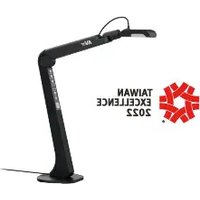
- WH100
- Wireless HDMI Transmitter & Receiver
- Europe – EU Declaration of Conformity
- 低功率電波輻射性電機管理辦法
- Disclaimer
- Trademarks
- Copyright
- More Help
- Contact Information
- Headquarters
- USA Branch Office
- Europe Branch Office
- Japan Branch Office
- Vietnam Branch Office
- Parts Info
- Transmitter
- Receiver
- Supported AVer Devices
- Screen Mirroring
- Connect the receiver.
- Connect the transmitter.
- Start mirroring.
- Attention!
- Re-Pair the Transmitter and Receiver
- Turn on Pairing Mode for the
- Connect the transmitter.
- Re-pair the transmitter.
- Re-pairing doesn't work?
- Specifications
- 包装内容物
- 部位名稱
- 發射器
- 連接發射器。
- 開始鏡像。
- 開啟接收器的配對模式。
- 連接發射器。
- 重新配對發射器。
- Teileinfo
- Sender
- Comience a reflejar.
Brand : AVer
Model : WH100
Category : Document camera