USER MANUAL EA8150 KRUPS
Congratulations! You are now the proud owner of an Espresso Automatic EA815-EA816-EA817 Series. With your machine, you can make a wide range of drinks: espressos, coffees or ristrettos, completely automatically. You can also make milk-based drinks such as cappuccinos. It has been designed so that you can enjoy restaurant quality coffee at home, whatever the time of the day and every day of the week. You will appreciate its ease-of-use and the quality of your cup of coffee. You can set the amount, strength and temperature of your drinks.
Thanks to its Compact Thermoblock System with built-in percolation chamber, its 15 bar pump, and because it uses coffee beans which have been freshly ground just before making the coffee, your machine will give you hot ristrettos, espressos and coffees from the first cup with maximum aroma and a creamy golden-brown froth.
To give the drink maximum flavour, an espresso is traditionally served in a small, flared porcelain cup. For an optimum temperature espresso and a dense creamy froth, we recommend that you pre-heat your cup.
You will probably need to try several types of coffee before you find the one that suits you.
By experimenting with the blend and/or roast, you will eventually arrive at the ideal result.
Espresso coffee has a richer aroma than classic filter coffee. Despite its stronger taste which remains longer on the palate, an espresso contains less caffeine than filter coffee (around 60 to 80 mg per cup compared to 80 to 100 mg per cup) due to its shorter percolation period.
The quality of water used is another determining factor which affects the overall quality of the brewed coffee. You should ideally use water which is fresh from the tap (so that it hasn't had time to stagnate due to air contact), which is cold and which does not smell of chlorine.
The ergonomic, compact LCD display makes the machine easy to use. It will guide you through each step, from preparing your drink to servicing your machine.
We wish you many years of enjoyment with your Krups machine.
The Krups team

| Buttons and knobs |
| "On-off" button | Navigation button (cursor key) |
| Favourite coffee type button A or press B
Save favourite button A press and hold B | To adjust selected settings |
| Steam drink button | Start STOP Start or stop equipment t |
| Maintenance and settings button | To adjust how finely ground you would like the coffee beans. |
| Symbols | Constant | Flashing | Meaning |
| ● | The coffee grounds collector is missing or improperly positioned |
| ● | Empty the coffee grounds collector + empty the drip tray |
| ● | Refill the water tank
The water tank is not properly in place |
| ● | Place a container (0.6 L minimum) under the steam and coffee jets |
| ● | Maintenance cycle in progress |
| ● | Malfunction: unplug the machine for ten seconds then plug it back in |
| ● | Install filter cartridge |
| ● | Rinsing cycle in progress |
| ● | ● | Clean machine with KRUPS cleaning tablet |
| ● | Cleaning cycle interrupted |
| ● | ● | Descale machine with KRUPS descaling sachet |
| ● | Descaling cycle interrupted |
| ● | Adjust the water hardness |
| ● | Enable automatic rinsing of the coffee circuit when the machine starts. |
| ● | | Program the length of time after which your machine switches off automatically (standby) |
| ● | ● | Adjust the coffee temperature/Pre-heating indicator |
| ● | | Favourite A or B - 2 drinks can be saved in memory |
| ● | Registering favourite A or B |
| ● | ● | Preparation progress indicator |
| PRESS START | ● | | Press the START-STOP button |
| [000] | ● | Coffee strength indicator |
| [BBB] | Volume or time indicator |
| [UP] | ● | Number of cups (1 or 2) |
| Active use indicator | |
| | Maintenance or settings selection |
APPLIANCE DESCRIPTION
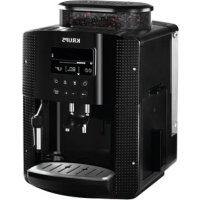
A. Water tank lid B. Water tank C. Used grounds collector D. Coffee outlet and height-adjustable handle E. Grid and removable drip tray F. Coffee bean container lid ① Coffee bean container G. Coffee grounds fineness adjustment knob H. Metal grinder I. Cleaning tablet funnel J. Cup grid (may vary according to model)
K. Water level float 2 Graphic screen L. On/off button M. Coffee and favourites button N. Steam button 0. Settings button P. Navigation button Q. + or - button R. Start/stop button S. Steam nozzle
BEVERAGE PREPARATION
| TYPES OF COFFEE | Number of possible cups | Possible settings Volume (ml) | Possible settings Strength |
| RISTRETTO | 1 20 to 30 | ml (per 10 ml) | 1 to 3 beans |
| 2 x 1 | 2 x 20 to 30 ml (per 10 ml) In two cycles |
| ESPRESSO | 1 30 to 70 | ml (per 10 ml) | 1 to 3 beans |
| 2 x 1 | 2 x 30 to 70 ml (per 10 ml) In two cycles |
| COFFEE | 1 80 to 180 | ml (per 10 ml) | 1 to 3 beans |
| 2 x 1 | 2 x 80 to 180 ml (per 10 ml) In two cycles |
BEVERAGE PREPARATION
Appliance preparation
To prevent used water spillage from making your work surface dirty and to avoid burning yourself, don't forget to attach the drip tray. Remove and refill the water tank (1-2). Refill the coffee bean container (3).
First use
Turn on the appliance by plugging it in then pressing the on/off button (4). The machine pre-heats. At the end of the cycle, the symbols and start button start to flash. Put a 0.6L container underneath the two coffee and steam nozzles. Press the start/stop button (5). The machine starts and rinses the hydraulic circuits (coffee and steam) for around 2 minutes. At the end of the initialisation cycle, the coffee types menu appears (6). You are advised to rinse the circuit if you have not used your machine for several days (see the chapter on Maintaining Your Appliance).
Preparing the grinder
You can adjust the strength of your coffee by adjusting how finely the coffee beans are ground.
Generally, the finer the coffee is ground, the stronger and creamier the coffee will be, but this also depends on the type of coffee used.
Adjust the fineness of grinding by turning the coffee grounds fineness adjustment knob which is located in the coffee bean container. It is advised that you do this during grinding, one notch at a time.
After 3 rounds, you will notice a pronounced difference in taste. To the left, the grounds are finer. To the right, the grounds are coarser (7).
Claris F 088 - Aqua Filter System cartridge (Sold separately)
To optimise the taste of your drinks and the lifespan of your appliance, you are advised to only use a Claris - Aqua Filter System cartridge with your machine (see the chapter OTHER FUNCTIONS - Installing the filter).
Every time you place a Claris-Aqua Filter into the machine you must prime the filter before using the machine by activating the "install filter cartridge" program.
MAKING AN ESPRESSO AND A COFFEE
Note:
The amount of water for making an espresso is between 30 and 70 ml.
The amount of water for making a coffee is between 80 and 180 ml.
Starting preparation (with 1 or 2 cups)
Press the on-off button and wait for the appliance to finish heating up. The coffee types menu is displayed. The function indicator is shown above the coffee types button (6). Place one or two cups under the coffee jets. You can lower or raise the coffee jets according to the size of your cup (8). Select the coffee strength (shown as coffee beans displayed on the screen in brackets) with the + button to increase or the - button to decrease. Press the navigation button to set the volume: select the volume of water displayed on the screen between brackets using the + or - buttons (10). Press the navigation button to set the number of cups: select 1 or 2 cups, displayed on the screen between brackets using the + or - buttons. Press the START button (11). You can set the water volume at any time using the + or - buttons. To stop the flow into your cup, press the STOP button. You can also adjust the temperature of your coffee (see the chapter OTHER functions - Settings).
Two cup function
The appliance will automatically carry out 2 full cycles of coffee preparation.
MAKING DRINKS USING STEAM
Steam is used to froth the milk, for example when preparing a cappuccino or caffe latte, and also to heat up liquids. As a higher temperature is required when producing steam than when making an espresso, the appliance will launch an additional pre-heating phase.
Frothing milk
For best results, you are advised to use very fresh, very cold pasteurised or UHT milk, recently opened. Unpasteurised milk does not produce the best results. Check that the steam nozzle is correctly positioned. Pour the milk into a milk jug which has a handle or into a cappuccino cup. Only fill it half way. When the screen displays the drink selection menu, press the steam button (12). The function indicator is located above the steam button. Insert the steam nozzle into the milk.
A screen indicates that the appliance is heating up. Once the appliance has finished heating up, you can begin to make steam by pressing START and following these steps (13):
Step 1: holding the milk jug in place, insert the steam nozzle approximately 2 cm into the milk and wait for it to start frothing.
Step 2: raise the container slightly (approximately 1 cm). Do not completely submerge the metal tube.
Step 3: gradually lower the container as the froth accumulates. (14)
When you have frothed the milk enough, press the STOP button to stop the cycle. Warning: the cycle does not stop immediately. To remove any milk traces from the steam nozzle, place a container under the nozzle and start the steam function again (approximately 10 seconds). The steam nozzle is removable in order to allow for deep cleaning. Wash it with water and a little non-abrasive detergent using a brush. Rinse and dry (15-16). Before replacing, make sure that the air holes are not clogged with milk residue. Unclog the holes with the needle supplied with your appliance if necessary (17). To stop the steam, press the STOP button.
Steam can be produced for a maximum of 2 minutes per cycle.
Auto-cappuccino XS 6000 set (sold separately)
This auto-cappuccino accessory enables you to make cappuccinos or lattes (18). Connect the different parts to each other. Ensure that the pipe is not pierced by keeping the knob in the correct place. After removing the lid, fill the jug with milk (19) and place a cup or glass under the auto-cappuccino nozzle (20). Select cappuccino or latte on the special nozzle (21). Start steam, as indicated in the chapter Making drinks with steam. Once you have made the milk froth, place your cup under the coffee jets and start a coffee cycle (22).
To prevent the milk from drying on the auto-cappuccino accessory, ensure that you clean it thoroughly. You are advised to wash it immediately by running a steam cycle with the accessory jug filled with water in order to clean the inside of the nozzle. For this you can use the KRUPS liquid detergent available separately.
MAINTAINING YOUR APPLIANCE
Emptying the coffee grounds collector and the drip tray
If the symbol starts flashing, empty and clean the drip tray (the drip tray may contain coffee grains) and the coffee grounds collector (23-25). The drip tray is fitted with floats which indicate when it needs to be emptied (26). Once you have removed the coffee grounds collector, you should empty it completely in order to avoid any overflow. The warning message will continue to be displayed if the coffee grounds collector is not pushed in or inserted correctly (24). You cannot make an espresso or a coffee while the warning message is shown.
Rinsing the circuits:
Press the maintenance and settings button (27). The function indicator is shown above the maintenance button.
If necessary, using the navigation button, select the rinse symbol.
Press START. Rinsing starts and finishes when the coffee menu appears.
Automatic rinsing of the circuits when the machine starts.
You can choose to program the machine to be rinsed automatically each time it is turned on. To do this, press the maintenance and settings button (27). Using the navigation button, select the automatic rinsing programming symbol. Press the button to choose ON, which confirms this program. If you press the button again, automatic rinsing is disabled. You can return to the coffee types menu by pressing the button. Warning: after this rinsing process, hot water will be released from the coffee jet. Ensure that the drip tray is in place even when the machine is not being used. The cycle lasts only a few seconds and stops automatically.
Cleaning program - total duration: approximately 13 minutes
You do not have to run the cleaning program as soon as the appliance requests it, but it must be done reasonably soon after. If cleaning is postponed, the alert message will remain illuminated until the process is carried out.
- When the symbol lights up, you can run the automatic cleaning program by pressing the maintenance and settings button. The symbol is selected. The function indicator is down above the maintenance button.
- The automatic cleaning program is divided into 2 stages: the cleaning cycle itself, followed by the rinse cycle. You can clean the machine at any time by pressing the maintenance and settings button when, using the navigation button, select the cleaning symbol. To run this cleaning program, you will need a container which holds at least 0.6 L and which can be placed beneath the coffee jets and the steam nozzle. The symbol flashes. Lift the cup grid (28). Insert the KRUPS cleaning tablet (29).
- Fill the water container to its maximum level of 1.7 L (2). Empty the coffee grounds collector and the drip tray (23-25). Put a 0.6 L container under the coffee and steam jets (30). Press START. The symbol becomes constant. The first phase (approximately 10 minutes) begins. When this phase has finished, empty the container and the drip tray. The symbol flashes. Put the parts back in place. Press START. The symbol becomes constant, the final phase (approximately 3 minutes) begins. When this phase has finished, empty the container and the drip tray. The cycle has finished, the coffee types menu appears.
Note: if you turn off or unplug your machine during cleaning or if there is a power failure, the cleaning program will start from the beginning of the program once the power is restored to the appliance. It is not possible to postpone this process. It is obligatory in order to rinse the water circuit. In this case, a new cleaning tablet may be necessary. It is best to run the full cleaning program in order to avoid any risk of poisoning. The cleaning cycle is irregular: do not put your hands under the coffee jets while the cycle is running.
Descaling program - duration: approximately 20 minutes
You do not have to run the descaling program as soon as the appliance requests it, but it must be done reasonably soon after. If descaling is postponed, the alert message will remain illuminated until the process is carried out.
The amount of limescale collected depends on the hardness of your water.
Warning: if your product is fitted with our Claris - Aqua Filter System cartridge, remove the cartridge before descaling.
- When the symbol lights up, you can run the automatic descaling program by pressing the maintenance and settings button (27). If necessary, using the navigation button, select the symbol. The symbol flashes and the function indicator is located above the maintenance button. To run the descaling program, you will need a container which holds at least 0.6 L and a sachet of KRUPS descaler. ■ Fill the water tank up to the CALC mark then pour in the contents of one sachet (31). Put a 0.6 L container under the coffee and steam nozzles. Press START to begin the first phase (approximately 8 min). The symbol becomes constant. When this phase has finished, empty the container and the drip tray. The end symbols flash. Remove and clean the water tank using a sponge. Once clean, refill your water tank and replace all parts. The symbol disappears.
- Press START to begin the second phase (approximately 6 min). The symbol becomes constant. When this phase has finished, empty the container and the drip tray. The symbol flashes.
Press START to begin the final phase (approximately 6 min). The symbol becomes constant. When this phase has finished, empty the container and the drip tray. Descaling is complete.
Note: if you turn off or unplug your machine during descaling or if there is a power failure, the cleaning program will start from the beginning of the program once the appliance is restarted. It is not possible to postpone this process. It is obligatory in order to rinse the water circuit. Running the descaling program is advisable. The descaling cycle is irregular: do not put your hands under the steam jet.
Once the cycle has finished, the coffee types menu appears.
OTHER FUNCTIONS
■ You can access the appliance's OTHER FUNCTIONS menu by pressing the maintenance and settings button. For all settings, use the navigation button and + or - for the values. To come out of the maintenance and settings menu, press the button.
MAINTENANCE
All of the following options allow you to run the selected programs:
| MAINTENANCE | | Allows you to access rinsing. |
| K | Allows you to access cleaning. |
| Allows you to access descaling when the appliance requests it. |
| Allows you to prime the filter (Claris cartridge). |
| Return to coffee types menu. |
TURNING OFF YOUR APPLIANCE
You can turn off your appliance at any time. When stopped, the machine emits a double beep and OFF is displayed on the screen. The appliance has registered your request and will stop as soon as possible.
SETTINGS
All of the following options allow you to run the selected programs:
| SETTING | | You can set your water hardness between 0 and 4 by pressing the + or - buttons See "Measuring water hardness" (below) |
| You can program automatic rinsing each time the appliance is turned on by pressing the buttons and selecting ON. |
| You can choose the period after which your appliance will turn off automatically (between 15 and 120 minutes by pressing the buttons). |
| You can adjust the temperature of your coffee to three different levels by pressing the buttons. |
| Return to coffee types menu. |
Measuring water hardness
It is advisable to adjust the appliance according to the hardness of the water used. To check the water hardness, use the stick supplied with your machine or contact your local water authority.
| Degree of hardness | Class 0 Very soft | Class 1 Soft | Class 2 Average hardness | Class 3 Hard | Class 4 Very hard |
| ° dH < 3° > | 4° > 7° > 14° | > 21° | | | |
| ° e < 3,75° | > 5° > 8,75° | > 17,5° > 26 | 25° | | |
| ° f | < 5,4° | > 7,2° | > 12,6° | > 25,2° | > 37,8° |
| Appliance settings | 0 | 1 | 2 | 3 | 4 |
Installing the filter (Claris - Aqua Filter System cartridge) (32)
Note: To correctly install your cartridge, ensure that you follow the installation procedure each time you replace it. (33) A mechanism which memorises the month in which the cartridge was changed and replaced (after a maximum of 2 months): set the date using the cartridge cursor. Fit the cartridge in the tank (34). In the maintenance and settings menu, the function indicator is located above the maintenance button. Using the navigation button, select the filter cartridge installation symbol. The symbols and the start button start to flash.
Place a 0.6 L container under the steam nozzle.
Press start. The start-up cycle begins and finishes when the coffee types menu appears.
If one of the problems described in the table persists, contact KRUPS customer service.
| PROBLEM MALFUNCTION CORRECTIVE ACTION |
| Your machine detects a fault:
a symbol appears. | Switch off and disconnect the machine, remove the filter cartridge, wait for a minute and restart the machine. |
| The appliance does not turn on when the button is pressed. | Check your fuses and plug sockets.
Check that the two power plugs are pushed in properly both on the appliance and at the socket. |
| The coffee grinder makes a strange noise. | There is a foreign body in the grinder. Disconnect the machine before investigating.
See if you can extract the foreign body using your vacuum cleaner. |
| The steam nozzle makes a noise. | Check that the steam nozzle is correctly attached to its corresponding end piece. |
| The steam nozzle on your machine seems partially or completely clogged. | Ensure that the opening in the end piece is not obstructed by milk residue or limescale. Unclog the holes with the needle supplied with your appliance. |
| The steam nozzle makes little or no milk froth. | For milk-based drinks, you use very fresh, very cold pasteurised or UHT milk.
It is also advisable to use a cold container. If the results do not improve, try changing the brand of milk. |
| No steam comes out of the nozzle. | Empty the tank and temporarily remove the filter cartridge. Fill the water tank with mineral water which is high in calcium (>100 mg/l) and run successive steam cycles. |
| The auto-cappuccino setting makes little or no froth.
The auto-cappuccino setting does not take in milk. | Check that the accessory is correctly attached to the appliance, remove it then replace it.
Check that the flexible tube is not obstructed or pierced and that it is correctly attached to the accessory so as to make it airtight. Rinse and clean the accessory (refer to the "Auto-cappuccino accessory" chapter). |
| There is water underneath the appliance. | Before removing the water tank, wait for 15 seconds after the coffee has finished flowing so that the machine finishes its cycle properly.
Check that the drip tray is correctly positioned on the machine; it should always be in place, even when the appliance is not in use.
Check that the drip tray is not full.
The drip tray should not be removed during a cycle. |
| After emptying the coffee grounds collector, the warning message is still displayed on the screen. | Correctly replace the coffee grounds collector and follow the instructions on the screen.
Wait at least 8 seconds before replacing them. |
| The coffee dispenses too slowly. | Turn the coffee fineness knob to the right to make the grounds courser (this could also depend on the type of coffee used).Run one or several rinsing cycles. Run a machine clean (see “Cleaning program”). Change the Claris Aqua Filter System cartridge (see “Installing the filter”). |
| Water or steam comes out abnormally from the steam nozzle. | At the beginning or end of making a drink, the steam nozzle may drip slightly. |
| The coffee fineness knob is difficult to turn. | Only change the grinder setting when it is running. |
| The espresso or coffee is not hot enough. | Increase the coffee temperature in the Maintenance and settings menuWarm the cup by rinsing it with hot water before making the drink. |
| The coffee is too lightly coloured or too weak. | Avoid using oily, caramelised or flavoured coffee. Check that the coffee bean container has coffee in it and that it is dispensing correctly.Decrease the drink volume, increase the drink strength. Turn the coffee fineness knob to the left to make the grounds finer.Make the drink in two cycles by using the 2 cups function. |
| The appliance is not producing coffee. | A problem has been detected during preparation of the drink.The appliance has restarted automatically and is ready for a new cycle. |
| Why can I not run descending/why does my machine not request a descending cycle? | The machine only requests a descending cycle once it has made a certain number of drinks using steam. |
| A power failure occurs during a cycle. | The appliance is automatically restarted when power is switched back on. |
| The appliance is working but no liquid is coming out. | Check that the water container is in the correct position and that the cord is not jammed between the appliance itself and the water container. |
| Coffee grains have found their way into the drip tray. | This happens if coffee grains fall outside the percolation tank; this keeps the machine clean. |
Danger: Only a qualified technician is authorised to carry out repairs on electrical wiring and carry out work on the electrical grid. If you do not follow these instructions, you risk death by electrocution! Do not use an appliance that is visibly damaged!
Dear customer,
DESCRIPTION OF THE APPLIANCE
Step 2: Lower the container slightly (about 1 cm). Do not immerse the metal tube completely.
Step 3: Lower the container again as the foam forms. (14)
When the foam is sufficient, press the steam button to stop the steam. Caution! The steam function does not activate immediately. Rinse the steam nozzle by dipping it into a container of cold milk, repeat the foam formation process (for about 10 seconds), then place a new container. The steam nozzle is removable, which allows you to clean it thoroughly. Clean it with a brush and water with a small amount of mild dishwashing detergent. Rinse and dry (15-16). Before reassembling, make sure the water inlet holes are not blocked by milk residues. If necessary, clean them with a pin (17). To stop the steam, press the steam button again.
CAUTION! THE STEAM FUNCTION DOES NOT ACTIVATE IMMEDIATELY.
Maximum productivity: preparing milk froth during one cycle takes up to 2 minutes. The XS 6000 milk frother is available separately.
The accessory is used for automatic preparation of cappuccino or latte (18). Connect the accessory parts. Make sure the plug is not twisted, attach it well and secure the parts in the correct position. Remove the lid from the milk container, pour in milk (19) and place the lid or the cap on the milk frother nozzle (20). Select the cappuccino or latte position on the special nozzle (21). Prepare the milk froth as described in the section “Preparing with milk froth”. Once the milk froth is ready, place the cup under the coffee outlet and start preparing the coffee (22).
Wipe the milk frother dry after use to prevent milk residue from drying on it. Rinse the nozzle thoroughly after each use. To start a new frothing cycle, use the accessory container filled with water. For cleaning, you can use KRUPS brand cleaning products, available as accessories.
CLEANING AND MAINTENANCE
Emptying the coffee grounds container and the drip tray
When the indicator lights up, empty the drip tray (a small amount of water may have collected) and the coffee grounds container (23-25). The drip tray is equipped with floats that signal when it needs emptying (26). As soon as you remove the coffee grounds container, empty it completely to prevent clogging and overflow. The display shows a message indicating that the coffee grounds container is not installed correctly (24). When the display shows this message, preparing espresso or coffee is impossible.
Rinsing the system:
Press the maintenance and settings button (27). The function indicator is located below the maintenance button. If necessary, use the navigation buttons to select the rinsing program. Press the START button to begin rinsing; it will finish when the coffee is fully dispensed. Automatic rinsing of the system before starting the appliance: You can program automatic rinsing after each time the appliance is switched on. Press the button
maintenance and settings (27). Use the navigation buttons to select the automatic rinsing program. Press the button to confirm the selection. If you press the button, automatic rinsing is activated.
You can return to the selection menu by pressing the button. During rinsing, hot water flows out through the coffee outlet. Be careful, as the drip tray may be full if the appliance has not been used for a while. This process lasts only a few seconds and then stops automatically.
It is not mandatory to perform the appliance cleaning immediately after receiving a message, but it should be done as soon as possible. If cleaning is not performed, the message will remain on the appliance display until you perform this operation.
The machine displays the descaling program. You can start the descaling program by pressing the descaling button and setting it. The selected program is indicated. The indicator is located above the descaling button. The descaling program consists of 2 stages: 1 descaling cycle and 2 rinse cycles. You can perform descaling at any time by pressing the descaling button and setting it, then using the navigation buttons to select the descaling program. For descaling, you will need a container with a capacity of at least 0.6 L, which must be placed under the coffee outlet and steam nozzle. The program will start descaling. Remove the drip tray and cup stand (28). Insert the descaling tablet into the slot (29). Fill the reservoir with water to the maximum level (1.7 L) (2). Empty the coffee grounds container and the drip tray (23-25). Place a container with a capacity of at least 0.6 L under the coffee outlet and steam nozzle (30). Press the START button. The program will start descaling. The first stage begins (duration approximately 10 min). After this stage is completed, empty the container and the drip tray. The program will continue descaling. Collect all parts and put them back in place. Press the START button. The machine will stop descaling and the final rinse stage will begin (duration approximately 3 min). After this stage is completed, empty the container and the drip tray. When the cycle is complete, the coffee recipe selection menu is displayed.
Note. If you turn off the machine during descaling or if the power is interrupted, the program will restart when the machine is turned on again. This operation is unavoidable because it is necessary for the rinse cycle of the hydraulic system. A new descaling tablet may be needed for the entire procedure. It is essential to complete the full rinse cycle correctly. The rinse cycles are continuous, and during the entire operation, do not touch the coffee outlet openings.
Descaling program duration: approximately 20 minutes.
It is not mandatory to perform descaling immediately after receiving the notification, but it should be done as soon as possible. If descaling is not performed, the notification will be displayed on the machine's display until you perform this operation.
The amount and thickness of scale depend on the hardness of the water.
Warning! If your appliance is equipped with the Claris Aqua Filter System water filter cartridge, it must be removed before descaling.
The program can be started automatically by pressing the service and setting button (27). If necessary, use the navigation buttons to select a program. The program will start, and the function indicator will be located above the service button. For descaling, you will need a container with a capacity of 0.6 liters and a package of KRUPS descaling agent. Fill the reservoir with water up to the CALC mark, then pour the entire package of the agent into it (31). Place the container under the steam and hot water outlet. Press the START button to begin the first cycle (approximately 8 minutes). The program
will stop. At the end of this cycle, empty the container and place it back to collect drips. The program will then start. Remove and rinse the water reservoir using the brush.
Fill the reservoir with water and put it back in place. The program is ready. Press the START button to begin the second cycle (approximately 6 minutes). The program will start. At the end of this cycle, empty the container and place it back to collect drips. The program will stop. Press the START button to begin the final cycle (approximately 6 minutes). The program will stop. At the end of this cycle, empty the container and place it back to collect drips. Descaling is complete.
Note: If you unplug the machine during descaling or if it is unplugged for more than 3600 seconds (1 hour) from the power supply, the program will restart after the machine is plugged back in. This operation cannot be skipped because it is necessary for the proper rinsing of the system. Therefore, complete the descaling program. Descaling is safe, so it is forbidden to use descaling agents during it.
When the cycle is complete, select the rinse cycle.
SETTINGS
Access to the settings menu is through the service and setting button. After pressing the button, use the navigation buttons and the <<+>> or <<->> to change the value. To exit the service and setting menu, press the button
SERVICE
The following descriptions allow you to start the selected programs.