USER MANUAL Conga 15090 SpinArm Home&Wash CECOTEC
Robot aspirador/ Roobot vacuum cleaner
natural_image
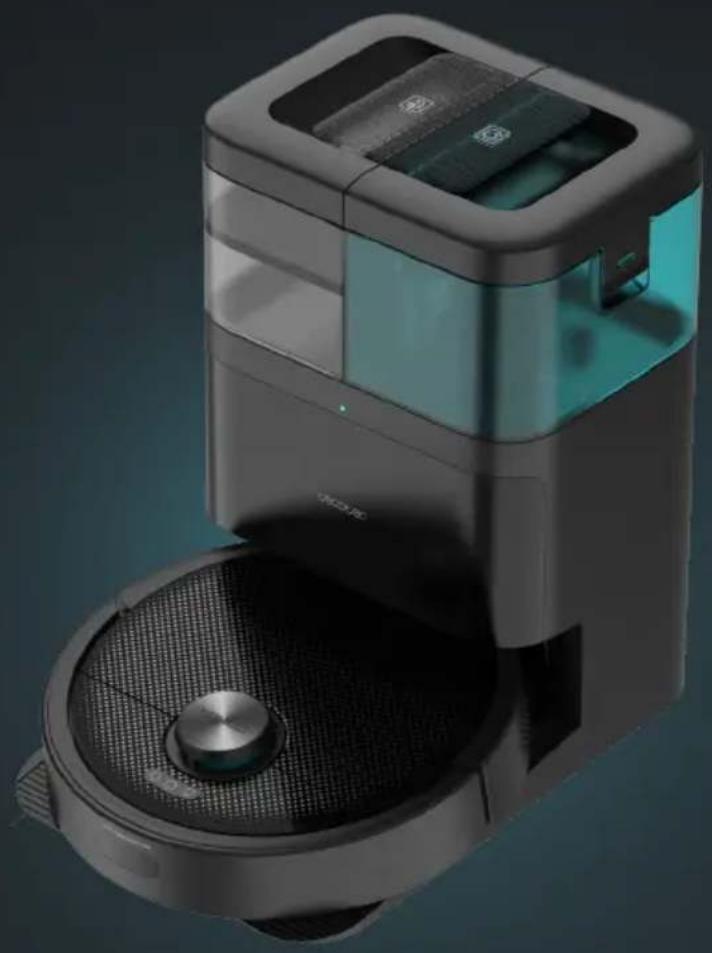
Modern robotic vacuum cleaner with digital display and mesh chamber (no visible text or symbols)
cecòtec
Safety instructions 8
-
Parts and components 64
-
Before use 65
-
Operation 67
-
Cleaning and maintenance 70
-
Troubleshooting 72
-
Technical specifications 74
-
Disposal of old electrical and electronic appliances 75
-
Technical support and warranty 75
-
Copyright 75
-
Declaration of conformity 75
SOMMAIRE
EU01_100104_Conga 15090 SpinArm Home&Wash
ES • La codificación de este manual es genérica y se aplica a todas las variantes de códigos del aparato.
EN • The coding in this manual is generic and applies to all code variants of the appliance.
FR • Le codage figurant dans ce manuel est générique et s'applique à toutes les variantes de code de l'appareil.
DE • Die Codierung in dieser Bedienungsanleitung ist allgemein und gilt für alle Codevarianten des Geräts.
IT • La codifica riportata nel presente manuale è generica e si applica a tutte le varianti di codici dell'apparecchio.
PT • A codificação apresentada neste manual é genérica e aplica-se a todas as variantes de código do aparelho.
NL • De codering in deze handleiding is algemeen en geldt voor alle codevarianten van het apparaat.
PL • Kody podane w niniejszej instrukcji są ogólne i mają zastosowanie do wszystkich wariantów kodowych urządzenia.
CZ • Kódování obsažené v tomto návodu je generické a platí pro všechny kódové varianty spotřebiče.
TR • Bu kılavuzdaki kodlama geneldir ve cihazın tüm kod varyantları için geçerlidir.
CT • La codificació d'aquest manual és genèrica i s'aplica a totes les variants de codis de l'aparell.
GR • Η κωδικοποίηση στο παρόν εγχειρίδιο είναι γενική και ισχύει για όλες τις παραλλαγές κωδικών της συσκευής.
Read these instructions thoroughly before using the appliance. Keep this instruction manual for future reference or new users.
- This appliance must be used in accordance with these operating instructions. Cecotec will not be held liable or responsible for any damages or injuries caused by improper use.
- Make sure that the mains voltage matches the voltage stated on the rating label of the appliance and that the wall outlet is earthed.
- Check the power cable regularly for visible damage. If the cable is damaged, it must be repaired by the official Cecotec Technical Support Service to avoid any type of danger.
- This appliance is designed for domestic use only and is not intended for bars, restaurants, farmhouses, hotels, motels, and offices.
- Do not attempt to repair the appliance yourself. Contact the official Cecotec Technical Support Service for advice.
- Do not use the appliance to vacuum liquids, lit matches, cigarette ends, hot ash, or on wet surfaces.
- Do not use this appliance on concrete, asphalt, or other rough surfaces.
- Stop using the appliance if you notice an abnormal sound or sense a temperature higher than usual.
- Do not block the appliance openings or airflow. Keep openings free of any objects, and do not block them with clothes or your fingers.
- Turn off and unplug the appliance from the mains supply when it is not going to be used for a long period of time, before cleaning or repairing, before attaching components, and before removing the battery. Pull from the plug, not the cable, to disconnect it from the outlet.
- WARNING: the appliance has rotating parts which may pose a risk of entrapment. Exercise extreme caution.
- Do not immerse the cable, plug, or any other part of the appliance in water or any other liquid or expose electrical connections to water. Make sure your hands are dry before handling the plug or switching on the appliance.
- This appliance can be used by children aged 8 years and
above and people with reduced physical, sensory, or mental capabilities or lack of experience and knowledge if they have been given supervision or instruction concerning use of the appliance in a safe way and understand the hazards involved. Children must not play with the appliance. Cleaning and user maintenance should not be carried out by unsupervised children.
- The mains plug of the power cable must be removed from the base before cleaning or maintenance operations.
- The appliance can only be used with the supply unit provided with it.
- The appliance must only be supplied with a very low safety voltage as indicated.
- Never touch the cable or the power socket with wet hands.
- Do not expose the appliance to direct sunlight, fire, water, or moisture.
- Do not sit or place sharp or heavy objects on top of the appliance.
- Before operating the robot vacuum cleaner, prepare the room and supervise it. To do so, remove any objects and cables that may affect its operation.
- Keep the appliance away from clothing, curtains, and similar materials.
- Always place the appliance on a flat and stable surface. Avoid placing it on unstable surfaces it could fall from (such as tables or chairs).
- Before switching on the robot vacuum cleaner, check that all connections, both on the robot and on the self-cleaning base, are in good condition.
- Avoid operating the robot vacuum cleaner under extremely high or low temperatures.
- The appliance must only be used with the battery supplied
with the appliance or with compatible charging units approved by Cecotec.
- Non-rechargeable batteries must not be recharged.
- Make sure the appliance is not plugged to a mains socket before cleaning it or carrying out maintenance on it.
- Make sure the self-cleaning base is not connected to a power outlet before cleaning.
Battery instructions
- The appliance includes a Li-ion battery. Do not incinerate or expose it to high temperatures, as it may explode.
- Batteries may leak under extreme conditions. Should that be the case, do not touch the liquid. If the liquid gets into contact with skin, wash immediately with soap and water. If the liquid gets into the eyes, wash them immediately with clean water for a minimum of 10 minutes and seek medical attention. Wear gloves when handling the battery or cells and dispose of it immediately in accordance with local regulations.
- Avoid contact between batteries and small metal objects such as paper clips, coins, keys, nails, or screws.
- Never modify the charger in any way.
- Batteries must be removed from the appliance for safe disposal.
- Keep batteries out of the reach of children if they can be swallowed.
- Battery ingestion can cause burns, perforation of soft tissue, and death. It can cause severe burns within two hours of the ingestion.
- In case of battery ingestion, please seek medical help immediately.
- WARNING: to recharge the battery, only use the self-cleaning
base supplied with the appliance.
- The batteries' supply terminals must not be short-circuited.
- If the appliance is to be stored for a long period of time, it is advisable to remove the batteries.
- Batteries must be inserted in the correct position. Pay attention to polarity when inserting it.
INSTRUCTIONS DE SÉCURITÉ
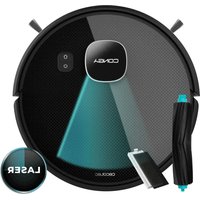
- Anti-collision sensors
- Back Home
- Power button
- Laser
- Top cover
- Rotating mops
- Drive wheels
- Main brush cover
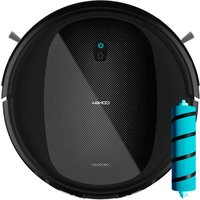
- Main brush
- Battery
- Side brush
- Omnidirectional wheel
- Ultrasonic sensor
- Free-fall sensors
Robot vacuum cleaner accessories. Fig. 1.2:
- Power cable
- Side brush
- Mop (x2)
- Dirt-disposal bag for the base
- Instruction manual
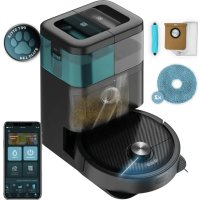
Self-cleaning base. Fig. 2:
- Self-cleaning base
- Self-cleaning tray drain
- Waste-water tank
- Clean-water tank
- Dirt tank
Mixed tank. Fig. 3:
- Charging terminals
- Infrared sensor
- Tank emptying system
- Top dirt tank cover
- Dirt tank opening
- High-efficiency filter
NOTE:
The graphics in this manual are schematic representations and may not exactly match the device.
2. BEFORE USE
- This robot vacuum cleaner includes a package designed to protect it during transport. Take the robot vacuum cleaner out of the box. Keep the original box and other elements in a safe place, as this will help you prevent damage to the robot vacuum cleaner when transporting it in the future. In case the original packaging is disposed of, make sure all packaging materials are recycled accordingly.
- Make sure all parts and components are included and in good conditions. If there is any piece missing or not in good condition, contact the official Cecotec Technical Support Service immediately.
- Do not remove the serial number of the appliance in order to keep a correct traceability of it in case of assistance.
Warnings
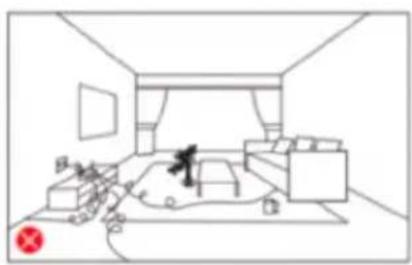
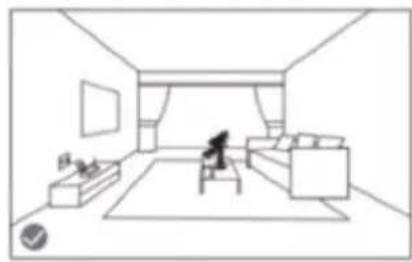
- Remove all objects around the robot vacuum cleaner such as clothing, papers, cables, curtains, or other fragile objects which may block or slow down the operation of the robot vacuum cleaner. Fig. 4
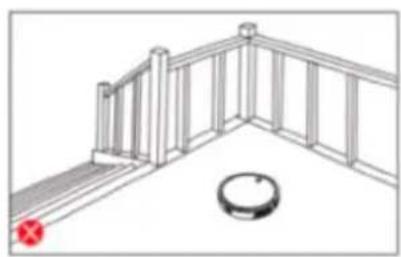
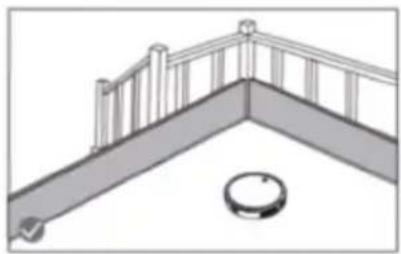
- If the room to be cleaned is near a balcony or stairs, a physical barrier should be placed to prevent the robot vacuum cleaner from falling and getting damaged, thus ensuring safe operation. Fig. 5.
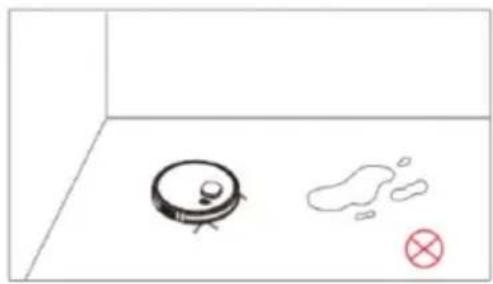
- Do not use the robot vacuum cleaner to vacuum up liquids. Fig. 6.
- Direct exposure to sunlight or heavy light contrasts may affect the correct operation of the sensors. If this happens, the robot vacuum cleaner will cease operation. Move it to a new location for it to start operating again.
- Please note that the total height of the robot vacuum cleaner is 10 cm and the sensors are at the bottom, so it is advisable to prevent access to all areas below 10 cm to avoid damaging the laser.
Installing the self-cleaning base. Fig. 7
- Place the self-cleaning base against a wall and leave a minimum free space of 1.5 metres to the front and 0.5 metres to each side.
- Plug the self-cleaning base to a power socket. Wind and store the remaining cable to prevent accidents.
- Press and hold the power button for some seconds.
- When the indicator light turns on, put the robot vacuum cleaner in the self-cleaning base and make sure the charging terminals of the robot match those of the base. If the
ENGLISH
indicator light is flashing blue, it means the battery is not completely charged. To ensure the maximum cleaning time, wait until the indicator light turns into steady blue, as this indicates that the battery is fully charged and that the robot vacuum cleaner is ready to clean.
Note
- The robot vacuum cleaner will turn on automatically when placed in the self-cleaning base.
- The robot vacuum cleaner cannot be turned off during recharge.
Clean water tank installation Fig. 8
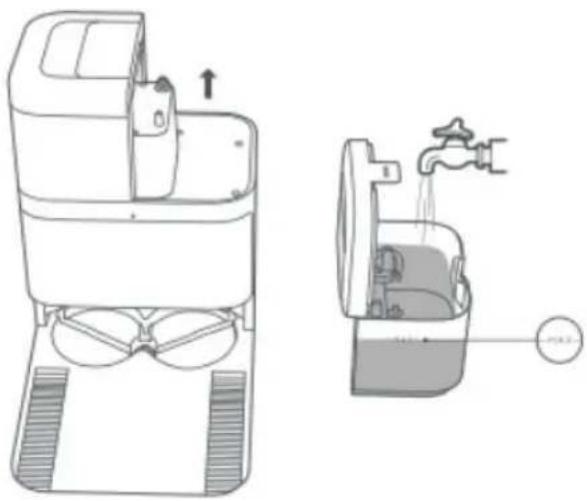
- Pull out the clean-water tank (tank with transparent cover) in the direction shown.
- Lift up the cover and fill the water tank with clean water. Do not exceed the "MAX" mark on the tank.
- Refit the clean water tank in its original position.
Note: the maximum clean-water tank capacity is 4 l.
First use
Once the robot vacuum cleaner and the self-cleaning base are installed, follow the steps below before the first cleaning.
- First of all, fully charge the robot vacuum cleaner. It is suggested to allow the robot to charge overnight. Once fully charged, it may carry out the first cleaning cycle and save the first map. To do so, activate the Auto mode and select the Eco suction level. It is very important to follow these instructions so that the robot vacuum cleaner recognises every corner of your house and can carry out a complete mapping of it.
- If your house is very large and the robot vacuum cleaner runs out of battery, it will return to the self-cleaning base, save both complete and incomplete maps, and, once recharged, it will resume cleaning where it left off until the entire cleaning surface has been mapped. The robot vacuum cleaner is constantly mapping, so it adapts in an individual and personalised way to the particularities of each home and constantly improves its map.
- The robot will return to the self-cleaning base to clean the mops and moisten them again to continue cleaning, according to the frequency selected in the application.
About the self-cleaning base
- The self-cleaning base includes the charging function, mop cleaning and dirt tank emptying. After cleaning, the robot will automatically return to the self-cleaning base to recharge the battery, empty the dirt tank, clean and dry the mops.
- During cleaning, the robot will return to the self-cleaning base to clean the mops and moisten them again to continue cleaning where it left off, depending on the frequency selected in the app.
-
The base will perform the self-emptying function according to the emptying frequency value selected on the app.
-
In addition, it is possible to force the emptying of the dirt tank from the robot vacuum cleaner by pressing the Back Home button or from the app.
- When the robot vacuum cleaner reaches the self-cleaning base it will beep once, indicating that it has made good contact with the charging terminals of the base.
- The base will then clean the mops and collect the dirty water generated. After cleaning and dirty water collection, the base will activate the mop drying function.
- If the indicator light on the self-cleaning base is red, it may indicate that the dirt-disposal bag is not attached or is full, the clean-water tank is empty or the waste water tank is full.
- If so, fit or replace the bag, fill the clean-water tank or empty the dirty water tank.
3. OPERATION
Auto Mode
Press the power button on the robot vacuum cleaner or select it in the app to make it start cleaning automatically in Edge mode, and then perform a cleaning cycle in an orderly zigzag pattern while it also recognises which areas have been cleaned and which have not. The robot vacuum cleaner will automatically plan the cleaning route during cleaning.
The robot will return to the self-cleaning base to clean the mops and moisten them again to continue cleaning, according to the frequency selected in the application.
If you control the robot vacuum cleaner manually during this mode, the robot will recalculate the route, so it may pass through already cleaned areas. To ensure efficient cleaning, do not operate the robot vacuum cleaner manually during automatic cleaning.
Thanks to the Total Surface 2.0 technology, if the battery is low during the cleaning cycle, the robot vacuum cleaner will smartly and automatically return to the self-cleaning base and, once fully charged, resume cleaning from where it left off.
During cleaning, the robot vacuum cleaner will stop briefly to evaluate the area and calculate the cleaning route (this stop will vary depending on the house conditions).
Back Home mode
Press the Back Home button on the robot vacuum cleaner or from the app to send the robot vacuum cleaner to the self-cleaning base.
This mode can be activated during any cleaning cycle.
The robot vacuum cleaner will take the shortest route back to the self-cleaning base thanks to its map-memorisation feature and the smart Back Home function.
When the battery is low, thanks to its TotalSurface 2.0 technology, the robot vacuum cleaner will automatically return to the self-cleaning base to avoid running out of battery. Once the robot has recharged, it will resume cleaning from the point it has stopped.
ENGLISH
Note:
The robot vacuum cleaner will not be able to return to the self-cleaning base if it can't easily access it. If this happens, manually place it in the self-cleaning base.
Functions
Pause
While the robot vacuum cleaner is cleaning or charging, press any button to pause the process. Press the power button on the robot vacuum cleaner or on the app to resume the cleaning process.
Standby
The robot vacuum cleaner will automatically enter standby mode after 10 minutes of inactivity. Press the power button on the app or the robot to start it up again.
Cleaning modes
- The robot vacuum cleaner includes different modes and functions that can be toggled from the app.
- In addition, in every one of the cleaning modes on the app, you will be able to select the Turbo mode on carpets, which activates the maximum suction power when the robot vacuum cleaner detects a carpet.
- Please note that the robot will stop the rotary movement of the mops when it detects the carpet, but if the mops are wet it may dampen the carpet. To avoid this, from the application you can indicate restricted areas in the areas where the carpets are in your home, or directly from the application indicate that the robot does not climb on the carpet when it detects it.
Edge mode
- When this mode is selected, the robot vacuum cleaner will clean along walls and around furniture (e.g., table or chair legs).
- The robot will return to the self-cleaning base to clean the mops and moisten them again to continue cleaning, according to the frequency selected in the application.
- Press the edge cleaning mode in the app.
Manual mode
The robot vacuum cleaner can be moved manually by selecting manual mode in the app and using the arrow keys.
Spot cleaning mode
- Select this mode if you want to thoroughly clean a specific point in the map, making the most of the robot vacuum cleaner's maximum power. The robot vacuum cleaner will clean
an area of 1.6 m x 1.6 m in a zigzag pattern and return directly to the self-cleaning base once finished. The robot vacuum cleaner will only clean the area selected on the map. It will therefore go to the selected area and return to the base without vacuuming.
- To activate this mode, select the spot cleaning option on the app.
Restricted Area mode
Mark out specific areas on the map that you do not want the robot vacuum cleaner to clean.
The robot vacuum cleaner will detect the defined area and will not clean it.
You can select more than one restricted area on the map.
Complete cleaning mode
- Select this mode to perform a deep cleaning of your house. The robot vacuum cleaner will clean in Edge mode and continue zigzagging horizontally and vertically. It will then return to the self-cleaning base.
- To activate this mode, select the Complete Cleaning option on the app.
Power level function
Select the power level on the app to control the robot vacuum cleaner's suction power during cleaning. There are four suction power levels: 3: Off, Eco, Normal and Turbo.
Cleaning schedule
- To make cleaning easier, the robot vacuum cleaner has a function that allows it to be programmed daily from the app. According to the setting, the robot vacuum cleaner will automatically start cleaning in the selected days at the desired time.
- Before adjusting the time and settings, make sure the robot vacuum cleaner is switched on.
- In addition, you can select different predefined cleaning programmes for different situations in your daily life.
Other functions
Do not disturb function
A Do not disturb time slot can be configured to control the operation of the robot vacuum cleaner; it can be modified or cancelled from the app. During the set time, the robot vacuum cleaner will disable the automatic, continuous cleaning and timer functions.
Map editing function
This function allows you to edit the generated maps: rename cleaning areas, split or combine areas, and edit cleaning mode, mark restricted areas and select different suction powers.
Robot vacuum cleaner's Location function
Allows to locate the robot vacuum cleaner on the map.
4. CLEANING AND MAINTENANCE
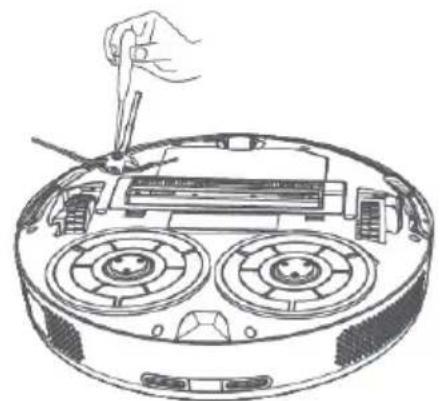
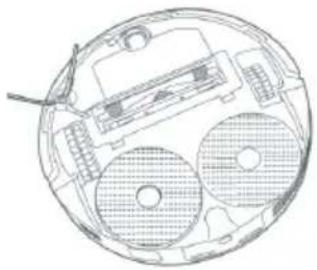
Cleaning the Side brush. Fig. 9
The side brush is designed with many bristles and used both to push dirt into the suction mouth and thoroughly clean edges and corners. This brush may wear out overtime, which will negatively affect cleaning efficiency.
Recommendations
- It is recommended to clean the side brush once a week.
- Remove the retaining screw of the side brush with a screwdriver and clean the brush regularly.
- After cleaning, reinstall the side brush using a screwdriver.
Recommendation
To ensure perfect cleaning, it is recommended to change the side brush every 3 months (depending on frequency and type of use).
Cleaning the main brush. Fig. 10
The main brush rotates at high speed and helps pushing the dirt into the suction mouth. This brush is in contact with the floor, and therefore with dirt, so it can wear out overtime, negatively affecting cleaning efficiency. For this reason, it is suggested to replace the main brush after a maximum of 320 hours or less.
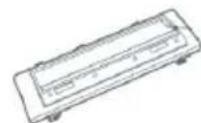
- Slightly press the main brush frame's tabs to open the main brush compartment and remove it.
- Remove lint and other dirt trapped in the brush and around the shafts with the help of the self-cleaning brush.
- Clear and clean the robot vacuum cleaner's suction channel.
- Reinstall the main brush and its frame.
It is recommended to clean the main brush once a week with the help of the self-cleaning brush.
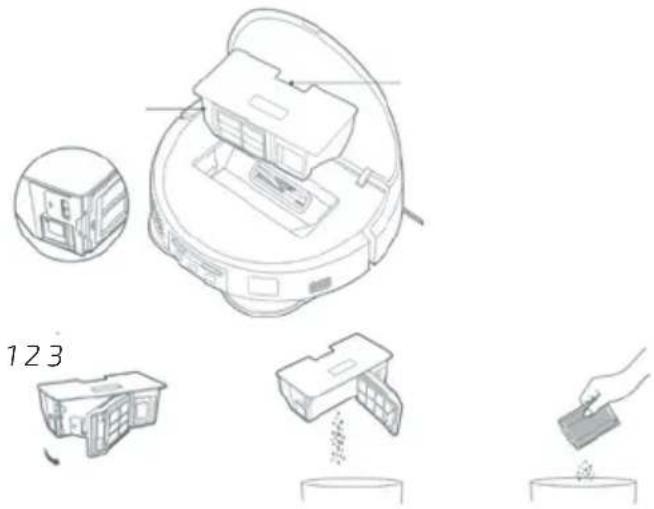
Dirt tank. Fig. 11.
- Lift the top cover of your robot.
- Press the tank removal button and remove the tank.
- Use the self-cleaning brush to clean the inside of the mixed tank.
- You can clean the dirt tank with water, without immersing the tank.
- Reinstall the dusk tank on the robot vacuum cleaner.
High-efficiency filter
- The high-efficiency filter is designed with fibres that help trap dust particles, dust mites, pollen, etc. It is very important to periodically clean the filter, to prevent these particles from building up in the filter, causing efficiency loss. It is convenient to carry out this maintenance once a week.
- Replace the high-efficiency filter every 3 months, depending on the frequency and type of use.
Recommendation
You can remove dirt from the high-efficiency filter with a small brush or gently shake the filter on a hard surface to remove the dust. The high-efficiency filter cannot be washed.
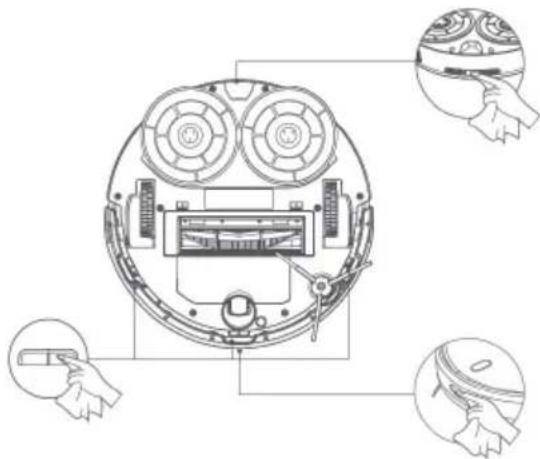
Sensor cleaning. Fig. 12:
- The robot vacuum cleaner has different types of sensors, for example, proximity sensors that allow the robot to move around while detecting obstacles, or fall-detection sensors that help the robot detect slopes or possible gaps/unevenness such as staircases. These sensors are always in contact with dust particles, and therefore can deteriorate over time, causing possible navigation errors.
- Use a clean, dry, and soft cloth to wipe off any dust from the free-fall sensor located on the robot vacuum cleaner part.
- It is recommended to clean all sensors of the robot vacuum cleaner every 35 hours of use or less, using a soft, dry cloth.
- The main brush rotates at high speed and helps pushing the dirt into the suction mouth. This brush is in contact with the floor, and therefore with dirt, so it can wear out overtime, negatively affecting cleaning efficiency. Therefore, it is recommended to change the main brush maximum every 320 hours or less (depending on frequency and type of use).
-
Slightly press the main brush frame's tabs to open the main brush compartment and remove it.
-
Remove hair, lint, and other dirt trapped in the brush and around the shafts with the help of the self-cleaning brush.
-
Clear and clean the robot vacuum cleaner's suction channel.
-
Reinstall the main brush and its frame.
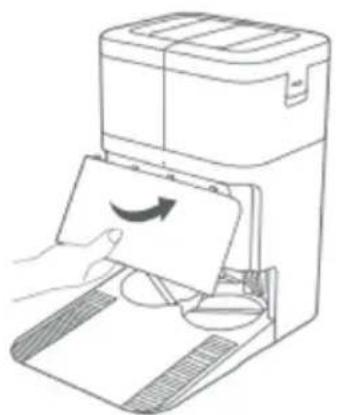
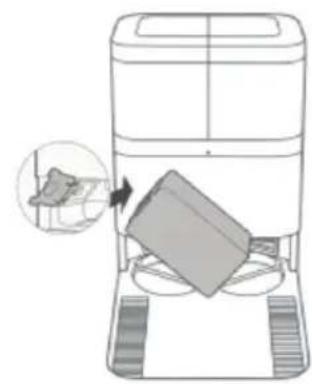
Replacing the dirt-disposal bag. Fig. 13.
To change the dirt-disposal bag, open the base cover, pull the handle, remove the bag and discard it.
Charging and replacing the battery.
To extend battery life, leave the robot vacuum cleaner charging on the self-cleaning base whenever not in use.
Remove the battery and store it in a safe, dry place if the robot vacuum cleaner will not be used for a long period of time.
ENGLISH
To replace the battery, follow the instructions below:
- Unscrew the screws on the bottom battery cover, remove the cover and remove the battery.
- Insert the new battery.
- Replace the battery and the lower casing and refasten the screws.
5. TROUBLESHOOTING
Robot vacuum cleaner
| Problem Possible cause and solution | |
| The robot vacuum cleaner does not switch on or does not clean | The robot vacuum cleaner does not work when battery is low. Allow it to charge before operation. |
| The room temperature is below 0 °C or above 40 °C. |
| The robot vacuum cleaner isn't charging or returning to the self-cleaning base | There are too many obstacles near the self-cleaning base. Relocate the base to an obstacle-free area. |
| Clean the charging terminals of the robot vacuum cleaner and the self-cleaning base. |
| Make sure the robot vacuum cleaner is switched on. |
| The robot vacuum cleaner is too far away from the self-cleaning base. Place it closer and try again. |
| The robot vacuum cleaner does not work properly | Turn off the robot vacuum cleaner and turn it on again.To reset the robot vacuum cleaner, follow the steps below: press and hold the Back Home button for 5 seconds until you hear a beep. If you reset the robot vacuum cleaner with the app next to it, you will see that this appliance disappears from the list of linked appliances in the main screen of the app. |
| The robot vacuum cleaner makes a strange noise during operation | The main brush, side brush, or omnidirectional wheel are blocked or tangled. Stop the robot vacuum cleaner and clean them. |
| The robot vacuum cleaner does not clean efficiently or doesn't pick up all the dirt | The high-efficiency filter is blocked. Clean it. |
| The main brush is blocked or tangled. Clean it. |
| The dirt tank is full, empty it. |
| The robot vacuum cleaner could not connect to the Wi-Fi network | Bad Wi-Fi signal. Check that the robot vacuum cleaner is located in an area with good Wi-Fi signal. |
| The Wi-Fi connection is unstable. Reset the router, check if there are any App updates, and try again. |
| Make sure that your smartphone mobile data are disabled to improve the linking process. |
| The robot vacuum cleaner did not carry out the scheduled cleaning task | Check if the robot vacuum cleaner is in Do not disturb mode and change mode. This option can be found on the general settings of the robot vacuum cleaner and allows you to define time slots in which the robot will not perform the scheduled cleaning tasks when in Do not disturb mode. |
| Make sure the robot vacuum cleaner is plugged to the mains, that it will not be able to carry out scheduled cleaning offline, and that the battery is not low. |
| The robot vacuum cleaner does not return to the self-cleaning base after finishing Spot cleaning or changing the starting position | The robot vacuum cleaner will map and calculate a new route after running in Spot cleaning mode or after changing its starting position. |
| If the self-cleaning base is too far away from the robot vacuum cleaner, the latter won't be able to return to the base. Manually move the robot vacuum cleaner close to the base. |
| The robot vacuum cleaner does not resume cleaning | Make sure the robot vacuum cleaner is not in Do not disturb mode, as it will not resume cleaning in this mode. |
| When manually placed in the self-cleaning base, the robot will not resume cleaning. |
| The robot vacuum cleaner is always offline | Make sure the robot is successfully connected to the network and always in areas with a good Wi-Fi signal. |
| The connection between the smartphone and the robot vacuum cleaner failed | Make sure the robot vacuum cleaner and the self-cleaning base are in an area with good Wi-Fi signal, reset the router, and retry connection. |
Self-cleaning base
| Problem Possible cause and solution |
| The self-cleaning base does not clean the mops | There is not enough water in the clean-water tank. Fill it in. |
| The waste-water tank is full. Empty and clean it. Also clean the openings of the waste water filter. |
6. TECHNICAL SPECIFICATIONS
Product: Conga 15090 SpinArm Home&Wash
Product reference: EU01_100104
Voltage: 14.4 V DC
Rechargeable Li-ion battery
Rated capacity: 14.4 V = 5200 mAh
Wi-Fi connection: Wi-Fi IEEE802.11b/g/n 2.4Ghz/5Ghz/ Bluetooth 5.0
Maximum Transmission Power: 20 dBm
Product: Self-cleaning base
Input: 220 - 240 V \~ 50/60 Hz
Output: 20 V = 1.8 A
Power: 650 W
Technical specifications may change without prior notification to improve product quality
Made in China | Designed in Spain
7. DISPOSAL OF OLD ELECTRICAL AND ELECTRONIC APPLIANCES
This symbol indicates that, according to the applicable regulations, the product and/or batteries must be disposed of separately from household waste. When this product reaches the end of its shelf life, you should dispose of the cells/batteries/accumulators and take them to a collection point designated by the local authorities.
For detailed information on the most appropriate way to dispose of electrical and electronic equipment and/or batteries, consumers should contact their local authorities.
Compliance with the above guidelines will help protecting the environment.
8. TECHNICAL SUPPORT AND WARRANTY
Cecotec shall be liable to the end user or consumer for any lack of conformity that exists at the time of delivery of the product under the terms, conditions, and deadlines established by the applicable regulations.
Repairs should be carried out by qualified personnel.
If at any moment you detect any problem with your product or have any doubt, do not hesitate to contact the official Cecotec Technical Support Service at +34 963 210 728.
9. COPYRIGHT
The intellectual property rights over the texts in this manual belong to CECOTEC INNOVACIONES, S.L. All rights reserved. The contents of this publication may not, in whole or in part, be reproduced, stored in a retrieval system, transmitted, or distributed by any means (electronic, mechanical, photocopying, recording or similar) without the prior authorization of CECOTEC INNOVACIONES, S.L.
CECecotec Innovaciones hereby declares that this robot vacuum cleaner, model EU01_100104 - Conga 15090 SpinArm Home&Wash, is in conformity with the Radio Equipment Directive 2014/53/EU.
The full text of the EU Declaration of Conformity can be found on the following website: www.cecotec.es
1. PIÈCES ET COMPOSANTS
Img. 1.1.
Output: 20 V = 1.8 A
Potenza: 650 W
5. PROBLEEMOPLOSSING
Robotstofzuiger
Product: Conga 15090 SpinArm Home&Wash
Fig./Img./Abb./Afb./Rys./Obr. 1.2
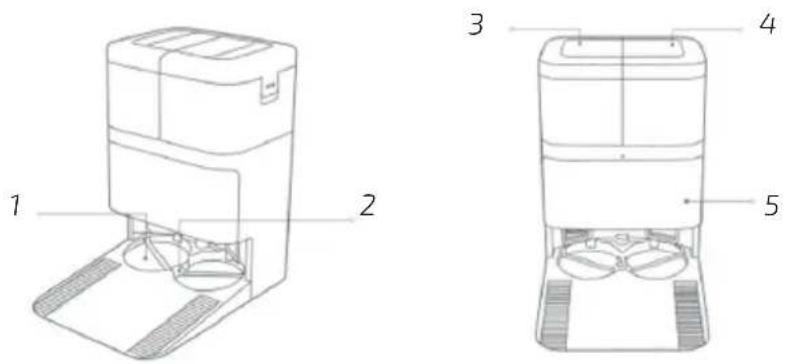
Fig./Img./Abb./Afb./Rys./Obr.2
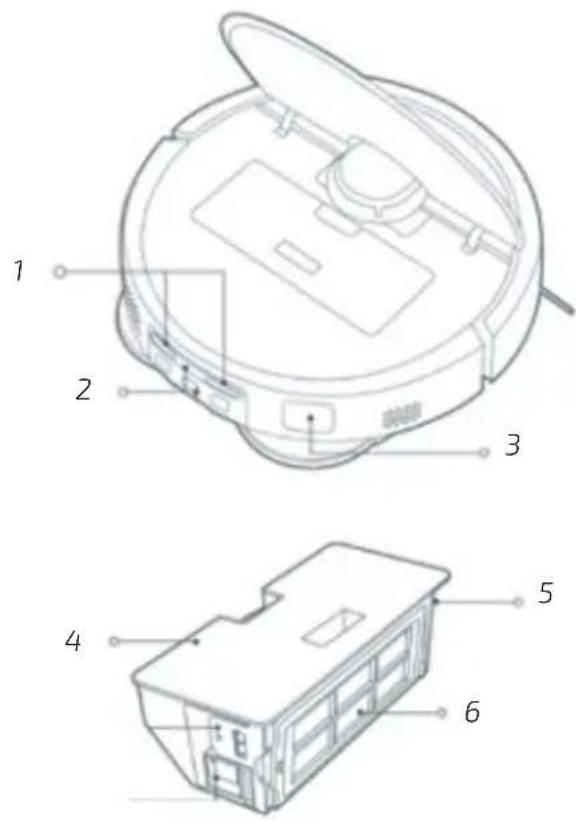
Fig./Img./Abb./Afb./Rys./Obr. 3
natural_image
Line drawing of a cozy living room with furniture and a small figure (no text or symbols)
natural_image
Line drawing of a minimalist living room interior with sofa, coffee table, and person sitting on the floor (no text or symbols)
Fig./Img./Abb./Afb./Rys./Obr. 4
natural_image
Simple line drawing of a balcony railing and a circular object on the floor (no text or symbols)
natural_image
Architectural diagram of a balcony with railing and circular base (no text or symbols)
Fig./Img./Abb./Afb./Rys./Obr. 5
natural_image
Simple line drawing of a robotic vacuum cleaner and a cloud-like shape with a red X mark, placed on a tiled floor (no text or symbols)
Fig./Img./Abb./Afb./Rys./Obr. 6
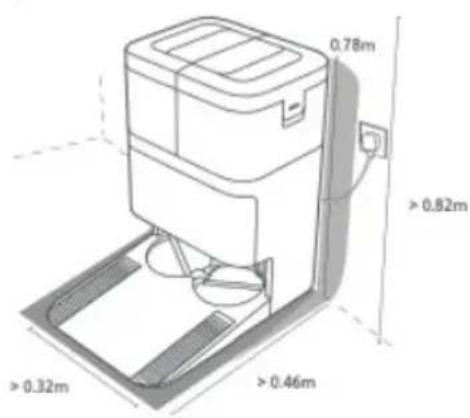
Fig./Img./Abb./Afb./Rys./Obr. 7
natural_image
Technical line drawing of a water purifier with water flow diagram showing inlet and outlet (no text or labels)
Fig./Img./Abb./Afb./Rys./Obr. 8
natural_image
Line drawing of a robotic vacuum cleaner with a hand adjusting the component (no text or symbols)
natural_image
Technical line drawing of a mechanical assembly with circular components and internal features (no text or symbols)
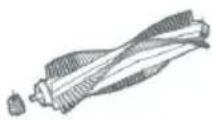
Fig./Img./Abb./Afb./Rys./Obr. 9 Fig./Img./Abb./Afb./Rys./Obr. 10
natural_image
Illustration of a robotic vacuum cleaner with components and a hand holding a container (no text or symbols)
Fig./Img./Abb./Afb./Rys./Obr. 11
natural_image
Technical line drawing of a mechanical device with labeled components (no text or symbols)
Fig./Img./Abb./Afb./Rys./Obr. 12
natural_image
Line drawing of a hand inserting a card into a device (no text or symbols)
natural_image
Diagram of a robotic device with a highlighted component and an inset showing a small object (no text or symbols present)
Fig./Img./Abb./Afb./Rys./Obr. 13
www.cecotec.es