TX2450 - Car radio MTX Audio - Free user manual and instructions
Find the device manual for free TX2450 MTX Audio in PDF.



| Product type | 4-channel Class AB audio amplifier |
| Brand | MTX Audio |
| Model | TX2450 |
| Number of channels | 4 |
| RMS power (CEA2006) @ 2Ω | 4 x 75 W |
| RMS power (CEA2006) @ 4Ω | 4 x 50 W |
| Bridged RMS power @ 4Ω | 2 x 150 W |
| Minimum bridged impedance | 4 Ω |
| Active filter | High-pass or low-pass 12 dB/oct, variable from 50 to 120 Hz |
| Signal-to-noise ratio (1 W) | > 73 dB |
| Distortion (THD+N, 1 W) | ≤ 0.2% |
| Frequency response (±1 dB) | 10 Hz – 60,000 Hz |
| Input sensitivity | 200 mV to 6 V |
| Dimensions (L x W x H) | 220 x 135 x 52 mm |
| Inputs | RCA (low-level) and high-level (adapter included) |
| EBC remote control | Optional (ref. EBC-1) |
| Power supply | 12 V (battery terminal), fuse recommended within 20 cm of battery |
| Protection | Thermal, short-circuit, under/over voltage |
| Maintenance and cleaning | Clean with a soft, dry cloth. Do not use solvents. |
| Spare parts and repairability | Contact technical support via mtxAudio.fr or support@mitekeurope.com. Professional repair recommended. |
| General information | Wideband Class AB amplifier, ideal for vehicle audio systems. Professional installation recommended. |
Frequently Asked Questions - TX2450 MTX Audio
User questions about TX2450 MTX Audio
0 question about this device. Answer the ones you know or ask your own.
Ask a new question about this device
Download the instructions for your Car radio in PDF format for free! Find your manual TX2450 - MTX Audio and take your electronic device back in hand. On this page are published all the documents necessary for the use of your device. TX2450 by MTX Audio.
USER MANUAL TX2450 MTX Audio
2-channel Class-AB Amplifier 660W Peak - 2x75W RMS
TX2450
4-channel Class-AB Amplifier 900W Peak - 4x50W RMS
Designed by MTX in Phoenix, AZ - USA
USA-UK
Thank You!
Thank you for purchasing an MTX Audio TX2 amplifier. Proper installation matched with MTX speakers and subwoofer provide superior sound and performance for endless hours of waking the neighbors. Congrats and enjoy the ultimate audio experience with MTX!
- Specifications :
TX2275 TX2450
- 2-channel Class-AB wide range amplifier
- CEA2006 certified Power Output :
- 2x110W RMS @2Ω and THD+N ≤ 1%
- 2x75W RMS @4Ω and THD+N ≤ 1%
- 1x220W RMS bridged @4Ω and THD+N ≤ 1%
Crossover: - High pass 12dB/oct, variable from 50Hz to 120Hz
- Low pass 12dB/occt, variable from 50Hz to 120Hz
- Signal-to-Noise Ratio (1 Watt): > 74dB
- THD+Noise (Distortion) (1 Watt): ≤ 0,18%
Frequency Response (± 1dB) : 10Hz - 60000Hz
Maximum Input Signal: 6V
Maximum Sensitivity: 200mV - Dimensions : 180x135x52mm
High level inputs -
Optional EBC remote control (EBC-1)
-
4-Channel Class-AB wide range amplifier
- CEA2006 certified Power Output :
- 4x75W RMS @2Ω and THD+N ≤ 1%
- 4x50W RMS @4Ω and THD+N ≤1%
- 2x150W RMS bridged @4Ω and THD+N ≤1%
Crossover: - High pass 12dB/oct, variable from 50Hz to 120Hz
- Low pass 12dB/occt, variable from 50Hz to 120Hz
- Signal-to-Noise Ratio (1 Watt): > 73dB
- THD+Noise (Distortion) (1 Watt): ≤ 0,2%
Frequency Response (± 1dB) : 10Hz - 60000Hz
Maximum Input Signal: 6V
Maximum Sensitivity: 200mV - Dimensions: 220x135x52mm
High level inputs - Optional EBC remote control (EBC-1)
- Settings, Power and Speaker connections :
TX2275
TX2450
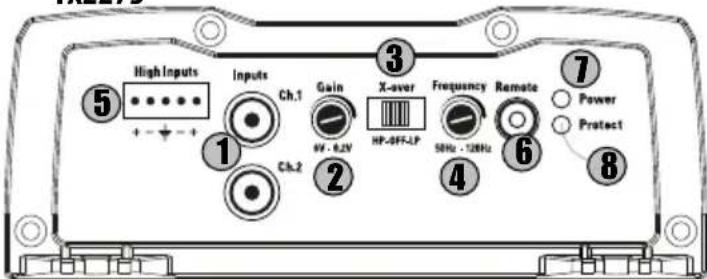
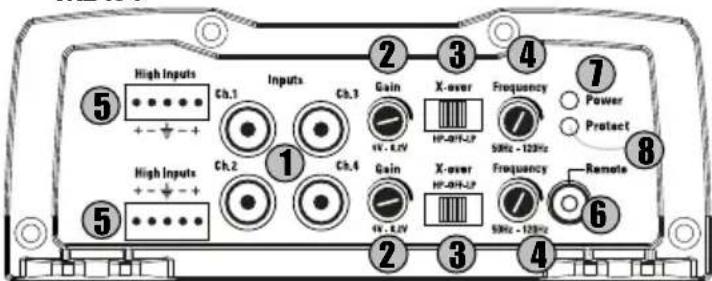
RCA Inputs (Input) : These RCA inputs are used with source units that have RCA or Line level outputs. (Source units need a minimum level of 200mV output for proper operation of the amplifier).
MTX recommends only high quality twisted pair cables (such as MTX ZNX) to decrease the possibility of radiated noise entering the system.
2 Gain Control (Gain): The gain control matches the input sensitivity of the amplifier to the source unit being used. The operating range varies from 200my to 6V.
Adjusting the gain
- Turn the gain control on the amplifier all the way down (counter clockwise).
- Turn up the volume control on the source unit to approximately 3/4 of maximum.
- Adjust the gain control on the amplifier until audible distortion occurs.
- Adjust the gain control down until audible distortion disappears.
- The amplifier is now calibrated to the output of the source unit.
X-Over Switch (X-Over):
In "LP" position, the active low pass (LP) x-over is turned on. Use this position for subwoofer application. In "HP" position, the active high pass (HP) x-over is turned on. Use this position for speaker application. In "Off" position, the x-over is turned off. The amp is in wide range mode.
X-Over Frequency Control (Frequency): Used to select the desired x-over frequency. The frequency is adjustable from 50Hz to 120Hz.
5 Speaker level inputs (High Inputs): This input will allow the amplifier to operate from source units with speaker-level outputs. Output speaker leads from the source unit should be tied directly to the wire harness provided with the amplifier. Note: When speaker level inputs are used, a remote turn on wire must be used to switch the amplifier on and off.
External Bass Control Port (Remote) - The Subwoofer Level Control Remote (EBC) plugs directly into this port, while the EBC itself can be placed anywhere in the vehicle for on demand bass adjustments. Attention, the EBC is optional. You can purchase it separately (Reference : EBC-1).
1 PowerOn LED (Power): The LED illuminates green when the amp is switched on.
Protection LED (Protec.) : The LED illuminates red when the amp is in short circuit or thermal protection.
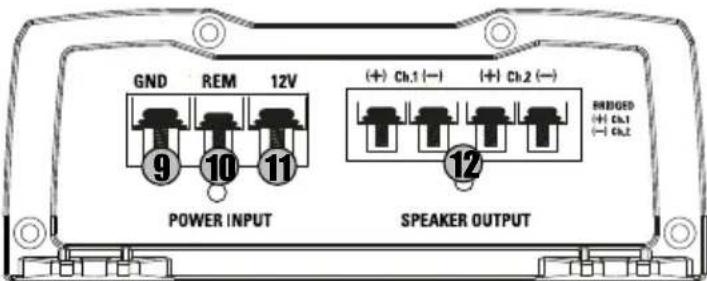
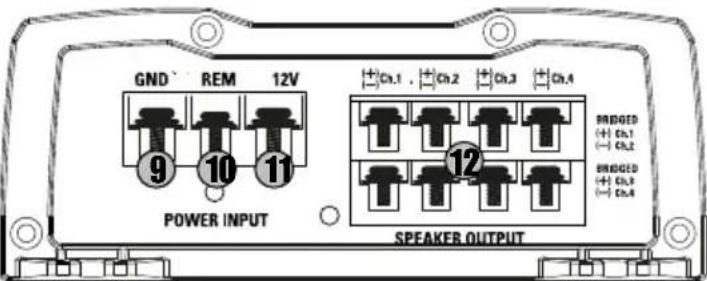
Ground Terminal (GND): A proper ground is required for your amplifier to operate at peak performance. A short ground cable the same diameter as the power cable should be used to attach the ground terminal directly to the chassis of the vehicle. Always remove paint, dirt or debris to expose bare metal where the ground will be attached.
Remote Terminal (REM): The amplifier can be turned on by applying 12 volts to this terminal. Typically this voltage is supplied by a wire from the source unit marked "remote" or "power antenna".
(+12V) Power Terminal (12V): This is the main power input for the amplifier and must be connected directly to the positive terminal of the vehicles battery for proper operation. Use caution when installing (+12) power cable in the vehicle. Avoid running this cable parallel with RCA cables, antennas, or other sensitive equipment due to massive currents that can induce noise into the audio system. It is also very important to have a tight, secure connection for maximum performance. MTX recommends using 8 10mm2 power wire with the MTX TX2275 and TX2450.
Speaker Terminals (Speaker Output): Connect speakers to these terminals. Ensure correct polarity, positive-to-positive (+ / +) and negative-to-negative (- / -) . Reversing the polarity strongly degrades the bass level and the sound quality. Bridge Mode:
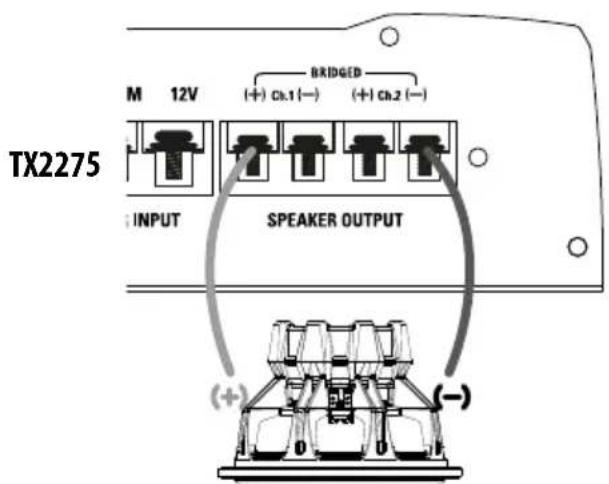
TX2275 : When bridging the amplifier, use the Ch.1 positive terminal and the Ch.2 negative terminal only.
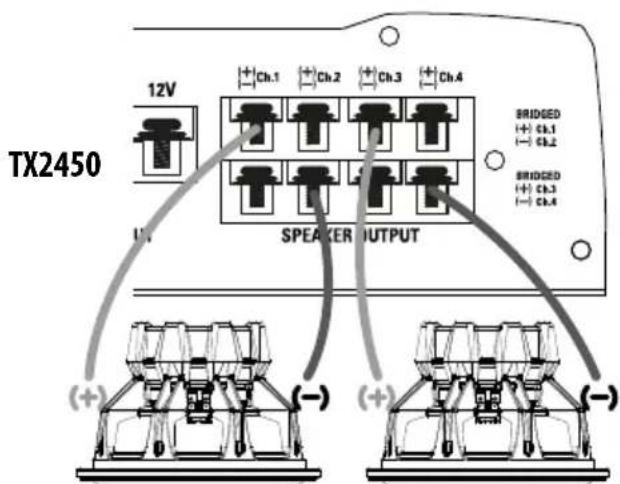
TX2450 : When bridging the amplifier, for the two first channels, use the Ch.1 positive terminal and the Ch.2 negative terminal only. For the two following channels, take the Ch.3 positive terminal and the Ch.4 negative terminal.
Warning : do not bridge the amplifier with an impedance lower than 4Ω
Installation & Mounting :
MTX recommends your new amplifier be installed by an Authorized MTX retailer. Any deviation from specified installation instructions can cause serious damage to the amplifier, speakers and/or vehicle's electrical system. Damage caused from improper installation is NOT covered under warranty. Please verify all connections prior to system turn on!
- Disconnect the vehicle's negative battery cable.
- Determine the mounting place for your MTX amplifier. Keep in mind there should be sufficient air flow for proper cooling. Mark the mounting holes from the amplifier to be drilled. Before drilling make sure all vehicle wires, gas lines, brake lines and gas tank are clear and will not interfere with installation. Drill the desired holes and mount the MTX amplifier.
- Install a positive (+) power cable from the vehicle's battery through the firewall using a grommet or firewall bushing to avoid cable damage from sharp edges of the firewall. Run the cable through the interior of the vehicle and connect it to the amplifier's (12V) terminal. Do Not connect to the battery at this time.
Note : Use only proper gauge wire for both positive and negative connections.
4. Install a circuit breaker or fuse within 20cm of the battery. This effectively lowers the risk of severe damage to you or your vehicle in case of a short circuit or accident. Make sure the circuit breaker is switched off or the fuse is taken out of the fuse holder until all connections are made. Now connect your positive power cable to the positive battery terminal of the battery.
5. Grounding - Locate a proper ground point on the vehicle's chassis and remove all paint, dirt or debris to reveal a bare metal surface. Attach the ground wire to that contact point. Connect the opposite end of the ground wire to the (GND) terminal on the MTX amplifier.
6. Connect a Remote Turn-on wire from the head unit to the MTX amplifier's Remote terminal. If the head unit does not have a dedicated Remote Turn-on lead, you may connect to the head unit's Power Antenna lead.
7. Connect RCA cables from the head unit to the MTX amplifier's RCA inputs. Run all signal cables away from vehicle wiring, computers and power cables. If cables must be crossed do so at a 90° angle. Use only high quality RCA cables to decrease radiated noise from entering the system.
8. Connect your speakers to the MTX amplifier's speaker terminals using proper gauge wire.
9. Double check all previous installation steps, in particular, wiring and component connections. Once verified, reconnect the vehicle's negative battery cable, turn the circuit breaker on or place the fuse in the fuse holder.
Note : Gain Levels on the amplifier should be turned all the way down (counter clockwise) before proceeding with adjustments.
Troubleshooting:
Problem
Cause
Solution
Power LED is off No +12V at remote connection Supply +12V to terminal
No +12V at Power connection Supply +12V to terminal
Insufficient ground connection Verify ground connection
Blown power fuse Replace fuse and try to understand why
Blown amp Return for service
3 LEDs are flashing red Speaker load is too low Remove the speaker(s)
The amp is in thermal protection Wait for the amp to cool down
Input tension is too high or too low Check your battery and your alternator
3 LEDs are solid red, Volume on head unit off Increase volume on head unit
but no output
Speaker connections not made Make speaker connections
Gain control on amplifier set to minimum
Turn up gain
Signal processing units off
Apply power to signal processor
All speakers blown
Replace speakers
Output distorted
Head unit volume set too high Lower head unit volume
Amplifier gain set too high
Lower amplifier gain
Balance reversed
Speakers wired reversed
RCA inputs reversed
Reverse RCA input
Bass is weak
Speakers wired out of phase
Not using MTX woofers
Buy MTX woofers
Blowing fuses
Excessive output levels
Amplifier defective
Return for service
Wire speakers with correct orientation
Wire speakers with correct phase
Lower the volume
- Stay Tuned - Technical support :

mtxaudio.eu

support@mitekeurope.com

twitter.com/MTXEurope

facebook.com/MTXEurope
Installation examples :
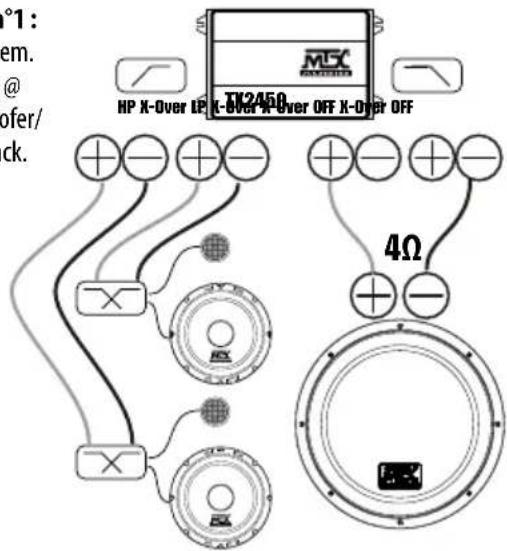
Installation n°1: 3-Channel system. Compo system @ front + subwoofer/ enclosure @ back.
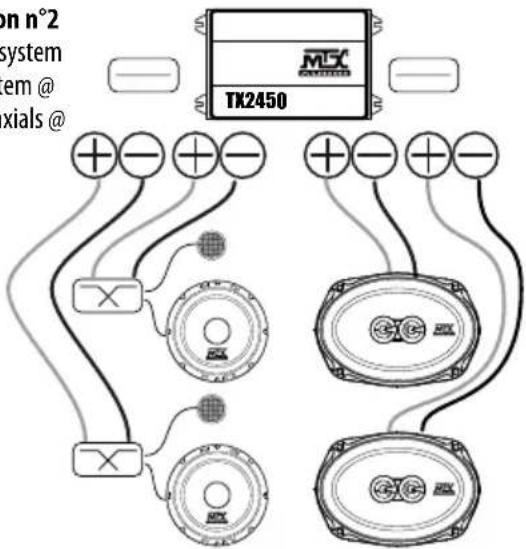
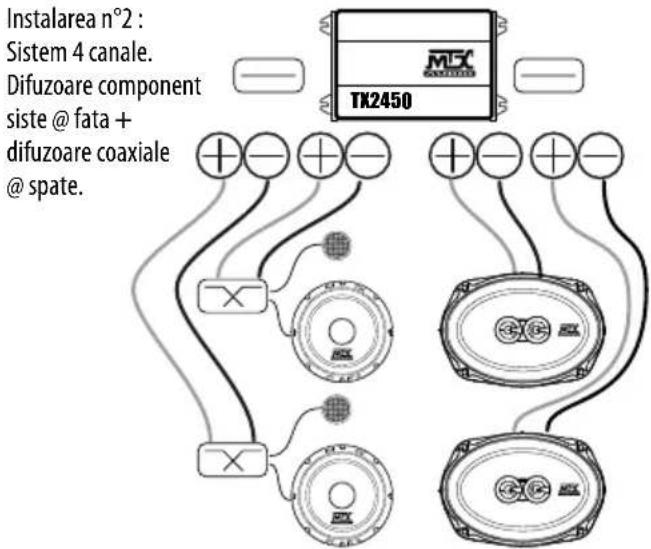
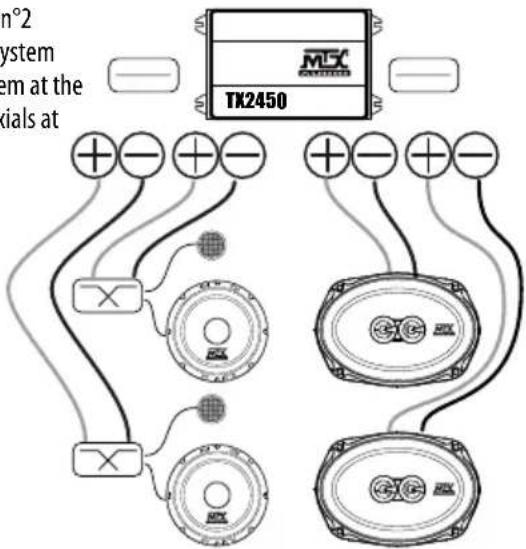
Installation n°2 4-Channel system Compo system @ front + coaxials @ back.
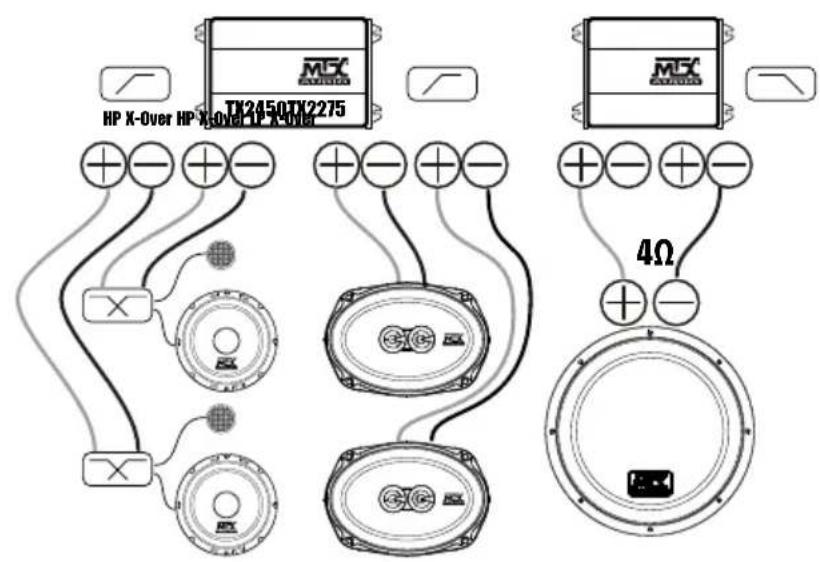
Installation n°3: 5-Channel system. Compo system @ front + coaxials @ back + subwoofer/enclosure system @ back
Installation n°4:
3-Channel system
with multiple amps.
Compo system @ front
+ dual subwoofer/enclosure system @ back
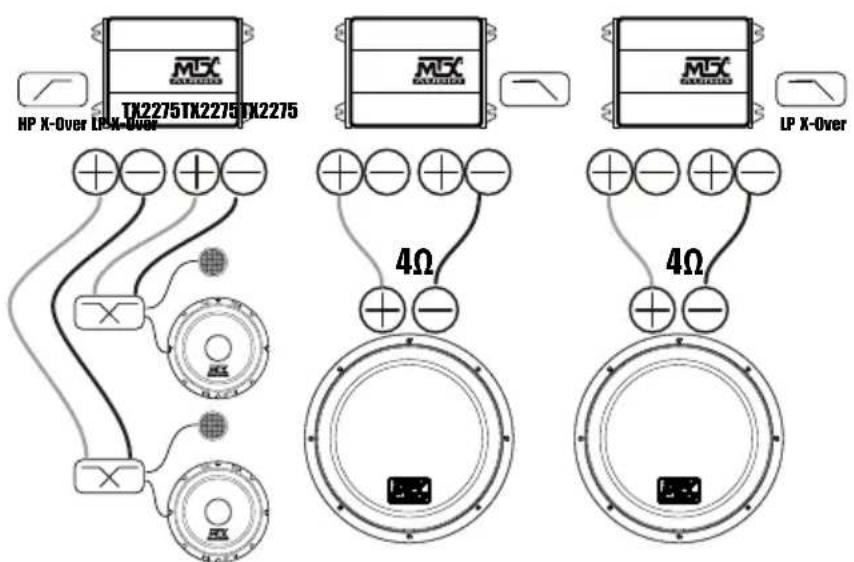
Recommended subwooers/enclosures: TR12-04, TR12AV, RTE12AS, RTF10AS, RT12AT, RT10AS, RT12AV
Recommended speakers: any TR/TRC/TRS speakers, any TX2 speakers, any TX4 speakers, any RTC/RTS speakers
FR
Merci!
twitter.com/MTXFrance

facebook.com/MTXFrance

twitter.com/MTXEurope

facebook.com/MTXEurope

Einbaubeispiele :
Invertas as saidas RCA
twitter.com/MTXEurope

facebook.com/MTXEurope
Exemplos de instalacao :
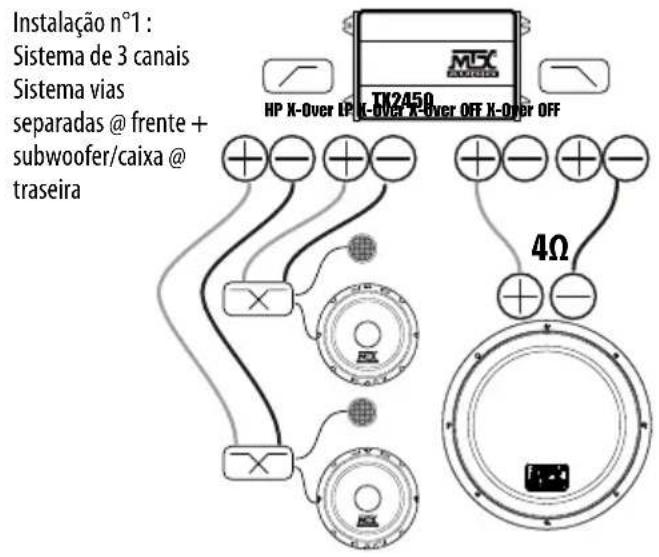
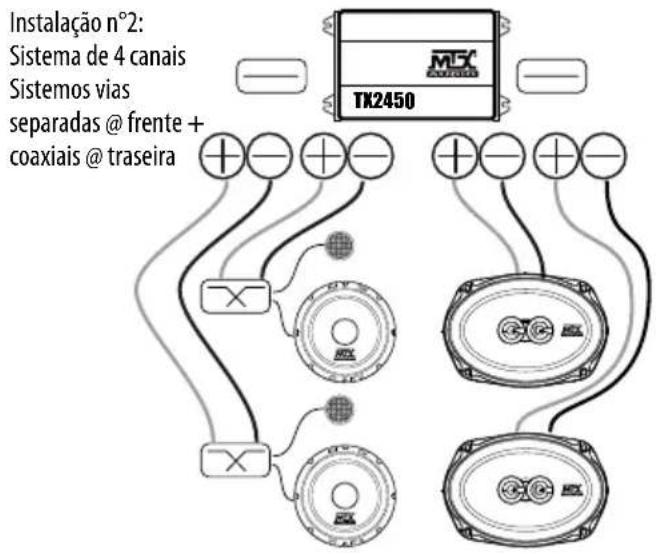
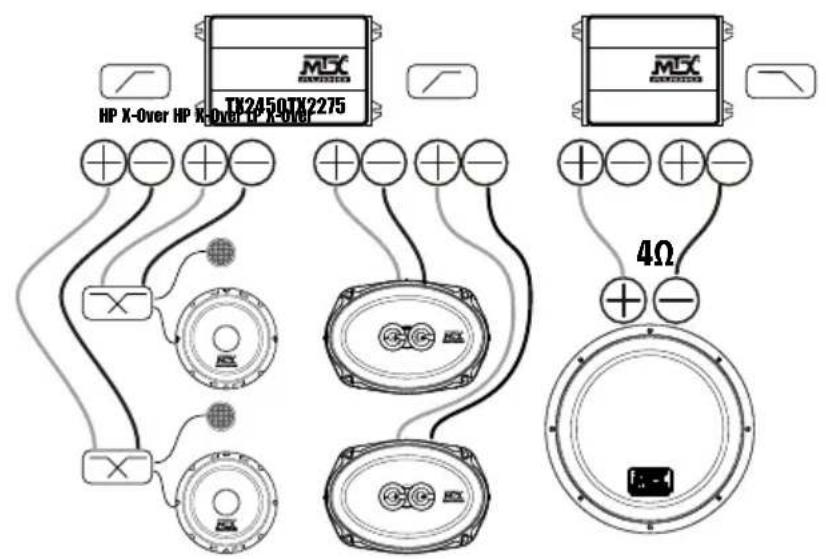
Instalacao n°3:
Sistema 5 canais
Sistema vias seperadas @ frente ^+ coaxiais @ traseira
+ subwoofer/caixa @ traseira
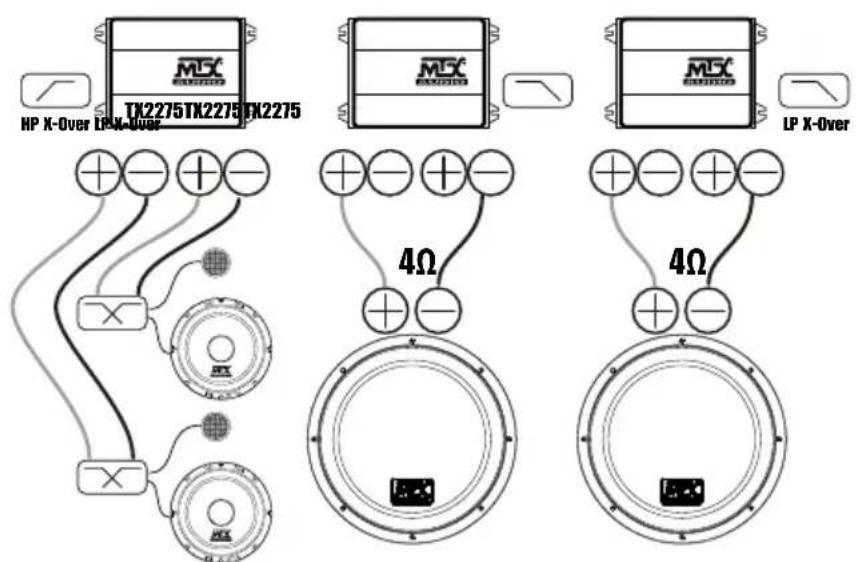
Instalacao n°4:
Sistema 3 canais
com multiplos amplificadores
Sistema vias seperadas @ frente ^+ duplo subwoofer/caixa
@traseira
Subwooers/caixas recomendadas: TR12-04, TR12AV, RTE12AS, RTF10AS, RT12AT, RT10AS, RT12AV Altifalantes recomendados: TR/TRC/TRS, TX2, TX4, RTC/RTS
IT
Grazie!
twitter.com/MTXEurope

facebook.com/MTXEurope

PpmeHHe: yOBeHb ycIneHn DoJIoKHe 6bIbYbpaH Do yOpNa npOTNB YacOBoN CTpeKN, NpeD hauAnom KoppeKtnpOBKn yOBoHyCIneHn.

YctpaHHe HeNcnpaBHOCTeI:
Ipo6nema
Pnunna
PeweHne
3cBeToIOIa BbIKIOueHb Het+12Ha npabnaIOe mnpoBoe IIOKIOHTe nTahme Ha KJIeMMy +12B
He+12B npn noKIOueHm nITAHm IIOKIOUHTe nITAHme Ha KNeMMy + 12 B
HnpeBnBHOe NOKIOUeHne 3a3EmHe HnpoeBpTe 3a3EmHe
Ipeperopen npedoxpaHnteB nHTaHn 3aMeHne npedoxpaHnteB n nonbtaTecb noHtB, noemy
YcIMInTeB HmCnPaBcH 06paTHeCB B CepBc
3 CBeToDnOda MrraIOT KpaChbIM Harpy3Ka DnHAMNKOB CnMIXKOM Hn3Ka CHNMMTE DnHAMNK (I)
HHeT3ByKa He npOn3BeHeO NoDKnIOueHne DnHaMnKOB
PeryatopynpaBHeHn yCHeHem BbCTaBHeHa MmHmym
06pa6oTKa CnHaHa BbIKHueHa
BceDINHAMIKBbIINH3CTPO8
BbIXOHOH CnHn NCKaJaETcyaPObEhB rPOMKoCTn Fy CNiUkOM BbICOKO
Ko3ΦΦHHT yCNIeHn CNIuKOM BbICOKOJ
Ipepyan6aianc Ipepyan6aianc
IpepyntaHbXoDbRCA
Bac cna6bI DnHaMnKpnacpa3npoBaHbI
He nnonb3yertcMTX ca6byeep
IpeoXpaHmTeHnHeCnpaBhbl NObbIeHHbIyOpoBeHbBixOda
YcunntTeB HeCnPbaEN 06paTHeCB B cepBnC
NIOIbTaIaTeCb IOHrTb,IOYEMy
M3KaJ CHMMITE DnHaMMK (N)
e10ocTbTb
BepbTe aKKyMnyTOp nReHepaTop
YBENyBENyBTe TpOMKoCTb Ha rONOBHOM yCTPOINCTBE
BbInonHnTe noKnOuChEmn DaHaMnKOB
Otperyuyeucnne
Ipaai Te nntaHne Ha npocccop CnHaNoB
3aMeHHTb DnHaMnKu
ymehbinte K03ΦmHneHT yCmHn
IIOKnIOUHTBeBxOdbiRCA B COOTBETCBMN C KaHanaMn F
PoiKIOUHTe DnHAMnKc C0bIODeHMeFa3bl
KynntbMTXca6Byfepe
a YmehbuntepomKoCTb

OCTaBaItecb cHaMn :

mtx-audio.de

support@mitekeurope.com

twitter.com/MTXEurope

facebook.com/MTXEurope
twitter.com/MTXEurope

facebook.com/MTXEurope

Exemple instalare :
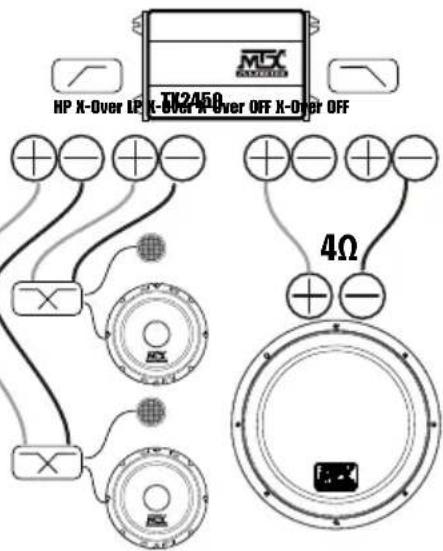
Instalarea n°1:
Sistem 3 canale.
Difuzoare component
sistem @ fata +
subwoofer @ spate.
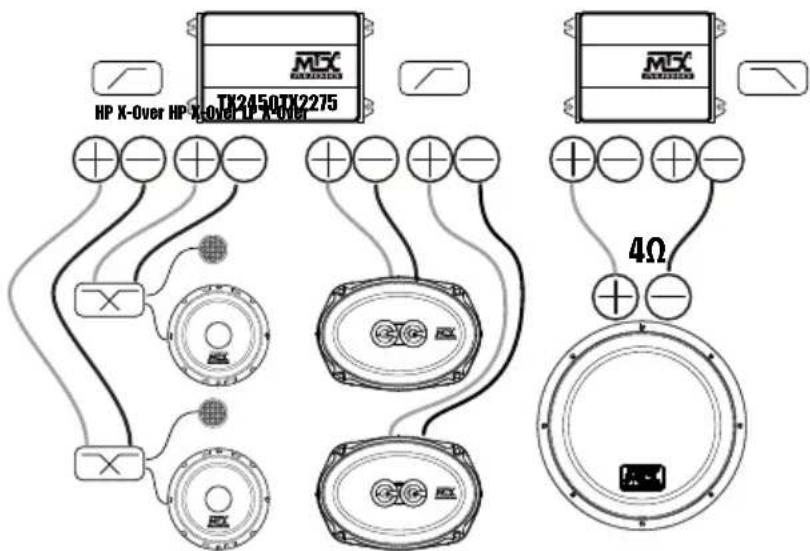
Instalare n°3:
Sistem 5 canale.
Difuzoare component system @ fata + difuzoare coaxiale @ spate + Subwoofer @ spate
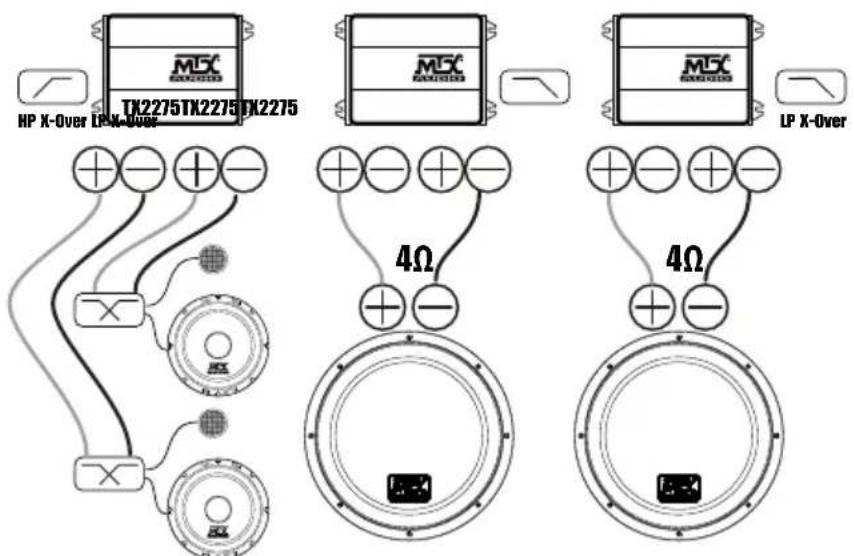
Instalarea n°4:
Sistem 3 Canale cu mai multe amplificatoare. Difuzoare component systemd @ fata + subwoofer dublu @ spate
Subwoofer/ incinte recomandate:TR12-04,TR12AV, RTE12AS,RTF10AS,RT12AT,RT10AS,RT12AV Difuzoare recomandate:TR/TRC/TRS, TX2, TX4, RTC/RTS
SP
Introduccion:
Thank you for purchasing an MTX Audio TX2 amplifier. Proper installation matched with MTX speakers and subwoofer provide superior sound and performance for endless hours of waking the neighbors. Congrats and enjoy the ultimate audio experience with MTX!
- Specificaciones :
TX2275 TX2450
MTX woofers no son usados
E twitter.com/MTXEurope
f facebook.com/MTXEurope
Installation n°2 4-Channel system Compo system at the front ^+ coaxials at the back.
MTX is proud to be an American Audio Company since 1971.

MTX is a proud member of Mitek Corp high quality consumer audio product lines.

Designed and Engineered by Mitek in Phoenix - AZ, USA - Assembled in Korea. © 2016 Mitek. All rights reserved. MTX is a registered trademarks of Mitek. Due to continual product development, all specifications are subject to change without notice.
Mitek-MTX-4545 East Baseline Rd. Phoenix, AZ 85042, USA


- TX2450
- USA-UK
- THANK YOU
- SPECIFICATIONS
- TX2275 TX2450
- SETTINGS, POWER AND SPEAKER CONNECTIONS
- INSTALLATION & MOUNTING
- TROUBLESHOOTING
- PROBLEM
- CAUSE
- SOLUTION
- STAY TUNED - TECHNICAL SUPPORT
- INSTALLATION EXAMPLES
- FR
- MERCI
- EINBAUBEISPIELE
- EXEMPLOS DE INSTALACAO
- IT
- GRAZIE
- YCTPAHHE HENCNPABHOCTEI
- IPO6NEMA
- PNUNNA
- PEWEHNE
- OCTABAITECB CHAMN
- EXEMPLE INSTALARE
- SP
- INTRODUCCION
- SPECIFICACIONES
Brand : MTX Audio
Model : TX2450
Category : Car radio