PA924 - Receiver Monacor - Free user manual and instructions
Find the device manual for free PA924 Monacor in PDF.



User questions about PA924 Monacor
0 question about this device. Answer the ones you know or ask your own.
Ask a new question about this device
Download the instructions for your Receiver in PDF format for free! Find your manual PA924 - Monacor and take your electronic device back in hand. On this page are published all the documents necessary for the use of your device. PA924 by Monacor.
USER MANUAL PA924 Monacor
These instructions are intended for the installer of the unit with knowledge in 100V or 70 V/50 V) PA technology. For operation (3 chapter 5), however, no specific knowledge is required.
Please read the operating instructions carefully prior to operating the unit and keep them for later reference. All control elements and connections described can be found on the fold-out page 3.
1 Control Elements and Connections
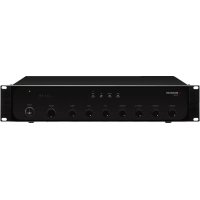
Figures 1 and 2 show the model PA-924. The control elements and connections of the model PA-948 are identical.
1.1 Front panel
1 Mounting bracket (2×) to install the unit into a rack
2 Buttons LINE, TUNER, CD and TAPE to select the corresponding input (23) for the AUX channel; to indicate the selection, the LED above the respective button will light up
3 LEDs to indicate the output level
4 Power indicator ON
5 Mixing controls to adjust the volume for the channels 1 to 4
6 Mixing control to adjust the volume for the AUX channel
7 Tone controls BASS and TREBLE
8 Control MASTER to adjust the total volume
9 POWER switch Note: It will not be possible to switch off the amplifier when a 24 V DC voltage of an emergency power supply unit is available at the terminals DC INPUT (10).
1.2 Rear panel
10 Screw terminals DC INPUT to connect an emergency power supply unit (= 24V)
11 Selector switch CHIME to select the type of chime: "2T" = 2-tone chime, "4T" = 4-tone chime
12 DIP switches 1 to 4 for the channels 1 to 4: To give a channel priority over the AUX channel, set the respective switch to "ON".
13 Control CHIME VOLUME to adjust the volume of the chime
14 Output MIX OUT (XLR, bal.) for the mixed signal; the output level is independent of the control MASTER (8)
15 Screw terminals SPEAKER OUTPUT (removable) to connect the speakers: chapter 4.2.1 and figures on page 3
16 Screw terminals CHIME REMOTE to connect a pushbutton for chime triggering
17 Mains jack for connection to a socket (230V / 50Hz) by means of the mains cable provided
18 Support for the mains fuse Always replace a blown fuse by one of the same type!
19 LEDs +48 V, one each for the channels 1 to 4; will light up when the phantom power supply for the respective channel is switched on
20 Switches PH.PWR, one each for the channels 1 to 4, to activate the 48V phantom power supply Please observe the notes in chapter 4.2.2.
21 Inputs (XLR, bal.), one each for the channels 1 to 4, to connect a microphone or a mono audio source with line signal level
22 Controls GAIN, one each for the channels 1 to 4, to match the input sensitivity to the audio source connected
23 Inputs LINE, TUNER, CD and TAPE (RCA) to connect stereo audio sources with line signal level
24 Output REC (RCA) to connect a stereo recorder; the output level is independent of the control MASTER (8)
25 Output PRE OUT and input AMP IN (RCA) to insert an audio processing unit chapter 4.2.6
Note: When PRE OUT and AMP IN are not used for the insertion of a unit, they must be connected by means of the jumper as shown in figure 2; otherwise, the signal flow will be interrupted.
2 Safety Notes
The unit corresponds to all relevant directives of the EU and is therefore marked with
WARNING

The unit uses dangerous mains voltage. Leave servicing to skilled personnel and do not insert anything into the air vents; inexpert handling may result in electric shock.
- The unit is suitable for indoor use only. Protect it against dripping water, splash water and high air humidity. The admissible ambient temperature range is 0 - 40^ .
- Do not place any vessels filled with liquid, e.g. drinking glasses, on the unit.
The heat generated inside the unit must be dissipated by air circulation; never cover the air vents of the housing. -
Immediately disconnect the unit from the power supply
-
if the unit or the mains cable is visibly damaged,
- if a defect might have occurred after the unit was dropped or suffered a similar accident,
- if malfunctions occur.
In any case the unit must be repaired by skilled personnel.
-
Never pull the mains cable to disconnect the mains plug from the mains socket, always seize the plug.
For cleaning only use a dry, soft cloth; never use water or chemicals. -
No guarantee claims for the unit and no liability for any resulting personal damage or material damage will be accepted if the unit is used for other purposes than originally intended, if it is not correctly connected or operated, or if it is not repaired in an expert way.

If the unit is to be put out of operation definitively, take it to a local recycling plant for a disposal which is not harmful to the environment.
3 Applications
This PA mono amplifier with five mixable input channels is specially designed for operation with 100V (or 70V / 50V ) speakers. However, it is also possible to use low-impedance speakers instead.
The amplifier provides:
- four XLR inputs for the channels 1 to 4 with adjustable sensitivity (line level to microphone level); phantom power supply (+48V) can be activated separately for each channel
- four RCA inputs, one of them to be selected for the channel AUX
- DIP switches to give the channels 1 to 4 priority over the AUX channel
- an XLR output and an RCA output for the mixed signal
- RCA jacks to insert an audio processing unit
- connection for a pushbutton to trigger a 2-tone chime or 4-tone chime
connection for an emergency power supply unit (≈ 24V) - protective circuits against overload, short circuit and overheating
4 Installation
The amplifier should only be installed by skilled personnel!
4.1 Setting up the amplifier
The amplifier can be set up on its own or installed in a rack for units with a width of 482mm (19^ ) . In order to ensure sufficient cooling of the amplifier, air must always be able to flow freely through all air vents.
4.1.1 Installation into a rack
Screw the two mounting brackets (1) provided to the sides of the unit. In the rack, 2 rack spaces (for model PA-924) or 3 rack spaces (for model PA-948) are required. To prevent the rack from becoming top-heavy, insert the amplifier into the lower section of the rack. The mounting brackets are not sufficient for fixing the amplifier safely; additionally use lateral rails or a bottom plate to secure the amplifier.
The hot air given off by the amplifier must be dissipated from the rack; otherwise, heat will accumulate in the rack which may not only damage the amplifier but also other units in the rack. In case of insufficient heat dissipation, install a ventilation unit into the rack.
4.2 Connections and settings

During operation, there is a hazard of contact with a dangerous voltage of up to 100V at the speaker terminals (15). Always switch off the PA system prior to making any connections!
4.2.1 Connecting speakers
Either 100V speakers (or 70V or 50V speakers) or low-impedance speakers can be connected. Never connect a combination of these speaker types.
Use the appropriate terminals SPEAKER OUT-PUT (15), depending on the speaker type:
- Connect 100 V speakers to "100V" and "COM": fig. 3 (70 V speakers to "70V" and "COM"; 50 V speakers to "50V" and "COM: figs. 4 and 5, respectively) The admissible load by the speakers is 240 W RMS max. (PA-924) and 480 W RMS max. (PA-948) respectively.
- Connect low-impedance speakers to "4Ω" and "COM". The total impedance of the speakers must not be less than 4 Ω. Figures 6 to 9 show various options of how to meet the minimum impedance of 4 Ω; please note that other options are possible.
Always observe the correct polarity when making the connections. The terminal COM is the negative pole.
To make handling easier, the screw terminal strip can be removed from its plug-in connection.
4.2.2 Audio sources for the channels 1 - 4 Each of the channels 1 to 4 provides an XLR jack (21) for the connection of a microphone or mono audio source with line signal level (e.g. mono output of a mixer). The jack is balanced; however, by means of an appropriate adapter such as the audio cable MCA-158 (RCA XLR) from MONACOR, it can also be used for an unbalanced connection.
Use the control GAIN (22) of the respective channel to match its input sensitivity to the output level of the audio source: When a microphone is connected, turn the control clockwise; when an audio source with line level is connected, turn the control anticlockwise. If required, readjust the control GAIN after the amplifier has been set into operation: When the mixing control (5) of the channel must be turned back very far (sound too loud or distorted) or turned up very far (sound too low) to set the volume desired, turn the control GAIN anti-clockwise or clockwise accordingly.
Phantom power supply
To activate the 48V phantom power supply for a channel (e.g. when a condenser microphone is connected), set the appropriate switch PH.PWR (20) to "ON". When the phantom power supply has been activated, the corresponding LED +48V (19) will light up.
ATTENTION
- Only actuate the switch when the amplifier is switched off (switching noise).
- Only activate the phantom power supply when a phantom-powered audio source is connected; audio sources not designed for phantom power supply (e.g. microphone with unbalanced output) may be damaged.
4.2.3 Audio sources for the AUX channel
The amplifier provides four inputs (23) for the connection of stereo audio sources with line signal level (e.g. tuner, CD / MP3 player, PC). During operation, use the appropriate button (2) on the front panel to select the desired input for the AUX channel.
Connect each of the units to a pair of RCA jacks L/R. In the amplifier, the signals of the two stereo channels will be mixed to a mono signal.
4.2.4 Priority function
The DIP switches 1 to 4 (12) can be used to give the individual channels 1 to 4 priority over the AUX channel (corresponding DIP switches set to "ON"). The volume of the AUX channel will be substantially attenuated as soon as a signal (e.g. a microphone announcement) is available on a channel of higher priority.
4.2.5 Pushbutton for chime triggering
A chime can be triggered by means of a connected pushbutton. Connect the pushbutton to the terminals CHIME REMOTE (16).
Setting the chime
After switching on the amplifier, use the switch CHIME (11) to select the type of chime desired (2T = 2 -tone chime, 4T = 4 -tone chime) and then use the control CHIME VOL- UME (13) to adjust the volume of the chime.
4.2.6 Audio processing unit
Use the RCA jacks PRE OUT and AMP IN (25) to insert an audio processing unit (e.g. equalizer, effect unit): The mixed signal will be routed to the audio processing unit via PRE OUT, processed and then returned to the amplifier via AMP IN.
1) Remove the jumper connecting the jacks PRE OUT and AMP IN.
2) Connect the input of the unit to be inserted to the output PRE OUT.
3) Connect the output of the unit to be inserted to the input AMP IN.
Note: When removing the unit inserted, remember to connect PRE OUT and AMP IN by means of the jumper; otherwise, the signal flow will be interrupted.
4.2.7 Additional amplifier and recorder
The XLR output MIX OUT (14) can be used to connect an additional amplifier (or a different subsequent audio unit). Connect the output to a balanced line level input.
The output REC (24) is suitable for the connection of a recorder. For the connection of a stereo unit, two jacks L/R are available. The amplifier is monophonic; therefore, the signals at the two jacks are identical.
The adjustment of the control MASTER (8) will have no influence on the output signal of MIX OUT and REC.
4.2.8 Power supply and emergency power supply
1) To ensure continued operation of the amplifier after a mains failure, connect the terminals DC INPUT (10) to an emergency power supply unit (= 24V) e.g. the emergency power supply unit PA-24ESP from MONACOR.
Notes:
- When = 24V is available at the terminals DC INPUT, the amplifier will be in operation even when the switch POWER (9) has been set to "Off". When both the emergency power supply and the mains power supply are available, the switch POWER will switch between these two power supplies.
- With emergency power supply, the amplifier will provide less power than with mains power supply.
2) Finally, first connect the mains cable provided to the mains jack (17) and then to a mains socket (230V / 50Hz)
5 Operation
To prevent switching noise, always switch on the audio sources connected before switching on the amplifier PA-924/-948. When a subsequent amplifier is connected to the PA-924/-948, switch on the subsequent amplifier last. After operation, switch off the units in reverse order.
1) To prevent a volume which is too high, turn the total volume control MASTER (8) to the left stop before switching on the amplifier for the first time.
2) Use the switch POWER (9) to switch on the amplifier (I = "On", O = "Off") . The power indicator ON (4) will light up when the amplifier is switched on.
Note: When, in case of a mains failure, the amplifier is operated by means of an emergency power supply unit, the switch POWER will have no effect.
3) Turn up the control MASTER so that the subsequent settings can be heard well via the speakers.
4) Select the audio source for the AUX channel: Press the button (2) that corresponds to the input (23) to which the audio source is connected (e.g. press the button CD for the audio source connected to the input CD); the LED above the respective button will light up.
5) Use the mixing controls CHANNEL 1 to CHANNEL 4 (5) and AUX (6) to adjust the volume desired for each channel. Turn the controls of unused channels to the left stop.
When a pushbutton for chime triggering is connected, actuate the pushbutton as desired (e. g. prior to an announcement).
Note: The volume of the AUX channel will be substantially attenuated:
- while the chime sounds
- when a signal (e.g. an announcement) is available on a channel of higher priority.
6) Use the control MASTER to adjust the volume desired for the PA system. The output level is indicated by the LED chain (3). When the red LED CLIP lights up, turn back the control MASTER and/or the mixing controls of the respective channels accordingly.
CAUTION

Never adjust the amplifier to a very high volume. Permanent high volumes may damage your hearing!
Your ear will get accustomed to high volumes which do not seem to be that high after some time. Therefore, do not further increase a high volume after getting used to it.
7) Use the controls BASS and TREBLE (7) to adjust the sound. Then readjust the volume, if required.
6 Specifications
RMS output power
PA-924: 240W
PA-948: 480 W
Music power
PA-924: 340W
PA-948: 680W
THD: < 0.1%
Speaker output: 100V/70V/50V 4Ω
Inputs CH1-CH4
Sensitivity: 2.5-100mV
Connection: XLR (balanced)
Phantom power: 48 V, can be additionally activated for each channel
Inputs AUX
Sensitivity: 350 mV
Connection: RCAleft/right
Input AMP IN
Sensitivity: 1V
Connection: RCA
Frequency range: 50-16000 Hz, ±3 dB
Tone control
Low frequencies: . . . . ±10dB/100Hz
High frequencies: . . . ±10dB/10kHz
S/N ratio: >75 dB
Power supply
Mains voltage: 230V/50Hz
Power consumption
PA-924: 640 VA
PA-948: 1090 VA
Emergency power supply
PA-924: 24V/18A
PA-948: 24V/27A
Ambient temperature: .0-40°C
Dimensions (W× H× D)
PA-924: 482* × 95 × 390 mm
2 rack spaces
PA-948: 482* × 137 × 395 mm
3 rack spaces
Weight
PA-924: 13 kg
PA-948: 19 kg
*430 mm without mounting brackets
Subject to technical modification.
Alimentation sector: 230V/50Hz
Consummation
PA-924: 640 VA
PA-948: 1090 VA