
AF 50 - Air purifier Kärcher - Free user manual and instructions
Find the device manual for free AF 50 Kärcher in PDF.
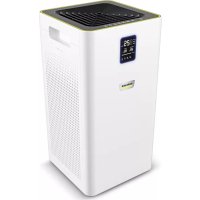



| Product type | Air purifier |
| Brand | Kärcher |
| Model | AF 50 |
| Dimensions (L x W x H) | 290 x 290 x 560 mm |
| Weight | 7.7 kg |
| Power supply | 220-240 V, 50-60 Hz, 50 W |
| Standby consumption | < 0.5 W |
| Maximum airflow | 520 m³/h |
| Maximum coverage area | 50 m² |
| Filter efficiency (0.3 µm) | 99.95 % |
| Number of fan speeds | 5 |
| Maximum noise level | 53 dB(A) |
| Filter lifespan | Up to 3000 hours |
| Operating modes | Automatic, ECO, Sleep, Timer (max. 10 h) |
| Child lock | Yes (control panel lock) |
| Air quality indicator | PM 2.5 with color code (blue, yellow, red) |
| Ambient temperature range | -10 °C to +40 °C |
| Maintenance | Exterior cleaning with soft dry cloth; filter replacement |
| Available spare parts | Filter, power adapter AF 30 |
| Warranty | According to country conditions (see manual) |
Frequently Asked Questions - AF 50 Kärcher
User questions about AF 50 Kärcher
0 question about this device. Answer the ones you know or ask your own.
Ask a new question about this device
Download the instructions for your Air purifier in PDF format for free! Find your manual AF 50 - Kärcher and take your electronic device back in hand. On this page are published all the documents necessary for the use of your device. AF 50 by Kärcher.
USER MANUAL AF 50 Kärcher
Deutsch 4
English 8
Français 13
Italiano 18
Nederlands 22
Español 27
Português 32
Dansk 37
Norsk 41
Svenska 46
Suomi 50
Ελληνικά 54
Türkçe 60
Русский 64
Magyar 69
Czech 74
Slovenian 79
Polish 83
Romanian 88
Slovak 93
Croatian 97
Serbian 102
Bulgarian 106
Estonian 111
Latvian 116
Lithuanian 120
Ukrainian 125
Arabic 134
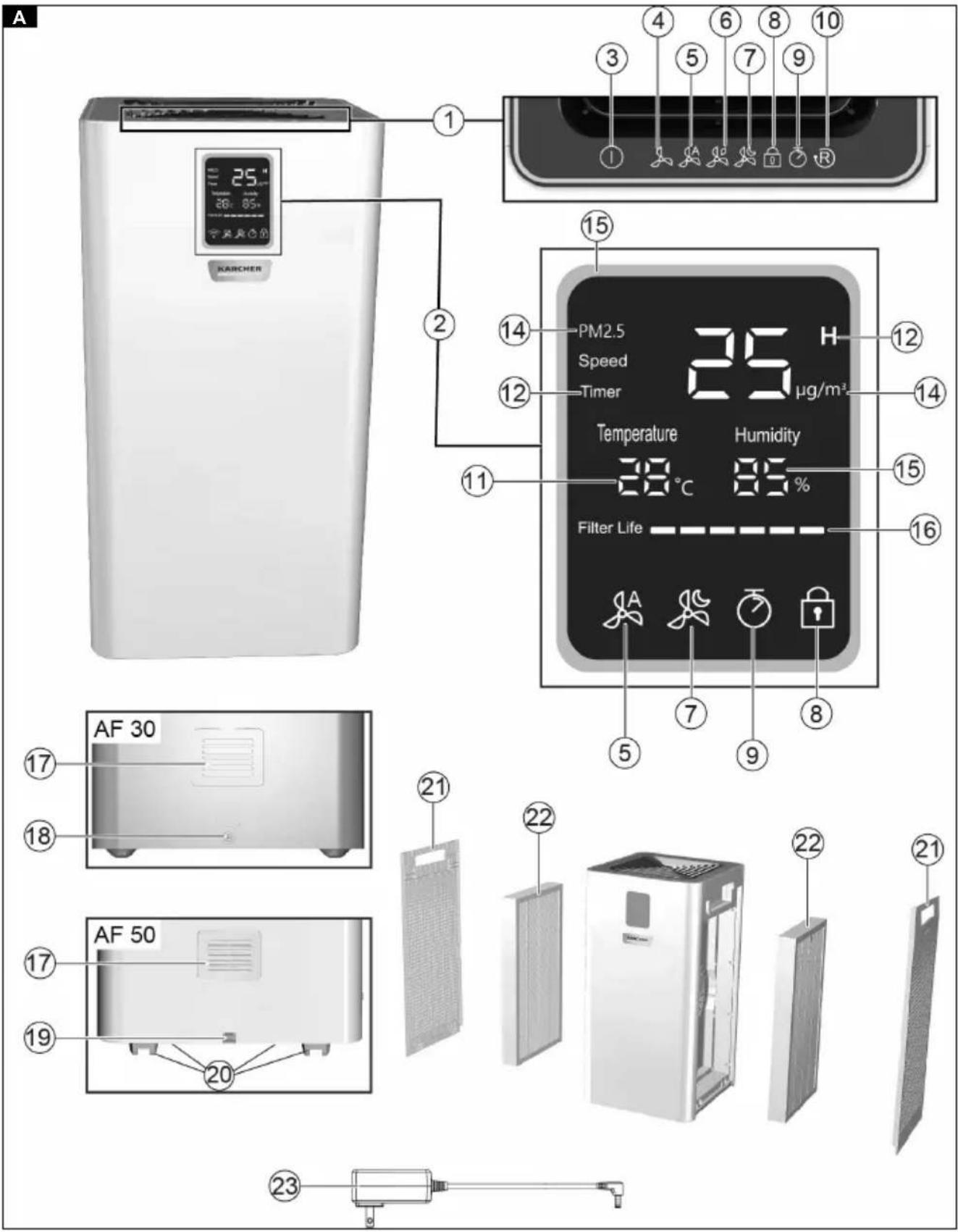
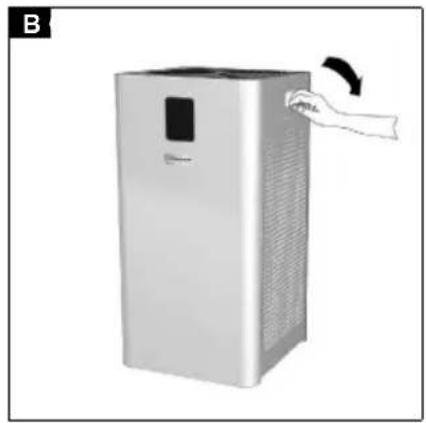


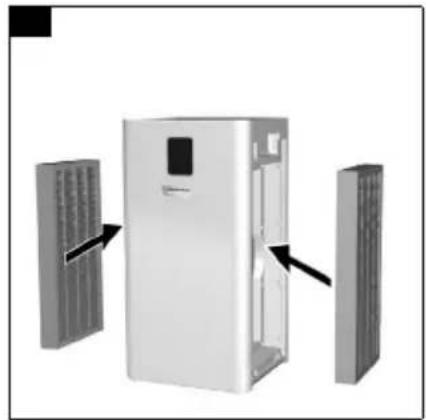
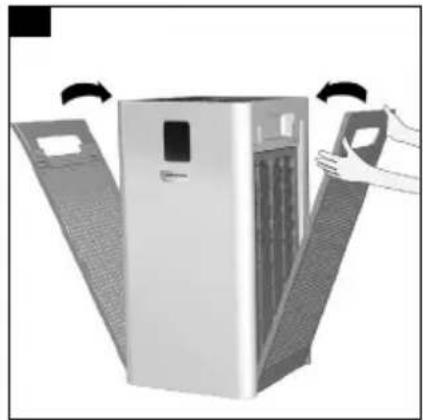
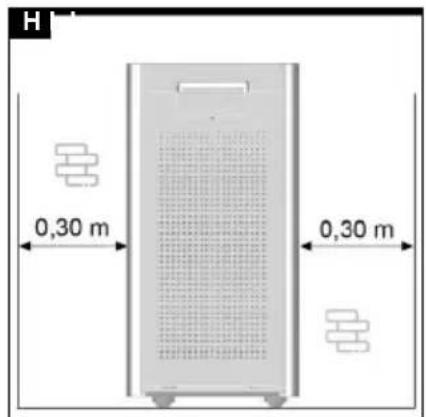
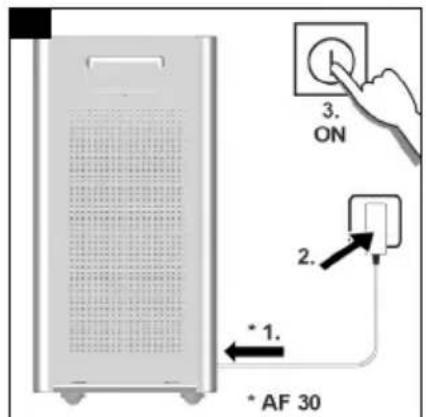
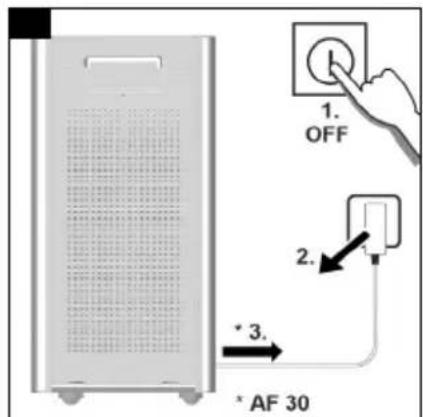
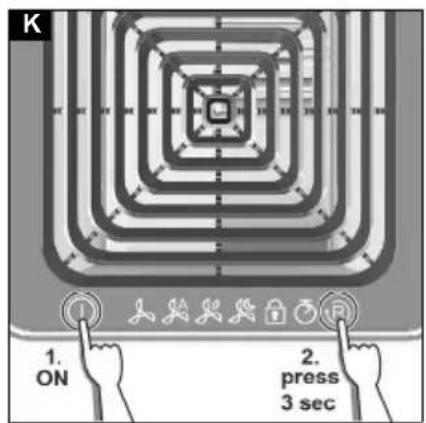
Table of Contents
| general notes | 8 |
| Safety instructions | 8 |
| Intended use | 9 |
| Environmental protection | 9 |
| Accessories and spare parts | 9 |
| Scope of delivery | 9 |
| Warranty | 9 |
| Description of the device | 9 |
| Initial Start-Up | 10 |
| Operation | 10 |
| Transport and storage | 11 |
| Care and service | 11 |
| Troubleshooting guide | 12 |
| Technical data | 12 |
General Notes

Read these original instructions and the safety instructions chapter before using the device for the first time. Act in accordance with them.
Keep these original instructions for future reference or for future owners.
Safety instructions
Hazard levels
⚠️ DANGER
- Indication of an imminent threat of danger that will lead to severe injuries or even death.
⚠ WARNING
- Indication of a potentially dangerous situation that may lead to severe injuries or even death.
△ CAUTION
- Indication of a potentially dangerous situation that may lead to minor injuries.
ATTENTION
- Indication of a potentially dangerous situation that may lead to damage to property.
General safety instructions
⚠️ DANGER • Only connect the device to alternating current. The voltage indicated on the type plate must match the voltage of the power source. • Never touch the mains plug and socket with wet hands. • Risk of asphyxiation. Keep packaging film out of the reach of children. • Operation in explosive atmospheres is prohibited.
⚠ WARNING • Persons with reduced physical, sensory or mental capabilities, or those with a lack of experience and knowledge, are only allowed to use the appliance if they are supervised or have been instructed with respect to using the appliance safely, and understand the resultant dangers involved. • Children from the age of 8 may use the appliance if they are supervised or have been instructed in its use by a person responsible for their safety, and if they have understood the resultant dangers involved. • Children must not play with the appliance. • Children must be supervised to prevent them from playing with the appliance. • Children may only perform cleaning work and user maintenance under supervision. • Check the power supply cable with mains plug for damage before operation each time. Do not put the device into operation with a damaged power supply cable. Have a damaged power supply cable replaced immediately by the authorised customer service / qualified electrician. • Switch off the device immediately and remove the mains plug before performing any care and service work.
⚠ CAUTION • Do not pull the mains plug out of the socket using the power supply cable. • Have repair work, installation of spare parts, and work on electrical components carried out by the authorized customer service only. • It is prohibited to cover the air inlet and outlet. • Switch off the device after each use and remove the mains plug. • Do not place the device near a heat source. • The device is not a replacement for appropriate ventilation. • The device must be placed on an even, firm subsurface. • Only use accessories and spare parts which are approved by the manufacturer. Only original accessories and original spare parts ensure that the appliance will run fault-free and safely.
- Do not use the device in damp conditions or in rooms with high ambient temperatures, e.g., bathroom.
Intended use
In accordance with the descriptions and safety instructions listed in these operating instructions, use the device only as an air purifier.
- The device is intended for use as an air purifier.
- The device is suitable for both private and commercial use.
- The device is intended only for indoor use.
Environmental protection

The packing materials can be recycled. Please dispose of packaging in accordance with the environmental regulations.
Electrical and electronic appliances contain valuable, recyclable materials and often components such as batteries, rechargeable batteries, or oil, which - if handled or disposed of incorrectly - can pose a potential threat to human health and the environment. However, these components are required for the correct operation of the appliance. Appliances marked by this symbol are not allowed to be disposed of together with the household rubbish.
Notes on the content materials (REACH)
Current information on content materials can be found at: www.kaercher.com/REACH
Accessories and spare parts
Only use original accessories and original spare parts. They ensure that the appliance will run fault-free and safely.
Information on accessories and spare parts can be found at www.kaercher.com.
Scope of delivery
The scope of delivery for the appliance is shown on the packaging. Check the contents for completeness when unpacking. If any accessories are missing or in the event of any shipping damage, please notify your dealer.
Warranty
The warranty conditions issued by our relevant sales company apply in all countries. We shall remedy possible malfunctions on your appliance within the warranty period free of cost, provided that a material or manufacturing defect is the cause. In a warranty case, please contact your dealer (with the purchase receipt) or the next authorised customer service site.
(See overleaf for the address)
Description of the device
For the illustrations, refer to the graphics page. Illustration A
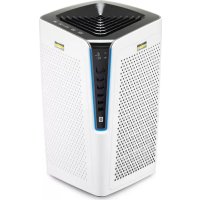
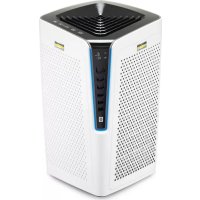
① Operation buttons ② Display field ③ Operation button for Device On / Off ④ Fan level operation button ⑤ Operation button/indicator for Auto mode On / Off ⑥ Operation button ECO mode On / Off ⑦ Operation button/indicator for Sleep mode On / Off ⑧ Operation button/indicator Function lock
⑨ Operation button/indicator Timer
⑩ Operation button for Filter reset
⑪ Indicator for temperature in °C
⑫ Indicator for time-controlled status start-up/shutdown
⑬ Indicator for fan level
⑭ Indicator for PM 2.5 index air quality (numerical / colour display)
15 Indicator for relative humidity
16 Filter service life display
17 Air quality sensor 18 Connection Power supply unit AF 30 19 Connecting cable AF50 20 Steering rollers AF50 (4x) 21 Filter cover 22 Filter 23 Power adapter AF30
Note
The function settings are only possible via the operation buttons and not via the displays.
Initial Start-Up
Before initial start up, the fine filters already installed in the unit must be unpacked.
- Open the two filter covers on the recessed grip and remove them with both hands.
Illustration B
Illustration C
- Remove the packed filters from the casing using the tabs.
Illustration D
- Unpack the filters.
Illustration E
- Insert the unpacked filters.
Illustration F
- Insert the filter cover firmly with both hands.
Illustration G
- Place the device on a level surface. Ensure that a distance of 0.30 m is maintained to each side.
Illustration H
- Make sure that the air intake and air outlet openings are not blocked.
Note
Do not place the device on hot surfaces or in the immediate vicinity of the room heating.
Do not allow any liquids or foreign bodies (e.g. metallic objects) to enter the device.
- AF 30: Insert the unit plug of the power supply unit into the device.
Plug the mains plug of the power supply unit into a socket.
AF 50: Plug the mains plug of the device into a mains socket.
Illustration I
The device is ready for operation.
Note
The first time you use the device, we recommend allowing it to run overnight to perform an initial basic cleaning of your room.
Note
The table with the hours of the display symbols for the filter service life, see Replacing the filter
Operation
Switching the device on/off
- To switch on the device: Press the on/off button on the device.
Illustration I
The device starts automatically.
Note
After the system is switched on, the displays and buttons on the control panel light up briefly. The integrated
air quality sensor measures the air quality in the room automatically.
- If required, the following functions, for example, can be set via the operation buttons:
- Fan level
- Auto mode ECO mode
- Sleep mode
- Lock control panel Timer
- Filter reset
- To switch off the device: Press the On/Off switch of the device.
The displays and buttons on the control panel go out. The device is switched off.
Depending on the air quality, the fan level can be manually set to level 1, 2, 3, 4 or 5. If the air quality is poor, for example to filter out smoke, the blower should run at maximum speed (level 5) for 15 - 20 minutes.
Note
To clean the air effectively, keep windows and doors closed while the air purifier is switched on.
Symbol Operation button for the fan level:

- Press the fan level operation button repeatedly until the desired level is reached.
The selected fan level is displayed on the control panel.
Note
When selecting the fan level manually, the selected speed is shown on the display for 3 seconds before the PM 2.5 index values are shown again on the display.
Setting auto mode
In auto mode, the air purifier sets the appropriate fan level (level 1, 2, 3, 4, 5) depending on the air quality. In the event of poor air quality, for example, the fan level is automatically set high.
Symbol Operation button and indicator for auto mode:

- Press the Auto mode operation button. The automatic mode is switched on or off.
Setting ECO / power saving function
Switch power saving mode on / off
Symbol Operation button and indicator for ECO / power saving mode

The device is in working mode:
- Press the ECO mode operation button for 3-5 seconds.
The device switches to power saving mode and the display is switched off.
The device is in power saving mode:
- Press the ECO mode operation button for 3-5 seconds. The device switches to working mode, the display lights up.
Setting sleep mode
In sleep mode, the fan runs at the lowest speed and is therefore very quiet.
- Press the sleep mode operation button. The sleep mode is switched on or off.
Symbol, operation button, and indicator for sleep mode:

Note
After the sleep mode operation button has been pressed, all display symbols (except sleep mode) go out.
After 10 seconds, the sleep mode operation button also goes out.
To exit sleep mode, press any operation button (except the on/off button).
Lock / unlock control panel
To prevent accidental change of settings, e.g. by children or pets, the control panel can be locked.
Symbol for the lock operation button and display for control panel:

- Lock: Press the button for 3 seconds.
- Unlock: Press the lock button for 3 seconds.
Setting the timer
The timer can be set to the desired run time (max. 10 h). When the set time has elapsed, the device switches off automatically. The blower speed can be changed at any time.
Symbol, operation button, and indicator for timer:

- Switching on: Press the Timer operation button repeatedly until the desired run time is reached. The set run time is displayed in the display.
- Switching off: Press the timer operation button until the display shows "0". If set to "0", the timer function is cancelled.
Perform the filter reset after filter change
After the filter lifespan has expired, the filters must be changed. For more information, see chapter Replacing the filter
Symbol Operation button for filter reset:

Display PM 2.5 air quality
The display shows the concentration of fine dust (PM 2.5) numerically in the unit µg / m3 . In addition, a colour index provides information about the air quality:
| PM 2.5 Air quality | Colour | |
| 0 - 60 Good Blue | ||
| 61 - 120 Moderate | Yellow | |
| 121 - 500 Poor Red |
Transport and storage
△CAUTION
Failure to observe the weight
Risk of injury and damage
Be aware of the weight of the device during transport and storage.
Store the device only in dry indoor rooms.
Care and service
Cleaning
⚠️DANGER
Danger of death from electric shock
Liquids can conduct electricity and thus cause serious or fatal injuries.
Always disconnect the power supply unit from the socket before cleaning and maintenance work.
Never immerse the device or the power supply unit in water.
Never use wet cloths to clean the device or the power supply unit.
- Switch off the device.
- Unplug the power supply unit from the socket.
- Wipe the device with a soft, dry cloth. Do not use abrasive or corrosive detergents.
Replacing the filter
The filter should be changed after 2500 - 3000 hours of operation at the latest. If the device gets louder, an unpleasant smell emanates from the device (filter) or the filter is visibly dirty, also earlier. If the filter service life is less than 150 hours, the symbol flashes in the display (flashing frequency 2x/second) to remind you to change the filter.
Depending on the service life, the following number of symbols is displayed:
| Display for service life of filter (h) | |
| 2501 - 3000 | |
| 2001 - 2500 | |
| 1501 - 2000 | |
| 1001 - 1500 | |
| 501 - 1000 | |
| 1 - 500 | |
- Switch off the device, and disconnect the power supply unit or mains plug from the socket and device.
Illustration J
- Open the two filter covers on the recessed grip and remove them with both hands.
Illustration B Illustration C
- Remove the filters from the casing using the tabs. Illustration D
- Unpack the new filters. Illustration E
- Insert the unpacked filters. Illustration F
- Insert the filter covers.
Illustration G
- Connect the power supply unit to the device and socket.
- Switch the device on.
a To reset the filter (Reset), press the symbol for 3 seconds.
Illustration K
Troubleshooting guide
Malfunctions often have simple causes that you can remedy yourself using the following overview. When in doubt, or in the case of malfunctions not mentioned here, please contact your authorised Customer Service.
| Fault Cause Rectification | ||
| The device cannot be switched on | No electrical voltage present | ● Check the socket and the power supply fuse. ● Insert the plug of the power supply unit into another socket. |
| Power supply unit defective | ● Contact Customer Service to replace the power supply unit. | |
| Device defective ● Contact Customer Service. | ||
| Display flashes and device does not start | Filter cover not inserted correctly | ● Insert the filter cover correctly, making sure that the filters are seated correctly. |
| Airflow is reduced | Filter clogged | ● Changing the filter, see chapter Replacing the filter. |
| Filter not unpacked | ● Unpacking the filter, see chapter Initial Start-Up. | |
| Fan level too low | ● Increasing the fan level, see chapter Setting the fan level. | |
| Air outlet is blocked | ● Remove foreign bodies. | |
| Odour elimination ineffective | Poor ambient air quality | ● Open windows to improve ventilation. |
| Filter used up or used too long | ● Replace the filter. | |
| Fan level too low | ● Increasing the fan level, see chapter Setting the fan level. | |
| Poor air quality | Fan level too low | ● Increasing the fan level, see chapter Setting the fan level. |
| Draught | ● Close the windows and doors while the device is working. | |
| AF 30: Room size clearly above 30 m2 | ● Observe the maximum room size. | |
| AF 50: Room size clearly above 50 m2 | ● Observe the maximum room size. | |
| Air slots on the device blocked | ● Keep the required distances from the device. ● Do not place anything on the device. | |
| Filter not unpacked | ● Unpacking the filter, see chapter Initial Start-Up. | |
| Filter clogged or contaminated. | ● Changing the filter, see chapter Replacing the filter. | |
Technical data
| AF 30 | AF 50 | ||
| Electrical connection | |||
| Mains voltage | V | 100-240 | 220-240 |
| Phase | ~ | 1 | 1 |
| Power frequency | Hz | 50-60 | 50-60 |
| Nominal power | W | 36 | 50 |
| Standby | W | < 0,5 | < 0,5 |
| Device performance data | |||
| Maximum airflow | m3/h | 320 | 520 |
| Floor space | m2 | * 30 | * 50 |
| Filter efficiency at 0.3 μm | 99,95% | 99,95% | |
| Maximum filter working time (depending on environment) | h | 3000 | 3000 |
| AF 30 | AF 50 | ||
| Ventilation levels | 5 | 5 | |
| Dimensions and weights | |||
| Weight | kg | 5.8 | 7.7 |
| Length x width x height | mm | 260x260x480 | 290x290x560 |
| Ambient conditions | |||
| Ambient temperature | °C | -10 °C - +40 °C | -10 °C - +40 °C |
| Determined values in acc. with EN 60335-2-69 | |||
| Sound power level LwA | dB(A) | 29-53 | 29-53 |
* At 3 m ceiling height and 3 x air exchange per hour. Subject to technical modifications.
Contents
Transport and storage 81
Transport and storage
CAUTION
Disregarding the weight
THANK YOU!
THANK YOU! DANKE! GRACIAS!

Register your product and benefit from many advantages.
www.kaercher.com/welcome


Rate your product and tell us your opinion.
www.kaercher.com/dealersearch
Alfred Kärcher SE & Co. KG
Alfred-Kärcher-Str. 28-40
71364 Winnenden (Germany)
Tel.: +49 7195 14-0
Fax: +49 7195 14-2212
- TABLE OF CONTENTS
- GENERAL NOTES
- SAFETY INSTRUCTIONS
- HAZARD LEVELS
- ⚠️ DANGER
- ⚠ WARNING
- △ CAUTION
- ATTENTION
- GENERAL SAFETY INSTRUCTIONS
- INTENDED USE
- ENVIRONMENTAL PROTECTION
- NOTES ON THE CONTENT MATERIALS (REACH)
- ACCESSORIES AND SPARE PARTS
- SCOPE OF DELIVERY
- WARRANTY
- DESCRIPTION OF THE DEVICE
- NOTE
- INITIAL START-UP
- ILLUSTRATION B
- ILLUSTRATION C
- ILLUSTRATION D
- ILLUSTRATION E
- ILLUSTRATION F
- ILLUSTRATION G
- ILLUSTRATION H
- ILLUSTRATION I
- OPERATION
- SWITCHING THE DEVICE ON/OFF
- SETTING AUTO MODE
- SETTING ECO / POWER SAVING FUNCTION
- SWITCH POWER SAVING MODE ON / OFF
- SETTING SLEEP MODE
- LOCK / UNLOCK CONTROL PANEL
- SETTING THE TIMER
- PERFORM THE FILTER RESET AFTER FILTER CHANGE
- DISPLAY PM 2.5 AIR QUALITY
- TRANSPORT AND STORAGE
- △CAUTION
- FAILURE TO OBSERVE THE WEIGHT
- CARE AND SERVICE
- CLEANING
- ⚠️DANGER
- DANGER OF DEATH FROM ELECTRIC SHOCK
- REPLACING THE FILTER
- ILLUSTRATION J
- ILLUSTRATION B ILLUSTRATION C
- TROUBLESHOOTING GUIDE
- CONTENTS
- CAUTION
- DISREGARDING THE WEIGHT
- THANK YOU
- THANK YOU! DANKE! GRACIAS
Brand : Kärcher
Model : AF 50
Category : Air purifier