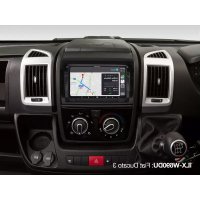
iLXW690DU - Car radio ALPINE - Free user manual and instructions
Find the device manual for free iLXW690DU ALPINE in PDF.


| Product type | Multimedia car stereo with touchscreen |
| Brand | Alpine |
| Model | iLXW690DU |
| Screen size | 6.95 inches (TN LCD type, resolution 800x480) |
| Chassis dimensions (WxHxD) | 178 x 100 x 60 mm |
| Weight | 1.0 kg |
| Power supply | 14.4 V DC (11-16 V allowed) |
| Output power | 50 W x 4 (max.) |
| FM tuner | Range 87.5-108.0 MHz, sensitivity 9.3 dBf |
| AM tuner | Range 531-1602 kHz, sensitivity 25.1 µV |
| DAB/DAB+ | Range 174.928-239.2 MHz, sensitivity -92 dBm |
| Bluetooth connectivity | Bluetooth V4.1, profiles HFP, PBAP, A2DP, AVRCP |
| USB port | USB 2.0, compatible iPod/iPhone, Android, USB flash drive |
| HDMI input | Yes (L-type connector 270°), formats 720p/480p/VGA |
| Apple CarPlay | Built-in, connection via USB |
| Android Auto | Built-in, connection via USB |
| Audio outputs | Front/rear pre-outs (4V), subwoofer output |
| Audio/video inputs | AUX input, HDMI input, front/rear video input |
| Hands-free functions | Bluetooth phone, built-in microphone |
| Operating temperature | -20°C to +60°C |
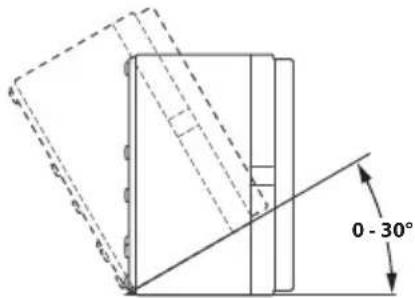
| Installation angle | Between 30° and horizontal |
| Maintenance | Clean with a soft dry cloth; avoid solvents |
| Safety | Handbrake required for video; do not watch while driving |
Frequently Asked Questions - iLXW690DU ALPINE
User questions about iLXW690DU ALPINE
0 question about this device. Answer the ones you know or ask your own.
Ask a new question about this device
Download the instructions for your Car radio in PDF format for free! Find your manual iLXW690DU - ALPINE and take your electronic device back in hand. On this page are published all the documents necessary for the use of your device. iLXW690DU by ALPINE.
USER MANUAL iLXW690DU ALPINE
KPATKOE CINPABOuHOE PYKOBOCTBO
Contents
WARNING 2
CAUTION 3
Getting Started 4
Apple CarPlay Operation (Optional) 7
Android AutoTM (Optional) 7
Radio/RDS Operation 8
DAB/DAB+Operation. 8
USB Flash drive Operation (Optional) 9
iPod mode on iPhone (Optional) 10
Hands-Free Phone Control 11
Installation 12
Connections 14
Specifications 17
IMPORTANT
Please record the serial number of your unit in the space provided below and keep it as a permanent record.
SERIAL NUMBER:
ISO SERIAL NUMBER: AL
INSTALLATION DATE:
INSTALLATION TECHNICIAN:
PLACE OF PURCHASE:
For details on all functions, refer to the Owner's Manual published on our website at https://www.alpine-europe.com/alpine-europe.html If required, an ALPINE dealer will readily provide you with a print out of the Owner's Manual published on the website.

WARNING
This symbol means important instructions. Failure to heed them can result in serious injury or death.
INSTALL THE PRODUCT CORRECTLY SO THAT THE DRIVER CANNOT WATCH TV/VIDEO UNLESS THE VEHICLE IS STOPPED AND THE EMERGENCY BRAKE IS APPLIED.
It is dangerous for the driver to watch TV/Video while driving a vehicle. Installing this product incorrectly enables the driver to watch TV/Video while driving. This may cause a distraction, preventing the driver from looking ahead, thus causing an accident. The driver or other people could be severely injured.
DO NOT WATCH VIDEO WHILE DRIVING.
Watching the video may distract the driver from looking ahead of the vehicle and cause an accident.
DO NOT OPERATE ANY FUNCTION THAT TAKES YOUR ATTENTION AWAY FROM SAFELY DRIVING YOUR VEHICLE.
Any function that requires your prolonged attention should only be performed after coming to a complete stop. Always stop the vehicle in a safe location before performing these functions. Failure to do so may result in an accident.
KEEP THE VOLUME AT A LEVEL WHERE YOU CAN STILL HEAR OUTSIDE NOISES WHILE DRIVING.
Excessive volume levels that obscure sounds such as emergency vehicle sirens or road warning signals (train crossings, etc.) can be dangerous and may result in an accident. LISTENING AT LOUD VOLUME LEVELS IN A CAR MAY ALSO CAUSE HEARING DAMAGE.
MINIMIZE DISPLAY VIEWING WHILE DRIVING.
Viewing the display may distract the driver from looking ahead of the vehicle and cause an accident.
DO NOT DISASSEMBLE OR ALTER.
Doing so may result in an accident, fire or electric shock.
USE ONLY IN CARS WITH A 12 VOLT NEGATIVE GROUND.
(Check with your dealer if you are not sure.) Failure to do so may result in fire, etc.
KEEP SMALL OBJECTS SUCH AS SCREWS OUT OF THE REACH OF CHILDREN.
Swallowing them may result in serious injury. If swallowed, consult a physician immediately.
USE THE CORRECT AMPERE RATING WHEN REPLACING FUSES.
Failure to do so may result in fire or electric shock.
DO NOT BLOCK VENTS OR RADIATOR PANELS.
Doing so may cause heat to build up inside and may result in fire.
USE THIS PRODUCT FOR MOBILE 12V APPLICATIONS.
Use for other than its designed application may result in fire, electric shock or other injury.
MAKE THE CORRECT CONNECTIONS.
Failure to make the proper connections may result in fire or product damage.
BEFORE WIRING, DISCONNECT THE CABLE FROM THE NEGATIVE BATTERY TERMINAL.
Failure to do so may result in electric shock or injury due to electrical shorts.
DO NOT ALLOW CABLES TO BECOME ENTANGLED IN SURROUNDING OBJECTS.
Arrange wiring and cables in compliance with the manual to prevent obstructions when driving. Cables or wiring that obstruct or hang up on places such as the steering wheel, gear lever, brake pedals, etc. can be extremely hazardous.
DO NOT SPLICE INTO ELECTRICAL CABLES.
Never cut away cable insulation to supply power to other equipment. Doing so will exceed the current carrying capacity of the wire and result in fire or electric shock.
DO NOT DAMAGE PIPE OR WIRING WHEN DRILLING HOLES.
When drilling holes in the chassis for installation, take precautions so as not to contact, damage or obstruct pipes, fuel lines, tanks or electrical wiring. Failure to take such precautions may result in fire.
DO NOT USE BOLTS OR NUTS IN THE BRAKE OR STEERING SYSTEMS TO MAKE GROUND CONNECTIONS.
Bolts or nuts used for the brake or steering systems (or any other safety-related system), or tanks should NEVER be used for installations or ground connections. Using such parts could disable control of the vehicle and cause fire etc.
DO NOT INSTALL IN LOCATIONS WHICH MIGHT HINDER VEHICLE OPERATION, SUCH AS THE STEERING WHEEL OR SHIFT LEVER.
Doing so may obstruct forward vision or hamper movement etc. and results in serious accident.

CAUTION
This symbol means important instructions. Failure to heed them can result in injury or material property damage.
HALT USE IMMEDIATELY IF A PROBLEM APPEARS.
Failure to do so may cause personal injury or damage to the product. Return it to your authorized Alpine dealer or the nearest Alpine Service Center for repairing.
HAVETHEWIRINGANDINSTALLATIONDONEBYEXPERTS.
The wiring and installation of this unit requires special technical skill and experience. To ensure safety, always contact the dealer where you purchased this product to have the work done.
USE SPECIFIED ACCESSORY PARTS AND INSTALL THEM SECURELY.
Be sure to use only the specified accessory parts. Use of other than designated parts may damage this unit internally or may not securely install the unit in place. This may cause parts to become loose resulting in hazards or product failure.
ARRANGE THE WIRING SO IT IS NOT CRIMPED OR PINCHED BY A SHARP METAL EDGE.
Route the cables and wiring away from moving parts (like the seat rails) or sharp or pointed edges. This will prevent crimping and damage to the wiring. If wiring passes through a hole in metal, use a rubber grommet to prevent the wire's insulation from being cut by the metal edge of the hole.
DO NOT INSTALL IN LOCATIONS WITH HIGH MOISTURE OR DUST.
Avoid installing the unit in locations with high incidence of moisture or dust. Moisture or dust that penetrates into this unit may result in product failure.
Getting Started
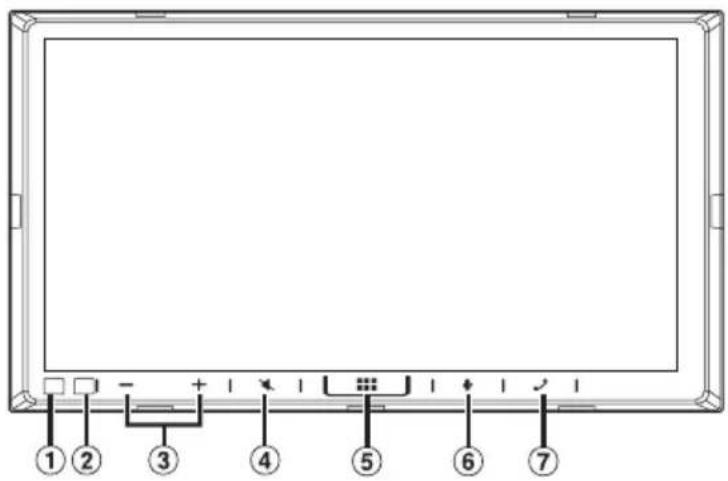
Controls Position
The screen design used in the Quick Reference Guide may differ from the actual screen.
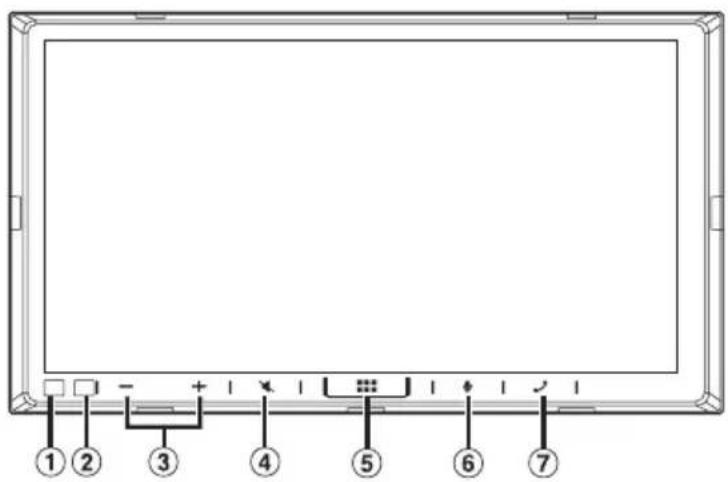
① Dimmer Sensor
Sense the brightness of the car interior.
Remote Sensor
Point the remote control transmitter towards the remote sensor within a range of 2 meters.
③ -/+DOWN/UP) button
Touch to adjust the volume.
(4) (MUTE) button
Touch to activate/deactivate the mute mode.
⑤ 商品(HOME) button
Activates the HOME screen.
⑥ button
Depending on the connected smartphone, touch to activate Siri function or voice recognition mode.
⑦ Phone) button
Activates the Phone Menu screen.
During an incoming call:
The phone call is started.
During a call:
The call finishes.
1Turn the ignition key to the ACC or ON position.
The system is turned on.
- When using the system for the first time, the Radio main screen is displayed.
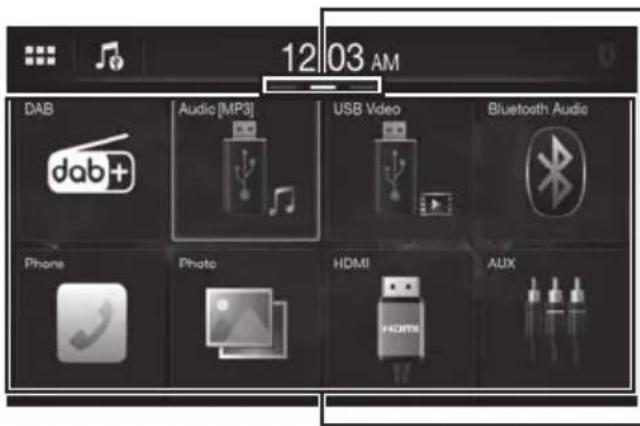
About the HOME Screen
Select a widget on the HOME screen to perform various settings and operations of the function.
1 Touch the (HERE) button.
The HOME screen is displayed.
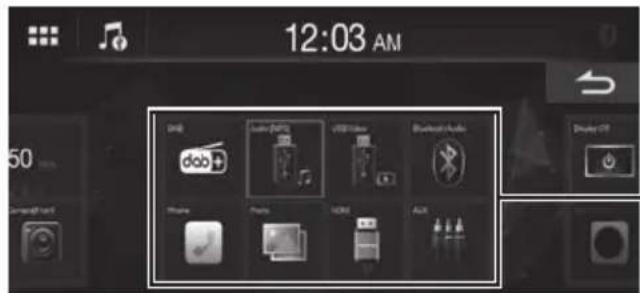
HOME screen example
HOME screen navigation
Swipe the HOME screen horizontally with your finger to change the page. Up to 3 pages exist.
Widget
Touch to activate the function.
You can customise widgets displayed on the HOME screen.
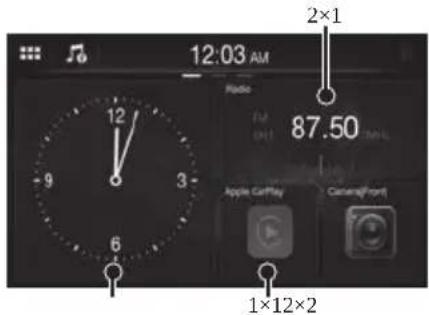
1 Touch and hold the HOME screen.
The widgets editing screen is displayed.
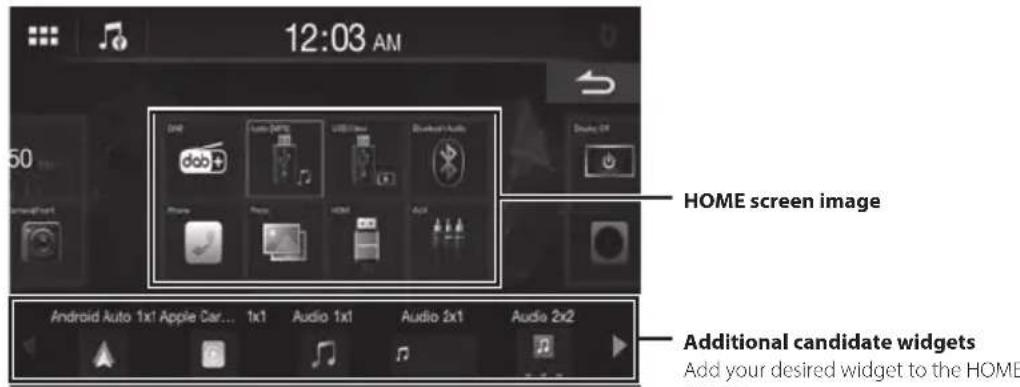
Additional candidate widgets
Add your desired widget to the HOME screen.
Swipe this area horizontally to show more candidate widgets.
- There are 3 sizes of widgets.
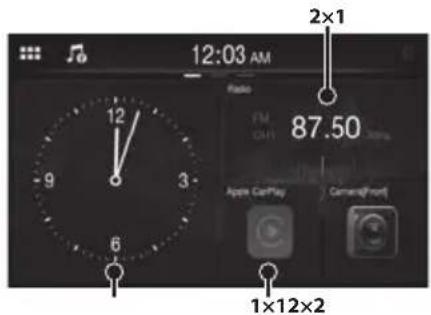
Adding a widget:
Drag and drop a widget from the additional candidate widgets area to the desired position of the HOME screen image area.
Changing the order of widget:
Drag and drop the widget to the desired position.
Deleting a widget from the HOME screen:
Drag and drop a widget from the HOME screen image area to the icon.
- The icon is displayed while touching a widget.
2 Touch the (HOME) button.
The HOME screen is displayed.
Apple CarPlay Operation (Optional)
Apple CarPlay is a smarter, safer way to use your iPhone in the car. Apple CarPlay takes the things you want to do with your iPhone while driving and puts them right on this unit. You can get directions, make calls, send and receive messages, and listen to music, all in a way that allows you to stay focused on the road. Just plug in your iPhone to this unit and go.
1 Touch the (HOME) button.
The HOME screen is displayed.
2Touch [Apple CarPlay].
The Apple CarPlay screen is displayed.
Refer to "Apple CarPlay" in the Owner's Manual for information on how to operate Apple CarPlay.
Owner's manual Android AutoTM (Optional)
Android Auto™ (Optional)
Android Auto brings your favorite smartphone apps into one place, making it easier for drivers to access their favorite navigation, media, and communication apps on the road while minimizing the distractions. Talk to Google on Android Auto™ and get things done with your voice so you can keep your eyes on the road and hands on the wheel. Easily send messages, get directions, control media and more. Just say, "Hey Google" or long-press the voice control button on your steering wheel.
1 Touch the (Hoge) button.
The HOME screen is displayed.
2 Touch [Android Auto].
The Android Auto screen is displayed.
- Refer to "Android Auto" in the Owner's Manual for information on how to operate Android Auto.
Radio/RDS Operation
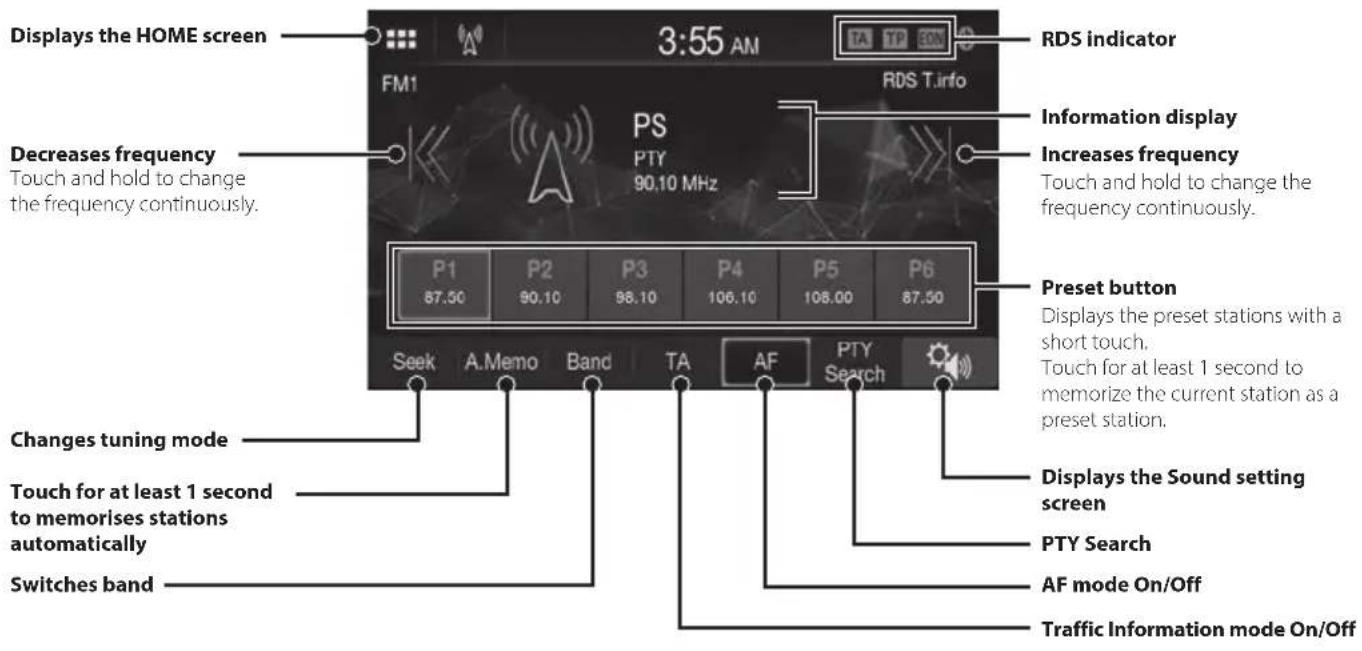
- The patterns of some keys in the Quick Reference Guide may differ from the actual screen.
Owner's manual DAB/DAB+
DAB/DAB+Operation
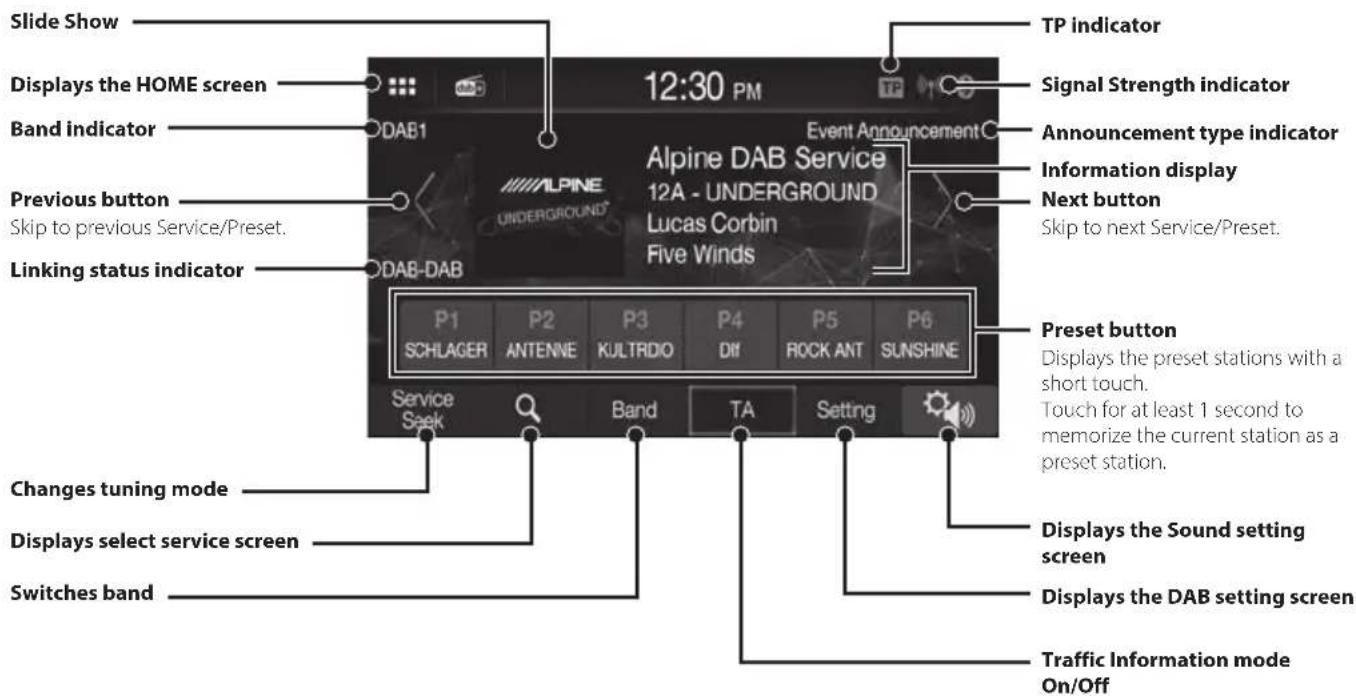
- The patterns of some keys in the Quick Reference Guide may differ from the actual screen.
USB Flash drive Operation (Optional)
You can play back music files (MP3/WMA/AAC/FLAC/WAV) and video files (MP4/AVI/WMV/MOV) stored in a USB flash drive on the internal player of this system.
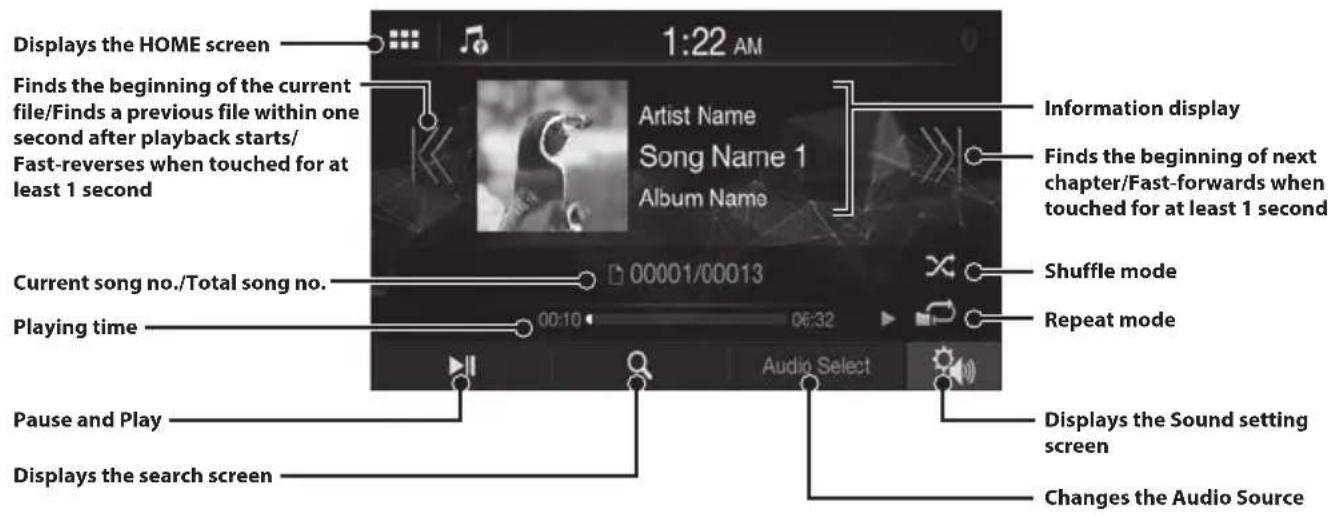
USB Audio main screen example
- The patterns of some keys in the Quick Reference Guide may differ from the actual screen.
iPod mode on iPhone (Optional)
A separately sold Lightning to USB cable (KCU-471i) is required depending on the type of iPhone.
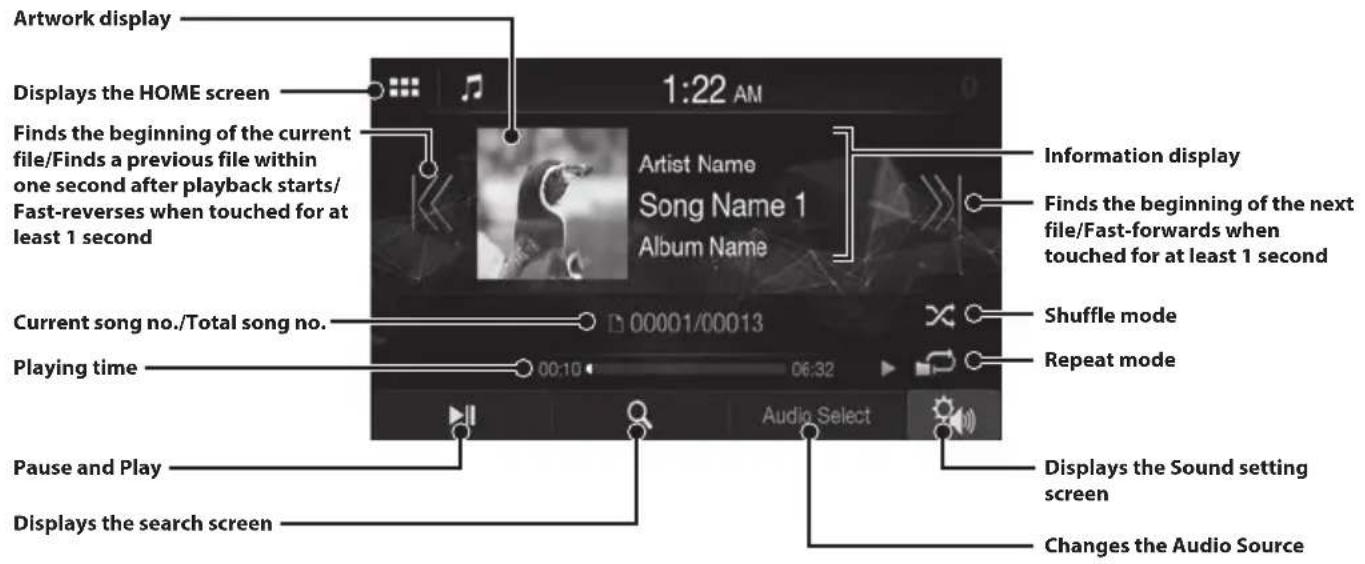
This unit supports iPhone (iPhone 5s or later) only. For using music playback only, set the "Apple CarPlay" setting to "Off" before connecting with your iPhone.
- The patterns of some keys in the Quick Reference Guide may differ from the actual screen.
Searching for a Music File
For example: Searching by Artist name
1 Touch [ (Search)] during playback.
2Touch [Artists].
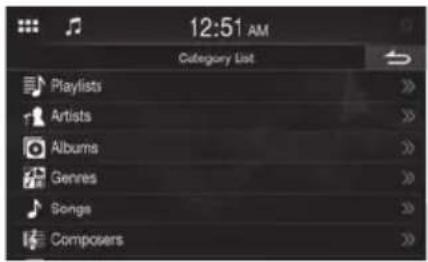
3 Touch the desired artist's name.
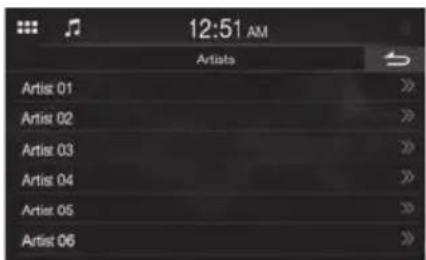
4 Touch the desired album's name.
5 Touch the desired song's name.
The selected song is played back.
Hands-Free Phone Control
The unit can connect with up to two hands-free phones.
How to connect to a Bluetooth compatible device (Pairing)
To display the Setup HOME screen:
- Bring your vehicle to a complete stop at a safe location. Engage the parking brake.
1 Touch [Settings] on the HOME screen.
2Touch [Connection].
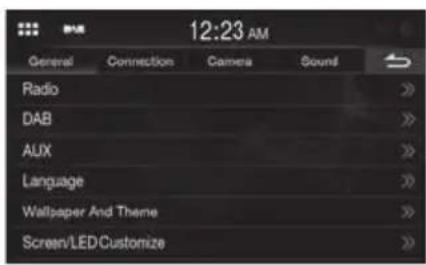
3 Touch [Set Bluetooth Device] to search for a new device.
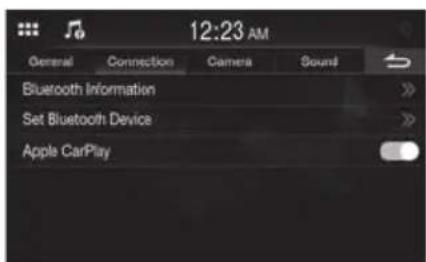
4The device registration is complete.
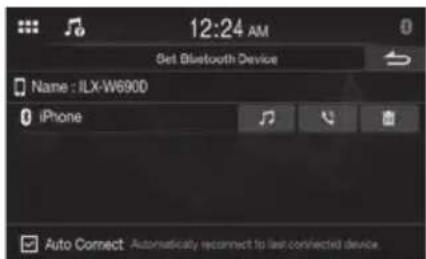
- You can register up to 5 Bluetooth compatible mobile phones.
- The Bluetooth registration process differs depending on the device version and SSP (Simple Secure Pairing). If a 4 or 6 character Passcode appears on this device, enter the Passcode using the Bluetooth compatible device. If a 6 character Passkey appears on this device, make sure the same passkey is displayed on the Bluetooth compatible device and touch "Yes."
Answering a Call
1 An incoming call triggers the ringtone and an incoming call display.
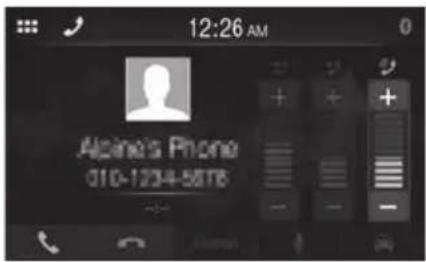
2Touch[].
The call starts.
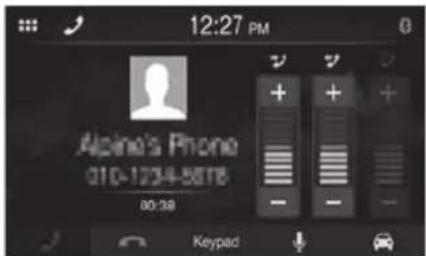
Hanging up the Telephone
1Touch [] (EndCall).
The call finishes.
Installation
Note on installation
- Install at an angle between horizontal and 30° . Note that installing at an angle outside of this range will result in a loss of performance and possible damage.
- Do not block the unit's heat sink, which would prevent air circulation. If blocked, heat will accumulate inside the unit and may cause a fire.
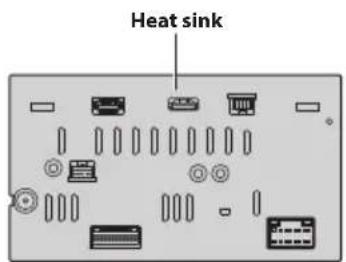
Rear of the Unit
Mounting the Microphone
For safe use, make sure of the following:
- Location is stable and firm.
- Driver's view and operations are not obstructed.
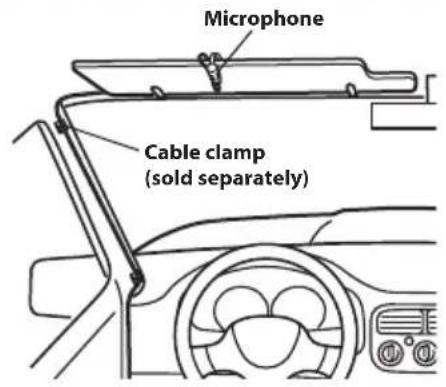
- Microphone is located where the driver's voice can be easily picked up (on the sun visor, etc.).
When you speak into the microphone, you should not have to change your driving posture. This may cause a distraction, taking your attention away from safely driving your vehicle. Carefully consider direction and distance while mounting the microphone. Confirm that the driver's voice can be easily picked up at the selected location.
Installing the Unit
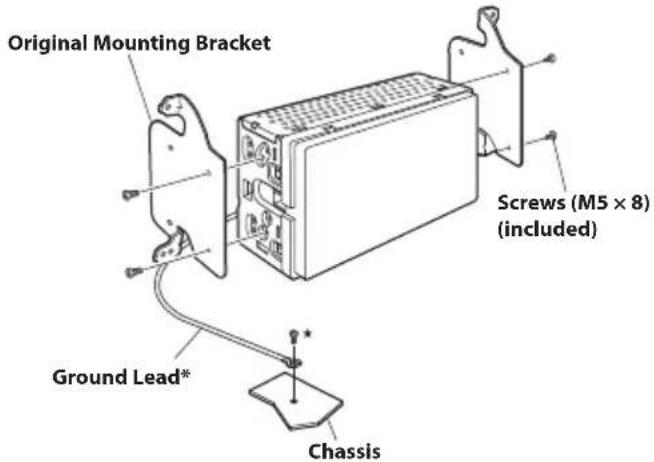
1Mount the original mounting bracket to the unit using the supplied screws.
2Connect all other leads of the unit according to details described in the "Connections" (page 14).
3 Mounting the unit in a car.
- To securely connect the ground lead, use an already installed screw on a metal part of the vehicle (marked () ) or a clean, bare metal spot on the vehicle's chassis.
Fix the cables carefully. Do not damage them by tucking them into movable parts, such as a seat rail, or by locating them against sharp or pointed edges.
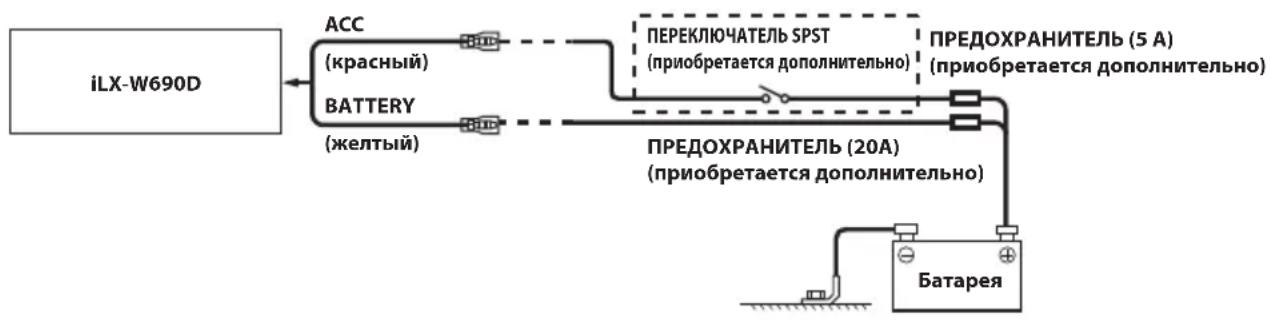
(If the ACC power supply is not available)
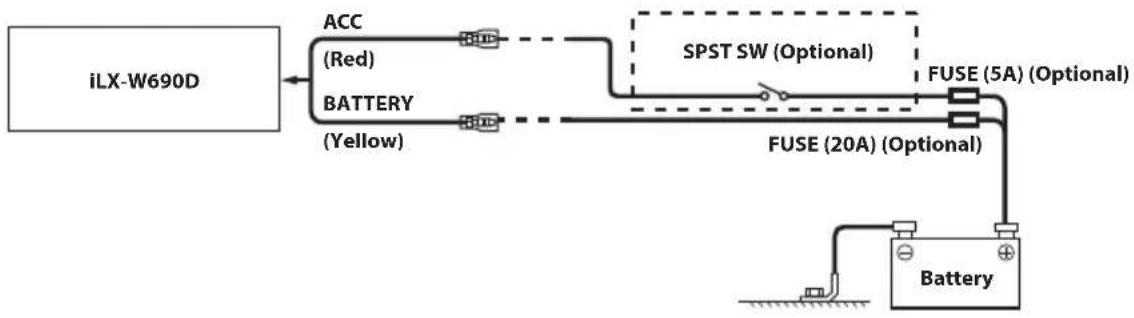
If your vehicle has no ACC power supply, add an SPST (Single-Pole, Single-Throw) switch (sold separately) and fuse (sold separately).
The diagram and the fuse amperage shown above are in the case when the unit is used individually.
- If the switched power (ignition) lead of the unit is connected directly to the positive (+) post of the vehicle's battery, the unit draws some current (several hundred milliamperes) even when its switch is placed in the OFF position, and the battery may be discharged.
Connections
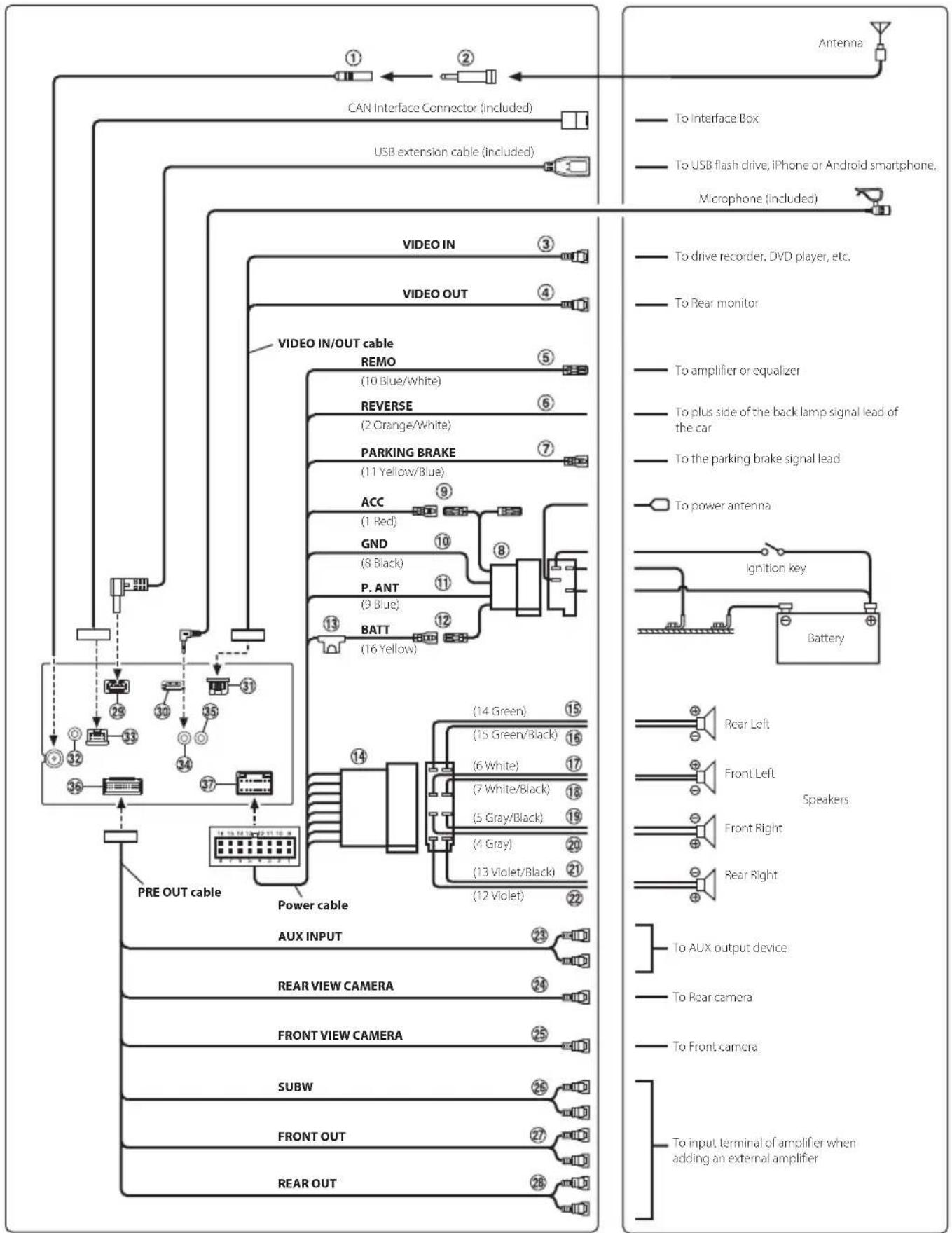
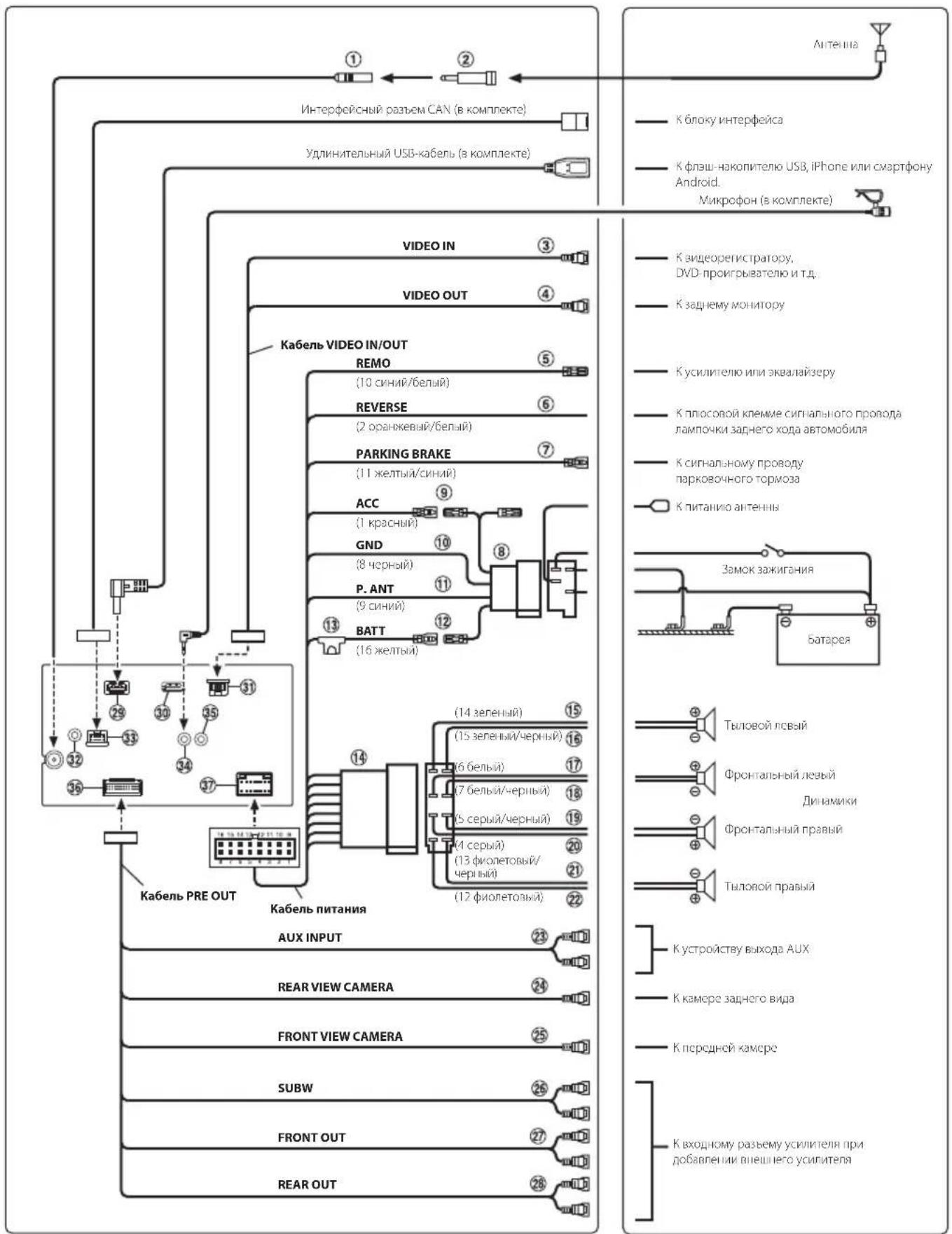
① Radio Antenna Receptacle
ISO/JASO Antenna Adapter (sold separately)
ISO/JASO Antenna Adapter may be required, depending on the vehicle.
③ Video Input Lead
④ Video Output Lead
Remote Turn-On Lead (Blue/White)
Connect this lead to the remote turn-on lead of your amplifier or signal processor.
6 Reverse Lead (Orange/White)
⑦ Parking Brake Lead (Yellow/Blue)
Connect this lead to the power supply side of parking brake switch to transmit the parking brake status signals to the unit.
ISO Power Supply Connector
Switched Power Lead (Ignition) (Red)
Connect this lead to an open terminal on the vehicle's fuse box or another unused power source that provides (+) 12V only when the ignition is turned on or in the accessory position.
Ground Lead (Black)
Connect this lead to a good chassis ground on the vehicle.
Make sure the connection is made to bare metal and is securely fastened using the sheet metal screw provided.
11 Power Antenna Lead (Blue)
Connect this lead to the + terminal of your power antenna, if applicable.
- This lead should be used only for controlling the vehicle's power antenna. Do not use this lead to turn on an amplifier or a signal processor, etc.
12 Battery Lead (Yellow)
Connect this lead to the positive (+) post of the vehicle's battery.
Fuse Holder (15A)
ISO Connector (Speaker Output)
Left Rear (+) Speaker Output Lead (Green)
16 Left Rear (-) Speaker Output Lead (Green/Black)
17 Left Front (+) Speaker Output Lead (White)
18 Left Front (-) Speaker Output Lead (White/Black)
Right Front (-) Speaker Output Lead (Gray/Black)
Right Front (+) Speaker Output Lead (Gray)
Right Rear (-) Speaker Output Lead (Violet/Black)
Right Rear (+) Speaker Output Lead (Violet)
23 AUX Input Connector
Input lead for AUX audio signal.
24 REAR CAMERA Input RCA Connector
Use when connecting a rear camera with RCA Output Connector.
FRONTCAMERAInputRCAConnector
Use when connecting a front camera with RCA Output Connector.
26 Subwoofer RCA Connectors
27 Front Output RCA Connectors
Can be used as Front Output RCA Connectors. RED is right and WHITE is left.
Rear Output RCA Connectors
Can be used as Rear Output RCA Connectors. RED is right and WHITE is left.
29 USB Connector
To USB flash drive, iPhone or Android smartphone.
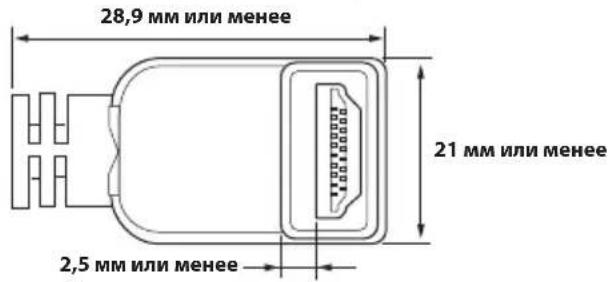
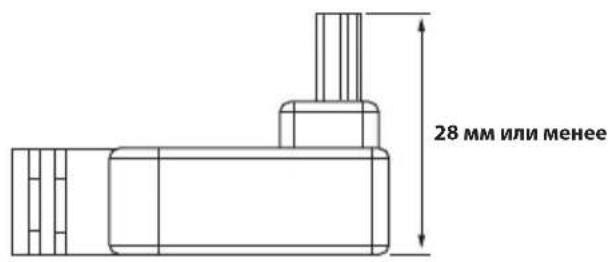
30 HDMI Input Connector
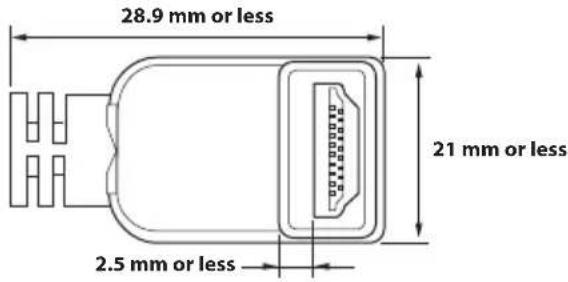
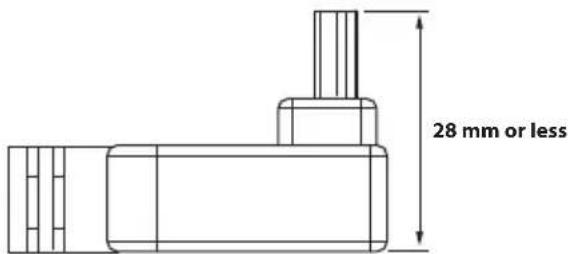
- To connect to the HDMI Input Connector, use an optional HDMI cable with an L-Type (270 degree) connector.
- Please take note of the size of the HDMI cable's L-Type connector. An HDMI cable with a connector exceeding this size will not be able to connect, as it will interfere with the peripheral cables, stacking amplifiers, etc.
③VIDEO Input/Output Connector
DAB Antenna Connector
To DAB Antenna (sold separately).
33 Connect2 Connector
To Interface Box.
MIC Input Connector
To Microphone (included)
35 Steering Remote Control Interface Connector
To steering remote control interface.
For details about connections, consult your nearest Alpine dealer.
36 AUX/PRE OUT/CAMERA Connector
37 Power Supply Connector
Specifications
MONITOR SECTION
Screen Size 6.95"
LCD Type Transparent type TN LCD
Operation System TFT active matrix
Number of Picture Elements 1,152,000 pcs.
(800× 480× 3 RGB)
Effective Number of Picture Elements
99% or more
Illumination System LED
FM TUNER SECTION
Tuning Range 87.5 - 108.0 MHz
Mono Usable Sensitivity 9.3 dBf (0.8 μV/75 ohms)
50 dB Quieting Sensitivity 13.5 dBf (1.3 µ V/75 ohms)
Alternate Channel Selectivity 80 dB
Signal-to-Noise Ratio 65 dB
Stereo Separation 35 dB
Capture Ratio 2.0 dB
AM TUNER SECTION
Tuning Range 531-1,602 kHz
Usable Sensitivity 25.1 µV / 28 dBf
DAB SECTION
Tuning Range 174.928 - 239.2 MHz
Usable Sensitivity -92 dBm
Signal-to-Noise Ratio BAND III 70 dB
Distortion BAND III 0.2%
USB SECTION
USB requirements USB 2.0
Max. Power Consumption 1,500 mA (CDP Support)
USB Class USB Play From Device)/
USB (Mass Storage Class)
File System FAT16/32
Number of Channels 2-Channels (Stereo)
Frequency Response* 5 - 20,000Hz (±1 dB)
Total Harmonic Distortion 0.008% (at 1 kHz)
Dynamic Range 95 dB (at 1 kHz)
Signal-to-Noise Ratio 100 dB
Channel Separation 85 dB (at 1 kHz)
*1 Frequency response may differ depending on the encoder software/bit rate.
HDMI SECTION
Input Format 720p/480p/VGA
Bluetooth SECTION Bluetooth Specification
Output Power +4 dBm Ave. (Power class 2)
Profile HFP (Hands-Free Profile)
PBAP (Phone Book Access Profile)
A2DP (Advanced Audio
Distribution Profile)
AVRCP (Audio/Video Remote
Control Profile)
GENERAL
Power Requirement 14.4 V DC
(11-16Vallowable)
Operating temperature -20°C to +60°C
Power Output 50W×4
Weight 1.0 kg
Audio output level
Preout (Front, Rear): 4V/10k ohms (max.)
Preout (Subwoofer): 4V/10k ohms (max.)
CHASSIS SIZE
Width 178mm
Height 100 mm
Depth 60 mm
- Due to continuous product improvement, specifications and design are subject to change without notice.
The LCD panel is manufactured using an extremely high precision manufacturing technology. Its effective pixel ratio is over 99.99% . This means that there is a possibility that 0.01% of the pixels could be either always ON or OFF.
- Windows Media and the Windows logo are trademarks, or registered trademarks of Microsoft Corporation in the United States and/or other countries.
- Apple, iPhone, and Siri are trademarks of Apple Inc., registered in the U.S. and other countries. Apple CarPlay is a trademark of Apple Inc.
- Use of the Made for Apple and Works with Apple badges means that an accessory has been designed to connect specifically to the Apple product(s) identified in the Made for Apple badge and to work specifically with the technology identified in the Works with Apple badge, and has been certified by the developer to meet Apple performance standards. Apple is not responsible for the operation of this device or its compliance with safety and regulatory standards.
- Please note that the use of this accessory with an Apple product may affect wireless performance.
- Use of the Apple CarPlay logo means that a vehicle user interface meets Apple performance standards. Apple is not responsible for the operation of this vehicle or its compliance with safety and regulatory standards. Please note that the use of this product with iPhone may affect wireless performance.
- Google, Android, Google Play and Android Auto are trademarks of Google LLC. To use Android Auto on your car display, you'll need an Android Auto compatible vehicle or aftermarket stereo, an Android phone running Android 6.0 or higher, and the Android Auto app.
- The terms HDMI and HDMI High-Definition Multimedia Interface, and the HDMI Logo are trademarks or registered trademarks of HDMI Licensing LLC in the United States and other countries.
- The Bluetooth® word mark and logos are registered trademarks owned by the Bluetooth SIG, Inc. and any use of such marks by ALPS ALPINE CO., LTD. is under license.
- MPEG Layer-3 audio coding technology licensed from Fraunhofer IIS and Thomson. Supply of this product only conveys a license for private, non-commercial use and does not convey a license nor imply any right to use this product in any commercial (i.e. revenue-generation) real time broadcasting (terrestrial, satellite, cable and/or any other media), broadcasting/Streaming via internet, intranets and/or other networks or in other electronic content distribution systems, such as pay-audio or audio-on-demand applications. An independent license for such use is required. For details, please visit http://www.mp3licensing.com
Made for iPhone X, iPhone 8, iPhone 8 Plus, iPhone 7, iPhone 7 Plus, iPhone SE, iPhone 6s, iPhone 6s Plus, iPhone 6, iPhone 6 Plus, iPhone 5s
Inhalt
PBAP (Phone Book Access Profile)
A2DP (Advanced Audio
Distribution Profile)
AVRCP (Audio/Video Remote
Control Profile)
ALLGEMEINES
Spannungsversorgung
DATE D'INSTALLATION:
TECHNICIEN D'INSTALLATION:
LIEU D'ACHAT:
Au microphone (inclus)
(Mass Storage Class)
PBAP (Phone Book Access Profile)
A2DP (Advanced Audio
Distribution Profile)
AVRCP (Audio/Video Remote
Control Profile)
GENERAL
Alimentación 14,4 V CC (11 - 16 V margen permissible)
PBAP (Phone Book Access Profile)
A2DP (Advanced Audio
Distribution Profile)
AVRCP (Audio/Video Remote
Control Profile)
GENERALI
Potenza richiesta
14,4VCC
(11-16V consentiti)
HE YCTAHABJINBAIYE YCTPOICTBO B MECTAX C BbICOKIM YPOBHEM BJIAXKHOCTN JNJ 3ANJIIEHHOCTN.
136eraTe yctaHaBnBaTb yCTPOICTBO B MecTx C BmCOKM yPOBHeM BAnKHOCTN HIN 3aIIbIeHHOCTN. IIpoHnKaIOJIne B yCTPOICTBO BnAra N IIbIb MOrYT BbIbTaT eTO HcIpaBHOCtB.
PpncTynpaK pa6oTe
PacnoonoxeHne 3JeMeHTOB ynpabNeHn
BHeuHn BnD 3KpaHOB, INcNoIb3yEmbIX B KpaTkom CnpaBOOHm pyKOBOdCTBe, MoKeT OTnUaTbcr OT peaNbHbIX 3KpaHOB.
① ΑaTчнКДИММерpa
OnpeJenrTcTeHbOCBeueHHocnCaNoHa aBTOMo6nI.
② DAtyKdY
HanpaBbTe nepaTaNk nybTa nCTaHcNOHHoro ynpabneHa daTnK Dc pacctOraHndo 2 MetpoB.
OTo6pa3ntcA kpaH n3MeHeHn BnDxKTeOB.
OBACTbAKTHBbIX BnJXeTOB HauaJIbHOrO 3KpaHa

IIOJIINITeJIbIe BNDKeTBI
IobabTe Heo6xOIMbBnIXeT HaHaayHbHb3KpaH, YTo6bYbIeT 60JIbWe IOnONHITeBbHX BnIXeTOB, npOBcIte TaIbCEm NO eKpaHy B TOpIN3HTaJIbHOM HapabJIeHN.
BnJKeTb npcTeBaIeHb B 3 paMepax.
IobabJIeHHe BnJKeTa:
IpeetaNTe BnJKeT n3 oBnaCTn DOnONHInTeNbHbIX BnJKeTOB B HyXHOe NIOJOxEHNe O6NaCTn aKTHBbIX BNJKeTOB Ha NaJIbHOM 3KpaHe.
N3MeHeHHe MeCTa pacIOJIOKeHHBnDKeTa:
NepetaNTe BnJKeT BHyKHe NOIOKeHne.
YdaJIeHHe BVJKeTa C HauaJIbHOrO 3KpaHa:
IepetaNTe BnJxet n3 06NaCTn aKTHBbIX BnJxETOB Ha HauaJIbHOM 3KpaHe I NOMEcTtE erHO HA 3HaQOK
- EcnKoCHyTbCBAUKeTa, NOBUTc3HaOK
2KoCHHTecb KHOJIKN (HAGIbHbI 3KPAH).
OTKpoeTcHaayabHbIyKpaH.
Pa6ota c Apple CarPlay (onця)
CnCTema Apple CarPlay denaet 6oonee 300fektnbim n 6e3onacbIM npimehenhe yctpoiCTBa iPhone b aTOMobnIe. C nomoosby Apple CarPlay BO BpemB BoKdEHH MoXHO Bb6paTb Heo6xOaMbIe 3JeMeHTb C yctpoiCTBa iPhone n nepeDaTb nx HenocpeDCTBeHHo Ha daHHO eYCTPOiCTBO. MoXHO npOKnaDbIaTb MapIpyT, DeNaTb TeNefoHHbIe 3BOHKn, NocblaTb n NOnyauTb COo6uHEna, a TAKKe cNoUaTb My3bIKy n Pn EToM OCTaBaTbC8 COcpeDToOeHHbIM Ha dopore. IpocTo NOkNIOUHTe CBoi iPhone K daHHomy yCTPOiCTBy OTnpaBnIeTecB NPyTb.
1KochnTeCb KhoNKn (HaJIbHbI IN 3KPAH).
OTKpoeTcHauaJIbHbI 3KpaH.
2KocHTecb [Apple CarPlay].
OTo6pa3nTc3 ekpaH Apple CarPlay.
- Inφopmaua no ucnno3obauu foynkuuu Apple CarPlay npedcmaeneha 6 pa3dene "Apple CarPlay" pykoobodcma nonb3obamea.
PykoBODCTBO noIb3ObaTeNa Android AutoTM (onu)
Android Auto™ (onця)
CnCTema Android Auto no3BOJAE T BODITENIO NOB3OBAbCS CaMbIM NOnyIaRbIMN fHyKcIaMm CMapTfoHa, ObecneuBaB 6e3oNaChbI DOCTyn K npInoKeHnM HABrAun, MylbTImeMaN I CpeIcTBam CBz3N BO Bpem A DBXKeHn I He OTBLeKaB BoNTeRA O dopOrn. O6paTntEc b K Google Ha Android AutoTM n ynpabnaite npInoKeHnMn C nOMoCbIO rONOCbIX KOMaHd, He OTBLeKaBcB OT dopOrn I He OTpbBaR pyk OT pynEBoro KOleCa. Bbl MokeTe 6e3 Tpyda OTnpablaTb COObSeHn, IpoknaDbBaTb Mapwpyb I HABrAtope, ynpabnTb MylbTImeDnHOH CnCTeMoN mHOrO dpyroe. PpocTo npOn3HeCnTe "Hey Google" nIN haxMtte n DoIro ydepXNBaIte KNOpKy rONOCBOrO ynpabJeHn HA pynBOM KOIace.
1KochnTeCb KhoNKn (HaJIbHbI IN 3KPAH).
OTKpoEcHaayaHbHbI KpaH.
2KochnTecb [Android Auto].
(EcnnnntouHHNNTaHNAACCHeoctyneH)
- Eclu 6 abmomohe ycmaHOEN ucmouHn k numaHua ACC, ycmaHOme npuo6pemaembe dononHumeNo nepeKIOUamEnb SPST (Single-Pole, Single-Throw) u npedoxpanumenb.
Iokaahhhe bttue cxema nodknoeueu u cuna moka npedoxpahumene npumehnomc 6 cyuae uhdubuyalbHOO ucnoib3oaban ycmpoucma. - Ecnu nepeknaemb bivod numaun (3aKuaHue) ycmpoicmba Hanpmyo nodknouen K noiohumebHomy (+) nonocy abmomoobn02o akymyamopa, nompebnem hebonbuou mok (neckonko comen muuuaamnp) dake npu bblknoenu nepeknouamej numanu, u akymyamop moem pa3paumbcra.
CoeHHHeHn
Pa3bem aHTehHb Radio
2 ANTeHHbI aanTep ISO/JASO (npno6peTaetcdoonHnTeNbHO)
B 3aBnCmOCTN OT aBTOMo6nI M0KET Ntpe6oBaTbCn aHTeHHb nnAanTpE ISO/JASO.
Bxod BundeocnHana
BbIXoB BuJeocurHana
5 BbIBoA dncTaHcNoHHOrO BKIOueHnra (CNHm/ 6enbl)
PoiKIOHTeTOT BbBOK K BXOy yDaneHHoro BkUoyehn yCunnteIa IIN npoeccopa CunHanOB.
6 BbIOd nIa KaMepbl 3aHrero Bnda (opaHKeBbl/ 6enbl)
⑦ BBIOJ napKOBOHyIbI TopMO3a (KeJIbI/cHnH)
IoiKIOUHTe 3OT BbOoK pa3bemy nHTaHn IpeKIOUaTeI npKOBOuHOro TOpMO3a IJIpeJaCnIHAnOB COCTOAHN IapKOBOuHOro TOpMO3a YCTPOINCTBy.
ISO-pa3bem MCTOCHNKA NHTAHN
BbIbO npepbIbATEJnTahnn(3aXnraHne) (KpaChbn)
IOnkIOUHTe 3OT BbBOK K OTkpBToN KJEMMe 6noka
PnabKnx npedoxpaHntene ABTOMO6nna nn K
Dpyromy CBO6oDHOMy NCTOCHNY nITAHNA,
06ecneuBaIOUcemy 3aXnraHne c HapraKeHHem 12 B (+) TOnbKO npn BkIOUcEHHom 3aXnraHnn nn B
DOONHHTeNBHOM NOOKeHH.
10 BbIBoD 3a3eMneHn (hePbH)
TuaTeBHO 3aEMnnte 3OT BbBOd Ha MAccy.
Y6eIITecbBTOM,HTO COeINHeHHe BbIOJIHeHO Ha OROJIeHHoMTeaJIInueckOIOBepXHOCTNHaIeJHO 3aΦNKcIPOBaHO C NOMOuIbIOpeIOCTaJIeHHOrO BVHTa IJIINCTOBORoMeTAnla.
11 BBIOB nNTAHn aHTEHbI (CNHn)
IopKIOUHTe3OT BbBOK KKNEMMe+BNITAHNAHTEHBI (ecnnnpmehmo).
3TOT BbBOJ CNEyET NcNOJIb3OBaTB TOLKO JnnynpabEnHnIITaHHe m aHTeHHbI. He nCNoB3yTe3TOT BbBOJ DnI BKNIOHEny yCNINTeNnINpOueCCopa CnHaNoB I.T.D.
12 BbIBoD 6aTapen (XeNTbI)
IIOKJIIOUHTE 3OT BBBOID K NOIOJNTeHOMy (+) IIOIICY 6batapeaBtOMO6nI.
13 PAnpoH nnaBkoI npedeoxpaHnteA (15A)
ISO-paBem (BbIXoHa dHnHAMnKn)
15 BbIOa Ha IeBBI TbIOBOu DNHaMnK (+) (3eneHbI)
16 BbIOa Ha JeBBI TbIOBOJ dHAMK (-) (3eHeBb/uePbB)
17 BbIOHa neBbIΦpoHTaHbHbI dHAMK (+) (6eNbi)
BbIOaHaNeBbIΦpoTAlbHbIIMHAMNK(-) (6ebl/uepHbI)
19 BbIOa Ha npaBbI pOHTaBbHbI dHAmK (-) (cepbi/uepHbI)
20 BbIOHa npaBbI pOHTaBbI dHAMK (+) (cepbi)
21 BbIBoHa npaBbI TbIOBOI DNHAMK (-) (fmonetobbl/uehpbl)
22 BbIOHa npaBbI TbIOBOH dHAmK (+) (fnoTeobbl)
23 BxOHOHpa3bEmAUX
Bxog ayuioocnHaAUX.
24 BxOaHoi pa3bem RCA kamepbI 3AdHErO BuIa
IcnoJIb3yETC npnIOKIIoueHnn KaMepb3aDHeRo Bua C BixOHyBIM pa3bemOM RCA.
25 BxoHou pa3bem RCA IPEDEHEI KAMEPbl
VcnoBbyeTc npn noKnHueHn nepeHne Kamepbic BblOHNbIM pa3bEMOM RCA.
26 Pa3bembl RCA ca6byphi
27 BbIXOHyIe pa3beMbI RCA φpoHTaJIbHbIX dNHAMIKOB
Moryt nCNoB3OBAbCB KaueCTBe BixOndbIX pa3bEmOB RCA foHTaJIbHbIX dHaAMKOB. KPACHblI -dna npaboro, BEnbl- dna neBoro.
28 BbIXOHyIe pa3beMbI RCA TbIOBbIX dHAMNKOB
Moryt nCnObl30BaTbCBAKaeCTBe 3aDnHx BbIXoDhBix pa3bEmOB RCA. KPACHbl - dI npaboro, EJIbl - IneBoro.
29 USB-pa3bem
Kфнш-hakonnteIO USB,iPhone nnn cMapTfoHy Android.
30 Bxodno pa3bem HDMI
-Дяпюкlioquehн KBxOHyOMy pa3bemyHDMI nCNoJIb3yIte npno6peTaembldoONHITeNbHO Ka6eIbHDMICr-06pa3HbIMpa3bEmOM(270 rpaaycoB).
-06paTnte BHHMaHHe Ha pa3mep I-6pa3Horo pa3bema Ka6eHa HDMi. Ka6eHb HDMi, pa3mep KOtOpOro npeBbIaet pa3mep pa3bema, He ydaCTcN OdkKIOuHTb, TaK KaK OH 6yTeMseTaTb NepnOeepnHbIM Ka6eJam, ycNInTeJAM nT.D.
31 BxodHOB/ByxoHOb pa3bem BuJeocnHa
32 Pa3bem aHTeHHbl DAB
KaHTHe DAB (npno6peTaetc DononHnTeJIbHO).
33 Pa3bem Connect2
K6noky nHTeppeicca.
34 BxOJHOpa3bemMIC
K M N K p o f O H y (B K O M P I N E K T e)
35 HHTepfchbim coeHHnten b nnoKIOueHn WtathbIX KHOONK Dy Ha pyne
KnHTepcEcy KhoNOK NaHa pyne.
IINONUYENHDOONHNHTeBHOH HFOPMaUNO BO3MOXHOCTHX NOKNIUChENH O6pauaTeCb K CBOemy 6nHexMy Dnepy Alpine.
36 Pa3bem AUX/PRE OUT/CAMERA
37 Pa3bem NCTOCHKA NTaHnA
TexHnueckneXapaKTepeNCTmKn
MOHHTOP
Pa3Mep 3KpaHa 6,95 IIOIma
Tin LCD npo3paHbI TIN TN LCD
OnepaONHnA CNTema aKTHBHa MaTpUla TFT
KoJIueCTBO 3JIeMeHToB U3O6paXKeHnI
1152000 nikceen
(800× 480× 3 RGB))
ФakTnueckoe KOLINueCTBO 3JIeMeHToB N3O6paKeHHe He MeHee 99%
CnCTema nOcBETKn LED
FM-TIOHEP
Диаэзн Настpoи 87,5-108,0 MФ
NoporOBaayBCTBNTbHOCTbOdHOroKaHaJa
9.3dΦBt(0.8mK/75OM)
IloporOBa yBCTbntbHOCTb 50 dB
13,5DΦB(T(1,3MKB/75OM)
136npateBbHOCTb aIbTePbHaTbHOrO KaHaJa
80d6
OTHOWEHNE CINHAN/7yM 65D6
TpeexoHoe 3aTyxHHe MeXdy CTepeokHaHaJAM
35
Ko3ΦΦnμηENT 3axBaT a 2,0
AM-TIOHEP
Duaanaoh HactpoiKn 531-1602 K
IloporOBaYyBCTBtEnbHOCTb25,1MKB/28dΦMBT
DAB
KoIueCTBO KaHaIOB 2-KaHaJIbHbIy 3ByK (CTepeo)
Pa3deneHnKaHaNoB 85Dp(np1K
*1 YactoTHaXapaKTePnCTKa MoKet OTINuATbcB 3aBncMOcTn OT IporpaMMHO O6ecNueHn yCTpoiCTBa KOINPOBaHH / ckOpcTH npeJaHn 6ntOB.
HDMI
BxOAnHOΦopMaT
720p/480p/VGA
Bluetooth
Texnueckne xapaektpcnctnkn Bluetooth
Bluetooth Bercnn 4.1
(2402-2480 MfU)
BbXoHnAR MOHOCTB +4Dm CpeH. (KnaCC MOHOCHTN 2)
HFP (npoΦnIb raphNtpyb)
PBAP (npofoibdno6meha
SIMPLIFIED EU DECLARATION OF CONFORMITY
Hereby, ALPS ALPINE EUROPE GmbH (https://www.alpine.de/) declares that the radio equipment type iLX-W690D is in compliance with Directive 2014/53/EU.
The full text of the EU declaration of conformity is available at the following internet address:
http://www.alpine.com/e/research/doc/
Compliant with UNECE Regulation 10 (E-Mark)

Hereby, ALPS ALPINE EUROPE GmbH (https://www.alpine.co.uk/) declares that the radio equipment type iLX-W690D is in compliance with Radio Equipment Regulations 2017.
The full text of the declaration of conformity is available at the following internet address:
http://www.alpine.com/e/research/doc/

| [EN] English | Hereby, ALPS ALPINE CO., LTD. declares that the radio equipment type ILX-W690D is in compliance with the relevant statutory requirements. The full text of the UK declaration of conformity is available at the following internet address: http://www.alpine.com/e/research/doc |
| [BG] Bulgarian | Спастоцanto ALPS ALPINE CO., LTD. Декларира, чу тои ти п радиос bоръжени ILX-W690D в съответства сДирешива 2014/53/EC. ЦялостниTekст на EC Декларцига за съответства може за симери на сделяни Intер在网络对接: http://www.alpine.com/e/research/doc/ |
| [CZ] Czech | Тимо ALPS ALPINE CO., LTD. prohlášuje, ze typ radiového zařízení ILX-W690D je v souladu se směrnicić 2014/53/EU. Уplné zněné EU prohlášeni o shodě je k dispozici na títo internetové adrese: http://www.alpine.com/e/research/doc/ |
| [DE] German | Hiermit erklärrt ALPS ALPINE CO., LTD., dass der Funkanlageotyp ILX-W690D der Richtlinie 2014/53/EU entspricht. Der vollständige Text der EU-Konformitätserklärgung ist unter der folgenden Internetadresse verfügbar: http://www.alpine.com/e/research/doc/ |
| [DK] Danish | Hermed erkrärer ALPS ALPINE CO., LTD., at radioudstyrstypen ILX-W690D er i overensstemmelse med direktiv 2014/53/EU. EU-overensstemmelseserklæringens fulde tekst kan findes på fölgende internetadresse: http://www.alpine.com/e/research/doc/ |
| [EE] Estonian | Käesolevaga deklareerib ALPS ALPINE CO., LTD. et kääseslev raadioseadme tüüp ILX-W690D vastab direktiivi 2014/53/EL nõuetele. ELi vastavusdeklaratsiooni täielik tekst on kättesaadav järgmisel internetiaadressil: http://www.alpine.com/e/research/doc/ |
| [ES] Spanish | Por la presente, ALPS ALPINE CO., LTD. declara que el tipo de equipoiradioelectrico ILX-W690D es conforme con la Directiva 2014/53/UE. El texto completo de la declaración UE de conformidad está disponible en la direction InternetoSigueiente: http://www.alpine.com/e/research/doc/ |
| [FI] Finnish | ALPS ALPINE CO., LTD. vakuuttaa, että radiolaitetyppi ILX-W690D on direktiivin 2014/53/EU mukainen. EU-vaatimustemmukaisuusvakuutuksen täysimittainen teksti on saatavilla seuraavassa internetosoitteessa: http://www.alpine.com/e/research/doc/ |
| [FR] French | Le soussigné, ALPS ALPINE CO., LTD., déclare que l'équipement radioé lectrique du type ILX-W690D est conforme à la directive 2014/53/UE. Le texte complet de la déclaration UE de conformité est disponible à l'adresse internet suivante : http://www.alpine.com/e/research/doc/ |
| [GR] Greek | Mε την παρούσα o/n ALPS ALPINE CO., LTD., δηλώνει οτι o ραδίοεξοπλιομός ILX-W690D πληροι την έθηνγία 2014/53/EE. To πλήρες κειμένον της δηλωσός συμμόρωσός EE διατίθεται Θτην ακόλουθηιοι ΕΟελίδα στο διαδίκτυο: http://www.alpine.com/e/research/doc/ |
| [HR] Croatian | ALPS ALPINE CO., LTD. ovime izjavljube da je radijska oprema tipa ILX-W690D u skladu s Direktivom 2014/53/EU. Cjeloviti tekst EU izjave o sukladnosti dostupan je na sljedećoj internetskoj adresi: http://www.alpine.com/e/research/doc/ |
| [HU] Hungarian | ALPS ALPINE CO., LTD. igazolja, hagy a ILX-W690D tipusú radióberendezé s megfelel a 2014/53/EU irányelnek. Az EU-megfelelóségi nyilatkozat teljes szövege elérhető a követkežő internetes címen: http://www.alpine.com/e/research/doc/ |
| [IE] Irish | Foghrafonn ALPS ALPINE CO., LTD., leis seo go bhfuil an cineál trealaimh raidio ILX-W690D in oiriúint le Treoir 2014/53/AE. Tá têacs iomlán an dearbaithe comhréireachta AE ar fáil ag an seoladh idirlín seo a leanas: http://www.alpine.com/e/research/doc/ |
| [IS] Icelandic | Hér, ALPS ALPINE CO., LTD. Iysir yfir að radióbúnáður tegund ILX-W690D er i samræmi við tilskipun 2014/53/ESB. The fullur texti af ESB-samræmisyfirlysing er i boði á eftirfarandi veffangi: http://www.alpine.com/e/research/doc/ |
| [IT] Italian | Il fabbricante, ALPS ALPINE CO., LTD., dichiara che il tipo di apparecchiatura radio ILX-W690D è conforme alla direttiva 2014/53/UE. Il testo completo della dichiarazione di conformità UE è disponibile al segunte indirizzo Internet: http://www.alpine.com/e/research/doc/ |
| [LT] Lithuanian | Aš, ALPS ALPINE CO., LTD., patvirtinu, kad radijo Žrenginiú tipas ILX-W690D atitinka Direktyvá 2014/53/ES. Visas ES atitikties deklaracijos tekstas prieinamas šiuo interneto adresu: http://www.alpine.com/e/research/doc/ |
| [LU] Luxembourg | ALPS ALPINE CO., LTD., déclare par la présente que l'équipement radio de type ILX-W690D est conforme à la directive 2014/53/UE. La version intégrale de la déclaration européen de conformité est disponible à l'adresse Internet suivante: http://www.alpine.com/e/research/doc/ |
| [LV] Latvian | Ar šo ALPS ALPINE CO., LTD. deklare, ka radioiekárta ILX-W690D atbilst Direktivai 2014/53/ES. Pilns ES atbilstibas deklaracijas teksts ir pieejams šādā interneta vietné: http://www.alpine.com/e/research/doc/ |
| [MT] Maltese | B'dan, ALPS ALPINE CO., LTD., niddikjara li dan it-tip ta' taghmir tar-radju ILX-W690D huwa konformi mad-Direttiva 2014/53/UE. lt-test kollu tad-dikjarazzjoni ta' konformità tal-UE huwa disponibbli f'dan l-indirizz tal-Internet li gej: http://www.alpine.com/e/research/doc/ |
| [NL] Dutch | Hierbij verkaar ik, ALPS ALPINE CO., LTD., dat het type radioapparatuur ILX-W690D conform is met Richtlijn 2014/53/EU. De volledige tekst van de EU-conformiteitsverklaring kan worden geraadpleegd op het volgende internetadres: http://www.alpine.com/e/research/doc/ |
| [NO] Norwegian | Herved ALPS ALPINE CO., LTD., erkräerer at radioutstyr type ILX-W690D er i samsvar med direktiv 2014/53/EU. Den fullstendige teksten i EU-erklassing er tilgängelig på følgende internettadresse: http://www.alpine.com/e/research/doc/ |
| [PL]Polish | ALPS ALPINE CO., LTD., niniejszym oświadcz, ze typ urzędzenia radiowego ILX-W690D jest zgodny z dyrektywa 2014/53/UE.Pelny tekst deklaracje zgodnosci UE jest dostępty pod następućzym adresem internetwym: http://www.alpine.com/e/research/doc/ |
| [PT]Portuguese | A abaixo assinada, ALPS ALPINE CO., LTD., declar que o presente tipo de equipoamento de rádio ILX-W690D está em conformidade com a Diretiva 2014/53/UE.O texto integral da declaração de conformidade CE está disponível no segunte endereço de Internet: http://www.alpine.com/e/research/doc/ |
| [RO]Romanian | Prin preventa, ALPS ALPINE CO., LTD., declară că tipul de echipamente radio ILX-W690D este în conformitate cu Directiva 2014/53/UE.Textul integral al declarației UE de conformitate este disponibil la următoarea adresă internet:http://www.alpine.com/e/research/doc/ |
| [SE]Swedish | Härmed fösärkRAR ALPS ALPINE CO., LTD., attenna typ av radioutrustning ILX-W690Döverensstämmer med direktiv 2014/53/EU.Den fullständiga texten till EU-fösärkran om överensstammelse finns på följande webbadress:http://www.alpine.com/e/research/doc/ |
| [SI]Slovenian | ALPS ALPINE CO., LTD., potrjube, da je tip radijske opreme ILX-W690D skladen z Direktivo 2014/53/EU.Celotno besedilo izjave EU o skladnosti je na voljo na naslednjem spljetnem naslovu:http://www.alpine.com/e/research/doc/ |
| [SK]Slovak | ALPS ALPINE CO., LTD., týmto vyhlasuje, ze rádiové zariadenie typu ILX-W690D je v súlade smernicou 2014/53/EU.Uplné EU vyhlásenie o zhode je k disposzíciùn na tejto internetovej adrese:http://www.alpine.com/e/research/doc/ |
| [TR]Turkey | ALPS ALPINE CO., LTD., ILX-W690D tipi telsiz cihazın 2014/53/EU sayili Direktiflere uygun olduğunu beman eder.AB uygünlik bemanın tam metni yüz adrente bulunar:http://www.alpine.com/e/research/doc/ |

ENGLISH
Information on Disposal of Old Electrical and Electronic Equipment and Battery (applicable for countries that have adopted spearate waste collection systems)
If you want to dispose this product, do not mix it with general household waste. There is a separate collection system for used electronic products in accordance with legislation that requires proper treatment, recovery and recycling. Contact your local authority for details in locating a recycle facility nearest to you. Proper recycling and waste disposal will help conserve resources whilst preventing detrimental effects on our health and the environment.
DEUTSCH
Auburn Hills, Michigan 48326, U.S.A.
Phone 1-800-ALPINE-1 (1-800-257-4631)
ALPINE ELECTRONICS OF AUSTRALIA PTY. LIMITED
161-165 Princes Highway,
Hallam Victoria 3803, Australia
Phone 03-8787-1200
ALPS ALPINE EUROPE GMBH
Ohmstrasse 4, 85716 Unterschleissheim, Germany
Phone: +49 (0) 89-32 42 640
For contact information on your respective country,
please visit www.alpine-europe.com.
ALPS ALPINE EUROPE GMBH
Aurora House, Deltic Avenue
Rooksley, Milton Keynes, MK13 8LW
United Kingdom
Phone: 0345-313-1640
The 9th Towers, Tower B, 24th Floor, Unit TNB01-03
33/4 Rama 9 road, Huay Kwang, Bangkok, 10310, Thailand
Phone +66 (2) 090 9596
20-1 Yoshima Industrial park,
Iwaki, Fukushima, Japan 970-1192
Phone 0246-36-4111

- CONTENTS
- IMPORTANT
- WARNING
- INSTALL THE PRODUCT CORRECTLY SO THAT THE DRIVER CANNOT WATCH TV/VIDEO UNLESS THE VEHICLE IS STOPPED AND THE EMERGENCY BRAKE IS APPLIED
- DO NOT WATCH VIDEO WHILE DRIVING
- DO NOT OPERATE ANY FUNCTION THAT TAKES YOUR ATTENTION AWAY FROM SAFELY DRIVING YOUR VEHICLE
- KEEP THE VOLUME AT A LEVEL WHERE YOU CAN STILL HEAR OUTSIDE NOISES WHILE DRIVING
- MINIMIZE DISPLAY VIEWING WHILE DRIVING
- DO NOT DISASSEMBLE OR ALTER
- USE ONLY IN CARS WITH A 12 VOLT NEGATIVE GROUND
- KEEP SMALL OBJECTS SUCH AS SCREWS OUT OF THE REACH OF CHILDREN
- USE THE CORRECT AMPERE RATING WHEN REPLACING FUSES
- DO NOT BLOCK VENTS OR RADIATOR PANELS
- USE THIS PRODUCT FOR MOBILE 12V APPLICATIONS
- MAKE THE CORRECT CONNECTIONS
- BEFORE WIRING, DISCONNECT THE CABLE FROM THE NEGATIVE BATTERY TERMINAL
- DO NOT ALLOW CABLES TO BECOME ENTANGLED IN SURROUNDING OBJECTS
- DO NOT SPLICE INTO ELECTRICAL CABLES
- DO NOT DAMAGE PIPE OR WIRING WHEN DRILLING HOLES
- DO NOT USE BOLTS OR NUTS IN THE BRAKE OR STEERING SYSTEMS TO MAKE GROUND CONNECTIONS
- DO NOT INSTALL IN LOCATIONS WHICH MIGHT HINDER VEHICLE OPERATION, SUCH AS THE STEERING WHEEL OR SHIFT LEVER
- CAUTION
- HALT USE IMMEDIATELY IF A PROBLEM APPEARS
- HAVETHEWIRINGANDINSTALLATIONDONEBYEXPERTS
- USE SPECIFIED ACCESSORY PARTS AND INSTALL THEM SECURELY
- ARRANGE THE WIRING SO IT IS NOT CRIMPED OR PINCHED BY A SHARP METAL EDGE
- DO NOT INSTALL IN LOCATIONS WITH HIGH MOISTURE OR DUST
- GETTING STARTED
- CONTROLS POSITION
- ① DIMMER SENSOR
- REMOTE SENSOR
- ③ -/+DOWN/UP) BUTTON
- (MUTE) BUTTON
- ⑤ 商品(HOME) BUTTON
- ⑥ BUTTON
- ⑦ PHONE) BUTTON
- 1TURN THE IGNITION KEY TO THE ACC OR ON POSITION
- ABOUT THE HOME SCREEN
- 1 TOUCH THE (HERE) BUTTON
- HOME SCREEN EXAMPLE
- HOME SCREEN NAVIGATION
- WIDGET
- 1 TOUCH AND HOLD THE HOME SCREEN
- ADDITIONAL CANDIDATE WIDGETS
- ADDING A WIDGET
- CHANGING THE ORDER OF WIDGET
- DELETING A WIDGET FROM THE HOME SCREEN
- 2 TOUCH THE (HOME) BUTTON
- APPLE CARPLAY OPERATION (OPTIONAL)
- 1 TOUCH THE (HOME) BUTTON
- 2TOUCH [APPLE CARPLAY]
- ANDROID AUTO™ (OPTIONAL)
- 1 TOUCH THE (HOGE) BUTTON
- 2 TOUCH [ANDROID AUTO]
- RADIO/RDS OPERATION
- DAB/DAB+OPERATION
- USB FLASH DRIVE OPERATION (OPTIONAL)
- IPOD MODE ON IPHONE (OPTIONAL)
- SEARCHING FOR A MUSIC FILE
- HANDS-FREE PHONE CONTROL
- HOW TO CONNECT TO A BLUETOOTH COMPATIBLE DEVICE (PAIRING)
- ANSWERING A CALL
- HANGING UP THE TELEPHONE
- INSTALLATION
- NOTE ON INSTALLATION
- MOUNTING THE MICROPHONE
- INSTALLING THE UNIT
- 1MOUNT THE ORIGINAL MOUNTING BRACKET TO THE UNIT USING THE SUPPLIED SCREWS
- 2CONNECT ALL OTHER LEADS OF THE UNIT ACCORDING TO DETAILS DESCRIBED IN THE "CONNECTIONS" (PAGE 14)
- 3 MOUNTING THE UNIT IN A CAR
- CONNECTIONS
- SPECIFICATIONS
- MONITOR SECTION
- FM TUNER SECTION
- AM TUNER SECTION
- DAB SECTION
- USB SECTION
- HDMI SECTION
- BLUETOOTH SECTION BLUETOOTH SPECIFICATION
- GENERAL
- CHASSIS SIZE
- INHALT
- ALLGEMEINES
- GENERALI
- HE YCTAHABJINBAIYE YCTPOICTBO B MECTAX C BBICOKIM YPOBHEM BJIAXKHOCTN JNJ 3ANJIIEHHOCTN
- PPNCTYNPAK PA6OTE
- PACNOONOXEHNE 3JEMEHTOB YNPABNEHN
- IOBABJIEHHE BNJKETA
- PA6OTA C APPLE CARPLAY (ONЦЯ)
- ANDROID AUTO™ (ONЦЯ)
- COEHHHEHN
- 30 BXODNO PA3BEM HDMI
- 31 BXODHOB/BYXOHOB PA3BEM BUJEOCNHA
- 32 PA3BEM AHTEHHBL DAB
- 33 PA3BEM CONNECT2
- 34 BXOJHOPA3BEMMIC
- 35 HHTEPFCHBIM COEHHNTEN B NNOKIOUEHN WTATHBIX KHOONK DY HA PYNE
- 36 PA3BEM AUX/PRE OUT/CAMERA
- 37 PA3BEM NCTOCHKA NTAHNA
- TEXHNUECKNEXAPAKTEPENCTMKN
- MOHHTOP
- FM-TIOHEP
- AM-TIOHEP
- DAB
- HDMI
- BLUETOOTH
- SIMPLIFIED EU DECLARATION OF CONFORMITY
- ENGLISH
- INFORMATION ON DISPOSAL OF OLD ELECTRICAL AND ELECTRONIC EQUIPMENT AND BATTERY (APPLICABLE FOR COUNTRIES THAT HAVE ADOPTED SPEARATE WASTE COLLECTION SYSTEMS)
- DEUTSCH
Brand : ALPINE
Model : iLXW690DU
Category : Car radio