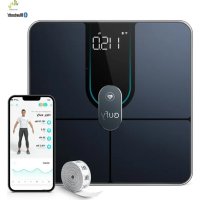
Smart Scale P2 Pro - Smart Home eufy - Free user manual and instructions
Find the device manual for free Smart Scale P2 Pro eufy in PDF.


User questions about Smart Scale P2 Pro eufy
0 question about this device. Answer the ones you know or ask your own.
Ask a new question about this device
Download the instructions for your Smart Home in PDF format for free! Find your manual Smart Scale P2 Pro - eufy and take your electronic device back in hand. On this page are published all the documents necessary for the use of your device. Smart Scale P2 Pro by eufy.
USER MANUAL Smart Scale P2 Pro eufy
For FAQs and more information, please visit:
www.eufylife.com
Owner's Manual
Smart Scale P2 Pro
T9149 51005003191 V01
English 01
Español 21
Deutsch
Français 59
Türkçe 79
Русский 97
Table of Contents
02 Important Safety Instructions
07 What's In the Box
07 Inserting the Batteries
08 Selecting the Measuring Unit
11 Starting a Measurement
12 Weight-Only Measurement
13 Using the Measuring Tape
13 Maintenance
14 Troubleshooting
16 Specifications
18 Customer Service
Important Safety Instructions
- This device is powered by 4 AAA batteries. Do not attempt to recharge non-rechargeable batteries as this can cause the batteries to leak or explode.
- Do not mix and use different types of batteries together, e.g. lithium-ion (Li-ion) and nickel-metal hydride (NiMH) batteries.
- Do not mix new and used batteries.
- If the device will not be used for an extended period of time, remove the batteries before storing the device in a cool and dry place.
- This device can be used by children aged from 8 years and above and persons with reduced physical, sensory or mental capabilities or lack of experience and knowledge if they have been given supervision or instruction concerning use of this appliance in a safe way and understand the hazards involved. Children should not play with the appliance. Cleaning and user maintenance should not be done by children without supervision.
- Used batteries should be placed in a sealed plastic bag and disposed of safely according to local environmental regulations.
- Read all instructions before using the device. Keep the manual for future reference.
- Only use the device as described in this user manual. Any misuse may result in electric shocks, burns, start a fire, or cause other unexpected hazards.
- Be aware that this device is designed for individuals to measure their weight and to monitor their body composition. Any information provided by this device is in no way meant to treat, cure, or prevent diseases or illnesses from happening.
- DO NOT use this device if you are pregnant or if you suspect you may be pregnant. The effects of this device on a fetus are unknown and untested.
- DO NOT use this device if you use a wearable or implanted electronic device such as a defibrillator or pacemaker.
• This device should not be used by individuals who are acutely or chronically ill, suffering from diseases or taking medications that can affect water levels. The accuracy of the readings for these individuals has not been verified. Specific medical advice should be obtained from a physician.
• The device is equipped with a data transmission function that emits electromagnetic energy. Portable Radio Frequency (RF) communications equipment (including peripherals such as antenna cables and external antennas) should not be used within 30 cm (12 inches) of the device, otherwise, performance may be affected. - Do not modify this device.
-
Do not expose this device to extreme temperatures, direct sunlight, moisture, or corrosive environments.
• To prevent slipping, do not step on the device after bathing or showering. -
This device should not be used when it is adjacent to or stacked on top of another device because it could cause the device to operate improperly. If such use is necessary, this device and the other device should be observed to verify that they are operating normally.
- If the batteries start to leak, put on your gloves and remove the leaking batteries from the battery door immediately. Place them in a clear plastic bag and recycle. If you don't wear gloves, you should wash your hands thoroughly with soap afterwards. In case of eye contact, seek medical attention immediately.
Usage Tips:
To ensure measurement accuracy, follow the instructions below when you start your measurement:
- Place the scale on a flat, hard surface. Soft surfaces such as carpeting will affect the performance of the scale.
- Step on the platform with bare feet. Stand still until the measurement is complete.
- For the most consistent measurements, weigh yourself at the same time of day and location.
- Avoid weighing yourself immediately after strenuous exercise, sitting in the sauna, taking a bath, or drinking and eating.
- The condition of the skin on the bottom of your feet can affect the measurement. The natural effects of aging or activity can make this skin hard. Take the reading with clean, slightly damp feet for best accuracy.
- Body fat percentage estimates will vary with the amount of water in the body, and can be affected by dehydration or overhydration due to factors such as alcohol consumption, menstruation, illness, intense exercise etc.
- Considering the vast individual differences among children under 16, the measurement of body fat or other body composition measurements may be less accurate. Their weight-only measurement should remain accurate.
04 EN EN 05
Notice

This symbol on the device or its packaging indicates: Do not dispose of electrical appliances as unsorted municipal waste; use separate collection facilities. Contact your local authority for information regarding the collection systems available. If electrical appliances are disposed of in landfills or dumps, hazardous substances can leak into the groundwater and get into the food chain, damaging your health and well-being. When replacing old appliances with new ones, the retailer is legally obliged to take back your old appliance for disposal at least free of charge.
FCC Statement
This device complies with Part 15 of the FCC Rules. Operation is subject to the following two conditions: (1) This device may not cause harmful interference, and (2) this device must accept any interference received, including interference that may cause undesired operation.
Warning: Changes or modifications not expressly approved by the party responsible for compliance could void the user's authority to operate the equipment.
Note: This equipment has been tested and found to comply with the limits for a Class B digital device, pursuant to Part 15 of the FCC Rules. These limits are designed to provide reasonable protection against harmful interference in a residential installation.
This equipment generates, uses, and can radiate radio frequency energy and, if not installed and used in accordance with the instructions, may cause harmful interference to radio communications. However, there is no guarantee that interference will not occur in a particular installation. If this equipment does cause harmful interference to radio or television reception, which can be determined by turning the equipment off and on, the user is encouraged to try to correct the interference by one or more of the following measures: (1) Reorient or relocate the receiving antenna; (2) Increase the separation between the equipment and receiver. (3) Connect the equipment into an outlet on a circuit different from that to which the receiver is connected. (4) Consult the dealer or an experienced radio / TV technician for help.
The following importer is the responsible party (for FCC matters only).
Company Name: POWER MOBILE LIFE, LLC
Address: 400 108th Ave NE Ste 400, Bellevue, WA 98004-5541
Telephone: +1 (800) 988 7973
RF Exposure Compliance Statement
This equipment complies with FCC/IC radiation exposure limits set forth for an uncontrolled environment. This equipment should be installed and operated with a minimum distance of 20cm between the radiator and your body.
ISED Compliance Statement
This device contains licence-exempt transmitter(s)/receiver(s) that comply with Innovation, Science and Economic Development Canada's licence-exempt RSS(s). Operation is subject to the following two conditions:
-
This device may not cause interference.
-
This device must accept any interference, including interference that may cause undesired operation of the device.
Declaration of Conformity
This product complies with the radio interference requirements of the European Community. Hereby, Anker Innovations Limited declares that the radio equipment type T9149 is in compliance with Directive 2014/53/EU. The full text of the EU declaration of conformity is available at the following internet address: https://www.eutylife.com/.
GB Declaration of Conformity
Hereby, Anker Innovations Limited declares that the product type T9149 is in compliance with Radio Equipment Regulations 2017 and The Restriction of the Use of Certain Hazardous Substances in Electrical and Electronic Equipment Regulations 2012. The full text of the GB declaration of conformity is available at the following internet address:
https://www.eufylife.com/
The following importer is the responsible party (contract for EU and UK matters)
Anker Technology (UK) Ltd
Suite B, Fairgate House, 205 Kings Road, Tyseley, Birmingham, B11 2AA, United Kingdom
Anker Innovations Limited
Room 1318-19, Hollywood Plaza, 610 Nathan Road, Mongkok, Kowloon, Hong Kong
06 EN EN 07
What's In the Box
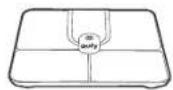
Smart Scale AAA Battery (×4)


Soft Measuring Tape (60in/150cm)

Owner's Manual & Other Documents
Inserting the Batteries
1 Turn the scale over and place it on a flat surface.
② Open the battery door and insert 4 AAA batteries. Make sure the positive and negative ends are facing the correct polarity directions marked in the battery compartment.
- The digits will show on the LED display.
3 Press down to close the battery door. Make sure the battery door is fixed in place.
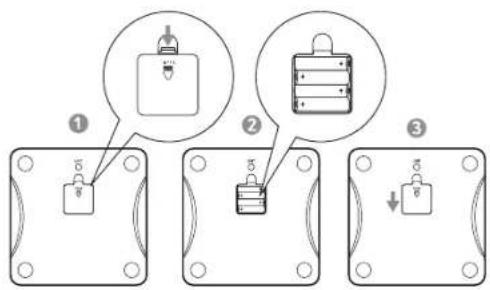

- Lo will appear on the LED display when the batteries are low. Replace all batteries at the same time. Do not mix new and used batteries.
- The scale turns off automatically after being idle for 10 seconds.
Selecting the Measuring Unit
Press the UNIT button at the bottom of the scale to cycle through and select the measuring unit: lb (Pound) / kg (Kilogram) / st (stone). The measuring
08 EN EN 09
unit can be selected and saved within the EufyLife app.
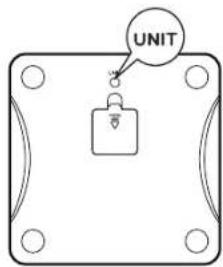

To restore factory settings, press and hold the UNIT button at the bottom of the scale for 10 seconds.
Installing the EufyLife App and Pairing
Download the EufyLife app from the App Store (IOS devices) or Google Play (Android devices).
② Enable Bluetooth on your smartphone or tablet.
3 Open the EufyLife app and follow the on-screen instructions to pair the scale with your device.
- Once paired, the app and scale will automatically connect the next time the app is opened.
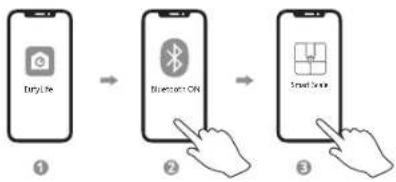
flowchart
graph LR
    A["Euryllie"] --> B["Bluetooth"]
    B --> C["Smart Server"]
| Bluetooth Status Icon | Status Icon Indicates | |
| Flashing | Pairing | |
| Solid Connected |
| Wi-Fi Status Icon | Status Icon Indicates | |
| Off | Not connected | |
| Flashing slowly | Ready for connecting | |
| Flashing quickly | Connecting | |
| Solid Connected |
10 EN EN 11

This scale is compatible with devices running iOS 10.0 and above or Android 5.0 and above.
- To complete the setup, you need to enable Bluetooth on your smartphone or tablet and allow the EufyLife app to use your location.
- Do not pair the scale from your smartphone's Bluetooth menu. Use the EufyLife app to pair the scale with your smartphone.
Starting a Measurement
Before taking your first measurement, you will need to create and set up a user ID in the EufyLife app.
1 Place the scale on a hard and flat surface.
② Open the EufyLife app and select "Add Device" on the homepage. Follow the in-app instructions to add the smart scale.
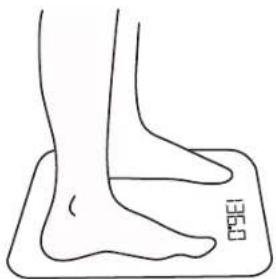
Step barefoot onto the scale.
- An analysis of your weight and your body's composition will begin automatically.
- After measuring, your weight and other available information will be shown on the LED display. You can find delialed body composition analysis within the EufyLife app.

Step barefoot onto the scale. Stand still until the measurement is complete.
natural_image
Line drawing of a human foot and ankle on a square foot mat (no text or symbols)Weight-Only Measurement
This scale can also be used as a conventional weight-reading scale.
- Open the EulyLife app and select "Simple mode".
- Step on the scale to measure your current weight.
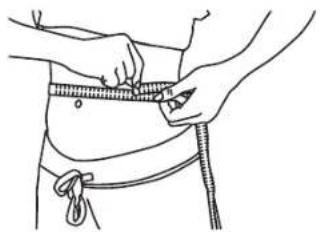
Using the Measuring Tape
With the measuring tape, you can gel accurate measurements according to your requirements.
natural_image
Line drawing of a person measuring their waist with a tape measure (no text or symbols)Maintenance
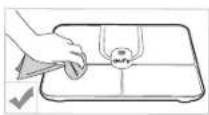
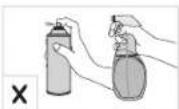
Regularly clean the scale with a dry or slightly dampened soft cloth.
12 EN EN 13

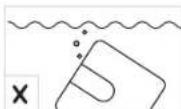
- This scale is waterproof, but it is not recommended to wash it with water for a long time or immerse it in water.
Never use detergents to clean the scale as this may cause it to malfunction or discolor.
Troubleshooting
Error Message
| Error Display Description Solution | ||
| oL | Overload. The device will power off. | Stop using this scale for measurement. |
| Lo | Low battery. The device will power off. | Replace all batteries at the same time. |
| Error Display Description Solution | ||
| FRI L | Wi-Fi setup failure. | ·Open the EufyLife app and follow the on-screen instructions to reconnect the scale with your device.·Move the scale to a place near your router before the Wi-Fi setup.·Press and hold the UNIT button for 10 seconds to restore factory settings, then restart the Wi-Fi connection. |
When Measuring
| Issue Cause Solution | ||
| Abnormal measurement results:• Too high• Too low• Huge difference between two recent measurements | • Incorrect posture. | Step onto the scale barefoot and stand still. |
| • Device is placed on soft carpeting or uneven surface. | Place the device on a hard and flat surface. | |
| LED display does not turn on after stepping onto the scale. | Batteries not installed. | Install 4 new AAA batteries. |
| Worn batteries. | Replace all batteries at the same time. | |
| Scale does not proceed to analyse body composition. | Taking a measurement while wearing shoes or socks. | Stand barefoot on the scale. |
| Using the weight-only measuring mode in the EufyLife app. | Change the measuring mode in the EufyLife app. | |
Specifications
| Model T9149 | |
| Power 6V (4 × AAA batteries) | |
| LED Display 2.5 × 1.4 in / 64 × 35 mm | |
| Measurement Units Pound / Kilogram / Stone | |
| Unit Increments 0.1lbs / 0.05kg | |
| Body Fat Unit Increments 0.1% | |
| Body Water Unit Increments 0.1% | |
| Muscle Mass Unit Increments 0.1% | |
| Measurement Range | 0.2lbs - 397lbs / 0.1kg - 180kg / 0st;0.2lbs - 28st; 5lbs |
| Activation Weight 3 kg | |
| Working Environment | Temperature: 10 - 40 °CHumidity: <= 90% RH |
| Storage Environment | Temperature: -10 - 50 °CHumidity: <= 90% RH |
| Operating Frequency Range 2400 MHz | 2500 MHz |
| Waterproof Degree IPX5 | |
| Transmitted Power | Wi-Fi: 18 dBmBluetooth: 4 dBm |
| Bluetooth Version | 5.0 |
| Wi-Fi Version | 2.4 G |
16 EN EN 17
Customer Service
For tutorial videos, FAQs, manuals, and more information, please visit: support.eufylife.com.
Contact Us
support@eufylife.com
www.eufylife.com
(US) +1 (800) 988 7973 Mon-Fri 6:15 - 17:00 (PT); Sat-Sun 6:30-16:30 (PT)
(UK) +44 (0) 1604 936200 Mon-Fri 6:00 - 17:00; Sat-Sun 6:00-14:00
(DE) +49 (0) 69 9579 7960 Mo-Fr 8:00 - 16:00 (日本) 03 4455 7823 月-金 9:00 - 17:00
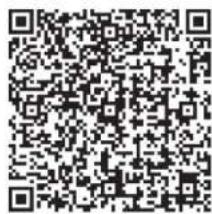
For more support phone numbers, please visit: support.culylife.com/s/phonecontactus Or scan the QR code below:
f @EufyOfficial @EufyOfficial @EufyOfficial @EufyOfficial
18 EN EN 19
Índice

flowchart
graph LR
    A["EupLite"] --> B["Bluetooth ON"]
    B --> C["SmartScale"]
natural_image
Line drawing of a human foot and foot on a mat with measurement markings (no text or symbols)natural_image
Line drawing of a person measuring their waist with a tape measure (no text or symbols)Mantenimiento
support@eufylife.com

www.eufylife.com

(US) +1 (800) 988 7973 Mon-Fri 6:15 - 17:00 (PT);
Sat-Sun 6:30-16:30 (PT)
(UK) +44 (0) 1604 936200 Mon-Fri 6:00 - 17:00;
Sat-Sun 6:00-14:00
(DE) +49 (0) 69 9579 7960 Mo-Fr 8:00 - 16:00
(日本)03 4455 7823月-金 9:00 - 17:00
36 ES ES 37

@EufyOfficial

@EutyOfficial

@EufyOfficial

@EufyOfficial
Inhaltsverzeichnis

flowchart
graph LR
    A["Help like"] --> B["Bluetooth GHz"]
    B --> C["Smart Endu"]
natural_image
Line drawing of a human foot and ankle on a rectangular mat (no text or symbols)Nur Gewichtsmessung
natural_image
Line drawing of a person measuring their waist with a tape measure (no text or symbols)Wartung
support@eufylife.com
www.eufylife.com
(US) +1 (800) 988 7973 Mon-Fri 6:15 - 17:00 (PT); Sat-Sun 6:30-16:30 (PT)
(UK) +44 (0) 1604 936200 Mon-Fri 6:00 - 17:00; Sat-Sun 6:00-14:00
(DE) +49 (0) 69 9579 7960 Mo-Fr 8:00 - 16:00
f @EufyOfficial @EufyOfficial @EufyOfficial @EufyOfficial
56 DE DE 57
Sommaire

Lo
natural_image
Line drawing of a human foot and ankle on a rectangular mat (no text or symbols)natural_image
Line drawing of a person measuring their waist with a tape measure (no text or symbols)Entretien
support@eufylife.com

www.eufylife.com

(US) +1 (800) 988 7973 Mon-Fri 6:15 - 17:00 (PT);
Sat-Sun 6:30-16:30 (PT)
(UK) +44 (0) 1604 936200 Mon-Fri 6:00 - 17:00;
Sat-Sun 6:00-14:00
(DE) +49 (0) 69 9579 7960 Mo-Fr 8:00 - 16:00
(日本)0344557823月-金9:00-17:00

@EufyOfficial

@EufyOfficial

@EufyOfficial

@EufyOfficial
76 FR FR 77
İçindekiler

natural_image
Line drawing of a human foot resting on a mat with measurement markings (no text or symbols)natural_image
Line drawing of a person measuring their waist with a tape measure (no text or symbols)Bakım
support@eufylife.com

www.eufylife.com

(US) +1 (800) 988 7973 Mon-Fri 6:15 - 17:00 (PT);
Sat-Sun 6:30-16:30 (PT)
(UK) +44 (0) 1604 936200 Mon-Fri 6:00 - 17:00;
Sat-Sun 6:00-14:00
(DE) +49 (0) 69 9579 7960 Mo-Fr 8:00 - 16:00
(日本)03 4455 7823 月-金 9:00 - 17:00
(TR) +90 850 460 1414 Mon-Fri
9.00-18.00
94 TR TR 95

@EufyOfficial

@EufyOfficial

@EufyOfficial

@EufyOfficial
Содержание

flowchart
graph LR
    A["Baidu"] --> B["Bluetooth ON"]
    B --> C["SmartScale"]
natural_image
Line drawing of a person measuring their waist with a tape measure (no text or symbols)Обслуживание
support@eufylife.com
www.eufylife.com

(US) +1 (800) 988 7973 Mon-Fri 6:15 - 17:00 (PT);
Sat-Sun 6:30-16:30 (PT)
(UK) +44 (0) 1604 936200 Mon-Fri 6:00 - 17:00;
Sat-Sun 6:00-14:00
(DE) +49 (0) 69 9579 7960 Mo-Fr 8:00 - 16:00
(日本)03 4455 7823 月-金 9:00 - 17:00
support.eufylife.com/s/phonecontactus.

@EufyOfficial

@EufyOfficial

@EufyOfficial

@EufyOfficial
116 RU RU 117
Гарантия: 1 год
Срок службы: 2 года
Toukohr (Room 1318 19, Hollywood Plaza, 610 Nathan Road, Mongkok, Kowloon, Hong Kong)