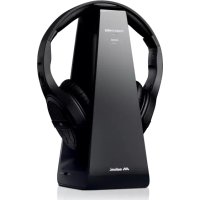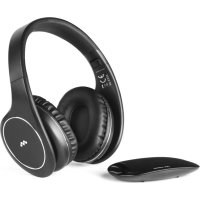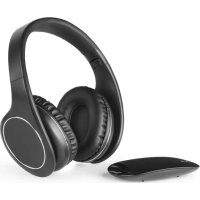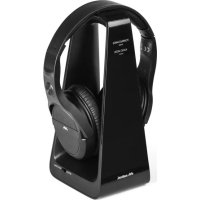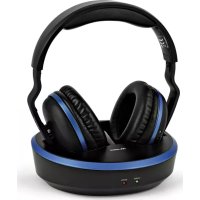
HP Comfort - Headphones MELICONI - Free user manual and instructions
Find the device manual for free HP Comfort MELICONI in PDF.


User questions about HP Comfort MELICONI
0 question about this device. Answer the ones you know or ask your own.
Ask a new question about this device
Download the instructions for your Headphones in PDF format for free! Find your manual HP Comfort - MELICONI and take your electronic device back in hand. On this page are published all the documents necessary for the use of your device. HP Comfort by MELICONI.
USER MANUAL HP Comfort MELICONI
WIRELESS TV STEREO HEADPHONES WITH RECHARGING BASE
IT Istruzioni d'uso 1
FR Mode d'emploi 5
ES Instruetiones de uso ....9
www.meliconi.com/doc/hpcomfort
FR
HP CONFAERT
www.meliconi.com/doc/hpcomfort
EN
HP CONFAERT
Thank you for purchasing a Meliconi product!
The HP600 Pro Meliconi wireless RF stereo headphone system uses advanced wireless audio transmission technology, allowing you to hear high e quality stereo sound from the most common audio playback devices up to a range of 100 metres in a free field, thereby giving you maximum freedom of movement. The signal passes through walls and ceilings. The transmitter can be connected to a TV, but also to any audio source, from DVD and Blu-Ray players to CD players, HiFi or radio systems, PCs or notebooks.
Safety warnings
The headset is supplied with specific rechargeable batteries already inserted, do not use any other type of batteries, for any replacements, please contact the Meliconi service.
-
This unit only accepts analogue stereo audio signals of an electrical nature; or those present on traditional audio output for headphones. Therefore, to connect a device that has a different audio output (digital - HDMI) or (optical digital - TO-SLINK) you will need to obtain a suitable converter/adaptor.
-
Do not use this device outdoors or in a damp environment. Do not not allow it to come into contact with liquids.
Do not install the device in an enclosed space, ensure adequate ventilation.
-
To enable the device to be easily disconnected from the power supply, the AC adaptor must be in a readily-accessible position.
-
Before making the connections, unplug the transmitter.
- To avoid electric shock, do not tamper with the appliance. Any repair work should only be carried out by qualified technicians.
If you notice any faults in the AC adaptor, disconnect it immediately from the socket. - Do not expose the device to any sources of excessive heat, like direct sunlight, fires or similar.
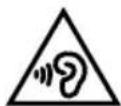
Do not use the headphones at high volume for long periods of time to avoid possible damage to your hearing.
DISPOSAL OF THE PRODUCT AND BATTERIES
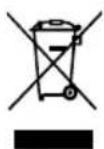
The crossed-out wheeled bin symbol indicates the product complies with European Directive 2012/19/EU.
The product must be disposed of separately from other waste at end-of-life. When no longer in use, it must be taken to an appropriate separated waste collection centre or returned to the retailer. This method of separate disposal helps to prevent possible negative impact upon the environment and on health, whilst encouraging the re-use and/or recycling of materials. Unlawful disposal of the product is subject to legal sanctions.
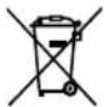
CAUTION: Do not dispose of batteries into the environment, do not disassemble them or throw them onto a fire. Improper use can harm the environment and health. The symbol of the crossed-out bin indicates the batteries must be disposed of in accordance with the regulations in force. Battery Disposal: The product is subject to Battery Directive 2006/66/EC + 2013/56/EU and must not be disposed of in household waste. Open the battery compartment and remove the two rechargeable batteries, which must then be taken to a recycling centre or returned to the dealer. Do not short-circuit the batteries.
Product Overview
- RF receiver headphones
- RED LED HEADSET: headphone on/off
- On/Off Switch
- Headphone Charging Contacts
- GREEN HEADSET LED: signal indicator
- AUTO TUNE button
- Volume Control Wheel
- RF Transmitting Base
- GREEN LED BASE: Charging indicator
- RED LED BASE: Signal presence indicator.
- Base charging Contacts
- Audio cable connector 3.5 mm jack
- AC Power Supply Connector
- Channel Selector (CHANNELS 1 2 3)
- 1.2 V Ni-MH rechargeable batteries (AAA size)
- AC adaptor
- 3.5mm /RCA jack adaptor
- 3.5mm audio cable jack
Installation
- Turn on the headphone power by removing the 2 insulating tabs that stick out from the right of the stand. (FIG.2)
- Make sure the headphones are switched off, and check that switch ③ is turned to OFF.
- Connect the AC adaptor cable to connector (13) (DC IN input) located on the rear of the base.
- Connect the AC adaptor to the mains supply.
The RED LED on the base will light up. - Select one of the 3 available channels.
- Place the headphones on the base slots (the headphones must be turned off) and make sure the green CHARGE LED is on to indicate correct contact has been made between the headphones and charging contacts 11.
- Leave the headphones to charge for 12 hours (at least for the first use).
CONNECTING THE AUDIO SOURCE (after charging the HEADPHONES)
Before making the connections, ensure that the Transmitting Base is switched off.
- Locate the headphone audio output (3.5 mm stereo jack plug) on the TV or the audio device you want to connect to. This is usually indicated by the symbol
WARNING: should not be confused by using another type of JACK that some TVs have as a PC audio input.
-
Connect one end of the audio cable jack to base 12 and the other end to the headphone audio output which is on the TV. If the device does not have an output JACK for headphones, read the chapter: "ALTERNATIVE AUDIO CONNECTION".
-
Turn on the base and the connected audio device.
- Remove the headphones from the recharging base.
- Make sure that the RED 10 "SIGNAL" indicator lights up on the base, which indicates the presence of an audio signal being input to the transmitter.
If this is not the case, the volume of the player (TV) should be increased. - Generally, when the jack is plugged in, the connected device (TV) no longer plays the sound through its own speakers.
CAUTION: some TVs have separate volume controls for SPEAKERS and HEADPHONES; use the latter one.
- Whilst staying near the base, turn the headphones on using the POWER ② button, and check that the red led lights up, red light comes on, then wait a few moments.
- Check that the GREEN ⑤ light on the left earpiece of the headphones lights up. If it does not, press the ⑥ AUTO-TUNE button for a second.
- Put the headphones on, and turn the wheel (7) to adjust the volume and achieve proper sound reproductions.
If the headphones fail to reproduce the audio, or if there is any interference with the audio, please consult the "TROUBLESHOOTING" section.
Use
For normal use, simply turn the headset on and off using the POWER ③ button.
In the absence of incoming audio signal, the transmitter on the base turns off automatically after 4 minutes.
When the headphones are not in use, after switching them off, place them on the recharging base, see paragraph "CHARGING THE BATTERIES". If the headphones are not in use for a long period, remove the batteries and unplug the AC adaptor.
IMPORTANT
- During normal operation, the RED 10 SIGNAL LED on the base should always remain on; when it is off, it means the audio signal at the input to the transmitter is poor or absent; then increase the volume on the TV until the LED lights up. To adjust the listening volume, turn the wheel 7 on the headphones and NOT the volume of the TV.
-If the sound is disturbed or absent when the headphones are turned on, move closer to the base and press button (AUTO TUNE) for a moment to activate the headset-base coupling which is indicated by the green LED lighting up.
Recharging Batteries
With charged batteries, the unit can operate wireless for about 8 hours. To recharge the batteries, turn the headphones off and store them on the base. Ensure that the charging clips (11) make contact (the green CHARGE LED on the front of the base must be on). Leaving the headphones on the base, even for several days will not cause any problems.
WARNING:
-For safety reasons, the batteries supplied are of a specific type. Never use other types of batteries to replace them. If necessary, get in touch with MELICONI technical assistance.
-When the headphones are not in use, turn them off to avoid draining the batteries completely and damaging them.
- The batteries must be fully charged before the first use. An initial charge of at least 12 hours is necessary to ensure the rechargeable batteries have an acceptable lifetime. Always make sure the power button ③ on the headphones is in the OFF position (red LED is off) during battery recharging.
Alternative audio connection
If the audio device doesn't have a headphone output, or if you want the TV to continue to play the sounds from your speakers, if the RCA audio jacks (red and white with the words "OUTPUT" on them are available on the TV), connect the audio cable from the base to the RCA audio outputs of the device, using the appropriate cable (2 x RCA male/JACK 3.5 mm female) included in the package.
Technical Specifications
Transmission mode: UHF FM stereo
Carrier frequencies:
CH1 = 863.51 - 863.55 Mhz
CH2 = 864.01 - 864.05 Mhz
CH3 = 864.51 - 864.55 Mhz
Power supply voltage:
Transmitter = 8V400mA
Receiver = 2.4V (2 X rechargeable Ni-MH size AAA batteries)
Frequency response: 35Hz -7.8 KHz.
TYP distortion: <1%
TYP signal/noise ratio: 78 dB.
TYP channel separation: 62 dB.
Maximum transmission distance: 100 metres (in free field)
Listening time: >8 hours
Troubleshooting
If the headphones do not produce any sound, or if the audio signal is distorted or is presumed to come from another source, carry out the following procedure:
- Place the headphones onto the base
- Make sure that the AC adaptor is fully inserted into the power outlet and that the cable is properly connected to the connector 13 from the base (DC IN).
- Make sure you use fully charged batteries. If necessary, recharge them.
- Make sure the TV or audio equipment is turned on and plays an audio signal.
- Remove the headphones from the base and make sure that the RED SIGNAL light 10 on the base remains constantly on when there is an incoming audio signal. If necessary, increase the volume of the audio source.
- Move closer to the base, turn on the headset and check the RED (2) (POWER) led lights up.
- On the headset, check that the GREEN led is on (3). If there is no audio in the headphones, use the headphone volume control (7) (wheel) to adjust the sound level; if necessary, press the AUTO TUNE button for a moment and wait.
- If the problem persists, turn the headphones off, and using the selector 14 on the base, try to change channels (1-2-3) and repeat the procedure from point 6 onwards.
Helpline
If you have any problems with or questions about HP COMFORT:
- read this instruction manual carefully, as it will help you resolve most problems.
- consult our website: www.meliconi.com
2 YEAR WARRANTY
In any eventuality, you can send an e-mail to: info@meliconi.com
SIMPLIFIED EU DECLARATION OF COMPLIANCE
The manufacturer, Meliconi S.p.A., hereby declares that the radio device, HP COMFORT headphones is
compliant with Directive 2014/53/EU (RED). The full text of the EU Declaration of Compliance
is available at the following internet address:
www.meliconi.com/doc/hpcomfort
DE
HP CONFAERT
www.meliconi.com/doc/hpcomfort
C E

meliconi