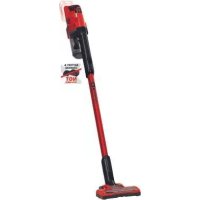
USER MANUAL TESV 18 Li EINHELL
GB Original operating instructions Cordless stick vac cleaner
2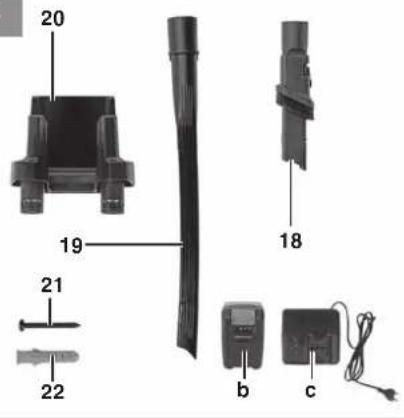
3a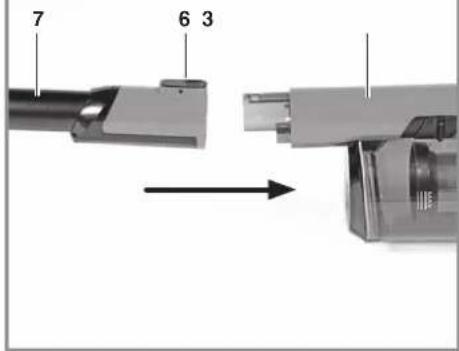
-2-
D
Danger!
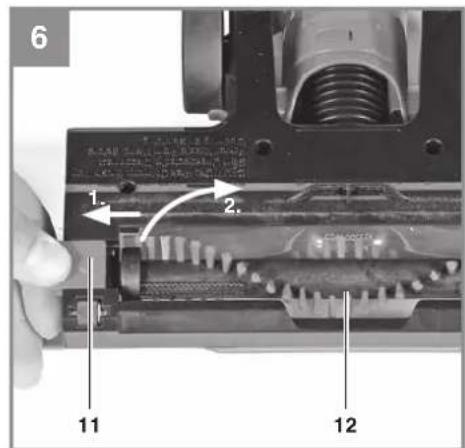
5.4 Assembly/disassembly of the brush roller (Fig. 6)
When using the equipment, a few safety precautions must be observed to avoid injuries and damage. Please read the complete operating instructions and safety regulations with due care. Keep this manual in a safe place, so that the information is available at all times. If you give the equipment to any other person, hand over these operating instructions and safety regulations as well. We cannot accept any liability for damage or accidents which arise due to a failure to follow these instructions and the safety instructions.
Explanation of the symbols used (see Fig. 12)
- Danger! - Read the operating instructions to reduce the risk of injury.
1. Safety regulations
The corresponding safety information can be found in the enclosed booklet.
Danger!
Read all safety regulations and instructions. Any errors made in following the safety regulations and instructions may result in an electric shock, fire and/or serious injury.
Keep all safety regulations and instructions in a safe place for future use.
- Important: read the operating instructions before assembling and using the appliance for the first time. Never clean the appliance with solvents.
- Never leave the appliance unattended when operational.
- Keep away from children.
- Never vacuum the following: burning matches, smoldering ash and cigarette butts, combustible, caustic, inflammable or explosive substances, vapor or liquids.
- This appliance is not suitable for vacuuming dust which can be harmful to health. Store the appliance in a dry indoor location. Never use the appliance if it is damaged.
- Only allow the appliance to be serviced by an authorized after sales service outlet.
- Only use the appliance to carry out work for which it has been designed. Take extra care when cleaning steps.
- Use only genuine accessories and spare parts.
- Warning! Moving parts! Do not touch the brush roller when the equipment is in operation.
This equipment can be used by children of 8 years and older and by people with limited physical, sensory or mental capacities or those with no experience and knowledge if they are supervised or have received instruction in how to use the equipment safely and understand the dangers which result from such use. Children are not allowed to play with the equipment. Unless supervised, children are not allowed to clean the equipment and carry out user-level maintenance work.
2. Layout and items supplied
2.1 Layout (Fig. 1-2)
- Handle
- On/Off switch
- Head
- Container
- Release button for container flap
- Release button for suction tube
- Suction tube
- Release button for motor brush
- Wheel
- Motor brush
- Release button for brush roller
- Brush roller
- Container flap
- Filter cage
- Filter
- Release button for equipment head
- Vacuum setting switch
- Crevice/brush nozzle
- Crevice nozzle
- Wall holder
- Screw 5 x 42 mm
- Plastic wall plug 8 mm
2.2 Items supplied
Please check that the article is complete as specified in the scope of delivery. If parts are missing, please contact our service center or the nearest branch of the DIY store where you made your purchase at the latest within 5 work days after purchasing the article and upon presentation of a valid bill of purchase. Also, refer to the warranty table in the warranty provisions at the end of the operating instructions.
- Open the packaging and take out the equipment with care.
- Remove the packaging material and any packaging and/or transportation braces (if available). • Check to see if all items are supplied.
GB
- Inspect the equipment and accessories for transport damage.
- If possible, please keep the packaging until the end of the guarantee period.
Danger!
The equipment and packaging material are not toys. Do not let children play with plastic bags, foils or small parts. There is a danger of swallowing or suffocating!
• Original operating instructions - Safety instructions
3. Proper use
The equipment is suitable for dry vacuuming when using the appropriate filter. The equipment is designed only for home use and only for domestic settings. The equipment is not suitable for the vacuuming of combustible, explosive or harmful substances.
The equipment is to be used only for its prescribed purpose. Any other use is deemed to be a case of misuse. The user / operator and not the manufacturer will be liable for any damage or injuries of any kind caused as a result of this.
Please note that our equipment has not been designed for use in commercial, trade or industrial applications. Our warranty will be voided if the equipment is used in commercial, trade or industrial businesses or for equivalent purposes.
4. Technical data
Voltage supply to motor 18 V DC
Tank volume: 0.61
Weight (without battery): 1.8 kg
5. Before starting the equipment
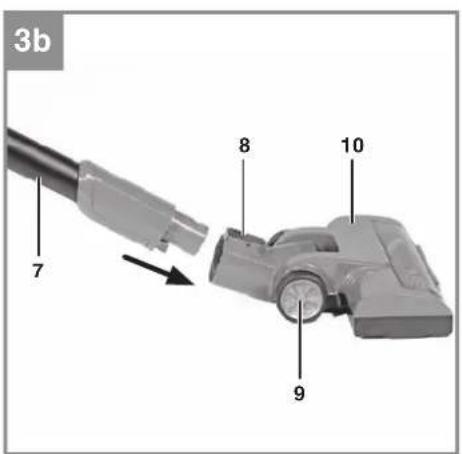
5.1 Assembling the equipment (Fig. 3a-3b)
Slot the equipment head (3) and the motor brush (10) onto the suction tube (7) until they latch in place with a click. The motor brush (10), the crevice/brush nozzle (18) and the crevice nozzle (19) can be mounted either directly on the equipment head or on the suction tube.
Warning! Make sure that nothing is jammed between the equipment connections.
5.2 Fitting the filters Important!
Never use the equipment without filters!
Always make sure that the filters are securely seated!
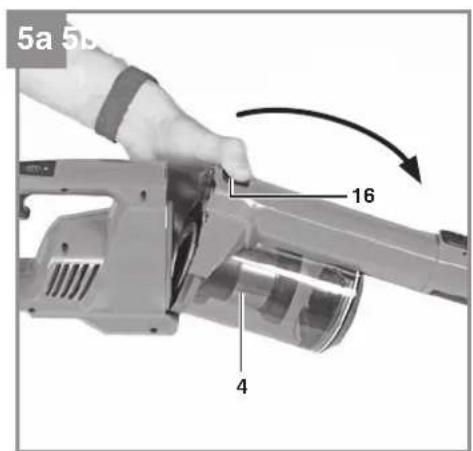
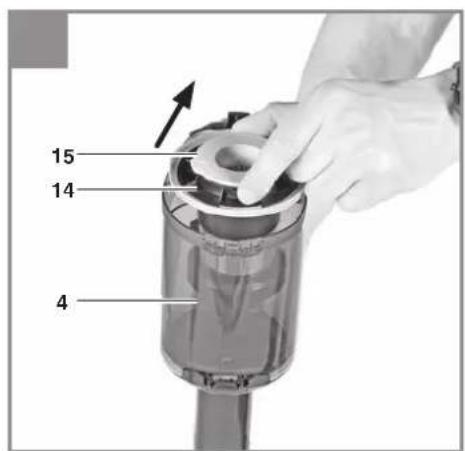
Fitting/removing the filters (Fig. 5a-5b)
Press the release button (16) and remove the container while doing so (4). You can then take the filter (15) together with the filter cage (14) out of the container (Fig. 5b). The filter must be taken out of the filter cage for it to be thoroughly cleaned.
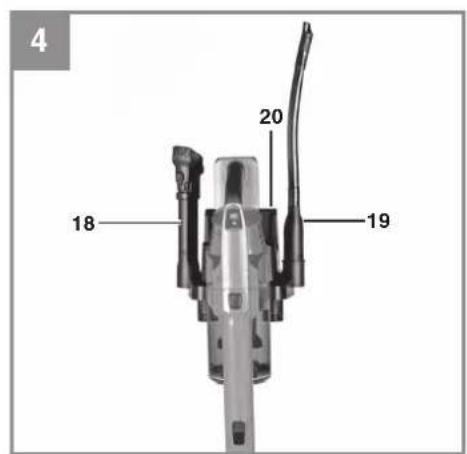
5.3 Fitting the wall holder (Fig. 4)
Danger! Check that there are no electric cables or other installations (such as water pipes) near the drill holes. Make sure that the wall holder is firmly seated on the wall in a horizontal position. Use only suitable fasteners on a wall capable of bearing the load.
The supplied wall plugs and screws are suitable for the following: concrete, densely structured natural stone, solid bricks, solid limestone bricks, solid lightweight concrete bricks, and aerated concrete.
5.4 Fitting/removing the brush roller (Fig. 6)
While pressing the release button (11), push it to the left and hold it tight. Lift the brush roller (12) out of the housing. Assemble in reverse order. Make sure that the brush roller latches in place correctly.
5.5 Suction nozzles
Crevice nozzle (Fig. 2)
The crevice nozzle (19) is designed for vacuuming in corners, edges, and other areas that are difficult to access.
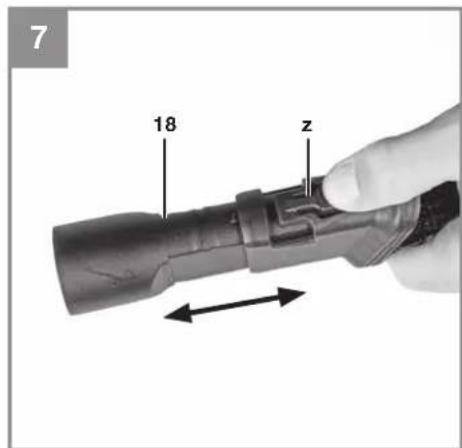
Crevice/brush nozzle (Fig. 7)
The crevice/brush nozzle (18) can be used as either a crevice nozzle or a brush. To use it as a brush, press the button (z) on the side of the nozzle and push the brush forward until it latches in place.
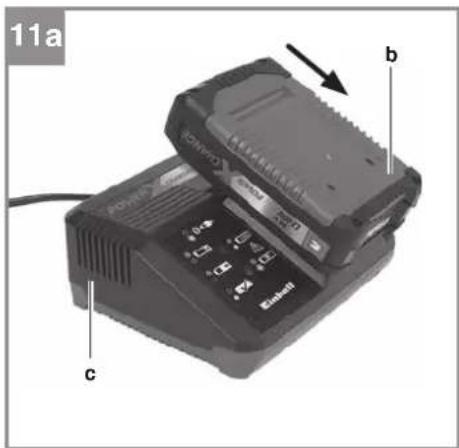
5.6 Charging the battery (Fig. 11a)
- Take the battery pack out of the equipment. Do this by pressing the side pushlock buttons.
- Check that your mains voltage is the same as
that marked on the rating plate of the battery charger. Insert the power plug of the charger (c) into the socket outlet. The green LED will then begin to flash.
- Insert the battery pack (b) into the battery charger (c).
- In the section entitled "Charger indicator" you will find a table with an explanation of the LED indicator on the charger.
The battery pack can become a little warm during charging. This is normal.
If the battery pack fails to charge, check:
• whether there is voltage at the socket outlet - whether there is good contact at the charging contacts
If the battery pack still fails to charge, send
- the charging unit
- and the battery pack
to our customer service center.
When shipping or disposing of batteries and cordless tools, always ensure that they are packed individually in plastic bags to prevent short circuits and fires.
To ensure that the battery pack provides long service, you should take care to recharge it promptly. You must recharge the battery pack when you notice that the performance of the device drops. Never allow the battery pack to become fully discharged. This will cause it to develop a defect.
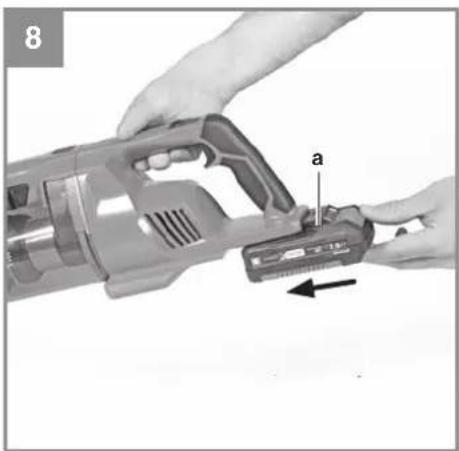
Fitting the battery (Fig. 8)
Push the battery (a) into the battery mount provided until you hear it latch in place.
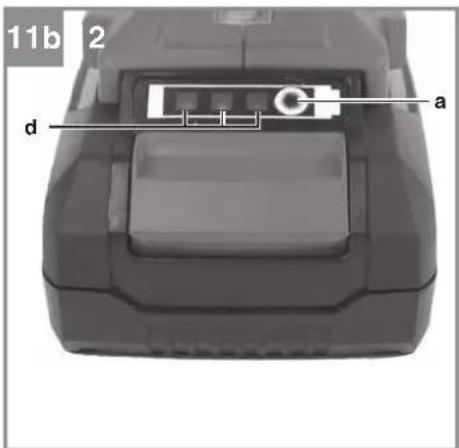
Battery capacity indicator (Fig. 11b)
Press the button for the battery capacity indicator (a). The battery capacity indicator (Fig. d) shows the charge status of the battery using 3 LEDs.
All 3 LEDs are lit:
The battery is fully charged.
2 or 1 LED(s) are lit:
The battery has an adequate remaining charge.
1 LED flashes:
The battery is empty, recharge the battery.
All LEDs blink:
The battery temperature is too low. Remove the battery from the equipment, keep it at room temperature for one day. If the fault reoccurs, this means that the rechargeable battery has undergone exhaustive discharge and is defective. Remove the battery from the equipment. Never use or charge a defective battery.
6. Operation
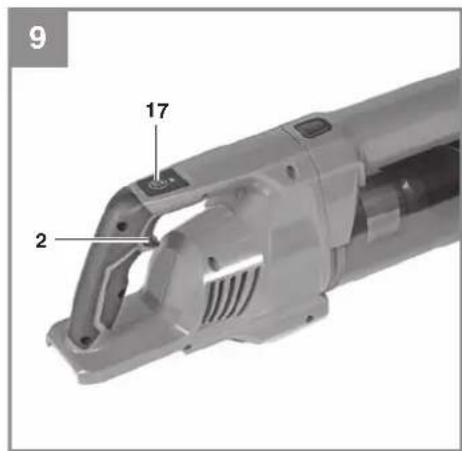
6.1 On/Off switch (Fig. 9)
To switch on: press the On/Off switch (2). To switch off: press the On/Off switch again.
6.2 Vacuum setting switch (Fig. 9)
The equipment has 2 vacuum settings: ECO - Normal suction power and motor brush speed for cleaning hard floors and short-pile carpets or when a longer running time is needed. BOOST - High suction power and motor brush speed for cleaning plush carpets and when a higher cleaning level is needed. The equipment starts in ECO mode. Press the vacuum setting switch (17) once to switch to BOOST mode.
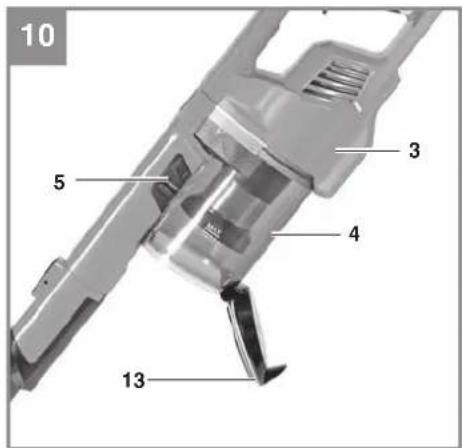
6.3 Emptying the container (Fig. 10)
Important! To achieve the best suction performance, empty the container each time after you use the cleaner or as soon as the dust reaches the MAX line.
Position the container (4) above a waste bin. Press the release button (5) downwards in order to open the container flap (13). When the emptying is finished, close the container flap until you hear it latch in place.
6.4 Cleaning the filter
Warning!
Switch off the equipment and remove the battery before you carry out any maintenance and cleaning work.
Cleaning the filter
Take care not to damage the filter when you clean it. Clean the filter by tapping it lightly and brushing it with a fine brush.
If necessary you can clean the filter with a little soft soap under running water and then allow it to air-dry.
Cleaning the filter cage
Clean the filter cage with a little soft soap under running water and allow it to air-dry.
6.5 Cleaning the brush roller
Take the brush roller out of the housing (see the section "Fitting/removing the brush roller"). Clean the brush roller of everything that has collected on it during use. Reinsert the brush roller in the housing.
6.6 Cleaning the equipment head
Clean the equipment regularly with a damp cloth and some soft soap. Do not use cleaning agents or solvents; these may be aggressive to the plastic parts in the equipment.
6.7 Cleaning the container
The container can be cleaned with a damp cloth and some soft soap.
7. Cleaning, maintenance and ordering of spare parts
Danger!
Always pull out the battery before starting any cleaning work.
7.1 Cleaning
- Keep all safety devices, air vents and the motor housing free of dirt and dust as far as possible. • We recommend that you clean the equipment immediately after you use it.
7.2 Maintenance
Check the equipment's filter at regular intervals and before each use.
7.3 Ordering spare parts
Please provide the following information on all orders for spare parts:
• Model/type of the equipment • Article number of the equipment • ID number of the equipment • Part number of the required spare part For our latest prices and information please go to www.Einhell-Service.com
8. Disposal and recycling
The equipment is supplied in packaging to prevent it from being damaged in transit. The raw materials in this packaging can be reused or recycled. The equipment and its accessories are made of various types of material, such as metal and plastic. Never place defective equipment in your household refuse. The equipment should be taken to a suitable collection center for proper disposal. If you do not know the whereabouts of such a collection point, you should ask in your local council offices.
9. Storage
Store the equipment and accessories in a dark and dry place at above freezing temperature. The ideal storage temperature is between 5 and 30 °C. Store the electric tool in its original packaging.
10. Charger indicator
| Indicator status Explanations and actions |
| Red LED Green LED | |
| Off | Flashing | Ready for useThe charger is connected to the mains and is ready for use; there is no battery pack in the charger |
| On Off Charging | The charger is charging the battery pack in quick charge mode. The charging times are shown directly on the charger.Important! The actual charging times may vary slightly from the stated charging times depending on the existing battery charge. |
| Off | On | The battery is charged and ready for use.The unit then changes over to gentle charging mode until the battery is fully charged.To do this, leave the rechargeable battery on the charger for approx. 15 minutes longer.Action:Take the battery pack out of the charger. Disconnect the charger from the mains supply. |
| Flashing Off | Adapted charging | The charger is in gentle charging mode.For safety reasons the charging is performed less quickly and takes more time. The reasons can be:- The rechargeable battery has not been used for a very long time.- The battery temperature is outside the ideal range.Action:Wait for the charging to be completed; you can still continue to charge the battery pack. |
| Flashing Flashing Fault | Charging is no longer possible. The battery pack is defective.Action:Never charge a defective battery pack.Take the battery pack out of the charger. |
| On On Temperature fault | The battery pack is too hot (e.g. due to direct sunshine) or too cold (below 0°C ).Action:Remove the battery pack and keep it at room temperature (approx. 20°C ) for one day . |

For EU countries only
Never place any electric power tools in your household refuse.
To comply with European Directive 2012/19/EC concerning old electric and electronic equipment and its implementation in national laws, old electric power tools have to be separated from other waste and disposed of in an environment-friendly fashion, e.g. by taking to a recycling depot.
Recycling alternative to the return request:
As an alternative to returning the equipment to the manufacturer, the owner of the electrical equipment must make sure that the equipment is properly disposed of if he no longer wants to keep the equipment. The old equipment can be returned to a suitable collection point that will dispose of the equipment in accordance with the national recycling and waste disposal regulations. This does not apply to any accessories or aids without electrical components supplied with the old equipment.
The reprinting or reproduction by any other means, in whole or in part, of documentation and papers accompanying products is permitted only with the express consent of the Einhell Germany AG.
Subject to technical changes
We have competent service partners in all countries named on the guarantee certificate whose contact details can also be found on the guarantee certificate. These partners will help you with all service requests such as repairs, spare and wearing part orders or the purchase of consumables.
Please note that the following parts of this product are subject to normal or natural wear and that the following parts are therefore also required for use as consumables.
| Category Example | |
| Wear parts* Battery, crevice nozzle, upholstery nozzle |
| Consumables* Filter, Brush roller | |
| Missing parts | |
* Not necessarily included in the scope of delivery!
In the effect of defects or faults, please register the problem on the internet at www.Einhell-Service.com. Please ensure that you provide a precise description of the problem and answer the following questions in all cases:
• Did the equipment work at all or was it defective from the beginning? • Did you notice anything (symptom or defect) prior to the failure? • What malfunction does the equipment have in your opinion (main symptom)? Describe this malfunction.
Warranty certificate
Dear Customer,
All of our products undergo strict quality checks to ensure that they reach you in perfect condition. In the unlikely event that your device develops a fault, please contact our service department at the address shown on this guarantee card. You can also contact us by telephone using the service number shown. Please note the following terms under which guarantee claims can be made:
- These guarantee terms apply to consumers only, i.e. natural persons intending to use this product neither for their commercial activities nor for any other self-employed activities. These warranty terms regulate additional warranty services, which the manufacturer mentioned below promises to buyers of its new products in addition to their statutory rights of guarantee. Your statutory guarantee claims are not affected by this guarantee. Our guarantee is free of charge to you.
- The warranty services cover only defects due to material or manufacturing faults on a product which you have bought from the manufacturer mentioned below and are limited to either the rectification of said defects on the product or the replacement of the product, whichever we prefer. Please note that our devices are not designed for use in commercial, trade or professional applications. A guarantee contract will not be created if the device has been used by commercial, trade or industrial business or has been exposed to similar stresses during the guarantee period.
- The following are not covered by our guarantee:
- Damage to the device caused by a failure to follow the assembly instructions or due to incorrect installation, a failure to follow the operating instructions (for example connecting it to an incorrect mains voltage or current type) or a failure to follow the maintenance and safety instructions or by exposing the device to abnormal environmental conditions or by lack of care and maintenance.
- Damage to the device caused by abuse or incorrect use (for example overloading the device or the use or unapproved tools or accessories), ingress of foreign bodies into the device (such as sand, stones or dust, transport damage), the use of force or damage caused by external forces (for example by dropping it).
- Damage to the device or parts of the device caused by normal or natural wear or tear or by normal use of the device.
- The guarantee is valid for a period of 24 months starting from the purchase date of the device. Guarantee claims should be submitted before the end of the guarantee period within two weeks of the defect being noticed. No guarantee claims will be accepted after the end of the guarantee period. The original guarantee period remains applicable to the device even if repairs are carried out or parts are replaced. In such cases, the work performed or parts fitted will not result in an extension of the guarantee period, and no new guarantee will become active for the work performed or parts fitted. This also applies if an on-site service is used.
- To make a claim under the guarantee, please register the defective device at: www.Einhell-Service.com. Please keep your bill of purchase or other proof of purchase for the new device. Devices that are returned without proof of purchase or without a rating plate shall not be covered by the guarantee, because appropriate identification will not be possible. If the defect is covered by our guarantee, then the item in question will either be repaired immediately and returned to you or we will send you a new replacement.
Of course, we are also happy to offer a chargeable repair service for any defects which are not covered by the scope of this guarantee or for units which are no longer covered. To take advantage of this service, please send the device to our service address.
Also refer to the restrictions of this warranty concerning wear parts, consumables and missing parts as set out in the service information in these operating instructions.
Danger!
Mounting/Dismounting the filter (fig. 5a-5b)
5.4 Mounting/Dismounting the brush roller (fig. 6)
Noise: measured Lwa = dB(A) ; guaranteed Lwa = dB(A)
P = kW; L/∅ = cm
Notified Body:
2012/46/EU_(EU)2016/1628
Emission No.:
Standard references: EN 60335-1; EN 60335-2-2; EN 62233; EN 55014-1; EN 55014-2
Subject to change without notice
Archive-File/Record: NAPR021369
Documents registrar: Sergey Hirsekom
Wiesenweg 22, D-94405 Landau/Isar
* SN Cordless atixo vacuum cleaner. * Aspirator balai sans fil - Eboxa electrica de balat - DNK Alkau-atsenoguer mod skaff - S Baltorkhden sketidemisaggerae - CZ Akumilatorki tyotny vysavač - SK Akumilatorky tyotny vysavač - ML Accu stolistomugir. * Aspirator escola inalmbricc - RIN Varmillan akupyminuri - SLO Baltorkje pokončit sesalnik - H Akus-ridopszivá - RO Aspirator vertical cu acumulator - GN Aktiatrik onoua pólajos, με μαρομα: P Aspirator de basie sae mi 10- NBN Bautriki stepti uvašava - RG Akumilatorki stepti uvašava. PL Bezprzewodowy odkurzacz ręczny (2) UTA Aukurjuklja: 37 UTA Akumilatorki belatis dukla surdyli. BG Akupilatorke berinivnega provizovaniwa - UNT BUST kinalnaijikuijorniro piutsoo - MX Bezgian na bravouklavaa so rapika.

We, Einhell UK Ltd
Champions Business Park, First Floor Unit 10, Arrowe Brook Rd, Upton, Wirral CH49 0AB, United Kingdom
declare the conformity to UK standards and legislation was assessed for:
Cordless stick vacuum cleaner TE-SV 18 Li (Einhell)
UK legislation
□ Simple Pressure Vessels (Safety) Regulation □ Electrical Equipment (Safety) Regulation □ Radio Equipment Regulation □ Personal Protective Equipment Regulation ☐ The Ecodesign for Energy-Related Products and Energy Information Regulation X The Restriction of the Use of Certain Hazardous Substances in Electrical and Electronic Equipment Regulation □ Noise Emission in the Environment by Equipment for use Outdoors Regulation Noise: measured L wA = dB (A); guaranteed L wA = dB (A) □ Supply of Machinery (Safety) Regulation X Electromagnetic Compatibility Regulation □ Measuring Instruments Regulation ☐ Pressure Equipment (Safety) Regulation
Annex IV
Notified Body:
Reg. No.:
Standards: BS 60335-1; BS 60335-2-2; BS 62233; BS 55014-1; BS 55014-2
Wirral, 2021.07.06
Archive-File/Record: NAPR021369
Art.-No.: 23.471.80 I.-No.: 21010
Subject to change without notice Wiesenweg 22, D-94405 Landau/Isar
Documents registrar: Sergey Hirsekom
EH 07/2021 (01)