ManualGo.com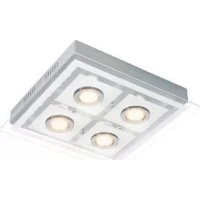
IAN 288445 - Lamp Livarno Lux - Free user manual and instructions
Find the device manual for free IAN 288445 Livarno Lux in PDF.



Download the instructions for your Lamp in PDF format for free! Find your manual IAN 288445 - Livarno Lux and take your electronic device back in hand. On this page are published all the documents necessary for the use of your device. IAN 288445 by Livarno Lux.
USER MANUAL IAN 288445 Livarno Lux
Vis (boîtier de raccordement)
hromaticity coordinate: (x < 0.
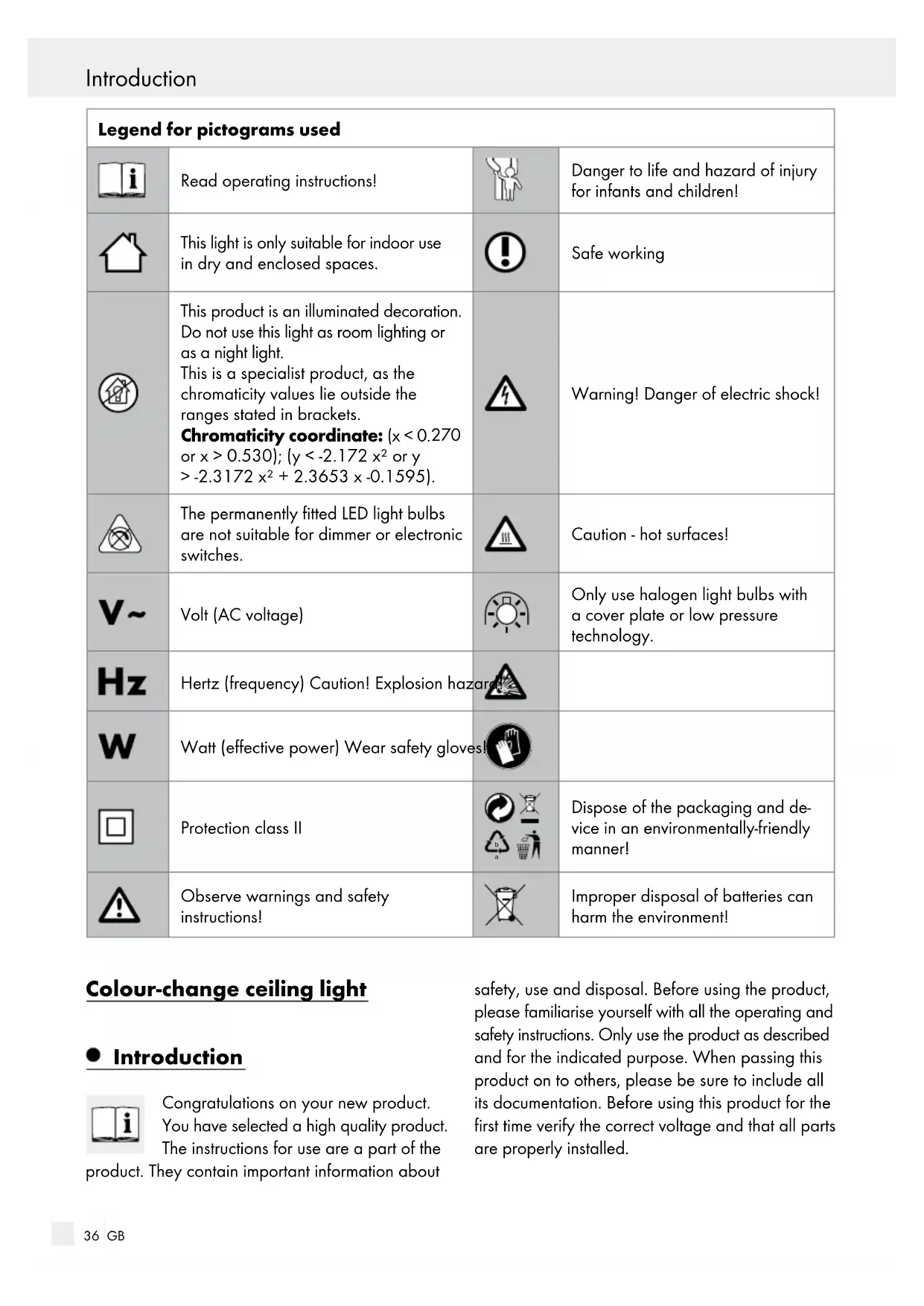
or x > 0.530); (y < -2.172 x² or y > -2.3172 x² + 2.3653 x -0.1595). Warning! Danger of electric shock! The permanently fitted LED light bulbs are not suitable for dimmer or electronic switches. Caution - hot surfaces! Volt (AC voltage) Only use halogen light bulbs with a cover plate or low pressure technology. Hertz (frequency) Caution! Explosion hazard! Watt (effective power) Wear safety gloves! Protection class II
Dispose of the packaging and de- vice in an environmentally-friendly manner! Observe warnings and safety instructions! Improper disposal of batteries can harm the environment! Colour-change ceiling light Introduction Congratulations on your new product. You have selected a high quality product. The instructions for use are a part of the product. They contain important information about safety, use and disposal. Before using the product, please familiarise yourself with all the operating and safety instructions. Only use the product as described and for the indicated purpose. When passing this product on to others, please be sure to include all its documentation. Before using this product for the first time verify the correct voltage and that all parts are properly installed. Introduction37 GB Introduction Introduction Intended use This light is only suitable for indoor use in dry and enclosed spaces. The light can be fastened to any normally inflammable surface. This product is only intended for private household use. This product is an illuminated deco- ration. Do not use this light as room lighting or as a night light. This is a specialist product, as the chromaticity values lie outside the ranges stated in brackets. Chromaticity coordinate: (x < 0.270 or x > 0.530); (y < -2.172 x² or y > -2.3172 x² + 2.3653 x -0.1595). The coloured LEDs are not designed for use in other applications. The permanently fitted illuminant (except for G4 light bulbs) is not replaceable; if the illuminant reaches the end of its life, replace the entire light.
he permanently fitted LED light b ulbs are not suitable for dimmer or elec- tronic switches. Scope of delivery Check immediately after unpacking that the parts are complete and that the product is in proper condition. 1 Colour-change ceiling light, model 3571-096L 9 Halogen light bulbs, G4, 14 W 1 Remote control 1 Battery, Type CR2032 4 Screws (ceiling bracket) 4 Wall plugs (ceiling bracket) 1 Tool 9 Lamp shades 1 Set of assembly instructions and instructions for use Parts description
Screws (connection housing)
Screws (mounting bracket)
Mains connection cable (external)
Remote control unit Technical Data Ceiling light: Operating voltage: 230–240 V∼, 50 Hz Halogen light bulb: 12 V∼, 14 W, G4 LED light bulb: LED 54 x 0.06 W, coloured Rated power maximum: 9 x max. 14 W Protection class: II / Protection class: IP20 Remote control receiver: Rated voltage: 220–240 V∼, 50 / 60 Hz Max. load capacity 250 W Frequency: 433.92 MHz Remote control transmitter: Operating voltage: 3 V , 5 mA Frequency: 433.92 MHz Remote control battery: 3 V , Type CR 203238 GB Safety Safety Safety notices Damage due to failure to comply with these operat- ing instructions will invalidate the guarantee! We assume no liability for consequential damage! We assume no liability for material damage or per- sonal injury due to improper handling or failure to comply with the safety instructions!
SMALL CHILDREN! Never leave children unsupervised with the packaging materials. The packaging material poses a suffocation hazard. Children frequently underestimate the dangers. Please always keep the product out of the reach of children. This device may be used by children aged 8 years and up, as well as by persons with reduced phys- ical, sensory or mental capacities, or lacking experience and / or knowledge, so long as they are supervised or instructed in the safe use of the device and understand the associated risks. Do not allow children to play with the device. Cleaning and user maintenance must not be performed by children without supervision. ATTENTION! Extremely rapid changes in light may in some cases impair vision in children or predisposed persons (e.g. due to mental health conditions). Avoid the risk of fatal injury from electric shock Protection class II / . This light is specially in- sulated and must not be connected to an earth conductor. Ensure that a qualified electrician, or a person trained to carry out electrical installations, per- forms the electrical installation. We assume no liability for material damage or personal injury due to improper handling or failure to comply with the safety instructions! Never use the light if any defects have been identified. Prior to installation, remove the fuse or switch off the circuit breaker (0 setting) in the fuse box. Ensure that the light does not come into contact with water or other liquids under any circum- stances. Before assembly, ensure that the available mains voltage corresponds to the operating voltage necessary for the light (see “Technical Data“). Ensure that no cables are damaged when installing. Do not install the lamp on damp if conductive surfaces. Never open any of the components of the elec- trical equipment or insert any objects into the same components. This will pose a risk of fatal injury from electric shock. Prevent fire and injury hazards To prevent burns, ensure that the light is switched off and has cooled down before touching it. Lamps develop a lot of heat in the area of the lamp head. ATTENTION! Do not touch bulb components or bulbs during operation as they can reach temperatures > 90 °C. Allow the light to cool down completely before replacing a defective bulb. Replace defective bulbs with new ones immedi- ately. Use only those bulbs as stated in the chapter on “Technical Data”. Before changing bulbs, always first remove the fuse or switch off the circuit breaker. The LED light bulbs are permanently fitted and are not replaceable. Do not look directly into the light source (light bulb, LED etc.). Do not look at the LED with an optical instrument (e.g. magnifier). Safety / Preparation39 GB Safety Safety / Preparation Safe working Only use the halogen light bulbs specified in the chapter "Technical Data". Do not touch the halogen lamps with bare hands. If this accidentally occurs, the light bulb must be wiped with alcohol and a lint-free cloth. Only use halogen light bulbs with cover glass or low-pressure technology. Mount the light so that it is protected from moisture and dirt. Carefully prepare for assembly and allow your- self adequate time. Organise all parts and any necessary additional tools or materials before starting so they are easy to reach. Always be attentive! Always pay attention to what you are doing and proceed with caution at all times. Never install the light if you are hav- ing difficulty concentrating or do not feel well. Safety instructions for batteries / rechargeable batteries
KEEP BATTERIES OUT OF
THE REACH OF CHILDREN! Swallowing batteries can cause chemical burns, perforation of soft tissue, and death. Severe burns may occur within 2 hours of swallowing batteries. Seek immediate medical attention. DANGER TO LIFE! Keep batteries / rechargeable batteries out of reach of children. If accidentally swallowed seek immediate medical attention. DANGER OF EXPLOSION! Never recharge non-rechargeable batteries. Do not short-circuit batteries / rechargeable batteries and / or open them. Overheating, fire or bursting can be the result. Never throw batteries / rechargeable batteries into fire or water. Do not exert mechanical loads to batteries / rechargeable batteries. Risk of leakage of batteries / rechargeable batteries Avoid extreme environmental conditions and tem- peratures, which could affect batteries / recha rge- able batteries, e.g. radiators / direct sunlight. Avoid contact with the skin, eyes and mucous membranes. In the event of contact with bat- tery acid, thoroughly flush the affected area with plenty of clean water and seek immediate medical attention. WEAR PROTECTIVE GLOVES! Leaked or damaged batteries / rechargeable batteries can cause burns on contact with the skin. Wear suitable protective gloves at all times if such an event occurs. In the event of a leakage of batteries / recharge- able batteries, immediately remove them from the product to prevent damage. Only use the same type of batteries / recharge- able batteries. Do not mix used and new batter- ies / rechargeable batteries. Remove batteries / rechargeable batteries if the product will not be used for a longer period. Risk of damage of the product Only use the specified type of battery / rech arge- able battery! Insert batteries / rechargeable batteries accord- ing to polarity marks (+) and (-) on the battery / rechargeable battery and the product. Clean the contacts on the battery / rechargeable battery and in the battery compartment before inserting! Remove exhausted batteries / rechargeable batteries from the product immediately. Preparation Required tools and material The tools and materials specified are not included. This information and these values are non-binding and are only provided as a reference. The nature of the material is determined by the individual local conditions.40 GB Preparation / Installation / Start-up - Pencil / making tool - Voltage tester - Screwdriver - Electric drill - Bit (approx. ø 8 mm) - Side cutting pliers - Ladder Prior to installation Important: The electrical connection must be established by a trained electrician or a person trained to perform electrical connections. This per- son must be familiar with the properties of the light and the connection regulations. Familiarise yourself with all the instructions and diagrams in this manual, as well as with the light itself, before you install it. Before installation ensure that the circuit, to which the light will be connected, is not energised. To do so, remove the fuse or switch off the circuit breaker in the fuse box (0 position). Verify the installation site is suitable to bear the weight of the light before installation. Use the voltage tester to verify the de-energised status. Installation Mounting the light Prior to installation, remove the fuse or switch off the circuit breaker (0 setting) in the fuse box. Remove the screws
visible at the side of the connection housing
at the back. Use the slotted holes intended for the mounting bracket
to mark the bores. Now drill the fixing holes (approx. ø 8 mm, depth approx. 40 mm). Ensure that you do not damage the supply line. Insert the rawlplugs
into the holes. Fasten the mounting bracket
with the provided screws
Open the plastic housing
. Then feed the mains connection cable (external)
through the protective tube
on the plastic housing
Now connect the connection cable of the light to the mains connection cable (external)
. Be sure to correctly connect the individual wires of the mains con- nection cable (external)
Close the plastic housing
to fasten the luminaire to the mounting bracket
from the lamp bulb sockets
onto each bulb socket
with the plastic rings
using the tool. Use a clean, lint-free cloth when inserting the light bulb
Carefully insert the light bulb
into the socket. Verify it is seated correctly. Reinsert the fuse or switch the circuit breaker back on. Your light is now ready to use. Start-up Inserting / replacing batteries (remote control) Open the battery compartment at the back of the remote control
Remove the spent battery, if necessary. Insert a new battery in the battery compartment. Only use batteries specified in the chapter “Technical Data“. Note: Be sure to correctly insert the batteries (polarity). This is indicated inside the battery cover. Close the battery compartment of the remote control
Start-up / Cleaning41 GB Preparation / Installation / Start-up Start-up / Cleaning Switching the luminaire on / off You have the possibility of operating the luminaire from an ordinary wall switch or switching it on and off using the supplied remote control unit. Switching the luminaire on / off using the remote control unit: – The wall switch is in the basic position (OFF). Activate the wall switch (ON). Press the ON button on the remote control
switch the light on (Halogen light bulb and LED). Push the OFF button on the remote control
switch the light completely off. Switching the light on / off with the wall switch The wall switch is in the basic position (OFF). Activate the wall switch (ON). The halogen light bulbs are on. Activate the wall switch within approx. 1 second by repeatedly pushing off and on. The following switch settings are cycled (halogen light bulb, LED light bulb, halogen and LED light bulb). The light can be switched off with the wall switch or the remote control
Remote control functions ON / OFF Halogen light bulb and LED on or off End colour change / colour selection Colour Change Slow colour change LED: Press 1 x = Direction of rotation left Press 2 x = Direction of rotation right rapid colour change LED: Press 3 x = Direction of rotation left Press 4 x = Direction of rotation right Press 5 x = flowing colour change LED Lamp Halogen light bulb on or off Colour Selection Press 1 x: LED blue Press 2 x: LED green Press 3 x: LED red Press 4 x: LED green / blue Press 5 x: LED green / red Press 6 x: LED red / blue Press 7 x: LED green / red / blue Troubleshooting: If the remote control
does not respond after switching the light on, first press the wall switch to switch the light off. Then wait approx. 15–20 sec- onds and activate the wall switch again. If after switching on the luminaire again via the remote control unit
the luminaire still does not respond, check the batteries in the remote control unit
HOT SURFACES! Allow the light to cool completely. Replace the bulb
only after it has fully cooled. Use a clean, lint-free cloth to replace the light bulb. Carefully remove the defective light bulb
from the socket. Only use the halogen light bulbs specified in the chapter "Technical Data". Carefully install the new light bulb
into the socket. Ensure that it is positioned correctly. Reinstall the fuse or switch on the circuit breaker. Cleaning RISK OF ELECTRIC SHOCK!
Disconnect the light from the mains circuit before cleaning. To do so, remove the fuse or switch off the circuit breaker in the fuse box (0 position). Only clean with a dry, lint-free cloth. Do not use solvents, spirit or similar substances. They could damage the light. Allow the light to cool off completely.42 GB Warranty / Service centreCleaning / Disposal / Warranty / Service centre The care of lights is limited to the surfaces. Never allow moisture to enter terminal compartments or conductive components. Disposal The packaging is made entirely of recy- clable materials, which you may dispose of at local recycling facilities.
Observe the marking of the packaging materials for waste separation, which are marked with abbreviations (a) and numbers (b) with following meaning: 1–7: plastics / 20–22: paper and fibre- board / 80–98: composite materials. The product and packaging materials are recyclable, dispose of it separately for better waste treatment. The Triman logo is valid in France only. Contact your local refuse disposal author- ity for more details of how to dispose of your worn-out product. To help protect the environment, please dispose of the product properly when it has reached the end of its useful life and not in the household waste. Information on collection points and their opening hours can be obtained from your local authority. Faulty or used batteries / rechargeable batteries must be recycled in accordance with Directive 2006/66/EC and its amendments. Please return the batteries / rechargeable batteries and / or the product to the available collection points. Environmental damage through incorrect disposal of the batter- ies / rechargeable batteries! Batteries / rechargeable batteries may not be dis- posed of with the usual domestic waste. They may contain toxic heavy metals and are subject to haz- ardous waste treatment rules and regulations. The chemical symbols for heavy metals are as follows: Cd = cadmium, Hg = mercury, Pb = lead. That is why you should dispose of used batteries / recharge- able batteries at a local collection point. Warranty / Service centre Warranty Declaration You receive a 36 month warranty on this product, valid from the date of purchase. The appliance has been carefully produced under strict quality control. Within the warranty period we shall rectify without charge all material and manufacturing defects. In the event of a defect during the warranty period, please send the appliance to the listed Service Cen- tre address, referencing the following item number: 3571-096L. Wear parts (such as bulbs) and damage caused by improper handling, non-observance of the oper- ating instructions or unauthorised interference are excluded from the warranty. The performance of services under the warranty does not extend or renew the warranty period. Service address Briloner Leuchten GmbH Im Kissen 2 DE-59929 Brilon GERMANY Tel.: +49 (0) 29 61 / 97 12–800 Fax: +49 (0) 29 61 / 97 12–199 E-Mail: kundenservice@briloner.com www.briloner.com IAN 288445 Please have your receipt and the article number (e.g. IAN 12345) ready as your proof of purchase when enquiring about your product.43 GB Warranty / Service centre Declaration of conformity This product fulfils the requirements of the applicable European and national directives (Electromagnetic Compatibility 2014 / 30 / EU, Low Voltage Directive 2014 / 35 / EU, Ecodesign Directive 2009 / 125 / EC
RoHS Directive 2011 / 65 / EU, Directive 2014 / 53 / EU). Conformity has been demonstrated. The relevant declarations and documents are held by the manufacturer. Manufacturer Briloner Leuchten GmbH Im Kissen 2 DE-59929 Brilon GERMANY Cleaning / Disposal / Warranty / Service centre44BRILONER LEUCHTEN GMBH Im Kissen 2 DE-59929 Brilon GERMANY