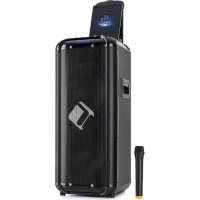
Moving 2100 - Hi-fi system Auna - Free user manual and instructions
Find the device manual for free Moving 2100 Auna in PDF.



| Brand | Auna |
| Model | Moving 2100 |
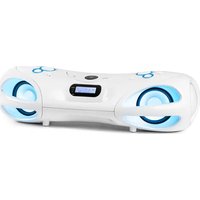
| Product type | Portable hi-fi system with microphone and guitar |
| Article numbers | 10034403, 10034405 |
| Power supply | Mains adapter 130-220 V~ 50/60 Hz, output 12 V= |
| RMS power | 60 W |
| Bluetooth | Yes, frequency 2.402–2.48 GHz, transmission power 4 dBm |
| Built-in battery | Rechargeable lead, minimum charge 12 h before first use |
| Playable formats | MP3, WMA via USB or SD/MMC card |
| Audio inputs | 2× microphone (6.3 mm), 1× guitar (6.3 mm), Line in (3.5 mm), USB, SD |
| Audio outputs | Line out (3.5 mm) |
| Sound settings | Volume, treble, bass, echo, equalizer (Pop, Rock, Jazz, Classic, Normal) |
| Special functions | Recording on USB/SD media, microphone priority, repeat, mute |
| Remote control included | Yes |
| Safety instructions | Do not open, avoid moisture, do not block ventilation, keep 60 cm away from screens |
| Cleaning | Dry cloth, without chemicals |
| Operating temperature | 5 °C to 35 °C |
| Recycling | Do not dispose of with household waste, deposit at collection point |
| Dimensions (estimated) | Approx. 40 × 25 × 30 cm |
| Weight (estimated) | Approx. 5 kg |
Frequently Asked Questions - Moving 2100 Auna
User questions about Moving 2100 Auna
0 question about this device. Answer the ones you know or ask your own.
Ask a new question about this device
Download the instructions for your Hi-fi system in PDF format for free! Find your manual Moving 2100 - Auna and take your electronic device back in hand. On this page are published all the documents necessary for the use of your device. Moving 2100 by Auna.
USER MANUAL Moving 2100 Auna
INHALT
Inhalt 3
Technische Daten 3
Member of Berlin Brands Group
Handwerkerstr. 11
15366 Dahlwitz-Hoppegarten
Deutschland
natural_image
Symbol of a trash bin crossed with a diagonal line, representing no waste or discharge (no text or labels)Berlin Brands Group UK Ltd
PO Box 1145
Oxford, OX1 9UW
United Kingdom
Congratulations on purchasing this device. Please read the following instructions carefully and follow them to prevent possible damages. We assume no liability for damage caused by disregard of the instructions and improper use. Scan the QR code to get access to the latest user manual and more product information.
CONTENTS
Contents 15
Technical Data 15
Safety Instructions 16
Product Overview 18
Operation 23
Disposal Considerations 24
Declaration of Conformity 24
TECHNICAL DATA
Item number
10034403 10034405
Power supply
Input: 130-220 V\~ 50/60 Hz
Power adapter
Output 12 V=
RMS power 60 W
BT frequency
2.402–2.48 GHz
Radio-frequency power
4 dBm
SAFETY INSTRUCTIONS
Read the manual prior to using the product. Follow the instructions in order not to invalidate the warranty. Take all precautions to avoid fire and/or electrical shock. Repairs must only be carried out by a qualified technician in order to avoid electrical shock. Keep the manual for future reference.
- Prior to using the product, please ask advice from a specialist. When the product is switched on for the first time, some smell may occur. This is normal and will disappear after a while.
- The product contains voltage carrying parts. Therefore do NOT open the housing.
- Do not place metal objects or pour liquids into the product. This may cause electrical shock and malfunction.
- Do not place the product near heat sources such as radiators, etc. Do not place the product on a vibrating surface. Do not cover the ventilation holes.
- The product is not suitable for continuous use.
- Be careful with the mains lead and do not damage it. A faulty or damaged mains lead can cause electrical shock and malfunction.
- When unplugging the product from a mains outlet, always pull the plug, never the lead.
- Do not plug or unplug the product with wet hands.
- If the plug and/or the mains lead are damaged, they need to be replaced by a qualified technician.
- If the product is damaged to such an extent that internal parts are visible, do NOT plug the product into a mains outlet and DO NOT switch the unit on. Contact your dealer. Do NOT connect the product to a rheostat or dimmer.
- To avoid fire and shock hazard, do not expose the product to rain and moisture.
- All repairs should be carried out by a qualified technician only.
- Connect the product to an earthed mains outlet (220-240 V AC/50 Hz) protected by a 10-16 A fuse.
- During a thunderstorm or if the product will not be used for a longer period of time, unplug it from the mains. The rule is: Unplug it from the mains when not in use.
- If the product has not been used for a longer period of time, condensation may occur. Let the unit reach room temperature before you switch it on. Never use the product in humid rooms or outdoors.
- To prevent accidents in companies, you must follow the applicable guide lines and follow the instructions.
- Do not repeatedly switch the product on and off. This shortens the life time.
- Keep the product out of the reach of children. Do not leave the product unattended.
- Do not use cleaning sprays to clean switches. The residues of these
sprays cause deposits of dust and grease. In case of malfunction, always seek advice from a specialist.
- Do not force the controls.
- If this product is with speaker inside which can cause magnetic field. Keep the product at least 60 cm away from computer or TV.
- If the product has built-in lead-acid rechargeable battery. Please recharge the battery every 3 months if you are not going to use the unit for a long period of time. Or the battery may be damaged.
- If the battery is damaged please replace with same specifications battery. And dispose the damaged battery environment friendly.
- If the product has fallen, always have it checked by a qualified technician before you switch the product on again.
- Do not use chemicals to clean the unit. They damage the varnish. Only clean the product with a dry cloth.
- Keep away from electronic equipment that may cause interference.
- Only use original spares for repairs, otherwise serious damage and/or dangerous radiation may occur.
- Switch the product off prior to unplugging it from the mains and/or other equipment. Unplug all leads and cables prior to moving the product.
- Make sure that the mains lead cannot be damaged when people walk on it. Check the mains lead before every use for damages and faults!
- Keep the original packing material so that you can transport the product in safe conditions.
- To make sure that the product will function normally, it must be used in rooms with a temperature between 5 °C/41 °F and 35 °C/95 °F.
PRODUCT OVERVIEW
Control panel and connections
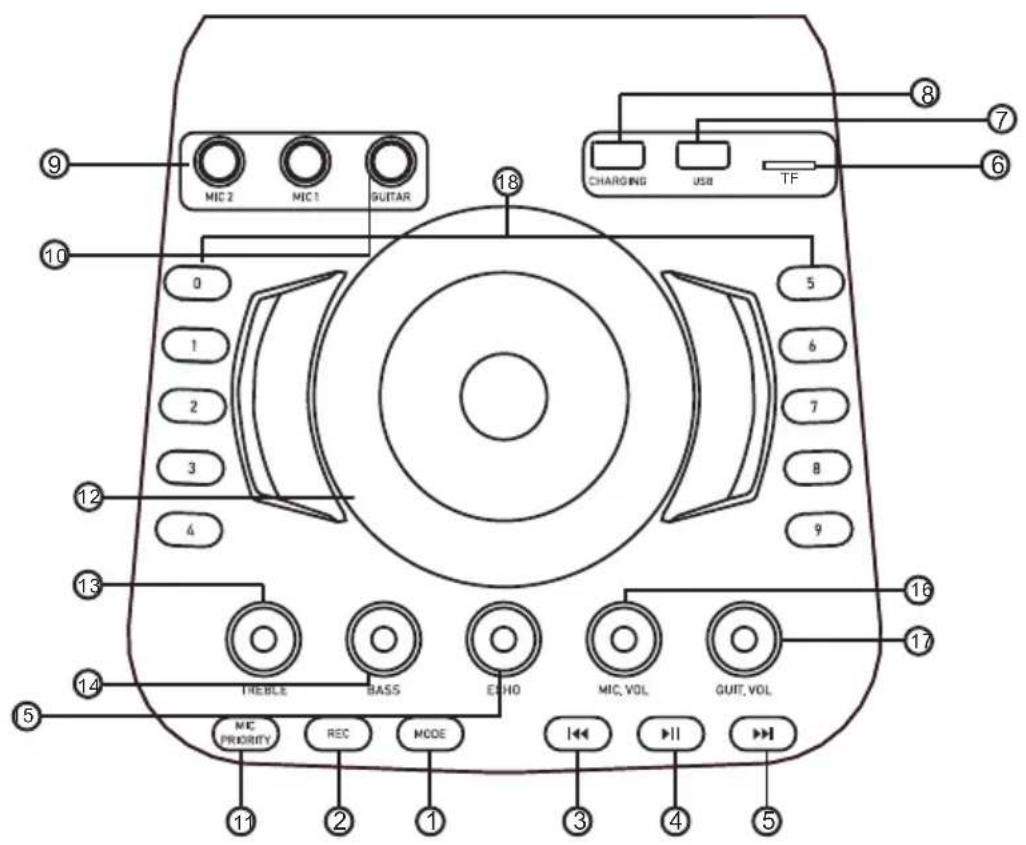
1 MODE
Press key to switch between MP3 player, Aux input or Bluetooth. Press and hold key to switch voice off/on.
2 RECORD: Press key for recording on USB/SD port
3 PREVIOUSTRACK/ VOL
Press key to select the previous track for playing. The volume will be reduced by pressing the key for longer than 3 seconds.
4 PLAY/PAUSE
Press key to switch between pause or playing.
5 NEXT TRACK / VOL
Press key to select the next track for playing. The volu me will be increased by pressing the key for longer than 3 seconds
6 SD PORT
Connect your TF card in this slot to play music with MP3 or WMA format.
7 USB PORT
Connect your USB devices to this slot to play music with MP3 or WMA format.
8 CHARGING
USB jack charge For mobile phone /Ipad etc.
9 MIC1/MIC2 Input: 6,3 mm input jack for connecting a microphone.
10 GT INPUT: 6,3 mm: input jack for connecting guitar
11 MIC PRIORITY: Press the microphone priority on, while you are speaking though the microphone, the music volume automatically will be lower.
12 VOLUME: Adjust the overall out put level of the portable sound sytem.
13 TEBLE: Adjust the overall out put level of the portable sound system-treble
14 BASS: Adjust the overall output bass level of the system.
15 ECHO CONTROL: Adjust the i ntensl ty of the echo effect.
16 ECHO-Einstellung : Adjust the signal level of microphone.
17 GT VOLUME: Adjust the signal level of guitar volume
18 Nummertasten: Direct selection of a track to play via USB or SD.
Back
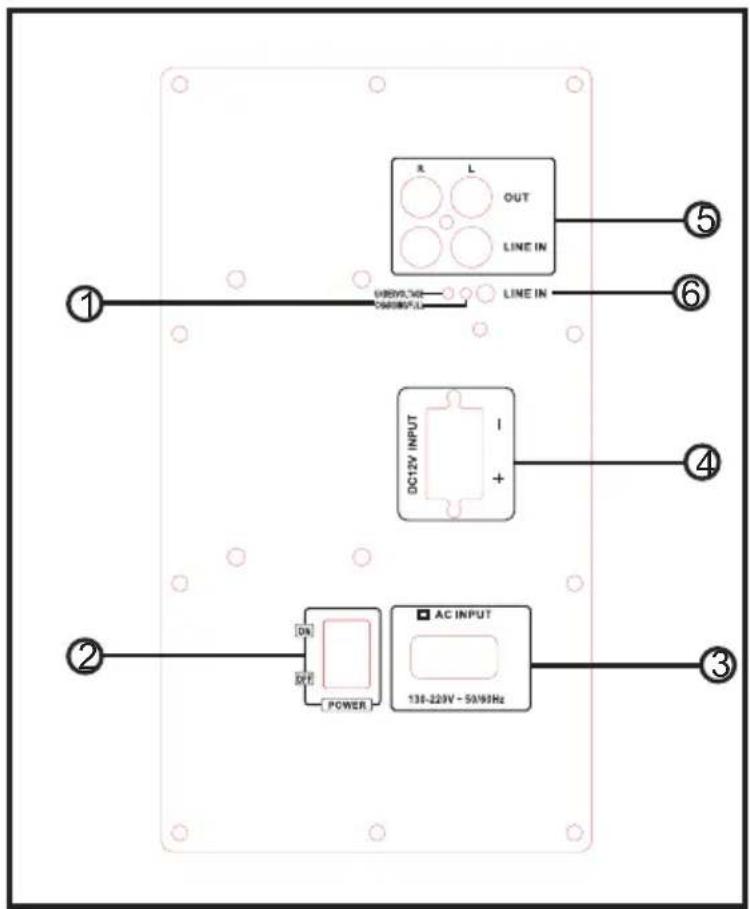
1 Charging indicator: LED lights when charging
2 Power switch: Turn the power on/off.
3 Power input
Before connecting the power cord, check if the mains corresponds to the voltage inicated on the rating plate on the unit.
4 DC 12-V-INPUT: The device can be powered with an external 12V DC adaptor. Connect external 12 V power to CD input jack on rear side of the amplifier.
5 LINE IN/OUT
Use the audio cable to connect your mobile phone and then play music.
6 LINE IN
Use a 3.5 mm audio cable to connect you mobile phone and then play music.
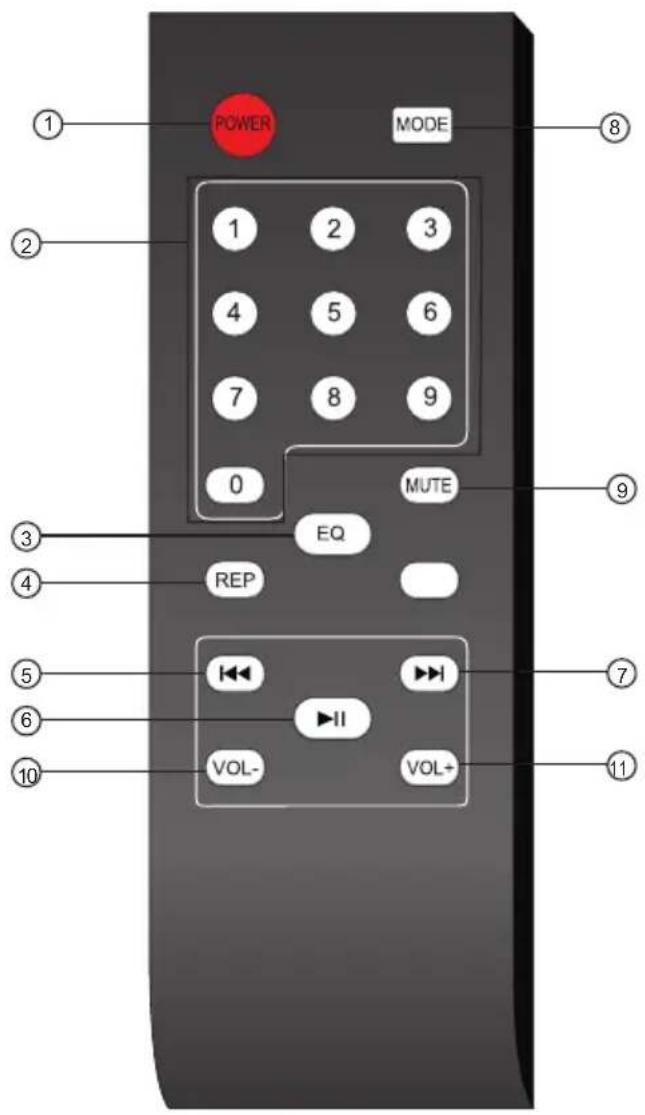
1 Power:: Press this button to turn the power on/off.
2 Track number: Number for selecting the certain track for USB/SD.
3 EQ: Press this button to select the EQ mode of Pop, Rock, Jazz, Classic, Normal for USB/SD.
4 REP (Repeat): If you want to play single song or all the songs circularly, when playing, you can press panel or "repeat" key on the remote control.
1x: to repeat single song
2x: to play all the songs circularly
3x: to recover to the playing status in defaulted sequence.
5 Back: The key to choose previous song in USB/SD/BT.
6 Play/Pause: The key to stop/play in USB/SD/BT.
7 Forward: The key to choose next song in USB/SD/BT.
8 MODE Press once to change the current access device of the unit.(BLUE TOOTH-USB interface - TF card reader) the unit priority read.
9 Mute:: Press this button to play or pause the unit
10 VOL -: Press this button to reduce the volume.
11 VOL+: Press this button to increase the volume.
OPERATION
Before the device the first time is actuated, please charge the battery at least 12 hours and max. 72hours!
Battery should be regularly charged. For optimal battery life the battery should be charged at least once per month.
Please note that if you do not load within 6 weeks, the battery becomes defective!
Make sure the volume control is lowered. Plug one end of the AC cord provided into the AC input jack on rear side of the portable sound system.
Then plug the other end of the AC cord into AC power outlet. Turn on the unit using the main power switch. This unit can be powered internally using the built-in rechargeable battery. When AC power is connected, the CHARGE LED indicator will light red. The rechargeable battery is being charged. If FULL LED indicator lights green, the battery is fully charged.
Turn of the power switch and disconnect the AC power. Turn the unit back ON and the rechargeable battery will power the unit alone.
Note: Turning off the unit power switch will allow the battery to be charged more quickly.
Connect BT Device
-
Set the search function on of the BT device you want to play the music. See the operating instructions for that device..
-
Press the "MODE" button and activate BT-function of media player.
-
Find on your BT device "Mobing 100" and make the connection. If password is required, you can enter "0000".
DISPOSAL CONSIDERATIONS
natural_image
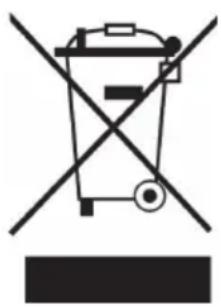
Symbol of a trash bin crossed with a diagonal line, representing no waste or discharge (no text or labels)If there is a legal regulation for the disposal of electrical and electronic devices in your country, this symbol on the product or on the packaging indicates that this product must not be disposed of with household waste. Instead, it must be taken to a collection point for the recycling of electrical and electronic equipment. By disposing of it in accordance with the rules, you are protecting the environment and the health of your fellow human beings from negative consequences. For information about the recycling and disposal of this product, please contact your local authority or your household waste disposal service.
This product contains batteries. If there is a legal regulation for the disposal of batteries in your country, the batteries must not be disposed of with household waste. Find out about local regulations for disposing of batteries. By disposing of them in accordance with the rules, you are protecting the environment and the health of your fellow human beings from negative consequences.
DECLARATION OF CONFORMITY

Manufacturer:
Chal-Tec GmbH, Wallstrasse 16, 10179 Berlin, Germany.
Importer for Great Britain:
Berlin Brands Group UK Ltd PO Box 1145 Oxford, OX1 9UW United Kingdom
Hereby, Chal-Tec GmbH declares that the radio equipment type Moving 100 is in compliance with Directive 2014/53/EU. The full text of the EU declaration of conformity is available at the following internet address: use.berlin/10034403
For Great Britain: Hereby, Chal-Tec GmbH declares that the radio equipment type Moving 100 is in compliance with the relevant statutory requirements. The full text of the declaration of conformity is available at the following internet address: use.berlin/10034403
Chère cliente, cher client,
SOMMAIRE
Sommaire 25
Fiche technique 25
natural_image
Symbol of a trash bin crossed out by a diagonal line, with no text or labels present.DÉCLARATION DE CONFORMITÉ

Fabricant :
Chal-Tec GmbH, Wallstraße 16, 10179 Berlin, Allemagne.
ÍNDICE
Índice 35
Datos técnicos 35
natural_image
Symbol of a trash bin crossed out by a diagonal line, with no text or labels present.Berlin Brands Group UK Ltd
PO Box 1145
Oxford, OX1 9UW
United Kingdom
INDICE
Indice 45
Dati tecnici 45
natural_image
Symbol of a trash bin crossed out by a diagonal line, with no text or labels present.natural_image
Abstract white logo design on dark background, resembling stylized letter 'S' or wave form (no text or symbols)
- INHALT
- Member of Berlin Brands Group
- Handwerkerstr. 11
- Dahlwitz-Hoppegarten
- Deutschland
- CONTENTS
- TECHNICAL DATA
- SAFETY INSTRUCTIONS
- PRODUCT OVERVIEW
- MODE
- PREVIOUSTRACK/ VOL
- PLAY/PAUSE
- NEXT TRACK / VOL
- SD PORT
- USB PORT
- CHARGING
- Back
- OPERATION
- Connect BT Device
- DISPOSAL CONSIDERATIONS
- DECLARATION OF CONFORMITY
- Manufacturer:
- Importer for Great Britain:
- SOMMAIRE
- DÉCLARATION DE CONFORMITÉ
- Fabricant :
- ÍNDICE
- INDICE
Brand : Auna
Model : Moving 2100
Category : Hi-fi system