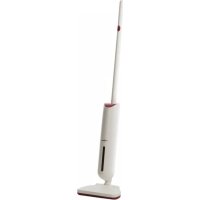
Turbo Buddy - Vacuum Cleaner OneConcept - Free user manual and instructions
Find the device manual for free Turbo Buddy OneConcept in PDF.



User questions about Turbo Buddy OneConcept
0 question about this device. Answer the ones you know or ask your own.
Ask a new question about this device
Download the instructions for your Vacuum Cleaner in PDF format for free! Find your manual Turbo Buddy - OneConcept and take your electronic device back in hand. On this page are published all the documents necessary for the use of your device. Turbo Buddy by OneConcept.
USER MANUAL Turbo Buddy OneConcept
text_image
QR code image containing encoded data, no visible human-readable textINHALTSVERZEICHNIS
text_image
Diagram of a vacuum cleaner with numbered parts for identification and assembly reference.natural_image
Illustration of a device with attached wires and accessories, showing exploded and assembled views (no text or symbols)Betriebleuchte
natural_image
Illustration of a hand holding a vacuum cleaner with three different actions: removing, removing, and removing it (no text or symbols present)natural_image
Illustration of a hand holding a small object, possibly a tool or device, with no visible text or symbols.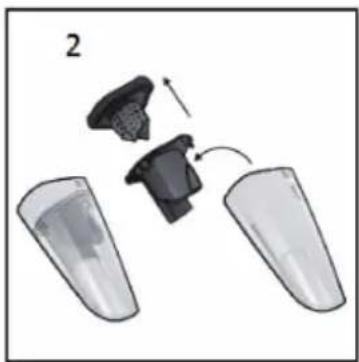
natural_image
Diagram showing a device being processed into two transparent containers, with no visible text or symbols.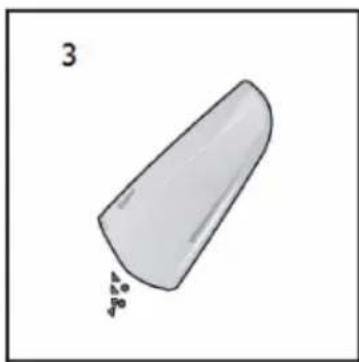
natural_image
Simple 3D illustration of a conical object with small particles falling from its base (no text or symbols)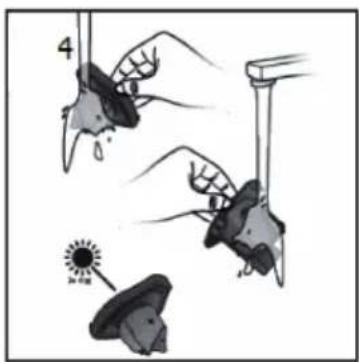
text_image
4 Be a sunnatural_image
Symbol of a trash bin crossed with a diagonal line, no text or numbers presentCongratulations on purchasing this equipment. Please read this manual carefully and take care of the following hints to avoid damages. Any failure caused by ignoring the items and cautions mentioned in the instruction manual is not covered by our warranty and any liability. Scan the QR code to get access to the latest user manual and other information about the product

text_image
QR code image containing encoded data, no visible human-readable textCONTENT
Safety Instructions 12
Product Overview 13
Charging 14
Operation 15
Cleaning and Care 16
Hints on Disposal 17
TECHNICAL DATA
| Item number 10032990 | |
| Power supply 220-240 V ~ 50/60 Hz |
DECLARATION OF CONFORMITY

text_image
C€Producer:
Chal-Tec GmbH, Wallstraße 16, 10179 Berlin, Germany.
This product is conform to the following European Directives:
2014/30/EU (EMC)
2014/35/EU (LVD)
2011/65/EU (RoHS)
SAFETY INSTRUCTIONS
- Read all instructions before using the vacuum cleaner and save for future reference. To reduce the risk of personal injury or damage to your vacuum, use only recommended accessories.
- Do not leave vacuum unattended when it is plugged in and/or operating. Unplug unit when not in use.
- Never operate this unit when flammable materials or when vapors are present because electrical devices produce arcs or sparks that can cause a fire or explosion.
• Always disconnect the plug from the wall outlet before removing the tank cover.
- Do not allow to be used as a toy. Close attention is necessary when vacuum is in use by or near children.
- Use only as described in this manual. Use only manufacturer's recommended attachments.
- Do not use with a damaged cord, plug, or other parts.
- If your vacuum is not working as it should, has missing parts, has been dropped, damaged, left outdoors, or dropped into water, call customer service.
- Sparks inside the motor can ignite flammable vapors or dust. To reduce the risk of fire or explosion, do not use near combustible liquids, gases, dusts, gasoline or other fuels, lighter fluid, cleaners, oil-based paints, natural gas, coal dust, magnesium dust, grain dust, aluminum dust or gun powder.
- Do not pull or carry the appliance by cord, close a door on cord, or pull cord around sharp edges or corners.
- Do not unplug by pulling on cord. To unplug, grasp the plug firmly.
- Do not handle plug or appliance with wet hands.
- Do not put any object into ventilation openings. Do not vacuum with any ventilation openings blocked; keep free of dust, lint, hair, or anything that can reduce air flow.
- Keep hair, loose clothing, fingers, and all parts of body away from openings and moving parts.
- Turn off the control before unplugging.
- Use extra care when cleaning stairs.
- Do not use to pick up flammable or combustible liquids such as gasoline or use in areas where they may be present.
- Do not pick up anything that is burning or smoking, such as cigarettes, matches, or hot ashes.
- Do not use without filters in place.
• Always unplug this appliance before connecting or disconnecting vacuum hose.
- Store the vacuum indoors. Put the vacuum away after use to prevent tripping accidents.
PRODUCT OVERVIEW

text_image
Diagram of a vacuum cleaner with numbered parts for identification and assembly reference.| 1 | Dust tank | 5 | Crevice tool |
| 2 | Dust tank release button | 6 | Rubber tool |
| 3 | Indicator light | 7 | Charging base |
| 4 | On/off switch button | 8 | Adapter |
EN
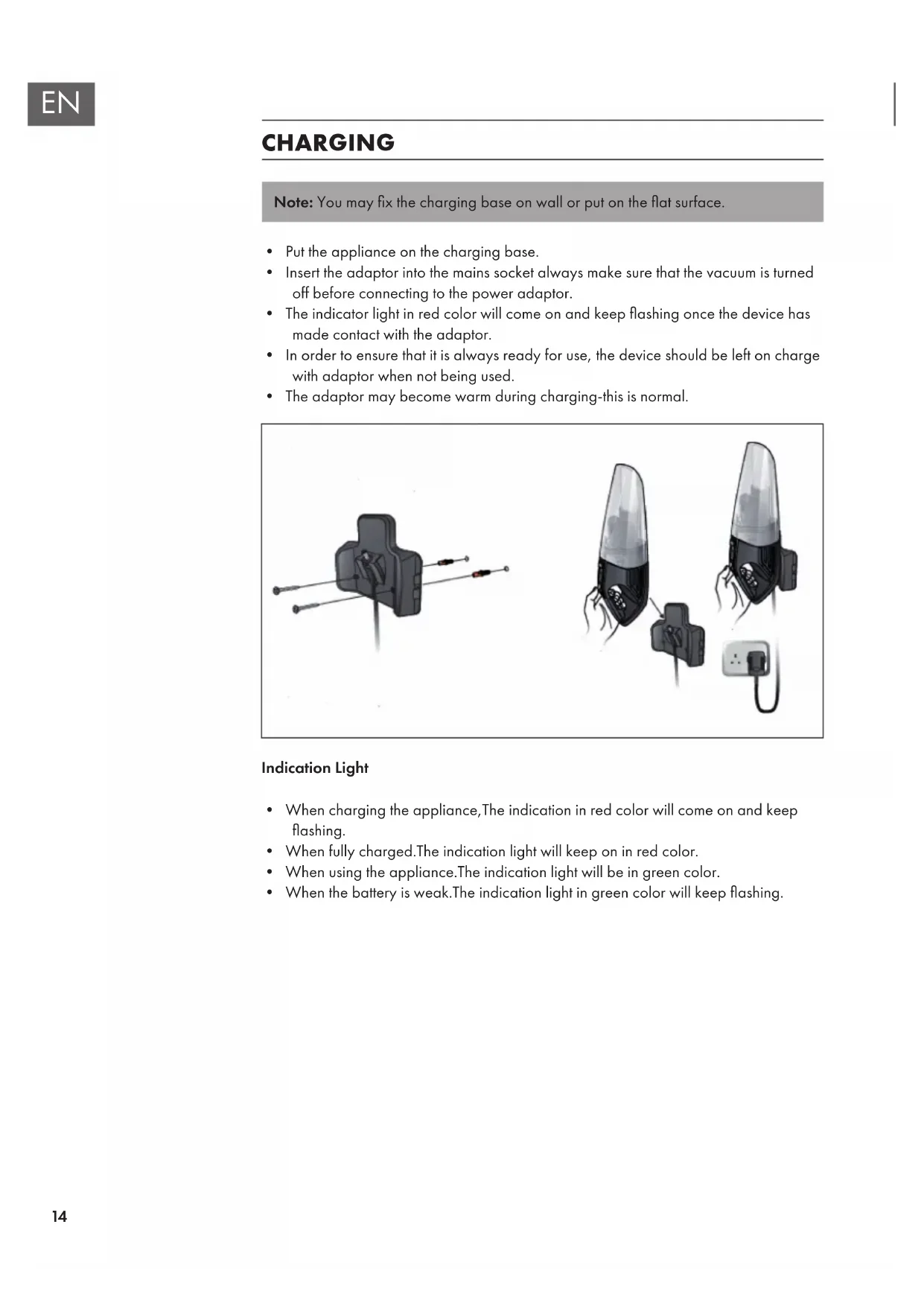
CHARGING
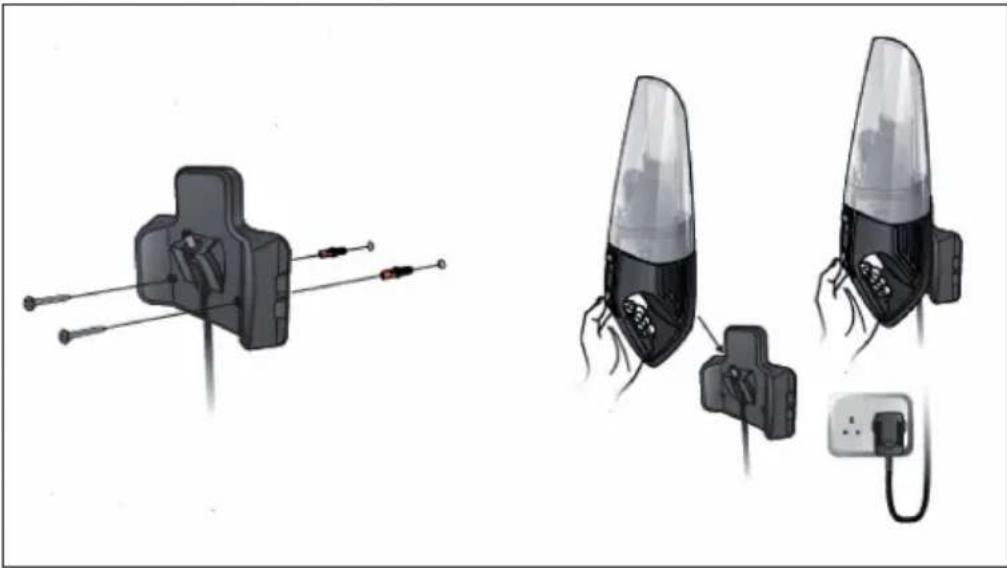
Note: You may fix the charging base on wall or put on the flat surface.
- Put the appliance on the charging base.
- Insert the adaptor into the mains socket always make sure that the vacuum is turned off before connecting to the power adaptor.
- The indicator light in red color will come on and keep flashing once the device has made contact with the adaptor.
- In order to ensure that it is always ready for use, the device should be left on charge with adaptor when not being used.
• The adaptor may become warm during charging-this is normal.
natural_image
Illustration of a device with attached cables and connectors, showing internal components and wiring (no text or symbols)Indication Light
- When charging the appliance, The indication in red color will come on and keep flashing.
- When fully charged. The indication light will keep on in red color.
- When using the appliance. The indication light will be in green color.
- When the battery is weak. The indication light in green color will keep flashing.
OPERATION
Do not connect the adaptor when using the appliance. You should regularly check that the nozzle is clean as any foreign object mayscratching sensitive floors.
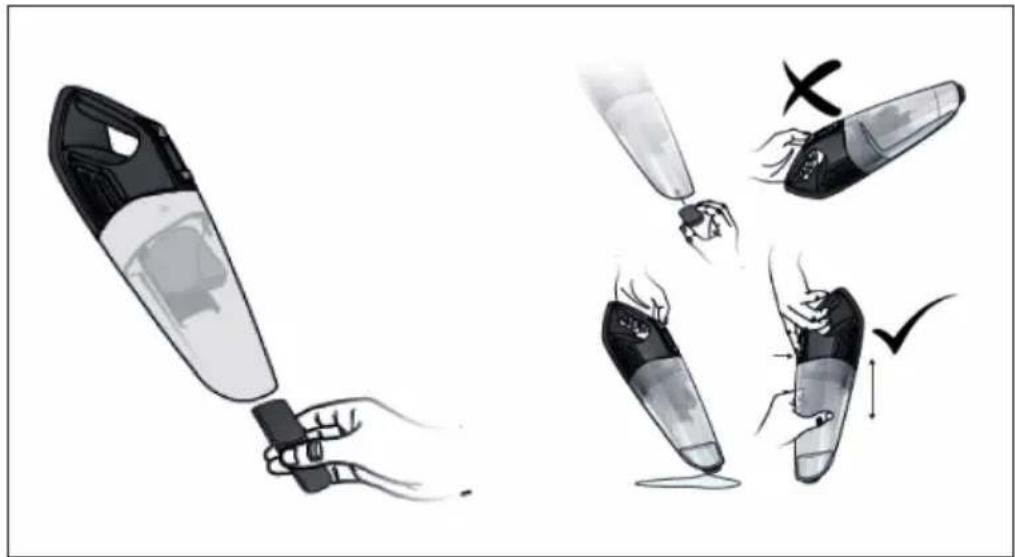
1 Inset the crevice nozzle(6) into main unit when cleaning table, car, corner sofa, carpet etc...
2 Insert the rubber nozzle into main unit when cleaning water.
3 Start the device by pushing the on/off button(4) upward.
4 Pushing the on/off switch button(4) downward to turn off the device.
natural_image
Illustration of a hand holding a vacuum cleaner with three different actions: removing, removing, and removing it (no text or symbols present)CLEANING AND CARE
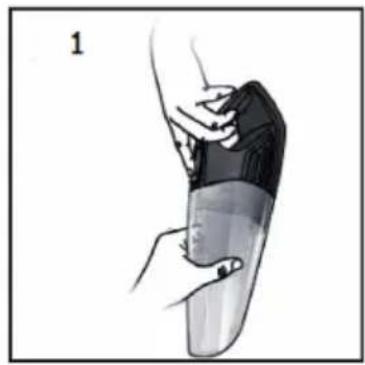
- Remove the whole dust bin by pressing the release button and take the dust container off. (pic1)
- Pulling out the filters and emptying the contents of the dust container into a suitable vessel or bag. The filter can be shaken clean or cleaned and rinsed using warm water. Make sure that the parts are dry before they are re-installed. (pic2)
- Empty the dust tank. (pic3)
- Washing the filters under water. (pic4)
- Re-install the components
Note: Make sure that the parts are dry before they are re-installed.
- Put the filter into dust container. Assemble the dust bin to the motor unit following up the opposite procedures for detaching the dust bin.
natural_image
Illustration of a hand holding a small object, possibly a tool or device, with no visible text or symbols.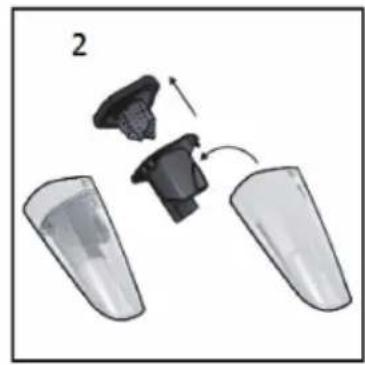
natural_image
Diagram showing two plastic containers with a small object inside, connected by an arrow indicating motion (no text or symbols)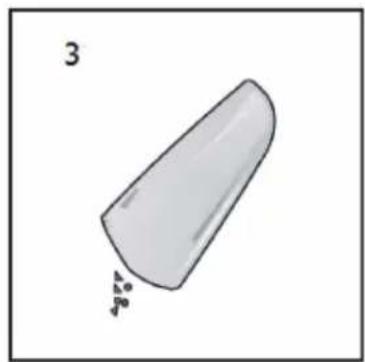
natural_image
Simple 3D illustration of a conical object with small particles, labeled '3' in top-left corner (no other text or symbols)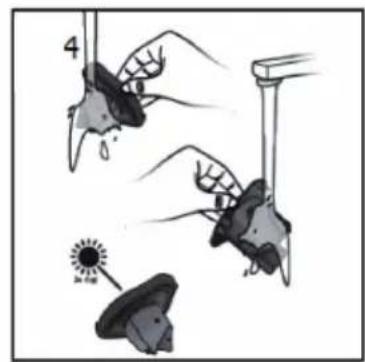
text_image
4 Be 6000HINTS ON DISPOSAL

natural_image
Symbol of a trash bin crossed with a diagonal line, no text or numbers presentAccording to the European waste regulation 2012/19/EU this symbol on the product or on its packaging indicates that this product may not be treated as household waste. Instead it should be taken to the appropriate collection point for the recycling of electrical and electronic equipment. By ensuring this product is disposed of correctly, you will help prevent potential negative consequences for the environment and human health, which could otherwise be caused by inappropriate waste handling of this product. For more detailed information about recycling of this product, please contact your local council or your household waste disposal service.
Your product contains batteries covered by the European Directive. 2006/66/EC, which cannot be disposed of with normal household waste. Please check local rules on separate collection of batteries. The correct disposal of batteries helps prevent potentially negative consequences on the environment and human health.
Estimado cliente:
text_image
QR code image containing encoded data, no visible human-readable textÍNDICE DE CONTENIDOS
text_image
Diagram of a vacuum cleaner with numbered parts for identification and assembly reference.natural_image
Illustration of a device with attached wires and plug, showing internal components (no text or symbols)Indicador luminoso
text_image
Illustration showing a hand holding a vacuum cleaner with three different actions: removing, removing, and removing it.LIMPIEZA Y CUIDADO
natural_image
Illustration of a hand holding a small object over a curved surface, no text or symbols present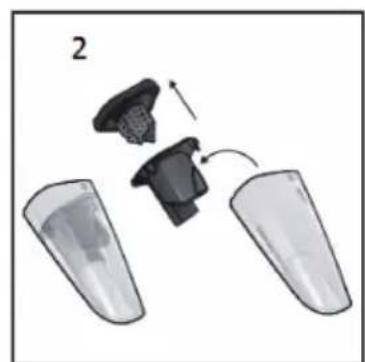
natural_image
Diagram showing two plastic containers with a device being inserted, no text or symbols present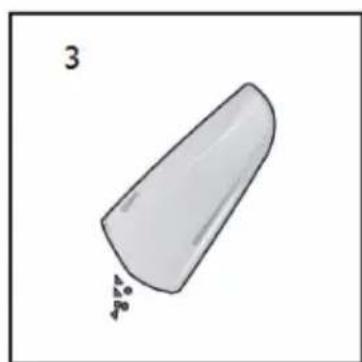
natural_image
Simple 3D illustration of a conical object with a small pile of particles, labeled '3' in the top-left corner (no other text or symbols)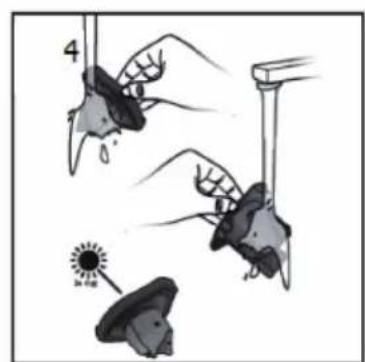
text_image
4 SunRETIRADA DEL APARATO

natural_image
Symbol of a trash bin crossed with a diagonal line, no text or numbers presenttext_image
QR code image containing encoded data, no visible human-readable textSOMMAIRE
DÉCLARATION DE CONFORMITÉ

text_image
C€Fabricant :
Chal-Tec GmbH, Wallstraße 16, 10179 Berlin, Allemagne.
text_image
Diagram of a vacuum cleaner with numbered parts for identification and assembly reference.natural_image
Illustration of a device with attached wires and accessories, showing exploded and assembled views (no text or symbols)Témoin de marche
natural_image
Illustration of a hand holding a vacuum cleaner with three different actions: removing, removing, and removing it (no text or symbols present)NETTOYAGE ET ENTRETIEN
natural_image
Illustration of a hand holding a transparent object with a black top, no text or symbols present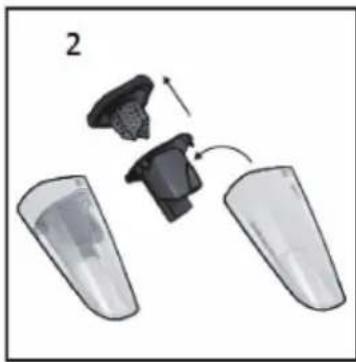
natural_image
Diagram showing a device being processed into two transparent containers, with no visible text or symbols.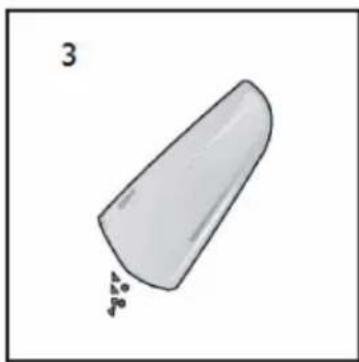
natural_image
Simple 3D illustration of a conical object with small particles falling from its base (no text or symbols)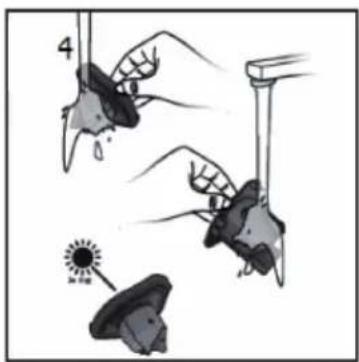
text_image
4 No. 100%CONSEILS POUR LE RECYCLAGE

natural_image
Symbol of a trash bin crossed with a diagonal line, no text or numbers presenttext_image
QR code image containing encoded data, no visible human-readable textINDICE
text_image
Diagram of a vacuum cleaner with numbered parts for identification and assembly reference.natural_image
Illustration of a device with attached wires and plug, showing internal components (no text or symbols)natural_image
Illustration of a hand holding a vacuum cleaner with three different actions: removing, removing, and removing it (no text or symbols present)natural_image
Illustration of a hand holding a small object, possibly a device or tool, with no visible text or symbols.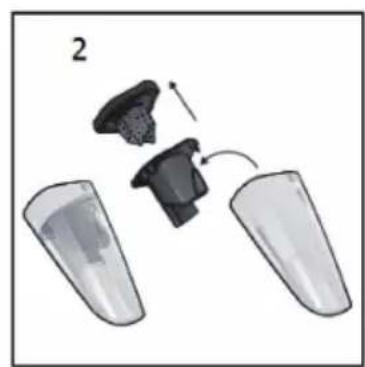
natural_image
Diagram showing a device being processed into two transparent containers, with no visible text or symbols.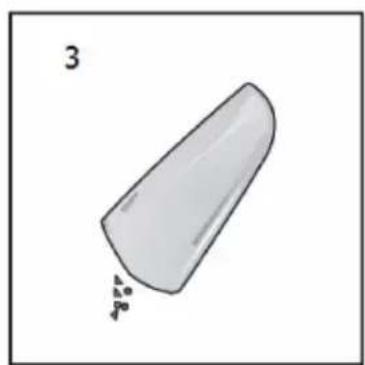
natural_image
Simple 3D illustration of a conical object with small particles at one end (no text or symbols)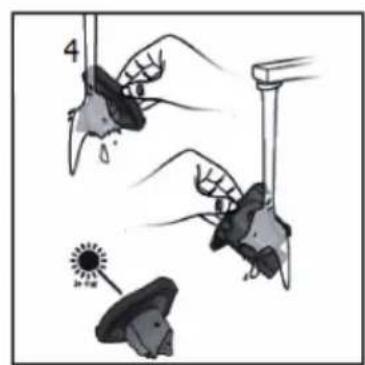
natural_image
Illustration of hands holding a star-shaped object with a droplet and a sun icon, no text or symbols present