XF 600 KB - Speaker Trevi - Free user manual and instructions
Find the device manual for free XF 600 KB Trevi in PDF.



| Product Type | Amplified speaker with microphones |
| Brand | Trevi |
| Model | XF 600 KB |
| Total power | 80 W |
| Power supply | Lithium battery 7.4 V - 3600 mAh or mains adapter 9 V / 2 A (230 V ~ 50 Hz supplied) |
| Connectivity | Bluetooth 2.4 GHz, USB, Micro SD, Line In (3.5 mm jack), 2 microphone inputs |
| Main functions | Bluetooth playback, USB, Micro SD, Line In; microphones with Echo effect; recording to USB/Micro SD; Disco-Light light effects; preset equalizer (POP, ROCK, JAZZ, CLASSIC, FLAT); microphone priority |
| Controls | Control panel and infrared remote control: volume, tone, echo, track selection, mode, light, etc. |
| Display | Digital screen |
| Battery | Rechargeable lithium 7.4 V - 3600 mAh; battery life not specified; charging via mains adapter |
| Maintenance and cleaning | Slightly damp soft cloth; avoid solvents and abrasive substances |
| Safety | Do not expose to water, heat, magnetic fields, dust or vibrations; maintain at least 5 cm clearance around for ventilation; unplug if liquid penetrates; do not pull on the power cable |
| Repairability | TREVI authorized service center; battery replacement reserved for specialized technical personnel |
| Included accessories | Remote control, microphone (cable not specified), power cable |
| Recommended charging temperature | 5 °C to 35 °C |
Frequently Asked Questions - XF 600 KB Trevi
User questions about XF 600 KB Trevi
0 question about this device. Answer the ones you know or ask your own.
Ask a new question about this device
Download the instructions for your Speaker in PDF format for free! Find your manual XF 600 KB - Trevi and take your electronic device back in hand. On this page are published all the documents necessary for the use of your device. XF 600 KB by Trevi.
USER MANUAL XF 600 KB Trevi
Listening at high volumes for a long time may damage your hearing.
This appliance is a high precision electronic instrument, therefore avoid using it in the following cases:
- Near magnetic fields.
• Near heat sources such as heaters and stoves.
• In very humid places such as bathrooms, swimming pools, etc ...
• In very dusty places.
• In places subject to strong vibrations. - Do not bring your ear close to the speaker during the adjustment and volume adjustment phases, and in particular to keep the volume to a minimum in the ignition phase.
- Position the appliance so that there is always enough space on its sides for the free circulation of air (at least 5 cm).
- If liquids penetrate inside the appliance, immediately disconnect the plug from the socket and take the appliance to the nearest authorized TREVI service center.
- Always check before recharging the appliance, that the power and connection cables are installed correctly.
- No naked flame sources, such as lighted candles, should be placed on the appliance.
- The appliance must not be exposed to dripping or splashing water and no objects filled with liquid, such as vases, must be placed on the appliance.
- Before turning on the appliance, always check that the power cable and the connection cable are installed correctly.
- The power adapter must be connected to an outlet near the device and must be easily accessible.
- If you notice excessive heat on the device or on the power adapter, immediately disconnect the plug from the main power socket.
- Do not pull on the power cable
- Keep this manual for future reference.
CARE AND MAINTENANCE
For cleaning, we recommend the use of a soft, slightly moistened cloth. Avoid solvents or abrasive substances.
IMPORTANT
This device is designed for non-professional home use. The good construction of this appliance guarantees perfect operation for a long time. However, should any inconvenience arise, it is advisable to consult the nearest TREVI Authorized Service Center.
TREVI pursues a policy of continuous research and development. Therefore the products may have different characteristics from those described.
WARNING FOR A CORRECT USE OF RECHARGEABLE BATTERY
- Recharge the battery in an ambient temperature between 5°C and 35°C.
- Don't recharge more than the suitable period to prevent the risk of overheating and burst.
- Don't recharge the battery for more than 4 hours.
- Recharging the battery over the suitable period or an extended period of inactivity may reduce battery duration.
- Rechargeable battery is liable to wear and tear and its performance will reduce gradually.
- To extend the duration of the battery use it when is completely charged up to the complete discharging, then recharge it fully before use it again. Recharge a battery not completely consumed, will result a reduced duration. In this case, repeat the full charging/discharging cycle many times.
- Avoid recharge the battery for the whole night.
text_image
1 2 3 4 5 6 7 8 NO.1 HOLD LINE NO TF GATEZ LOAD AUTO INPUT POWER 12 9 JOUT NO 13 MOS VOLUME 10 MENU 11 14 15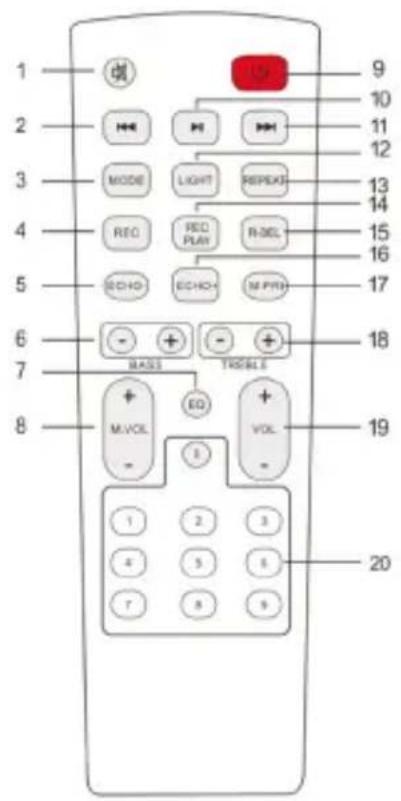
text_image
1 2 3 4 5 6 7 8 9 10 11 12 13 14 15 16 17 18 19 20 LED M MODE REQ ECHO BASS EQ M.VOL - - + - RECKS RECK ECHO+ RECK R.DEL M.P.PRO VOL - - + - TROUBLEHS179NE
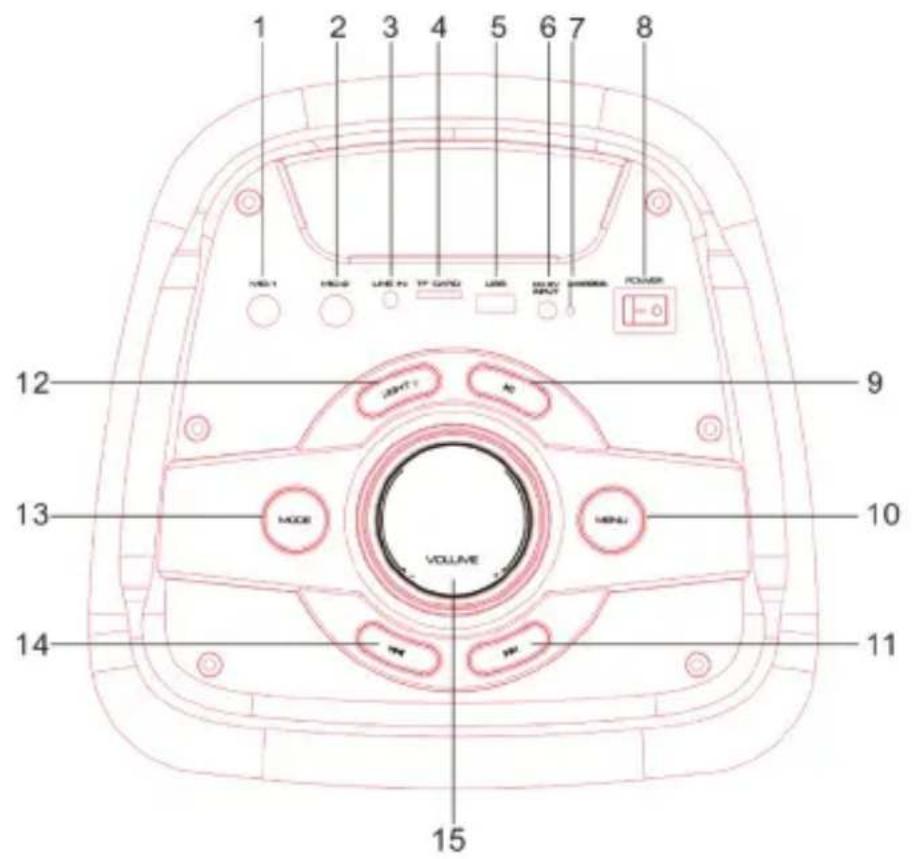
UNIT COMMANDS
- Mic IN 1
- Mic IN 2
- LINE IN
- Micro SD memory slot
- USB socket
- 9V ---power socket
- LED charging indicator
- On/ Off switch
REMOTE CONTROL COMMANDS
- MUTE function
- Key ◀◀, previous
- MODE button
- REC button
- ECHO- button
- Low tone adjustment keys
- EQ button, predefined equalizations
- Microphone volume adjustment keys
- Power/ standby button
-
▶ II button, Play/ Pause
-
▶ II button, Play / Pause
- MENU button
- Key ▶, next
- LIGHT button (Led disco light effects)
- MODE button
- Key ◀◀, previous
-
Volume adjustment knob
-
Key ▶, next
- LIGHT button (Led disco light effects)
- REPEAT button
- REC/ PLAY button
- REC DEL button
- ECHO + button
- M-PRI key, microphone priority
- Treble keys
- Volume adjustment keys
- Direct numeric selection keys
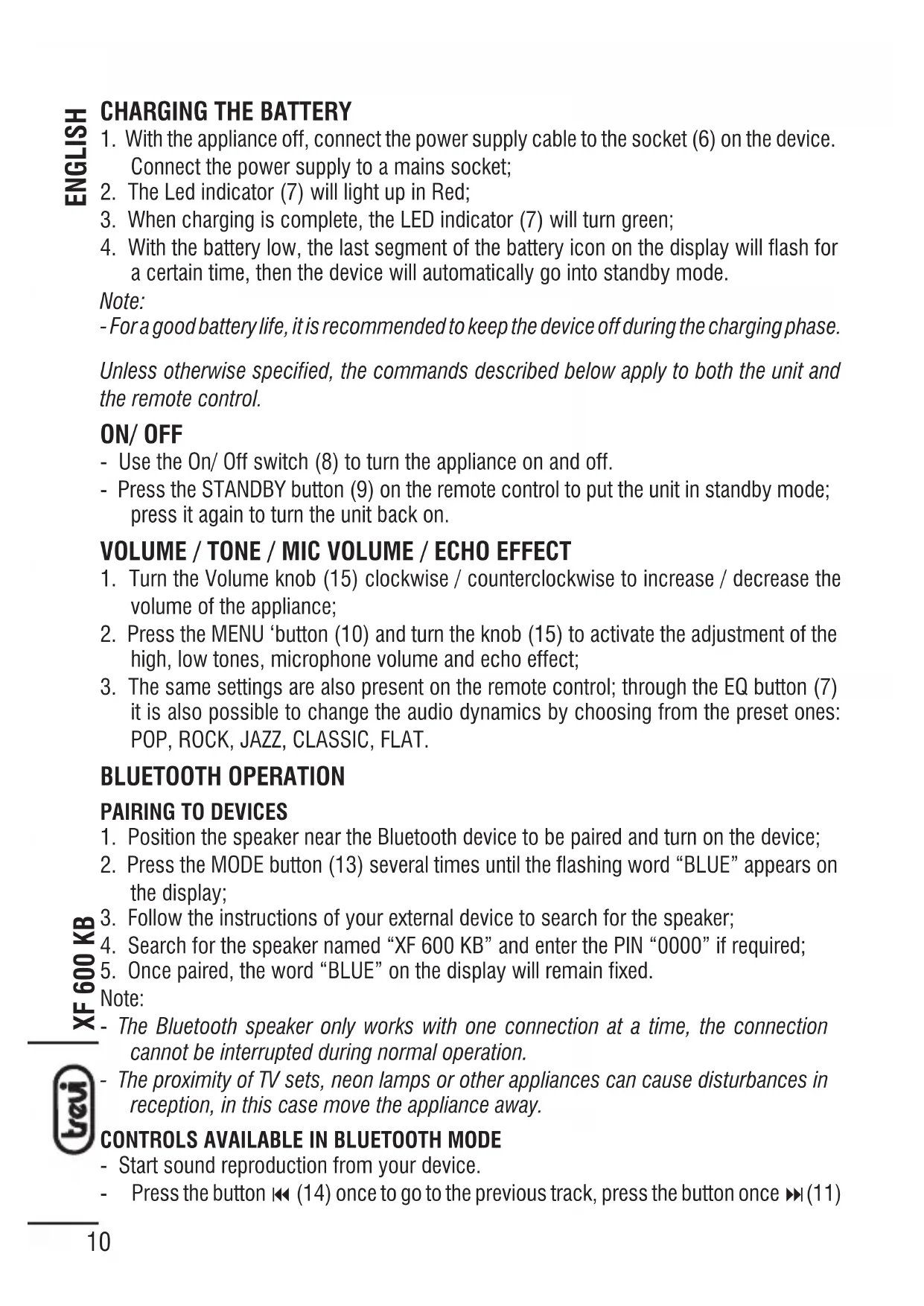
CHARGING THE BATTERY
- With the appliance off, connect the power supply cable to the socket (6) on the device. Connect the power supply to a mains socket;
- The Led indicator (7) will light up in Red;
- When charging is complete, the LED indicator (7) will turn green;
- With the battery low, the last segment of the battery icon on the display will flash for a certain time, then the device will automatically go into standby mode.
Note:
- For a good battery life, it is recommended to keep the device off during the charging phase.
Unless otherwise specified, the commands described below apply to both the unit and the remote control.
ON/ OFF
- Use the On/ Off switch (8) to turn the appliance on and off.
- Press the STANDBY button (9) on the remote control to put the unit in standby mode; press it again to turn the unit back on.
VOLUME / TONE / MIC VOLUME / ECHO EFFECT
- Turn the Volume knob (15) clockwise / counterclockwise to increase / decrease the volume of the appliance;
- Press the MENU 'button (10) and turn the knob (15) to activate the adjustment of the high, low tones, microphone volume and echo effect;
- The same settings are also present on the remote control; through the EQ button (7) it is also possible to change the audio dynamics by choosing from the preset ones: POP, ROCK, JAZZ, CLASSIC, FLAT.
BLUETOOTH OPERATION
PAIRING TO DEVICES
- Position the speaker near the Bluetooth device to be paired and turn on the device;
- Press the MODE button (13) several times until the flashing word "BLUE" appears on the display;
- Follow the instructions of your external device to search for the speaker;
- Search for the speaker named "XF 600 KB" and enter the PIN "0000" if required;
- Once paired, the word "BLUE" on the display will remain fixed.
Note:
- The Bluetooth speaker only works with one connection at a time, the connection cannot be interrupted during normal operation.
- The proximity of TV sets, neon lamps or other appliances can cause disturbances in reception, in this case move the appliance away.
CONTROLS AVAILABLE IN BLUETOOTH MODE
- Start sound reproduction from your device.
- Press the button ◀◀ (14) once to go to the previous track, press the button once ▶◀ (11)
to go to the next track.
- Press the ▶ II key (9) to pause, to resume the music playback press ▶ II (9) again.
MICRO SD CARD/USB
- Insert a Micro SD card into the slot (4) or a USB stick into the socket (5) and turn on the device;
- Playback will start automatically. Otherwise, press the MODE button (13) several times until the USB or CARD appears on the display;
- Press button ◀◀ (14) once to go to the previous track, press button ▶◀ (11) once to go to the next track;
- Press the ▶ II key (9) to pause, to resume playback press it again;
- Press and hold key ◀◀ (14) or key ▶▶ (11) to fast forward or reverse listening to the song, release the key to return to normal listening;
- Using the REPEAT button (13) on the remote control, it is possible to activate the track repeat function (ONE = repeats the single track, FOLDER = repeats the folder being played, ALL = repeats all the tracks present);
- Use the number buttons on the remote control (20) to select a song directly.
LINE IN
- Connect any unit equipped with audio output via a 3.5mm jack cable to the LINE IN input (3), press the MODE key (13) several times until the word "LINE" appears on the display;
- Adjust the external device from your controls.
DISCO-LIGHT
To change the color of the Disco-Light effects, press the LIGHT button (12).
To change or deactivate the Disco-Light effects, long press the LIGHT button (12).
USE OF THE MICROPHONE
- Connect the microphone supplied to the MIC1 (1) or MIC2 (2) socket;
- Adjust the volume and the ECHO effect of the microphone as described in the paragraph volume/ tone/ mic volume/ echo effect paragraph;
- Pressing the M.PRI button (17) activates the microphone priority, during speech the music will automatically be played at a lower volume. Press it again to deactivate the function.
REC FUNCTION
It is possible to record only the speech of the microphone on microSD/ USB memory:
- Insert a microSD memory or a USB memory into the respective inputs;
- Press the REC (4) button to start recording; REC appears on the display followed by the recording start time;
- Press the REC/ PLAY button to listen to the recording you have just made;
- Press the R-DEL button to cancel the recording just made.
Note: by recording from the microphone, it is plausible to have some background noise on the recording.
TECHNICAL FEATURES
Total power: 80W Max Bluetooth transmission power: 0.8mW Bluetooth transmission frequency: 2.4GHz Power supply: 7.4V =3600mA lithium battery with external power supply 230V \~ 50Hz - 9V = 2A provided Dimensions: 240 (L) x 230 (D) x 580 (H) mm Weight: 5.5 kg
INFORMATION ON THE REMOVAL AND DISPOSAL OF BATTERIES
Warning: the removal and disposal operation is reserved exclusively for specialized technical staff!
- Remove the screws that secure the upper control panel;
- Remove the control panel;
- Locate and remove the battery from its compartment;
Whatever the type of exhausted battery, it must not be thrown into household waste, in fire or in water. Any type of exhausted battery must be recycled or disposed of at the specific dedicated collection centers.
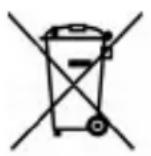
Precautions for correct disposal of the product.
The symbol shown on the equipment indicates that waste must be disposed of in “separate collection” and so the product must not be disposed of together with urban waste.
The user must take the product to special “separate waste collection centres” provided by local government, or deliver it to the retailer against the purchase of a new product.
Separate collection of waste and subsequent treatment, recycling and disposal operations promotes the production of equipment with recycled materials and limits negative effects on the environment and on health caused by improper handling of waste.
Illegal disposal of the product leads to the enforcement of administrative penalties.
NOTES D'UTILISATION
Dimensions: 240 (L) x 230 (P) x 580 (H) mm
Poids: 5,5 kg
INFORMATIONS SUR LE RETRAIT ET L'ÉLIMINATION DES PILES
SIMPLIFIED EU DECLARATION OF CONFORMITY
Hereby TREVI Spa declares that the radio equipment type XF 600 KB is in compliance with directive 2014/53/EU.
The full text of the EU declaration of conformity is available at the following internet address https://www.trevi.it/dms/zidi/TREVI/DOCXF600KB.pdf
text_image
Grid of nine country flags with speech bubbles, likely representing global or regional contexts.If you will not find your language on the instruction manual, please go on our website www.trevi.it to find it