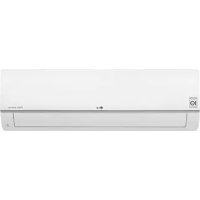
S09BF - Air-conditioner LG - Free user manual and instructions
Find the device manual for free S09BF LG in PDF.


User questions about S09BF LG
0 question about this device. Answer the ones you know or ask your own.
Ask a new question about this device
Download the instructions for your Air-conditioner in PDF format for free! Find your manual S09BF - LG and take your electronic device back in hand. On this page are published all the documents necessary for the use of your device. S09BF by LG.
USER MANUAL S09BF LG
Please read this manual carefully before operating your set and retain it for future reference.
TYPE: WALL MOUNTED
TABLE OF CONTENTS
A. Safety Precautions.. 3
B. Electrical Safety 6
Temporary Use of an Adapter.. 6
Temporary Use of an Extension Cord...6
Symbols used in this Manual. 6
C. Product Introduction.. 7
Indoor Units. 7
Operation Indication Lamps 7
Self-Diagnosis Function 7
D. Operating Instructions.. 8
How to insert the Batteries 8
Wireless Remote Controller
Maintenance. 8
Operating Method. 8
Wireless Remote Controller. 9
Operation Mode. 10
Healthy Dehumidification Operation....11
Auto Operation (Optional) 11
Auto Changeover Operation
(Optional) 11
Jet Cool/Heat Operation. 12
Auto Clean 12
Energy-Saving Cooling Mode
(Optional) 13
Display Luminosity 13
Forced operation 13
Sleep Mode 14
Setting the Current Time 14
Timer Setting. 14
Vertical / Horizontal Airflow
Direction Control. 15
Air Circulation Mode. 15
Auto Restart Function. 15
Wired Remote Controller (Accessory) ....16
E. Maintenance and Service 17
Outdoor Unit. 18
Operation Tips! 18
Troubleshooting Tips!
Save time and money! 19
Call the service immediately in the
following situations 19
FOR YOUR RECORDS
Write the model and serial numbers here:
Model #
Serial #
You can find them on a label on the side of each unit.
Dealer's Name
Date Purchased
Staple your receipt to this page in the event you need it to prove date of purchase or for warranty issues.

READ THIS MANUAL
Inside you will find many helpful hints on how to use and maintain your air conditioner properly. Just a little preventive care on your part can save you a great deal of time and money over the life of your air conditioner.
You'll find many answers to common problems in the chart of troubleshooting tips. If you review our chart of
Troubleshooting Tips first, you may not need to call for service at all.

PRECAUTION
- Contact the authorized service technician for repair or maintenance of this unit.
- Contact the installer for installation of this unit.
The air conditioner is not intended for use by young children or invalids without supervision. - Young children should be supervised to ensure that they do not play with the air conditioner.
- When the power cord is to be replaced, replacement work shall be performed by authorized personnel only using only genuine replacement parts.
Safety Precautions
To prevent injury to the user or other people and property damage, the following instructions must be followed.
Incorrect operation due to ignoring instruction will cause harm or damage. The seriousness is classified by the following indications.

WARNING
This symbol indicates the possibility of death or serious injury.

CAUTION
This symbol indicates the possibility of injury or damage.
- Meanings of symbols used in this manual are as shown below.


Be sure not to do.
Be sure to follow the instruction.

WARNING
Always use a power plug and socket with a ground terminal.
- There is a risk of electrical shock.
For electrical work, contact the dealer, seller, a qualified electrician, or an Authorized Service Center. Do not disassemble or repair the product by yourself. - There is a risk of fire or electrical shock.
Do not use a defective or underrated circuit breaker. Use the correctly rated breaker and fuse.
- There is a risk of electrical shock.
Always ground the product as per the wiring diagram. Do not connect the ground wire to gas or water pipes lightening rod or telephone ground wire. - There is a risk of fire or electrical shock.
Use the correctly rated breaker or fuse.
- There is a risk of fire or electrical shock.
Do not install the product on a defective installation stand. Be sure that the installation area does not deteriorate with age. - It may cause the product to fall.
Do not modify or extend the power cable. If the power cable or cord has scratches or skin peeled off or deteriorated then it must be replaced.
- There is a risk of fire or electrical shock.
In outdoor unit the step-up capacitor supplies high voltage electricity to the electrical components. Be sure to discharge the capacitor completely before conducting the repair work.
An charged capacitor can cause an electrical shock.
Never install the outdoor unit on a moving base or a place from where it can fall down.
- The falling outdoor unit can cause damage or injury or even death of a person.
When installing the unit, use the installation kit provided with the product. - Otherwise the unit may fall and cause severe injury.
Do not use a multi consent. Always use this appliance on a dedicated circuit and breaker.
- Otherwise it can cause an electrical shock or fire.
Install the panel and the cover of control box securely.
- There is a risk of fire or electrical shock due to dust, water etc.
For installation, removal or reinstall, always contact the dealer or an Authorized Service Center.
- There is a risk of fire, electrical shock., explosion, or injury.
When the product is soaked (flooded or submerged) in water, contact an Authorized Service Center for repair before using it again.
- There is a risk of fire or electrical shock.
Be sure to use only those parts which are listed in the svc parts list. Never attempt to modify the equipment.
- The use of inappropriate parts can cause an electrical shock, excessive heat generation or fire.
| Indoor/outdoor wiring connections must be secured tightly and the cable should be routed properly so that there is no force pulling the cable from the connection terminals. | Safely dispose off the packing materials. Like screws, nails, batteries, broken things etc after installation orsvc and then tear away and throw away the plastic packaging bags. | Make sure to check that the power cable plug is not dirty, loose or broken and then only insert the plug completely. |
| • Improper or loose connections can cause heat generation or fire. | Children may play with them and cause injury. | Dirty, loose or broken power plug can cause an electrical shock or fire. |
| Be sure to check the refrigerant to the used. Please read the label on the product. | Don't use a power cord, a plug or a loose socket which is damaged. | Do not touch, operate, or repair the product with wet hands. Hold the plug by hand when taking out |
| Incorrect refrigerant used can prevent the normal operation of the unit. | Otherwise it may cause a fire or electrical shock. | There is a risk of electrical shock or fire. |
| Do not place a heater or other heating appliances near the power cable. | Do not allow water to run into electric parts. Install the unit away from water sources. | Do not store or use or even allow flammable gas or combustibles near the product. |
| There is a risk of fire or electrical shock. | There is a risk of fire, failure of the product, or electrical shock | There is a risk of fire. |
| Do not use the product in a tightly closed space for a long time. Perform ventilation regularly. | Do not open the front grille of the product during operation. (Do not touch the electrostatic filter, if the unit is so equipped.) | If strange sounds, smell or smoke comes from product. Immediately turn the breaker off or disconnect the power supply cable. |
| • Oxygen deficiency could occur and hence harm your health. | There is a risk of physical injury, electrical shock, or product failure. | There is a risk of electrical shock or fire. |
| Ventilate the product room from time to time when operating it together with a stove, or heating element etc. | Turn the main power off and unplug the unit when cleaning or repairing the product. | When the product is not to be used for a long time, disconnect the power supply plug or turn off the breaker. |
| • Oxygen deficiency can occur and hence harm your health. | There is a risk of electrical shock. | There is a risk of product damage or failure, or unintended operation. |
| Take care to ensure that nobody especially kids could step on or fall onto the outdoor unit. | Take care to ensure that power cable could not be pulled out or damaged during operation. | Do not place ANYTHING on the power cable. |
| This could result in personal injury and product damage. | There is a risk of fire or electrical shock. | There is a risk of fire or electrical shock. |
Do not plug or unplug the power supply plug to turn the unit ON/OFF.
- There is a risk of fire or electrical shock.
When flammable gas leaks, turn off the gas and open a window for ventilation before turn the product on.
- Do not use the telephone or turn switches on or off. There is a risk of explosion or fire.
CAUTION
Two or more people must lift and transport the product.
- Avoid personal injury.
Keep level even when installing the product.
- To avoid vibration or noise.
Do not install the product where it will be exposed to sea wind (salt spray) directly.
- It may cause corrosion on the product.
Do not install the product where the noise or hot air from the outdoor unit could damage or disturb the neighborhoods.
- It may cause a problem for your neighbors and hence dispute.
Install the drain hose to ensure that the condensed water is drained away properly.
- A bad connection may cause water leakage.
Always check for gas (refrigerant) leakage after installation or repair of product.
- Low refrigerant levels may cause failure of product.
| Do not use the product for special purposes, such as preserving foods, works of art, etc. It is a consumer air conditioner, not a precision refrigeration system. ·There is a risk of damage or loss of property. ·Do not touch the metal parts of the product when removing the air filter. ·There is a risk of personal injury. Do not insert hands or other objects through the air inlet or outlet while the product is operating. ·There are sharp and moving parts that could cause personal injury. Do not tilt the unit when removing or uninstalling it. ·The condensed water inside can spill. Dismantling the unit, treatment of the refrigerant oil and eventual parts should be done in accordance with local and national standards. If the liquid from the batteries gets onto your skin or clothes, wash it well with clean water. Do not use the remote if the batteries have leaked. ·The chemicals in batteries could cause burns or other health hazards. Do not expose your skin or kids or plants to the cool or hot air draft. ·This could harm to your health. | Do not block the inlet or outlet of air flow. ·It may cause product failure. ·Do not step on or put anything on the product. (outdoor units) ·There is a risk of personal injury and failure of product. Be cautious when unpacking and installing the product. ·Sharp edges could cause injury. Do not mix air or gas other than the specified refrigerant used in the system. ·If air enters the refrigerant system, an excessively high pressure results, causing equipment damage or injury. Replace the all batteries in the remote control with new ones of the same type. Do not mix old and new batteries or different types of batteries. ·There is a risk of fire or product failure. If you eat the liquid from the batteries, brush your teeth and see doctor. Do not use the remote if the batteries have leaked. ·The chemicals in batteries could cause burns or other health hazards. Do not drink the water drained from the product. ·It is not sanitary and could cause serious health issues. | Use a soft cloth to clean. Do not use harsh detergents, solvents or splashing water etc. ·There is a risk of fire, electrical shock, or damage to the plastic parts of the product. Always insert the filter securely after cleaning. Clean the filter every two weeks or more often if necessary. ·A dirty filter reduces the efficiency. If the refrigerant gas leaks during the repair, do not touch the leaking refrigerant gas. ·The refrigerant gas can cause frostbite (cold burn) If the refrigerant gas leaks during the installation, ventilate the area immediately. ·Otherwise it can be harmful for your health. Do not recharge or disassemble the batteries. Do not dispose off batteries in a fire. ·They may burn or explode. Do not let the air conditioner run for a long time when the humidity is very high and a door or a window is left open. ·Moisture may condense and wet or damage furniture. Use a firm stool or ladder when cleaning, maintaining or repairing the product at an height. ·Be careful and avoid personal injury. |
Electrical Safety
WARNING
- This appliance must be properly grounded.
To minimize the risk of an electrical shock, you must always plug into a grounded outlet. - Do not cut or remove the grounded prong from the power plug.
- Attaching the adapter ground terminal to the wall receptacle cover screw does not ground the appliance unless the cover screw is metal and not insulated, and the wall receptacle is grounded through the house wiring.
- If you have any doubt whether the air conditioner is properly grounded, have the wall receptacle and circuit checked by a qualified electrician.
Temporary Use of an Adapter
We strongly discourage the use of an adapter due to potential safety hazards. For temporary connections, use only a genuine adapter, available from most local hardware stores. Ensure that the large slot in the adapter is aligned with the large slot in the receptacle for a proper polarity connection.
To disconnect the power cord from the adapter, use one hand on each to avoid damaging the ground terminal. Avoid frequently unplugging the power cord as this can lead to eventual ground terminal damage.
WARNING
- Never use the appliance with a broken adapter.
Temporary Use of an Extension Cord
We strongly discourage the use of an extension cord due to potential safety hazards.
WARNING
This appliance should be installed in accordance with national wiring regulations. This guide acts as a guide to help to explain product features.
Symbols used in this Manual

This symbol alerts you to the risk of an electrical shock.

This symbol alerts you to hazards that may cause harm to the air conditioner.
NOTE
This symbol indicates special notes.
Product Introduction
Here is a brief introduction of the indoor and outdoor units. Please see the information specific to your indoor unit type.
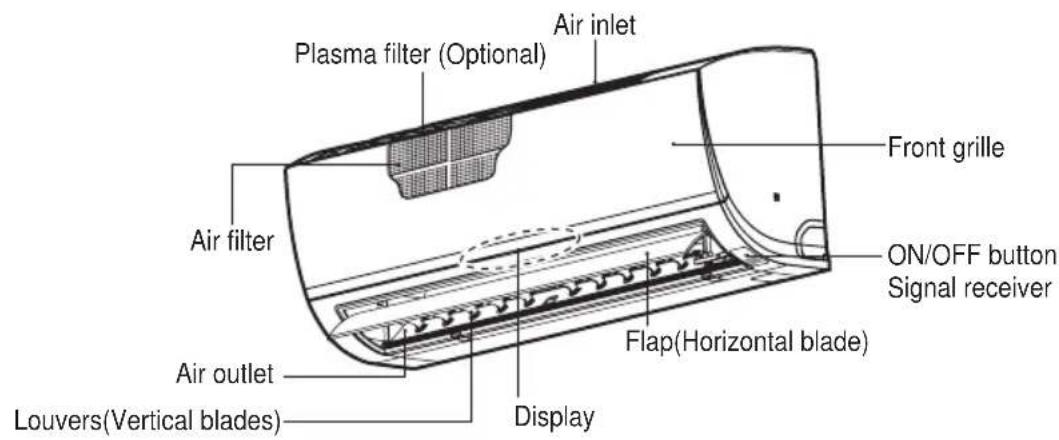
Indoor Units
Standard Split Type
Display panel LED indicators
Operation Indication Lamps
The display will be activated for 10 seconds during STARTing operation or by pressing any button on the remote controller. After 10 seconds, display retains about 50% luminosity.
- Blue lamp : during Cooling, Dehumidification, Auto Operation cooling, Auto Changeover cooling, Air circulation Operation. Error code (1 digits)
- Red lamp : during Heating, Auto Operation heating, Auto Changeover heating. Error code (10 digits)
Self-Diagnosis Function
* Error Indicator : lights up Blue lamp and red lamp alternately Number of lamp's blink : indicate Error code
| Error code Description |
| 01 Indoor ROOM themistor error (TH1) |
| 02 Indoor IN-PIPE thermistor error (TH1) |
| 03 Remote controller error |
| 05 Muncation error between in and out |
| 06 Indoor OUT-PIPE thermistor error (TH2) |
| 10 Indoor BLDC fan lock |
| 12 Indoor MID-PIPE thermistor error (TH3) |
Operating Instructions
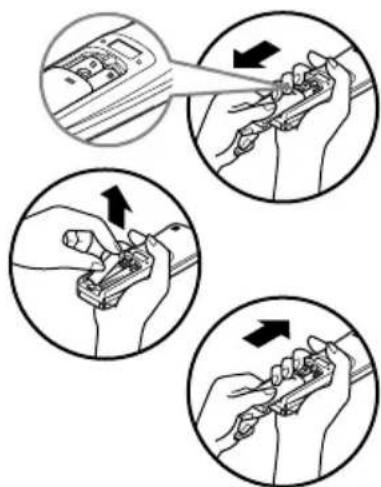
How to insert the Batteries
- Remove the battery cover by pulling it according to the arrow direction.
- Insert new batteries making sure that the (+) and (-) of battery are installed correctly.
- Reattach the cover by sliding it back into position.
NOTE
- Always use/replace both batteries of same type.
- If the system is not to be used for a long time, remove the batteries to save their working life.
- If the display screen of remote controller starts fading, replace both of the batteries.
- Use 2 AAA(1.5 volt) batteries.
Wireless Remote Controller Maintenance
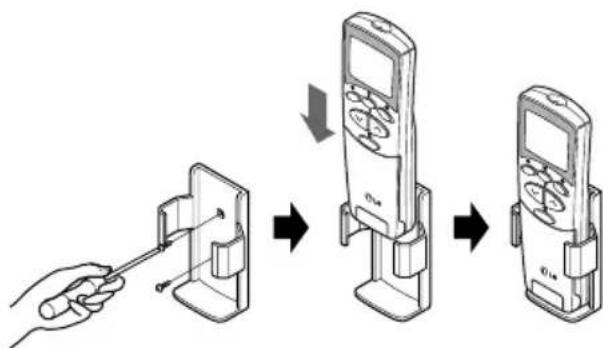
- Choose a suitable place where its safe & easy to reach.
- Fix the holder to wall etc with the supplied screws firmly.
- Slide the remote controller inside the holder.
NOTE
- Remote controller should never be exposed to direct sunlight.
- Signal transmitter & receiver should always be clean for proper communication. Use a soft cloth to clean them.
- In case some other appliances also get operated with remote control, change their position or consult your serviceman.
Operating Method
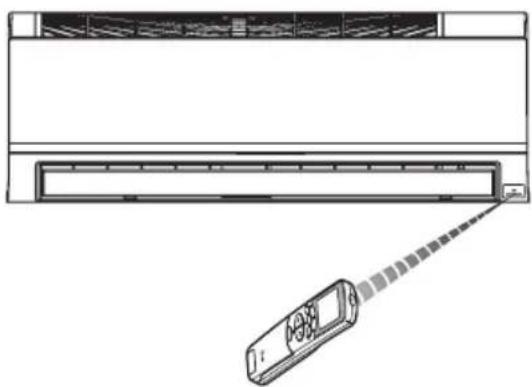
- The signal receiver is inside the unit.
- Aim the remote controller towards the unit to operate it. There should not be any blockage in between.
Wireless Remote Controller
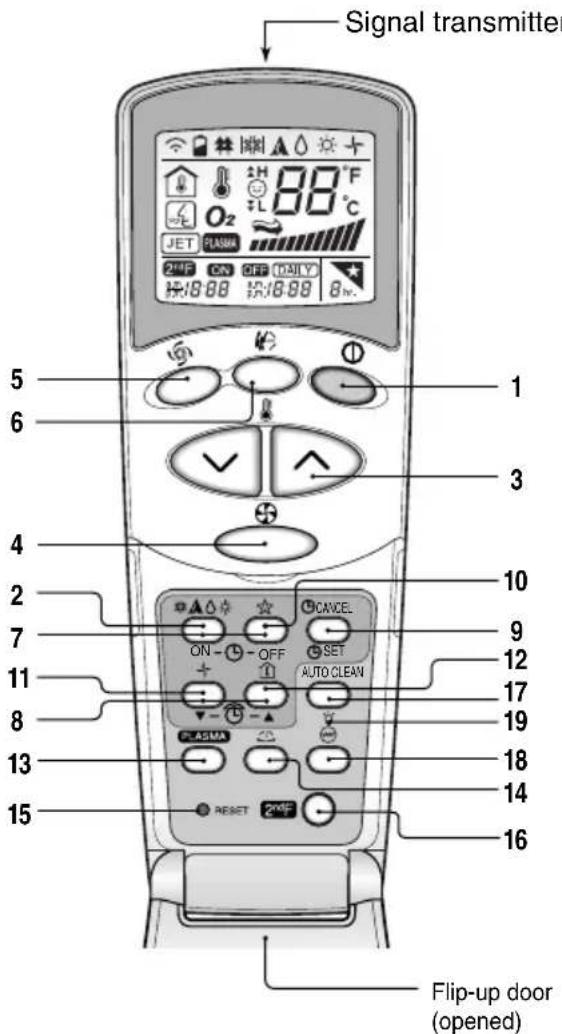
The controls will look like the following.
NOTE
- START/STOP BUTTON
Used to turn off/on the unit.
- OPERATION MODE SELECTION BUTTON
Used to select the operation mode.
- ROOM TEMPERATURE SETTING BUTTONS
Used to select the room temperature.
- INDOOR FAN SPEED SELECTOR BUTTON
Used to select fan speed in four steps low, medium, high and CHAOS.
5.JET COOL/JET HEAT BUTTON
Used to start or stop the speed cooling and heating. The Jet Cool/Jet Heat operates fan in super high speed.
- CHAOS SWING BUTTON
Used to stop or start louver movement and set the desired up/down airflow direction.
- ON/OFF TIMER BUTTONS
Used to set the time of starting and stopping operation.
- TIME SETTING BUTTONS
Used to adjust the time.
- TIMER SET/CANCEL BUTTON
Used to set and to cancel the timer operation.
10.SLEEP MODE AUTO BUTTON
Used to set sleep mode auto operation.
- AIR CIRCULATION BUTTON(OPTIONAL)
Used to circulate the room air without cooling or heating.
ENERGY-SAVING COOLING MODE BUTTON (OPTIONAL) For inverter type models
- ROOM TEMPERATURE CHECKING BUTTON
Used to check the room temperature.
- PLASMA BUTTON(OPTIONAL)
Used to start or stop the plasma-purification function.
- HORIZONTAL AIRFLOW DIRECTION CONTROL BUTTON (OPTIONAL)
Used to set the desired horizontal airflow direction.
- RESET BUTTON
Used prior to resetting time.
16.2nd F BUTTON
Used prior to using modes printed in blue at the bottom of buttons.
- AUTO CLEAN BUTTON(OPTIONAL)
Used to set auto clean mode.
In some models this button has a 2nd function of LED luminosity control.
- HEATER BUTTON(OPTIONAL)
(Not available in all models)
19.LCD LUMINOSITY BUTTON(OPTIONAL)
Used to adjust LCD luminosity.
To use the functions printed in blue at the bottom of the buttons press 2^ndF button first and then the required function button. Pressing the 2^ndF button activates the blue printed function of the respective button. To cancel the function press the 2nd F button again else it will automatically cancel if remains idle after 10 seconds.
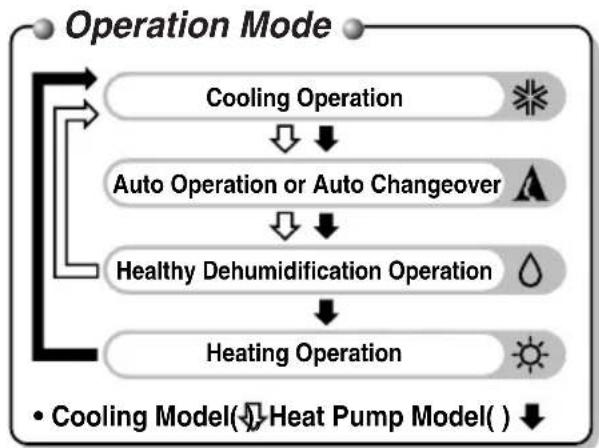
Operation Mode
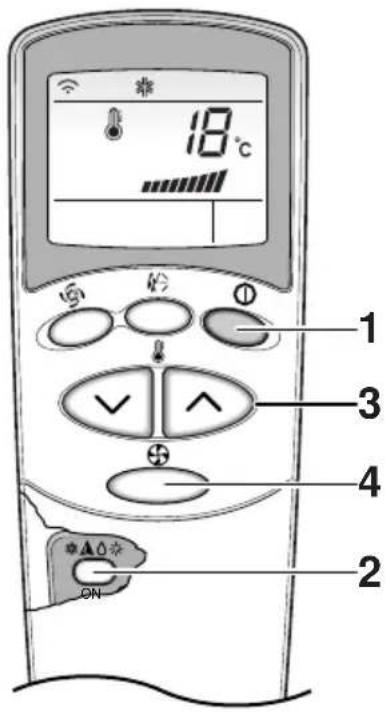
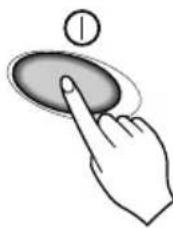
Press the START/STOP BUTTON to turn the unit on.
The unit will respond with a beep.
2 Open the door of the remote controller and press the operation mode button. Each time the button is pressed, the operation mode is shifted in the direction of the arrow.

Cooling
Single : Auto
Changeover
Dehumidification
Heating
(Heat pump model only)
Multi:AutoOperation
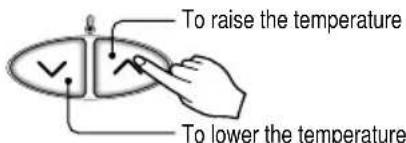
3 For cooling or heating operation set the desired indoor temperature by pressing the ROOM TEMPERATURE SETTING BUTTONS.
For cooling the temperature can be set within 18^ 30^ and for heating the temperature range is 16^ 30^ .
4 Set the fan speed with the remote controller. You can select the fan speed in four steps-low, medium, high and CHAOS by pressing the INDOOR FAN SPEED SELECTOR BUTTON. Each time the button is pressed, the fan speed mode is shifted.
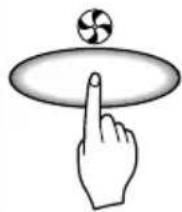

Fan speed is on low. Fan speed is on medium. Fan speed is on high.CHAOS Air
Natural wind by the CHAOS logic
For fresher feeling, press the INDOOR FAN SPEED SELECTOR BUTTON selector and set to CHAOS mode. In this mode, the wind blows like a natural breeze by automatically changing fan speed according to the CHAOS logic.
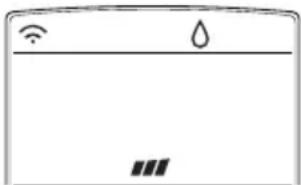
Healthy Dehumidification Operation
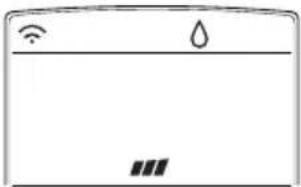
Healthy Dehumidification
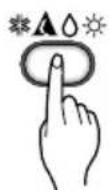
During Healthy Dehumidification Operation
If you select the dehumidification mode on the OPERATION MODE SELECTION BUTTON, the product starts to run the dehumidification function. It automatically sets the room temperature and airflow volume to the best condition for dehumidification, based on the sensed current room temperature.
In this case, however, the setting temperature is not displayed on the remote controller and you are not able to control the room temperature either.
During the healthy dehumidification function, the airflow volume is automatically set according to the optimization algorithm responding to the current room temperature status, so that the room condition is kept healthy and comfortable even in the very humid season.
To run the healthy dehumidification mode follow steps 1, and 2 and 4 (See operation mode)
Auto Operation (Optional)
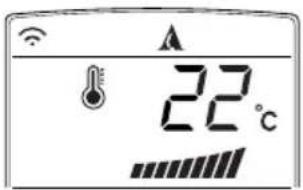
Auto Operation
In this operation the actual operating mode is automatically set by the electronic control logic based on the current room temperature or other connected indoor unit. If you feel hot or cold, you can set the temperature or fan speed for more cooling or heating effect.
Setting Temp. Range: 18 30^
To run the auto operation follow steps 1, and 2. (See operation mode)
Auto Changeover Operation (Optional)
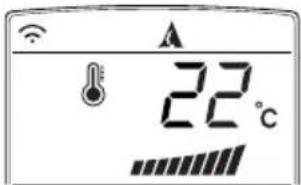
Auto Changeover
Auto operation basically is heating or cooling function of the air conditioner.
But during this operation the controller changes the operation mode automatically to keep the temperature within ± 2^ with respect to the setting temperature.
To run this operation follow steps 1, 2, 3, and 4. (See operation mode)
Jet Cool/Heat Operation
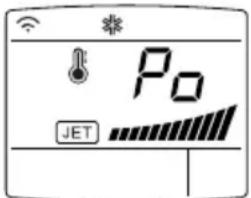
Jet Cool function can be used to cool the room quickly in hot summer. When this function is turned on, the air conditioner runs in cooling operation mode with super high fan speed and 18^ setting temperature for 30 minutes for fast and effective cooling.
Similarly, Jet Heat function (available only in some models) warms up the room quickly by operating at super high fan speed and 30^ setting temperature for 30 minutes.
You can activate this operation by pressing the JET COOL/HEAT BUTTON.
To change from Jet Cool mode to high fan speed cooling mode, press the JET COOL/HEAT BUTTON or INDOOR FAN SPEED SELECTOR BUTTON or the ROOM TEMPERATURE SETTING BUTTON again.
NOTE
- Jet Cool/Heat operation cannot be activated during Air Circulation operation, Auto operation and Auto changeover operation.
- Jet Heat operation cannot be activated when wired remote controller is connected.
- You can use Jet Heat function by pressing JET COOL/HEAT BUTTON in heating operation.
Auto Clean
□Auto Clean function remove moisture in indoor units after cooling operation(cooling, healthy dehumidification, auto operation cooling, auto changeover cooling)
AUTO CLEAN
- Press the AUTO CLEAN BUTTON to activate this function.
- Now whenever the unit is turned off, the indoor fan is still running for about 30 minutes internally without cooling or dehumidification operation. Also the louver is closed.
- This dries up any remains of moisture & cleans the unit internally.
- If you press AUTO CLEAN BUTTON again during operation, this function is cancelled.
NOTE
□ During Auto Clean function, you can use only START/STOP BUTTON, PLASMA BUTTON and AUTO CLEAN BUTTON.
Energy-Saving Cooling Mode (Optional)
Energy-saving cooling mode can save energy in cooling and healthy dehumidification operation, because it can operate efficiently by setting body-adaptation time according to the change of time and temperature and adjusting automatically desired temperature.
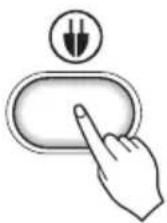
- Press the START/STOP BUTTON to start the unit.
- Open the door on the remote controller. Select cooling operation or healthy dehumidification operation.
- Press the ENERGY-SAVING COOLING MODE BUTTON.
- To cancel the energy-saving cooling mode, press the ENERGY-SAVING COOLING MODEL BUTTON again and unit will operate in previous mode(Cooling or healthy dehumidification mode).
Display Luminosity (Optional)
The Display Luminosity can be adjusted by using the remote control.
Press the start/stop button to start the unit. Open the door on the remote control, press the 2ndF button and, press display luminosity button.
Display will be dark. Press the button again to set bright display.
Forced operation
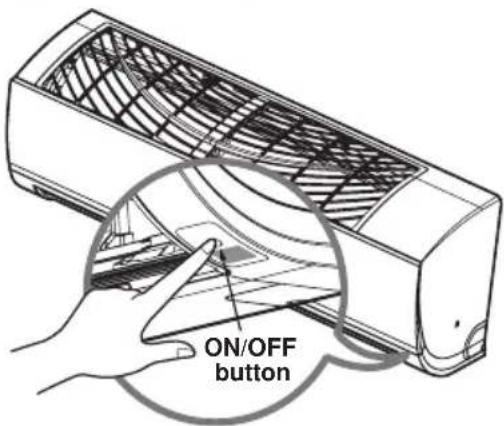
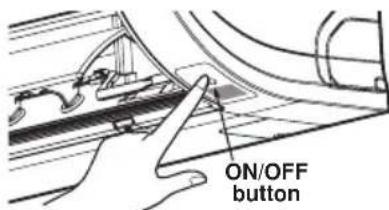
Operation procedures when the remote control can't be used. The operation will be started if the ON/OFF button is pressed. If you want to stop operation, re-press the button.
| Cooling only Model | Heat pump Model | |||
| Room Temp. ≥ 24°C 21°C ≤ Room Temp. < 24°C Room Temp. < 21°C | ||||
| Operating mode | Cooling Cooling | Healthy Dehumidification | Heating | |
| Indoor FAN Speed | High High | High High | ||
| Setting Temperature | 22°C 22°C | 23°C 24°C | ||
Test operation
During the TEST OPERATION, the unit operates in cooling mode at high speed fan, regardless of room temperature and resets in 18 minutes.
During test operation, if remote controller signal is received, the unit operates as remote controller sets.
If you want to use this operation, Press and hold the ON/OFF button for 3~5 seconds, then the buzzer sound 1 "beep".
If you want to stop the operation, re-press the button.
Sleep Mode
- Press the SLEEP MODE AUTO BUTTON to set the time when you want the unit to stop automatically.
- The timer is programmed in one-hour increments by pressing the SLEEP MODE AUTO BUTTON 1 to 7 times.
The sleep mode is available for 1 to 7 times.
To alter the time period in steps of 1 hour, press the SLEEP MODE AUTO BUTTON while aiming at air conditioner.

NOTE
- The sleep mode will operate indoor fan at slow speed in cooling mode and at low speed in heating mode for pleasant sleep.
In cooling mode or healthy dehumidification mode:
The setting temperature will rise automatically two times by 1^ over next consecutive 30 minutes (2^ in 1 hour) for a comfortable sleep. Now this will be the final setting temperature as long as sleep mode is functioning.
In heating mode:
The setting temperature will drop automatically two times by 1^ over next consecutive 60 minutes for a comfortable sleep. Now this will be the final setting temperature as long as sleep mode is functioning.
Setting the Current Time
- Time can be set only when you press the RESET BUTTON. Having replacing the batteries, you should press the RESET BUTTON to reset the time. Press the Start/Stop button.
- Press 2nd F button and check if 2ndF icon is on.
- Press the TIME SETTING BUTTONS until the desired time is set.
- Press the TIME SET/CANCEL BUTTON.
NOTE
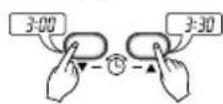

Check the indicator for A.M. and P.M.
Timer Setting
- Make sure to set current time correctly on the display of the remote controller.
-
Press 2nd F button.
-
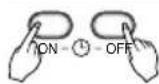
Press the ON/OFF TIMER BUTTONS to turn timer on or off.
-
Press the TIME SETTING BUTTONS until the desired time is set.
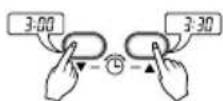
- To set the selected time, press the TIMER SETTING BUTTONS aiming the remote controller at the signal receptor.
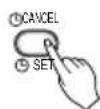
To cancel the timer setting
Check if 2^ndF icon is off.
Press the TIMER CANCEL BUTTON aiming the remote controller at the signal receptor.
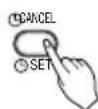
(The timer lamp on the air conditioner and the display will go off.)
NOTE
Select one of the following four types of operation.

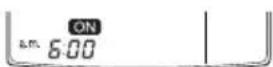
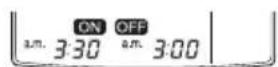
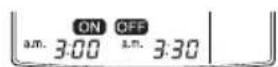
Delay off timer Delay on timer Delay off and on timer Delay on and off timer
Vertical / Horizontal Airflow Direction Control
The up/down airflow (Vertical airflow) can be adjusted by using the remote controller.
-
Press the START/STOP BUTTON to start the unit.
-
Press CHAOS SWING BUTTON.
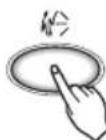
- The louvers will swing up & down automatically.
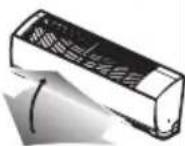
- To stop the louver at a desired angle, press again
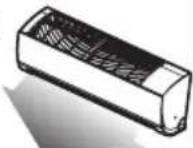
(Optional)
The left/right(Horizontal airflow) can be adjusted by using the remote control.
- Press the START/STOP BUTTON to start the unit.
- Press the HORIZONTAL AIRFLOW DIRECTION BUTTON.
- The louvers will swing left & right automatically.
- To stop the louvers at a desired angle, press again.
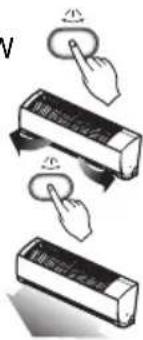
(OptionaI)
Adjust the horizontal airflow direction by manually moving the horizontal airflow direction louver by hand. At this time, be careful not to touch the fan with hands.
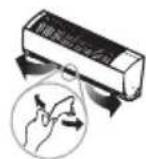
NOTE
- By pressing the CHAOS SWING BUTTON the horizontal air flow direction is changed automatically based on the chaos algorithm to distribute the air in the room evenly and at the same time to make the human body feel most comfortable as if enjoying natural breeze.
- Always use the remote controller to adjust the up and down air flow direction. Manually moving the vertical air flow direction louver by hand could damage the mechanism. When the unit is shut off, the up/down airflow direction louver will close the air outlet vent of the system.
Air Circulation Mode
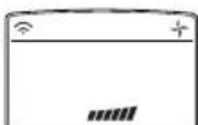
This operation circulates the air without cooling or heating. It can be activated by pressing the AIR CIRCULATION BUTTON. Once the air circulation is activated you can select the air speed by pressing the INDOOR FAN SPEED SELECTOR BUTTON.
NOTE
CHAOS Air economizes power consumption and prevents overcooling. The fan speed is automatically changed from high to low or vice versa, depending on the ambient temperature.
Auto Restart Function
This function is useful in the situation of power failure. When power regains after a failure this feature restore the previous operating condition and the air conditioner will run in the same settings.
NOTE
This feature is enabled by factory default setting, but you can disable it by pressing the ON/OFF button for 6 seconds. The display will double-blink 3 4 times. To enable it, press the button again for 6 seconds. The display will blink 3 4 times.
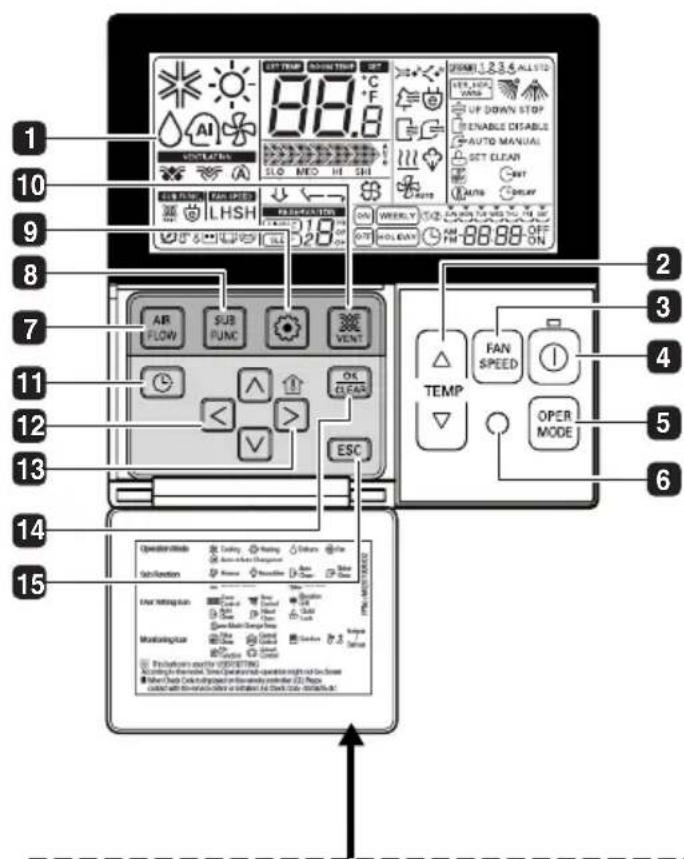
MODEL : PQRCVSAO
Please attach the inform label inside of the door. Please choose proper language depend on your country.
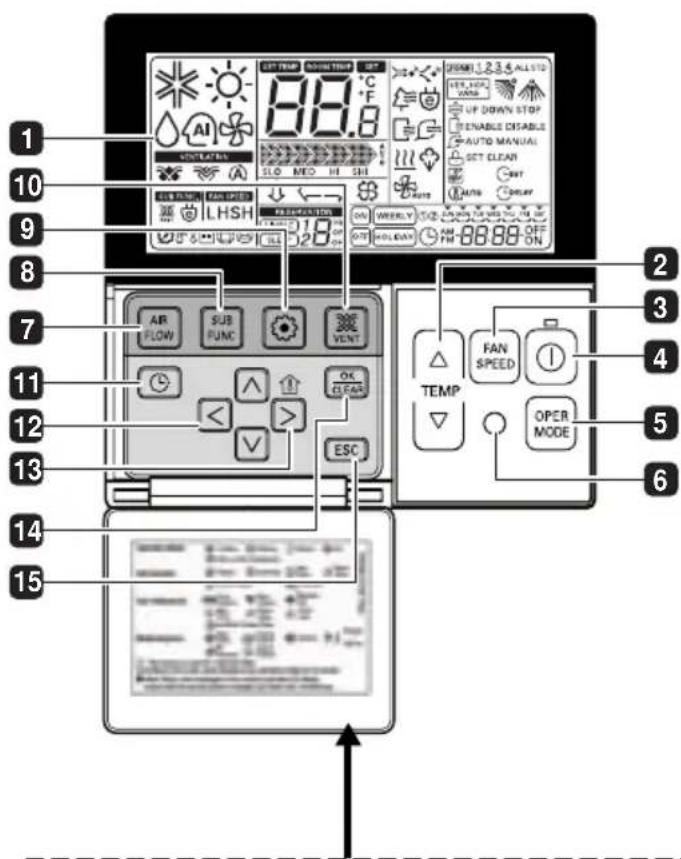
1 OPERATION INDICATION SCREEN
2 SET TEMPERATURE BUTTON
3 FAN SPEED BUTTON
4 ON/OFF BUTTON
5 OPRATION MODE SELECTION BUTTON
6 WIRELESS REMOTE CONTROLLER RECEIVER
- Some products don't receive the wireless signals.
AIR FLOW BUTTON
SUBFUNCTION BUTTON
9 FUNCTION SETTING BUTTON
10 VENTILATION BUTTON
11 RESERVATION
12 UP,DOWN,LEFT,RIGHT BUTTON
To check the indoor temperature, press button.
13 ROOM TEMPERATURE BUTTON
14 SETTING/CANCEL BUTTON
15 EXIT BUTTON
- Some functions may not be operated and displayed depending on the product type.
※ Read Remote Controller's Owner's manual for detail operation method.
Maintenance and Service
CAUTION
Before performing any maintenance, turn off the main power to the system, disconnect the circuit breaker and unplug the power cord.
Clean the unit with a soft dry cloth. Do not use bleach or abrasives.
CAUTION
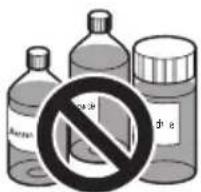
Never use any of these
Water hotter than 40^ . It may cause deformation and discoloration.
- Volatile substances. They may damage the surface of the air conditioner.
Air Filters
The air filters behind the front panel / grill should be checked and cleaned once in every 2 weeks or more often if necessary. To remove the filters see the self explanatory diagrams for each model type. Clean the filters with a vacuum cleaner or warm soapy water. If dirt is not easily removed, wash with a solution of detergent in lukewarm water. Dry well in shade after washing and reinstall the filters back in place.
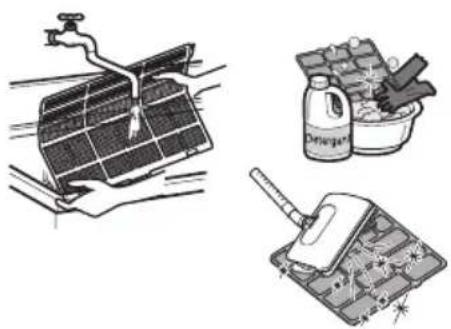
Allergy Free Filter + Triple Filter
Remove the Allergy Free Filter + Triple Filter behind the air filter
and expose them in direct sunlight for 2 hours.
And then insert these filters into original position.
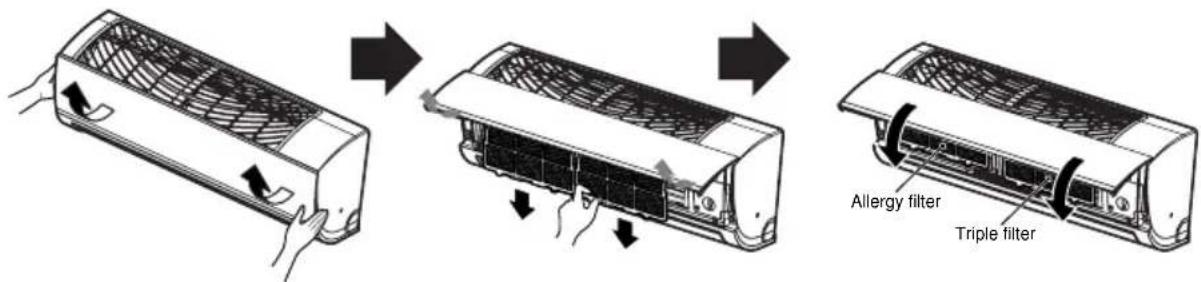
Removal of Filters
Open the front panel as shown.
Then pull the filter tab slightly forward to remove the air filter.
After removing the air filter remove the Allergy Free and Triple filter by slightly pulling forward.
Outdoor Unit
The heat exchanger coils and panel vents of the outdoor unit should be checked regularly. If clogged with dirt or soot, the heat exchanger and panel vents may be professionally steam cleaned.
NOTE
Dirty or clogged coils will reduce the operating efficiency of the system and cause higher operating costs.
Operation Tips!
Do not overcool the room.
This is not good for the health and wastes electricity.
Keep blinds or curtains closed.
Do not let direct sunshine enter the room when the air conditioner is in operation.
Keep the room temperature uniform.
Adjust the vertical and horizontal airflow direction to ensure a uniform temperature in the room.
Make sure that the doors and windows are shut tight.
Avoid opening doors and windows as much as possible to keep the cool air in the room.
Clean the air filter regularly.
Blockages in the air filter reduce the airflow and lower cooling and dehumidifying effects. Clean at least once every two weeks.
Ventilate the room occasionally.
Since windows are kept closed, it is a good idea to open them and ventilate the room now and then.
Use high fan speed for effective and fast cooling.
The unit gives its rated cooling capacity when the fan speed is high.
Troubleshooting Tips! Save time and money!
The air conditioner may be operating abnormally when:
| Problem | What To DoPossible Cau | |
| Air conditioner does not start | ■ The air conditioner is unplugged. | ·Make sure the air conditioner plug is pushed completely into the outlet. |
| ■ The fuse is blown/circuit breaker is tripped. | ·Check the house fuse/circuit breaker box and replace the fuse or reset the breaker. | |
| ■ Power failure. | ·If power failure occurs, turn the mode control to OFF. When power is restored, wait 3 minutes to restart the air conditioner to prevent tripping of the compressor overload. | |
| ■ High voltage. | ·If the voltage is unusually very high or low the circuit breaker will trip. | |
| Air conditioner does not cool as it should | ■ Airflow is restricted. | ·Make sure there are no curtains, blinds, or furniture blocking the front of the air conditioner. |
| ■ The air filter is dirty. | ·Clean the filter at least every 2 weeks. See the Maintenance and Service section. | |
| ■ The room may have been hot. | ·When the air conditioner is first turned on, you need to allow time for the room to cool down. | |
| ■ Cold air is escaping. | ·Check for open furnace floor registers and cold air returns. | |
| ■ Check the temperature settings. | ·Make sure they are correct. | |
| ■ There might be any heating source in the room. | ·Check and remove such source or turn it off while using the air conditioner. |
Call the service immediately in the following situations
- Anything abnormal such as burning smell, loud noise etc. happen. Stop the unit and turn the breaker off. Never try to repair by yourself or restart the system in such cases.
- Main power cord is too hot or damaged.
- Error code is generated by self diagnosis.
- Water leaks from indoor unit even if the humidity is low.
- Any switch, breaker (safety, earth) or fuse fails to work properly
User must carry routine checkup & cleaning to avoid unit's poor performance. In case of special situation, the job must be carried out by service person only.
MANUALE DELL'UTENTE
CLIMATIZZATORE
In this operation mode the actual operating mode is automatically set by the electronic control logic based on the current room temperature or other connected indoor unit. If you feel hot or cold, you can set the temperature or fan speed for more cooling or heating effect. Setting Temp. Range: 18 30^
TOUCHES MINUTERIE MARCHE/ARRET
LESEN SIE DIESES HANDBUCH
ΔIABA Σ E A Y T O T O E Γ X E I P I ΔI0
Moea oe auto Ba perte noaec eviaepouoc ouubouae yia to noc unopeite va xnpaunoiite kai va ouvtnpite oot a Kauatiotkoac. Me liyn npoox ano tvn taeupac unopeite va eokovounote xpovk axpu kata tn diapkeia tou kkuau zwnc tou kauatiotikouac.
Oa Bpeite noAe c anavtnoeic oKoivnpoBAnata OToV nivakaue Tc ouBouEysTyn EIIuON npBAnatw.
Eav meelntoe Tov nivaka e Tc Zmuoulac yia tnv
Eniuaon PpoBAnuTawv npwta, evExetai va un xpeiaotei va kaEoTe yia oepic.

PPOΦYΛEΕΙΣ
- Eπιονωνησε με τον εξουσιδόθημένοτεχίκο για ἀπιόρθωση ἡυντήροση ης σύοκεύς.
Etnkoivwnote e Tov unuBuvO yia Tnv EykataoTnS oukeunc.
To kaiatioTko 8ev npTei va xpoionoiitai ano mikpa naia n atoa ma Kivntikc duokolcs xwiic epiBaeyn.
Ta miKpa naiDiia 3a npenei va eitnpouvtau ia va diaopapaiotei otiv 3naiqouv me to kaiatiotko.
OTAV ELETEvaavikataoTHaTeTO kALWIO TPOPOOOSIAC, nepyaiaavikataoTaONcTaEKELEOTe i anEouoiooTnuevo npoownko xnpauonowvTac mov auEvTKa avtaaakTk.

Oδηγίες Ασφαλείας
Tia va anopuyyete atuxmuata oovxnoi n ne aalouc kaboc kalneipouiaka otoixia, npenei va akolouhoote tnpapakowoyiec.
H eepaevn xpon nou opiealee oun thponn twv obnyw v npoei va npokaloei tpaumatouoc n qmuec. H oobapotnta kataypapetai e Tc akoloubec evdeiEic.

IPOEIAOIOIHs
To ouoAo auto 8nawvTe Nv nIavotnta npokAnoc Bavatou n oBapou atuxmuatoC.

PPOsOXH
To o o auto i Tnv nIthetaVOTnTa npokAnOns Tpaumatou n Znmuac.
8.KOYMIIA PYOMIISHE THS OPA
Xpouonoiieitai yia t npuion nnc wpc.
9.KOYMNI PYOMIHΩPAZ/AKYPOH
Xpnaionoiieiia yia n puBnian kai nV akupwn Tnc aeitoupyiac Tou xpvouetpuo.
- KOYMII AYTOMATHZ ANENEPIHZ KATAZTAHZE AEITOYPIIAS
Xpouonoeiia iia n puiion tnc autouatn avepeyns kataotaang aeitoupyiac.
- KOYMNI KYKIAOΦIa AEPA(IIPOAIPETIKO)
Xpnooioeitai yia tvkloopopia tou aepa tou ouaiou xwpic quen n eepavon.
KOYMII AEITOYPTIAZ YEHIGIA EEOIKONOMHSH
ENEPTEIAZ (NPOAIPETIKO) Tia ovtéλa tunou εvaλακη
- KOYMNI EAEIXOY OEPMOKPAIAZ MATIOTY
Xpnoiopoieita yaoT ov EeYxo nC Bepuokpaiaac Tou dou
- KOYMNI PLASMA (IPOAIPETIKO)
XpnoiOnoiTeiai yia nEvapEn n th diakom nC Ieitoupyiac kaqipou plasma.
- KOYMNI EAEIXOY OPIZONTIAKATEYGYNHOPOHE TOY AEPA (IPOAIPETIKO)
XpouoieiayoovKaOiooTNCeIuunnc opovia kateubvongnpoqouepa.
- KOYMNI NEA∑ PYOMIISHZ
Please attach the inform label inside of the door. Please choose proper language depend on your country.
Wired Remote Controller (Accessory)....16
VOOR UW ADMINISTRATIE
VOORZORGSGMAATREGELEN
- PLASME KNOP (OPTIONEEL)
- LCD HELDERHEID KNOP (OPTIONEL)
Healthy Dehumidification
Wired Remote Controller (Accessory)
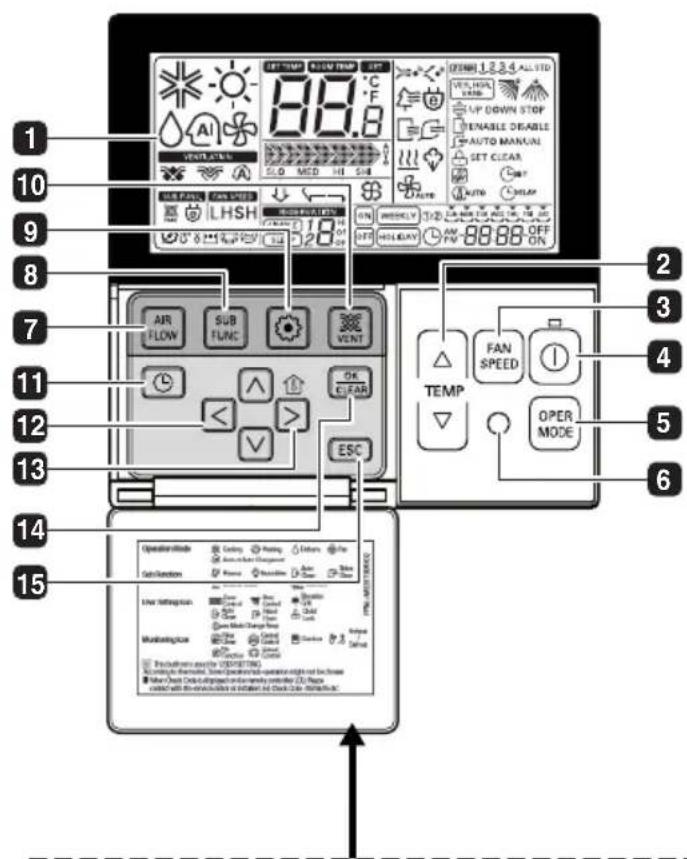
MODEL: PQRCVSA0
Please attach the inform label inside of the door. Please choose proper language depend on your country.
1 BEDIENINGSSCHERM
2 TEMPERATUURKNOP INSTellen
3 KNOP VOOR VENTILATORSNELHEID
4 AAN/UIT-KNOP
KEUZEKNOP VOOR BEDRIJFSSTAND
6 ONTVANGER VOOR DRAADLOZE AFSTANDSBEDIENING
Wired Remote Controller (Accessory)
MODEL: PQRCVSA0
Please attach the inform label inside of the door. Please choose proper language depend on your country.
1 WSKAZNIK DZIAŁANIA EKRANU
2 PRZYCISK NASTAWY TEMPERATURE
3 PRZYCISK PREDKOSCI WENTYLATORA
4 PRZYCISK ZAL./WYL. (ON/OFF)
5 PRZYCISK WYBORU TRYBU PRACY
6 ODBIORNIK BEZPRZEWODOWEGO PILOT A
Wired Remote Controller (Accessory)
MODEL: PQRCVSA0
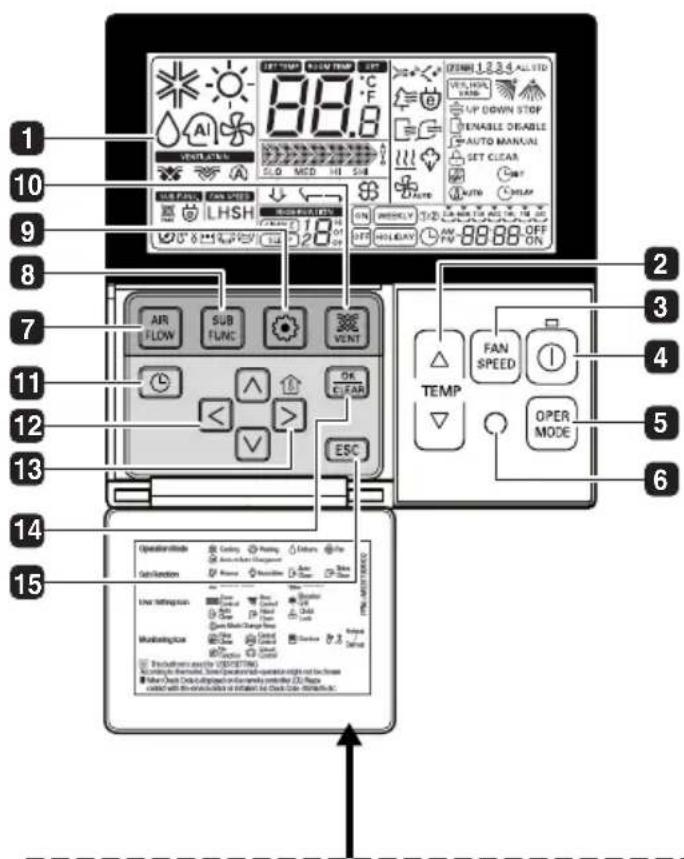
Please attach the inform label inside of the door. Please choose proper language depend on your country.
1 ÜZEMMÖDKIJELZÉS
2 HOMERSEKLET-BEALLITO GOMB
3 VENTILATORSEBESSÉG-GOMB
4 BE/KI KAPCSOLO GOMB
5 ÜZEMMÓDVÁLASZTÓ GOMB
VEZETÉK NELKÜLITAVVEZERLO VEVÖJE