IAN 341154 - Indoor weather station AURIOL - Free user manual and instructions
Find the device manual for free IAN 341154 AURIOL in PDF.



| Product type | Indoor weather station with alarm function |
| Brand | Auriol |
| Model | IAN 341154 |
| Power supply | 2 AAA 1.5 V R03/LR03 batteries |
| Temperature measurement range | 0 °C to 50 °C |
| Humidity measurement range | 20 % to 95 % |
| Temperature accuracy | ± 1 °C |
| Humidity accuracy | ± 5 % |
| Display | Digital with alarm icons |
| Main functions | Display indoor temperature and humidity, dew point, comfort indices, humidity, mold, flu and heatwave alarms, MIN/MAX recording |
| Settings | Adjustable humidity alarm thresholds, adjustable mold alarm, °C/°F selection |
| Low battery indicator | Yes, icon on screen |
| Wall mounting | Yes, by hanging |
| Table placement | Yes, with fold-out support stand |
| Magnetic attachment | Yes, by magnets on the back |
| Care and cleaning | Clean with a soft, dry, lint-free cloth. Do not use harsh cleaning products or immerse in water. |
| Safety | Do not expose to excessive humidity, direct heat sources, direct sunlight, or magnetic fields. Keep batteries out of reach of children. |
| Warranty | 3 years from date of purchase, covers material and manufacturing defects |
Frequently Asked Questions - IAN 341154 AURIOL
User questions about IAN 341154 AURIOL
0 question about this device. Answer the ones you know or ask your own.
Ask a new question about this device
Download the instructions for your Indoor weather station in PDF format for free! Find your manual IAN 341154 - AURIOL and take your electronic device back in hand. On this page are published all the documents necessary for the use of your device. IAN 341154 by AURIOL.
USER MANUAL IAN 341154 AURIOL
WAARSCHUWINGSFUNCTIE

CJA KLMATYCZNA DO POMIESZCZEN
Usage and safety instructions. 21
FR BE
Table of contents -21-
Preliminary note 23
Intended use -23
Scope of delivery 23
Technical specifications 24
Important safety information important safety information 24
Important safety information for users 24
Important safety information for the batteries 25
Display and controls 26
Safely positioning the room climate monitor 27
Setup 28
Basic settings 28
Dew point temperature display/DEW POINT -28-
Note on dew point temperature 28
Setting humidity limits 29
Activating or deactivating humidity alarm 30
Comfort index 31
Room tempature display -31
Mould warning 31
Flu and heat chart 32
Flu warning indicator. 33
Heat warning indicator -33
Showing MAX.MIN recorded values -33
Delet ing MAX MIN recorded values -33
Battery low indicator 33
Cleaning instructions 34
Disposal 34
-21

Disposal of the electronic appliance -34-
Disposal of the batteries 35
Recycling 35
Waste disposal 35
digi-tech gmbh warranty 35
Warranty conditions 36
Warranty period and defects liability 36
Scope of the warranty 36
Warranty claim procedure 37
Service. 38
Supplier 39
ROOM CLIMATE MONITOR
Preliminary note
Congratulations on the purchase of your new room climate monitor. You have chosen a high quality appliance. The manual is part of the appliance. It contains important safety, usage and disposal information. Please read all usage and safety instructions before using the appliance. Please only use the appliance as described and for the described uses. If you sell or give this room climate monitor to someone else it is very important to also include this manual. Please keep the packaging and the instruction manual for future reference.
Intended use
This electronic device is intended for display the described features. Any other use or modification of the electronic device does not comply with the intended uses. The manufacturer is not liable for damages caused by improper use or misuse. The device is not intended for commercial use.
Scope of delivery
Please note: Check the scope of delivery after purchase. Please ensure that all parts are included and undamaged.
- 1 x Room climate monitor
- 2 x Batteries 1.5 V AAA LRO3
- 1 x Instruction manual

-23

Technical specifications
- Measuring range/temperature: 0^ - 50^
Measuring range/humidity: 20% -95% - Temperature display/tolerance in core measuring range: +/- 1 °C
- Humidity display/tolerance in core measuring range: +/- 5% Batteries: 2 x 1.5 V AAA R03/LR03
-
- Symbol for direct voltage
Important safety information
Important safety information for users

WARNING! RISK OF INJURY!
This device may be used by persons (including children over 8 years of age) with reduced physical, sensory or mental abilities or lack of experience and knowledge, if they are supervised or instructed regarding the safe use of the device and understand the dangers that may arise. Children may not play with the device. Cleaning and user maintenance of the device may not be performed by children without supervision. Keep packaging films out of the hands of children. There is a danger of suffocation.

-24
Important safety information for the batteries

WARNING!
HEALTH HAZARD! RISK OF EXPLOSION!
Keep batteries out of reach of small children. If a battery is swallowed, you must seek medical attention immediately. Batteries/rechargeable batteries must always be inserted in the correct polarity. If necessary, clean the battery and device contacts. Never attempt to recharge non-rechargeable batteries. Never short-circuit or attempt to open batteries. Never throw batteries into fire as they may explode. If the device will not be used for an extended time period, remove the battery and store the device in a dry and dust-free area. Improper use of the battery can lead to explosion or leakage.
If the battery leaks, avoid contact with skin, eyes and mucous membranes. Use gloves. If you are exposed to battery acid, rinse the affected areas with plenty of clean water and immediately seek medical attention. Remove discharged batteries from the device as they present an increased risk of leakage.
-25

Display and controls
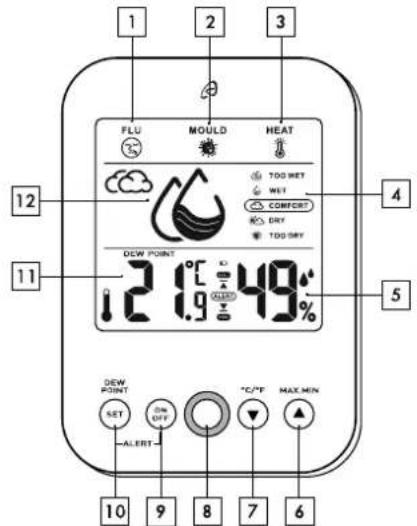
| 1 Flu warning 7 °C/°F, down button |
| 2 Mould warning 8 LED- warning signal |
| 3 Heat warning 9 ALERT ON, OFF |
| 4 Comfort display 10 ALERT SET, dew point |
| 5 Indoor humidity 11 Indoor temperature |
| 6 MAX.MIN, up button 12 Humidity symbol |
GB 1E
-26
Safely positioning the room climate monitor
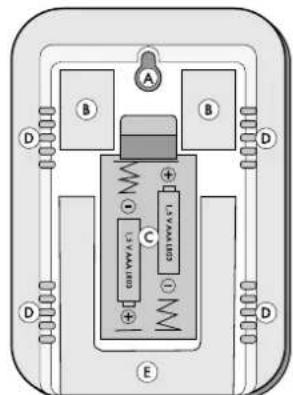
| A | Hole for wall mounting |
| B | Magnets |
| C | Battery compartment |
| D | sensors |
| E | Stand |
The room climate monitor is not intended for use in rooms with high humidity (such as bath rooms). The room climate monitor can be hung from a nail or
screw by using the hole for wall mounting A, fastened to a magnetic metal surface or set on a surface using the Stand E. Make sure that:
the device isn't placed on a thick carpet or bed during operation;
- no direct heat sources (i.e. radiators) influence the device;
- no direct sunlight reaches the device;
contact with splashing or dripping water must be avoided (don't place any items filled with liquids, i.e. vases, onto or next to the device);
the device doesn't stand near magnetic fields (i.e. speakers);
- candles and other open flames must be kept away from this product at all times to prevent the spread of fire;
- no foreign objects penetrate the housing.
-27

Setup
Remove the protective film from the display. Open the battery compartment C on the backside of the climate station.

Insert two 1.5 V AAA R03/LR03 batteries in the
correct polarity.
Close the battery compartment C.
After inserting the batteries, all display elements are shown briefly. The alarm will blink briefly and the climate station will switch to normal display mode.
Basic settings
After inserting the batteries, the climate station is pre-set to mould alarm 65% , upper humidity limit 95% and lower humidity limit 20% .
Dew point temperature display/DEW POINT
Press SET 10 in normal display mode to show the dew point temperature. Press SET 10 again to return to normal display mode/current room temperature 11.
Note on dew point temperature
The dew point temperature is a measure for the ratio of moisture in the air. It describes the amount of water vapour in the air and is calculated from the relation between the relative humidity and the air temperature. If the air temperature is the same as the dew point temperature, the relative humidity is 100% . Warmer air can hold more moisture. Mugginess, for example, is experienced when the dew point temperature is over approximately 16^ . The dew point temperature is lowered near cold outer walls and the moisture from the air may condensate on the walls, which, over a longer time period, may lead to mould.

-28-
| Dew point-temperature °C | Human perception | Relative humidity at 32 °C |
| >over 26 °C | Very high. Very bad for asthma sufferers. | 65 % and higher |
| 24 - 26 °C | Very unpleasant. Very oppressive - especially for elderly persons. | 62 % |
| 21 - 24 °C | Very humid. Very unpleasant. | 52 % - 60 % |
| 18 - 21 °C | Somewhat unpleasant for most elderly persons. | 44 % - 52 % |
| 16 - 18 °C | All right for most people but the humidity is noticeable for everyone | 37 % - 46 % |
| 13 - 16 °C | Comfortable/pleasant | 38 % - 41 % |
| 10 - 12 °C | Very comfortable/very pleasant | 31 % - 37 % |
| <10 °C | May be slightly too dry for some people | 30 % |
If the dew point temperature rises above 50^ "HH.H" is shown. If the dew point temperature falls below 0^ "LL.L" is shown.
Setting humidity limits
Press and hold SET 10 in normal display mode. The upper limit 5 and will blink. The value can be set in 5 % increments by pressing C / ^7 or
MAX.MIN 6. Confirm your setting by pressing SET 10. The lower limit 5 and will blink. The value can be set by pressing °C/°F 7 or MAX.MIN 6. Confirm your setting by pressing
-29.

SET 10. The climate station will enter normal display mode/current indoor humidity 5.
| Low humidity |
| Normal humidity |
| High humidity |
Activating or deactivating humidity alarm
Press ON, OFF 9 in normal display mode to activate the humidity alarm. ALETR on the display. When the humidity falls below the lower limit or rises above the upper limit, red LED-alarm signal 8 will blink. Press any button to turn off the red LED-alarm signal 8. ALERT will continue blinking until the humidity returns to the normal range, for example by air ing the room. Press ON, OFF 9 to deactivate the humidity alarm. ALERT will disappear from the display.
GB 1E
-30
Comfort index
At a relative room temperature of approximately 20^ - 25^ the following comfort levels are calculated:
| Comfort level Relative | humidity |
| TOO WET too wet | ≥ 85 % |
| WET wet | 66 % - 84 % |
| COMFORT comfortable | 45 % - 65 % |
| DRY dry | 30 % - 44 % |
| TOO DRY too dry | ≤ 29 % |
Room tempature display
Press C / ^7 in normal display mode to select the temperature unit degrees Celsius (^) or degrees Fahrenheit (^)
Mould warning
Press and hold C / 一 F 7 in normal display mode.

The upper limit 5 and the 2 symbol will appear. You may set the upper limit by pressing C/°F7 or MAX.MIN 6.Wait 10 seconds for the set value to be accepted and the climate station will return to normal display
-31

mode. When the set value is exceeded, the symbol and the red LED alarm signal will blink. Press any button to slow the blinking to once approximately every 7 seconds. The symbol
2 will continue to blink until the humidity is lowered to below the set value, for example by airing the room.
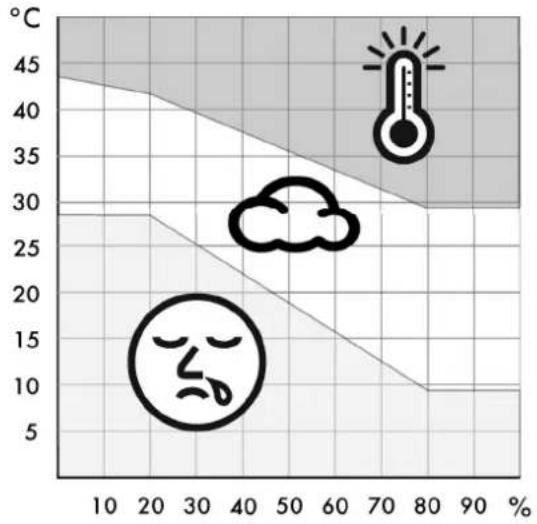
Flu and heat chart
GB E
-32-
Flu warning indicator
Your climate station is equipped with a flu warning

display. If the symbol links on the display, remedy the situation, for example, by heating the room.
Heat warning indicator
Your climate station is equipped with a heat warning indicator. If the symbol 6 blinks on the display, remedy the situation, for example, by airing the room.

Showing MAX.MIN recorded values
Press MAX.MIN 6 in normal display mode. the recorded maximum temperature and humidity values are shown. Press MAX.MIN 6 repeatedly appear and the recorded minimum temperature and humidity values are shown. Wait 10 seconds for the climate station to return to normal display mode or press MAX.MIN 6.
Deleting MAX.MIN recorded values
Press MAX.MIN 6 in normal display mode. appear. Press and hold MAX.MIN 6 to delete the recorded values for maximum and minimum temperature and humidity. Wait 10 seconds for the climate station to return to normal display mode.
Battery low indicator
If the battery charge becomes too weak to power the climate station, the battery low indicator will appear on the display. Replace the batteries as soon as possible.
-33

Cleaning instructions
Improper cleaning can damage the device. Do not submerge the device in water or other liquids. Do not use aggressive cleaners, brushes with metal or nylon bristles, or sharp or metallic cleaning tools such as knives, scrapers or similar implements. These may damage the surface of the device. Clean the device using a soft, dry, lint-free cloth, such as a glasses cleaning cloth.
Disposal
This device and all the packaging materials are recyclable. Please dispose of them separately for better waste handling. You can find out about disposal options for your product by contacting your municipality.
Please take note of the marking of packaging material when separating waste materials. They are marked with abbreviations (a) and numbers (b) with the following meanings:
1-7:plastics 20-22:paper and cardboard 80-98:composite materials.

Disposal of the electronic appliance
This room climate monitor may not be disposed of with normal household waste. In the interest of the environment, when your device has reached the end of its usefulness, do no throw it in the normal household trash. Dispose of it in the proper and correct way. You can find out about collection sites and their business hours from your public administration. Please adhere to applicable requirements.

-34
Disposal of the batteries
Defective or spent batteries/rechargeable batteries must be recycled in accordance with directive 2006/66/EC and its revisions. Return batteries, rechargeable batteries or the device at the available collection sites.


Improper disposal of batteries/rechargeable batteries causes environmental damage!
Batteries/rechargeable batteries may not be disposed of in normal household waste. They may contain toxic heavy metals and are subject to hazardous waste treatment. The chemical symbols of the heavy metals are as follows: Cd = Cadmium, Hg = Mercury, Pb = lead. Therefore, please dispose of spent batteries/rechargeable batteries at a communal collection site.
Recycling
The product packaging consists of recyclable materials. Dispose of the packaging in an environmentally sound manner using the proper collection systems.

Waste disposal
Dispose of the packaging in an environmentally responsible fashion. Please note the marking of the different packaging materials and separate them if applicable.

digi-tech gmbh warranty
This room climate monitor includes a 3 year warranty starting on the day of purchase. In case of defects of this room climate monitor you have, by law, certain rights regarding the vendor of
-35.

the room climate monitor. These rights are not changed by the warranty which is described in the following paragraphs.
Warranty conditions
The warranty duration starts on the date of purchase. Please keep the original receipt in a safe place. The receipt is needed as a proof of purchase. If a defect occurs in the room climate monitor within 3 years, the room climate monitor will be repaired or replaced (according to our choice) free of charge. This warranty requires that, within the 3 year warranty period, the room climate monitor and the receipt can be made available to us along with a short written description of the defect and when it occurred. If the defect is covered by the warranty, you will receive the repaired room climate monitor or a new room climate monitor. repair or replacement does not cause the warranty period to restart.
Warranty period and defects liability
The warranty period is not increased by the defect liability. This also applies to repaired or replaced parts. If defects are noticed at the time of purchase they must be reported immediately upon unpacking the item. Paid repair may be available after the end of the warranty period.
Scope of the warranty
The room climate monitor was manufactured according to strict quality guidelines and was carefully inspected before delivery. The warranty does not include parts that experience normal wear and tear and can thus be seen as wear parts or fragile parts that are damaged. Examples include Switches, Batteries or parts made of glass. This warranty becomes void if the room climate monitor is damaged, is not used in the recommended way or is improperly repaired. For proper use of the room

-36-
climate monitor all instructions in this manual must be adhered to exactly. Use of the room climate monitor in a way that is discouraged in the manual must be avoided. The room climate monitor not intended for commercial use. Abusive or improper use, excessive force and changes that are made by nonauthorized repair centres will void the warranty.
Warranty claim procedure
To ensure that your call is processed in a fast and efficient manner please note the following directions:
Have your receipt (as proof of purchase) and the article number (341154_1910) handy.
The article number can be found on the type label, an engraving, the front page of the manual (bottom left) or a sticker on the backside or bottom side of the case.
In case defects occur, please first contact the service centre (see below) by phone or email.

Visit www.lidl-service.com to download this and many other manuals, product videos and software.
With this QR-Code you can reach the Lidl-Service-Site (www.lidiservice.com) directly and you can open your manual by entering the article number (341154_1910).
-37

Service
Please note that the following address is not a service address. Please first contact the service address (see above).
Name: digi-tech gmbh
Street: Valterweg 27A
Town: DE-65817 Eppstein
Country:GERMANY

-39.

KAMERKLIMAATSTATION MET WAARSCHUWINGSFUNCTIE
Inleiding
Na www.lidl-service.com这其中 some of the most popular databases are:


- ROOM CLIMATE MONITOR
- Preliminary note
- Intended use
- Scope of delivery
- Technical specifications
- Important safety information
- Important safety information for users
- WARNING! RISK OF INJURY!
- Important safety information for the batteries
- WARNING!
- HEALTH HAZARD! RISK OF EXPLOSION!
- Safely positioning the room climate monitor
- Setup
- Basic settings
- Dew point temperature display/DEW POINT
- Note on dew point temperature
- Setting humidity limits
- Activating or deactivating humidity alarm
- Comfort index
- Room tempature display
- Mould warning
- Flu warning indicator
- Heat warning indicator
- Showing MAX.MIN recorded values
- Deleting MAX.MIN recorded values
- Battery low indicator
- Cleaning instructions
- Disposal
- Disposal of the electronic appliance
- Disposal of the batteries
- Improper disposal of batteries/rechargeable batteries causes environmental damage!
- Recycling
- Waste disposal
- digi-tech gmbh warranty
- Warranty conditions
- Warranty period and defects liability
- Scope of the warranty
- Warranty claim procedure
- Service
- KAMERKLIMAATSTATION MET WAARSCHUWINGSFUNCTIE
- Inleiding
Brand : AURIOL
Model : IAN 341154
Category : Indoor weather station