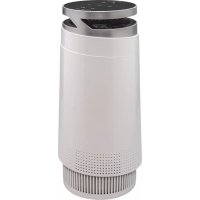
PA98 - Air purifier Bimar - Free user manual and instructions
Find the device manual for free PA98 Bimar in PDF.



| Product type | Air purifier |
| Brand | Bimar |
| Model | PA98 |
| Use | Domestic, indoor |
| Power supply | Mains 220-240 V ~ 50/60 Hz |
| Filters | HEPA H13 filter, pre-filter, activated carbon filter |
| Efficiency | Blocks fine particles PM2.5, smoke, dust mites, pollen, mold, formaldehyde, odors |
| Speeds | 3 adjustable speeds |
| Night mode | Yes (minimum speed, reduced indicator light) |
| Ionizer | Yes (produces negative ions) |
| Light | Chromatic effects, fixed blue, off |
| Connectivity | Wi-Fi 2.4 GHz, BIMAR Live Smart app (iOS 8.0+ / Android 4.4+) |
| Voice control | Compatible with Amazon Alexa, Google Assistant, IFTTT |
| Filter replacement indicator | Yes (flashes red, reset via dedicated button or app) |
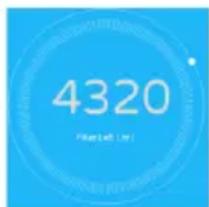
| Filter life | Approximately 4320 hours (indicated in the app) |
| Electrical safety | Class II (double insulation) |
| Cleaning | Soft damp cloth, no abrasive or corrosive products |
| Housing material | Plastic |
| Supplied accessories | Power cord, user manual |
| Dimensions | Not provided |
| Weight | Not provided |
Frequently Asked Questions - PA98 Bimar
User questions about PA98 Bimar
0 question about this device. Answer the ones you know or ask your own.
Ask a new question about this device
Download the instructions for your Air purifier in PDF format for free! Find your manual PA98 - Bimar and take your electronic device back in hand. On this page are published all the documents necessary for the use of your device. PA98 by Bimar.
USER MANUAL PA98 Bimar
type PA97 (mod. VK-6070A)

Per iOS

natural_image
Simple circular icon with a yellow square and a white center, resembling a battery or power button (no text or symbols)Controllo vocale
natural_image
Simple line drawing of a garment sleeve with textured fabric and a small triangular object on top (no text or symbols)natural_image
Diagram showing a mechanical component with blue arrows indicating motion, alongside a close-up of a circular component with directional arrows (no text or symbols)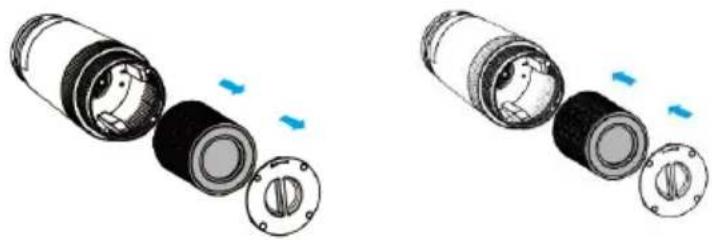
natural_image
Two views of a cylindrical mechanical component with internal components and blue directional arrows indicating movement (no text or symbols)natural_image
Diagram of a cylindrical mechanical component with internal rotating parts and directional arrows, alongside a close-up view of the curved surface (no text or symbols)This symbol indicates that these instructions should be read carefully before using the appliance, and that other users should also be informed of them, if necessary. Store this booklet for future reference and for the entire lifetime of the device. If any parts of these instructions are difficult to understand or when in doubt, contact the manufacturer at the address found on the last page before using the product.

This symbol indicates Class II electrical insulation, that is, the plug is not earthed.
GENERAL WARNINGS
- This appliance is exclusively intended for domestic use, for purifying the air in indoor environments, as per the methods outlined in these instructions.
- This purifier is a radio device which intentionally emits and/or receives radio waves for radiocommunication and/or radiodetermination purposes.
- Do not use the appliance outdoors or in very dusty areas or areas with airborne particles/materials that could block filters or damage to motor. Any other use should be considered inappropriate and dangerous. The manufacturer cannot hold responsible for any damages caused by improper, incorrect or irresponsible use and/or by repairs done by unqualified person.
Examples of appliances for domestic use are those used for common domestic purposes, in domestic environments and that can be used by non-experts:
- in shops, offices and other similar places of work;
- in farming businesses or similar businesses;
- by guests in hotels, motels and other residential type environments;
- in bed and breakfast accommodation.
- Do not use the device unless the filter and cover are correct locked into place.
• Always unplug the appliance from the socket if not being used and before assembly, disassembly or cleaning the appliance
- The appliance must be kept out of reach of children.
- The appliance can be used by children over 8 and by people whose physical, mental or emotional capacity is limited or compromised, or who lack the appropriate experience of knowledge, only if they are supervised after receiving instructions about safe use of the appliance and they understand the hazards. Children must not play with the appliance. Cleaning and maintenance that must be carried by the user must not be done by children unless they are supervised.
- Make sure the appliance does not come into contact with water or any other liquid. If water or any other liquid comes contact with the appliance, first turn off the power by switch it off at the distribution board, and only then remove the plug from the socket. Carefully dry both the plug and the socket before restoring power. Plug into the mains and then continue using the appliance. If in doubt consult a qualified profession
Danger:
- Do not put any tools or fingers through the mesh of the protective grilles.
- The plug point must be accessible so as to easily remove the plug in case of an emergency.
- If the power cord is damaged, it must be replaced by the manufacturer or its technical assistance centre or by someone who is similarly qualified, in order to prevent ar risks.
- In order to prevent electric shocks, never immerse the plu the power cord or the appliance in water or any other liq
- This device is not a replacement for ventilation device therefore, you are advised to clean rooms regularly with vacuum cleaner and use extractor hoods or fans while cooking.
- The purifier does not remove carbon monoxide (CO) of Radon (Rn). It cannot be used as a safety device in case of accidents involving combustion and hazardous chemicals.
- Do not use this device:
- in very hot or damp/wet locations, such as kitchens bathrooms.
- in the immediate vicinity of a bathtub, a shower, a swimming-pool, washbasins, etc.
- Do not place anything on top of the purifier.
- Do not sit or stand on the purifier.
- Do not touch the appliance with wet hands or feet.
- Do not move the appliance when it is running.
- Do not allow the appliance to be exposed to the weather (s rain, etc.).
- Should the appliance fail or not work correctly, disconnect power cord immediately. Check that it is not damaged, and thereafter turn it back on: if in any doubt, consult a qualified professional.
- Do not pull on the power cord or the appliance itself to un the appliance from the plug point.
- Do not pull on the power cord to move the appliance.
- Do not use the appliance if it does not work properly or if i appears damaged; when in doubt, contact a qualified technician.
- Check the condition of the appliance periodically. If there is any faults or when in doubt consult a qualified professional
- If the appliance is not being used, unplug it from the plug point.
INSTALLATION
- After unpacking, check that all parts of the appliance are present; if in doubt, do not use and contact a qualified technician. The packaging materials (plastic bags, polystyrene, metal staples, etc.) must not be left within reach of children, as they are potentially hazardous and must be disposed of according to applicable regulations in recycling containers. Warning: any stickers or advertising leaflets applied must be removed before using the appliance.
- Before connecting the appliance, check that the voltage on the data plate matches that of the electric system. In the event of incompatibility between the power socket and the appliance's plug, have the plug replaced with a suitable model by a qualified professional, who should ensure that the cable is appropriate for the power rating of the device. The use of adaptors or extensions is generally not advisable; if it is necessary to use them, they must comply with safety regulations and the total current (amps) must not be rated lower than the maximum current of the appliance.
-
Do not use the purifier unless the filter and cover are correctly fitted.
-
The plug point must be accessible so as to easily remove the plug in case of an emergency.
- Stand the appliance on a flat, horizontal and stable surface, and keep it away from:
- fans
- heat sources (e.g. open flames, gas stoves, fire places etc.), flammable gasses or explosive materials
- liquids (e.g. from bathtubs, showers, sinks etc.) to avoid splashing water and to prevent it from falling into them (the appliance should be kept a minimum of 2 metres away).
- fabrics (curtains, etc.) or floating materials/particles that may block the aspiration grid; check also that the front part is free from floating particles (dust, etc.).
- If there is a fault or the appliance is not working correctly, switch it off and have it checked by a qualified professional. Repairs done by an unqualified person can be dangerous and cause the guarantee to become void.
DESCRIPTION
Smart device with integral wi-fi, usable via Smartphone using an app with Android or iOS operating systems.
- Purifier electronics with integral wi-fi allowing Smartphone-purifier communication via an App.
- App (application) allowing remote control of the following device functions: (Onstandby); adjustable air flow, "Change filter" warning light, Mode: Normal/ Sleep, Light with colour effects, steady or off, ioniser.
- Check that the router is for domestic use (i.e. it does not have any access restrictions except the password), that the wi-fi network is 2.4G Hz, and that there is a strong, uniform wi-fi signal in the room where the device is to be installed.
- Make sure that the smartphone is connected to the wi-fi network to be used for the purifier.
1.1 First Installation/Setup
- Install the "BIMAR life Smart" App by downloading it from Google Play (Android) or AppStore (iOS), or scan the QR code provided here to install. The free "BIMAR Live Smart" app is compatible with devices which support iOS 8.0 or above or Android 4.4 or above.
For Android

For iOS

- Once installed, the app icon appears in the smartphone screen. Click the "Bimar Live Smart" icon to run the app.
-
To start registration:
-
click "Register" and confirm the "Privacy Policy Statement" with "I agree" to continue
- enter your phone number or email address (select the mode in the top right-hand corner)
- click "Get check code", wait a few moments and then enter the code received in the registration email or text message in the "Check code" field (also check in the Spam folder if you cannot find the email in your "Incoming Mail" folder).
Enter the password required and click "Done".
-
A screen will open: click "Create Family".
-
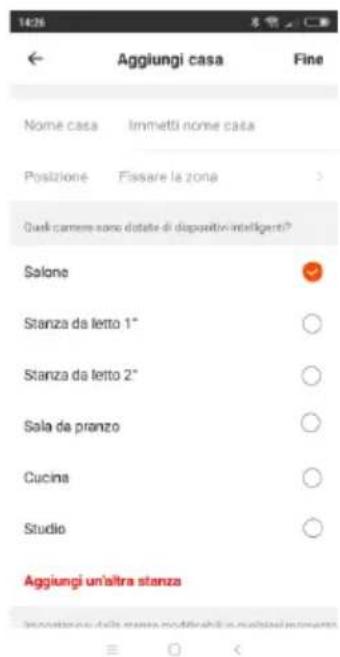
A screen (as shown on the right) appears where you can customise the home (name, position and name of room). Confirm when done.
- Connect the plug to the device's power socket (you will hear a "beep" indicating that the device is in standby), press button "☐" for about five seconds, and the
wi-fi connection light " flashes quickly.
-
Open the smartphone app: perform the search for the device by clicking the “+” (Add Device) symbol in the top right corner.
-
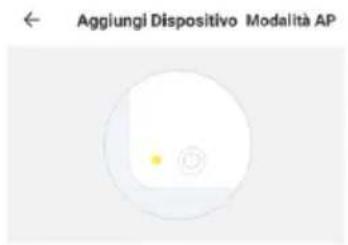
This opens a screen (as shown on the right); select "LED flashing quickly".
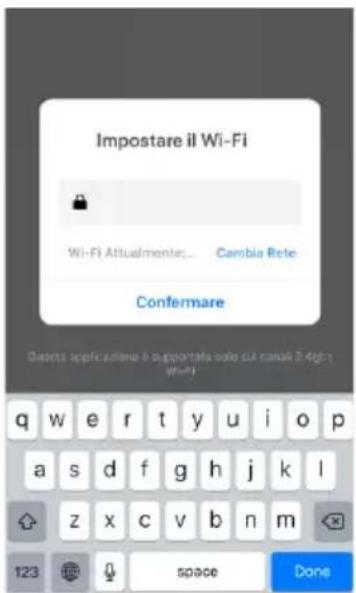
- A screen (as shown below) appears: enter the PASSWORD (the password of your wi-fi network) and click the "confirm" symbol to start the connection. Concentric graphics and the time countdown will appear (as shown below) and will be interrupted as soon as smartphone has connected to the device.
- If the procedure is carried out correctly, the device control panel appears: here the device can be renamed, clicking "Done" to confirm.
Remove the plug from the power socket and leave the device disconnected for 30 seconds. Connect the plug to the device's power socket, press button “” for about five seconds, and the wi-fi connection light ” flashes quickly.
Description of Smartphone Settings Screen

Press “ Profilo ” at the bottom right to personalise the App. This displays the following functions: home management; message centre; comment; settings. Click the account at the top to personalise your profile (photo, name, temperature unit of measurement, region, etc.).

Press “” at the bottom centre personalise the App, to display the scenes. Personal scenes can be created to suit requirements (Back home, Leaving home, Dawn, Goodnight) if all conditions (Temperature, Humidity, Weather, Air quality, Dawn/dusk) are met.
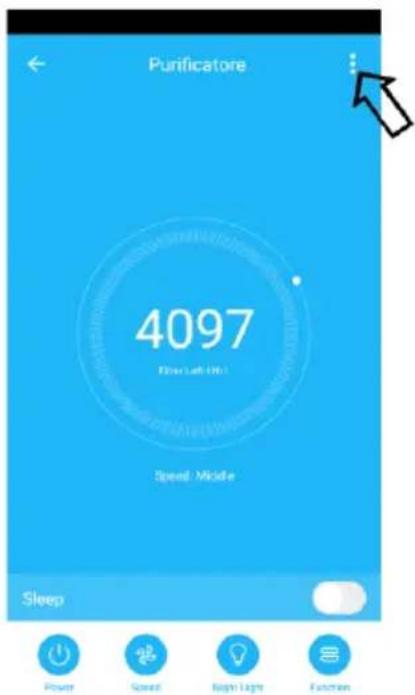
Press top right to personalise the App: this shows the screen on the right, displaying the following functions:
- Change device Name and Position
- Check Network
- Third-party devices supported: Amazon Alexa, Google Assistant, IFTTT
- Device sharing
- Device Info
- Create a Comment group
- Check for Firmware updates
- Remove device
- etc.
Voice control
The purifier is compatible with Amazon Alexa and Google Assistant voice controls and supports IFTTT. Open the corresponding App (make sure that the account used is the same as that of the “Bimar Live Smart” app) and follow the settings.
Description of purifier control panel or Use via smartphone ( Follow the procedure in point 1.1)
Control panel
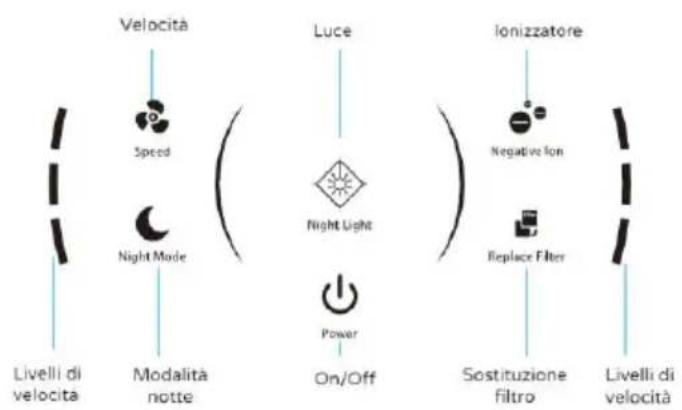
- The device has the following adjustment and control functions and accessories:
- Button “⏻”: press to operate the device; hold down for about five seconds to restore the initial wi-fi settings.
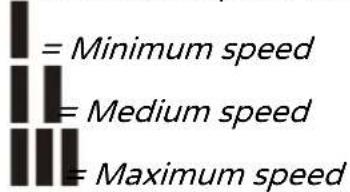
- Button “Speed”: press repeatedly to select the 3 speeds; the level corresponding to the selected speed will illuminate on the display:
- Night “Night Mode” mode: activated by pressing the button; the device will only operate at the minimum speed, with only the “light illuminated on the display. To restore normal operation (deactivate night mode), repeat the procedure in reverse.
- “” button: the ionising function produces a flow of negative ions which neutralise the positive ions in the air. This function is activated whenever the button is pressed; the light corresponding to the button will illuminate on the display and the “” symbol will appear on the screen.
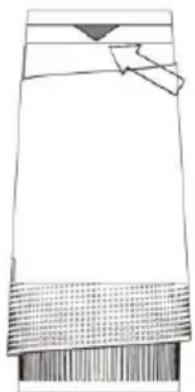
- “☐” button: press the button repeatedly to turn on the light (underneath the control panel, as shown on the right) with variable colour effects, steady (blue) and off; cannot be operated with night mode active. If the device is in standby (wi-fi light remains on), only the steady light is available.
natural_image
Simple line drawing of a rectangular object with textured base and small protrusions (no text or symbols)- Filter, comprising:
• one H13 HEPA filter: traps PM2.5, smoke, dust mites and other pollutants
• one pre-filter: traps larger particles such as hairs, fluff or threads.
- 1 activated carbon filter: absorbs harmful substances such as unpleasant odours, mould and formaldehyde
Filter change alert light: the light 📄️) flashes (red) whenever the filter needs changing. To reset the light, press the “ 📋️ ” button (or use the App) for about 3 seconds, switch off the device, remove the plug from the power socket and change the filter.
The app's main screen shows concentric graphics and the countdown of the hours left until filter replacement during operation (total hours at start of count: 4320hr)
- To deactivate the device, press the “⏻” button: the “WiFi” symbol remains on. To switch off the device, remove the plug from the power socket.
When not in use for long periods, the plug must always be removed from the socket.
CLEANING AND MAINTENANCE
Important: before performing routine cleaning, remove the plug from the mains.
- Regularly check that the filters are clean to ensure operation remains as effective as possible.
- FILTER:
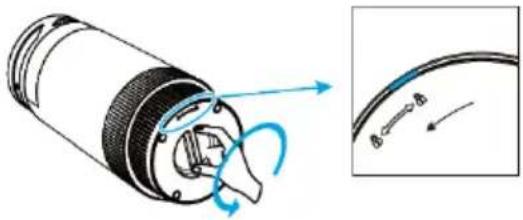
- Place the purifier on a horizontal surface covered with a soft cloth, or another soft surface.
- Turn the filter cover anticlockwise in the direction shown by the arrow

natural_image
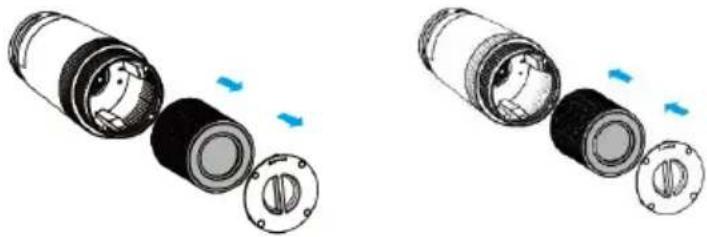
Diagram of a mechanical component with directional arrows indicating motion, alongside a close-up view of a curved wire or cable (no text or symbols present)- Remove the filter and fit the new filter in place, taking care to position it correctly
natural_image
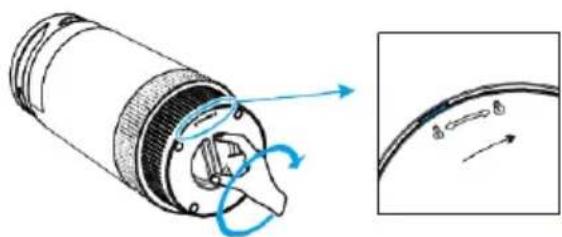
Two views of a cylindrical mechanical component with internal components and blue directional arrows indicating movement (no text or symbols)- Fit the lid onto the base so that the 3 pins are aligned with their respective slots in the body, and turn fully clockwise in the direction shown by
the arrow ; you will hear it lock in place with a "click".
natural_image
Diagram of a mechanical component with directional arrows indicating motion, alongside a close-up view of a curved surface (no text or symbols)- To clean the body, use a soft cloth dampened with water and, if necessary, use also a mild everyday detergent.
- Do not use abrasive or corrosive products.
- Do not immerse any electrical parts in water or another liquid. In the event this occurs, dry carefully and check that the electric parts are completely dry. Only thereafter, plug the appliance into the mains. If in doubt, contact a qualified professional.
- If the appliance is not used for long periods of time, you should store it away from dust and moisture; we recommend using the original packaging.
- If you decide to no longer use the appliance, it is recommended that be made inoperative by cutting the power cord (first ensure that the appliance has been unplugged from the power supply), and ensure that any parts that could represent a risk to playing children are put away.
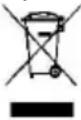
Correctly disposing of the product as per European Directive 2011/65/UE.
At the end of its lifespan, the product must not be disposed of as part of ordinary waste.
It can be handed in to specific collection points set up by the local authority, or to retailers who provide such a service.
Disposing of a household appliance separately avoids possible negative consequences for the environment and human health resulting from inappropriate disposal and allows to recover the materials from which it is made in order to obtain significant savings in energy and resources. As a reminder of the obligation to dispose of appliances separately, the product is marked with a crossed-out wheelie bin symbol. Incorrect disposal of the product by the user will lead to sanctions according to current law.

- This device is not a replacement for ventilation devices; therefore, you are advised to clean rooms regularly with a vacuum clear and use extractor hoods or fans while cooking.
- The purifier does not remove carbon monoxide (CO) or Radon (Rn). It cannot be used as a safety device in case of accidents involving combustion and hazardous chemicals.
- Do not use this device:
- in very hot or damp/wet locations, such as kitchens and bathrooms.
- in the immediate vicinity of a bathtub, a shower, a swimming pool, washbasins, etc.
- Do not place anything on top of the purifier.
- Do not sit or stand on the purifier.
Für iOS

natural_image
Pure technical line drawing of a mechanical component without any text, numbers, or symbolsnatural_image
Diagram of a mechanical component with a blue arrow indicating rotation, alongside an inset showing a circular detail with arrows (no text or symbols)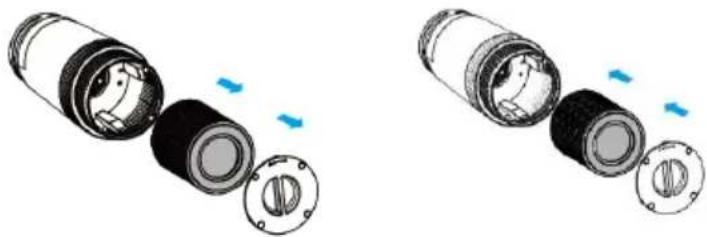
natural_image
Two views of a cylindrical mechanical component with internal components and blue directional arrows indicating movement (no text or symbols)natural_image
Diagram of a mechanical component with directional arrows indicating motion, alongside a close-up view of a curved surface (no text or symbols)Pour iOS

Contrôle vocal
natural_image
Simple line drawing of a rectangular object with a textured base and a small triangular top (no text or symbols)- Filtre, composé:
natural_image
Diagram of a mechanical component with directional arrows indicating motion, alongside a close-up view of a circular component (no text or symbols)natural_image
Two views of a mechanical component with internal parts and blue directional arrows indicating movement (no text or symbols)natural_image
Diagram of a mechanical component with a magnified inset showing internal components (no text or symbols)Para iOS

natural_image
Simple line drawing of a garment sleeve with patterned fabric and a small triangular detail (no text or symbols)natural_image
Diagram of a mechanical component with a hand operating a curved tool, shown alongside with an inset view of a circular component (no text or symbols present)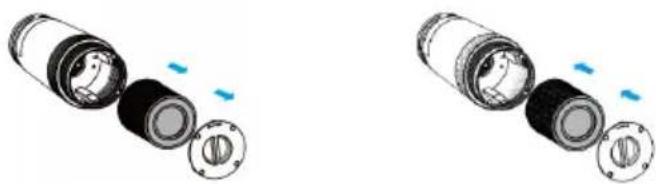
natural_image
Two views of a cylindrical mechanical component with internal components and blue motion indicators (no text or symbols)natural_image
Diagram of a cylindrical mechanical component with internal rotating parts and an inset showing a curved surface with directional arrows (no text or symbols)


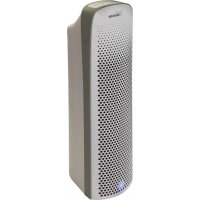
Brand : Bimar
Model : PA98
Category : Air purifier