 ManualGo.com
14120005L - Lighting Livarno Lux - Free user manual and instructions
Find the device manual for free 14120005L Livarno Lux in PDF.



Download the instructions for your Lighting in PDF format for free! Find your manual 14120005L - Livarno Lux and take your electronic device back in hand. On this page are published all the documents necessary for the use of your device. 14120005L by Livarno Lux.
USER MANUAL 14120005L Livarno Lux
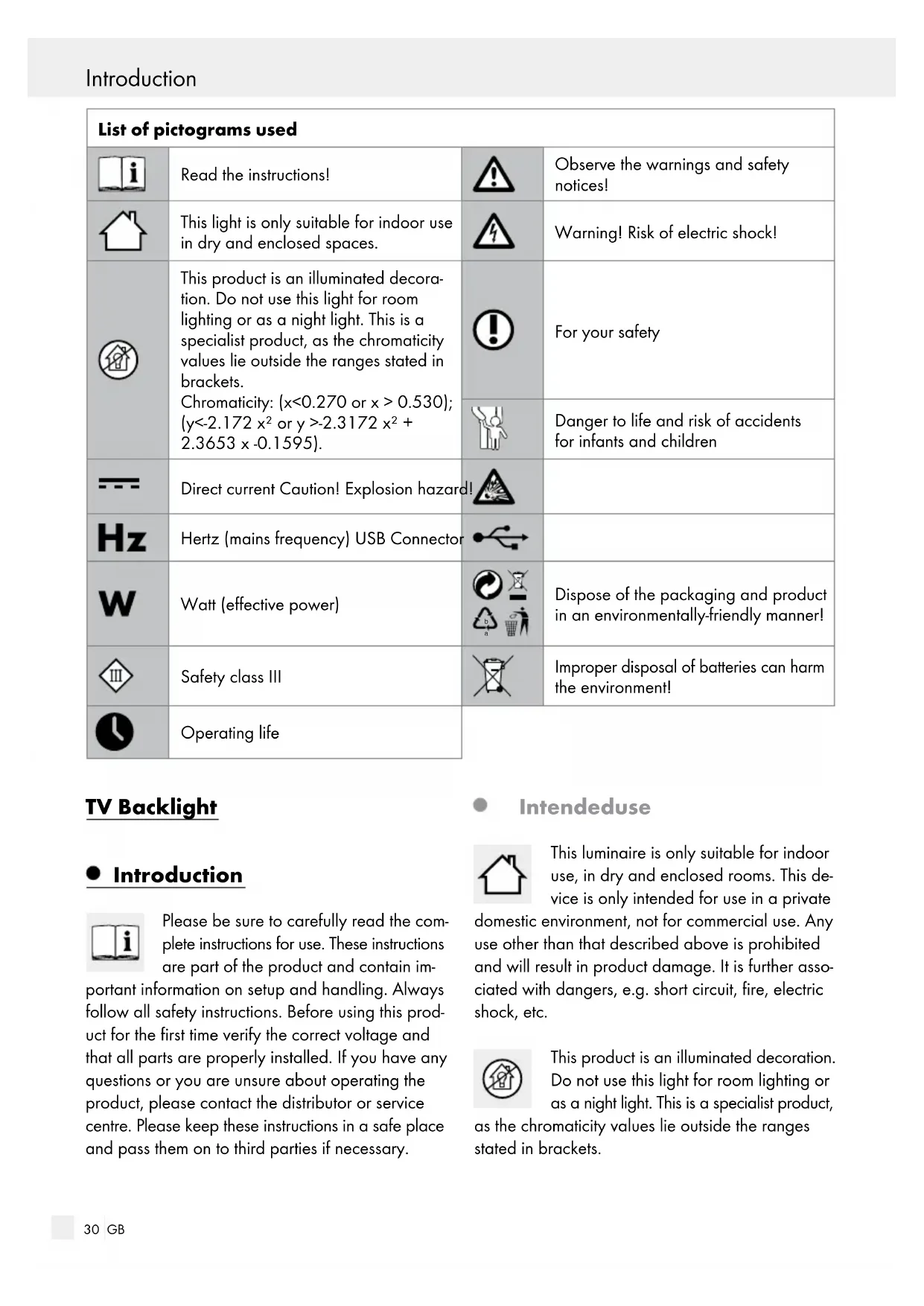
Dispose of the packaging and product in an environmentally-friendly manner! Safety class III
mproper disposal of batteries can harm the environment! Operating life TV Backlight Introduction Please be sure to carefully read the com- plete instructions for use. These instructions are part of the product and contain im- portant information on setup and handling. Always follow all safety instructions. Before using this prod- uct for the first time verify the correct voltage and that all parts are properly installed. If you have any questions or you are unsure about operating the product, please contact the distributor or service centre. Please keep these instructions in a safe place and pass them on to third parties if necessary. Intended use This luminaire is only suitable for indoor use, in dry and enclosed rooms. This de- vice is only intended for use in a private domestic environment, not for commercial use. Any use other than that described above is prohibited and will result in product damage. It is further asso- ciated with dangers, e.g. short circuit, fire, electric shock, etc. This product is an illuminated decoration. Do not use this light for room lighting or as a night light. This is a specialist product, as the chromaticity values lie outside the ranges stated in brackets. Introduction Introduction / Safety31 GB Chromaticity: (x<0.270 or x > 0.530); (y<-2.172 x² or y >-2.3172 x² + 2.3653 x -0.1595). Scope of delivery Check immediately after unpacking that the parts are complete and that the product is in proper condition. 1 LED strip with USB connector 3 LED strips 3 Connectors 3 Direct connectors 1 Remote control 1 Cable holder 1 Adhesive strip 1 Set of assembly instructions and instructions for use Parts Description
Direct connector Technical Data Model no.: 14120005L Operating voltage: SELV 5 V LED strip: 4 x 12 LED max. 2.5 W Protection class: III / Protection type: IP20 LEDS are not replaceable Remote control: Type: Infrared Battery: CR2025 3 V Safety Safety instructions Damage due to failure to comply with these instruc- tions for use will void the warranty! We assume no liability for consequential damages! We assume no liability for property damage or personal injury due to improper handling or failure to comply with the safety instructions!
DLERS AND SMALL CHILDREN! Do not leave the LED strip or packaging mate- rial lying unattended. The packaging material presents a suffocation hazard and there is a risk of loss of life from strangulation. Children frequently underestimate the dangers. Always keep children away from the product. This device may be used by children aged 8 years and up, as well as by persons with reduced physical, sensory or mental capaci- ties, or lacking experience and/or knowledge, so long as they are supervised or instructed in the safe use of the device and understand the associated risks. Do not allow children to play with the device. Cleaning and user mainte- nance must not be performed by children without supervision. Avoid the risk of fatal injury from electric shock Check the LED strip for damage before every use. Never use the LED strip if any damage is detected. A damaged connection cable poses the dan- ger of death from electric shock. In the case of damage, repairs or other problems, please contact the service centre or a qualified electri- cian. The connection cable of this device can- not be replaced. If the cable is damaged, the device must be disposed of. The device Introduction Introduction / Safety32 GB Safety / Initial useSafety contains no parts which may be serviced by the consumer. Before use, verify that the available mains volt- age corresponds with the required operating voltage of the item (see „Technical Data“). Never allow the live power cables and con- tacts to come into contact with water or other liquids. Never open any of the electrical equipment or insert objects into these. This will pose the risk of fatal injury from electric shock. Do not use the LED strip if it is covered with objects or is inlaid into a surface. Do not install the LED strip on damp or conductive surfaces. This LED strip must not be connected electroni- cally with other LED strips. Protect the product from sharp edges, mechani- cal loads and hot surfaces. Do not secure with sharp staples or nails. Disconnect the USB plug from the connected device before assembly, dismantling or cleaning. Never touch the plug or the LED strip with wet hands. Only use the individual parts supplied, other- wise all warranty claims will become invalid. This item must not be connected with the power supply while it is still in its packaging. Lay out the item completely before you connect it to the device. Prevent fire and injury hazards This product does not contain any parts that can be serviced by the user. The LEDs cannot be replaced. The lamp‘s light source is not replaceable, the entire light needs to be replaced if the light source reaches the end of its service life. Do not look into the operating LEDs from close by. Do not look at the LEDs with an optical instrument (e.g. magnifying glass). Exposure to certain strobe lights or lighting effects can cause epileptic seizures or uncon- sciousness in some people. If you experience symptoms of an epileptic seizure, seek immedia
medical attention. Safe working Install the light so that it is protected from dirt and excessive heating. Always be attentive! Always pay attention to what you are doing and use common sense. Never use the LED strip if you are having diffi- culty concentrating or do not feel well. Before use, familiarise yourself with all the in- structions and diagrams in these instructions, as well as with the LED strip itself. To completely disconnect the LED strip from the power supply, the USB plug must be disconn ected from the connected device. Safety instructions for batteries / rechargeable batteries
OF THE REACH OF CHILDREN! Swallowing batteries can cause chemical burns, perforation of soft tissue, and death. Severe burns may occur within 2 hours of swallowing batteries. Seek immediate medical attention. DANGER TO LIFE! Keep batteries / rechargeable batteries out of reach of children. If accidentally swallowed seek immediate medical attention. DANGER OF EXPLOSION!
Never recharge non-rechargeable batteries. Do not short-circuit batteries / rechargeable batteries and / or open them. Overheating, fire or bursting can be the result. Never throw batteries / rechargeable batteries into fire or water. Do not exert mechanical loads to batteries / rechargeable batteries.33 GB Safety / Initial useSafety Risk of leakage of batteries / rechargeable batteries Avoid extreme environmental conditions and temperatures, which could affect batteries / rechargeable batteries, e.g. radiators / direct sunlight. Avoid contact with the skin, eyes and mucous membranes. In the event of contact with battery acid, thoroughly flush the affected area with plenty of clean water and seek immediate medical attention. WEAR PROTECTIVE GLOVES!
Leaked or damaged batteries / rechargeable batteries can cause burns on contact with the skin. Wear suitable protective gloves at all times if such an event occurs. In the event of a leakage of batteries / rechargeable batteries, immediately remove them from the product to prevent damage. Only use the same type of batteries / recharge- able batteries. Do not mix used and new bat- teries / rechargeable batteries. Remove batteries / rechargeable batteries if the product will not be used for a longer period. Risk of damage of the product Only use the specified type of battery / rechargeable battery! Insert batteries / rechargeable batteries accord- ing to polarity marks (+) and (-) on the battery / rechargeable battery and the product. Clean the contacts on the battery / rechargea- ble battery and in the battery compartment before inserting! Remove exhausted batteries / rechargeable batteries from the product immediately. Initial use Remove all packaging materials before first use. Connecting the LED strip The LED strip
may be connected individually.
from the power supply before performing any work on it. To do this, re- move the USB plug
from the USB connector. Connect the LED strip
using the plug-in connectors
Choose between a plug-in connector
or a direct connector
When connecting, the LED strip
pole marked “+“ must be on the plug end of the plug-in connector
marked with the arrow. Ensure the correct polarity (+ G R B <–> + G R B) here. Verify it is seated correctly. Shortening the LED strip The LED strip
may be trimmed to size.
from the power supply before performing any work on it. To do this, remove the USB plug
from the USB connector. Choose the desired LED strip length. Note: Ensure that you cut the LED strip
the right place. The cutting point is the exact middle between the positive and negative poles and is always marked with a white line. Shorten the LED strip
using a pair of scissors. Be sure to cover the open end of the LED strip
with the adhesive strip
before use. CAUTION: After shortening the LED strip
it may no longer be connected together.34 GB Disposal / Warranty and ServiceInstalling … / Switching the LED ... / off / Installing / replacing ... / Maintenance ... Installing the LED strip Note: Ensure that the installation area is clean, grease-free and dry. Otherwise the functionality of the adhesive strip may be impaired. Note: Ensure that a USB connector is located in close proximity to the installation area. Choose a suitable installation area. Remove the protective foil from the reverse side of the LED strip
Remove the protective foil from the reverse side of the cable hold
in the directed location. Stick the infrared diode into the cable holder
with the adhesive strip onto the installation area and press it on firmly. Insert the USB plug
into the USB connector. Your light is now ready to use. Switching the LED strip on / off with the remote control Note: Position the infrared diode for the receiver so it can be controlled with the remote control
without obstructions. Note: The range of the remote control
approx. 4 m. Remove the safety strip in the battery compart- ment before switching the light on. Press the ON button to switch the lamp on. Press the OFF button to switch the light off. Choose from the following functions: Button : brighter Button : dim 5 x R: selects the desired colour 5 x G: selects the desired colour 5 x B: selects the desired colour 1 x W: selects the desired colour FLASH button: rapid colour change STROBE button: slow colour change FADE button: slow, flowing colour change SMOOTH button: flowing colour change Installing / replacing the battery (remote control) Note: Please observe the imprint on the back of the remote control
Push in the release lever and pull out the battery compartment. Remove the spent battery, if ne- cessary. Insert a new battery in the battery com- partment. Only use batteries specified in the chapter „Technical Data“. Note: Be sure to correctly insert the batteries (polarity). This is indicated on the remote con- trol
Slide the battery compartment back into the re- mote control. Maintenance and Cleaning Switch off the LED strip
from the power supply before performing any work on it. To do this, remove the USB plug
from the USB connector. Do not use solvents, benzene or similar sub- stances. They could damage the light. Use a dry, lint-free cloth to clean the LED strip
.35 GB Disposal / Warranty and ServiceInstalling … / Switching the LED ... / off / Installing / replacing ... / Maintenance ... Disposal The packaging is made entirely of recy- clable materials, which you may dispose of at local recycling facilities.
Observe the marking of the packaging materials for waste separation, which are marked with abbreviations (a) and numbers (b) with following meaning: 1–7: plastics / 20–22: paper and fibre- board / 80–98: composite materials. The product and packaging materials are recyclable, dispose of it separately for better waste treatment. The Triman logo is valid in France only. Contact your local refuse disposal au- thority for more details of how to dispose of your worn-out product. To help protect the environment, please dispose of the product properly when it has reached the end of its useful life and not in the household waste. Information on collection points and their opening hours can be obtained from your local authority. Faulty or used batteries / rechargeable batteries must be recycled in accordance with Directive 2006/66/EC and its amendments. Please return the batteries / rechargeable batteries and / or the product to the available collection points. Environmental damage through incorrect disposal of the batter- ies / rechargeable batteries! Batteries / rechargeable batteries may not be dis- posed of with the usual domestic waste. They may contain toxic heavy metals and are subject to haz- ardous waste treatment rules and regulations. The chemical symbols for heavy metals are as follows: Cd = cadmium, Hg = mercury, Pb = lead. That is why you should dispose of used batteries / recharge- able batteries at a local collection point. Warranty and Service Warranty You receive a 36 month warranty on this product, valid from the date of purchase. The appliance has been carefully produced under strict quality control. Within the warranty period we shall rectify without charge all material and manufacturing defects. In the event of a defect during the warranty period, please send the appliance to the listed Service Centre address, referencing the following item number: 14120005L. Wear parts (such as bulbs) and damage caused by improper handling, non-observance of the oper- ating instructions or unauthorised interference are excluded from the warranty. The performance of services under the warranty does not extend or renew the warranty period. Manufacturer / Service address Briloner Leuchten GmbH Im Kissen 2 DE-59929 Brilon GERMANY Tel.: +49 (0) 2961 / 97 12–800 Fax: +49 (0) 2961 / 97 12–199 E-Mail: kundenservice@briloner.com www.briloner.com IAN 285491 Please have your receipt and the item number (e.g. IAN 12345) ready as your proof of purchase when enquiring about your product. Declaration of Conformity This product fulfils the requirements of the applicable European and national directives. Conformity has been demonstrated. The relevant declarations and documents are held by the manufacturer.36BRILONER LEUCHTEN GMBH Im Kissen 2 DE-59929 Brilon GERMANY